IndustryInsights
2026-09-08 10:24:21

BAR on the N4 Interface Controls Downlink Buffering and DDN in 5G CM-IDLE

BAR on the N4 interface controls how the UPF buffers downlink packets when immediate forwarding is unavailable. This guide explains FAR association, BUFF/NOCP, buffering limits, PFCP reports, CM-IDLE behavior and troubleshooting.

Becke Telcom

BAR on the N4 Interface Controls Downlink Buffering and DDN in 5G CM-IDLE

Technical Q&A: How does BAR on the N4 interface control downlink packet buffering and data notification when a UE is in CM-IDLE?


When a UE enters CM-IDLE, its PDU Session does not disappear. However, the N3 user-plane path previously used for downlink forwarding may no longer be active. If new data arrives from an external network at this point, the packets can still reach the UPF, but they cannot be forwarded immediately to the gNB over N3 as they would be in CM-CONNECTED. The UPF therefore needs to determine whether the packets should be buffered, how many packets can be retained, how long they can remain buffered, and when the control plane should be notified that downlink data has arrived.

Within the PFCP rule framework on the N4 interface, BAR (Buffering Action Rule) provides the rules for this buffering behavior. BAR, however, does not independently decide whether buffering should occur. The buffering action is triggered by the Apply Action in the FAR, while BAR defines how that buffering should be performed. This distinction is fundamental to understanding the relationship between FAR and BAR.

BAR Defines How the UPF Buffers Packets

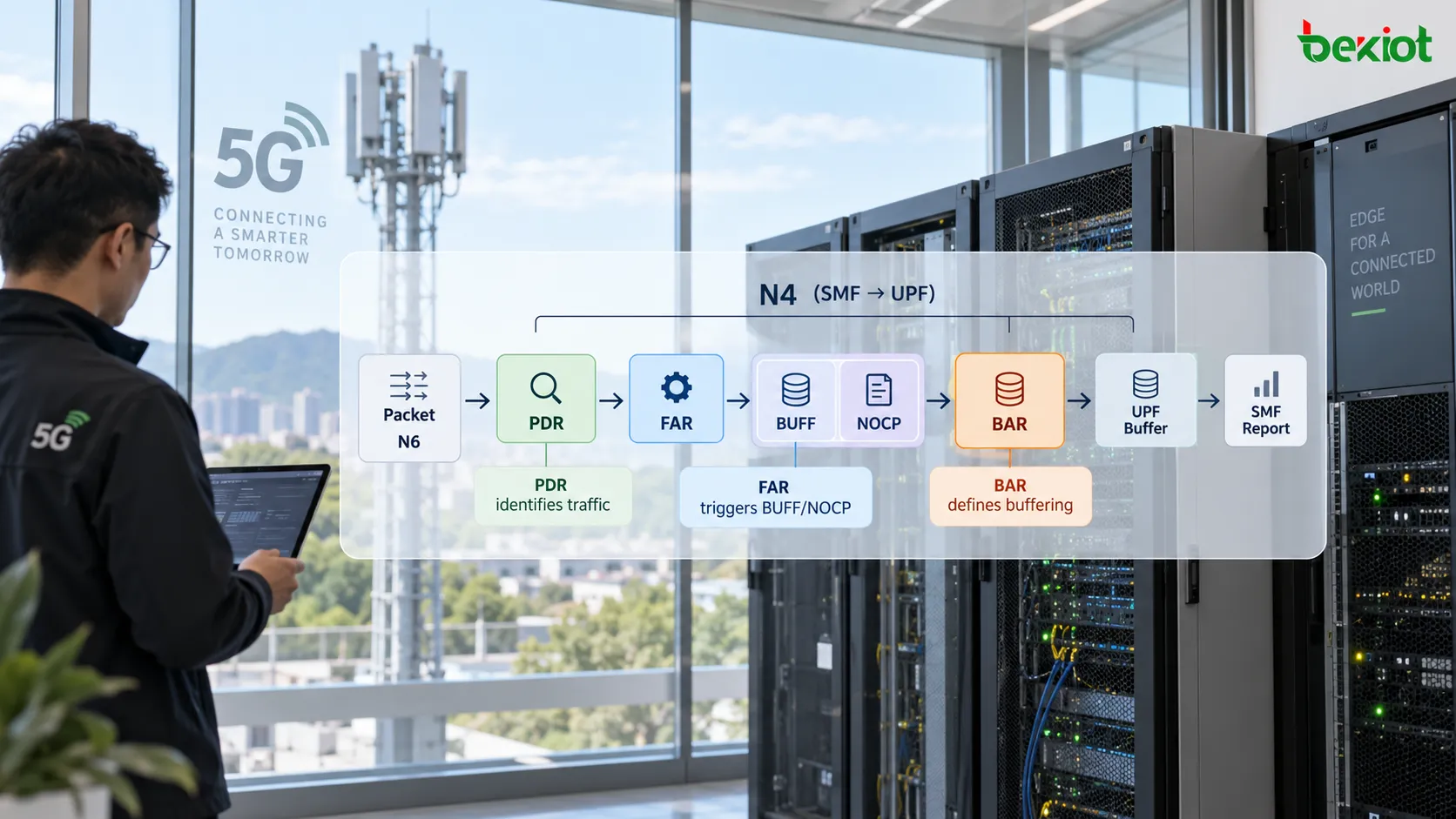
When the UPF receives a packet, it first uses a PDR to identify the traffic and then follows the FAR referenced by that PDR to determine the next action. If the FAR requires normal forwarding, the UPF forwards the packet according to the Forwarding Parameters. If the FAR Apply Action contains BUFF, the packet is not immediately sent toward the destination interface and instead enters the buffering process.

This is where BAR becomes relevant. The FAR can reference a BAR that tells the UPF how the affected packets should be buffered. The relationship can be summarized as:

PDR identifies the packet → FAR selects BUFF/NOCP → BAR defines the buffering behavior.

A common misunderstanding is to treat BUFF and BAR as if they were the same thing. They are not. BUFF answers the question, "Should this packet be buffered now?" BAR answers, "Once buffering has been selected, under what conditions should the packet be buffered?" Looking only at BUFF in the FAR without checking the associated BAR or the UPF's local buffering configuration provides only part of the user-plane picture.

NOCP is also commonly associated with this scenario. When the UPF is buffering downlink packets, NOCP can require the UPF to notify the control plane that downlink data has arrived so that the SMF can initiate the next control-plane procedures. Buffering and notification therefore happen as two coordinated tasks: the user plane temporarily retains the packets while the event is reported to the control plane.

N4 interface rule chain where a PDR identifies downlink traffic, the FAR uses BUFF and NOCP to trigger buffering and control-plane notification, and BAR defines how the UPF buffers the packets

The Most Typical BAR Scenario Occurs After the UE Enters CM-IDLE

The role of BAR is easiest to understand when a UE transitions from CM-CONNECTED to CM-IDLE. Assume that the UE has already completed registration and PDU Session establishment. While it is connected, the N3 user-plane path is available and the UPF can forward downlink packets directly toward the gNB.

After a period of inactivity, the access side may release the connection and the UE enters CM-IDLE. The PDU Session remains in place, but the previously active N3 user-plane forwarding path is no longer immediately available. External servers are not necessarily aware of this state change, so new downlink IP packets may still arrive at the UPF through N6.

This creates the key problem: the UPF has received the data, but it currently has no usable N3 path over which to deliver it to the UE.

At this stage, the SMF updates the user-plane rules over N4 so that the relevant FAR changes from immediate forwarding to buffering behavior. In a typical case, BUFF and NOCP are enabled in the Apply Action, while FORW is no longer used as the current downlink action. When new downlink packets arrive, the UPF retains them according to the applicable buffering policy and reports the arrival of downlink data to the SMF.

After receiving the notification, the SMF can coordinate with the AMF to initiate the procedures needed to make the UE reachable again, including paging where applicable. Once the UE returns to a state in which user-plane traffic can be carried and the N3 path is restored, the SMF updates the UPF rules again so that downlink handling changes from buffering back to forwarding. Buffered packets can then continue toward the UE.

BAR is therefore not simply a static memory-allocation rule. Its real purpose is to help the user plane bridge the temporary period during which downlink packets have already arrived but immediate forwarding is not yet possible.

Key BAR Parameters Define the Limits of Buffering

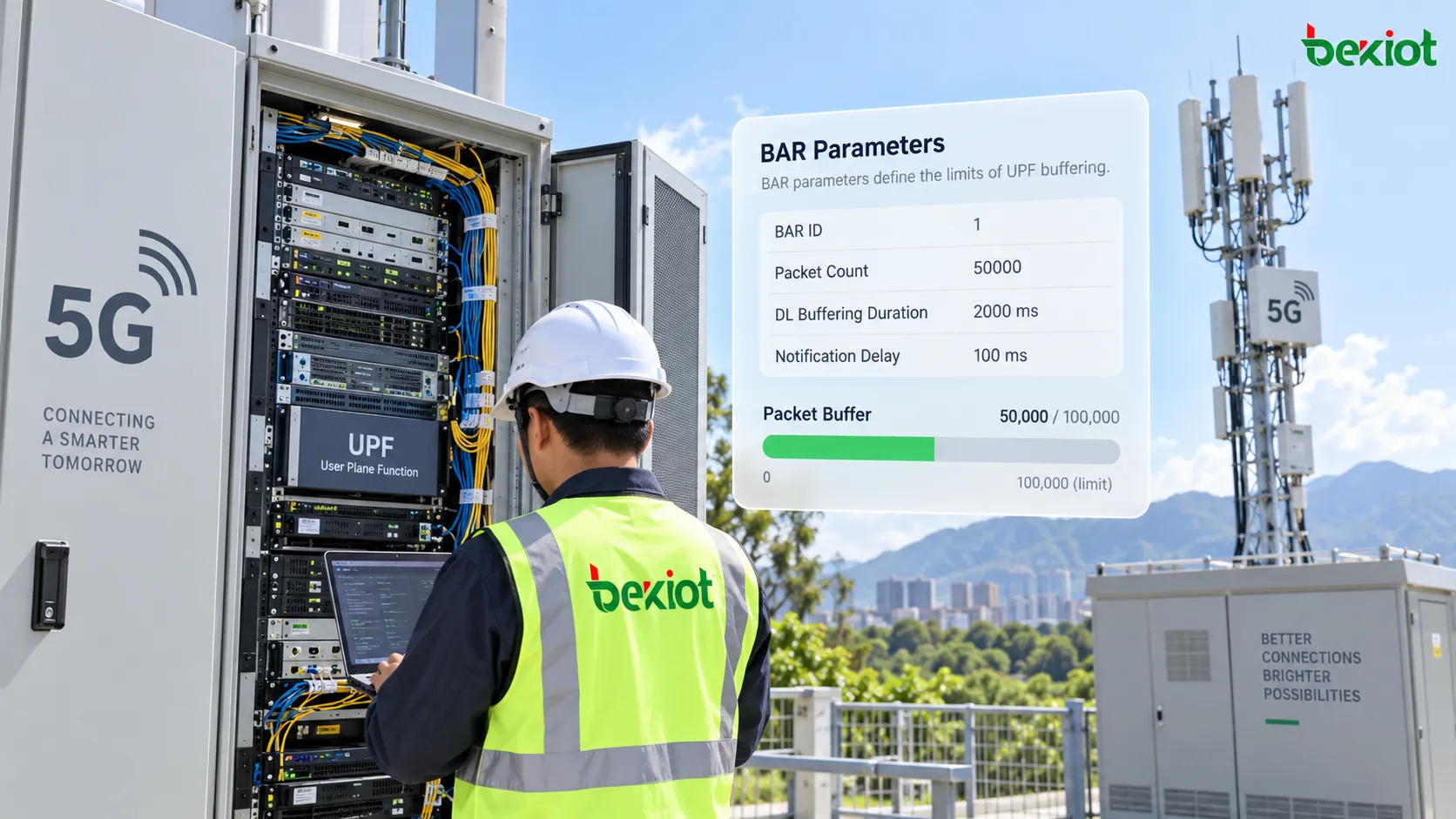
Buffering cannot continue indefinitely. If the UPF were allowed to retain unlimited downlink data for an unreachable UE, user-plane memory could be consumed unnecessarily. BAR therefore provides boundaries for buffering behavior. Depending on the PFCP procedure and UPF capabilities, these can include BAR ID, packet-count limits, buffering duration and notification delay parameters.

BAR ID

BAR ID uniquely identifies the buffering rule within the PFCP Session and allows the relevant FAR to reference the correct BAR. During troubleshooting, seeing a Create BAR alone does not prove that the rule affects the traffic being analyzed. The corresponding FAR should also be checked to confirm which BAR ID it actually references.

Suggested Buffering Packets Count

Suggested Buffering Packets Count indicates the number of packets the UPF is advised to buffer for the applicable traffic. Once the suggested limit is exceeded, additional packets may be discarded. This parameter controls the buffering-capacity boundary rather than the buffering time.

Its presence also depends on UPF feature support. If the field is not visible in a PFCP trace, that alone does not prove that buffering control is missing. The analysis should also consider whether the UPF supports the relevant capability and whether local buffering parameters are being used instead.

DL Buffering Duration

DL Buffering Duration defines the period for which downlink packets may continue to be buffered in the UPF under the applicable procedure. It reflects an important design principle: buffering is intended as a temporary mechanism while user-plane delivery is being restored, not as permanent packet storage.

If the UE remains unreachable for an extended period, the buffering process needs a defined termination condition; otherwise, user-plane resources could remain occupied indefinitely.

Downlink Data Notification Delay

In supported procedures and capability combinations, Downlink Data Notification Delay can control how long the UPF waits after receiving the first downlink packet before notifying the control plane. This parameter affects when the notification is sent, rather than whether the packet should be buffered.

Its behavior should therefore be interpreted in the context of the specific PFCP procedure, network implementation and UPF capabilities rather than inferred from the parameter name alone.

BAR parameters including BAR ID, suggested buffering packet count, downlink buffering duration and notification delay controlling the boundaries of UPF downlink buffering

Why Are Complete BAR Parameters Sometimes Missing from PFCP Traces?

This is one of the easiest points to misinterpret when analyzing BAR. The number of packets to buffer, the buffering duration and other buffering parameters do not always have to be dynamically provisioned over N4. Operators or equipment vendors can also configure buffering policies locally in the UPF.

With this implementation, the SMF may only need to change the FAR action dynamically. For example, after the UE enters CM-IDLE, the SMF can use PFCP Session Modification to update the relevant FAR to BUFF/NOCP. Once the UPF sees the buffering action, it can apply locally configured packet-count and duration limits.

The following observation in a trace is therefore not automatically abnormal:

The FAR requests BUFF, but the PFCP messages do not contain the complete BAR parameters expected by the engineer.

At least two additional questions should be checked: whether the UPF is using locally configured buffering values, and whether the UPF supports dynamic provisioning of the relevant BAR parameters. Otherwise, an implementation difference may be mistaken for a missing rule from the SMF.

Local configuration can also have practical advantages. It can reduce some N4 signaling and accommodate capability differences between UPF implementations. The trade-off is that part of the buffering behavior is no longer fully visible in a single PFCP trace, so multi-vendor troubleshooting may require both signaling analysis and inspection of the UPF's local configuration.

How Should the PFCP Flow Be Understood When Downlink Data Arrives in CM-IDLE?

BAR is easier to understand when it is placed back into the complete procedure rather than analyzed as an isolated Information Element.

While the UE is in CM-CONNECTED, the N3 path is available and the UPF forwards downlink packets according to the normal FAR. After a period of inactivity, the access-side connection is released. Once the SMF learns that the user-plane connection state has changed, it uses PFCP Session Modification to update the relevant UPF rules.

The important point is that the PDU Session has not been deleted. Instead, the current downlink user-plane path is temporarily unavailable for immediate delivery. The relevant FAR can therefore move into buffering behavior by enabling BUFF and the required control-plane notification action, while BAR or local UPF configuration provides the detailed buffering conditions.

When an Internet server or application subsequently sends new downlink data, the packets first arrive at the UPF. The UPF uses the PDR to identify the traffic and then applies the associated FAR. Because the current action is no longer FORW, the packets are buffered. At the same time, the UPF reports the arrival of downlink data to the SMF through the PFCP reporting mechanism.

The SMF then coordinates with the AMF-side procedures so that the UE can become reachable again and the user-plane path can be re-established. Once N3 forwarding becomes available, the FAR on N4 is updated again for normal forwarding and the UPF can continue delivering downlink traffic to the UE.

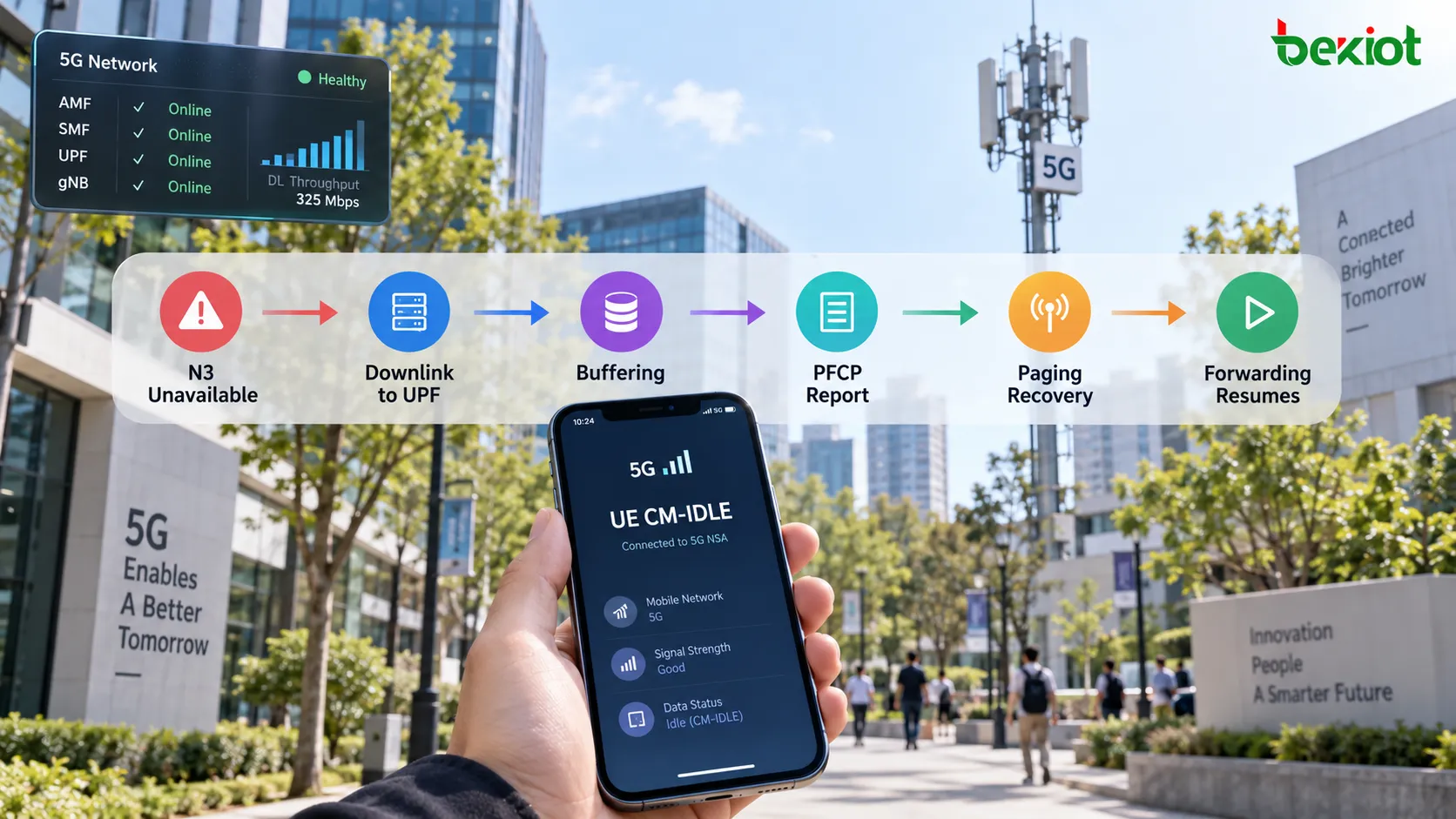
The overall logic can be summarized as:

UE enters CM-IDLE → N3 is temporarily unavailable → SMF updates FAR/BAR → Downlink data reaches the UPF → UPF buffers and reports it → Control plane restores UE reachability → N3 is restored → FAR returns to forwarding.

BAR therefore controls user-plane behavior during the period when the data has already arrived, but the delivery path has not yet returned.

5G CM-IDLE flow where N3 is temporarily unavailable, downlink packets reach the UPF, BAR controls buffering, the UPF reports the data arrival to the SMF, and paging restores the user-plane path

BAR Troubleshooting Should Follow Four Steps: Action, Buffering, Notification and Recovery

BAR-related problems rarely appear as an explicit "BAR error." More often, the symptom is that the first downlink traffic after the UE has entered an idle state behaves abnormally. An application may work normally while active, but after a period of inactivity the next message arrives with a noticeable delay. In another case, the UE may be successfully paged and reconnected, yet the first few downlink packets have already been lost.

These problems can be analyzed in four stages.

Step 1: Confirm That the FAR Actually Entered Buffering Mode

Start with the FAR referenced by the relevant downlink PDR and confirm that the expected PFCP Session Modification occurred after the UE entered CM-IDLE. Check whether the Apply Action changed from normal FORW behavior to the BUFF and notification actions expected for the scenario.

If the FAR still attempts to forward packets toward a user-plane path that is no longer usable, the problem is not primarily a BAR issue.

Step 2: Determine Which Buffering Rules the UPF Is Applying

Check the BAR ID referenced by the FAR and then examine the corresponding Create BAR or Update BAR parameters. If the PFCP trace does not contain the complete buffering parameters, continue by checking the UPF's local buffering configuration and supported capabilities.

If the packet-count limit is too small, some of the first downlink packets may be discarded before the UE becomes reachable again. If the observed buffering behavior differs substantially from expectations, the BAR association itself should also be verified.

Step 3: Confirm That the UPF Reported the Downlink Data Arrival

Buffering packets alone does not restore communication with the UE. If the control plane is unaware that new downlink data has arrived, the subsequent paging or user-plane recovery procedure will not be initiated. The trace should therefore be checked for the appropriate PFCP Session Report and for correct processing by the SMF.

If packets are already buffered in the UPF but no further control-plane procedure follows, troubleshooting should move from BAR parameters toward the UPF-to-SMF reporting path and the subsequent SMF procedures.

Step 4: Confirm That Forwarding Resumes After User-Plane Recovery

After the UE becomes reachable again, verify that the SMF updates the N4 rules correctly so that the downlink FAR changes from buffering back to normal forwarding and the required N3 forwarding parameters are restored.

If paging succeeds and the UE has returned, but the FAR remains in BUFF, the system can enter a state where the UE is reachable while packets continue to remain in the UPF. BAR troubleshooting should therefore continue until the user-plane forwarding path has been fully restored.

The Core Value of BAR

Within the PFCP rule framework, BAR does not participate in every normally forwarded packet in the same way that PDR and FAR do. Its importance becomes most visible in a specific but critical situation: the session still exists, but the current user-plane path cannot immediately deliver newly arrived downlink data.

FAR changes the packet-processing action from FORW to BUFF, BAR defines the buffering boundaries, the UPF temporarily retains the packets and reports their arrival, and control-plane functions such as the SMF and AMF coordinate the restoration of UE reachability. Together, these mechanisms bridge the transition from temporary delivery unavailability back to an active user-plane path.

BAR should therefore not be understood only as "Buffering Action Rule = a packet buffering rule." A more useful interpretation is: BAR tells the UPF how to manage downlink packets that have already arrived while the user-plane delivery path is temporarily unavailable. Once BAR is viewed together with CM-IDLE, FAR BUFF/NOCP, PFCP Session Report and the subsequent paging and user-plane recovery procedures, its role on the N4 interface becomes much clearer.

FAQ

What Is the Difference Between BAR and BUFF in the FAR?

BUFF is an Apply Action in the FAR indicating that matching packets should be buffered instead of immediately forwarded. BAR defines how that buffering should be performed, such as packet-count limits, buffering duration or other applicable conditions. In simple terms, FAR decides that buffering is required, while BAR defines how the buffering is performed.

Can BAR Operate Independently of a FAR?

BAR should not be treated as an independent packet-matching rule. The packet is first matched by a PDR, which references the relevant FAR. When that FAR requires buffering and references the applicable BAR, the BAR parameters are then used to control how those packets are buffered.

Why Are Downlink Packets Not Simply Discarded When the UE Enters CM-IDLE?

CM-IDLE does not mean that the PDU Session has been deleted. External applications may continue sending data while the user-plane delivery path is only temporarily unavailable. Short-term buffering allows part of that downlink traffic to be retained while the control plane restores UE reachability, helping reduce disruption to application continuity.

Does the Absence of Suggested Buffering Packets Count Mean the BAR Is Misconfigured?

Not necessarily. Whether this parameter appears depends on the PFCP procedure, UPF capability and implementation. Packet-count limits and other buffering behavior may also be configured locally in the UPF, so capability support, BAR association and device-side buffering configuration should all be checked.

Why Does the UE Still Not Receive Data Even Though the UPF Has Buffered the Downlink Packets?

Buffering is only one part of the procedure. The UPF must also report the arrival of downlink data to the SMF, the control plane must initiate the procedures needed to restore UE reachability, and the SMF must update the FAR and N3 forwarding parameters once the user-plane path is available again. A failure at any of these stages can leave packets buffered or eventually cause them to be discarded.

Recommended Products
catalogue
customer service Phone
We use cookie to improve your online experience. By continuing to browse this website, you agree to our use of cookie.

Cookies

This Cookie Policy explains how we use cookies and similar technologies when you access or use our website and related services. Please read this Policy together with our Terms and Conditions and Privacy Policy so that you understand how we collect, use, and protect information.

By continuing to access or use our Services, you acknowledge that cookies and similar technologies may be used as described in this Policy, subject to applicable law and your available choices.

Updates to This Cookie Policy

We may revise this Cookie Policy from time to time to reflect changes in legal requirements, technology, or our business practices. When we make updates, the revised version will be posted on this page and will become effective from the date of publication unless otherwise required by law.

Where required, we will provide additional notice or request your consent before applying material changes that affect your rights or choices.

What Are Cookies?

Cookies are small text files placed on your device when you visit a website or interact with certain online content. They help websites recognize your browser or device, remember your preferences, support essential functionality, and improve the overall user experience.

In this Cookie Policy, the term “cookies” also includes similar technologies such as pixels, tags, web beacons, and other tracking tools that perform comparable functions.

Why We Use Cookies

We use cookies to help our website function properly, remember user preferences, enhance website performance, understand how visitors interact with our pages, and support security, analytics, and marketing activities where permitted by law.

We use cookies to keep our website functional, secure, efficient, and more relevant to your browsing experience.

Categories of Cookies We Use

Strictly Necessary Cookies

These cookies are essential for the operation of the website and cannot be disabled in our systems where they are required to provide the service you request. They are typically set in response to actions such as setting privacy preferences, signing in, or submitting forms.

Without these cookies, certain parts of the website may not function correctly.

Functional Cookies

Functional cookies enable enhanced features and personalization, such as remembering your preferences, language settings, or previously selected options. These cookies may be set by us or by third-party providers whose services are integrated into our website.

If you disable these cookies, some services or features may not work as intended.

Performance and Analytics Cookies

These cookies help us understand how visitors use our website by collecting information such as traffic sources, page visits, navigation behavior, and general interaction patterns. In many cases, this information is aggregated and does not directly identify individual users.

We use this information to improve website performance, usability, and content relevance.

Targeting and Advertising Cookies

These cookies may be placed by our advertising or marketing partners to help deliver more relevant ads and measure the effectiveness of campaigns. They may use information about your browsing activity across different websites and services to build a profile of your interests.

These cookies generally do not store directly identifying personal information, but they may identify your browser or device.

First-Party and Third-Party Cookies

Some cookies are set directly by our website and are referred to as first-party cookies. Other cookies are set by third-party services, such as analytics providers, embedded content providers, or advertising partners, and are referred to as third-party cookies.

Third-party providers may use their own cookies in accordance with their own privacy and cookie policies.

Information Collected Through Cookies

Depending on the type of cookie used, the information collected may include browser type, device type, IP address, referring website, pages viewed, time spent on pages, clickstream behavior, and general usage patterns.

This information helps us maintain the website, improve performance, enhance security, and provide a better user experience.

Your Cookie Choices

You can control or disable cookies through your browser settings and, where available, through our cookie consent or preference management tools. Depending on your location, you may also have the right to accept or reject certain categories of cookies, especially those used for analytics, personalization, or advertising purposes.

Please note that blocking or deleting certain cookies may affect the availability, functionality, or performance of some parts of the website.

Restricting cookies may limit certain features and reduce the quality of your experience on the website.

Cookies in Mobile Applications

Where our mobile applications use cookie-like technologies, they are generally limited to those required for core functionality, security, and service delivery. Disabling these essential technologies may affect the normal operation of the application.

We do not use essential mobile application cookies to store unnecessary personal information.

How to Manage Cookies

Most web browsers allow you to manage cookies through browser settings. You can usually choose to block, delete, or receive alerts before cookies are stored. Because browser controls vary, please refer to your browser provider’s support documentation for details on how to manage cookie settings.

Contact Us

If you have any questions about this Cookie Policy or our use of cookies and similar technologies, please contact us at support@becke.cc .