IndustryInsights
2026-09-09 15:49:14

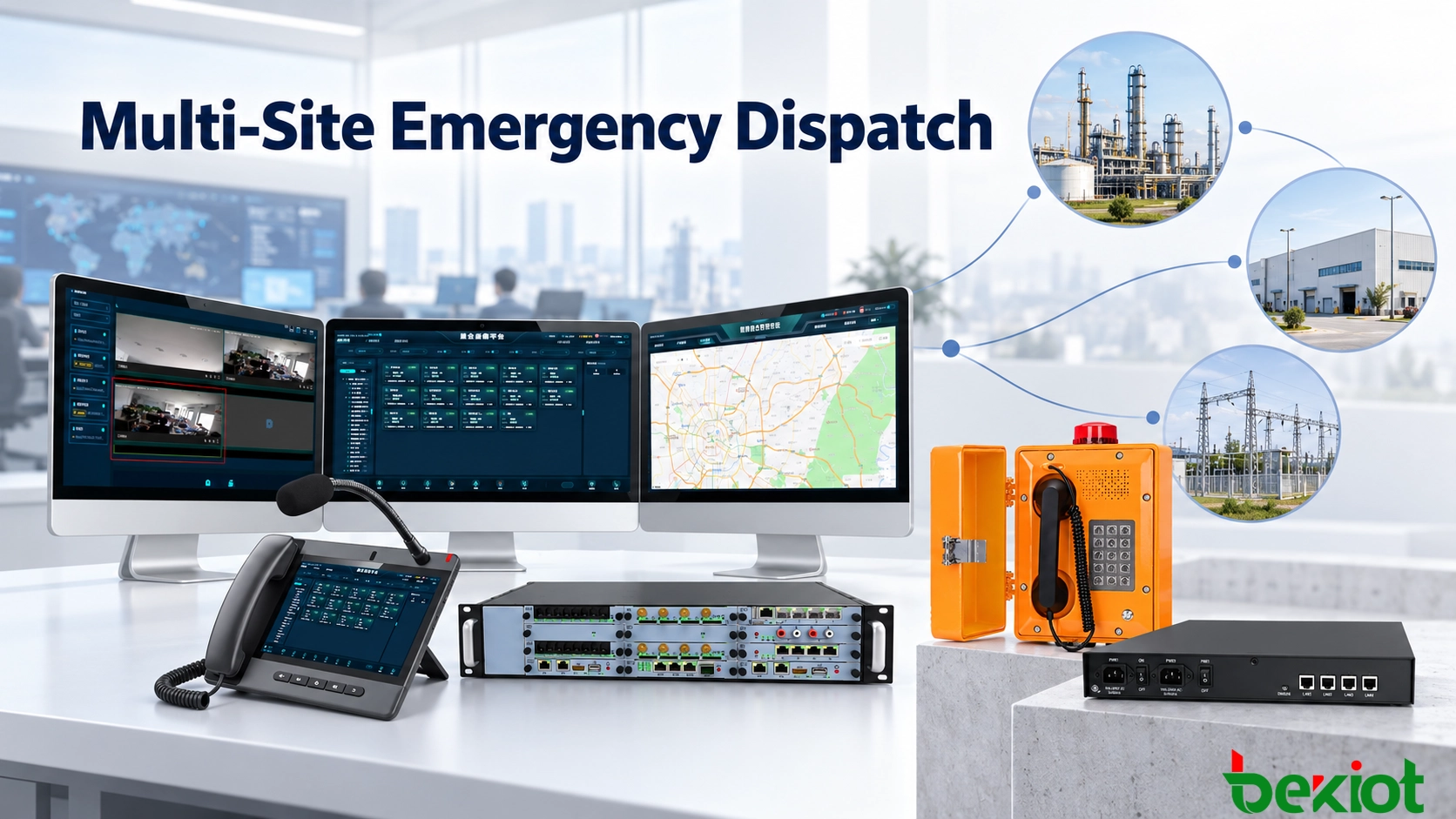
Multi-Site Emergency Dispatch: Central Control and Local Resilience

Learn how to design a multi-site emergency dispatch system that combines centralized control with local continuity during WAN outages, server failures and partial site isolation.

Becke Telcom

Multi-Site Emergency Dispatch: Central Control and Local Resilience

A company operates a central dispatch center, three production plants and several remote substations. During normal operation, calls, alarms, radio groups and paging tasks are coordinated through one platform. Dispatchers at headquarters can monitor field terminals, communicate with local teams and support incidents across every connected location.

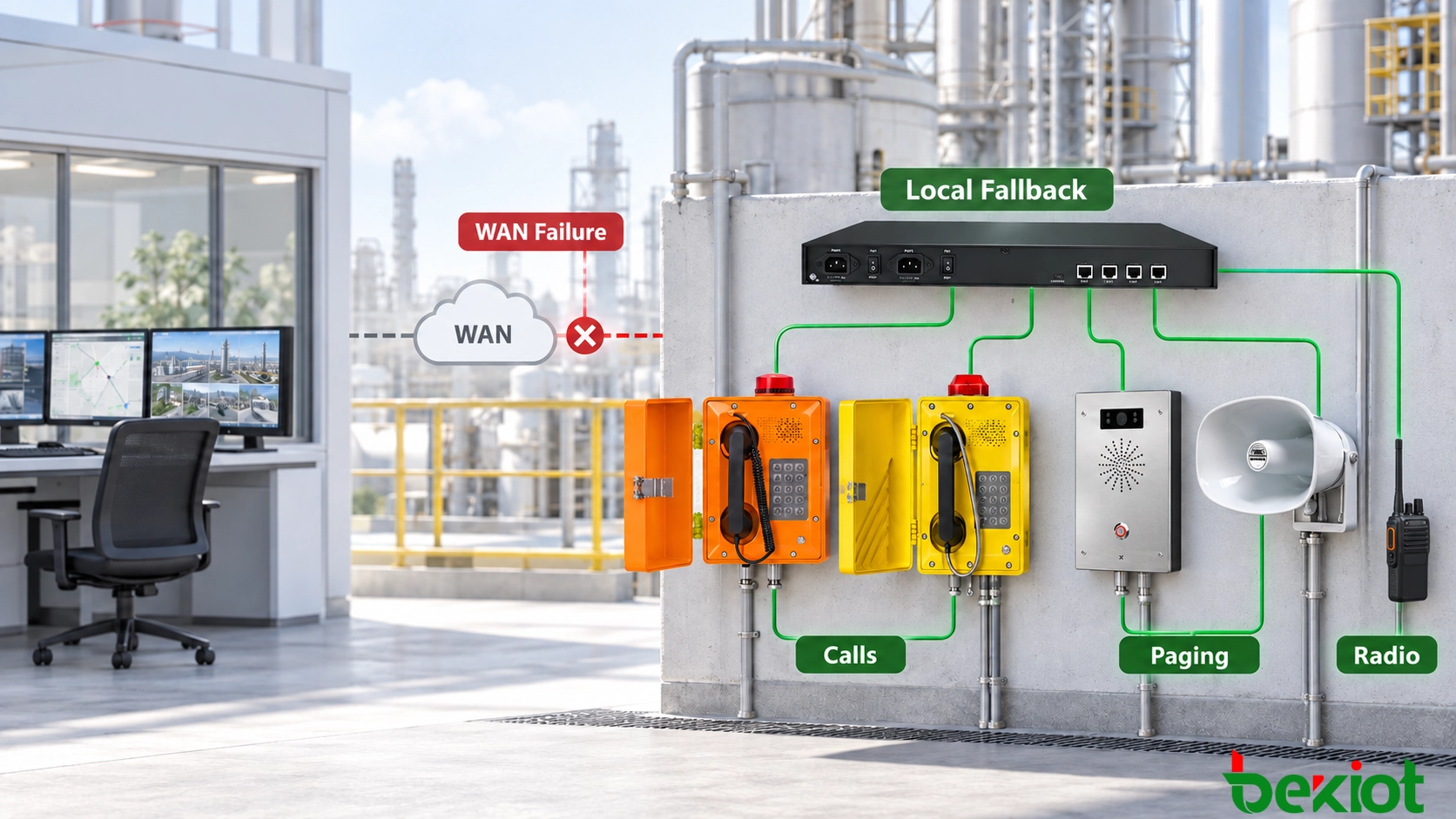
If the WAN connection to one plant fails, however, emergency communication at that location cannot stop until the central network returns. Workers must still be able to call the local control room, operators must still issue safety instructions, and radio users must continue coordinating inside the affected site.

The design challenge is therefore not simply how to connect multiple sites. It is how to combine centralized coordination with sufficient local independence. During normal operation, the central platform provides unified visibility and cross-site control. During a failure, each critical location retains the communication functions needed to protect people and maintain essential operations.

Where Centralized Dispatch Becomes Vulnerable

Centralized dispatch simplifies the management of a distributed organization. Extension numbers, radio channels, broadcast zones, user permissions, recordings and event logs can be maintained under one structure. Headquarters can see activity across the network and coordinate resources when an incident affects more than one location.

This model works efficiently while the central servers and communication paths remain available. The risk appears when every local service depends on a remote platform. A fiber cut, router fault, VPN interruption, firewall error or central server failure may isolate a site even though its local switches, telephones, intercoms and speakers are still operational.

Dependence can also be less obvious. A local telephone may appear to call another device in the same facility while its SIP signaling and media are actually routed through a distant data center. If the WAN fails, a communication path that could have remained inside the site is lost unnecessarily.

A resilient architecture separates centralized management from essential local operation. The central center coordinates the network, but it is not the only location capable of processing every emergency call, broadcast or alarm.

Failure conditionPossible operational impactRequired local capability
WAN connection interruptedSite endpoints lose access to central servicesLocal registration and call routing
Central dispatch server unavailableCalls and dispatch tasks cannot be processed centrallySecondary server or local controller
VPN or security tunnel failsCross-site SIP and management traffic may be interruptedIndependent site communication rules
Central operator positions go offlineEmergency calls are not answered at headquartersLocal operator or alternate dispatch group
Central database becomes unavailableRecords may no longer reach central storageLocal event and recording storage
Only part of the WAN recoversSome sites reconnect while others remain isolatedIndependent status and control for each site
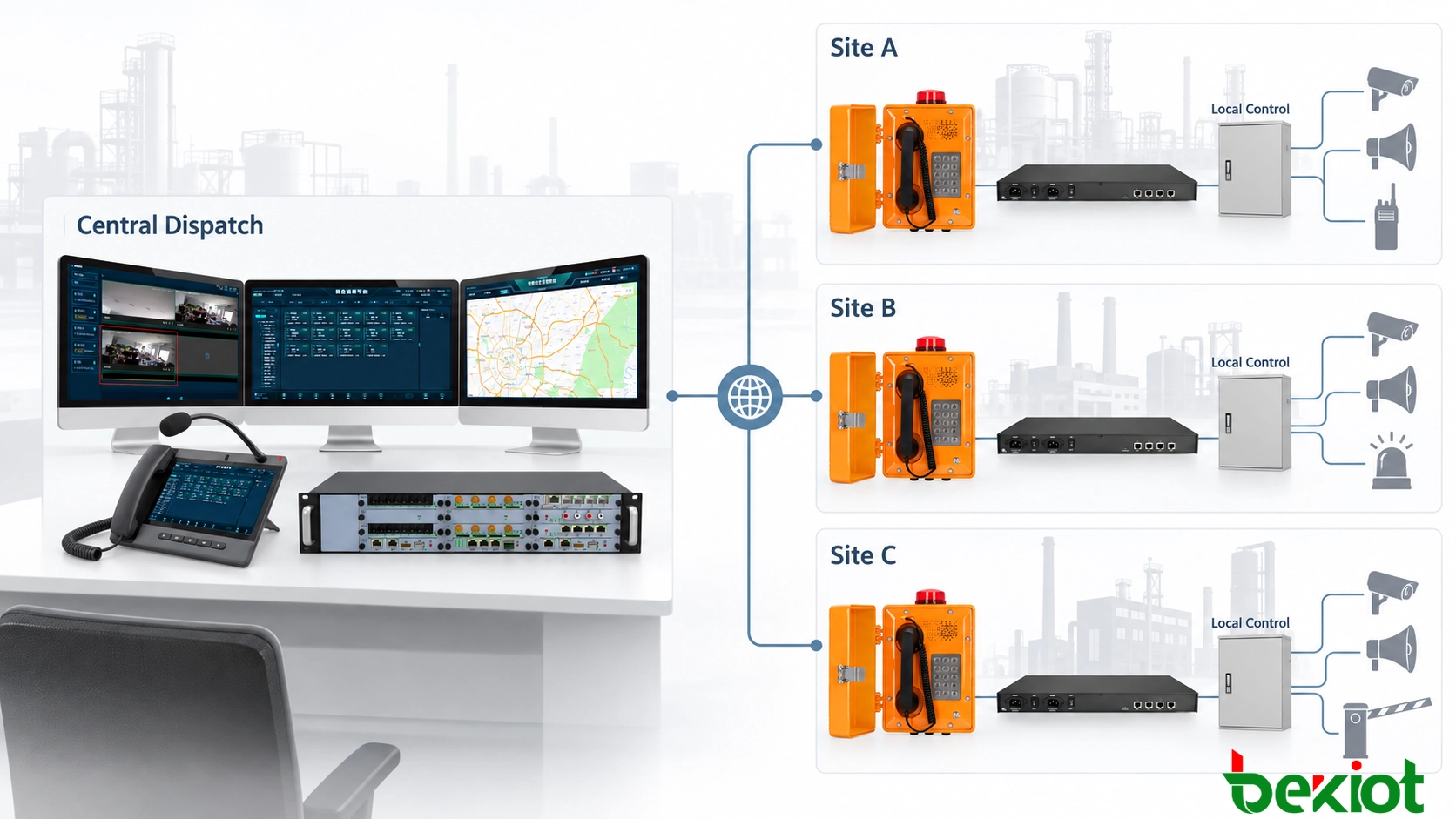
Multi-site emergency dispatch architecture with a central control center and local communication servers
Multi-site emergency dispatch architecture with a central control center and local communication servers.

Central, Site and Field Communication Layers

A practical multi-site system can be divided into a central command layer, a site control layer and a field communication layer. Each layer performs a different role during normal operation, site isolation and system recovery.

Central command layer

The central layer provides organization-wide coordination. It may include the main dispatch platform, central SIP servers, recording services, GIS applications, alarm management, system databases and operator consoles.

Authorized dispatchers can communicate with users at any connected site, select radio groups, establish cross-site conferences, initiate broadcasts and review events from several facilities. Central administration also maintains numbering plans, user roles, routing policies and common system configurations.

Site control layer

Each critical location has a defined local control capability. Depending on the size and risk of the facility, this may be provided by a local SIP server, survivable gateway, compact dispatch controller, paging server or integrated communication appliance.

The site layer maintains the functions required when central services cannot be reached. It can register essential terminals, process internal calls, route emergency numbers, receive alarm inputs, connect local radio channels and activate selected broadcast zones.

The local system does not need to reproduce every central function. Organization-wide reporting, global directory management and cross-site resource coordination may remain unavailable during isolation. The purpose of local resilience is to preserve essential communication, not to create a complete second headquarters at every location.

Field communication layer

The field layer includes industrial telephones, emergency call stations, SIP intercoms, paging microphones, horn speakers, radio gateways, handheld radios and alarm interfaces. These devices connect workers and members of the public with the appropriate control point.

Communication that begins and ends within the same facility is best kept on the local network whenever the architecture allows it. A call between a field telephone and the local control room should not depend unnecessarily on a remote data center. Local signaling and media routing reduce WAN dependence and avoid additional delay.

Related Solution: Converged Communication System

Control Responsibilities During Normal Operation

When all services are available, the central dispatch center maintains the overall operational picture. It monitors endpoint registration, network status, active calls, alarms and operator activity across connected sites.

Central dispatchers can communicate directly with local control rooms or field users. They can also create temporary communication groups that include telephones, radio users and mobile response teams from different locations. This becomes important when an incident requires personnel or equipment from several sites.

Local operators retain authority over events confined to their own facility. A maintenance request, minor equipment alarm or site-specific safety announcement may be handled locally while headquarters monitors the event. This reduces unnecessary central intervention and allows the people closest to the incident to respond immediately.

Responsibilities need to be defined before deployment. The system design must identify which functions belong to headquarters, which remain under local control and which conditions allow authority to move from one level to another.

FunctionCentral dispatch centerLocal site
Cross-site coordinationPrimary responsibilityParticipates when required
Local emergency callsMonitors or assistsImmediate response
Site-specific pagingAvailable to authorized usersDirect local access
Radio communicationCoordinates cross-site groupsMaintains local channels
Configuration managementMaintains system-wide policiesReceives restricted operational rights
Emergency overrideControls organization-wide actionsControls immediate site actions

Central authority must not delay a local warning. If a gas detector activates inside a plant, the local operator needs immediate access to the affected broadcast zones even if headquarters has not yet reviewed the incident. At the same time, central dispatch may need authority to issue instructions across several sites when the event becomes regional.

Transitioning from Central Control to Local Operation

Local fallback begins when a site can no longer reach the central communication service. The system needs to distinguish a genuine failure from a short delay or temporary packet loss. A decision based on one missed response may create unnecessary switching.

Health checks can combine SIP registration status, server heartbeats, route monitoring and network reachability. The local system initiates fallback only after the configured conditions have been met.

A typical transition follows this sequence:

  1. The site detects loss of the primary central server or WAN connection.

  2. Central services are retried for a defined period to rule out a brief disturbance.

  3. The system attempts to reach a secondary central server or alternative network path where available.

  4. If central access remains unavailable, essential services move to the local controller.

  5. Local dial plans, emergency numbers and dispatch groups become active.

  6. The local operator position receives calls normally directed to headquarters.

  7. Paging, intercom, radio and alarm functions continue in an approved local mode.

  8. The site records the failure and all subsequent communication activity.

Endpoint and gateway limitations

Failover behavior depends on the equipment. Some SIP terminals support primary, secondary and local registration targets. Other devices can register with only one server and depend on a survivable gateway, local DNS policy, virtual address or network-level switching.

These differences need to be verified during equipment selection. A design cannot assume that every telephone, speaker, intercom or gateway will automatically move to a local server. Registration recovery time, retry intervals and active-call behavior also vary between devices.

Automatic and manual takeover

Automatic fallback is useful when communication must continue without waiting for an administrator. It reduces the interval between central failure and local service recovery.

Some command functions may still require confirmation from an authorized local supervisor. Manual confirmation can prevent an unstable WAN connection from repeatedly changing the control structure or activating local emergency procedures unnecessarily.

Degraded operating mode

Site isolation does not always preserve every feature. Cross-site conferences, centralized video services, global directories and advanced reports may become unavailable. A degraded mode can retain only emergency calling, local paging, radio communication, alarm handling and essential recording.

Operator interfaces need to show which functions remain available. A visible isolation indicator prevents personnel from assuming that a call, radio transmission or broadcast has reached headquarters or another disconnected location.

Local emergency telephones paging radio and intercom continuing during a WAN connection failure
Local emergency telephones, paging, radio and intercom continue operating when the WAN connection to the central platform fails.

Managing Partial and Multi-Site Failures

Distributed systems rarely fail in one clean, predictable way. One site may lose its WAN connection while another remains connected. A regional network fault may isolate several locations at once. During recovery, some services may return before others.

For this reason, operational status must be maintained separately for each site. Headquarters may continue controlling Site A while Site B operates locally and Site C communicates through a backup mobile or satellite link. The platform should not treat the entire network as either online or offline.

Several sites entering local mode

If several facilities become isolated simultaneously, each local controller manages its own essential services. Emergency numbers, broadcast zones and radio resources remain tied to the correct site so that a failure does not route calls to another disconnected location.

Where an alternative link remains available, sites may report a reduced set of information to headquarters. Alarm summaries and short status messages may be prioritized over video streams, large recordings or routine management traffic.

Preventing conflicting commands

A partially restored network can create control conflicts. Headquarters may regain access to a site while the local operator is still handling an active emergency. If both levels issue incompatible commands, field users may receive overlapping calls or contradictory announcements.

The system requires an explicit authority model. An active local emergency session can remain under local control until it is closed or formally transferred. Alternatively, a central supervisor can request takeover, with the local console displaying who now owns the event.

Broadcast priority also needs deterministic rules. A local evacuation message should not be interrupted by a routine announcement from headquarters. A verified organization-wide emergency command, however, may receive authority over lower-level local traffic.

Avoiding split control

Split control occurs when the central and local platforms both believe they are responsible for the same site. This can lead to duplicate calls, repeated alarms, conflicting device states and inconsistent records.

Session ownership, site identifiers and control-state flags help prevent this condition. A site that enters local mode is marked accordingly, and central actions remain restricted until the connection and authority state are confirmed.

Recovery timers also prevent rapid switching. Once connectivity returns, the system can wait for a defined stable period before transferring control. If the WAN fails again during that period, the site remains local instead of moving repeatedly between operating modes.

Recovery, Data Synchronization and Verification

Restoring a network connection does not automatically mean that the site is ready to return to central control. The recovery process first verifies the central SIP service, dispatch applications, databases, authentication systems and media paths.

Active emergency calls and broadcasts are normally allowed to finish before registrations or routes change. Interrupting a live evacuation message simply because the WAN has returned would introduce more risk than remaining in local mode for a few additional minutes.

Returning authority to central dispatch

Once central services remain stable for the required period, the site can request or accept a controlled return. The local console displays the change, and the central platform confirms that it has resumed responsibility.

Site status, active alarms and unfinished communication tasks are reviewed before local control is released. This prevents an event acknowledged locally from reappearing at headquarters as a new, unanswered incident.

Synchronizing records

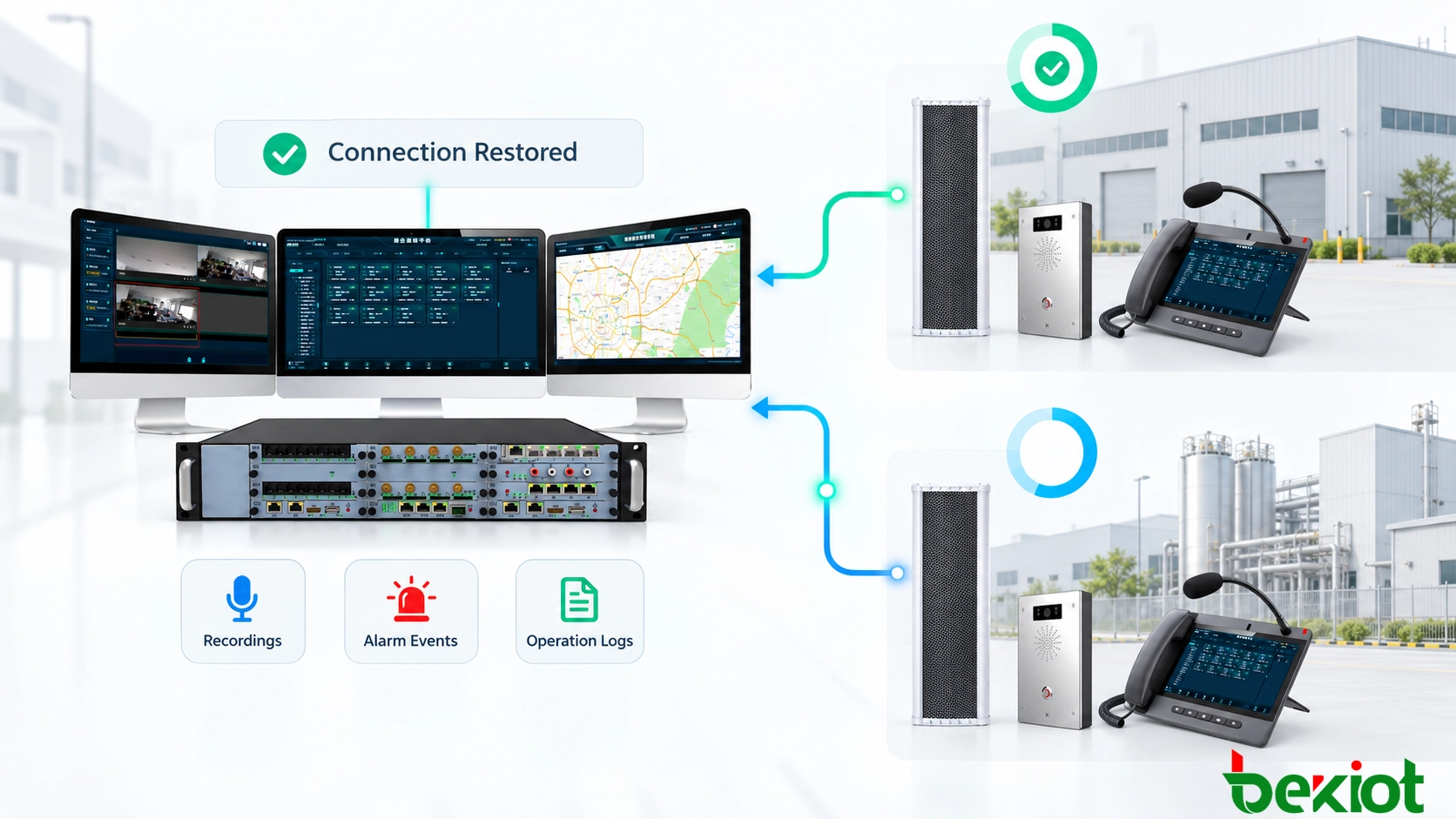
Calls, broadcasts, alarms and operator actions stored during isolation are uploaded after connectivity returns. Each record needs an original timestamp, site identifier, device identity and event reference so that it can be placed correctly in the central history.

The synchronization process checks for duplicate events. If the central and local systems created separate records for the same incident, the platform can link them instead of presenting them as unrelated emergencies. Records that cannot be reconciled automatically are flagged for administrative review.

Reliable timekeeping is essential. A local time source or suitable holdover method limits clock drift while a site is disconnected. Without this control, recordings and alarms may appear in the wrong order after synchronization.

Testing realistic failure conditions

Acceptance testing must cover the complete transition rather than checking only whether a backup server starts. Useful test scenarios include:

  • Disconnecting the primary WAN link while local calls are active

  • Stopping the main central SIP or dispatch service

  • Interrupting the VPN while the physical network remains available

  • Taking the central operator positions offline

  • Isolating two or more sites at the same time

  • Restoring connectivity to only one of several isolated sites

  • Placing emergency calls during local operation

  • Issuing live and prerecorded local broadcasts

  • Confirming continued access to local radio channels

  • Testing simultaneous central and local broadcast requests

  • Restoring the WAN while an emergency call remains active

  • Checking recordings, timestamps and event synchronization afterward

The test report can record failure detection time, switching time, calls lost during transition, services available in degraded mode and the time required to restore central control. Operators also need to participate because communication continuity depends on personnel recognizing the operating state and following the correct procedure.

Dispatch recordings alarms and event logs synchronizing after network connectivity is restored
Locally stored dispatch recordings, alarms and event logs synchronize with the central platform after network recovery.

A multi-site emergency dispatch system needs to operate as one coordinated network without becoming one fragile system. Central control provides shared visibility, consistent management and cross-site coordination. Local resilience allows an isolated facility to receive emergency calls, warn personnel and coordinate its own response.

The appropriate design is neither completely centralized nor completely independent. Organization-wide command remains with the central platform, while each site retains the functions it genuinely needs during isolation. When connectivity returns, authority and data move back through a controlled recovery process rather than an immediate and unverified switch.

FAQ

How long should a site operate without the central platform?

The required period depends on the site risk assessment and expected repair time. A small facility may require several hours of local operation, while a remote industrial site may need enough local capacity, storage and backup power to operate for one or more days.

Can analog telephones use a local fallback system?

Yes. Analog telephones can remain available through a local analog gateway, PBX or survivable voice controller. The gateway and routing configuration must allow local calls to continue without depending on a remote SIP server.

Can several small sites share a regional backup center?

A regional backup center can support several locations when an alternative communication path remains available. Critical sites may still require basic on-site communication because a regional network failure could disconnect them from both the main and backup centers.

How should local fallback permissions be protected?

Local control requires role-based accounts, restricted emergency functions, operation logs and secure administrative access. Default passwords and shared operator accounts are unsuitable because local fallback may provide access to high-priority calling and broadcast functions.

Does local survivability require separate licensing?

This depends on the dispatch platform, SIP server and connected applications. Some systems include standby or survivable-site functions in the main license, while others require separate licenses for local servers, recording channels, gateways or operator positions. Licensing must be confirmed before the system architecture is finalized.

Recommended Products
catalogue
customer service Phone
We use cookie to improve your online experience. By continuing to browse this website, you agree to our use of cookie.

Cookies

This Cookie Policy explains how we use cookies and similar technologies when you access or use our website and related services. Please read this Policy together with our Terms and Conditions and Privacy Policy so that you understand how we collect, use, and protect information.

By continuing to access or use our Services, you acknowledge that cookies and similar technologies may be used as described in this Policy, subject to applicable law and your available choices.

Updates to This Cookie Policy

We may revise this Cookie Policy from time to time to reflect changes in legal requirements, technology, or our business practices. When we make updates, the revised version will be posted on this page and will become effective from the date of publication unless otherwise required by law.

Where required, we will provide additional notice or request your consent before applying material changes that affect your rights or choices.

What Are Cookies?

Cookies are small text files placed on your device when you visit a website or interact with certain online content. They help websites recognize your browser or device, remember your preferences, support essential functionality, and improve the overall user experience.

In this Cookie Policy, the term “cookies” also includes similar technologies such as pixels, tags, web beacons, and other tracking tools that perform comparable functions.

Why We Use Cookies

We use cookies to help our website function properly, remember user preferences, enhance website performance, understand how visitors interact with our pages, and support security, analytics, and marketing activities where permitted by law.

We use cookies to keep our website functional, secure, efficient, and more relevant to your browsing experience.

Categories of Cookies We Use

Strictly Necessary Cookies

These cookies are essential for the operation of the website and cannot be disabled in our systems where they are required to provide the service you request. They are typically set in response to actions such as setting privacy preferences, signing in, or submitting forms.

Without these cookies, certain parts of the website may not function correctly.

Functional Cookies

Functional cookies enable enhanced features and personalization, such as remembering your preferences, language settings, or previously selected options. These cookies may be set by us or by third-party providers whose services are integrated into our website.

If you disable these cookies, some services or features may not work as intended.

Performance and Analytics Cookies

These cookies help us understand how visitors use our website by collecting information such as traffic sources, page visits, navigation behavior, and general interaction patterns. In many cases, this information is aggregated and does not directly identify individual users.

We use this information to improve website performance, usability, and content relevance.

Targeting and Advertising Cookies

These cookies may be placed by our advertising or marketing partners to help deliver more relevant ads and measure the effectiveness of campaigns. They may use information about your browsing activity across different websites and services to build a profile of your interests.

These cookies generally do not store directly identifying personal information, but they may identify your browser or device.

First-Party and Third-Party Cookies

Some cookies are set directly by our website and are referred to as first-party cookies. Other cookies are set by third-party services, such as analytics providers, embedded content providers, or advertising partners, and are referred to as third-party cookies.

Third-party providers may use their own cookies in accordance with their own privacy and cookie policies.

Information Collected Through Cookies

Depending on the type of cookie used, the information collected may include browser type, device type, IP address, referring website, pages viewed, time spent on pages, clickstream behavior, and general usage patterns.

This information helps us maintain the website, improve performance, enhance security, and provide a better user experience.

Your Cookie Choices

You can control or disable cookies through your browser settings and, where available, through our cookie consent or preference management tools. Depending on your location, you may also have the right to accept or reject certain categories of cookies, especially those used for analytics, personalization, or advertising purposes.

Please note that blocking or deleting certain cookies may affect the availability, functionality, or performance of some parts of the website.

Restricting cookies may limit certain features and reduce the quality of your experience on the website.

Cookies in Mobile Applications

Where our mobile applications use cookie-like technologies, they are generally limited to those required for core functionality, security, and service delivery. Disabling these essential technologies may affect the normal operation of the application.

We do not use essential mobile application cookies to store unnecessary personal information.

How to Manage Cookies

Most web browsers allow you to manage cookies through browser settings. You can usually choose to block, delete, or receive alerts before cookies are stored. Because browser controls vary, please refer to your browser provider’s support documentation for details on how to manage cookie settings.

Contact Us

If you have any questions about this Cookie Policy or our use of cookies and similar technologies, please contact us at support@becke.cc .