A control room operator needs to warn personnel in a loading area without interrupting the entire facility. Instead of opening separate paging software or walking to a dedicated microphone, the operator presses a programmed key on the dispatch telephone, selects the required zone and speaks through the handset, speakerphone or gooseneck microphone.
The operation may take only a few seconds, but several functions must work together behind it. The dispatch telephone must register correctly, the SIP platform must recognize the paging destination, the receiving terminals must answer automatically, and the network must carry the voice without excessive delay or packet loss.
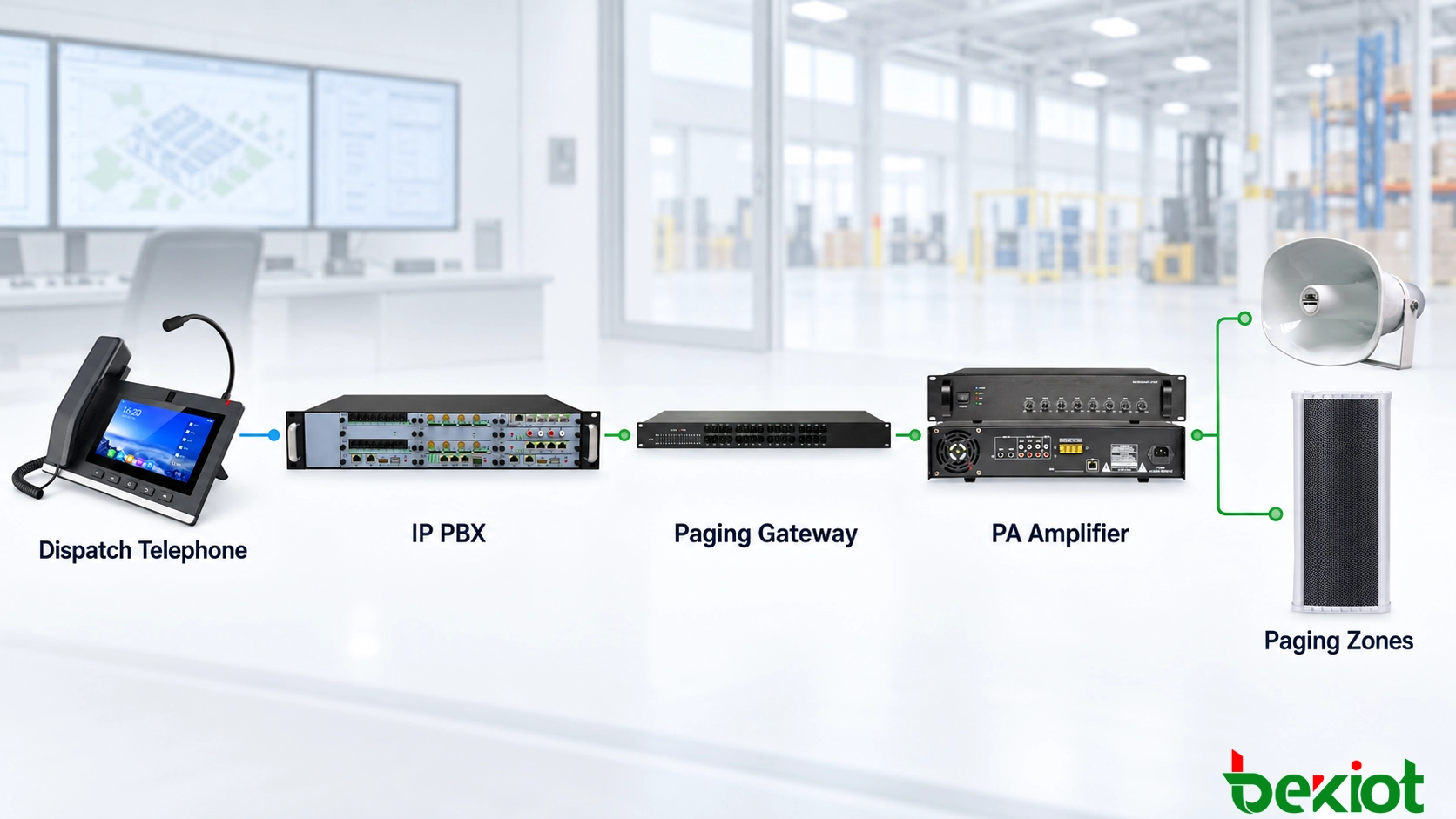
In most installations, a dispatch telephone does not connect directly to every loudspeaker. It works as a SIP endpoint within a wider communication system, using an IP PBX, SIP server or dispatch platform to reach SIP speakers, paging gateways and broadcast zones.
The Dispatch Telephone’s Position in the Paging Architecture
A SIP paging system normally contains a call-control layer, an operator endpoint and one or more audio-output devices. The dispatch telephone is the operator endpoint used to initiate live announcements and select the required destination.
A typical system may include:
A SIP dispatch telephone or paging console
An IP PBX, SIP server or command-and-dispatch platform
SIP horn speakers and IP column speakers
SIP paging gateways
Traditional amplifiers and analog speaker lines
PoE switches, routers and network security equipment
Both the dispatch telephone and the paging endpoints are registered with the same SIP platform. Each device or paging group receives an extension number. When the operator calls a paging number, the platform applies the configured routing and connects the telephone to the corresponding broadcast endpoint.
For an all-IP deployment, the basic connection path is:
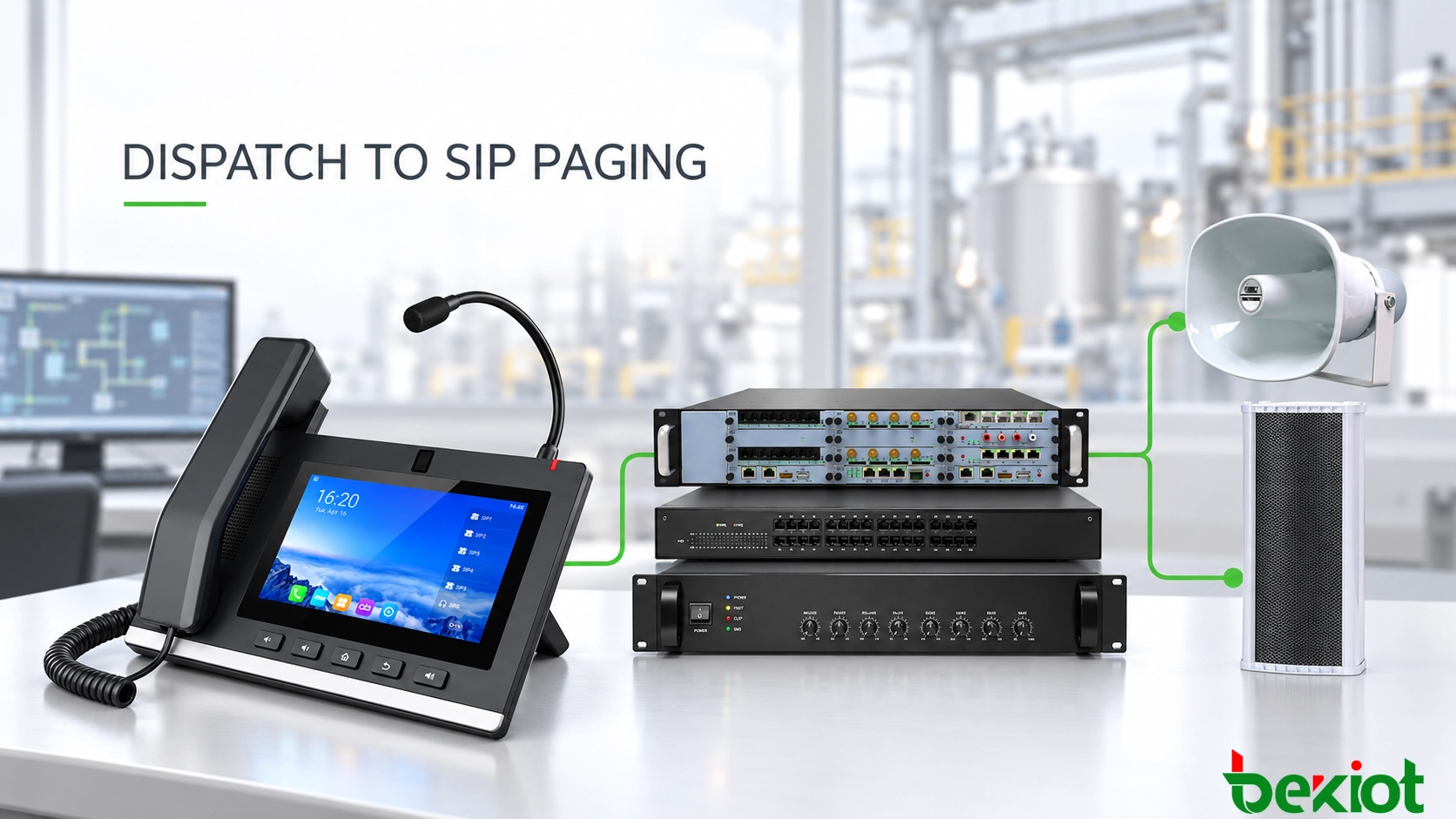
Dispatch Telephone → SIP Server or IP PBX → Paging Group → SIP Speakers
If the site retains an existing analog public address system, the path becomes:
Dispatch Telephone → SIP Server → SIP Paging Gateway → PA Amplifier → Analog Speakers
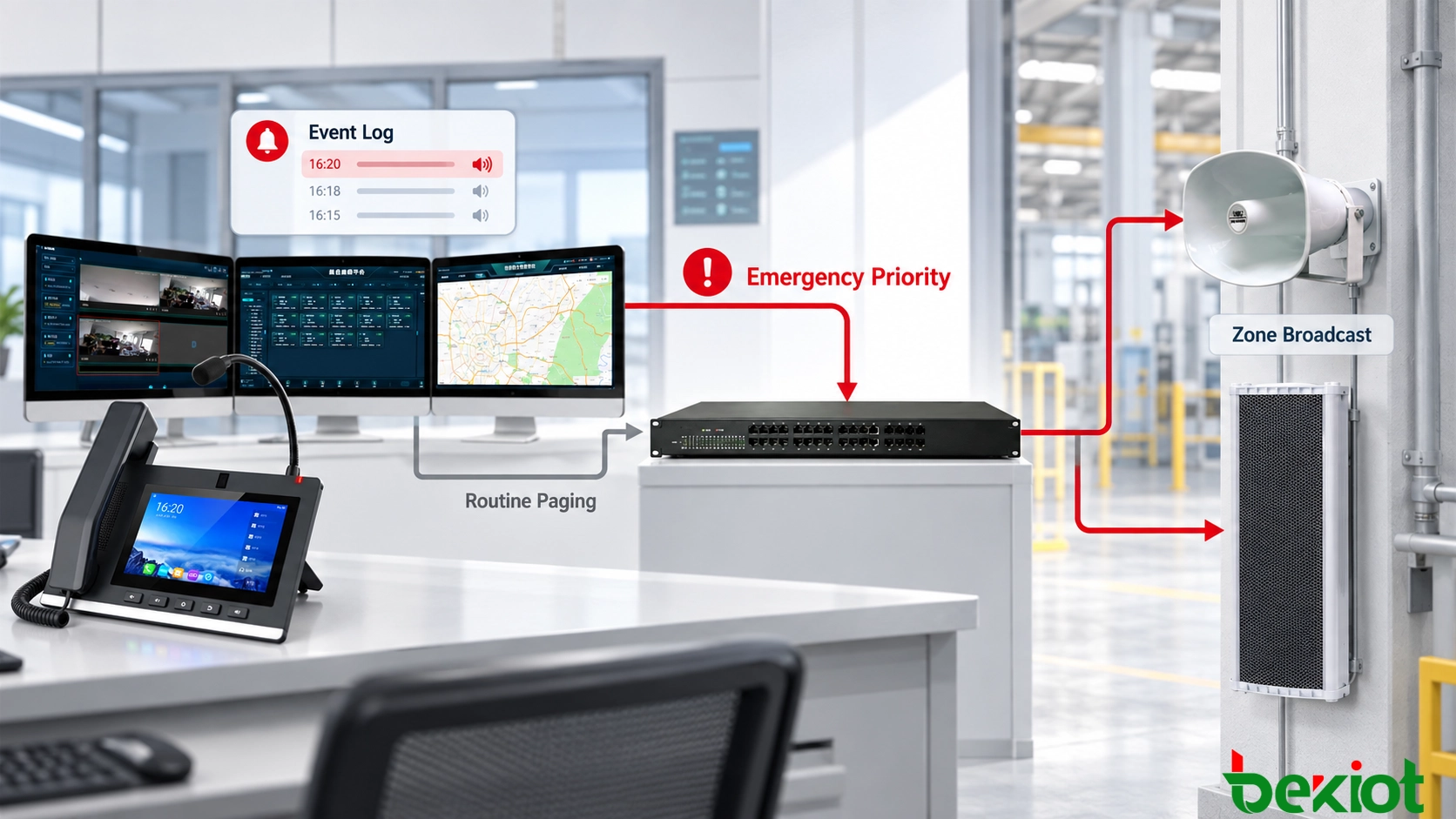
In a larger command-and-control environment, the dispatch platform may sit between the telephone and the SIP server. It can add operator permissions, paging records, priority levels, alarm linkage and graphical zone selection while the SIP server continues to handle device registration and call routing.

Connection Methods for Different Paging Networks
Direct SIP Extension Calling
Direct extension calling is the simplest arrangement. The dispatch telephone and each SIP paging terminal register with the IP PBX or SIP server as separate extensions. A SIP horn might use extension 6101, while an IP column speaker in another area uses extension 6102.
When the operator dials one of these numbers, the server establishes a SIP session between the telephone and the selected endpoint. The paging terminal answers automatically and plays the operator’s live voice.
This approach is suitable for small systems, individual locations and installations where operators occasionally need to address one specific area. It also makes it easy to test or maintain a single paging device without activating an entire zone.
However, calling every speaker separately becomes inefficient when a site contains many endpoints. Individual extension calling should therefore be reserved for point-to-point paging, equipment testing or locations that need independent control.
SIP Paging Groups
A paging group allows several endpoints to share one destination number. For example, extension 6200 might represent the production area and activate six SIP horns at the same time. Other numbers can be assigned to the warehouse, loading bays, office buildings or outdoor areas.
Paging groups are generally created on the IP PBX, SIP server or broadcast management platform. Depending on the system, the platform may establish individual SIP sessions with the receiving devices or convert the call into a multicast audio stream.
Group paging simplifies daily operation because the dispatcher selects an operational area rather than an individual loudspeaker. It also provides a practical foundation for user permissions, paging schedules and emergency priority rules.
Zone membership should follow the physical layout and operating procedures of the site. A speaker installed near a loading bay, for example, should not automatically belong to a warehouse paging group simply because both devices are connected to the same network switch.
SIP Paging Gateway Connection
A paging gateway is used when the destination is a traditional PA amplifier or an existing analog speaker network. The gateway registers with the SIP platform as a callable extension and converts received SIP audio into an analog signal.
When the gateway receives a call, it may also activate a relay to start an amplifier, open an audio input or trigger a zone controller. The exact wiring depends on the gateway output and the amplifier input, which may use RCA, balanced audio terminals or another line-level interface.
This design allows an organization to add telephone-based paging without replacing serviceable amplifiers and speakers. It is particularly useful in factories, campuses, warehouses and transportation facilities undergoing a gradual migration to IP communications.
Before installation, the project team should confirm the required audio level, input impedance, grounding method and relay behavior. A successful SIP call does not guarantee correct playback if the analog interface between the gateway and amplifier is mismatched.
SIP-Controlled Multicast Paging
Multicast is useful when the same announcement must reach a large number of IP speakers with minimal setup delay. The audio is transmitted to a multicast address, and every authorized endpoint subscribed to that address can receive the stream.
A dispatch telephone may support multicast transmission directly, but this capability should not be assumed. In many installations, the telephone first places a SIP call to the server, and the paging platform converts that call into multicast audio for the selected zone.
The network switches must support the intended multicast design. IGMP snooping, VLAN configuration and multicast routing should be checked before deployment, particularly when paging must cross different subnets or buildings.
SIP signaling and multicast audio serve different purposes in this arrangement. SIP identifies the caller, checks authorization and starts the paging task, while multicast distributes the same audio stream efficiently to multiple endpoints.
SIP Accounts and Paging Parameters
The integration begins by assigning the dispatch telephone a SIP account. The required settings normally include the SIP server address, extension number, authentication name, password, port, transport method and preferred audio codec.
The SIP speakers or paging gateways require similar registration parameters. Each endpoint should also have a clear device name and location description so that maintenance personnel can identify it without relying only on an extension number.
| Configuration Area | Typical Parameters | Purpose |
|---|---|---|
| Dispatch telephone | SIP account, server address, port, transport and codec | Registers the operator endpoint and establishes paging calls |
| SIP platform | Extensions, paging groups, routing rules and permissions | Directs calls to the correct zone or terminal |
| Paging endpoint | SIP account, automatic answer, volume and multicast address | Receives and plays live announcements |
| Paging gateway | Audio output, relay action and amplifier interface | Connects SIP calls to traditional PA equipment |
| Network | VLAN, QoS, PoE, RTP ports and multicast control | Maintains reliable signaling and audio delivery |
The following example shows how a small industrial paging system could be organized:
| Item | Example Configuration |
|---|---|
| Dispatch telephone | Extension 2001 |
| Production paging group | Extension 6201 |
| Warehouse paging group | Extension 6202 |
| Loading-bay paging group | Extension 6203 |
| All-zone emergency group | Extension 6299 |
| DSS Key 1 | Speed Dial 6201 |
| DSS Key 2 | Speed Dial 6202 |
| DSS Key 3 | Speed Dial 6203 |
| Emergency key | Speed Dial 6299 with server-side permission control |
| Audio codec | G.711 A-law or μ-law according to platform requirements |
| Paging endpoint behavior | Automatic Answer |
Automatic answer is essential for live paging. A loudspeaker cannot wait for someone to accept the call manually. Depending on the equipment, automatic answer may be enabled locally on the terminal or triggered by specific SIP headers sent by the server.
Codec compatibility must also be confirmed. G.711 is commonly used on managed local networks because it provides predictable voice quality and is widely supported. G.711 A-law is common in many international and European-oriented systems, while G.711 μ-law is frequently used in North American and Japanese networks. The dispatch telephone, server and paging endpoints must use mutually supported codec settings.
A lower-bandwidth codec may be considered for remote connections, but every device in the audio path must support the selected format. Transcoding may be possible on some communication platforms, although it increases processing requirements and can introduce additional delay.
Call permissions should prevent an ordinary extension from broadcasting to emergency or site-wide zones. The DSS key only provides access to the configured destination number. Authorization should be enforced by the SIP server or dispatch platform according to the caller’s extension, user role, schedule or paging group.
Related Product: Becke Telcom IP Dispatch Consoles
One-Touch Zone Selection on the Dispatch Telephone
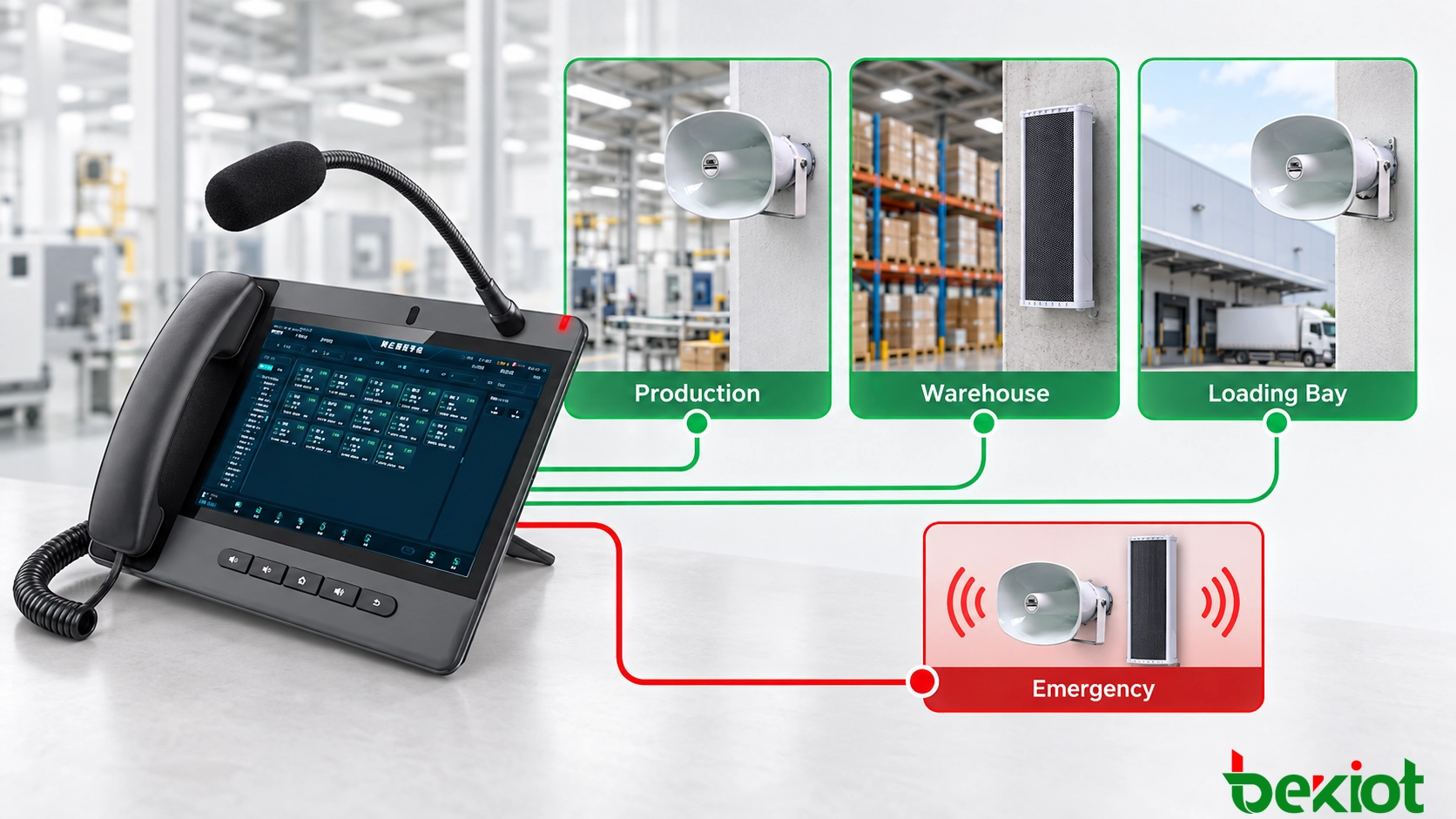
A control room should not require operators to remember a long list of extension numbers. Frequently used paging destinations can be assigned to DSS or programmable keys on the dispatch telephone.
| Key Label | Paging Destination | Example Use |
|---|---|---|
| Production | Production-area paging group | Shift instructions and operating notices |
| Warehouse | Warehouse speaker zone | Loading and inventory coordination |
| Loading Bay | Outdoor horn group | Vehicle and personnel instructions |
| Maintenance | Workshop and equipment-room zone | Technical response requests |
| Emergency | Authorized all-zone group | Site-wide emergency instructions |
The label visible to the operator should describe the physical or operational area, not the underlying extension number. This reduces selection errors during time-sensitive events.
A programmable key may operate as a speed-dial key or a push-to-talk control. With speed dial, the operator presses the key, waits for the paging path to connect and then speaks. With push-to-talk operation, the operator may need to hold the key while speaking and release it to end the announcement.
The exact key behavior must be confirmed before training control room personnel. Operators should not assume that every telephone uses the same press, hold and release sequence.
Some dispatch telephones can use BLF subscriptions or platform status information to show whether a destination is available or currently active. A green indicator may represent an available zone, while red or flashing indicators may show an active announcement or emergency state.
Status display depends on interoperability between the telephone, SIP server and paging system. A key can initiate paging even when real-time status monitoring is unavailable, so the required behavior should be confirmed during system design.

Call Flow and Broadcast Priority
When an operator presses a paging key, the dispatch telephone sends a SIP INVITE to the call-control platform. The platform identifies the caller, checks the dial plan and permissions, and resolves the selected paging destination.
The platform then calls the relevant SIP speaker, gateway or paging group. After the destination answers automatically, the operator’s voice is carried in an RTP stream or converted into multicast audio for distribution to the selected endpoints.
The operator should wait for a paging confirmation tone, on-screen indication or active-zone light before speaking. Starting too early may cause the first part of the message to be lost while the SIP session and audio path are still being established.
A dispatch paging workflow can therefore be summarized as:
The operator selects the required paging zone.
The telephone sends a SIP call request.
The platform verifies the destination and the operator’s permission.
The paging endpoints answer automatically.
The telephone displays an active state or plays a confirmation tone.
The operator delivers the announcement.
The voice is carried through RTP or multicast to the selected endpoints.
The operator releases the PTT key or ends the call.
The platform terminates the session and returns the zone to its normal state.
The event is recorded if logging is enabled.
When the announcement ends, the platform should release the paging group promptly. Speakers may then return to background music, scheduled playback or standby status according to their previous operating state.
Emergency paging requires additional control. A high-priority announcement may need to interrupt background music, scheduled audio or a routine announcement already in progress. The system should define which operator roles can use this function and which zones can be overridden.
Priority is not created by the dispatch telephone alone. The SIP platform must recognize the priority level, and the receiving paging equipment must support the intended interruption behavior.
The system must also define what happens when two operators try to page the same zone. Possible policies include:
Allowing the first active call to retain control of the zone
Rejecting the second call with a busy indication
Placing the second request in a paging queue
Allowing a higher-priority operator to interrupt the active announcement
These rules should be established before commissioning. An undefined conflict policy can result in mixed audio, interrupted messages or uncertainty about which operator controls the paging zone.
Recording and event logs can provide the operator identity, paging destination, start time and call duration. These records support incident review and maintenance. However, a completed SIP record only confirms that the communication session occurred; it does not prove that every loudspeaker produced audible sound.

Commissioning and Troubleshooting
Testing should cover the complete path from the dispatch telephone microphone to the loudspeaker output. A successful SIP registration only confirms that the device can communicate with the server; it does not confirm correct routing, automatic answer, audio transmission or speaker coverage.
Each paging zone should be called individually. The installer should verify the displayed zone name, the devices activated by the call, the connection prompt, the audio level and the release of the audio path after the operator hangs up.
The beginning and end of each test message should be checked carefully. If the first words are missing, the operator may be speaking before the audio path is ready. If the last words are cut off, the PTT key or call-release timing may need adjustment.
Site-wide and emergency groups should be tested separately under controlled conditions. The test should confirm whether emergency paging interrupts lower-priority audio and whether normal service resumes correctly afterward.
Tests involving multiple operators should also be performed. One dispatcher can occupy a routine zone while another attempts a normal or emergency call to the same destination. The observed result should match the approved priority and conflict-handling policy.
| Observed Problem | Items to Check |
|---|---|
| The dispatch telephone cannot register | SIP server address, account, password, port, transport and network access |
| The paging number cannot be reached | Dial plan, paging group, routing rule and caller permission |
| The endpoint rings but does not answer | Automatic-answer settings and supported SIP alert headers |
| The call connects without audio | RTP ports, codec compatibility, firewall, NAT and media routing |
| The beginning of the message is missing | Call setup time, confirmation tone and operator procedure |
| Some speakers do not receive group paging | Group membership, multicast address, IGMP and VLAN configuration |
| Audio is delayed or interrupted | Packet loss, latency, QoS policy, bandwidth and switch utilization |
| A zone remains occupied after paging | SIP session release, PTT behavior, gateway relay and endpoint timeout |
| Emergency paging cannot interrupt routine audio | Priority rules, user authorization and endpoint override support |
A fallback method should also be considered. If a central SIP server fails, a standby server may take over device registration. In a multi-site system, local paging controllers can maintain communication inside the affected facility when the WAN connection to the central platform is unavailable.
The appropriate fallback design depends on operational risk. Routine workplace announcements may tolerate a short interruption, while emergency command centers, industrial plants and transportation facilities may require redundant servers, backup power and local paging continuity.
A reliable connection between a dispatch telephone and a SIP paging system depends on more than successful SIP registration. Zone routing, automatic answer, programmable keys, audio priority and network quality must be tested as one complete operating path. For the control room, the final objective is simple: select the correct area, confirm that the paging path is ready and deliver a clear message with the fewest possible actions.
FAQ
Can a dispatch telephone connect directly to SIP speakers without an IP PBX?
Direct IP calling may be possible when both devices support peer-to-peer SIP communication. However, this arrangement provides limited routing, permissions, group management and failover. An IP PBX or SIP platform is generally more suitable for control rooms and multi-zone paging systems.
Can one dispatch telephone call several SIP speakers simultaneously?
Yes. The speakers can be assigned to a paging group, or the platform can distribute the operator’s audio through multicast. The appropriate method depends on the number of endpoints, network design and capabilities of the SIP platform.
Does a dispatch telephone require a dedicated paging server?
Not always. A compatible IP PBX may provide extension calling and basic paging groups. A dedicated paging or dispatch platform is more appropriate when the project requires many zones, priority levels, scheduled audio, event linkage, monitoring or detailed user permissions.
Can the operator receive confirmation that an announcement was heard?
SIP signaling can confirm that a paging endpoint accepted the call, but it does not prove that people heard the message. Stronger confirmation may require endpoint monitoring, amplifier fault detection, microphone-based audio testing or a return call from personnel in the affected area.
What happens when the WAN connection to the central platform fails?
Paging may stop if every call depends on the central server. A resilient design can use a local SIP server, survivable gateway or local paging controller so that essential communication remains available within the site during a WAN failure.
Does every SIP paging device support emergency priority override?
No. Priority behavior depends on the SIP platform, paging endpoint and configured routing policy. Compatibility should be confirmed through interoperability testing rather than assumed from SIP registration alone.