


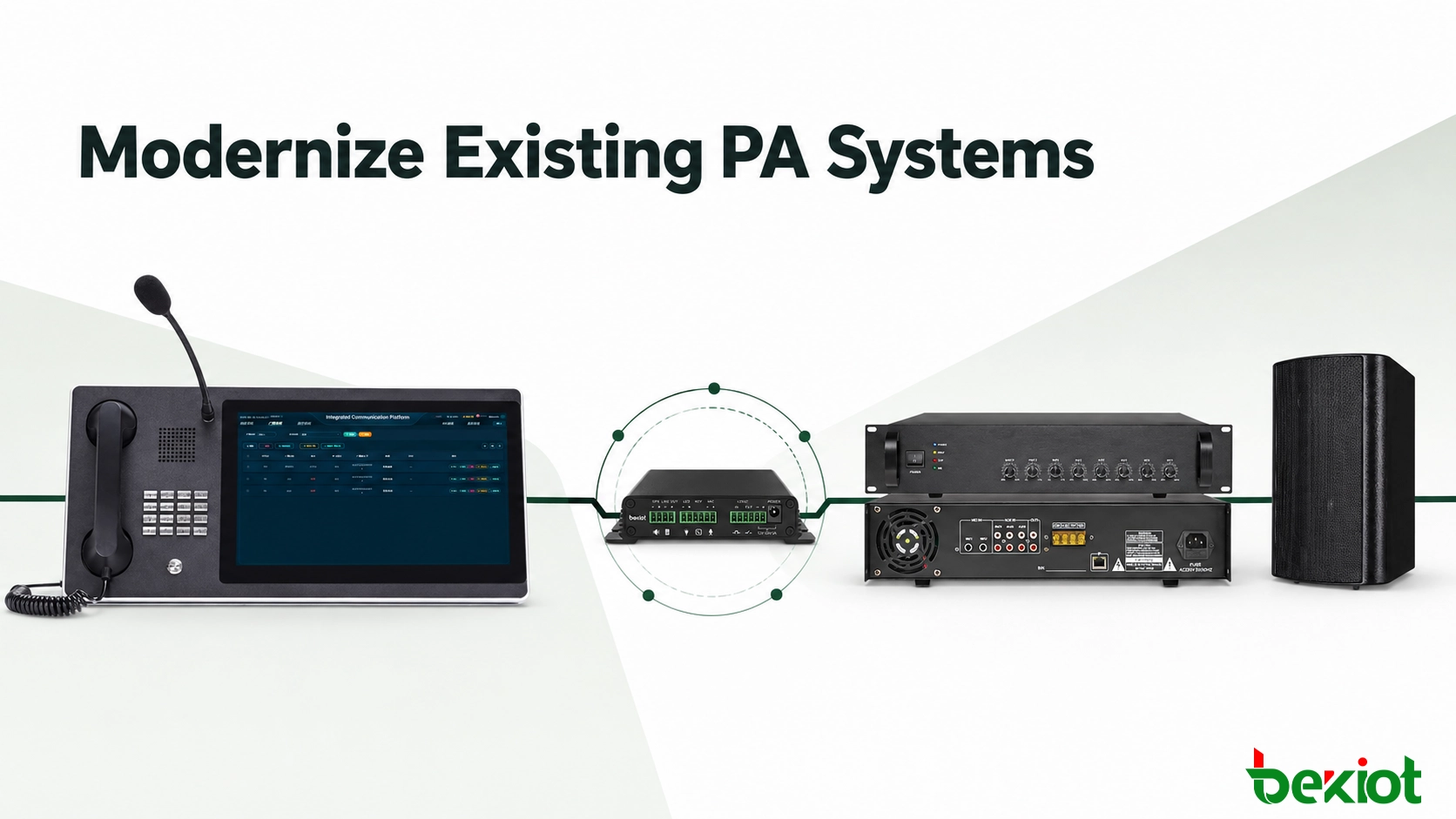
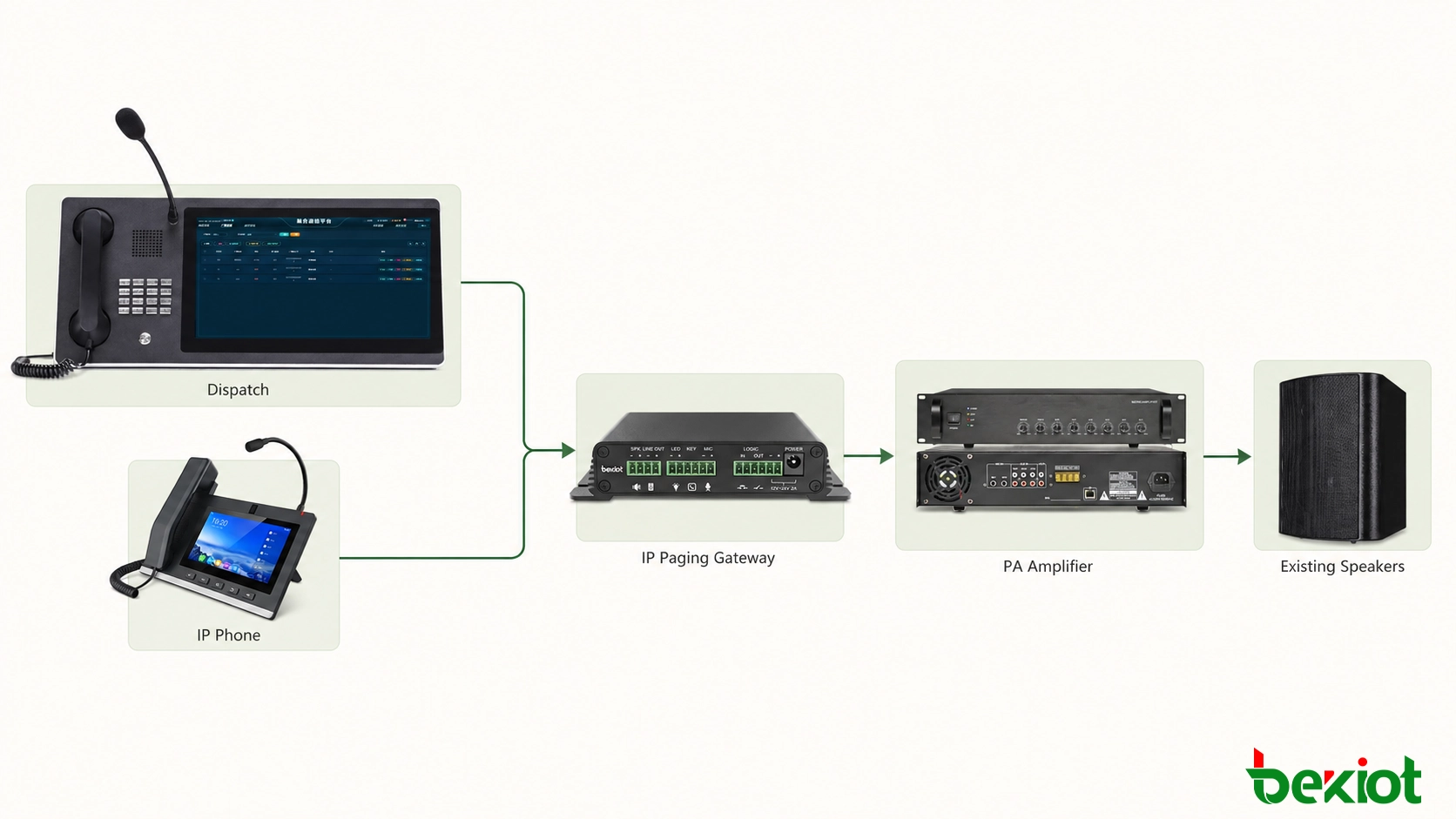
An older public address system does not automatically need to be replaced when a site moves to IP telephony or centralized dispatch. If the amplifiers, zone controllers and loudspeakers remain serviceable, an IP paging gateway can provide the missing link between the network voice platform and the analog audio input of the installed PA equipment.
The result is a practical retrofit: operators can make live announcements from a dispatch console, desk phone or authorized mobile client, while the existing amplifier and speaker circuits continue to deliver sound across the site. This approach reduces construction work, shortens deployment time and allows analog and native IP paging endpoints to operate under the same communication plan.
Related Product: Intercom Paging Gateway
Why a Gateway-Based Upgrade Makes Sense
Traditional PA systems are often built around durable components: rack-mounted amplifiers, zone selectors, ceiling speakers, horn speakers and long runs of speaker cable. These parts may still perform well even if the control method is limited to a local microphone or a dedicated analog input. Replacing every field device simply to gain network access can create unnecessary cost and disruption.
A paging gateway changes the control layer rather than the entire distribution layer. It connects to the IP network, appears as a callable endpoint on the voice or dispatch platform, and provides an audio output that the existing amplifier can accept. Once the endpoint is included in the dial plan, authorized users can reach a building, workshop or broadcast zone without standing beside the PA rack.
This architecture is especially useful when a project needs to:
Retain existing amplifiers and speaker circuits.
Extend paging access to dispatch consoles, IP phones or remote offices.
Bring separate PA zones into a unified communication interface.
Add network-based scheduling, recording or event linkage at the platform level.
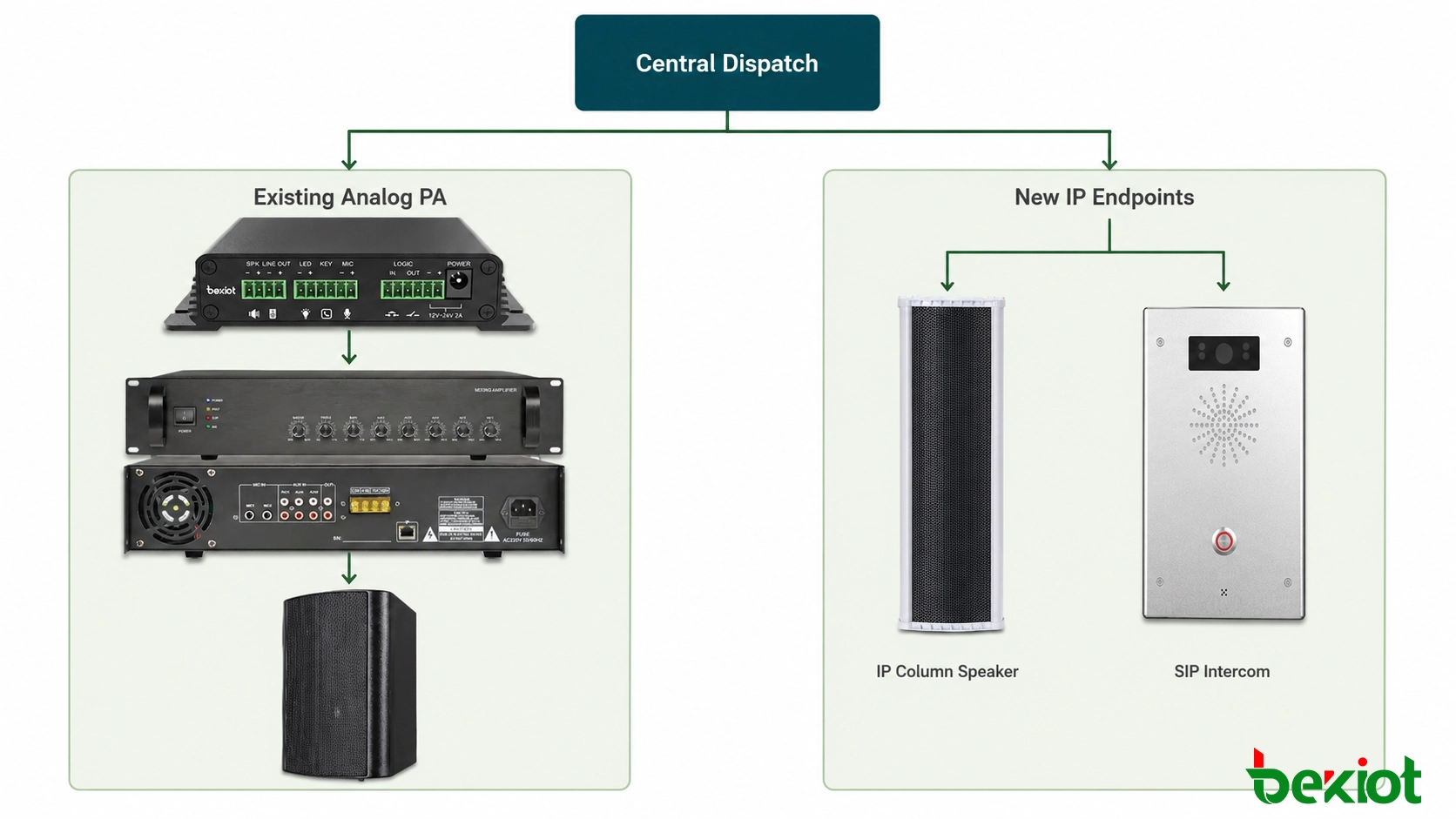
Deploy native IP speakers in new areas while keeping analog zones in service.
What the Gateway Changes—and What It Leaves in Place
The gateway changes how a broadcast is initiated and transported. Instead of relying only on a microphone located beside the amplifier rack, the site gains a network-addressable paging point. The operator can select a named destination, start a live announcement and release the channel from the same interface used for other voice or dispatch tasks. Depending on the surrounding platform, the project may also add user permissions, call records, scheduled audio, broadcast groups and event-driven actions.
It does not change the electrical design of the speaker circuit. Amplifier output power, loudspeaker tapping, cable loss, impedance, acoustic coverage and local volume controls remain part of the existing PA system. If the old system has weak coverage, damaged speakers or overloaded amplifier channels, adding a network gateway will not correct those faults. A retrofit survey should therefore separate control limitations from audio-distribution problems before the solution is approved.
This distinction helps set a realistic project scope. The gateway is the boundary device between network communication and analog audio; it is not a substitute for every component behind that boundary. When the installed PA equipment is healthy, this separation is an advantage because it allows the project to modernize control without disturbing field infrastructure that already works.
How Voice Moves from the Network to the Amplifier
The operating principle is straightforward. In a SIP-based deployment, the gateway is configured on the network and registered to the IP voice platform in much the same way as another communication endpoint. The platform assigns it an extension or paging target. When an operator calls that target, the SIP session carries the voice stream to the gateway, which converts the media into analog audio.
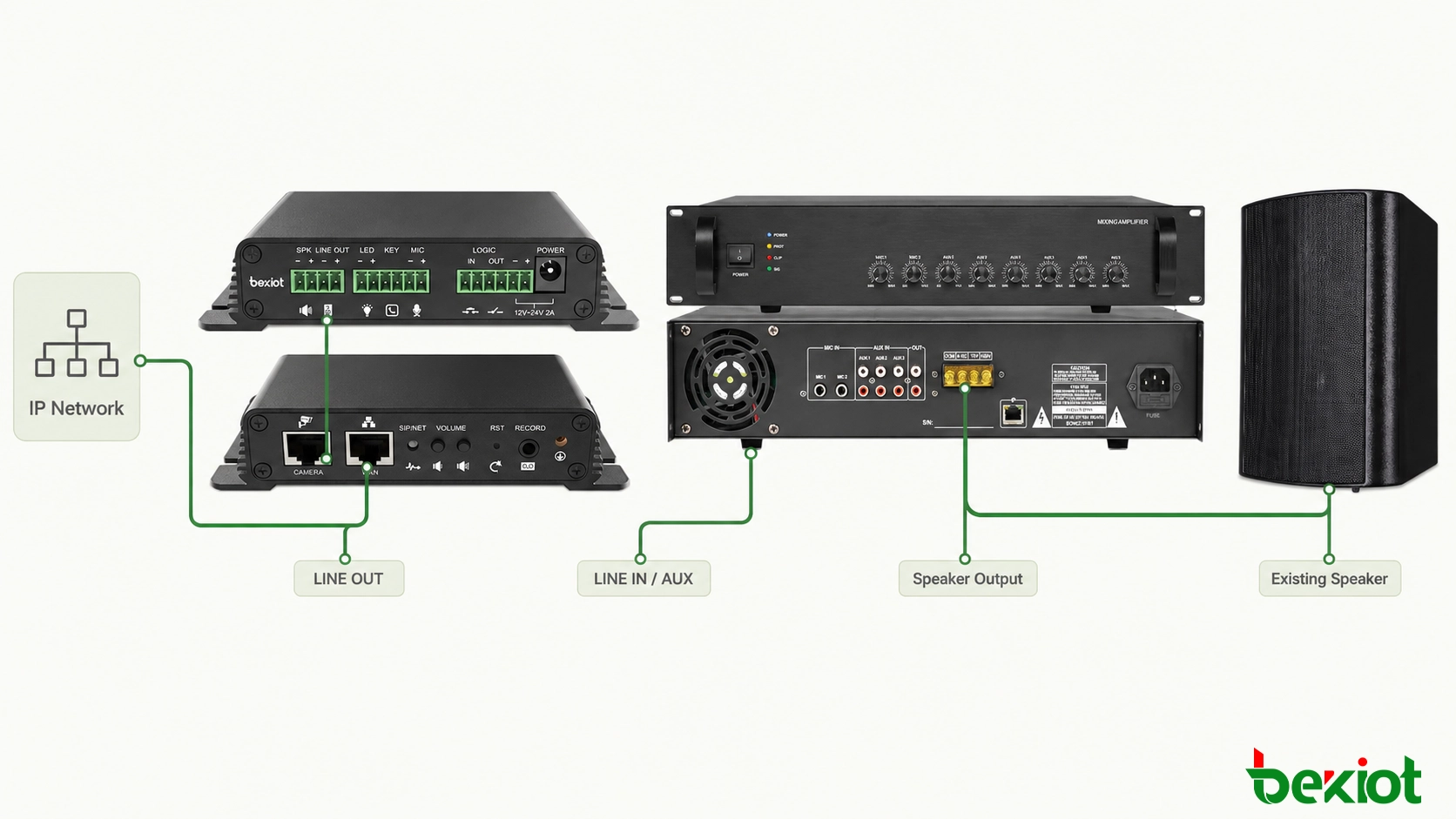
The amplifier remains responsible for power amplification and speaker distribution. The gateway is responsible for network access, call handling and audio conversion. Keeping these roles separate is important: a line-level gateway output should normally feed an AUX, LINE IN or equivalent input on the amplifier, not a high-voltage speaker output.
A Practical Retrofit Architecture
A basic single-zone installation needs three connections: Ethernet to the communication network, power to the gateway if it is not powered through the network, and analog audio from the gateway to the amplifier. The physical audio cable depends on the available interfaces. For example, a gateway with a terminal-block line output can be connected to an amplifier's RCA or balanced line input using a correctly wired cable.
Before making that cable, confirm whether the amplifier input is balanced or unbalanced, its nominal input level and its grounding arrangement. Incorrect pin assignment can cause low volume, hum, distortion or loss of one audio channel. Shielded cable and a clean grounding strategy are advisable around equipment racks and electrically noisy industrial areas.
Three Common Deployment Models
Single amplifier, single paging destination. This is the simplest model. One gateway feeds one amplifier input, and the platform presents the complete speaker network as a single destination. It fits a small warehouse, shop, office floor or independent building where every announcement should reach the same area. The main design tasks are endpoint registration, audio-level matching and a clear extension name.
Central PA matrix with several zones. Larger sites may already have a matrix, zone selector or multi-channel amplifier rack. The gateway supplies the audio program, while the PA controller determines where that program is sent. Zone selection may be performed manually at the PA rack, by control contacts or through a supported interface. This model retains the existing zoning logic but requires careful coordination between the voice session and the zone-control action.
Distributed gateways across several locations. A campus or multi-site organization can place a gateway beside the amplifier at each building or remote facility. All endpoints register to the central platform, giving the control room individually named destinations and site-wide groups. Keeping the analog audio run short can reduce noise, while the IP network carries the call over the longer distance. WAN resilience, local power backup and the effect of a central-platform outage must be considered for each location.
Handling More Than One Broadcast Zone
Zone design depends on the existing PA controller. A project may use a dedicated gateway endpoint for each independent analog zone, or feed one gateway into a PA matrix that already selects zones. Where the installed controller accepts contact closures, gateway I/O or an external relay interface may be used to coordinate audio with zone selection. The paging logic should be agreed before hardware is assigned; otherwise, a seemingly simple retrofit can leave operators with unclear destination names or unexpected all-zone announcements.
The dial plan should use operational names rather than equipment labels. “Workshop East,” “Administration Building” and “All Production Areas” are easier for a dispatcher to understand than gateway extension numbers. Permissions can then prevent general users from reaching sensitive or site-wide groups. If several users can call the same zone, the system also needs a defined busy policy: reject the second call, queue it or allow a higher-priority source to interrupt the current announcement.
Priority handling must be designed across the complete path. Giving an emergency console a higher priority on the IP platform is not enough if the analog amplifier continues playing another local source. The amplifier or PA matrix must provide a suitable priority input, mute contact or control method. The commissioning test should confirm that the selected high-priority source takes control, that lower-priority audio is suppressed as intended, and that normal operation returns after the urgent message ends.
Running Analog and IP Endpoints Together
The retrofit does not prevent further modernization. Existing analog zones can remain behind gateways, while new buildings or remote areas use IP speakers and intercom terminals. Both types of endpoint can be grouped at the platform level when the selected system supports paging groups. This staged approach allows expansion without forcing a site-wide cutover on one day.
Hybrid groups should be tested for timing as well as coverage. Network speakers and an analog amplifier path may not begin playback at exactly the same moment. A small difference is often acceptable when the zones are physically separated, but it can create an audible echo where coverage areas overlap. In shared acoustic spaces, delay alignment or a different zone grouping may be necessary.
Optional Control and Event Integration
Some projects need more than a live voice path. A dry-contact input can allow a button, alarm panel or machine signal to request a predefined action. An output contact may operate a warning beacon, enable an amplifier input or signal another controller. These functions should be treated as explicit control logic, not as assumptions based on the presence of an I/O terminal.
For each event, document the trigger source, destination zones, audio content, priority, reset condition and expected behavior after a network or power interruption. If recorded messages are used, define where the audio file is stored and which device is responsible for playback. Clear ownership prevents a common commissioning problem in which the voice platform, gateway and PA controller are each configured correctly in isolation but the complete automated sequence does not work.
Installation and Commissioning Checklist
Good results depend more on the site survey and commissioning process than on the number of devices. The following sequence keeps network, audio and operational checks separate enough to identify faults quickly.
Survey the installed PA equipment. Record amplifier input types, zone controls, speaker loading, local microphones, priority inputs and any fire-alarm or evacuation interfaces.
Define who can page which zone. Create clear extension names, paging groups and permissions for dispatchers, phones and mobile users.
Prepare the network. Assign addressing, voice VLAN policy, quality-of-service rules and firewall paths appropriate to the platform. Remote sites should be tested across the actual WAN rather than only on a bench.
Register and verify the endpoint. Confirm that the gateway remains online, receives calls from authorized devices and releases each session correctly.
Connect the audio path. Use the correct terminal-to-terminal, terminal-to-RCA or balanced audio cable for the amplifier input. Do not connect line output to a speaker-level circuit.
Set gain in stages. Begin with conservative output and amplifier levels, then raise them while checking intelligibility, clipping, background hum and acoustic feedback.
Test real operating cases. Verify individual zones, all-call groups, busy conditions, call termination, scheduled content, power recovery and the behavior of any local fallback microphone.
Test Intelligibility, Not Only Volume
A loud broadcast is not necessarily a clear one. Commissioning should use a consistent spoken test message and evaluate every representative area while normal background noise is present. Listen for clipped consonants, excessive bass, hum, feedback and large differences between zones. If the amplifier input is driven too hard, reducing the loudspeaker volume will not remove distortion already created earlier in the signal chain.
Audio gain should be adjusted from source to destination: operator microphone level, platform media level, gateway line output and amplifier input or master level. Change one stage at a time and record the accepted settings. This provides a repeatable baseline if equipment is replaced or a later maintenance visit reports that announcements have become quieter or distorted.
Include Network and Security Checks
Because paging becomes a network service, endpoint security is part of the audio design. Replace default credentials, restrict management access, keep time synchronization consistent and back up the final configuration. Place voice devices in an appropriate network segment and allow only the signaling, media and management paths the system requires. A paging endpoint should not be exposed directly to the public internet merely to simplify remote access.
Quality-of-service settings should be verified end to end, particularly across shared WAN links. Packet loss, jitter or unstable routing can turn a successful call into an unintelligible announcement. The acceptance test should include calls during realistic network load, not only when the site is quiet. For remote facilities, test recovery after link loss and confirm whether local paging remains available when the central platform cannot be reached.
| Check | What to Confirm | Why It Matters |
|---|---|---|
| Audio interface | Line level, connector type, balanced or unbalanced wiring | Prevents distortion, hum and incorrect signal levels |
| Call control | Extension, paging group, auto-answer and release behavior | Ensures announcements start and stop predictably |
| Zone logic | Dedicated endpoints, PA matrix selection or contact control | Avoids broadcasting to the wrong area |
| Resilience | Network, power, platform and local paging fallback | Defines what remains available during a fault |
Where This Approach Fits Best
Gateway-based integration works well in factories, warehouses, schools, hospitals, office campuses, transport facilities, retail sites and utility locations where an analog PA network already covers the required areas. It is also useful in multi-site projects: a central dispatch team can reach remote amplifiers over the IP network, subject to the site's security, bandwidth and resilience design.
Manufacturing and logistics: Connect production halls, loading areas and warehouses to a central dispatch desk while retaining high-power horn speakers designed for noisy environments.
Schools and business campuses: Allow authorized offices to call individual buildings or common areas, while scheduled content and routine announcements are managed centrally.
Hospitals and care facilities: Integrate general paging areas without disturbing existing ward speaker circuits, subject to privacy, priority and local operational requirements.
Transport and public facilities: Extend control-room announcements to legacy concourse, platform or parking-area amplifiers and add IP endpoints during later expansion.
Utilities and remote sites: Provide central access to substations, water facilities or unattended locations while preserving a local microphone or other fallback path.
The approach is less suitable when the existing amplifier or speaker wiring is unreliable, when precise per-speaker monitoring is mandatory, or when the required emergency voice system must meet standards that the installed PA equipment was never designed to satisfy. In those cases, the gateway may still be part of the solution, but it cannot compensate for unsuitable field hardware or replace a compliant life-safety design.
A phased retrofit should therefore include a replacement boundary. Serviceable zones can be integrated first, while damaged or non-compliant sections are scheduled for renewal. New IP speakers can be introduced where individual endpoint monitoring, flexible zoning or easier expansion provides a clear operational benefit. This avoids treating “analog” and “IP” as an all-or-nothing decision and gives the project a controlled migration path.
For most retrofit projects, the best first step is not selecting a device. It is mapping the current signal path, zone structure and operator workflow. Once those three elements are clear, the gateway can be placed at the correct boundary between network communication and analog amplification, with a test plan that reflects how the site will actually use the system.
FAQ
Is a Paging Gateway the Same as a PA Amplifier?
No. A paging gateway connects network-based call or media services to audio and control interfaces. A PA amplifier supplies the power needed to drive loudspeakers. Some gateway products include a small amplifier output, but that does not automatically replace the installed amplifier required for a large speaker circuit.
Can One Gateway Address Several Existing PA Zones?
It can when the PA controller or matrix provides a supported method for selecting zones. Otherwise, independent zones may require separate audio endpoints. The final design depends on the amplifier inputs, matrix controls and the paging groups required by operators.
Does Connecting a Gateway Make the System Two-Way?
Not by itself. A conventional amplifier-to-speaker path is one-way. Two-way communication requires a microphone or intercom endpoint at the field location and a return-audio path designed for that purpose.
What Happens If the IP Network or Voice Platform Is Unavailable?
Network-originated paging may be unavailable unless the design includes redundant network paths, a secondary platform or a local paging fallback. Availability requirements should be defined during system design and verified during acceptance testing.
Can This Retrofit Be Used for Emergency Evacuation Announcements?
Only when the complete system—including control equipment, supervision, amplifiers, power, wiring and loudspeakers—meets the applicable project and life-safety requirements. Adding a gateway alone does not certify an existing PA system for emergency use.







