



A paging console may report that an announcement was sent while one workshop remains silent, a speaker in an adjacent building plays the message, or employees hear a tone but cannot understand the instruction. These outcomes are different faults. A successful call status alone does not establish that a paging message reached the correct people in the correct area.
Verification therefore has to follow the announcement beyond the dispatch screen: from the selected paging zone and call-control decision, through the audio distribution path, to the receiving speaker or amplifier and the actual listening position. Verification must also establish that speakers and amplifiers outside the selected zone are not unintentionally activated or assigned its paging stream.
Delivery Evidence and Acceptance Boundaries
Before testing, define what delivered means. A server may mark a task complete after forwarding audio, while an endpoint may acknowledge a session without confirming loudspeaker output. Acceptance criteria must identify the evidence required at each layer rather than trusting a single status label.
Four Separate Levels of Evidence
Routing: the authorized destination resolves to the intended zone and endpoints; this does not prove their availability.
Session and media: the SIP call leg, where applicable, was accepted and media transmitted. Receiver counters, captures or RTCP may establish reception, not audible output.
Playback: terminal status or an observer confirms reproduction. An output-on flag may not detect a broken speaker or circuit.
Listening: the message meets agreed audibility and intelligibility criteria at occupied positions under representative noise conditions.
Verify correct exclusion as well: unrelated endpoints must remain inactive. Sound leaking through an open doorway is an acoustic issue; a non-target speaker receiving the stream is a routing fault.
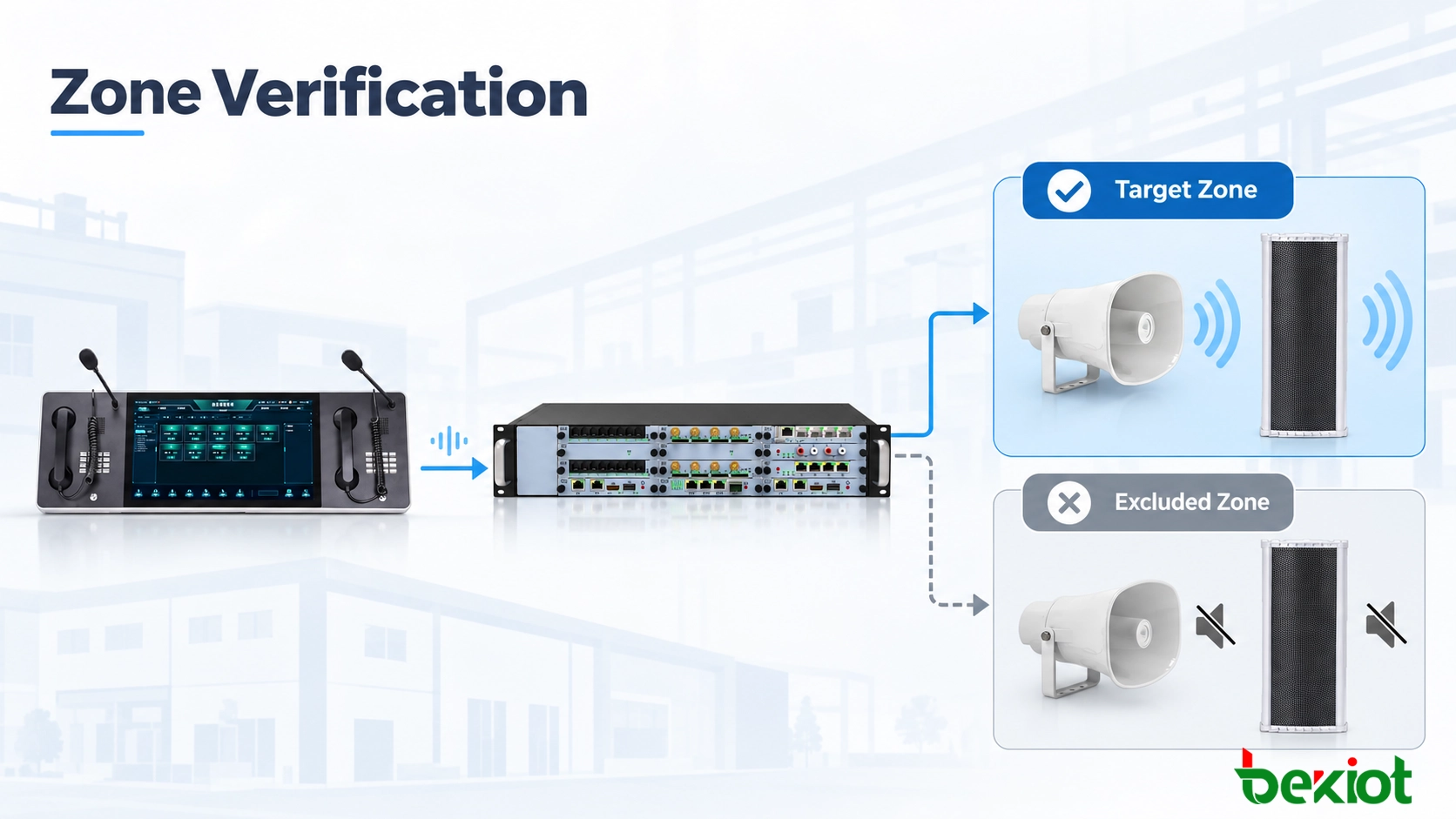
Fig. 1 - A zone is verified through routing, media reception, physical playback and listening-position evidence, with checks for unintended zones.
Zone Mapping and Endpoint Verification
A meaningful test starts with the approved as-built zone plan. The name shown on a paging console may differ from the SIP extension, multicast group, amplifier channel and physical area name. Without a common mapping record, technicians can demonstrate that a number connects but cannot show that it represents the correct area.
Record the Real Destination Behind Each Zone Name
Prepare one zone record containing:
Source: microphone, console or automated task and the operator role.
Target: displayed zone, extension/group ID and relevant permissions.
Active endpoints: speaker IDs, amplifier channels and installed locations.
Excluded endpoints: adjacent or restricted zones that must remain inactive.
Listening checkpoints: occupied, noisy, distant and boundary positions.
Traceability: map revision, task ID, evidence, observations and result.
For example, a hypothetical Loading Zone A contains two SIP horn speakers and a network amplifier. All three should activate, while the Warehouse Office endpoint stays inactive. This illustrates a test plan, not a prescribed system design.
Use the same zone-map revision for console labels, paging server groups and installation drawings. A speaker moved between buildings or replaced after maintenance may retain an old identifier or subscription; compare the current device inventory with the approved acceptance baseline before field testing.
Check the Operator's View Against the Installed Site
Test from the production operator interface. A laptop calling a speaker directly may bypass incorrect console shortcuts or permissions. Select the displayed zone, send a unique test message and compare the resolved group with the as-built endpoint list.
Examples of paging sources include Becke Telcom's GP600 SIP Paging Microphone and DSC-173 IP Paging and Dispatch Console. Verification concerns actual zone assignments and user permissions, not only the ability to place calls.
Related Product: GP600 SIP Paging Microphone
SIP Signaling and RTP Delivery Verification
If the selected area behaves incorrectly, isolate signaling, media delivery and playback before changing groups or speaker gain.
Interpret SIP Responses and SDP Negotiation
A SIP dialog may be established through an INVITE, successful 2xx response and ACK. SDP offer/answer commonly occurs in the INVITE and response, but a delayed offer may appear in the 2xx response and be answered in the ACK. A 200 OK confirms acceptance by that call leg, not RTP delivery or playback at every speaker.
Check caller identity, destination URI, group resolution, response codes and individual call legs. A paging server may terminate SIP and distribute multicast audio without SIP dialogs to receivers. Record whether the status applies to the group or each endpoint.
Verify Unicast and Multicast Delivery Separately
With unicast, the platform may send separate RTP flows. Check SDP media parameters, IP addresses, ports and payload types, then confirm packet arrival at the receiver. Sequence gaps, jitter or RTCP statistics describe transport quality, not speaker output.
With multicast, verify the group address and port, receiver IGMP membership, snooping and querier operation. Across subnets, check multicast routing. A source-side capture alone cannot prove reception at a distant speaker; verify the affected access segment.
Compare working and failed endpoints under the same conditions. Use short, authorized captures where logs are insufficient, noting time, VLAN and capture location.
For multicast faults affecting only one subnet, examine IGMP membership expiry, access-control rules, address scope and the path between the sender and receiver. Avoid assuming that a functioning unicast telephone call proves that multicast paging is healthy.
Check Decoding, Amplification and Output
RTP may arrive while playback fails because of muting, codec mismatch, amplifier protection, broken wiring or competing audio. Check decoder and output status, gain and the physical signal path before adjusting levels.
Endpoints such as Becke Telcom's PA-BHS-IP30 SIP Horn Speaker and SK12 SIP Column Speaker require model- and firmware-specific verification; do not assume identical acknowledgement or fault-supervision capabilities.
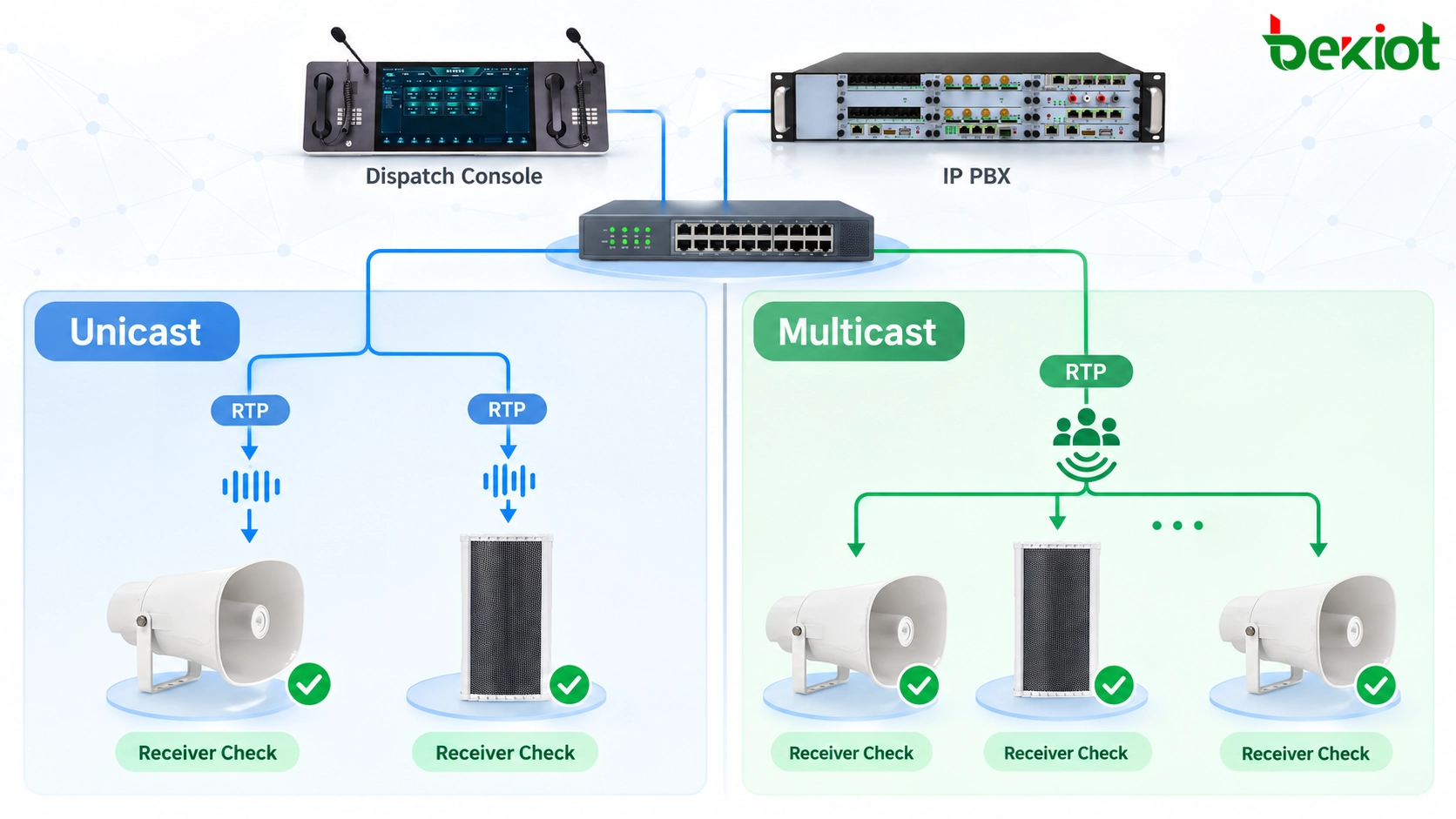
Fig. 2 - The evidence required at a receiver differs between unicast call legs and multicast streams; neither transport method guarantees audible playback by itself.
Acoustic Coverage and Speech Intelligibility
Field testing determines whether people understand the message at occupied positions, not merely below a speaker. Machinery, traffic and reverberation can change the result, so record operating conditions.
Use a Repeatable Speech Test, Not Only a Tone
Use a repeatable spoken test containing a start, zone identifier, distinctive words and clear ending. Tones cannot show whether instructions are understood or the first syllables are clipped. Test live paging from the normal microphone and talk key.
Observe distant, noisy and boundary positions. Record clipped words, dropouts, echoes and timing differences between overlapping speakers.
Run more than one announcement at troublesome points. An intermittent first-word loss may depend on the activation sequence, amplifier wake-up or how long the operator waits after the talk cue. Record whether the defect occurs on every transmission or only some attempts.
Assess Speech Under Operating Noise
Test during representative operation. Sound pressure alone does not establish intelligibility; use STI or STIPA where required by the project.
Apply the relevant IEC 60268-16 measurement procedure when specified; no universal sound-level or intelligibility threshold fits every site. Record calibrated instruments, background noise and contract criteria. General paging acceptance does not certify a regulated fire voice-alarm system.
If measurements are required, keep the measurement microphone and test conditions consistent with the specified method. Informal smartphone sound-level readings may help locate a weak position but should not be presented as calibrated intelligibility results.
Check Both Coverage and Zone Exclusion
At boundaries, verify endpoint activation separately from sound leakage. Acoustic spillover may need speaker re-aiming; an unintended active speaker suggests faulty group, channel or stream mapping.

Fig. 3 - Field observers verify complete spoken messages at defined listening positions and check that adjacent zones are not unintentionally activated.
Acceptance Testing and Fault Isolation
Test Intended, Excluded and Degraded States
Single-zone delivery: select each zone from an authorized source; confirm its expected endpoints and field listening positions while checking at least one prohibited neighbouring destination.
Combined-zone delivery: select the approved group of zones; confirm membership and check overlapping endpoint assignments for duplicate or distorted playback.
Operator-permission check: attempt a restricted destination using a role that lacks access; verify a controlled rejection without unintended paging.
Competing source check: introduce a second paging request during a controlled announcement; confirm only the conflict behavior specified for the platform. Do not assume all products support identical priority override.
Endpoint-loss check: isolate one test speaker or amplifier using an approved method; record what the platform reports and whether the remaining zone coverage meets the agreed degraded-state criteria.
Recovery check: restore service and repeat delivery without relying on stale device status, old group membership or a previous task-completion record.
Illustrative Acceptance Record
Illustrative test template for Loading Zone A; no results are presumed passed. Record observed results and witnesses separately.
| Check | Expected outcome | Evidence to retain |
|---|---|---|
| Console selection | Loading Zone A resolves to approved endpoint IDs | Zone-map revision and dispatch event ID |
| Session and transport | Configured media paths reach expected receivers | SIP logs, receiver counters or targeted captures |
| Speaker playback | All assigned speakers reproduce the entire test message | Device output status and field observer notes |
| Zone exclusion | Warehouse Office endpoints remain inactive | Endpoint status and boundary observation |
| Speech intelligibility | Designated positions meet project-specific criteria | Listening sheet and measurement results if specified |
| Recovery | Endpoint returns to required operating state after restoration | Repeat-test record and any remaining exceptions |
Correlate dispatch, receiver and field records by task ID or timestamp. Mark each criterion pass, fail or not tested; other speakers passing cannot clear an unverified endpoint.
Apply a Fault-Isolation Order
Classify faults before making changes: wrong destinations indicate mapping errors; missing RTP indicates forwarding trouble; RTP without sound points to playback or amplification; unclear speech requires acoustic investigation. Retest both target and excluded zones.
Define Acceptance and Retest Conditions
Sign-off identifies approved configuration revisions, witnesses, test conditions, measurement methods and open defects. An offline endpoint stays in scope unless an approved change removes it.
Retest after substantial changes to group mapping, speaker placement, permissions, network media paths or acoustics. Continuous device monitoring supplements, but does not replace, periodic field listening checks.
FAQ
Should live and prerecorded announcements use the same acceptance test?
They should share destination and audibility criteria, but their execution paths need separate checks. A prerecorded file may bypass the live microphone input, use different level processing or start from a schedule. Test each path that the project actually relies on, including the beginning and end of the message.
What if an existing analog amplifier provides no endpoint status?
Do not treat the paging server's successful transmission as proof of analog output. Add evidence from the amplifier's available fault contacts or meters, a supervised speaker circuit where provided, and direct field playback observations. Record the supervision limitation explicitly.
Is a separate human acknowledgement required after every page?
Not automatically. Routine announcements may be accepted through technical and periodic field tests, while safety-critical instructions may need an operational acknowledgement by a supervisor or response team. The acknowledgement requirement should be defined by the site's procedure, not assumed to be a SIP protocol feature.
How should multilingual announcements be verified?
Check both language-to-zone assignment and the actual spoken message. A technically correct stream can still be operationally wrong if a language-specific file is assigned to the wrong audience. Use qualified reviewers for content and pronunciation where comprehension is essential.
How should paging be evaluated when workers wear hearing protection?
Assess the message under the conditions in which personnel actually work, including the type and fit of their hearing protection. A satisfactory measurement at an unprotected microphone position does not establish that a worker wearing earplugs or earmuffs will recognize every instruction. Where the site risk assessment requires it, evaluate complementary visual alerts, procedural confirmation or other approved notification channels rather than relying on louder paging alone.






