



Wrong-zone paging occurs when an operator selects one paging area on a dispatch console but the announcement is reproduced by another area or by additional unintended speakers. SIP signaling and audio quality may appear normal throughout the call, even though the target mapping is incorrect. The fault can originate in a console key, SIP routing rule, paging group, multicast subscription or analog PA output.
Effective troubleshooting identifies the earliest mismatch between the requested destination and the physical devices that actually reproduce the announcement. This guide follows that trail across touchscreen dispatch consoles, SIP servers, network loudspeakers and legacy amplifier zones. It focuses on isolating and correcting misrouting, rather than repeating general zone setup or acoustic acceptance procedures.
Identify Where the Intended and Actual Zones Diverge
Start by defining the fault precisely. “Wrong zone” may mean that the console displayed an incorrect label, that the SIP platform routed the call to the wrong group, that a receiver played a stream it should not subscribe to, or that an amplifier energized an incorrect physical speaker circuit. Their remedies differ.
Capture One Controlled Incident
Before changing settings, record the console model, logged-in account, displayed zone name, selected group or shortcut, time, call or task ID, and the physical locations where sound was heard. Save the screen and logs. Identify whether live, recorded, scheduled or alarm paging was involved.
Obtain permission for testing, use an unmistakable non-emergency message and inform personnel in all potentially affected areas. Do not repeatedly activate an actual evacuation group merely to reproduce a fault. Follow site impairment procedures if emergency warning is affected.
Classify the Symptom Before Opening Configuration Pages
Only one console is wrong: compare its shortcuts, cached zone list, operator account and locally stored dialing rules with a known-good console.
Every console reaches the same wrong area: inspect the shared server group, dial-plan translation and downstream paging or PA controller.
Both intended and unintended zones play: look for overlapping group membership, duplicate stream subscriptions, matrix outputs or unintended audio distribution.
A different zone plays only after a scheduled task or alarm: distinguish the operator's live-page route from the automation or priority route that was already active.
The correct device is active but people report the next room: inspect physical speaker placement and acoustic spill before changing logical group assignments.
Retain a consistent incident or task reference throughout the trace: display label → command or dialed URI → server decision → group or media stream → endpoint or amplifier channel → physical speaker circuit. Where no common ID exists, correlate reliable timestamps and source identities.
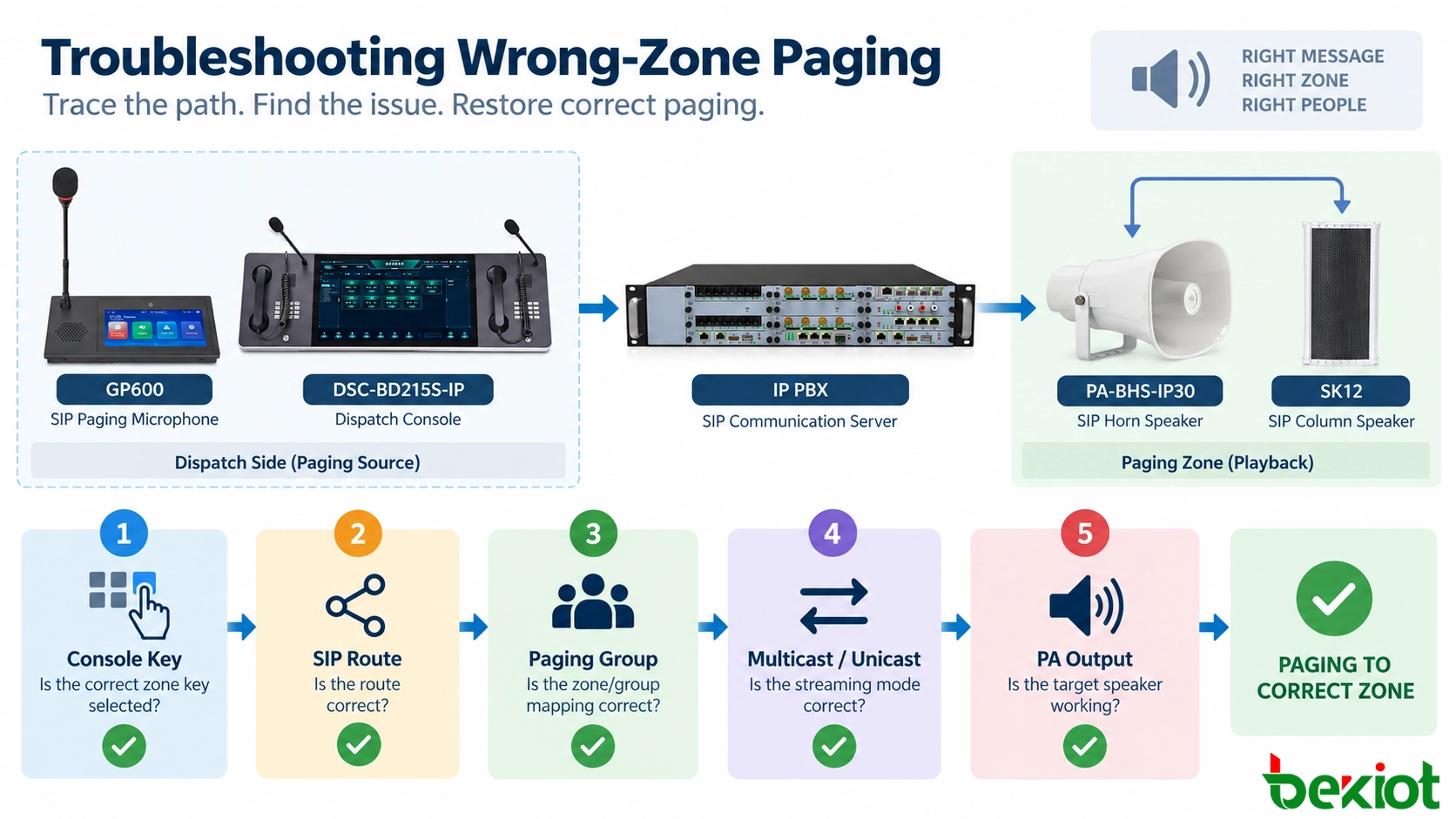
Fig. 1 - Start with the observed symptom and follow separate checks for console mapping, server routing, media receivers and analog PA outputs.
Check Console Keys, Zone Lists and Operator Profiles
A displayed zone name is not necessarily the destination the console sends. Keys can reference extensions, group IDs or actions. A renamed zone may retain an obsolete target.
Compare the Label with the Actual Command
Open the affected key or zone-entry configuration and examine its stored target. For example, “Loading Bay” may still call a former warehouse extension. Compare with the approved zone register.
Where authorized, compare the named touchscreen action with direct dialing of its documented paging destination. If only the shortcut fails, examine the console mapping; if both fail, move to shared routing. Direct dialing may bypass group logic or permissions and is diagnostic evidence, not acceptance of the normal workflow.
Check User-Specific and Replicated Settings
Compare affected and unaffected operator profiles, replicated console settings and client cache versions. Confirm that server-side zone changes were actually published to the affected seat. Multiple selected zones, latched keys and retained all-zone choices may also explain apparent misrouting; record them before resetting the interface.
Becke Telcom's DSC-BD215S IP Dispatch Console provides an example of a touchscreen dispatch endpoint with customizable controls. The DSC-173 IP Paging and Dispatch Console is another option; mapping behavior depends on installed software.
Related Product: DSC-BD215S IP Dispatch Console
Trace SIP Dialing, Platform Routing and Group Membership
If the console sent the expected destination, inspect the server's resolution of that request. Zone labels, SIP routes and receiver membership may be stored separately.
Examine the Effective Destination, Not Only the Call Result
Locate the SIP call by source, time and Call-ID where available. Examine the Request-URI, dial-plan translation and effective application destination. An alias, tenant rule or prefix can redirect a correct short code to an obsolete group. A SIP 200 OK confirms acceptance by a call leg; it does not identify the speaker circuits that finally reproduce audio.
Where a paging application accepts an API command rather than a SIP dial string, inspect the command payload and the service's resolved group identifier. Follow the project's actual service path.
Resolve the Group to an Explicit Endpoint List
Export or inspect the effective membership of the selected group at the time of the incident. Compare endpoint IDs, site names and amplifier channels to the approved zone register. Check moved devices, cloned profiles, copied groups and automation rules.
Use stable device identifiers where available. DHCP addresses and reused extensions cannot replace physical location records. Check whether the platform applies dynamic membership by schedule, operator role or an alarm state. Inspect effective settings, not templates.
Worked Example: Production West Reaches the Warehouse
Consider a hypothetical plant where an operator selects Production West but hears the test announcement from Warehouse North. The approved configuration identifies Production West as PW-02 and its paging group as G-12. The dispatch service instead resolves PW-02 to G-14, which belongs to Warehouse North.
| Trace checkpoint | Expected | Observed evidence |
|---|---|---|
| Operator selection | Production West / PW-02 | Console event: PW-02 |
| Issued request | PW-02 | Dispatch request: PW-02 |
| Server group resolution | G-12 | Routing log: G-14 |
| Downstream members | G-12 speaker list | G-14 warehouse members |
| Field observation | Production West audible | Warehouse North audible |
The first proven mismatch is at the PW-02-to-group lookup. Before touching speaker subscriptions, export the active mapping, compare it with the approved revision and review the change history. Correct the mapping at the owning platform under change control; do not edit the valid G-14 warehouse membership simply because its speakers played.
After applying and publishing the repair, check that PW-02 now resolves to G-12. Then repeat the page from the original operator login and test Warehouse North separately. The example identifiers and log fields are illustrative, not Becke-specific commands or demonstrated platform output.
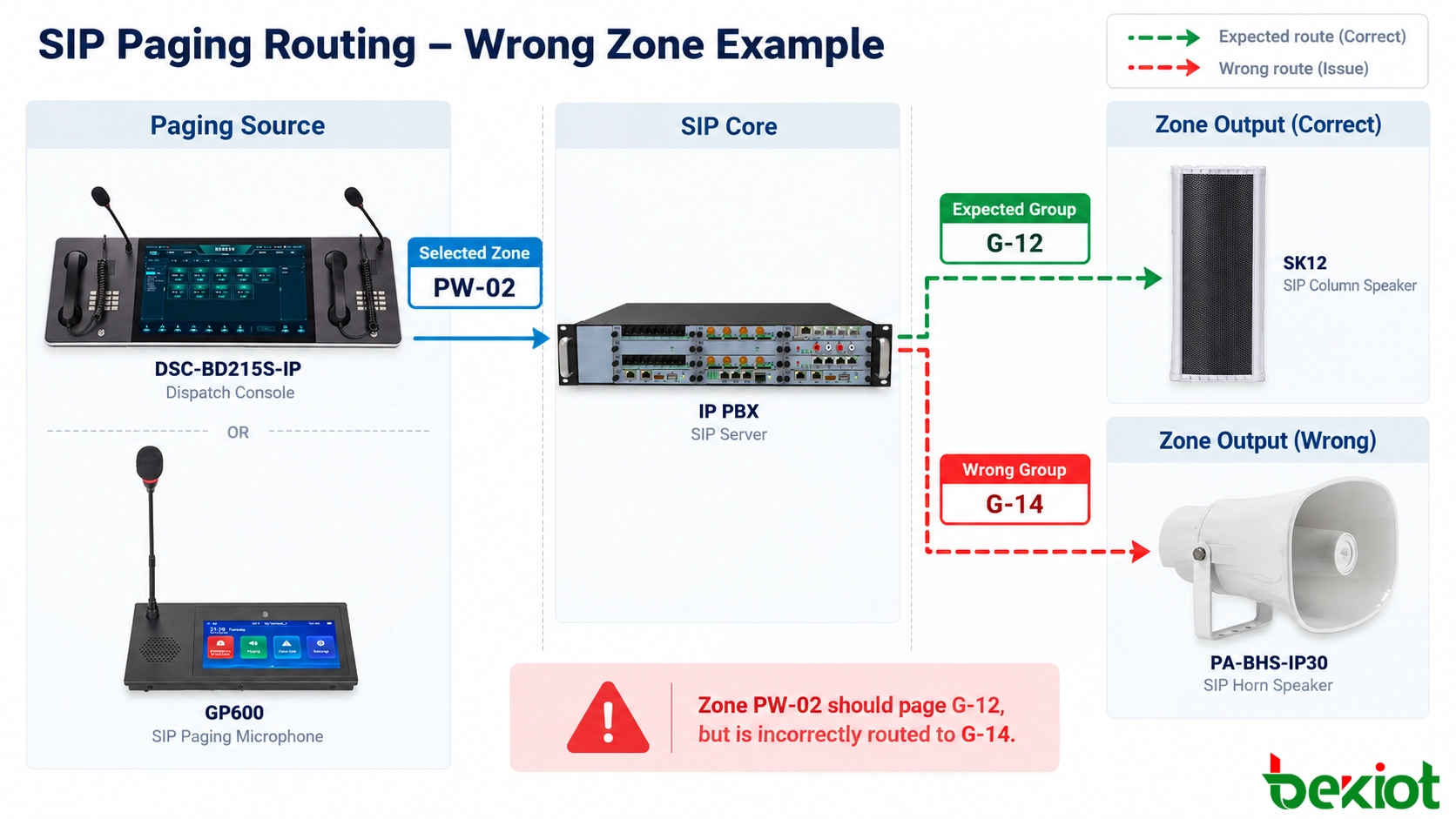
Fig. 2 - Expected PW-02 to G-12 mapping compared with an incorrect PW-02 to G-14 server resolution; endpoints are examined only after the route is established.
Inspect Network Audio, Subscriptions and Analog Outputs
If the server resolves the correct destination and group, move downstream. Now compare commanded zone with actual media receivers for the transport in use.
Unicast: Identify the Real Media Receivers
In a unicast design, the paging server may create a separate RTP flow or SIP call leg to each endpoint. Compare destination addresses and ports with the expected receiver list. Wrong media targets or cloned endpoint identities can misdirect audio.
Targeted receiver captures can confirm whether a non-target endpoint actually received RTP. Receiver identity and wiring must still be checked; packet arrival is not proof of audible playback.
Multicast: Verify the Group Address and Endpoint Subscriptions
For multicast paging, compare the configured destination multicast address and UDP port for each zone. Check the active subscription or join state of the unintended receiver, not just the sender's task status. Duplicate group addresses and stale subscriptions can misdirect playback.
Check IGMP joins, snooping, querier operation and multicast routing. Network flooding may deliver packets to unintended switch ports, but flooding alone cannot establish that a speaker subscribed, decoded or played the stream. Verify its effective receiver configuration before blaming switching infrastructure.
Becke Telcom network speakers such as the PA-BHS-IP30 SIP Horn Speaker and SK12 SIP Column Speaker can serve as field endpoints in supported paging projects. Verify supported subscriptions and logs for each installed model and firmware.
Legacy PA: Follow Gateway, Relay and Amplifier Channels
When SIP paging feeds existing analog PA equipment, the selected extension may terminate at a gateway, controller or audio matrix. Check the gateway's output assignment, relay contacts, zone-select commands, amplifier input and final loudspeaker circuit. Reversed relays or mislabeled speaker lines can activate the wrong area.
Qualified technicians should compare actual outputs with the as-built cable schedule during a controlled point-to-point test. Follow electrical isolation and local safety procedures before inspecting amplifier or constant-voltage speaker wiring.
Rule Out Shared-Source and Acoustic Effects
Check whether background music, scheduled audio or an emergency-priority stream has occupied the destination. Match event IDs and times to rule out a concurrent announcement. Sound passing through open space is not a group-mapping error.
Correct the First Mismatch and Perform Regression Tests
Once the first mismatch is supported by logs or measurements, correct the responsible layer with the smallest approved change. Back up the relevant console profile, dial plan, group definition, subscription or PA matrix. Multiple simultaneous edits make the root cause and rollback difficult to verify; additional faults may also remain downstream.
Use a Compact Fault-Isolation Matrix
| Observed symptom | First decisive comparison | Likely fault domain |
|---|---|---|
| One console selects Zone A but sends Zone B | Visible label versus issued command | Shortcut, macro, profile or stale client map |
| All consoles send A, server selects B | Request or event ID versus resolved group | PBX dial plan or dispatch routing table |
| Group is correct but an extra SIP speaker plays | Effective membership and receiver media/subscription | Group record or terminal configuration |
| Network endpoint is correct but wrong analog area sounds | Gateway output versus amplifier and cable schedule | Relay, PA matrix or physical speaker circuit |
| Wrong-zone report occurs only during another task | Overlapping event IDs, media sources and priority state | Concurrent schedule, alarm or override path |
Retest One Target, Its Neighbours and Every Affected Source
After the correction, test the affected destination from the original operator login and console. Confirm the display, command, resolved group and active receivers. Also page neighbouring zones so the repair does not remove valid membership.
Repeat relevant cases: individual page, approved multi-zone page, restricted all-zone action and any scheduled or alarm-triggered path that shares the changed mapping. Compare already-open and newly logged-in dispatch sessions. Confirm the intended zone plays and unintended receivers remain inactive; merely restoring the original shortcut is not enough.
Record the Root Cause and Prevent Reoccurrence
Record intended and wrong zones, root cause, logs, approved change, rollback and retest. Close the incident only after checking related zones and confirming that emergency functions remain available or have a documented compensating measure.
Keep a controlled zone register linking stable IDs to buildings, endpoints and PA outputs. Zone moves, renamed areas, software-template imports and rewiring require targeted negative tests as well as a successful call to the intended group.
In a mixed industrial installation, a GP600 SIP Paging Microphone may provide another authorized zone-selection interface alongside a dispatch console. Comparing the resulting server-side commands can help isolate an operator-interface issue, provided both use the same intended service and permissions. The interfaces need not behave identically.

Fig. 3 - Following a mapping correction, verify the target, adjacent zones and alternate dispatch sources under controlled field conditions.
FAQ
Can two paging zones deliberately share the same physical speaker?
Yes, where the design expressly permits overlapping coverage or membership. The shared speaker should have a documented role in each permitted zone and a defined outcome when two sources page it concurrently. Undocumented overlaps are unsafe to assume correct.
Why might a wrong-zone problem appear only after server failover?
Active and standby nodes may use different versions of routing tables, zone databases or provisioning files. Check synchronization and failover routing. Resynchronize using supported procedures and retest both nodes.
Why does a corrected paging zone revert after a device reboot?
The active change may have been saved only in a running configuration while automatic provisioning restores an older profile at startup. Check the device's provisioned configuration source, template version, central management policy and startup logs. Update the authoritative configuration through the supported process, then restart and retest in a controlled window.
How should zone names be handled on multilingual operator screens?
Use one stable internal zone identifier and maintain reviewed language-specific display labels mapped to it. Distinguish similar site names. Validate language changes and imports without altering the underlying destination ID or operator authorization.
What should an operator do if a safety warning is sent to the wrong area?
Follow the site's emergency communication and impairment procedure immediately. Stop or correct the erroneous announcement if authorized, notify the responsible control-room or safety lead, and deliver the required message through an approved alternative path. Preserve evidence and maintain an approved backup warning path.






