


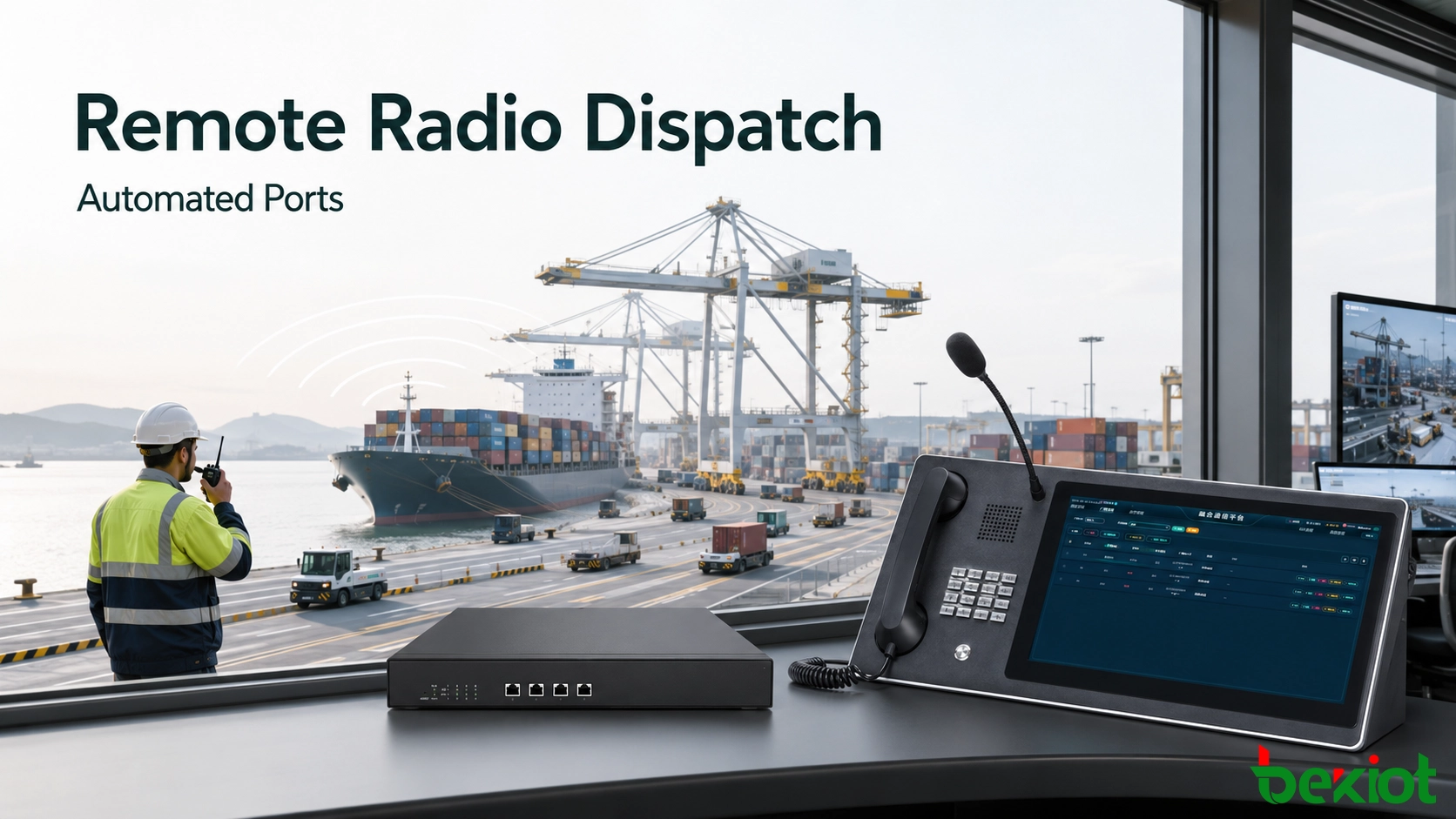
Automated cargo handling does not remove the need for voice communication. Vessel crews, equipment operators, security teams and maintenance personnel still rely on maritime VHF or other two-way radio channels when work must be coordinated immediately. The problem appears when the control center is moved away from the waterfront: operators can see the terminal through cameras and management software, but a handheld radio in the control room may no longer reach the people carrying out the work.
A Radio over IP gateway closes this gap without requiring the port to replace its established radio network. Installed beside the radio equipment at the terminal, the gateway transports voice and push-to-talk control across the port IP network. The remote dispatcher can then communicate with field radios from the same console used for intercom, public address and operational calls.
The requirement is not limited to routine ship-to-shore calls. A remote operator may need to coordinate a berth change, confirm that a crane lane is clear, contact a maintenance team beside automated equipment or pass an operational instruction during poor visibility. These calls are usually short, but they are time-sensitive and involve people using different communication devices. The solution must therefore preserve the immediacy of radio while making the channel available inside the wider port dispatch environment.
Why Direct Radio Communication Breaks Down
A conventional handheld-to-handheld radio link works best when the dispatcher is within the designed coverage area. In an automated or remotely operated port, the control room may be located in an office campus, an operations center or another secure site far from the quay. Distance, container stacks, cranes, buildings and local terrain can make direct radio coverage unreliable or impossible.
Sending dispatch personnel back to the waterfront simply to use a radio defeats the purpose of remote operations. It also introduces avoidable travel, delays decision-making and places more staff near moving machinery. Installing a high-powered radio at the remote office is not always a sound answer either: the site may lack suitable antenna infrastructure, and the long radio path remains exposed to the same physical obstacles.
The more practical approach is to keep the VHF radio and antenna where radio coverage is already proven—the port equipment room—and extend the operator position over the existing network. This separates the two parts of the communication path:
The local radio link covers vessels, quayside teams and mobile workers.
The IP link carries audio and control between the port and the remote control center.
These two coverage domains should be assessed separately. A weak signal between a handheld radio and the port antenna is an RF coverage issue, while broken or delayed audio between the equipment room and control center is an IP transport issue. Treating both as a single fault makes troubleshooting slower. A practical design records the intended radio coverage area, the network route and the responsible maintenance team for each part of the path before the system enters service.
Architecture for Extending Maritime VHF over IP
A basic single-channel deployment retains the original article's practical structure: one RoIP gateway, one maritime-band VHF radio in the port equipment room and one dispatch terminal in the remote control room. The VHF radio continues to use its local antenna and assigned operating channel. The gateway connects to the radio's audio and control interface, while its Ethernet port connects to the port LAN or a managed wide-area link.
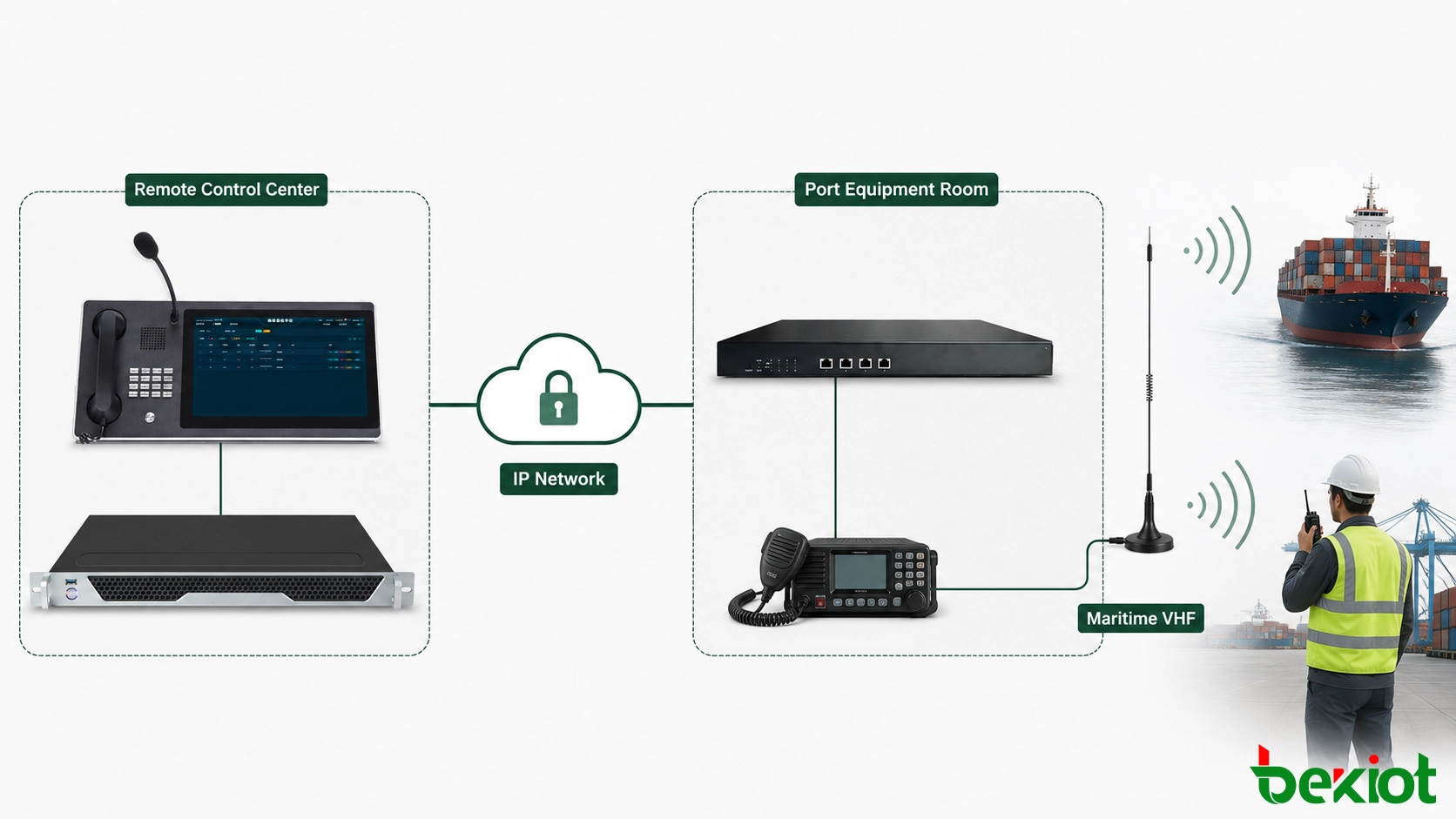
On the IP side, the gateway can register with or connect to a SIP-based dispatch platform. It converts radio receive audio into an IP media stream and converts audio from the dispatcher back into a signal suitable for radio transmission. A control interface carries the push-to-talk command so the dispatcher can key the radio remotely rather than leaving it permanently in transmit mode.
This arrangement is different from replacing VHF with a smartphone application. Field teams and vessel crews continue using the radios and channels already suited to waterfront operations. RoIP changes how the control center reaches the radio base station; it does not change the air interface used by personnel in the field.
The IP section can also span more than one site. A port LAN may carry the traffic from the equipment room to a local operations building, while a managed WAN or private tunnel extends it to a regional control center. In either case, the radio endpoint should be kept on a controlled network segment. Routing, firewall rules and voice priorities can then be managed without exposing the gateway or dispatch service directly to an untrusted network.
The implementation drawing should identify three related paths: receive audio from the radio, transmit audio toward the radio and PTT control from the dispatcher. Status information, such as gateway availability or radio interface state, may use a separate signaling path. Documenting these flows makes it easier to assign firewall rules, diagnose one-way audio and confirm which component controls transmission. It also prevents a common commissioning mistake in which voice packets pass correctly but the radio never keys because the control path has not been mapped.
Related Product: Becke RoIP Gateway
How Dispatch Operators Communicate with the Field
From the operator's perspective, the radio channel should behave like a clearly identified resource rather than a collection of interfaces. The gateway can be assigned a number, channel label or dispatch key in the communication platform. A dispatcher selects that resource, listens for channel activity and presses PTT to speak to radios operating on the same frequency.
A desk console or dispatch phone with programmable keys can provide one-touch access. The key should be labeled by operational function—such as Berth Operations, Marine Channel or Yard Maintenance—instead of displaying an internal extension number that operators must memorize. An external gooseneck microphone may be used when the control room handles frequent announcements or radio calls.
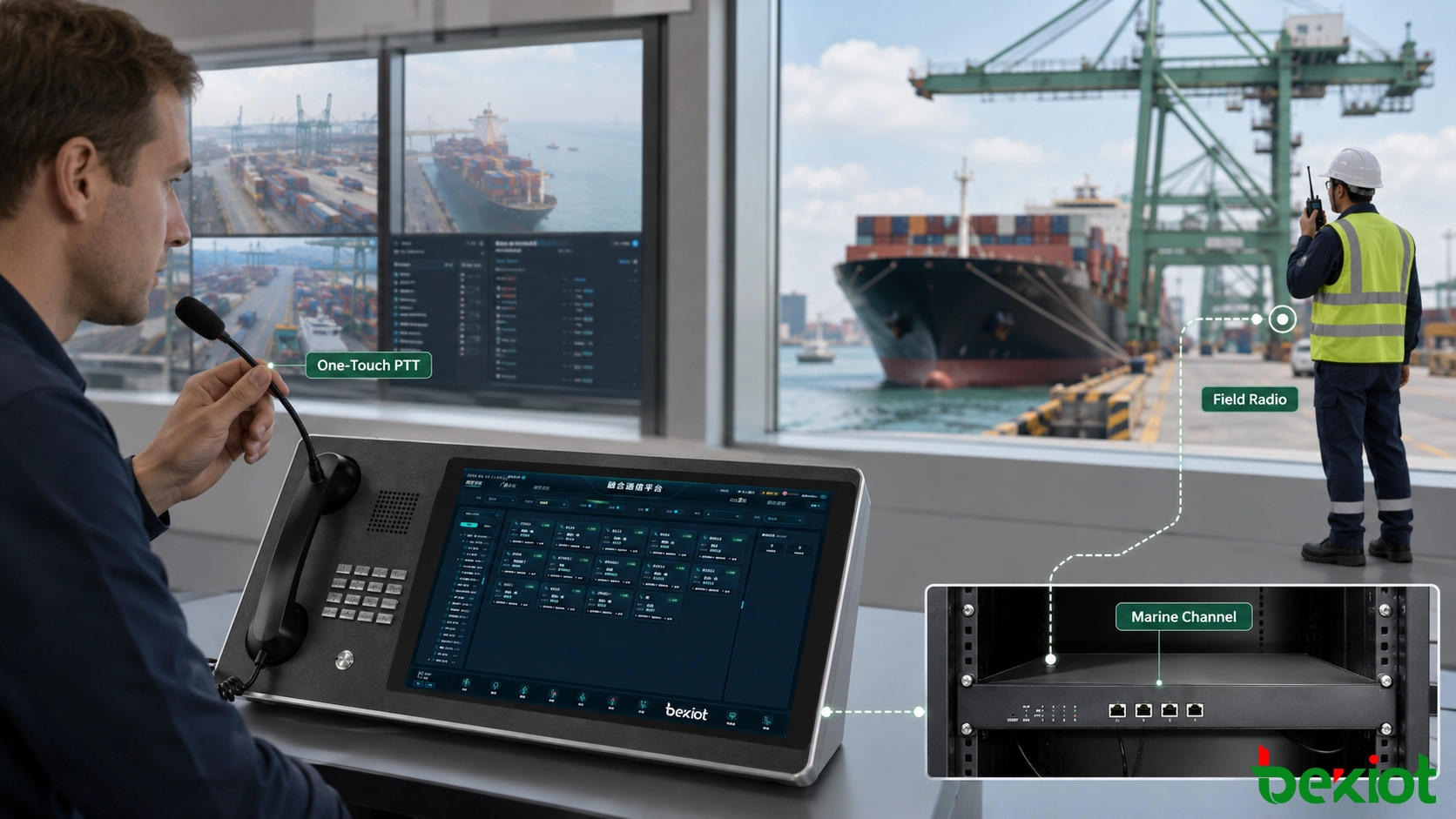
A live call normally follows this sequence:
The dispatcher selects the required radio channel on the console.
The platform checks or presents the channel's current activity state.
When the dispatcher presses PTT, the command is sent through the IP network to the gateway.
The gateway keys the connected VHF radio and passes the dispatcher's audio to its transmit input.
When PTT is released, the radio returns to receive mode and field replies are played at the dispatch position.
PTT timing matters. If voice begins before the radio transmitter has fully keyed, the first syllable can be lost. A well-engineered system applies an appropriate transmit lead-in and adjusts audio levels so that remote speech is clear without overdriving the radio input.
Console procedure is equally important when several dispatchers can access the same channel. Operators should be able to see whether the resource is available, listen before transmitting and identify which position currently holds PTT. Channel names and shortcut keys should remain consistent across primary and backup consoles. These small interface decisions reduce accidental double transmissions and help a replacement operator use the radio path correctly without learning the underlying gateway configuration.
Integration with Existing Port Systems
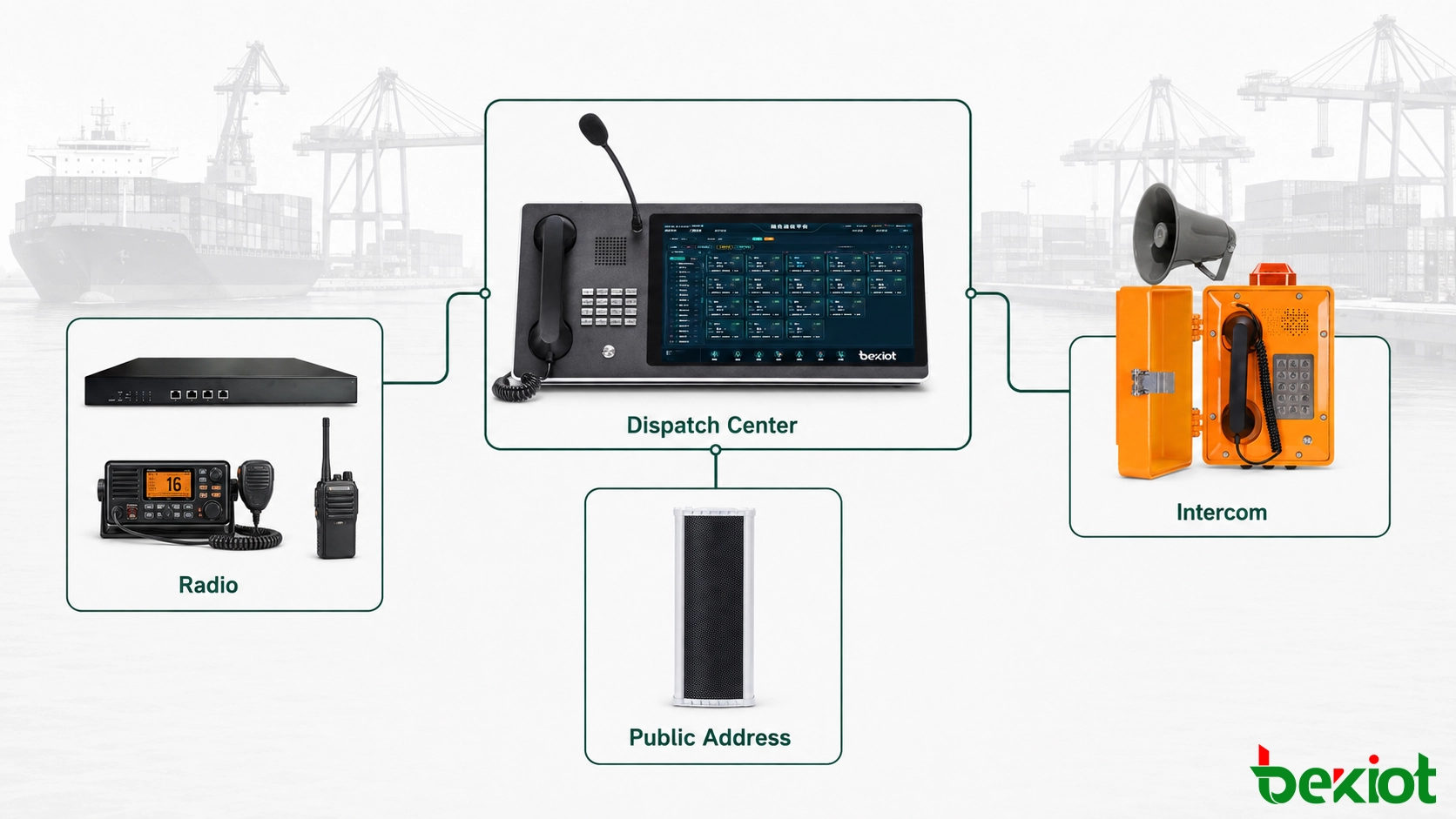
The main value of the gateway is not limited to radio extension. Many ports already operate an IP dispatch system that serves industrial intercom stations, IP horns, paging endpoints and control-room phones. Adding the radio channel to that environment gives the operator a single interface for several otherwise separate communication paths.
For example, a dispatcher may call the VHF channel used by a vessel, speak to a maintenance worker through an industrial intercom and broadcast a non-emergency operational message to a loading zone without changing desks. The systems do not need to share the same physical media; they only need controlled integration at the dispatch layer.
A unified interface also helps the operator follow the context of an event. When an equipment alarm or camera notification identifies a problem area, the dispatcher can select the radio group responsible for that zone, contact a nearby intercom point and issue a targeted announcement if work needs to pause. The communications remain separate at device level, but their names, permissions and operating status are presented together. This reduces channel-selection errors and avoids broadcasting a message to areas that are not involved.
This design also preserves earlier investments. If the VHF radio, antenna system, internal LAN and dispatch platform are already serviceable, the project does not require a complete communications replacement. The gateway is added at the boundary between the radio and IP domains. Expansion can then follow actual demand: a second operational channel can be integrated separately, while unrelated channels remain unchanged.
Integration should still respect operational boundaries. Routine paging, private telephone calls and marine radio traffic have different users and permissions. The dispatch platform should identify each resource clearly and restrict access by role so that only authorized positions can transmit on a radio channel.
Engineering the Deployment for Daily Operations
The architecture is simple, but reliable operation depends on several details that should be confirmed before installation.
Radio and control compatibility
The gateway must match the radio's available receive audio, transmit audio and PTT control connections. Some radios expose a dedicated accessory interface; others require an approved interface cable or isolation circuit. Compatibility should be verified from interface documentation and a bench test, not assumed from the radio connector alone.
Network quality
Radio conversations are short and interactive, so stable latency and low packet loss matter more than raw bandwidth. Voice traffic should use a managed path with appropriate quality-of-service policies. If the remote center is reached through a public or shared network, a secured private connection is preferable to exposing voice services directly to the internet.
Audio level and PTT tuning
Receive and transmit gains should be adjusted using real radio traffic. Excessive gain produces distortion and noise; insufficient gain makes the dispatcher difficult to understand. PTT activation, release timing and any busy-channel behavior should be tuned together so the remote console follows the operating discipline of the local radio network.
Monitoring and fallback
The control room should be able to distinguish a silent channel from a failed gateway, disconnected radio or unavailable network path. Device reachability, registration status and interface alarms can be presented to technical staff or the dispatch platform. A local radio position should remain available for essential operations when the IP link or remote control center is unavailable.
Power and equipment-room conditions
The radio and gateway should be installed on a stable power source appropriate to the port's continuity requirements. Backup power is useful only when the Ethernet switch, network uplink and any required dispatch server are protected as part of the same communication chain. The equipment room should also provide suitable grounding, ventilation and separation between radio-frequency cabling and network or audio wiring. Clear cable labels and accessible test points make later maintenance safer, especially when several radios and antennas share the same rack or technical room.
Commissioning under real operating conditions
Final testing should use the actual radio, antenna, network route and operator console planned for service. Test calls should be made from a vessel-side position, the quay, areas behind container stacks and any maintenance zone where coverage has previously been weak. The team should confirm two-way audio, the beginning and end of each transmission, channel-busy behavior, console labels and recovery after a temporary network interruption. Results should be recorded by location and channel so that radio coverage issues are not mistaken for gateway faults after handover.
When these details are addressed, the solution provides a controlled way to extend existing radio coverage into a remote operations environment. It reduces the need for dispatch staff to travel to the quay, shortens the communication path between decision-makers and field teams, and brings radio, intercom and paging resources into one operational view. Most importantly, it achieves that result without forcing vessels or port workers to abandon the radios already used in day-to-day work.
FAQ
Does a RoIP connection change maritime radio licensing requirements?
No. Extending the control point over IP does not remove the licensing, channel-use or operator obligations that apply to the connected radio service. The port must continue to follow the rules of the relevant jurisdiction and radio authority.
Can local radio users still communicate if the IP link fails?
Normally, yes. Handheld and mobile radios using the same local radio channel can continue communicating over RF. The remote dispatcher loses access until the IP path is restored, which is why an essential operation should retain a local fallback position.
Can an existing analog or digital VHF radio be reused?
It may be reusable if it provides suitable audio and PTT control interfaces and the gateway supports the required signaling method. Digital features beyond basic voice and PTT require separate compatibility confirmation.
How should multiple operational frequencies be handled?
Each independently controlled radio channel needs a corresponding radio path and gateway interface. The dispatch platform can present these paths as separate labeled resources, allowing authorized operators to select the required channel without retuning a shared radio during active work.
What information can be stored with recorded radio calls?
Where recording is permitted, the system may associate audio with time, channel identity, dispatch position and call direction. The exact metadata depends on the radio interface and dispatch platform, and retention must follow local privacy and operational policies.







