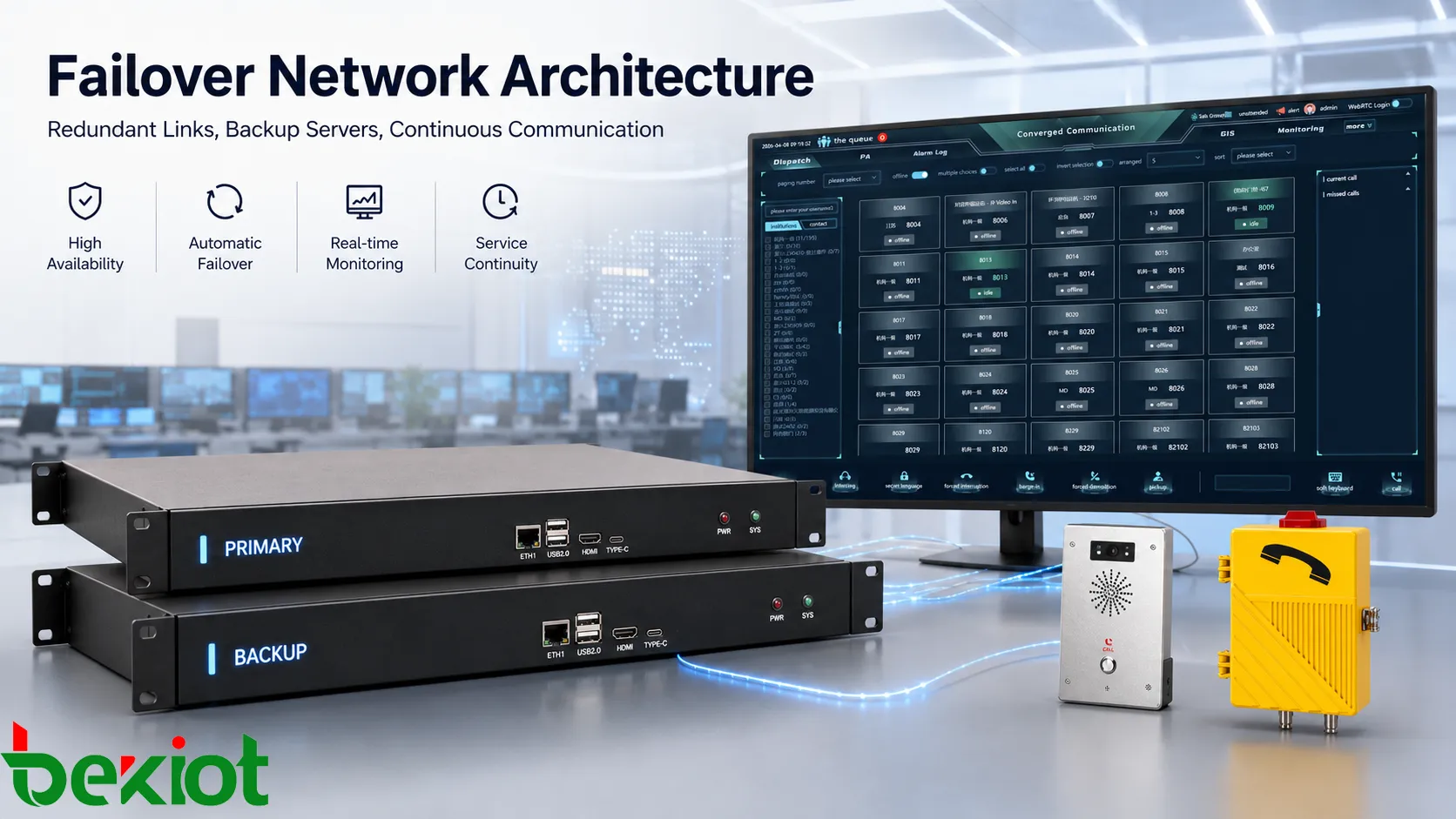
Failover network architecture is designed for one practical question: what happens when a network path, device, server, gateway, trunk, or communication platform stops working? In a simple network, one failure may interrupt the whole service. In a failover design, the system prepares a backup path or backup resource in advance, then switches traffic when the primary resource becomes unavailable.
This idea is important in communication systems because many services must stay online for long periods. IP PBX platforms, SIP trunks, dispatch systems, emergency phones, paging servers, intercom terminals, gateways, recording services, control room networks, and branch connections may all depend on stable network access. If one switch, link, or server becomes a single point of failure, calls and alarms may be interrupted at the worst time.
A good failover design is not only about adding one backup cable or one standby device. It needs failure detection, switching logic, routing control, session handling, monitoring, power protection, and maintenance planning. The purpose is to reduce service interruption and make recovery predictable instead of relying on manual troubleshooting after a fault occurs.
Why Redundancy Matters
Redundancy is the foundation of failover architecture. It means the network has more than one available resource for a critical function. This may include two network links, two switches, two routers, two SIP servers, two gateways, two power supplies, two firewall paths, or two data centers. When the primary resource fails, the secondary resource can continue the service.
In communication systems, redundancy is valuable because users often notice service failure immediately. A phone cannot register, a dispatch console cannot reach field devices, a SIP trunk cannot make outbound calls, or an emergency endpoint cannot contact the control room. These problems may affect operation, safety, and response speed. Redundancy reduces the chance that one physical or logical fault stops the entire workflow.
However, redundancy must be useful, not decorative. If two devices share the same power source, same uplink, same switch, same rack failure risk, or same misconfigured routing rule, the backup may fail together with the primary system. True redundancy should remove or reduce the single point of failure. Engineers should ask whether the backup path is independent enough to survive the expected fault.
There are several common redundancy models. Active-standby design keeps one resource active and another ready to take over. Active-active design allows multiple resources to share traffic at the same time. Link redundancy provides alternate network paths. Server redundancy provides backup application or platform capacity. Geographic redundancy places resources in different locations so a local site failure does not stop all service.
The right model depends on the service requirement. A small office voice system may only need backup internet access and a secondary SIP route. A large industrial dispatch system may require redundant servers, dual switches, backup gateways, UPS power, separated cabling, and monitored failover rules. Redundancy should match business impact and emergency importance.
How Failures Are Found
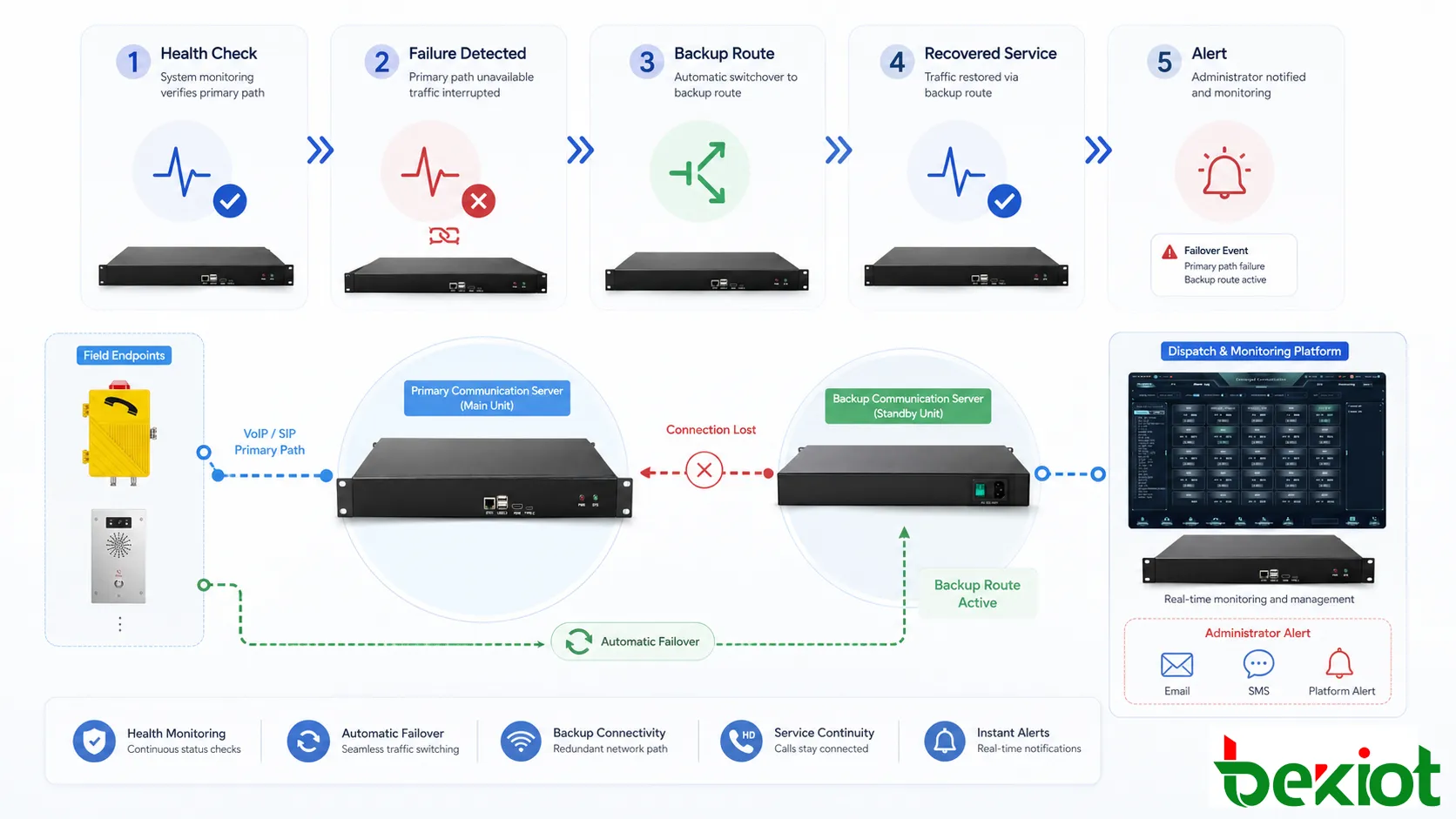
Failover begins with detection. The system must know that something is wrong before it can switch to a backup resource. Failure detection may be based on heartbeat messages, link status, ping checks, TCP checks, SIP OPTIONS, routing protocol status, service health checks, power alarms, device logs, or platform monitoring.
A simple link-down event is easy to detect. If a cable is disconnected or a port goes down, the switch or router can react quickly. More difficult failures are partial failures. A device may remain powered on but stop forwarding traffic correctly. A SIP server may respond to ping but fail to process registrations. A gateway may stay online but lose its trunk connection. A database may run but become too slow for the application. In these cases, basic reachability checks may not be enough.
Good failover architecture uses meaningful health checks. Instead of asking only whether a device is powered on, it asks whether the required service is actually usable. For a SIP platform, this may include registration health, signaling response, media path availability, and trunk status. For a dispatch system, this may include operator console connectivity, database access, recording service, and endpoint status. For a gateway, this may include port status, line status, SIP trunk availability, and routing readiness.
Detection timing also matters. If failure detection is too slow, users experience longer interruption. If it is too sensitive, the system may switch unnecessarily during temporary delay or short packet loss. False failover can be disruptive, especially in real-time voice systems. The detection threshold should match the normal network behavior and service criticality.
Monitoring should also distinguish between different fault types. A server failure, link congestion, power loss, routing loop, trunk rejection, DNS problem, firewall issue, or endpoint offline event may produce similar user complaints but require different recovery actions. Accurate detection helps the system choose the correct failover path and helps engineers find the root cause later.
How Traffic Fails Over
After a failure is detected, the architecture must decide where traffic should go. Failover may occur at different layers. At the physical layer, traffic may move from one cable or port to another. At the network layer, routing may select another path. At the application layer, users may register to a backup server. At the trunk level, outbound calls may move to a secondary carrier or gateway. At the platform level, a standby server may take over the active role.
Automatic switching is usually preferred for critical services because it reduces manual delay. If the primary route fails, the system can redirect traffic to the secondary route according to predefined rules. In a voice system, this may mean registering phones to a backup SIP server, moving calls to a backup trunk, switching a gateway path, or using a redundant dispatch platform.
Some failover events are session-preserving, while others are service-restoring. Session-preserving failover tries to keep active communication alive during the switch. This is more difficult, especially for real-time media. Service-restoring failover may drop active sessions but restore new call ability quickly. Many practical communication systems focus on fast service restoration because maintaining an active call across all fault types can be complex.
Failback is another important concept. Once the primary resource recovers, should traffic automatically return to it? Automatic failback can restore the normal design, but it may also cause another interruption if the primary resource is unstable. Manual failback gives engineers more control but requires operational discipline. The system should define how and when recovery to the primary path occurs.
Switching should be visible. Operators and administrators should know when failover has occurred, which resource is active, which resource failed, and whether service is degraded. A hidden failover may keep calls working temporarily, but if nobody notices the primary fault, the system may remain vulnerable until the backup also fails.
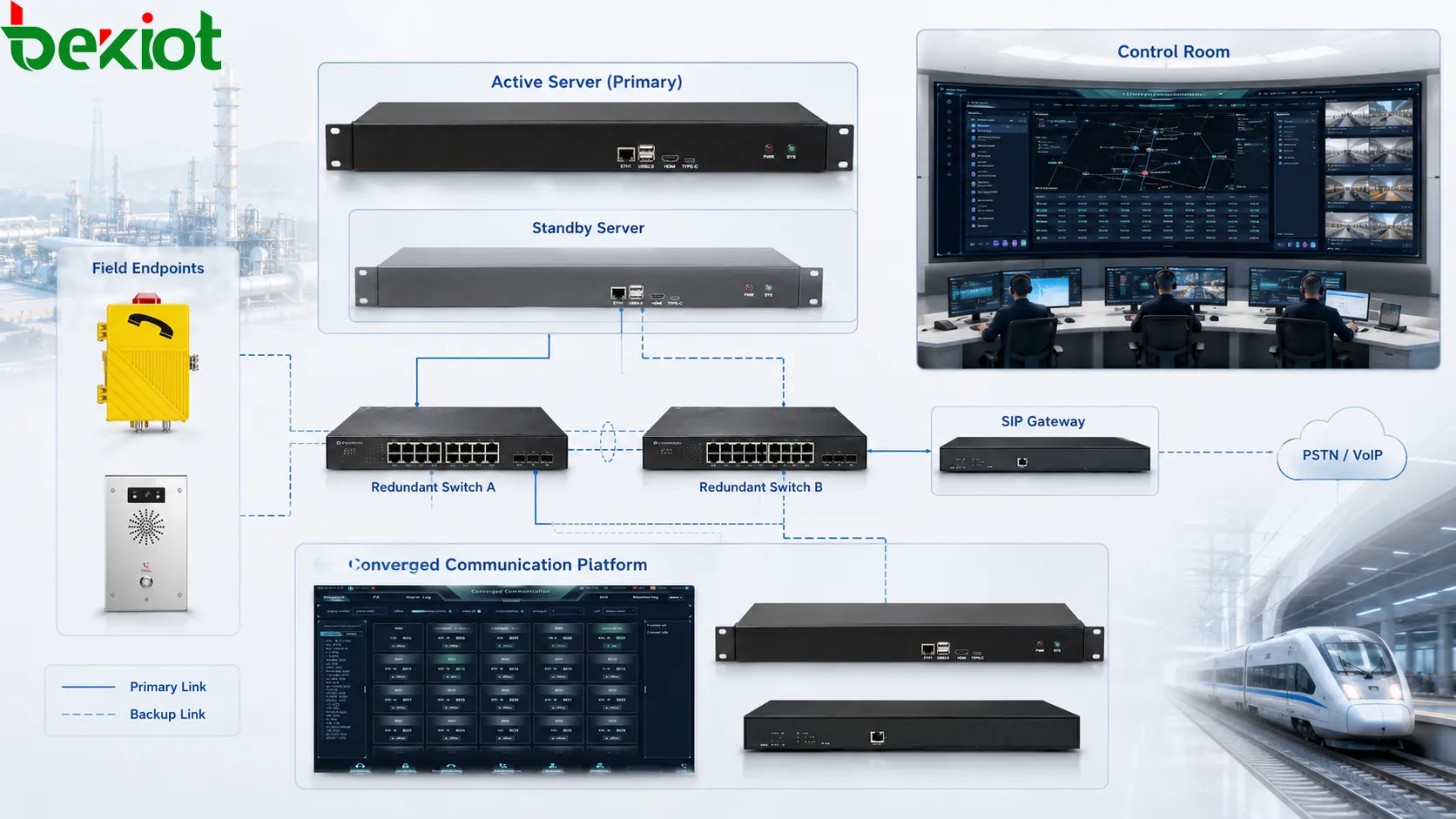
What Layers Need Backup
Physical links and switches
The most visible layer is the physical network. Critical endpoints, servers, and gateways may require dual network links, redundant switches, separated cable routes, and protected network rooms. If all equipment depends on one access switch, that switch becomes a single point of failure. If both cables follow the same path and can be damaged together, link redundancy may be weaker than it appears.
Switch redundancy should be planned carefully. Two switches should not only exist; they should be configured correctly. VLANs, spanning tree, link aggregation, port security, QoS, and management access should support failover rather than create loops or blocked traffic. Communication systems that use real-time voice should also protect RTP media traffic, not only signaling traffic.
Routing and internet access
Many systems depend on routers, firewalls, WAN links, VPNs, or internet access. A branch office may connect to a central SIP platform through a VPN. A cloud communication platform may require stable internet. A remote industrial site may use two carriers for resilience. Routing failover ensures traffic can move through another path when the primary link fails.
Dual WAN design can improve continuity, but it must handle NAT, SIP signaling, RTP media paths, DNS, firewall rules, and security policies. Voice systems are sensitive to delay, jitter, and packet loss, so the backup link must be tested for real communication quality, not only basic connectivity.
Servers and applications
Application redundancy protects the services that users actually need. In a communication system, this may include SIP registration, call control, recording, dispatch control, paging service, alarm linkage, database storage, web management, and device monitoring. A backup server must have current configuration and enough capacity to take over.
High availability may use active-standby servers, clustered services, database replication, shared storage, or distributed platforms. The architecture should define what happens if the primary server fails, how the backup becomes active, how endpoints find the backup, and how data remains consistent.
Trunks and gateways
Voice systems often rely on trunks or gateways for external calls, analog lines, radio access, public network access, or interconnection with other systems. A failover architecture may provide secondary SIP trunks, alternate carriers, backup FXO lines, spare gateway ports, or emergency routing paths.
Trunk failover should include route priority, caller ID handling, codec compatibility, emergency number routing, and billing or access restrictions. It should also consider what happens when the primary trunk partially fails. For example, registration may remain active, but outbound calls may be rejected. Functional testing is necessary.
Power and environment
Network failover can still fail if power is not protected. Switches, routers, servers, gateways, PoE supplies, access control devices, and communication endpoints may all require UPS or backup power depending on their role. If a backup server uses the same unprotected power source as the primary server, the failover plan may not survive a power fault.
Environmental risks also matter. Heat, water, dust, vibration, corrosion, unauthorized access, and cable damage can all affect availability. A reliable architecture should include physical protection, equipment room planning, ventilation, grounding, surge protection, and maintenance access.
Use Cases and Risks Align
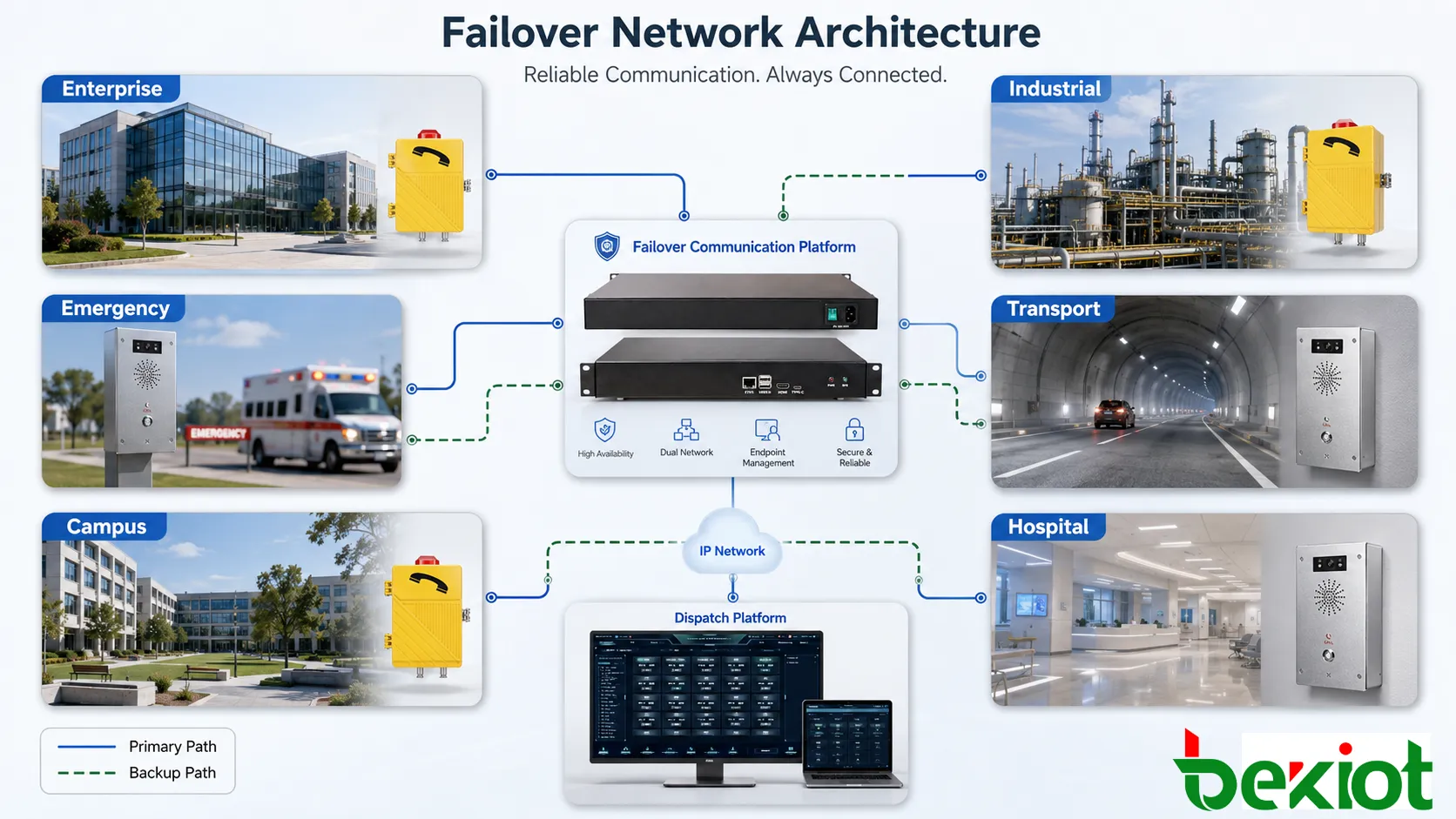
Enterprise and industrial networks
Failover architecture is useful wherever communication service must remain available despite faults. In enterprise voice systems, it supports office phones, branch extensions, remote workers, call routing, and customer service lines. If one internet link or SIP trunk fails, the system can move to another path and reduce business interruption.
In industrial sites, failover is more closely tied to operational continuity. Production lines, control rooms, maintenance teams, warehouses, substations, mines, ports, tunnels, and utility sites may depend on fixed communication points. If a SIP server, switch, or gateway fails, workers may lose access to dispatch or emergency contact. Redundant architecture keeps critical communication paths available.
Emergency and public facilities
In emergency communication systems, failover can support help points, alarm-linked phones, public address control, emergency paging, blue-light stations, elevator phones, and control room platforms. These systems may not generate heavy traffic every day, but they must work when needed. Failover design reduces the chance that a hidden fault prevents urgent communication.
Transportation environments also benefit from redundancy. Metro stations, railway systems, airports, road tunnels, bus depots, and traffic management centers may rely on distributed communication endpoints. Network failover helps maintain connection between field devices and central control when a link, switch, or server fails.
Campuses, hospitals, public buildings, and large commercial complexes may use failover for security desks, emergency intercoms, visitor assistance, access control communication, and internal paging. Because these sites include many users and public-facing areas, service interruption can quickly become visible. A failover plan helps maintain service continuity while faults are being repaired.
Hidden single points remain
A common mistake is adding backup equipment while leaving hidden single points of failure. Two servers may still use one database. Two network links may still pass through one switch. Two gateways may still rely on one power supply. Two trunks may still depend on one internet provider. A failover design should be reviewed from end to end to find these hidden dependencies.
Backup paths are untested
Another problem is treating failover as a diagram rather than a verified function. A backup route may exist in the configuration, but it may not work when needed because of firewall rules, expired credentials, wrong DNS records, outdated routes, missing licenses, or insufficient bandwidth. Failover must be tested under controlled conditions.
Data consistency is ignored
In server redundancy, data consistency is critical. If call routing tables, user accounts, recordings, logs, device registrations, or configuration changes are not synchronized, the backup system may start with outdated information. The result may be partial service recovery or unexpected routing behavior.
Automatic recovery loops occur
Failover logic can become unstable if detection thresholds are poorly designed. A link that fluctuates may cause traffic to switch back and forth repeatedly. This can interrupt calls and make troubleshooting difficult. Designs should include hold-down timers, stable failback policies, and alarms for repeated state changes.
Operations teams lack visibility
A system that fails over silently may appear healthy until the backup resource is also lost. Administrators need clear visibility: active path, failed component, failover time, recovery state, and remaining risk. Logs and alerts should be part of the architecture, not an afterthought.
Maintenance procedures should also be documented. Teams should know how to test failover, replace failed equipment, restore the primary path, verify call functions, and review incident logs. Without operating discipline, even a technically strong design can become unreliable over time.
Final Notes
Failover network architecture is a practical method for improving service continuity. It prepares backup resources, monitors the health of primary resources, detects faults, switches traffic, alerts administrators, and supports controlled recovery. In communication systems, this can protect SIP registration, call routing, gateway access, dispatch operation, paging service, emergency endpoints, and remote site connectivity.
A good design should include more than one redundant element. Physical links, switches, routers, firewalls, servers, applications, trunks, gateways, power supplies, and monitoring tools should be reviewed together. The architecture should also define detection thresholds, switching behavior, failback rules, logging, and maintenance procedures.
The most reliable failover design is one that has been tested under real operating conditions. It should not only look redundant on paper; it should continue communication when a fault happens, make the failure visible, and allow the operations team to restore normal service with confidence.
FAQ
What does failover mean in networking?
Failover means switching service from a failed primary resource to a backup resource. The backup may be another link, server, switch, gateway, trunk, data center, or communication route.
Is failover the same as load balancing?
No. Failover focuses on service continuity after failure, while load balancing distributes traffic across multiple resources during normal operation. Some architectures combine both methods.
Does failover keep active calls alive?
Not always. Some systems can preserve sessions under certain conditions, but many failover designs focus on restoring new call capability quickly. Real-time media is harder to preserve than basic connectivity.
Why does failover testing matter?
Testing confirms that backup paths, routing rules, credentials, firewall settings, trunks, servers, and monitoring actually work. A backup shown in a diagram may fail if it is never tested.
What is the biggest design mistake?
The biggest mistake is leaving hidden single points of failure. Redundant devices are not enough if they still depend on the same power, uplink, platform, database, or physical cable route.