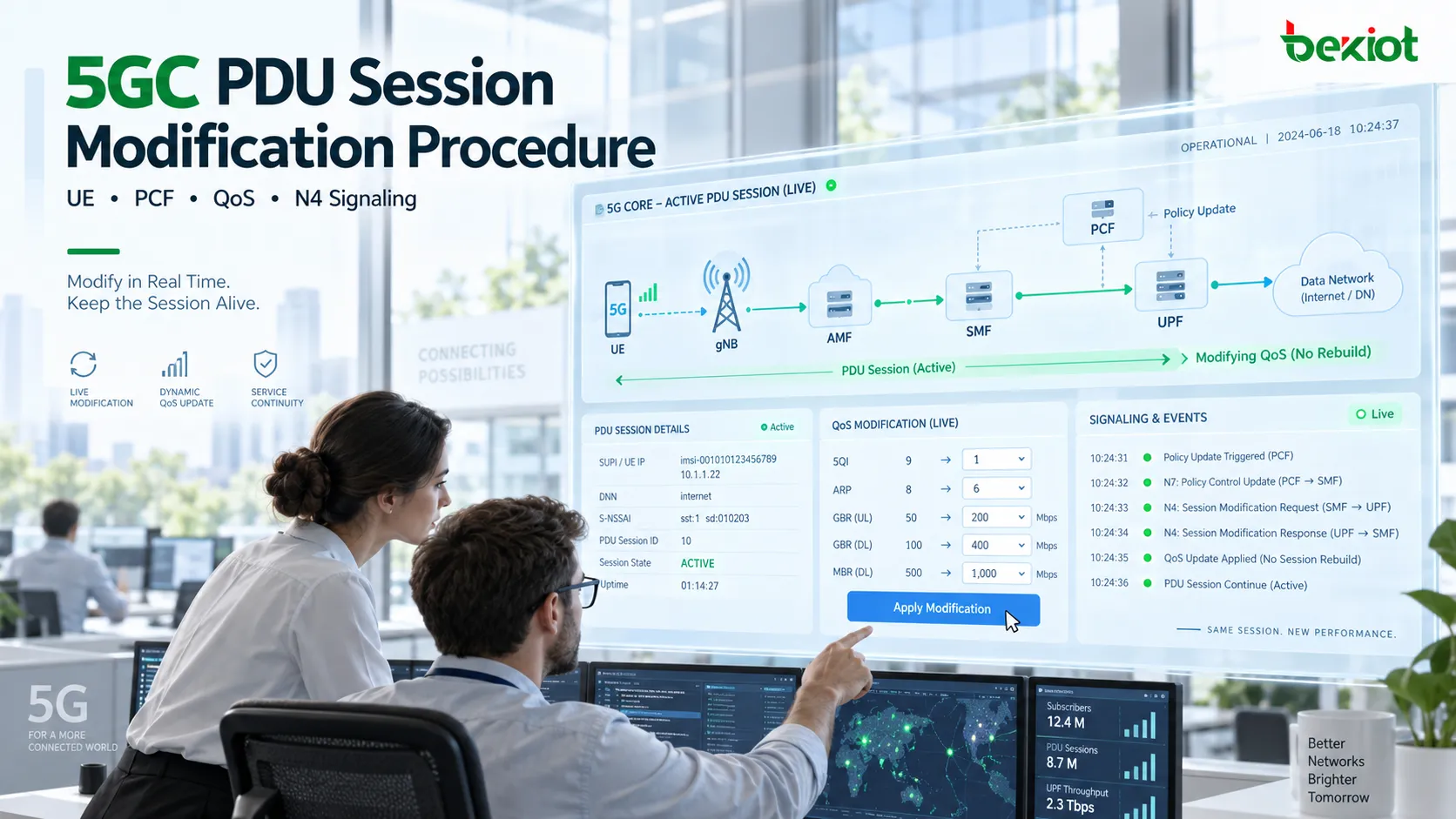
A PDU Session may have been operating normally for some time: the UE already has an IP address, the N3 user-plane path is active, and application traffic is flowing as expected. Then the service conditions change. The previously authorized data rate needs to be reduced, a QoS Flow needs a different 5QI, or the network decides to limit the maximum rate of the session to 10 Mbps.
In this situation, the 5GC does not need to tear down and rebuild the entire PDU Session. The existing session can remain active while only the affected QoS rules, QoS Flow parameters or user-plane enforcement policies are updated. This is the role of PDU Session Modification.
The distinction from PDU Session Establishment is straightforward. Establishment creates a session that did not previously exist. Modification changes a session that is already active. The main questions are therefore no longer how the SMF was selected or how the UPF was initially created, but what triggered the change, how the SMF obtains the new policy, what the UE and gNB need to update, and whether the new QoS policy is actually enforced in the UPF.
Scope of PDU Session Modification
PDU Session Modification has one important prerequisite: the target PDU Session must already exist. The UE, SMF, PCF and relevant RAN context are already associated with that session, and the user plane is normally operational.
The purpose of the modification procedure is to change parameters while the session remains active. QoS is one of the most common examples. An existing QoS Flow may need a different 5QI, MBR, MFBR or another authorized parameter. A policy change may also require the rate control already enforced in the UPF to be updated.
A QoS modification should not be understood as merely changing one NAS field. A single QoS update may affect three different parts of the system:
UE side: the UE needs to receive the new QoS Rule or QoS Flow parameters;
RAN side: the gNB may need to modify the corresponding PDU Session Resource or QoS Flow resources;
UPF side: if user-plane enforcement changes, the relevant PFCP rules need to be updated over N4.
PDU Session Modification is therefore best viewed as an online reconfiguration of an active session. The session identity remains unchanged, and the modification is applied to the existing PDU Session ID and its associated QoS Flows.
There is also an important boundary to keep in mind. PDU Session Modification can update an existing QoS Flow, but in applicable service scenarios it can also be used to establish a new QoS Flow within the same PDU Session. For example, application-driven policy for a VoNR call may require an additional Flow with specific QoS characteristics. The focus here, however, is modifying the parameters of an existing QoS Flow rather than creating a new one.
Main Triggers for Session Modification
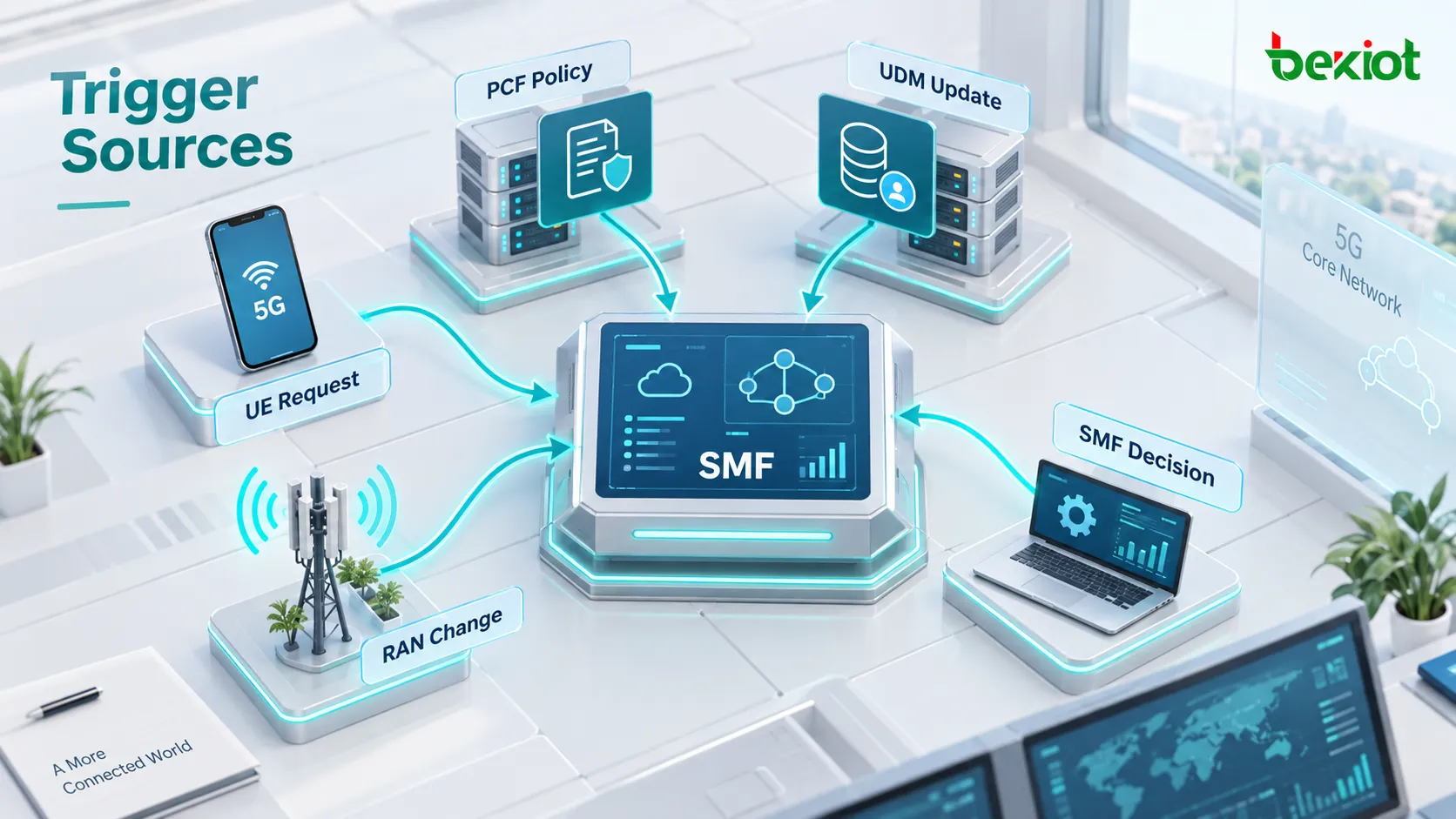
One major difference from PDU Session Establishment is that the UE is not the only possible trigger. An active PDU Session may be reconfigured because of a UE request, a network policy change, updated subscription data or changing radio conditions.
Common trigger sources can be grouped into five categories:
UE-triggered: the UE sends a PDU Session Modification Request to ask for a QoS or related session change;
PCF-triggered: policy control changes, for example when a usage threshold is reached and the network reduces the authorized rate, or when application policy requires different QoS;
UDM-triggered: Session Management Subscription Data changes, such as an updated subscriber tier or subscribed QoS profile;
SMF-triggered: the SMF decides to reconfigure the session according to local policy, network configuration or existing session state;
RAN-related trigger: the gNB reports radio or resource conditions, after which the SMF determines that session parameters should be modified.
These triggers ultimately converge at the SMF. The reason is that the SMF owns the PDU Session control context and translates a new service or policy requirement into parameters that can be applied by the UE, RAN and UPF.
When troubleshooting PDU Session Modification, the first step should therefore not be to start from PDU Session Modification Command and work forward. It is more useful to identify the earliest control event that caused the change. If the first event is a UE Modification Request, the procedure is UE-initiated. If the PCF pushes a new policy to the SMF through a Notification URI, the change is policy-driven. If a UDM subscription-data update appears first, the investigation should follow the subscription-change path.
UE-Initiated PDU Session Modification
A UE-initiated procedure is easiest to understand as a case in which an application requires different QoS.
Assume that the UE currently has PDU Session ID 5 and one of its QoS Flows is still using the original configuration. An application introduces a new service requirement, so the UE requests different QoS parameters by sending a PDU Session Modification Request.
The NAS message first travels through the gNB to the AMF. The AMF then updates the existing SM Context toward the SMF. On the service-based interface, the AMF uses:
POST /nsmf-pdusession/v1/sm-contexts/{smContextRef}/modify
This is different from Create SM Context. The SM Context already exists; the network is now updating an existing session context.
The UE request may contain Requested QoS Rules, Requested QoS Flow Descriptions and related Packet Filters. After receiving the request, the SMF needs to determine whether the network can authorize the requested change. If the session uses dynamic policy control, the SMF also sends the service request to the PCF for authorization.
For example, if the UE requests 5QI 8 for a particular Flow, the SMF can invoke the PCF SM Policy Control service to modify the current Policy Association. The PCF evaluates subscriber policy, service rules and current network conditions, then returns the QoS parameters that are actually authorized.
One distinction is important: the QoS requested by the UE is not necessarily the QoS that will ultimately be enforced. The UE expresses the service requirement, while the final parameters are subject to authorization by the SMF and PCF.
Once the authorized parameters are determined, the SMF generates two types of information:
N1 SM: PDU Session Modification Command carrying the new QoS-related parameters toward the UE;
N2 SM: information for the PDU Session Resource Modify procedure, instructing the gNB to modify the corresponding QoS Flow resources.
The AMF delivers the N2 information to the gNB over NGAP and forwards the PDU Session Modification Command contained in N1 to the UE.
After the gNB adjusts the relevant resources, it returns a PDU Session Resource Modify Response. Once the UE accepts the new parameters, it sends PDU Session Modification Complete over NAS.
Only after the SMF receives the relevant execution results can it confirm that the new session parameters have moved from policy authorization into actual implementation at the access and UE sides.

PCF-Triggered Network-Side QoS Modification
Network-side modification follows a different logic. The UE has not requested new QoS. The change begins in the policy-control layer.
Consider a usage-threshold example. A user already has an active PDU Session and is continuously transferring data. The PCF requires the session to report or monitor Usage information. Once the accumulated usage reaches a configured threshold, policy may reduce the maximum rate of the session or related Flow to 10 Mbps.
The PCF then notifies the SMF through the Notification URI registered when the SM Policy Association was established. The notification carries the new SM Policy Decision, such as the updated MBR and the corresponding Policy Control Trigger.
From the SMF perspective, this is not the creation of a new session. It is a modification of a PDU Session that is still valid and active.
If the new rate needs to be enforced in the UPF, the SMF sends a PFCP Session Modification Request over N4. The relevant QER can be updated, for example by changing the MBR to 10 Mbps. Only after the UPF accepts the modification does the new rate limit take effect in the user plane.
Two different uses of the word "Modification" should not be confused:
PDU Session Modification: the overall 5GS procedure for modifying an active PDU Session;
PFCP Session Modification: the specific N4 control procedure used by the SMF to update user-plane rules in the UPF.
They operate at different layers. A PDU Session Modification may include a PFCP Session Modification, but the presence of one PFCP modification message does not mean that the complete PDU Session Modification has finished.
After the UPF begins enforcing the new QER, the SMF may still need to update the RAN and UE. N1/N2 information is sent through the AMF, the gNB receives a PDU Session Resource Modify Request, and the UE receives a PDU Session Modification Command.
Once the gNB finishes updating radio resources and the UE accepts the new QoS parameters, both sides return their execution results. The SMF can then report the successful outcome back to the PCF so that the policy system knows the QoS Decision has actually been enforced rather than merely stored as a policy decision.
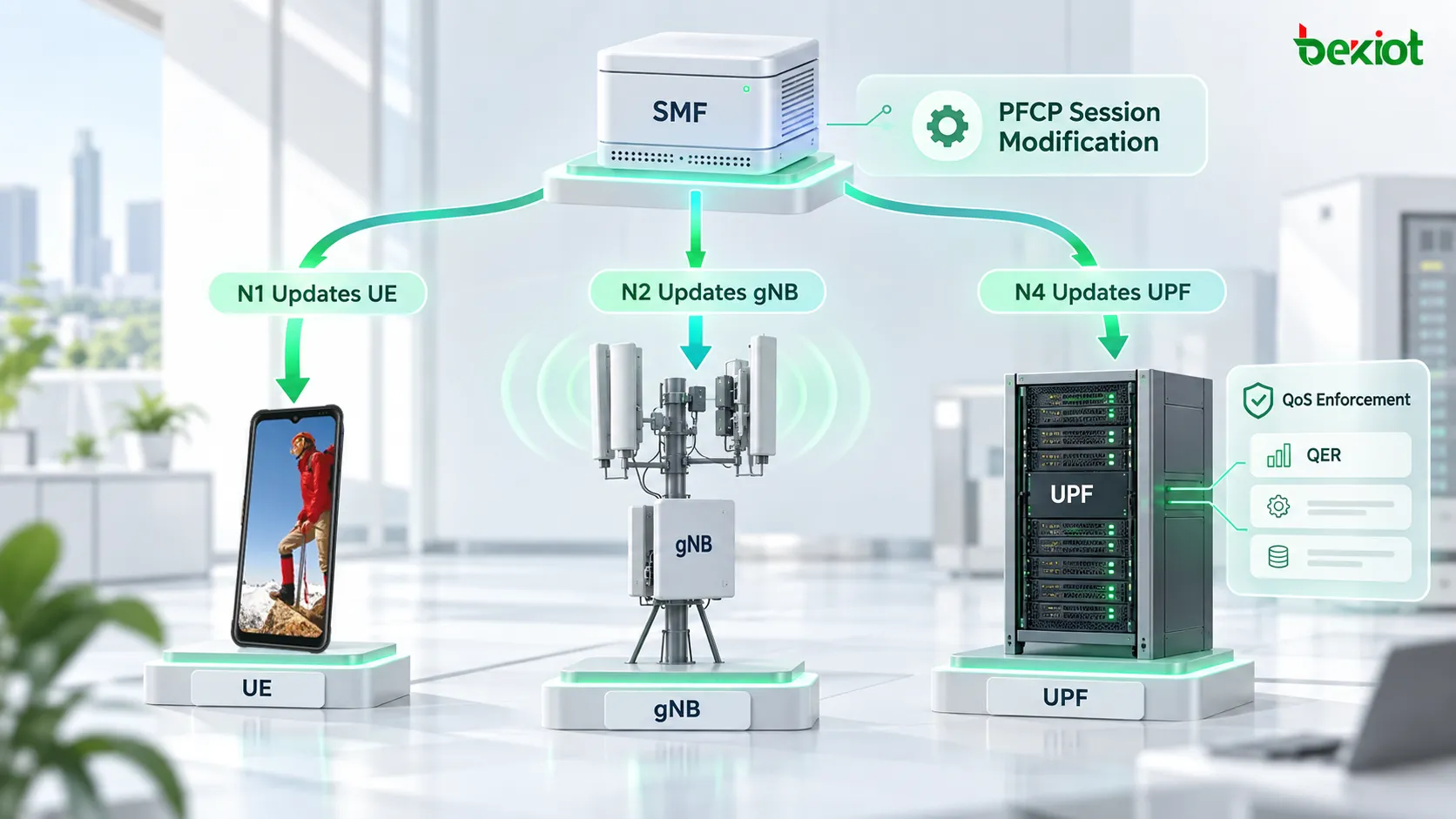
Coordinated Modification Across N1, N2 and N4
One of the most confusing parts of PDU Session Modification is that the same QoS change may produce modification procedures in NAS, NGAP and PFCP at the same time.
The logic becomes clearer when the three paths are separated.
N1 Updates UE Session Parameters
N1 SM carries Session Management information between the UE and SMF. After the network decides to modify the session, the SMF sends a PDU Session Modification Command to the UE through the AMF.
The UE updates its local PDU Session parameters and confirms acceptance with PDU Session Modification Complete.
N2 Updates RAN Resources
When radio resources associated with a QoS Flow need to change, the SMF generates the corresponding N2 SM information and delivers it to the gNB through the AMF. The gNB modifies the relevant QoS Flow resources using the PDU Session Resource Modify procedure and returns the result, including successfully modified QFIs where applicable.
N4 Updates UPF Enforcement Rules
If the change affects user-plane forwarding or QoS Enforcement, the SMF updates the relevant UPF rules through PFCP Session Modification.
A rate-limit change may require a QER update. Other policy changes may affect a PDR, FAR or another user-plane rule. Which rules are modified depends on the service and control policy; a PDU Session Modification does not necessarily rewrite every PFCP rule.
A complete QoS change can therefore be summarized as:
Policy / UE Request
→ SMF recalculates session parameters
→ N4 updates UPF enforcement
→ N2 updates gNB resources
→ N1 updates UE parameters
→ Each side confirms the result
The exact message order may vary depending on the trigger and the parameters being changed. During troubleshooting, it is not useful to insist that every scenario must contain an identical sequence of messages. A better test is to confirm that every execution point that needs to change actually receives and applies the new parameters.
Modification Completion and Signaling Troubleshooting
PDU Session Modification problems have one characteristic that makes them different from establishment failures: the PDU Session may remain active, and the user may still be able to transfer data, while the resulting QoS does not match the intended policy.
For example, policy may require the rate to be reduced to 10 Mbps, and the PCF may already have issued the new Decision, yet an actual throughput test still shows a much higher rate. The continued existence of the PDU Session does not prove that the modification succeeded. The investigation needs to determine where the new parameters stopped being applied.
A practical troubleshooting sequence can use the following checkpoints:
Identify the trigger: determine whether the first event was a UE Modification Request, PCF Notification, UDM data change or an SMF/RAN-side event;
Verify the SMF decision: confirm whether the SMF accepted the request and whether the PCF returned the expected Policy Decision;
Check N4 Enforcement: if the UPF needs to enforce new QoS, verify that PFCP Session Modification succeeded and that the relevant QER parameters actually changed;
Check N2 execution: verify that the gNB received the PDU Session Resource Modify Request and returned the successfully modified QoS Flows;
Check N1 confirmation: verify that the UE received PDU Session Modification Command and returned PDU Session Modification Complete;
Validate the service result: confirm that real traffic now follows the updated rate, QoS or service policy.
If the PCF has already authorized 10 Mbps but the QER in the UPF still contains the old MBR, the investigation should focus on the SMF-to-N4 path. If the UPF is already enforcing the new rate but the gNB QoS Flow still uses the old parameters, the N2 Resource Modify procedure needs further inspection. If the network side has completed all required changes but the UE never returns Modification Complete, the NAS side should be checked to determine whether the new QoS rules were accepted.
One message name can also cause confusion. Some procedure diagrams use the phrase "PDU Session Modification Command Ack" to describe the UE confirmation step. In 5GSM NAS signaling, however, the actual message sent by the UE after accepting PDU Session Modification Command is PDU Session Modification Complete. Packet analysis should therefore use the actual NAS Message Type.
This layered troubleshooting method is much more effective than restarting the investigation from Registration Request. The PDU Session already exists. The issue is that an active session has not been updated consistently according to the new policy. The fault domain should therefore remain focused on the current SM Context, Policy, QoS Flow and user-plane Enforcement.
FAQ
Does PDU Session Modification Reassign the UE IP Address?
A normal QoS modification updates an existing PDU Session and its QoS Flows rather than rebuilding the entire session. Whether other session attributes change depends on the specific scenario, but a modification limited to parameters such as 5QI or MBR should not be treated as another PDU Session Establishment procedure.
Is PDU Session Modification Always Initiated by the UE?
No. The UE can request a modification through PDU Session Modification Request, but a PCF policy change, UDM subscription-data update, SMF local decision or RAN-related event can also trigger a network-side modification. The SMF normally coordinates the required updates across the UE, RAN and UPF.
What Is the Difference Between PDU Session Modification and PFCP Session Modification?
PDU Session Modification is the overall 5GS procedure for modifying an active session and may involve the UE, RAN, SMF, PCF and user plane. PFCP Session Modification occurs specifically over the N4 interface between the SMF and UPF and changes concrete user-plane rules in the UPF. The latter can be one part of the former, but the two are not equivalent.
If the QER Has Already Been Updated, Why Do the gNB and UE Still Need Modification?
QER controls QoS Enforcement in the UPF, but a QoS Flow is not defined only at the UPF. The UE may need a new QoS Rule or Flow description, while the RAN may need to adjust corresponding radio resources. Some QoS modifications therefore require N1, N2 and N4 to remain consistent. Updating only the UPF does not mean the complete PDU Session Modification procedure has finished.
Can PDU Session Modification Add a New QoS Flow?
Yes. PDU Session Modification can update the parameters of an existing QoS Flow and, in applicable scenarios, can also be used to establish a new QoS Flow within the same PDU Session. For example, application-driven VoNR service may require an additional QoS Flow with a specific 5QI. That scenario has a different service context from a simple update to an existing Flow and is better analyzed separately.