
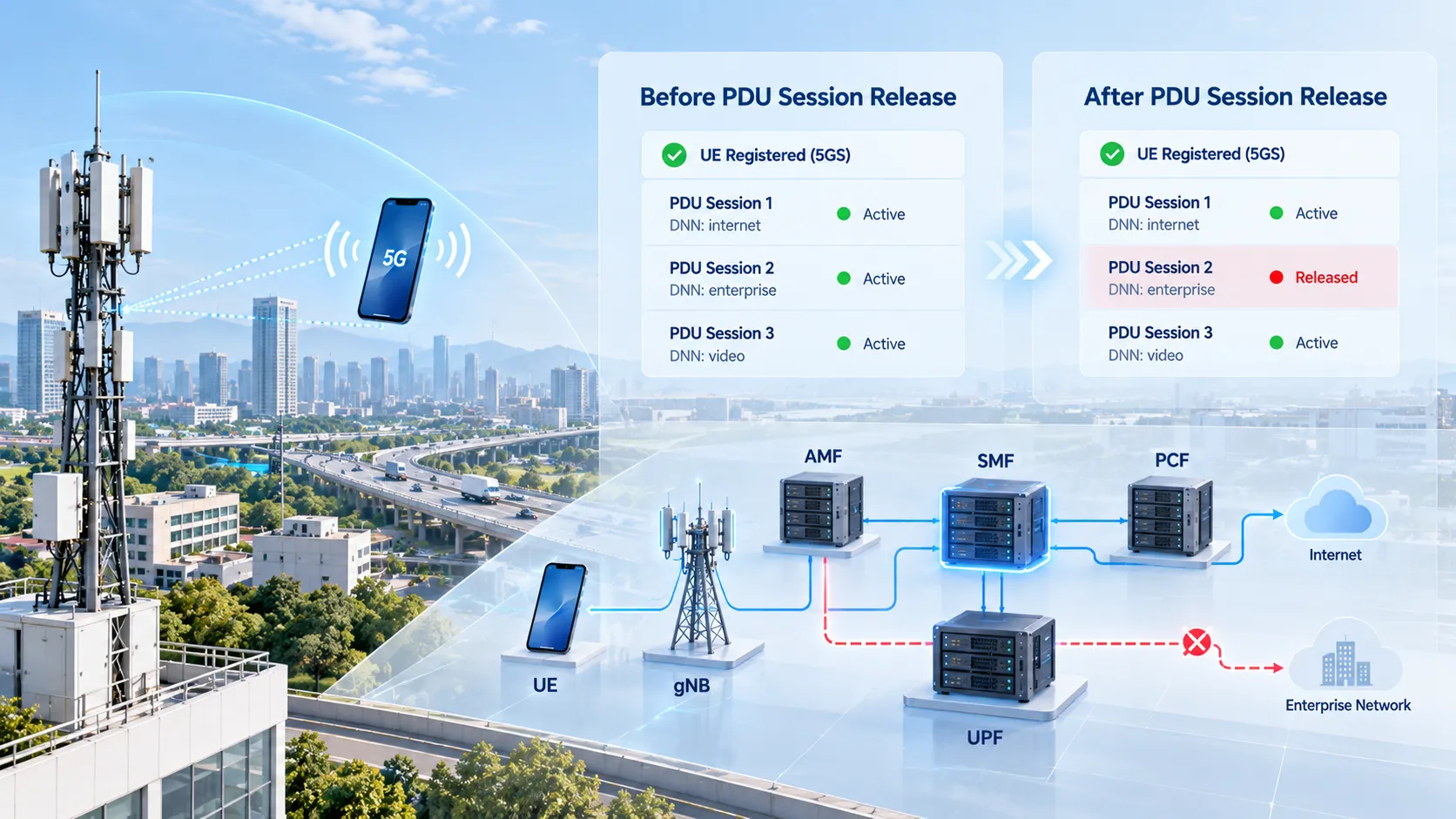
Consider an established PDU Session that has already been carrying traffic normally. The UE has an IP address, the gNB maintains the corresponding PDU Session Resource and QoS Flows, and the UPF has an active PFCP Session for user-plane forwarding. If the user decides to terminate the data connection, a policy function requires the session to end, or the network determines that the session should no longer remain active, the 5GC is no longer modifying a few QoS parameters. It has to tear down the session across both the control plane and user plane.
This is the purpose of PDU Session Release. It defines how an established PDU Session is removed: the UE-side 5GSM context is cleared, RAN resources are released, the N4 Session and forwarding state in the UPF are deleted, and the associated policy relationship is terminated where applicable. The objective is to bring the AMF, SMF, gNB, UPF and UE to a consistent state in which that PDU Session no longer exists.
This procedure is not at the same level as Registration. A UE can release one PDU Session while remaining registered with the 5GS, and other active PDU Sessions can continue to operate. When analyzing this signaling, the main task is to follow how resources associated with a specific PDU Session ID are removed from the UE, RAN, SMF, UPF and policy-control layers, rather than restarting the trace analysis from Registration Request.
Boundaries Between Session Release, Establishment, Modification and Deregistration
PDU Session Establishment, Modification, Release and 5GS Deregistration can appear in the same trace set, but they solve very different problems.
| Procedure | Primary Purpose | Resulting State |
|---|---|---|
| PDU Session Establishment | Create a new data session and user-plane resources | A new PDU Session becomes active |
| PDU Session Modification | Modify QoS, policy or existing session resources | The PDU Session remains active |
| PDU Session Release | Terminate a specific PDU Session and release its resources | That PDU Session no longer exists |
| 5GS Deregistration | Terminate the registration relationship between the UE and 5GS | The UE leaves the corresponding 5GS registered state |
Release and Deregistration are particularly easy to confuse. Assume a UE maintains one PDU Session for Internet access and another for a private enterprise network. Releasing one of them does not automatically remove the other, nor does it necessarily delete the UE Registration Context in the AMF.
RRC Release should not be treated as PDU Session Release either. RRC Release primarily changes the radio-connection state between the UE and gNB, while the PDU Session may remain active in the core network. PDU Session Release, by contrast, removes session resources associated with a specific PDU Session ID.
To review how the session was originally created, see 5GC Core Network PDU Session Establishment Procedure. If the session remains active and only its QoS or policy parameters change, see 5GC Core Network PDU Session Modification Procedure.
Main Triggers for PDU Session Release
A PDU Session Release can be initiated from several points in the network. An active session may be terminated because of a UE action, policy-control decision, network-state inconsistency or resource-related condition.
Common triggers include:
UE-triggered: the UE sends a PDU Session Release Request when it no longer needs the current data session;
PCF-triggered: policy control requires the session to terminate because service authorization, usage conditions or another policy requirement no longer permits it to remain active;
AMF-triggered: the AMF detects an inconsistency between UE and network PDU Session states, or the associated Network Slice is no longer available;
RAN-triggered: for example, all QoS Flows associated with a PDU Session have already been released and the RAN reports the resulting state to the core network;
SMF-triggered: the SMF determines that the session should end based on local policy or information received from functions such as the UDM or CHF.
Because the initial trigger can originate from different network functions, the first few signaling steps are not always identical. The procedure eventually converges on the SMF because the SMF maintains the PDU Session control context and coordinates the UPF user plane, AMF/RAN access resources and PCF policy relationship.
During packet-trace analysis, identifying which entity first requested the release is usually more useful than starting directly from PDU Session Release Command. A UE Release Request indicates a UE-initiated procedure. A termination notification from the PCF indicates a policy-driven release. An AMF request to release an SM Context belongs to another network-triggered branch.
N1, N2 and N4 Signaling in a UE-Initiated Release
A UE-initiated release provides a clear view of how session resources are removed across the different layers.
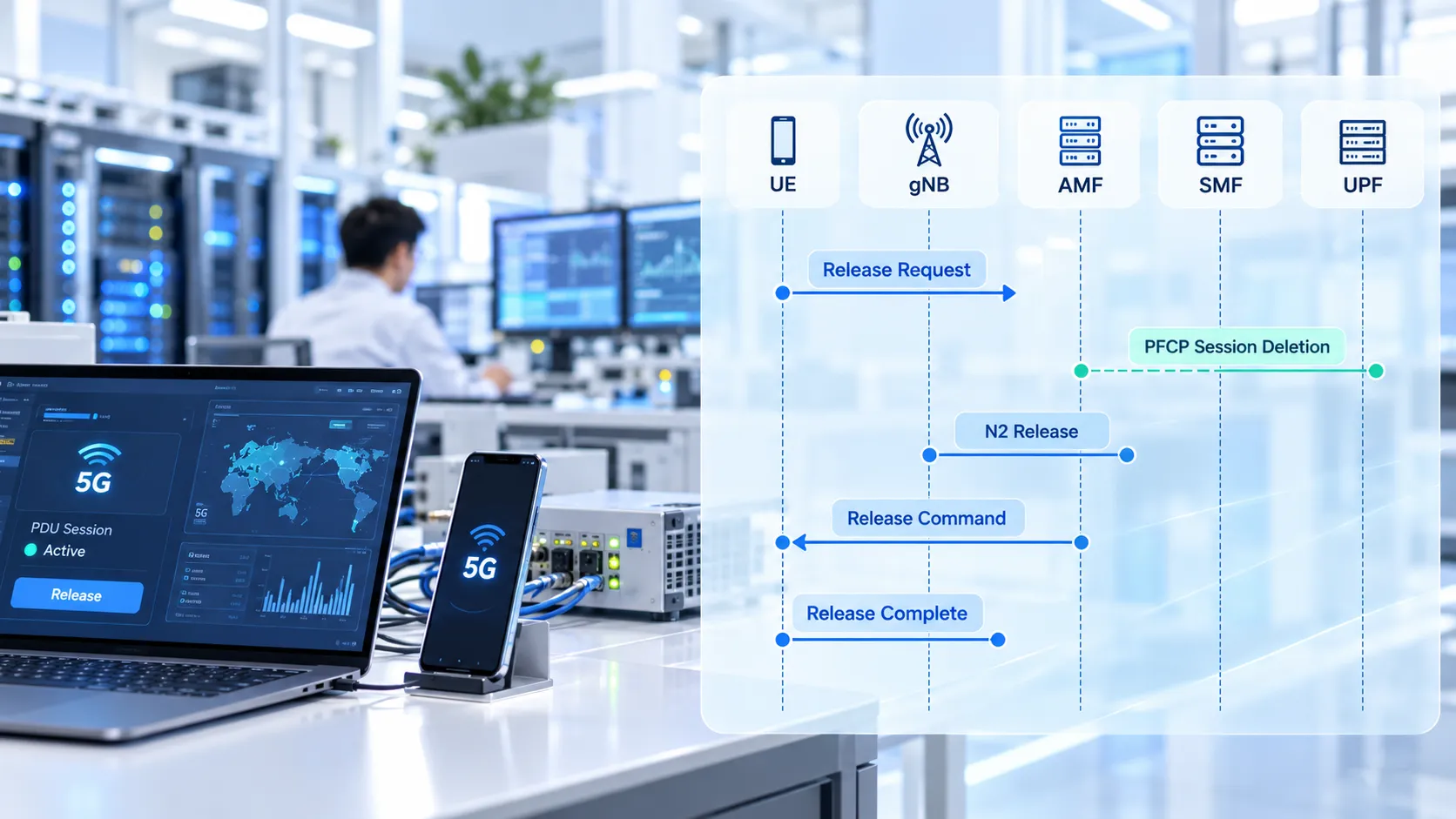
Assume the UE is currently using PDU Session ID 5 for data access. When the device no longer needs the session, it generates a PDU Session Release Request and sends it in an N1 SM Container. The gNB forwards the NAS message to the AMF using UL NAS Transport, and the AMF identifies the SMF responsible for the specified PDU Session ID.
On the Service-Based Interface, the AMF forwards the Release Request through the existing SM Context, for example by invoking Nsmf_PDUSession_UpdateSMContext. This is not a new SM Context creation. The context already exists, and the AMF is informing the SMF that the active session is entering the release procedure.
The SMF then handles the user-plane cleanup. For an existing N4 Session, it sends a PFCP Session Deletion Request to the UPF. The UPF removes the user-plane state associated with the corresponding PFCP Session and returns a PFCP Session Deletion Response.
This is fundamentally different from PFCP Session Modification during PDU Session Modification. A Modification updates rules within an existing N4 Session, while a Deletion removes the session-level state from the UPF.
After user-plane cleanup has been initiated, the SMF prepares information for the RAN and UE:
N2 SM: instructs the gNB to release the corresponding PDU Session Resource;
N1 SM: carries PDU Session Release Command toward the UE.
The AMF sends PDU Session Resource Release Command to the gNB over NGAP, and the message can include the NAS PDU Session Release Command for delivery to the UE. After releasing the access-side resources associated with the PDU Session, the gNB returns PDU Session Resource Release Response.
After receiving Release Command, the UE removes its local PDU Session context and sends PDU Session Release Complete as the 5GSM confirmation.
A typical UE-initiated sequence can be summarized as:
UE Release Request → AMF → SMF → PFCP Session Deletion → N2 Resource Release → PDU Session Release Command → UE Release Complete
If the UE is initially in CM-IDLE, the live network may first require a Service Request to restore the signaling connection needed to continue the release procedure. Packet traces therefore should not be expected to begin from the same radio state in every case.
Network-Initiated Release and PCF Policy Termination
In a network-initiated release, the UE does not send PDU Session Release Request first. The change may begin inside the policy-control layer or another core-network function.
Consider a PCF-triggered case. A PDU Session is carrying traffic normally, but the PCF later determines that the session should be terminated according to policy. The PCF notifies the SMF through the notification mechanism established for the existing policy association.
After receiving the policy-driven release trigger, the SMF still has to tear down the user plane. PFCP Session Deletion Request and Response can therefore appear before the SMF sends the required N1 and N2 information through the AMF:
SMF → AMF → gNB / UE
The AMF N1N2 Message Transfer can carry both N2 information related to PDU Session Resource Release and the PDU Session Release Command intended for the UE.
From the UE perspective, whether the initial release was triggered by the PCF, SMF or another network function, an explicit NAS release procedure still involves the network sending PDU Session Release Command, followed by the UE returning PDU Session Release Complete.
From a core-network trace perspective, however, those two NAS messages are not enough to identify the original trigger. The important evidence appears before Release Command: a PCF policy termination, an AMF request to release the SM Context, a RAN-related event or an SMF local decision.
This distinction is important for both technical analysis and troubleshooting: PDU Session Release Command shows that the network is instructing the UE to terminate the session, but it does not by itself identify which entity originally triggered the release.
Resource Cleanup Across the UPF, RAN and Policy Context
A PDU Session Release should not be considered complete simply because the UE can no longer send data. The resources associated with that PDU Session need to be cleaned up across the relevant network functions for the specific release scenario.
N4 Deletes the UPF Session
PFCP Session Deletion is a major user-plane cleanup point. Once the UPF deletes the corresponding N4 Session, the PDRs, FARs, QERs, URRs and other applicable forwarding state associated with that session no longer operate as part of the released PDU Session.
N3 resources related to the PDU Session, together with other applicable user-plane termination resources, are also released as the session lifecycle ends.
N2 Releases gNB Resources
The gNB maintains access-side resources associated with the PDU Session and its QoS Flows. After receiving PDU Session Resource Release Command, the RAN removes the relevant resources and reports the result to the core network through the corresponding Response.
A successful PFCP Session Deletion alone therefore does not prove that the entire PDU Session Release has completed. If the UPF has been cleaned up while the gNB still retains the PDU Session Resource, the network remains in an inconsistent state.
The UE Removes Its 5GSM Session Context
After receiving PDU Session Release Command, the UE clears the local session context and confirms the action with PDU Session Release Complete. For an IP-type PDU Session, the IP address or Prefix associated with that session also enters the release process.
The SMF Notifies the AMF and Cleans Up Policy State
When the session reaches the Released state, the SMF can send an SM Context Status Notification to the AMF so that the AMF can synchronize its stored session state.
If the PDU Session has an SM Policy Association, the related PCF policy relationship also needs to be terminated or deleted according to the applicable branch. If this is the last session that requires a particular DNN, S-NSSAI or subscription-related state, the SMF may also perform further subscription or registration cleanup involving the UDM or UDR when the relevant conditions are met. These actions are conditional and do not necessarily appear in every release.
The cleanup therefore covers a collection of states built around the PDU Session ID rather than a single tunnel:
UE Context + RAN Resource + SM Context + UPF N4 Session + Policy Association

Verifying Release Completion in Signaling Traces
PDU Session Release failures are not always obvious from the user experience. The UE may already have stopped transferring data while stale state remains in one or more core-network functions. In another case, the UE may have removed its local session while the PFCP Session in the UPF remains active.
Rather than memorizing every possible message sequence, a more effective troubleshooting method is to build a set of checkpoints around the affected PDU Session ID.
Identify the session being released: lock the analysis to the correct PDU Session ID so signaling from another concurrent session is not mixed into the trace;
Identify the trigger: determine whether the first event is a UE Release Request, PCF termination notification, AMF request or another network-side event;
Verify SMF handling: confirm that the request reached the SMF responsible for the PDU Session and that the SMF entered the release procedure;
Check N4 resources: confirm that PFCP Session Deletion Request and Response completed and that the original UPF session rules were removed;
Check N2 resources: verify that the gNB received the PDU Session Resource Release signaling and returned the corresponding release result;
Check N1 state: in an applicable explicit NAS release procedure, verify that the UE received Release Command and returned PDU Session Release Complete;
Verify final state: confirm that the PDU Session state in the AMF, the SMF context and any PCF association are consistent with the Released result.
For example, if the UE has already returned PDU Session Release Complete but the corresponding PFCP Session is still present in the UPF, the investigation should focus first on SMF and N4 resource cleanup. If PFCP state has been removed but the gNB still retains the relevant PDU Session Resource, the N2 release path should be checked next.
Conversely, seeing only an RRC Release is not enough to conclude that the PDU Session has been terminated if there is no PDU Session Release Request, Release Command or corresponding core-network resource cleanup.
Message naming across specification layers can also cause confusion. Some procedure descriptions may use a term such as “PDU Session Release Ack” for a stage of the flow, while the actual 5GSM NAS message sent by the UE after accepting PDU Session Release Command is PDU Session Release Complete. Air-interface and NAS trace analysis should follow the actual Message Type.
A more reliable completion criterion is therefore: have the states associated with the original PDU Session ID been removed from the UE, RAN, SMF and UPF, rather than has one particular “final” message appeared?
FAQ
Does PDU Session Release Deregister the UE?
Not necessarily. PDU Session Release terminates only the specified data session. The UE can remain 5GS Registered and can continue using other active PDU Sessions. Deregistration is the procedure that terminates the UE’s registration relationship with the 5GS.
Does PDU Session Release Release the UE IP Address?
For an IP-type PDU Session, the IP address or Prefix associated with that session is one of the resources that needs to be released. After the procedure completes, it should no longer be used as the valid user-plane address of the released PDU Session. Address-pool reclamation and any later reassignment depend on the network implementation.
Is PFCP Session Deletion the Same as PDU Session Release?
No. PFCP Session Deletion is the N4 procedure used by the SMF to remove the UPF session and its user-plane rules. It is commonly an important part of PDU Session Release, but the complete release procedure can also involve the UE, RAN, AMF, PCF and other related contexts.
What Is the Main Difference Between PDU Session Release and PDU Session Modification?
PDU Session Modification keeps the existing PDU Session active while changing QoS, policy or related resources. PDU Session Release terminates the specified session and removes its associated resources. If the same PDU Session ID remains valid and continues carrying traffic, the operation is generally not a completed Release.
Why Does the Network Send PDU Session Release Command After a UE-Initiated Release Request?
The UE Release Request expresses the UE’s request to terminate the session, but the SMF still has to coordinate the state across the UPF, RAN and UE. After the network proceeds with the release, PDU Session Release Command instructs the UE to clear the corresponding 5GSM session context, and the UE responds with PDU Session Release Complete.