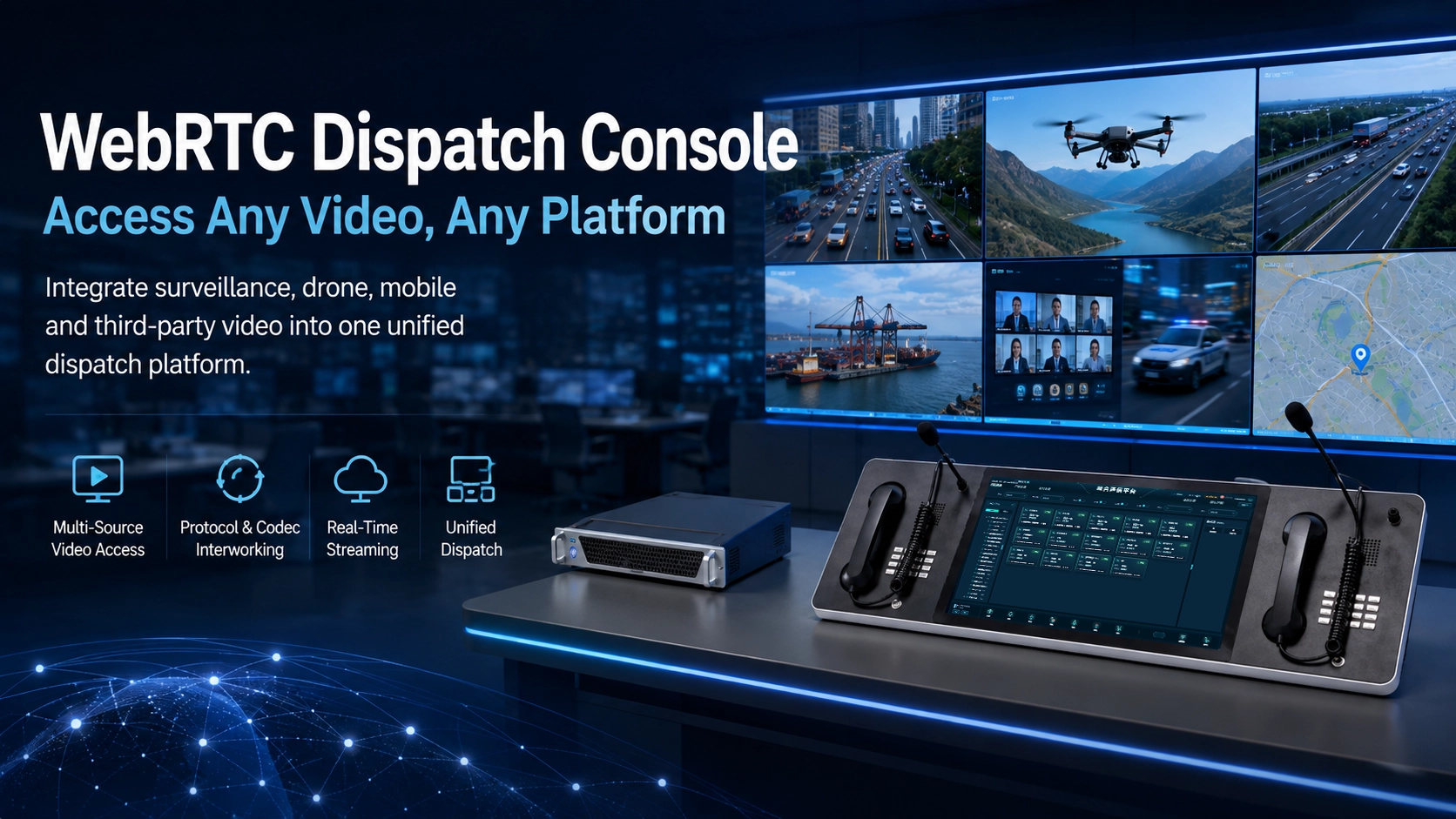
WebRTC is increasingly used to build browser-based dispatch consoles for emergency command, converged communications, industrial control, public safety, and remote operations. Its real-time audio and video capabilities make it possible to combine calling, conferencing, command functions, and multimedia communications in one web interface without requiring operators to install a traditional desktop client.
The challenge appears when the dispatch platform must also display video from existing surveillance systems, portable monitoring cameras, drones, body-worn devices, or third-party video platforms. These systems may use different codecs, transport protocols, resolutions, frame rates, and streaming formats. A video stream that works correctly inside a surveillance platform may therefore fail to play directly inside a WebRTC dispatch console. The practical solution is not to redesign the entire dispatch application, but to place a media conversion and protocol adaptation layer between the video source and the browser-based console.
Why Video Access Becomes Difficult
A modern dispatch system is rarely limited to voice. Operators may need to answer calls, communicate with field personnel, monitor CCTV feeds, view a drone camera, participate in a video conference, and inspect an incident location from the same workstation. The system is therefore expected to connect communication resources that were originally designed independently.
WebRTC works particularly well for interactive browser communication. It provides low-latency media transmission and is widely used for browser-based audio, video, and conferencing applications. A dispatch console built around WebRTC can expose communication controls through a standard web interface and can be integrated with other business applications more easily than a closed desktop client.
Surveillance infrastructure, however, follows a different technical history. Cameras, network video recorders, video management systems, portable surveillance terminals, drones, and industry-specific monitoring platforms may provide streams through GB/T28181, RTSP, RTP, RTMP, HLS, SIP, or other interfaces. They may also use video codecs selected primarily for storage efficiency rather than browser playback.
The resulting problem is an interoperability gap. The video source is available, the dispatch console is operating normally, and the network connection is working, but the browser still cannot decode or consume the stream in its original form.
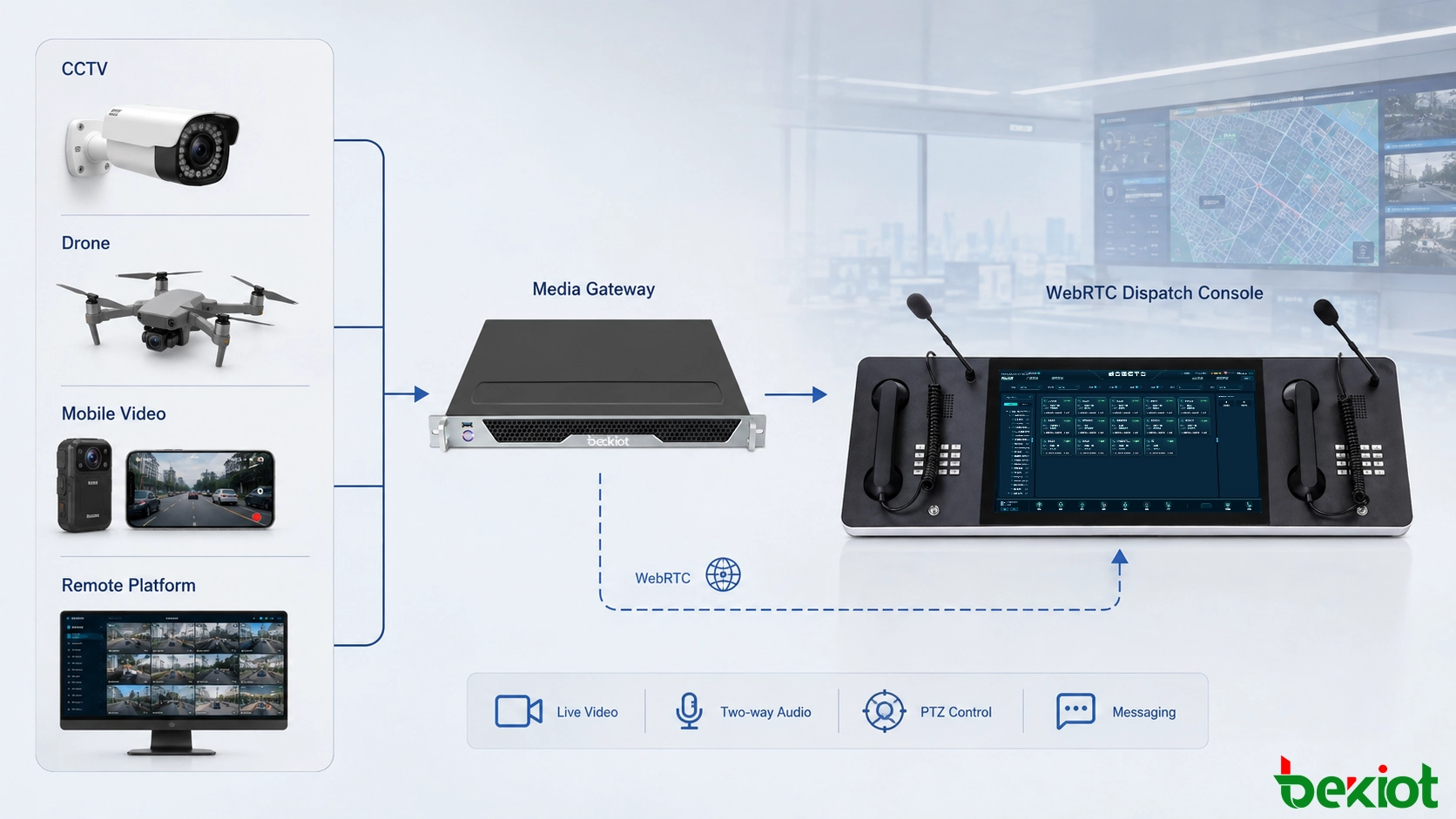
Related Product: Becke Dispatch Console
Where H.265 Creates a Compatibility Gap
One of the most common integration issues appears when a surveillance system delivers H.265 video. H.265, also known as HEVC, is attractive for monitoring applications because it can reduce bandwidth and storage requirements compared with older encoding methods at comparable image quality. For large camera deployments, this efficiency can be valuable.
The problem is that H.265 playback support is not consistently available across typical WebRTC and browser environments. A surveillance platform may therefore provide a perfectly valid H.265 stream that cannot be consumed directly by the WebRTC application used at the dispatch position.
Replacing all cameras or changing the entire surveillance platform simply to satisfy the browser is usually impractical. Modifying the dispatch console around every possible third-party codec also creates unnecessary development complexity. A more manageable approach is to normalize the media before it reaches WebRTC.
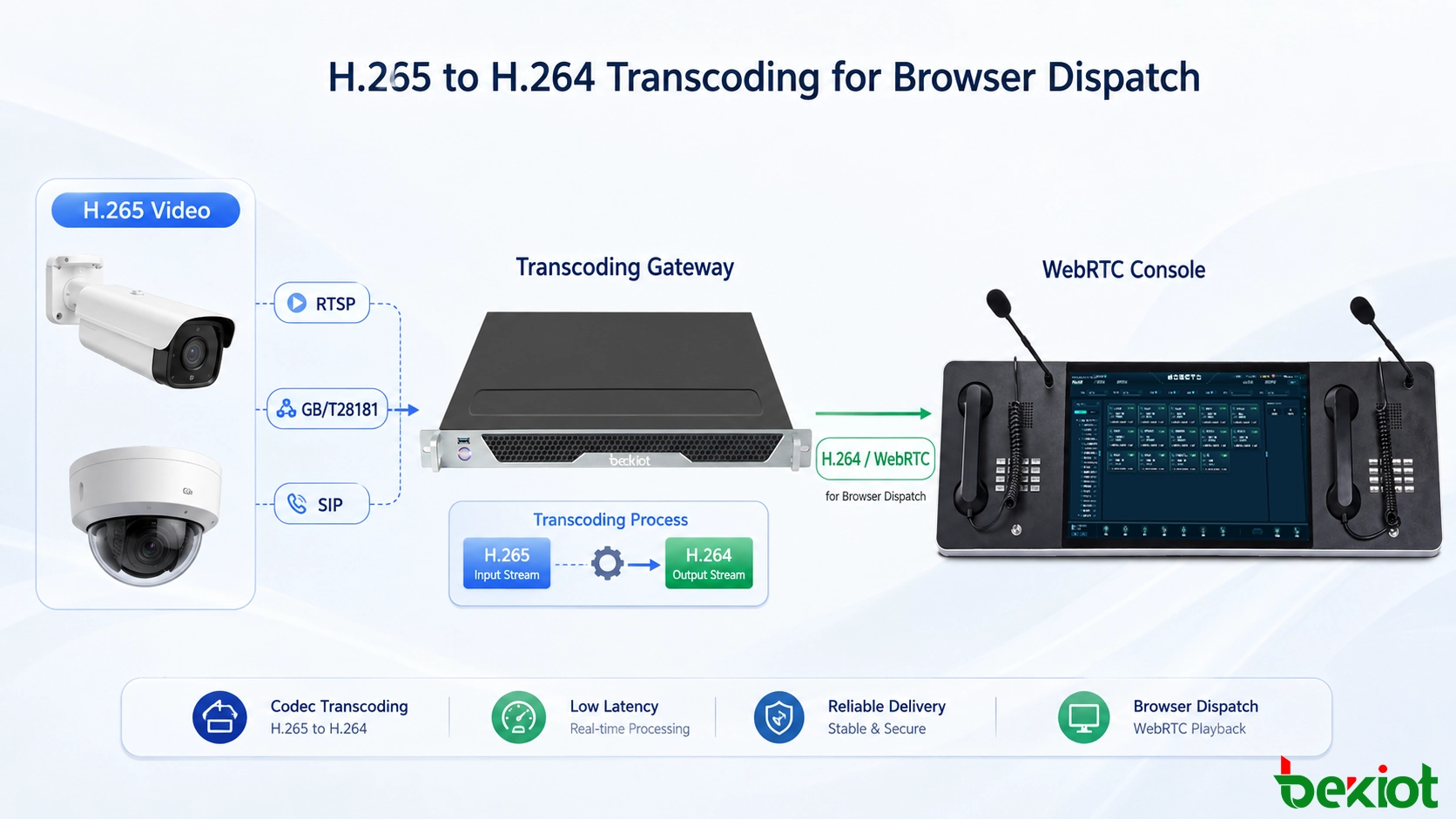
In this architecture, a video transcoding service receives the original H.265 stream and converts it into H.264 or another format supported by the target WebRTC environment. The dispatch console then consumes the converted stream rather than trying to decode the original H.265 media directly.
This separation is important because it keeps media compatibility outside the core dispatch application. The browser interface can continue to use its normal WebRTC workflow while the gateway handles codec adaptation in the background.
A Practical Transcoding Gateway Architecture
A video transcoding gateway acts as the media bridge between surveillance resources and the WebRTC dispatch layer. Its role is broader than simple codec conversion. In a real converged communication project, it may need to receive streams from several video platforms, convert media parameters, repackage streams, and publish them in a format that the dispatch system can use.
A typical workflow can be divided into five stages:
The dispatch platform requests a specific camera, drone, portable monitoring device, or third-party video resource.
The gateway obtains the source stream through the available surveillance or streaming protocol.
The media service checks the incoming codec, resolution, frame rate, bitrate, and stream format.
If necessary, the video is transcoded or repackaged into a format suitable for the WebRTC environment.
The converted media is delivered to the browser-based dispatch console for real-time viewing.
For an H.265 source, the most important step is typically H.265-to-H.264 conversion. In other projects, the codec may already be compatible but the resolution, bitrate, frame rate, or protocol packaging may still need adjustment.
This architecture also reduces coupling between systems. The surveillance platform does not need to understand how the dispatch interface is implemented, and the WebRTC application does not need to contain dedicated logic for every camera vendor or streaming format. Each side connects to a media adaptation layer designed specifically for interoperability.
Protocol Interworking Across Video Systems
Codec conversion solves only part of the integration problem. Different systems may also use different signaling and transport protocols. A complete video gateway therefore needs to perform protocol adaptation as well as media processing.
Common interfaces encountered in command and surveillance environments include GB/T28181, RTSP, RTP, RTMP, FLV, HLS, SIP, and WebRTC. Their purposes are not identical. Some are used for surveillance device access and control, some for real-time media transport, some for streaming distribution, and others for session signaling or browser communication.
A gateway positioned between these systems can receive a stream in one format and provide it through another interface required by the dispatch platform. For example, a surveillance camera may be accessed through RTSP, while an existing monitoring platform may expose resources through GB/T28181. The dispatch application does not need to consume these protocols directly if the gateway converts them into a WebRTC-compatible delivery path.
An integrated streaming service can also manage stream pulling and publishing. When an operator selects a camera, the system can initiate a pull operation from the source platform, process the media, and publish the resulting stream toward the dispatch console. This avoids maintaining unnecessary streams when a resource is not being viewed.
The same architecture is useful beyond CCTV. Portable surveillance cameras, drone video, video phones, conferencing systems, and other real-time media resources may all enter the unified command environment through different protocols. A protocol-aware gateway provides a common point for handling those differences.
| Video Resource | Possible Access Method | Gateway Role | Dispatch Output |
|---|---|---|---|
| CCTV Cameras | RTSP / GB/T28181 | Stream pull, codec conversion, repackaging | WebRTC-compatible video |
| Video Management Platform | GB/T28181 / SIP / RTP | Protocol adaptation and media normalization | Unified dispatch viewing |
| Drone or Portable Camera | RTMP / RTP / RTSP | Real-time forwarding and transcoding | Browser-based monitoring |
| Video Conference Resource | SIP / RTP | Codec and session adaptation | Integrated command interface |
Deployment Workflow for Real Projects
A successful integration project should begin with the existing video environment rather than with the WebRTC interface alone. The first task is to identify what resources need to be displayed and how those resources are currently exposed.
Map Existing Video Sources
The project team should list surveillance platforms, fixed cameras, portable cameras, drones, conferencing systems, video phones, and any other relevant sources. For each resource, the available protocol, codec, resolution, frame rate, authentication method, and network location should be documented.
Separate Signaling From Media
In some systems, signaling determines which device should be accessed while media is transported through another protocol. Treating signaling and media as separate integration layers makes troubleshooting easier. A camera may register and be controlled successfully while its video stream still fails because of codec or transport incompatibility.
Normalize Only When Necessary
Transcoding consumes computing resources and may introduce additional processing delay. A practical gateway should therefore avoid unnecessary conversion. If the source already uses a codec and media profile accepted by the WebRTC environment, repackaging or forwarding may be sufficient. Full transcoding should be used when codec or media parameters are genuinely incompatible.
Use On-Demand Stream Pulling
Large monitoring systems can contain hundreds or thousands of cameras, but a dispatch operator normally views only a small subset at one time. Starting a stream only when an operator requests it can reduce bandwidth, media-processing load, and unnecessary server resource consumption.
Keep the Operator Workflow Simple
Media conversion should remain invisible to the dispatch operator. Ideally, the operator selects a camera from a contact list, GIS map, incident page, or video resource panel and the image opens directly. Protocol selection, codec conversion, stream establishment, and recovery should be handled by the backend.
Reliability and Media Quality Matter
Making a stream visible is only the first step. Emergency command and industrial dispatch applications also need stable video under changing network conditions. A usable media layer should therefore be able to adapt more than the codec alone.
Resolution adjustment can be useful when a high-resolution camera must be displayed in a smaller dispatch window or delivered across a restricted network connection. Frame-rate conversion may reduce processing and bandwidth requirements for monitoring scenarios where extremely high frame rates are unnecessary. Bitrate control can help maintain continuity when the available network capacity changes.
These capabilities are also useful when two video systems use different media profiles even though both nominally support H.264. Differences in resolution, profile, frame rate, bitrate, or packetization can still prevent smooth interoperability.
The media gateway can therefore serve as a normalization point between video phones, conferencing platforms, CCTV systems, drone feeds, and browser-based dispatch applications. Instead of requiring every subsystem to match every other subsystem directly, each system only needs a reliable connection to the gateway.
Network design should also consider delay, packet loss, stream recovery, authentication, access control, and concurrent viewing requirements. A command center may need several operators to view the same source, while an incident may suddenly require multiple video resources to be opened at once. Capacity planning should reflect realistic peak workflows rather than only a single test stream.
Final Notes
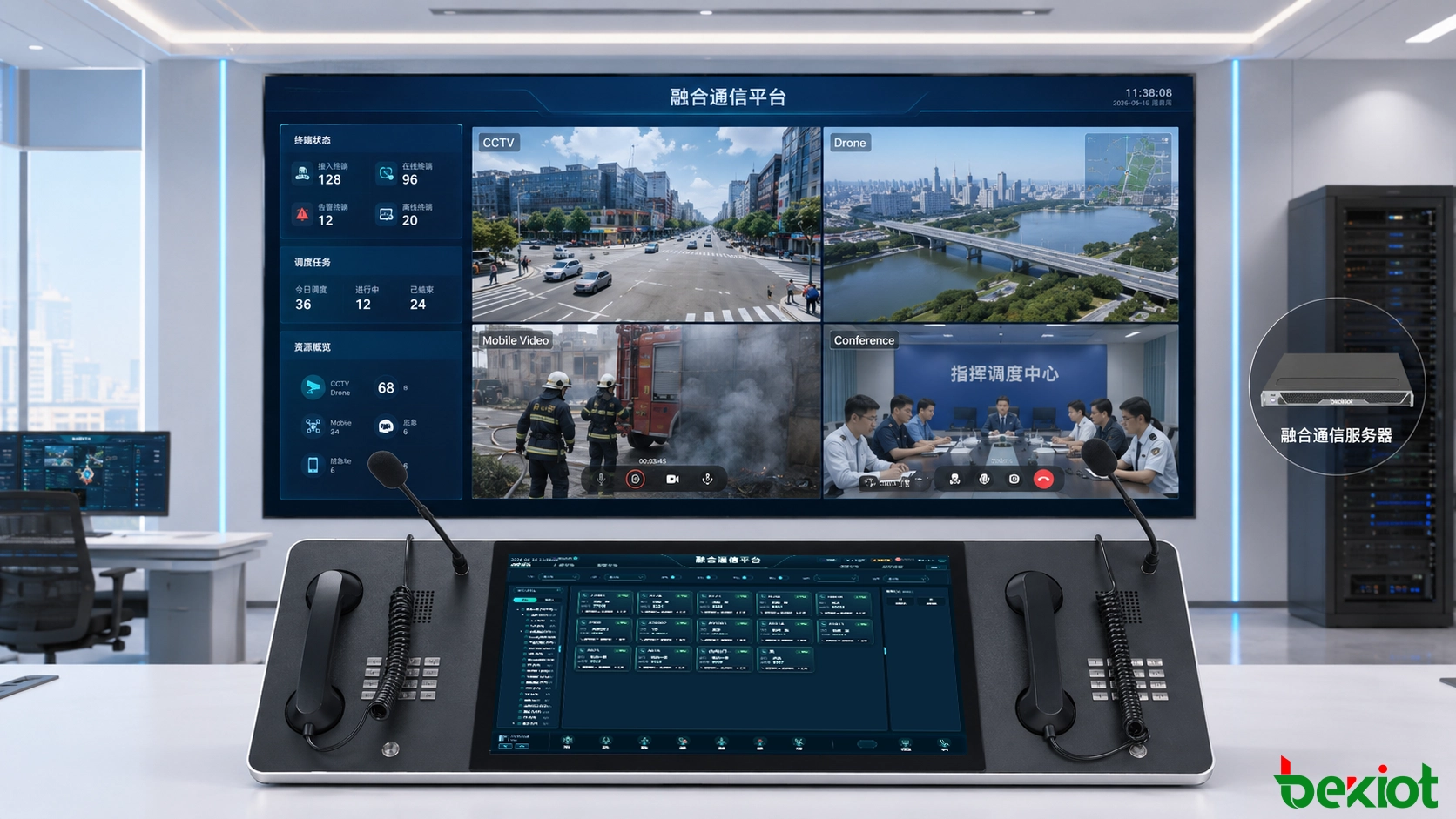
WebRTC provides an effective foundation for browser-based dispatch consoles, but real-world command systems must connect far more than native WebRTC endpoints. CCTV platforms, drones, portable monitoring equipment, conferencing systems, and legacy video resources often introduce different codecs and streaming protocols.
H.265 is a particularly common source of incompatibility. Instead of redesigning the dispatch console or replacing existing surveillance equipment, a media transcoding gateway can receive the original stream, convert H.265 to H.264 when required, adapt resolution, frame rate, and bitrate, and deliver the result through a WebRTC-compatible path.
When the same gateway also supports interfaces such as GB/T28181, RTSP, RTP, RTMP, FLV, HLS, SIP, and WebRTC, it becomes a practical interoperability layer for a broader converged communication architecture. The result is a dispatch workflow in which operators can access heterogeneous video resources through one interface while codec conversion and protocol adaptation remain behind the scenes.
FAQ
Should every surveillance stream be permanently converted before an operator requests it?
Usually not. In large deployments, on-demand processing is often more efficient. The media service can begin pulling and adapting a stream when an operator opens the corresponding resource, then release processing capacity when the stream is no longer required.
Can the same camera stream be delivered to several dispatch operators?
Yes, provided the streaming architecture is designed for one-to-many distribution. A media service can receive a source once and distribute the processed output to multiple authorized viewers instead of opening a separate upstream connection for every operator.
How should video access permissions be managed?
Camera access should normally follow the dispatch platform's user and role permissions. Operators may be allowed to view only specific regions, facilities, camera groups, or incident-related resources, while administrators can receive broader control and configuration privileges.
What happens when the original video source becomes temporarily unavailable?
The dispatch application should receive a clear offline or reconnecting state rather than displaying a frozen image indefinitely. The backend can attempt reconnection according to defined retry policies and restore the stream automatically after the upstream source becomes available again.