


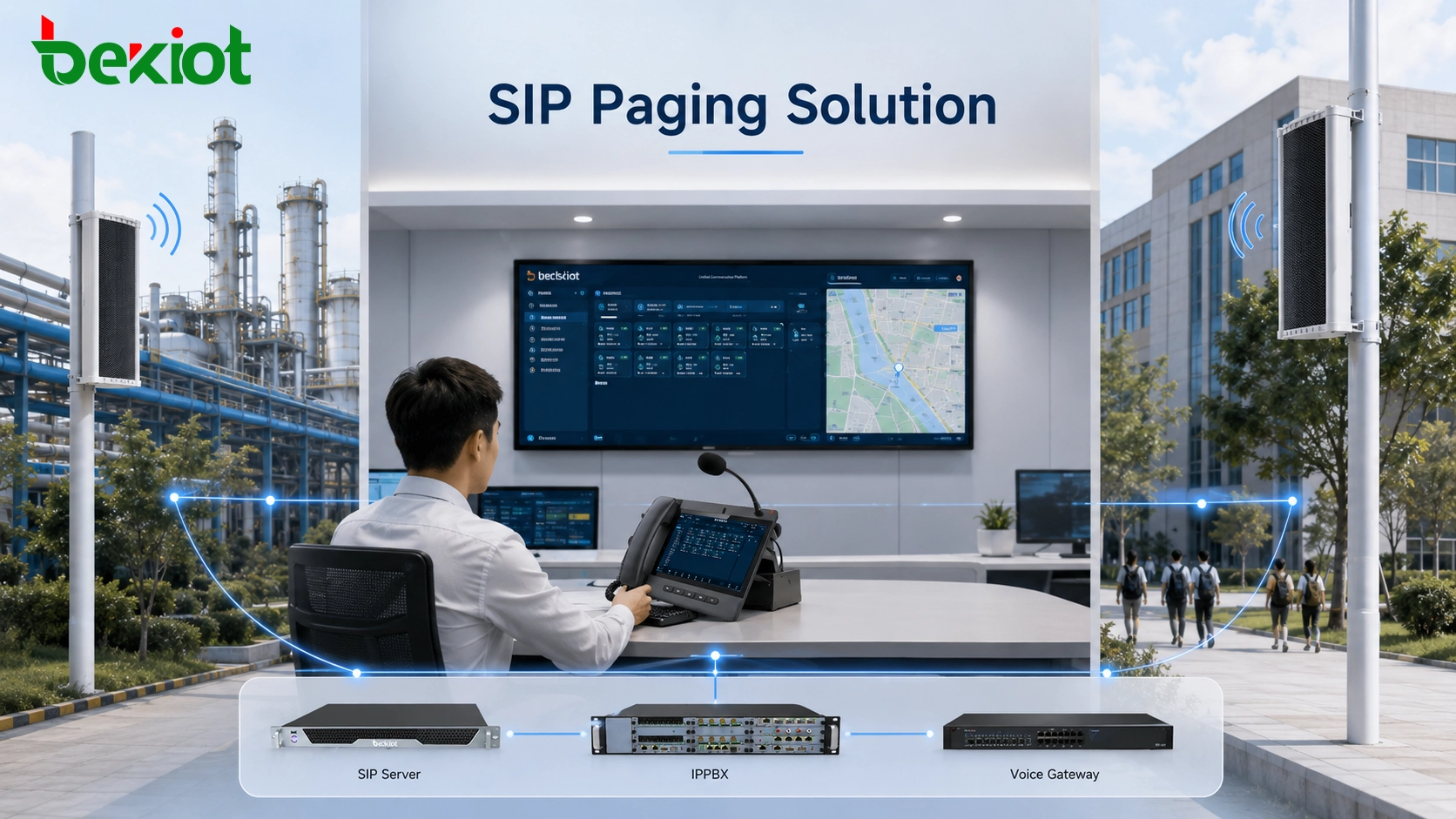
A SIP column speaker can do much more than play announcements from a dedicated public address controller. When it is designed around standard SIP signaling and IP audio transport, the speaker becomes a network communication endpoint that can interact with IP phones, IP PBX systems, unified communication platforms, dispatch consoles, voice gateways and other SIP-based devices. This makes it possible to bring paging and public address functions into the same network used for operational voice communication.
The key to a successful deployment is not simply confirming that two devices carry a “SIP-compatible” label. Reliable interoperability depends on how signaling, media negotiation, audio codecs, network transport, security policies and call behavior are implemented on both sides. A practical solution therefore starts with the complete communication path rather than the speaker alone.
How Network Paging Fits into SIP Architecture
SIP, or Session Initiation Protocol, is an application-layer signaling protocol used to establish, modify and terminate multimedia communication sessions. In a paging environment, SIP handles the session itself while the actual voice stream is normally carried separately through RTP.
This separation is important when designing an IP public address solution. The SIP platform does not need to transport every part of the audio conversation directly. Instead, it coordinates endpoints, identifies where a session should be delivered and negotiates the media parameters required for communication.
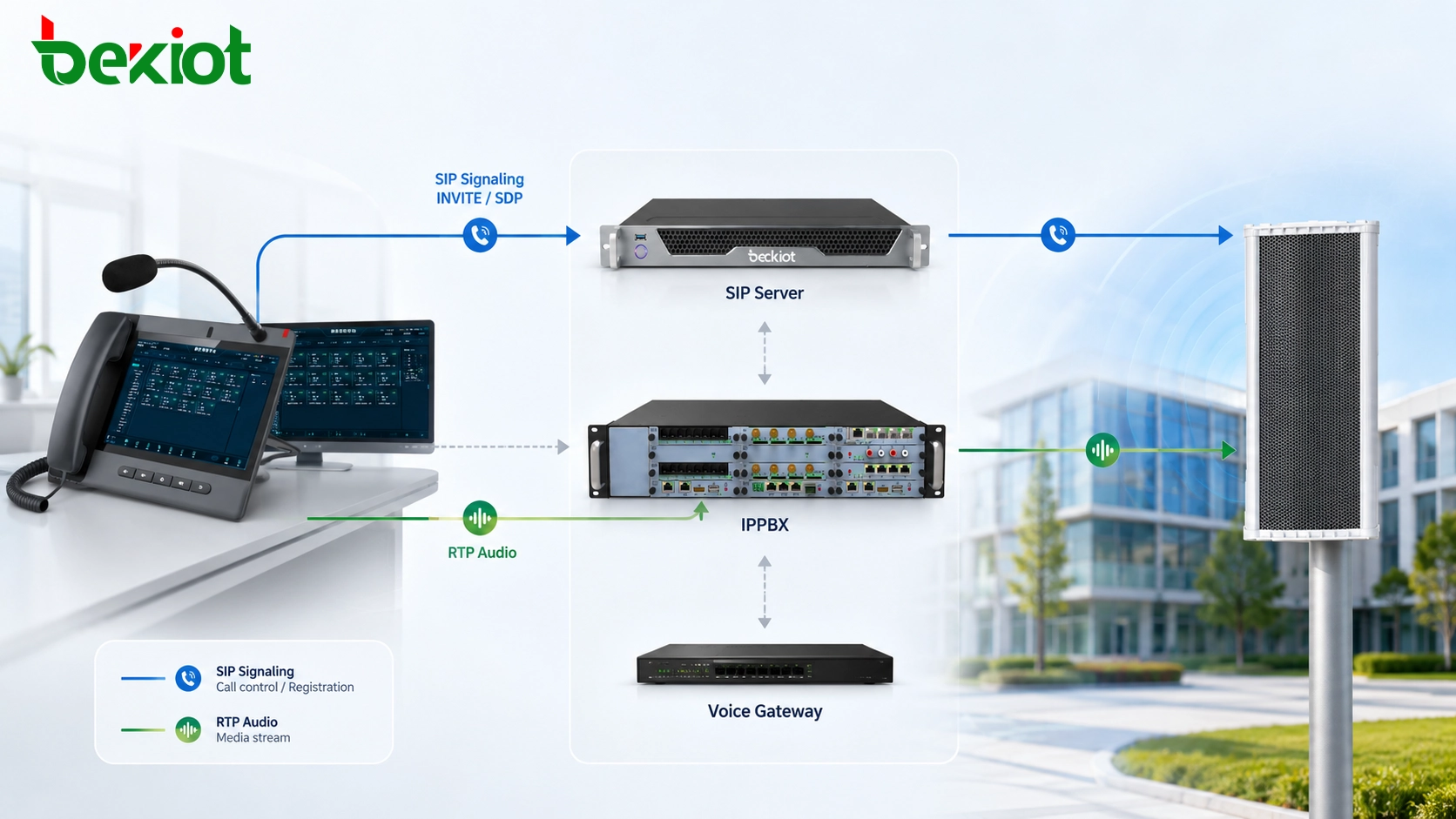
A typical paging session may begin when an IP phone, dispatch console or software platform sends an INVITE request toward the speaker. The receiving endpoint responds according to its configured call policy. Once the session is accepted, SDP information is exchanged to determine media parameters such as the supported audio codec, IP address and RTP port.
The voice stream can then travel over RTP between the participating endpoints. RTCP may be used alongside RTP to provide information related to transmission quality. When the paging session ends, SIP signaling such as a BYE request closes the session and releases the associated communication resources.
This architecture allows the speaker to participate in a standard IP communication environment instead of operating as an isolated analog loudspeaker. It also gives system designers greater freedom to combine paging with telephony, dispatching, emergency notification and operational communication.
What Determines Device Interoperability
Two products supporting SIP do not automatically guarantee complete functional compatibility. SIP provides the signaling framework, but actual interoperability depends on several layers working together.
SIP Registration and Call Control
The first requirement is successful registration or direct SIP communication between the speaker and the selected server or communication platform. The system should correctly handle the signaling required for call establishment, acknowledgement and termination.
Basic methods such as INVITE, ACK, BYE and OPTIONS are particularly relevant during interoperability testing. Advanced functions should be evaluated separately because different platforms may implement optional SIP methods in different ways.
SDP and Codec Negotiation
SDP is used during session establishment to describe the available media parameters. Even when signaling succeeds, audio may still fail if the two endpoints cannot agree on a common codec or media configuration.
Common voice codecs in SIP communication environments include G.711 and G.722, while other codecs may be supported depending on the endpoint and platform. The deployment team should confirm an overlapping codec set before commissioning the system.
RTP Media Routing
SIP signaling and RTP audio do not necessarily follow exactly the same network path. A speaker can register successfully while producing no sound if RTP traffic is blocked by a firewall, routed incorrectly between VLANs or translated improperly by NAT.
For this reason, interoperability tests should always verify both signaling and real audio transmission. Checking only whether an extension appears online in the SIP server is not sufficient.
Transport and Security Policies
SIP environments may use UDP, TCP or encrypted signaling depending on system requirements. Media traffic may also be protected by SRTP in projects where voice security is important.
Both ends need compatible transport and encryption settings. If the PBX requires encrypted signaling but a field endpoint is configured for unencrypted SIP only, registration and call setup can fail even though both products technically support SIP.
Common Systems That Can Connect
One of the main advantages of SIP-based audio is the ability to connect public address endpoints with communication systems that already exist in the organization. The exact functions available depend on the platform, but several device categories are commonly used in these projects.
IP Phones
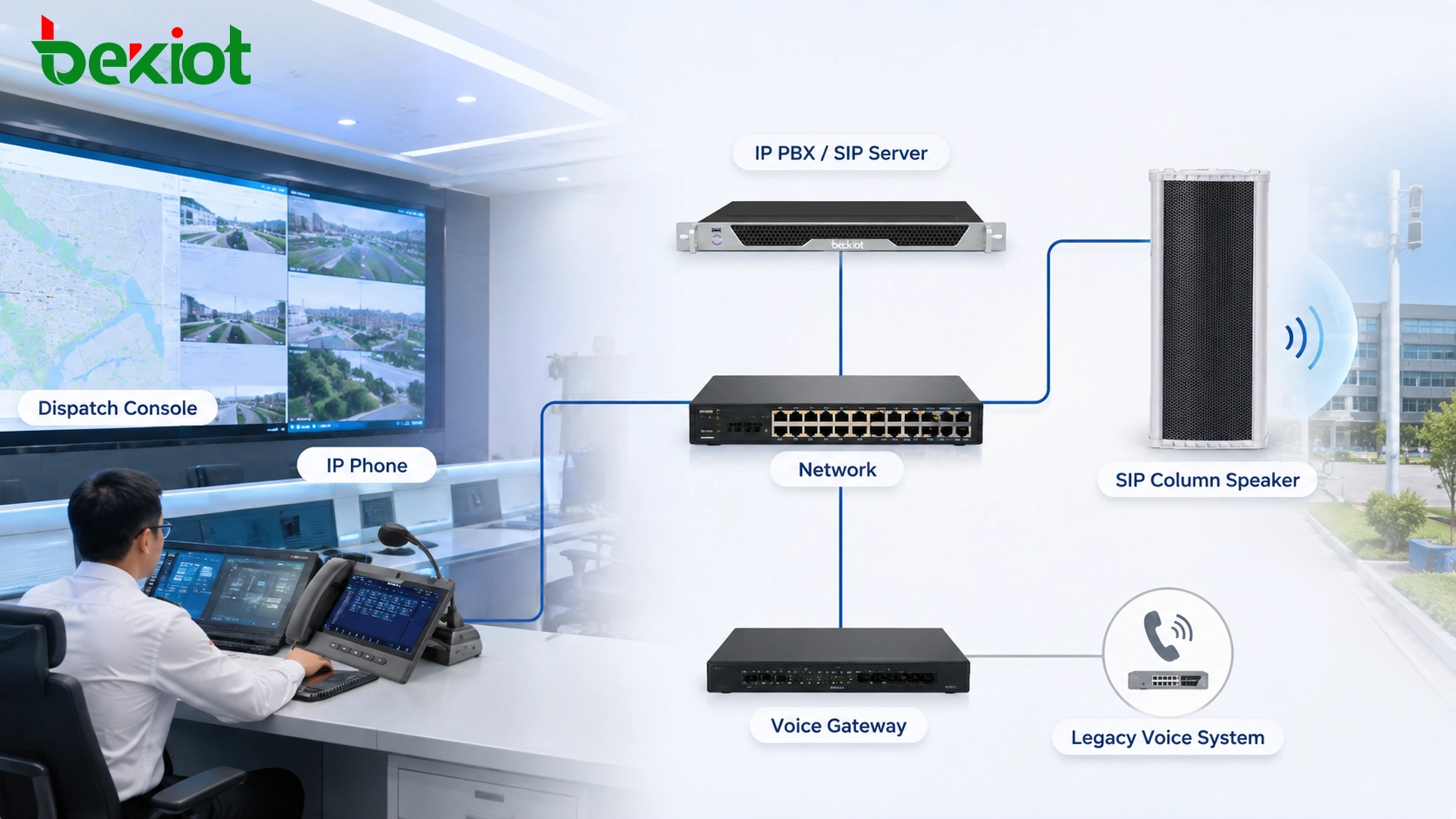
SIP IP phones can provide a simple paging source. A user can dial the extension assigned to an individual speaker, paging group or broadcast service and speak directly into the handset or hands-free microphone.
This approach is useful for reception desks, security rooms, maintenance offices, control rooms and other locations where staff already use IP phones. It eliminates the need to deploy a dedicated paging microphone for every ordinary announcement point.
IP PBX and SIP Servers
An IP PBX or SIP server can act as the central call-control layer. Speakers can be managed as SIP endpoints while phones, consoles and other terminals use extension numbers or paging groups to reach the required areas.
This architecture is particularly practical for organizations that already operate an enterprise voice network. Paging can be added without creating an entirely separate signaling infrastructure.
Unified Communication Platforms
A unified communication platform can connect voice communication, paging and operational workflows through a common control environment. Instead of keeping telephony and broadcasting completely independent, administrators can organize users, terminal groups and communication permissions according to departments, sites or operating zones.
In a multi-building campus, for example, the same platform may support routine internal calls while also providing targeted voice announcements to selected areas.
Dispatch and Command Systems
Industrial plants, transport facilities, utilities and large campuses often require more than basic telephone paging. A dispatch system can provide a visual interface for selecting zones, calling field terminals and coordinating communication during operational or emergency events.
When SIP speakers are connected to this environment, dispatchers can use the communication network to extend voice instructions beyond individual telephone users and reach work areas where loudspeaker coverage is more effective.
Voice Gateways
Voice gateways are useful when a project must retain existing analog or carrier-side communication resources. They can provide an interface between legacy voice infrastructure and the IP communication environment.
This is especially valuable in phased modernization projects. An organization does not necessarily need to replace every existing voice resource before deploying SIP paging. Instead, gateways can help bridge older systems while IP endpoints are introduced gradually.
From Call Signaling to Audio Delivery
A useful way to evaluate a SIP paging solution is to follow one announcement from the operator to the final speaker rather than reviewing equipment individually.
The process usually begins when an operator chooses a destination. This may be an individual speaker extension, a predefined paging group, a building zone or a broadcast service configured on the communication platform.
The system then establishes the SIP session. During this stage, the calling endpoint and receiving speaker exchange signaling information and negotiate compatible media settings through SDP. If the destination is configured for automatic answering, the audio path can open without requiring manual operation at the speaker.
Once the session is active, the voice stream is transmitted through RTP. This separation between signaling and media gives the network designer flexibility but also means that firewall policies, routing tables and VLAN configurations must account for both types of traffic.
When the announcement finishes, the SIP session is terminated and the speaker returns to standby. The same endpoint can then receive another routine page, scheduled notification or higher-priority message according to the logic implemented by the overall system.
Designing a Reliable Deployment
SIP interoperability is only one part of a dependable public address solution. Network design, speaker placement, management policies and operating procedures determine whether the system remains usable once it is installed across a real site.
Plan Zones Before Assigning Extensions
Speaker grouping should follow the physical and operational layout of the site. A campus might use separate groups for teaching buildings, outdoor areas and service zones, while an industrial facility may organize speakers by workshop, loading area, warehouse or utility zone.
Creating a logical naming and numbering structure at the beginning makes later operation much easier. Operators should be able to identify a destination without memorizing unrelated extension numbers.
Give Voice Traffic the Right Network Priority
Paging traffic competes with ordinary business data when both share the same IP infrastructure. Network congestion, excessive jitter and packet loss can reduce speech intelligibility even when the SIP session itself remains connected.
QoS policies can therefore be used to prioritize real-time voice traffic. DSCP and differentiated service policies are commonly considered when the network must carry paging together with video, office traffic, monitoring data and other services.
Check Firewall and NAT Behavior
Multi-site systems often require communication across routed networks, security zones or WAN links. SIP signaling ports and RTP media ranges must be included in the network design, and NAT behavior should be evaluated whenever endpoints communicate across translated address spaces.
A common commissioning mistake is to confirm successful SIP registration while ignoring the return audio path. End-to-end tests should verify that voice reaches every intended zone under the same routing conditions that will exist during normal operation.
Separate Routine and Emergency Workflows
Routine announcements and emergency messages serve different operational purposes. Daily paging may include shift notices, visitor information or service announcements, while emergency broadcasting may need to reach larger areas with higher operational priority.
The communication platform should therefore define who can initiate each type of announcement, which destinations are available to each user and how competing audio sessions are handled.
Choose Field Equipment for the Installation Environment
A successful SIP network does not compensate for unsuitable field hardware. Outdoor and semi-outdoor locations require speakers designed for exposure to dust, moisture and changing environmental conditions, while indoor public spaces may prioritize compact installation and speech coverage.
For projects requiring an outdoor-oriented network audio endpoint, the Becke Telcom SK03-SIP integrates a 30W digital amplifier with IP65 protection and SIP-based communication. It supports two SIP lines as well as commonly used SIP and RTP media functions, making it suitable for distributed paging applications where a compact column-style speaker is preferred.
SIP Outdoor Waterproof Column Speaker – SK03-SIP 30W SIP PA Column Speaker
In a complete solution, the field speaker should be selected together with the SIP platform, network design and coverage plan. Rated output alone does not determine performance; mounting position, background noise, listening distance and the acoustic characteristics of the site also affect speech intelligibility.
Where This Architecture Works Best
SIP paging is particularly useful in sites where voice communication and public announcements must reach many distributed locations without building an independent control network for every communication service.
Industrial and Logistics Facilities
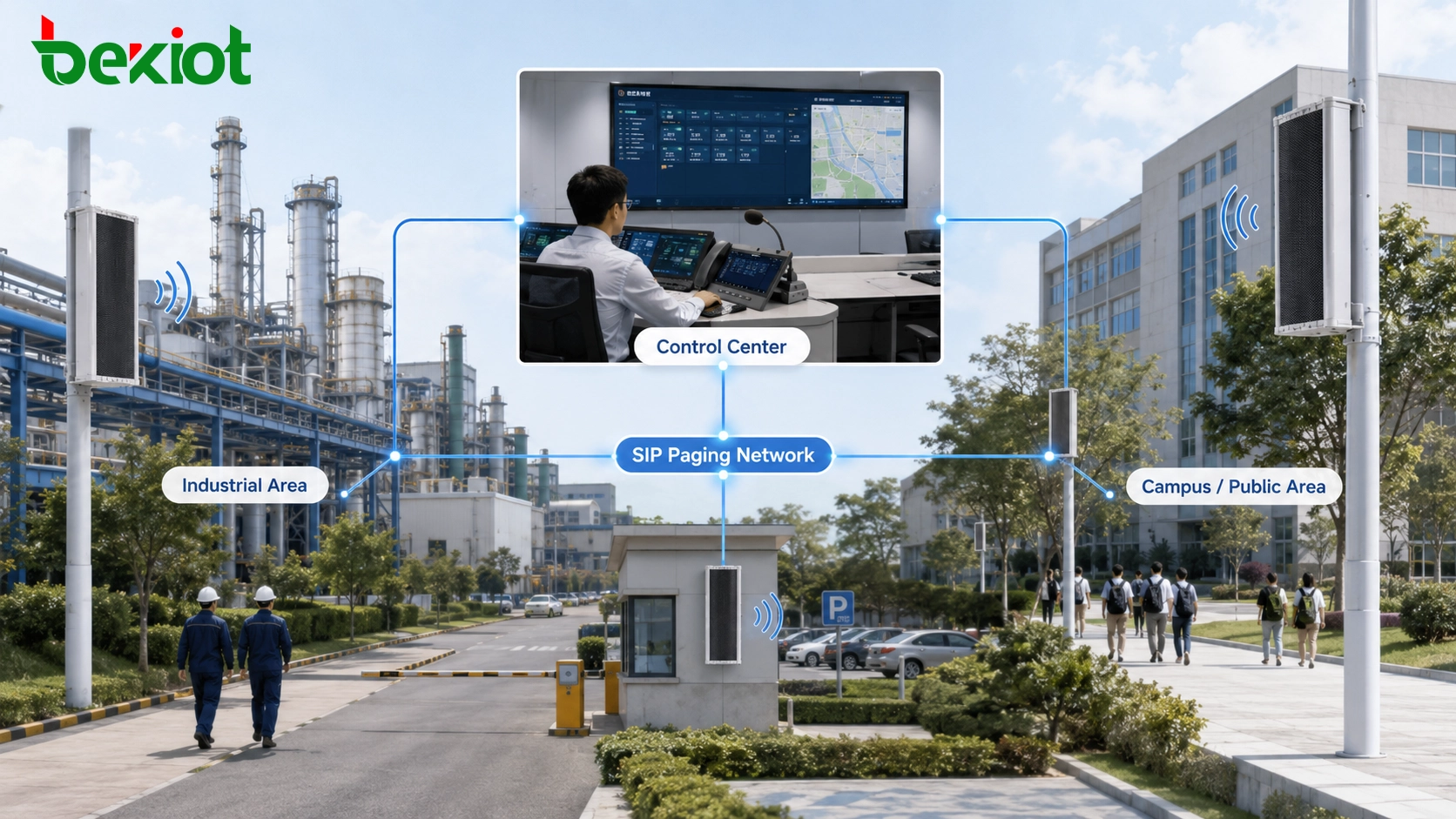
Production plants, warehouses and logistics areas can use SIP speakers for work instructions, shift announcements, maintenance notifications and safety messages. Integration with dispatch or enterprise telephony allows control-room staff to communicate with both individual users and wider operating zones.
Schools and Campuses
Educational environments can divide speakers into classrooms, corridors, outdoor spaces, sports areas and common zones. The network can support routine announcements while allowing authorized staff to initiate targeted or campus-wide messages when conditions require it.
Transportation and Public Facilities
Stations, parking structures, service areas and passenger facilities often need centrally controlled announcements distributed across physically separated zones. SIP architecture allows these endpoints to share existing Ethernet infrastructure while remaining addressable from centralized communication systems.
Commercial and Multi-Building Sites
Office parks, retail complexes and public service buildings can combine telephone communication with network paging for visitor guidance, service notifications, scheduled announcements and operational coordination.
Final Notes
The value of a SIP column speaker lies in its ability to become part of a larger communication environment rather than remain an isolated broadcast device. IP phones can become paging sources, IP PBX systems can provide call control, dispatch platforms can organize communication by zone, and gateways can help retain existing voice infrastructure during network modernization.
The most important design principle is to evaluate interoperability as an end-to-end process. SIP registration is only the first step. SDP negotiation, common audio codecs, RTP routing, QoS, security settings, network topology and operational permissions all influence whether the final system works reliably.
When these elements are planned together, SIP-based paging provides a scalable path for combining public address, routine communication and emergency voice delivery on a common IP infrastructure while still allowing the system to expand as new buildings, zones and communication endpoints are added.
FAQ
Can SIP speakers be installed on a different VLAN from the IP PBX?
Yes, provided that routing, firewall rules and the required SIP and RTP traffic are correctly configured between the VLANs. The deployment should be tested using real audio sessions rather than relying only on successful device registration.
Does every SIP speaker need its own SIP account?
That depends on the platform architecture and paging strategy. Individual SIP accounts provide direct endpoint addressing, while some systems use paging groups, multicast services or platform-controlled broadcast logic. The preferred method should be defined before extension numbering and zone configuration are finalized.
Can an existing analog PA system be retained during migration?
In many projects, yes. A phased architecture can retain selected analog amplifiers or speaker circuits while introducing SIP endpoints in new or upgraded areas. Appropriate gateways, paging interfaces or platform integration may be required to connect the two environments.
How should third-party SIP compatibility be tested before deployment?
A pilot test should include registration, incoming paging, session termination, codec negotiation, RTP audio in both normal and routed network conditions, automatic answering behavior, concurrent calls, recovery after network interruption and any required security settings. Testing representative devices before large-scale installation can reveal interoperability differences early.







