


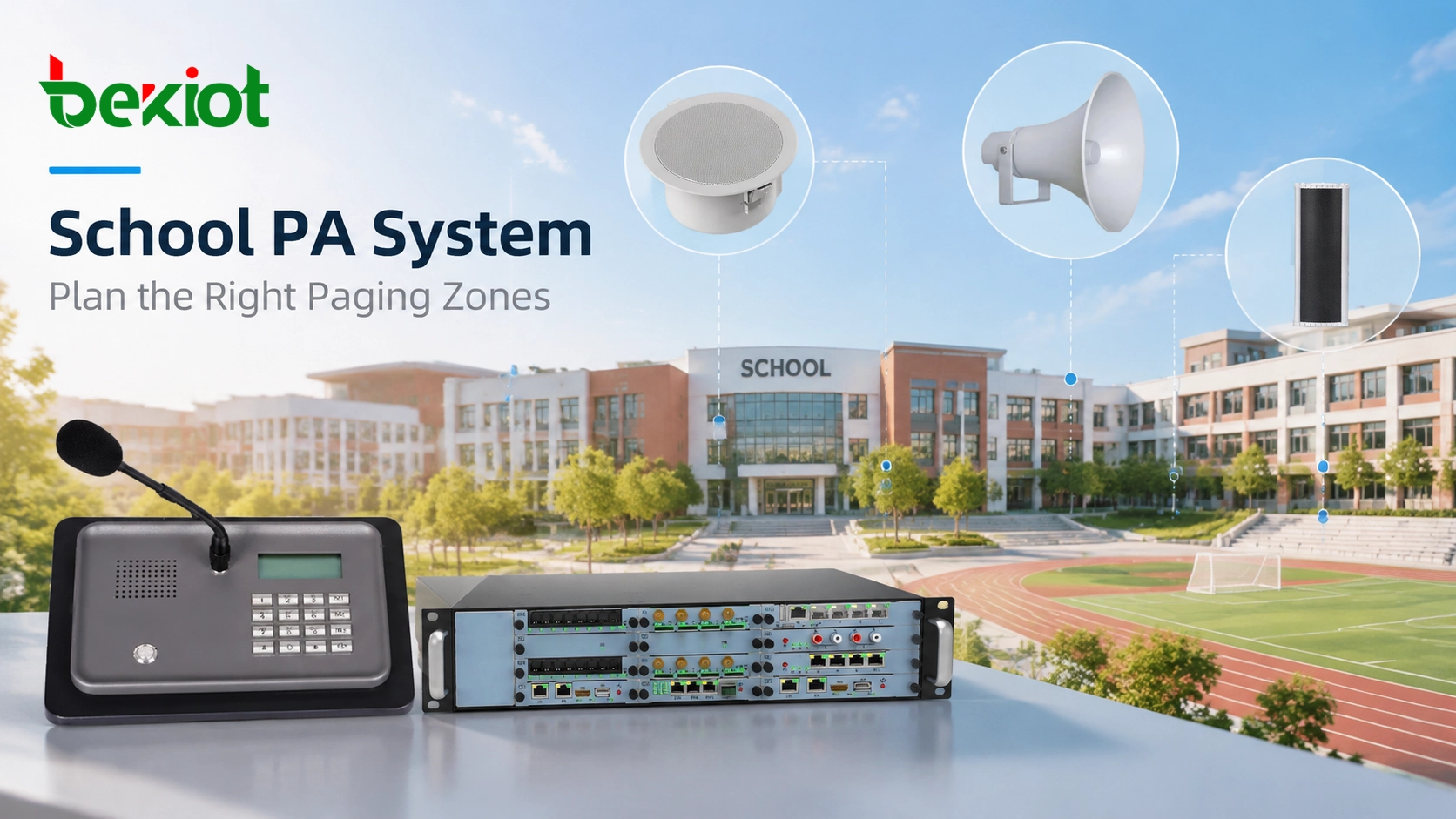
A school PA system is not only used for broadcasting the same message across an entire campus. In daily operation, different users often need to communicate with different areas. Teachers may need to send announcements to a specific building, administrators may need to notify the whole campus, and security staff may need to deliver urgent instructions to selected locations.
Paging zone planning determines whether a school PA system can deliver the right message to the right place at the right time. A properly designed zone structure improves daily communication efficiency, reduces unnecessary interruptions, and provides a more effective method for emergency notification.
Modern IP-based school PA systems provide greater flexibility compared with traditional fixed-zone broadcast systems. By using SIP paging microphones, network speakers, and centralized communication platforms, schools can create paging zones based on campus layout, operational requirements, and emergency procedures.
Why Paging Zones Matter in a School PA System
Without proper zone planning, a school broadcast system may not match the actual communication needs of the campus. For example, a classroom announcement does not always need to interrupt every area, while an emergency notification may require immediate coverage across multiple buildings.
A well-designed paging zone structure allows schools to:
Send announcements to specific buildings or areas
Separate daily paging from emergency broadcasts
Reduce unnecessary disruption during teaching activities
Provide different access levels for different users
Expand communication areas when the campus grows
Effective zoning is not simply dividing speakers into groups. It is about creating a communication structure that follows how the school operates every day.
Common Paging Zones in Schools
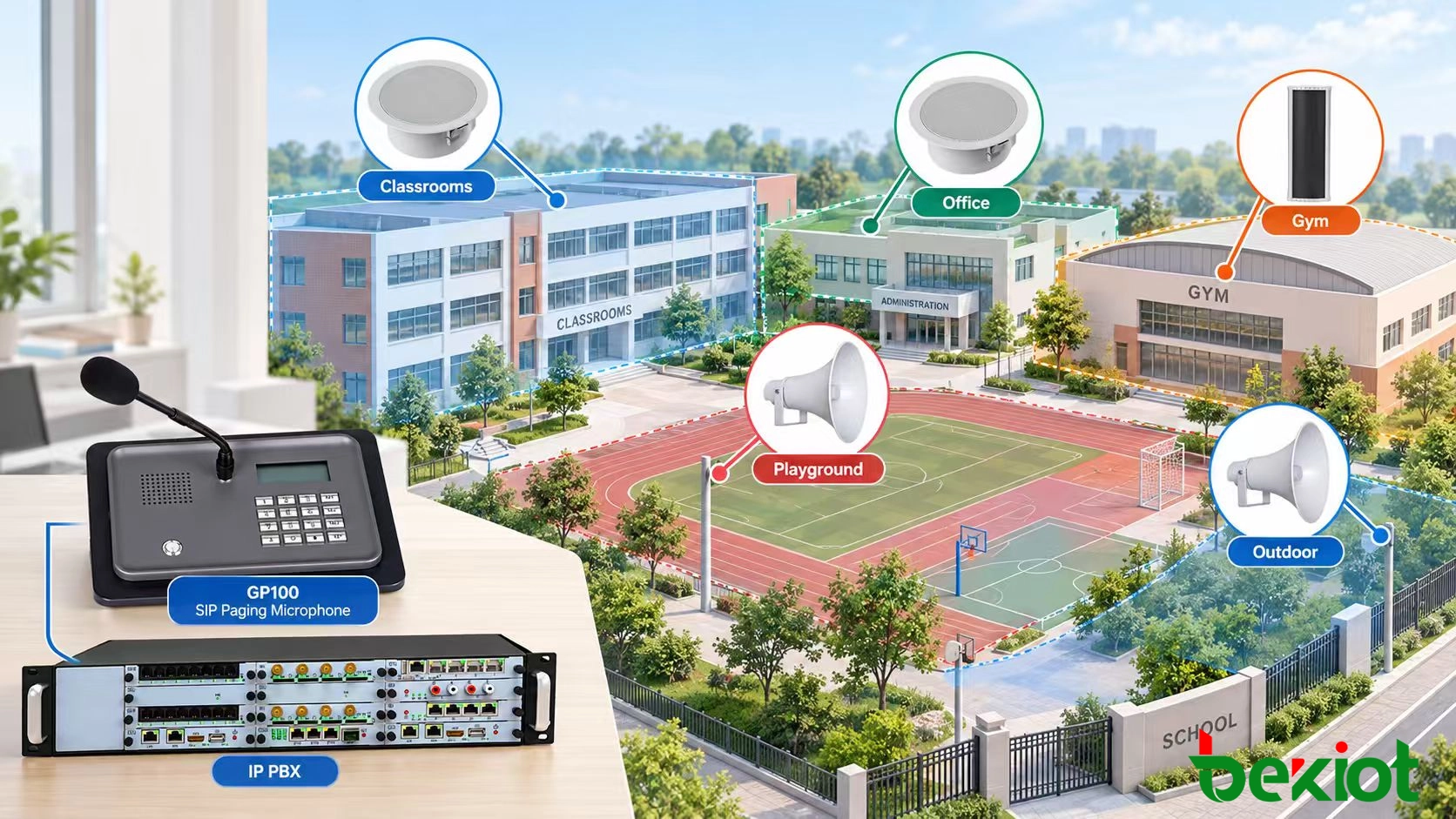
The number of paging zones depends on the size, building layout, and communication requirements of the school. Most campuses divide broadcast areas according to building functions, user requirements, and emergency response needs.
Classroom and Teaching Zones
Classroom areas are usually the primary zones in a school PA system. They are commonly organized by building, floor, or teaching department.
Typical classroom paging functions include:
Daily announcements
Class schedule notifications
Teaching-related messages
Administrative information
For larger campuses, separating classrooms by building or floor allows administrators to send targeted messages without disturbing unrelated areas.
Administrative and Staff Zones
Administrative areas such as offices, reception areas, and staff rooms often require independent communication capabilities.
These zones may be used for:
Internal staff communication
Visitor management coordination
School operation notifications
Separating administrative zones from classroom zones helps maintain efficient communication while minimizing disruption to teaching activities.
Public and Outdoor Zones
Public areas usually have different acoustic requirements compared with classrooms. These areas may include:
Hallways
Cafeterias
Gymnasiums
Playgrounds
Parking areas
Outdoor and public zones require careful speaker placement because background noise, distance, and environmental conditions can affect voice clarity.
Emergency Paging Zones
Emergency communication requires special consideration during zone planning. A school may need to send instructions to a specific area or immediately broadcast an alert across the entire campus.
Emergency paging zones should consider:
Priority announcement capability
Fast access for authorized users
Clear voice coverage
Integration with emergency procedures
Factors to Consider When Designing School Paging Zones
Campus Layout and Building Structure
The physical layout of a campus is one of the most important factors when planning paging zones. A school with multiple buildings usually requires more detailed zone management than a single-building campus.
Designers should consider:
Number of buildings
Floor distribution
Indoor and outdoor areas
Distance between communication locations
Daily Communication Requirements
A school PA system supports different communication tasks throughout the day. The paging zone design should support both scheduled announcements and manual paging.
Examples include:
Automated school bell schedules
Teacher announcements
Campus activity notifications
Management communication
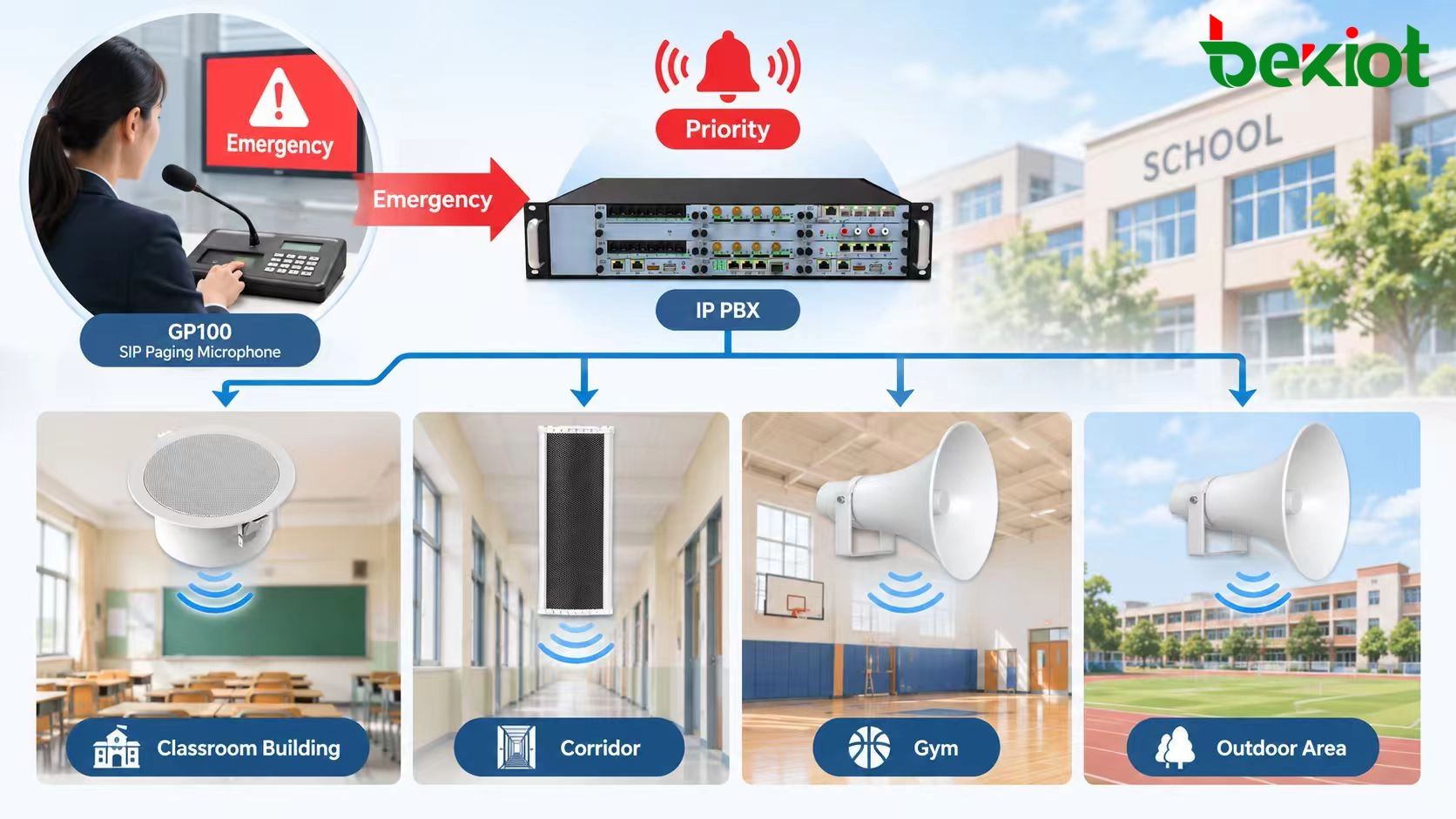
Emergency Response Planning
Emergency paging should have higher priority than normal announcements. The system should allow authorized users to quickly send instructions to selected zones or all areas.
A typical emergency paging workflow includes:
Emergency message → Priority paging → Selected zones or all zones → Voice notification
Designing a Flexible Paging Zone Hierarchy
A well-designed school PA system should provide both detailed control and simple operation. If zones are too broad, users may be forced to broadcast unnecessary messages across the entire campus. If zones are divided too narrowly, daily operation can become complicated and difficult to manage.
A practical zone hierarchy usually includes multiple control levels:
Room-level zones: Individual classrooms, offices, or special rooms requiring targeted announcements
Floor-level zones: Multiple rooms and corridors grouped together for building management
Building-level zones: Complete academic buildings, dormitories, or functional areas
Campus-wide zone: All areas activated together for major announcements and emergency situations
Modern IP-based PA systems allow administrators to combine or separate zones through software configuration. For example, a school can create a temporary outdoor zone for sports events or combine multiple buildings into one emergency broadcast group without changing physical wiring.
Matching Speaker Selection With Paging Zones
Paging zone planning is closely connected with speaker selection and installation design. Different areas of a campus have different acoustic conditions, and the same speaker arrangement may not provide suitable coverage everywhere.
Classroom areas usually require clear voice reproduction at moderate volume levels, while gyms, cafeterias, and outdoor spaces require stronger sound coverage because of larger spaces and higher background noise.
When planning speaker coverage, designers should consider:
Room size and layout
Background noise levels
Ceiling height and building materials
Indoor or outdoor installation conditions
Required speech clarity
The goal of zone planning is not simply to increase sound output. A properly designed system should deliver clear and understandable messages while avoiding unnecessary disturbance in unrelated areas.
Related Product: SIP Speakers
Emergency Paging and Priority Management
Emergency communication is one of the most important reasons for carefully planning school PA system zones. During an incident, staff may need to send information quickly to specific locations or the entire campus.
A properly configured system should allow emergency messages to take priority over normal paging functions.
Typical priority levels may include:
Emergency level: Fire alarms, lockdown instructions, severe weather notifications, and evacuation messages
Safety level: Security announcements and urgent operational communication
Routine level: Daily announcements, class reminders, and scheduled bell notifications
General level: Events, background audio, and non-critical messages
Aligning paging zones with emergency procedures allows schools to improve response efficiency. For example, a localized incident may require communication with one building, while a campus-wide emergency requires all zones to receive the same instruction.
How SIP Technology Improves School Paging Zone Management
Traditional analog PA systems often depend on fixed hardware zones. Modern SIP-based school PA systems provide more flexible zone management by using IP networks for communication and control.
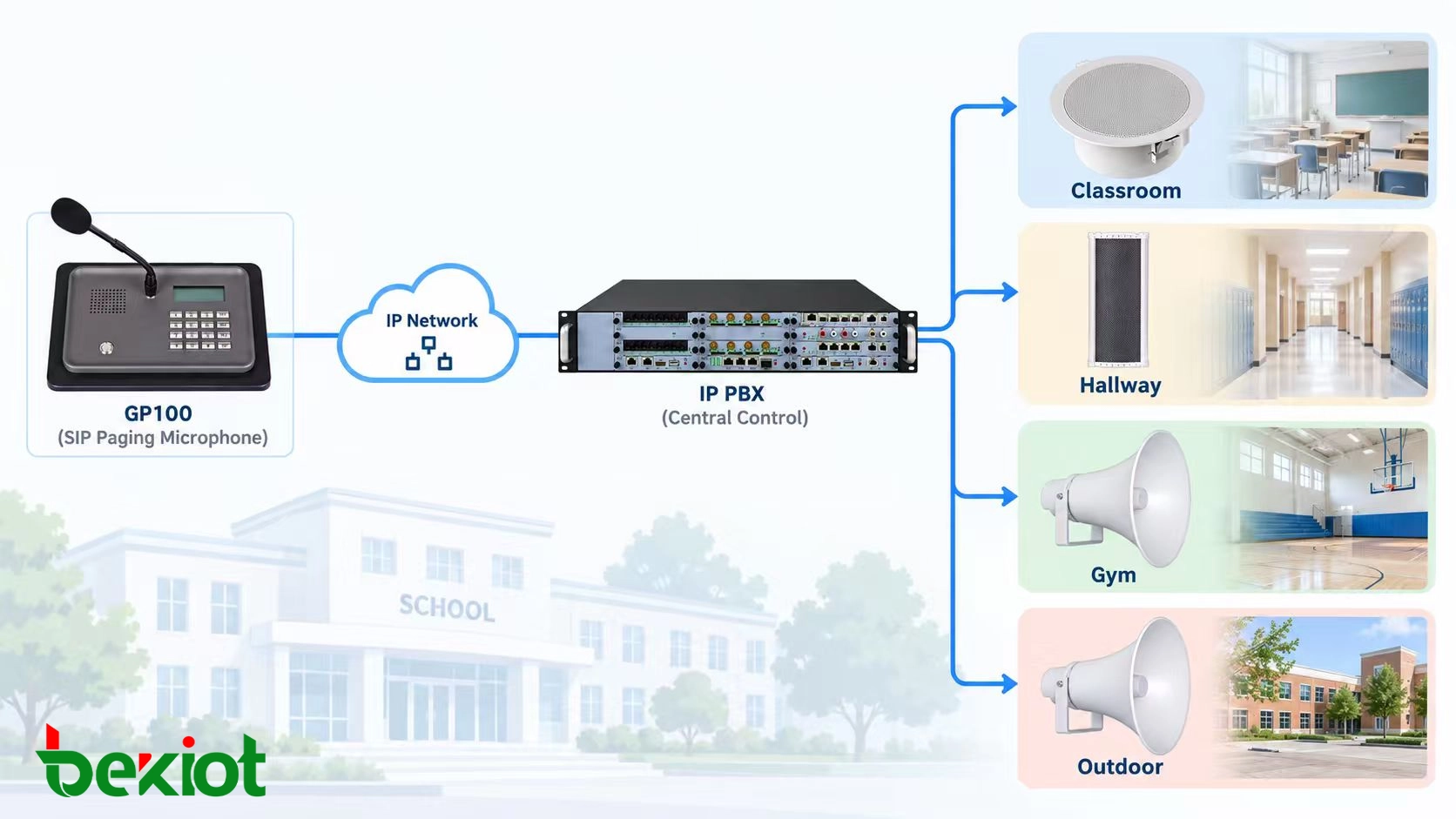
A SIP-based architecture can connect paging microphones, network speakers, communication servers, and management platforms through the same network infrastructure.
A typical SIP school PA workflow includes:
SIP Paging Microphone → IP Network → Communication Server → Selected Paging Zones → Network Speakers
SIP technology provides several advantages for school paging zone management:
Flexible zone configuration through software
Easier expansion when adding new classrooms or buildings
Centralized control of multiple campus areas
Support for priority and emergency announcements
Integration with existing IP communication systems
Related Product: SIP Paging Microphone
Building a Scalable School PA System
Schools often change over time. New classrooms, additional buildings, and updated communication requirements may appear after the original installation.
A scalable paging zone design should consider future expansion from the beginning.
Recommended planning considerations include:
Reserving capacity for additional paging zones
Using IP-based communication equipment for easier expansion
Standardizing network speaker deployment
Maintaining clear zone naming and management rules
Compared with traditional fixed systems, IP-based school PA solutions allow administrators to adjust paging structures as campus requirements change.
Becke Telcom School PA System Solutions
Becke Telcom provides SIP-based communication solutions for schools and campuses requiring flexible paging, voice communication, and emergency notification capabilities.
By combining SIP paging microphones, network speakers, and IP communication platforms, schools can design paging zones according to building layouts, daily operation requirements, and emergency procedures.
A properly planned school PA system can support classroom announcements, administrative communication, scheduled bell functions, and emergency broadcasts through the same network infrastructure.
The combination of SIP technology and flexible paging zones allows educational facilities to build communication systems that are easier to manage, expand, and integrate with other campus communication solutions.
FAQ
How many paging zones does a school PA system need?
The required number of paging zones depends on campus size, building structure, communication requirements, and emergency procedures. Small schools may need only several zones, while large campuses may require many independent areas.
Can different school buildings have separate paging zones?
Yes. IP-based school PA systems allow different buildings, floors, and functional areas to be configured as independent paging zones.
Can emergency announcements override normal school paging?
Yes. Priority paging allows emergency messages to interrupt normal announcements when required.
How are speakers assigned to different paging zones?
Speakers are usually assigned according to campus layout, sound coverage requirements, building functions, and communication workflows.
Can IP paging zones be expanded after installation?
Yes. IP-based paging systems provide easier expansion because new zones can be added by extending network devices and updating system configuration.







