


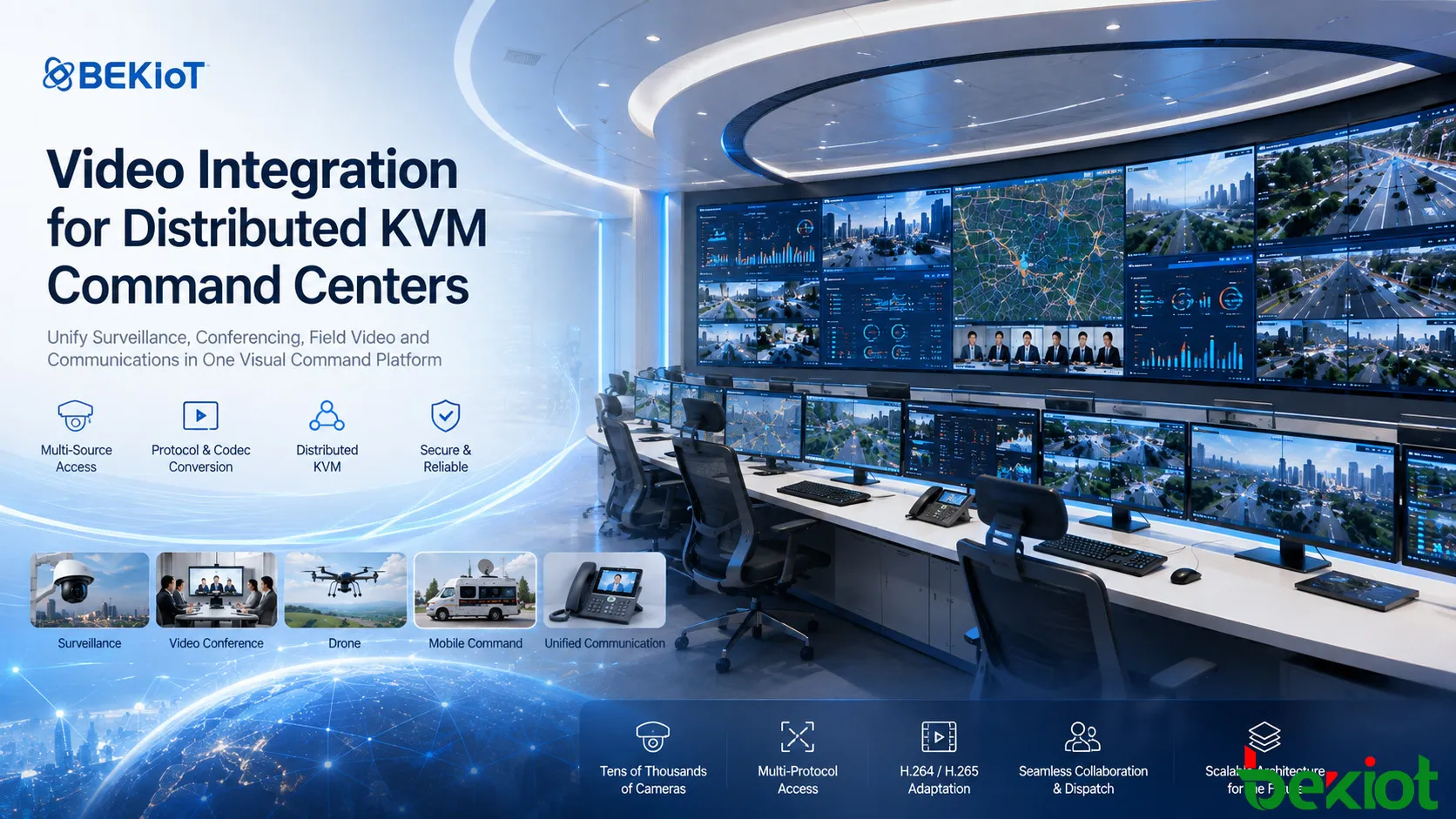
Distributed KVM systems provide a flexible way to manage audio and video resources inside modern command and control centers. Business computers, recording systems, surveillance platforms, video conferencing resources and other visual information can be distributed through IP or fiber networks and presented on operator workstations, video walls and other display endpoints. This gives command personnel greater freedom to call, switch and share information without being limited by fixed point-to-point cabling.
The challenge becomes more complex when the command center must integrate video resources that already exist on different networks. Surveillance systems, video conferencing platforms, video phones, drones, mobile command vehicles and other remote systems may all use different streaming methods, codecs and communication protocols. In a large deployment, the surveillance network alone may contain tens of thousands of cameras. Connecting every external source through an individual hardware encoding and decoding path can make the system increasingly difficult to expand and manage. A more practical architecture is to introduce a unified video access and media conversion layer between these external systems and the distributed KVM environment.
Where Distributed KVM Fits
The primary strength of distributed KVM is the management of audio and video resources within the physical command center. Video sources can be transported through network or fiber infrastructure and assigned to different display destinations according to operational requirements.
In a typical command room, an operator may need to call a workstation onto a desktop display, move another source to the main video wall and quickly switch between different information systems during an incident. Distributed KVM provides the switching and presentation framework required for these operations.
This model is especially effective when the source is a computer, server, recorder or another device with a predictable local video interface. The difficulty appears when the resource is already a network video stream rather than a conventional physical video signal.
Modern command centers increasingly depend on video from systems located outside the room itself. A surveillance platform may manage cameras distributed across an entire city, industrial site or transportation network. A video conferencing platform may provide remote meeting images. A drone or mobile command vehicle may continuously return live video from an incident scene. Unified communication systems may also contain SIP-based video terminals that operators need to display immediately.
If every one of these systems is converted separately into a physical KVM source, the number of interfaces and intermediate devices can increase rapidly. The KVM layer therefore works more effectively when it remains focused on command-room interaction while another layer handles network-native video access.
This separation is also valuable for system planning. The number of operator seats and large-screen outputs does not necessarily need to grow at the same rate as the number of available cameras or remote video sources. A command center may have access to tens of thousands of video channels while only a small percentage are viewed simultaneously. Instead of treating every available stream as a permanently occupied physical input, the system can call the required network resource when an operator, incident or dispatch task needs it.
Building a Unified Media Access Layer
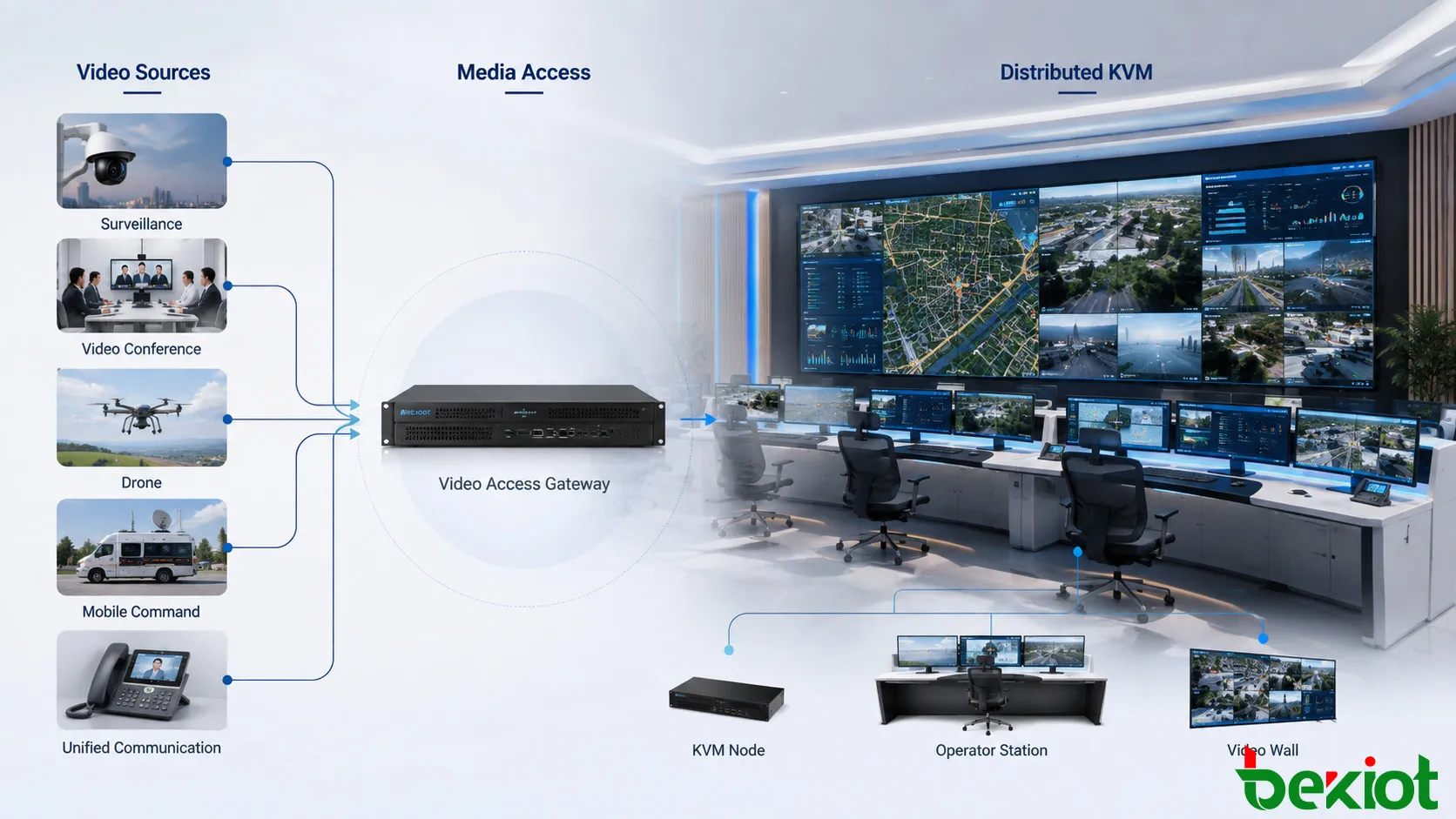
A scalable command center can place a video access gateway or media service between external video systems and the distributed KVM network. Its purpose is not to replace KVM switching. Instead, it provides a common entry and exit point for network video resources.
External systems first deliver their streams to the media layer through their existing network interfaces. The media layer identifies the required source, receives or pulls the stream, converts the protocol or codec when necessary and then provides a compatible stream to the KVM environment.
This creates a clearer division of responsibilities. Surveillance, conferencing, mobile video and communication platforms continue to perform their original tasks. The media layer handles stream integration and compatibility. Distributed KVM remains responsible for distributing the resulting visual resources to operators and displays.
The architecture is particularly useful when a command center must continuously add new video systems. Instead of rebuilding the KVM infrastructure whenever a new platform is introduced, the new resource can first be adapted at the media access layer. Once it has been converted into a format that the KVM side can recognize, it becomes another available resource within the command environment.
The result is a more unified workflow. Operators do not need to understand how each original system delivers video. They only need access to the resources required for monitoring, dispatching and incident response.
From an engineering perspective, this layered design can also reduce unnecessary coupling between systems. Changes to a surveillance platform, video communication system or field-video source do not automatically require corresponding changes throughout the KVM network. As long as the media access layer can continue to obtain and normalize the required stream, the command-room presentation workflow can remain largely unchanged.
Connecting Surveillance and Conference Video
Surveillance systems are one of the most important sources in a command center. Large projects can involve thousands or even tens of thousands of cameras. Directly integrating every camera through an independent hardware encoding path is difficult to maintain and can make later expansion unnecessarily complicated.
A unified media layer can connect directly to selected network cameras or communicate with an existing video surveillance platform. Where the upstream platform already maintains camera directories and organizational structures, those resources can be retrieved through the platform rather than recreating every camera relationship inside the KVM system.
The required streams can then be converted into a format suitable for downstream KVM decoding. RTSP is widely used for this type of video delivery. When the original surveillance resource is acquired through another access method, the media layer can normalize the stream before presenting it to the KVM environment.
Resource selection is particularly important in large surveillance deployments. The command center does not normally need to decode every camera continuously. Operators can retrieve video according to geographic area, event type, camera group or operational task. Relevant images can then be assigned to operator screens, investigation positions or large-screen display layouts as the situation develops.
Video conferencing introduces a different integration model. In a basic deployment, a conference terminal can be connected to the distributed KVM system as a conventional physical video source. This approach is suitable when the command center only needs to display the terminal output.
Deeper integration can instead take place at the media level. A conferencing MCU or related conferencing platform can provide mixed meeting video as a network stream. That stream can be introduced directly into the command center media environment, reducing dependence on a dedicated physical video output for every conference resource.
This approach is useful when video conferencing and command-center visualization need to operate as parts of the same information workflow rather than as completely separate systems. During a major incident, for example, conference participants, surveillance footage and remote field video can be presented within the same command environment so that decision-makers can compare live visual information while communicating with remote teams.
Bringing Field Video Into Operations
Command centers increasingly need real-time images from locations far beyond fixed surveillance coverage. Drones, mobile command vehicles and other remote video systems are frequently used during emergency response, infrastructure inspection, security operations and large public events.
These sources are different from fixed cameras because the communication path may change as the field equipment moves. Some devices push video toward the command center, while other systems allow the center to request a stream. For this reason, relying on only one video delivery method can restrict interoperability.
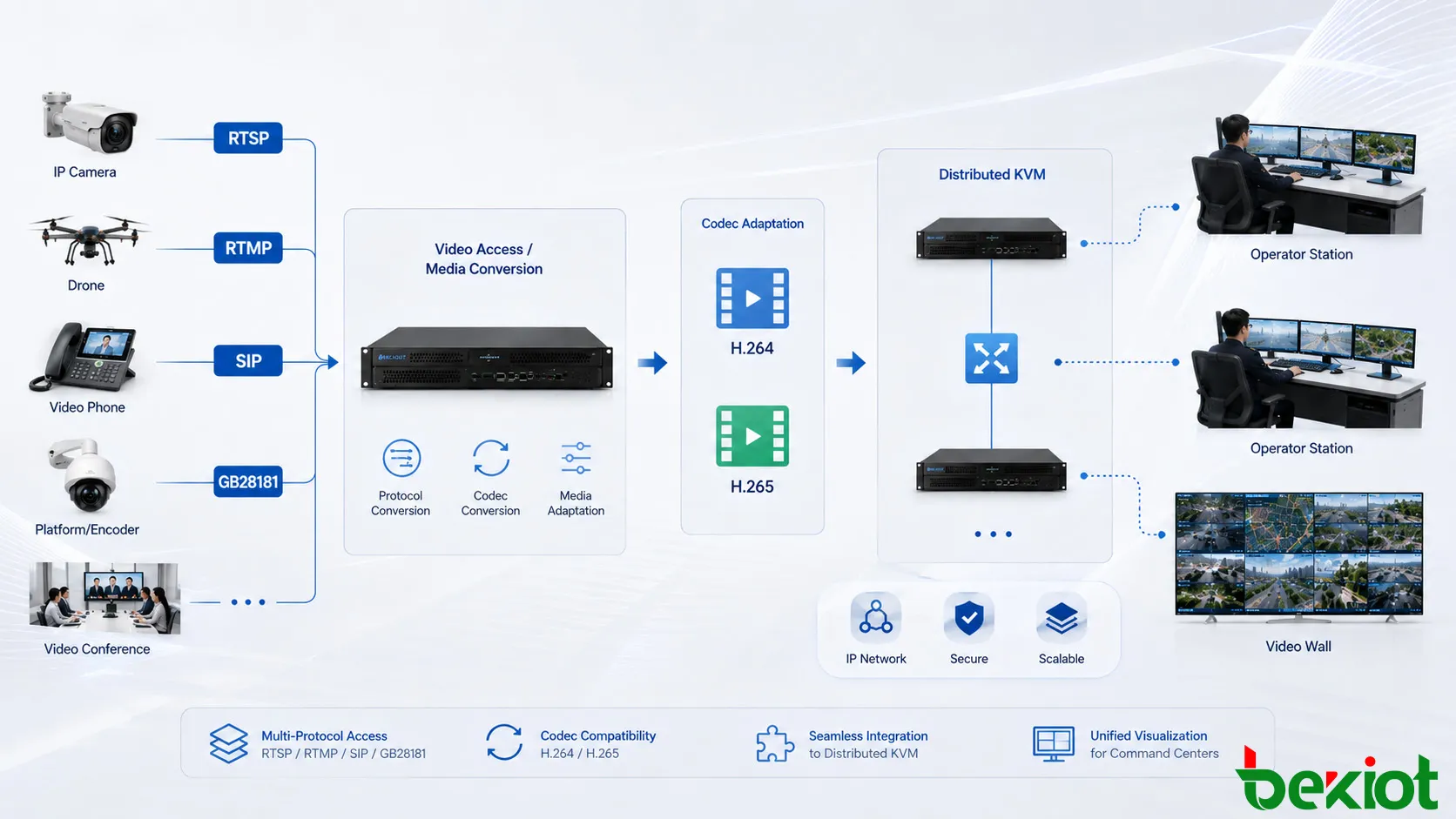
A media access layer designed for heterogeneous video should be able to work with common streaming and communication methods such as RTMP, RTSP, SIP and GB28181. Supporting several interfaces allows the command center to accept video from a wider range of field equipment without creating a separate integration architecture for each device category.
Media adaptation is also important because the incoming stream may not match the capabilities of the downstream KVM decoder. Video from field devices can differ in codec, resolution, frame rate and bitrate. The integration layer can normalize these characteristics before forwarding the stream into the command-center display system.
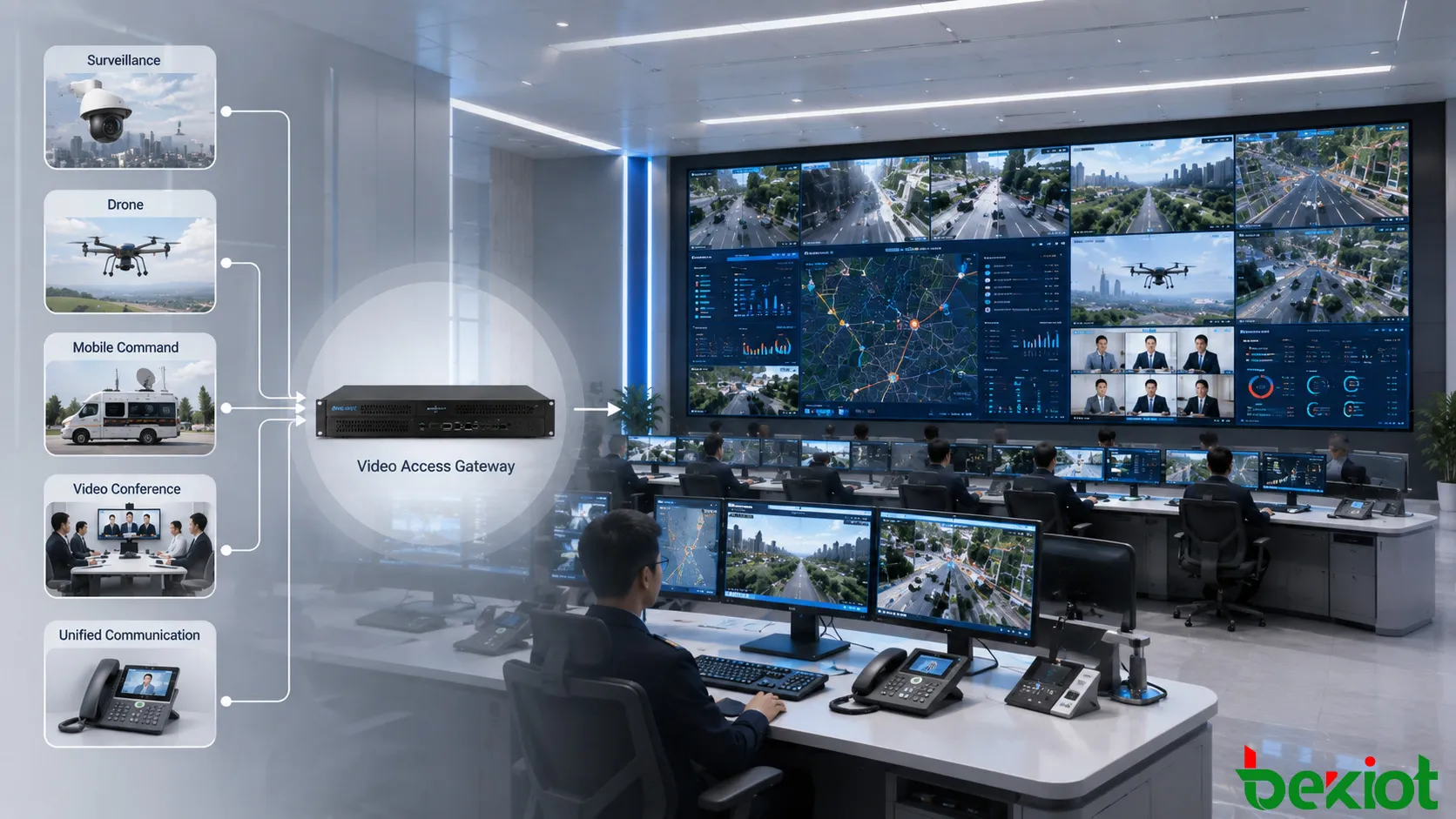
This creates a practical path from the incident scene to the operator. A drone can provide an aerial view, a vehicle-mounted system can send video from a mobile response unit, and fixed surveillance cameras can provide surrounding context. Once these sources have been converted into compatible network video, the KVM system can distribute them to the required operator positions or large-screen displays.
For emergency applications, the value lies not only in receiving a remote video stream but also in making it immediately usable within the existing command workflow. Field video should be capable of being called alongside maps, surveillance images, communication interfaces and business applications, allowing operators to compare information without repeatedly switching between unrelated platforms.
Solving Protocol and Codec Differences
Video integration is not achieved simply because two systems are connected to the same network. The sending and receiving systems must also agree on how the video is encoded, transported and presented.
H.264 and H.265 are both commonly encountered in surveillance and real-time video environments. A source may generate H.265 while a downstream endpoint or application is designed around H.264. In that situation, codec conversion may be necessary before the stream can be used reliably by the destination system.
Protocol differences create a similar problem. A SIP-based video communication system and an RTSP-oriented KVM video workflow do not use the same signaling model even if both carry IP video. Converting SIP video into an RTSP-accessible stream allows communication-system video to become available to KVM decoders without changing the original function of the communication platform.
The opposite conversion can also be useful when media needs to move from an RTSP-oriented environment toward a SIP-based system. In this way, the media layer acts as an interoperability boundary rather than forcing every connected platform to support every other system's native interface.
Resolution, frame rate and bitrate may also need adjustment during this process. The objective is not to apply identical settings to every stream, but to create a media profile that the receiving application can process correctly.
Network planning should be considered at the same time. High-resolution streams can consume significant bandwidth when many channels are opened concurrently. The number of simultaneous streams, required image quality and available network capacity therefore need to be evaluated together. This is especially important when video is transmitted between remote sites, command centers and field networks rather than remaining inside a single local-area network.
Integration With Unified Communications
A modern command center often combines visual monitoring with voice, video calling and dispatch communications. Unified communication platforms may include video phones, intelligent communication terminals and other SIP-based endpoints that contain useful real-time video.
These resources are valuable during coordinated response because operators may need to place communication video beside surveillance images or field feeds on the same command display environment. However, communication terminals are normally designed around interactive sessions rather than continuous KVM video distribution.
A media conversion layer provides the bridge between these operating models. SIP-based video can be converted into a stream that downstream KVM resources can receive. Codec, resolution, frame rate and bitrate can also be adapted when the communication system and display system use different media requirements.
The command center can therefore combine several previously independent categories of information. Fixed surveillance provides continuous monitoring, conferencing supports remote collaboration, mobile video provides images from the field and unified communications adds visual information from communication endpoints.
Distributed KVM then performs the role it is best suited for: deciding where those resources should be displayed and making them available to the correct operator or command screen.
This is particularly useful in multi-department command environments. Security, operations, emergency response and management teams may use different communication and video systems in daily work, but major incidents often require those resources to be viewed together. A common visual access framework reduces the need to build a separate display path for each department.
Planning for Growth and Reliability
Scalability should be considered from the beginning of a distributed KVM command center project. The number of connected video sources can increase much faster than the number of physical operator seats. New surveillance areas, temporary monitoring points, additional conferencing systems and mobile video devices may all be introduced after the command center has entered operation.
A modular architecture makes this growth easier to manage. External systems can remain within their own operational domains while the media integration layer provides controlled access to selected resources. The KVM environment only needs to handle the streams that are actually required for current display and dispatch tasks.
Reliability also depends on avoiding unnecessary single-purpose signal paths. Where possible, network architecture, media services and KVM distribution should be designed so that a failure in one external video source or application does not affect unrelated command-center resources. Network segmentation, bandwidth planning and redundant paths can be considered according to the importance and scale of the project.
Centralized resource organization can further improve daily operation. Instead of operators remembering individual device addresses or manually switching between many independent platforms, cameras and other video sources can be organized according to location, department or operational purpose. This makes it easier to find the required image during routine monitoring as well as emergency response.
A More Flexible Command Center Architecture
The central design principle is to avoid forcing the distributed KVM system to directly solve every external video compatibility problem. KVM provides an effective foundation for resource distribution inside control rooms and command centers, especially when high-capacity IP or fiber networks are already available. External network video, however, introduces a separate set of requirements.
By adding a unified video access and media conversion layer, surveillance systems, video conferencing platforms, drones, mobile command vehicles and unified communication terminals can be connected through a consistent integration path. RTSP, RTMP, SIP and GB28181 resources can be brought into the architecture, while H.264 and H.265 differences can be handled when conversion is required.
This separation makes the overall solution easier to extend. The KVM layer continues to manage the command room, while the media layer concentrates on external video access, stream conversion and interoperability. As additional video systems are introduced, they can be integrated without changing the fundamental operating model of the command center.
More importantly, the architecture allows the command center to manage video as an operational resource rather than as a collection of isolated physical inputs. Operators can call the information required for a specific task, display it at the appropriate seat or video wall, and combine multiple sources as the situation changes.
For projects that must combine large surveillance networks with conferencing, mobile video and real-time communication, this layered approach turns distributed KVM from a local signal distribution system into part of a broader visual command and dispatch environment.
FAQ
Can body-worn recorders and portable surveillance units be connected?
Yes. These devices can be introduced when their network video streams can be accessed by the media integration layer. Their streams can then be converted into a format suitable for the downstream command-center environment.
Can the same architecture accept video live-streaming sources?
Yes. Network live-streaming sources can be incorporated alongside surveillance and communication video when the relevant streaming method is supported by the media access layer.
Can command-center video be sent into a conferencing MCU?
Yes. Integration does not have to be limited to receiving conference video. Selected command-center video resources can also be aggregated and delivered toward a conferencing MCU when the required media conversion is available.
Can an external stream be used as a video conferencing input?
Yes. In addition to operator workstations and large displays, an adapted network video stream can be delivered to a conferencing workflow when the destination interface and media format are compatible.







