


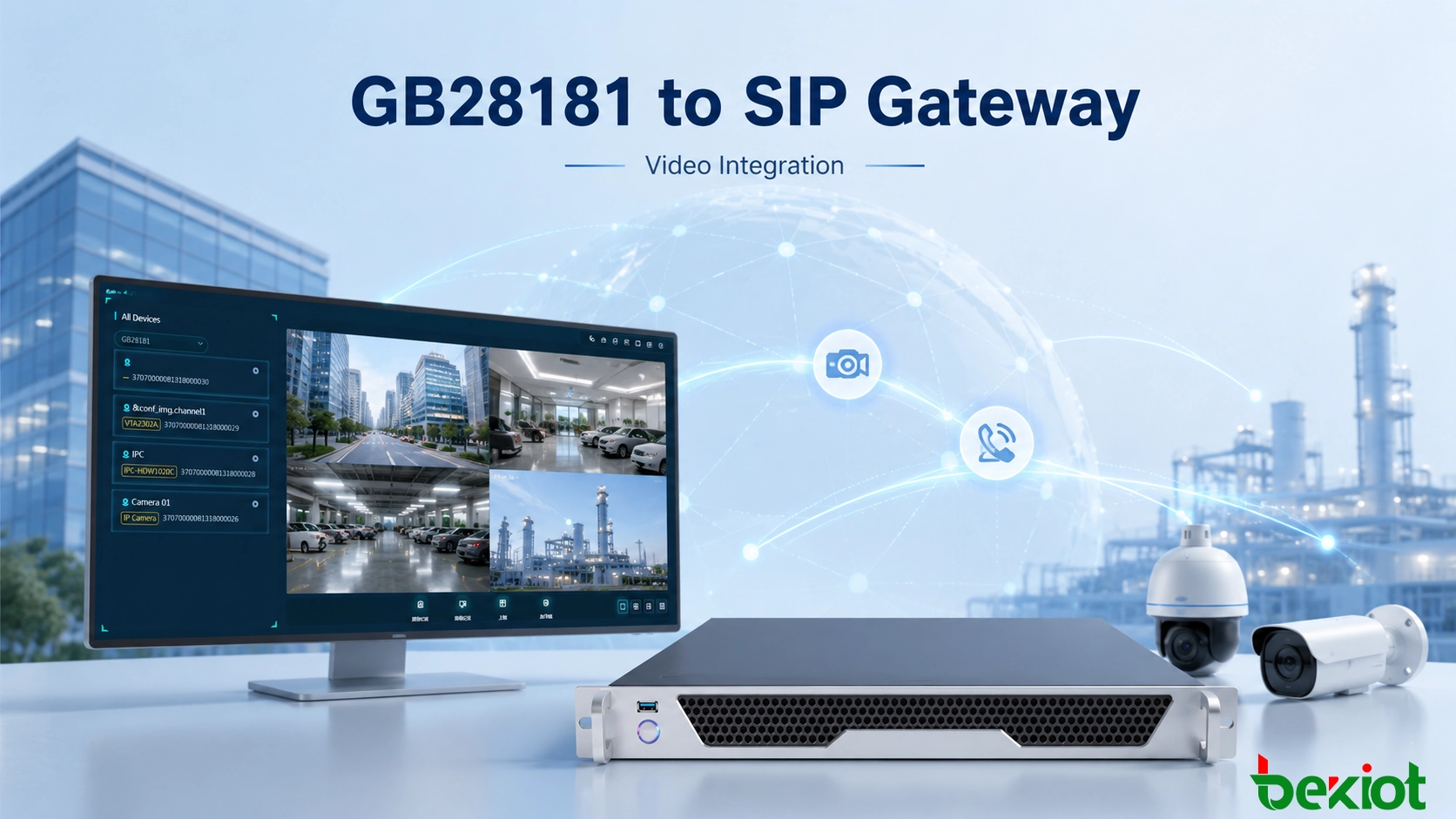
Large-scale video surveillance systems commonly use GB28181 to organize cameras, NVRs and multi-level monitoring resources under a centralized platform. Unified communication and emergency command systems, however, are more commonly built around standard SIP. Although GB28181 also uses SIP as part of its signaling architecture, it is not directly equivalent to a conventional SIP communication system. When these two environments need to work together, a GB28181 to SIP gateway provides a practical interoperability layer without requiring extensive redevelopment of either existing platform.
The gateway can obtain surveillance resources from an existing GB28181 platform, translate selected camera channels into SIP-accessible video resources, adapt H.264 and H.265 streams when required, and provide additional media outputs such as FLV, HLS, WebRTC, RTMP and RTSP. This makes it possible to bring fixed cameras and other video sources into dispatch consoles, emergency command applications and other SIP-based communication workflows.
Why an Interworking Layer Is Needed
A conventional surveillance platform and a unified communication system are designed around different operational goals. The surveillance side focuses on organizing cameras, accessing live video and managing large numbers of monitoring resources. The communication side focuses on calls, dispatch operations and real-time interaction between users and terminals.
GB28181 provides a standardized framework for surveillance networking and is particularly useful when video resources are distributed across different regions or administrative levels. A GB28181 platform can maintain a device directory and organize large numbers of cameras, NVR channels and other video resources.
SIP-based communication platforms use a different service model. A SIP terminal is normally treated as a callable communication endpoint. When a dispatcher selects an endpoint, the system expects a SIP signaling process to establish the session. A camera managed by a GB28181 surveillance platform is not automatically presented to the communication system in this form.
This difference becomes a practical problem in emergency command and converged communication projects. Operators may already have access to telephones, dispatch terminals and other SIP users, while live surveillance video remains isolated inside a separate monitoring platform. Without an interoperability mechanism, switching between the two systems adds operational steps and limits the ability to combine communication and video information in one workflow.
Developing a direct software interface between the two systems is possible, but it can require substantial protocol adaptation, media processing and compatibility testing. A dedicated gateway reduces this integration workload by handling the protocol and media differences between the GB28181 and SIP environments.
Converting Surveillance Resources into SIP Endpoints
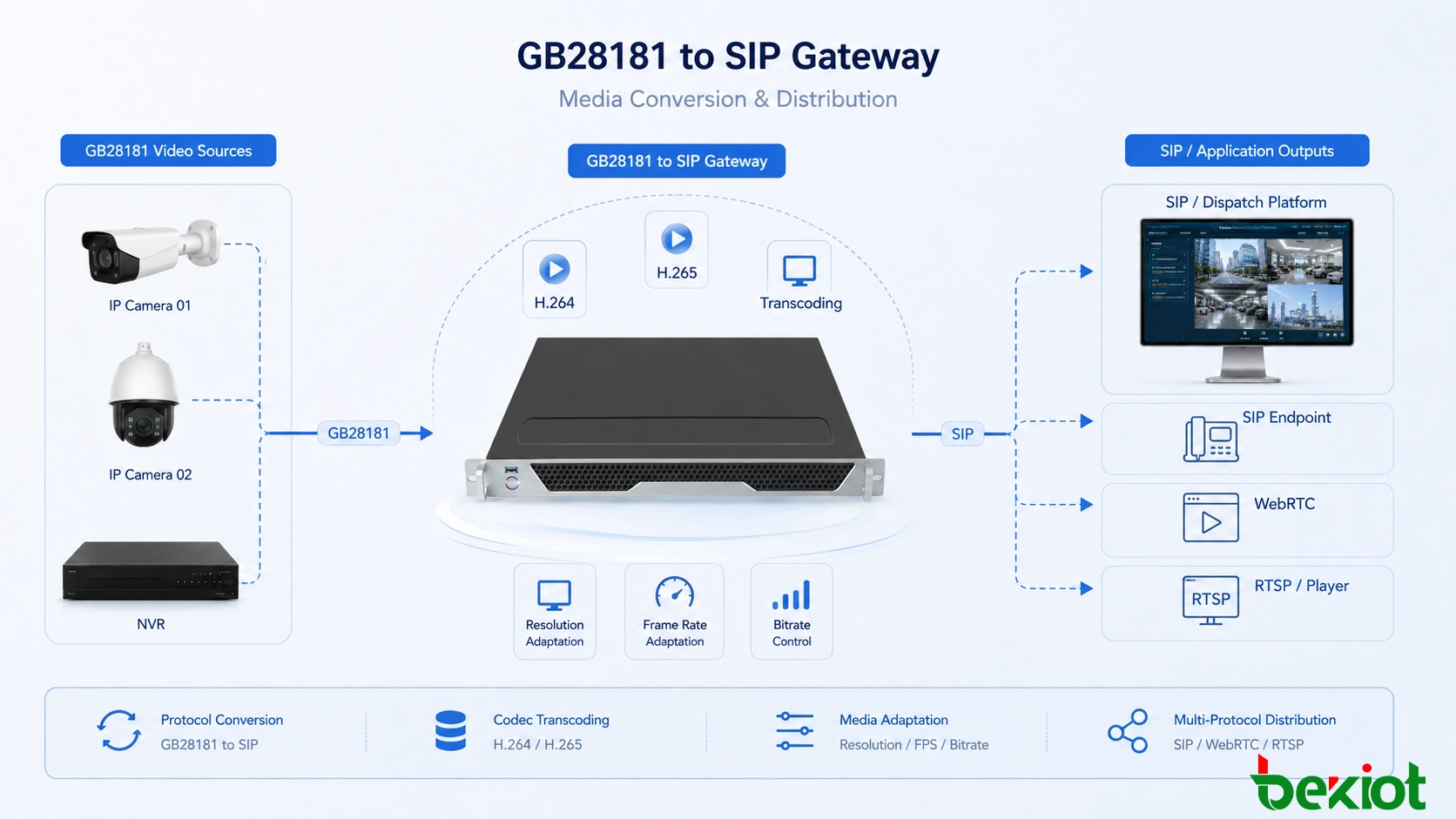
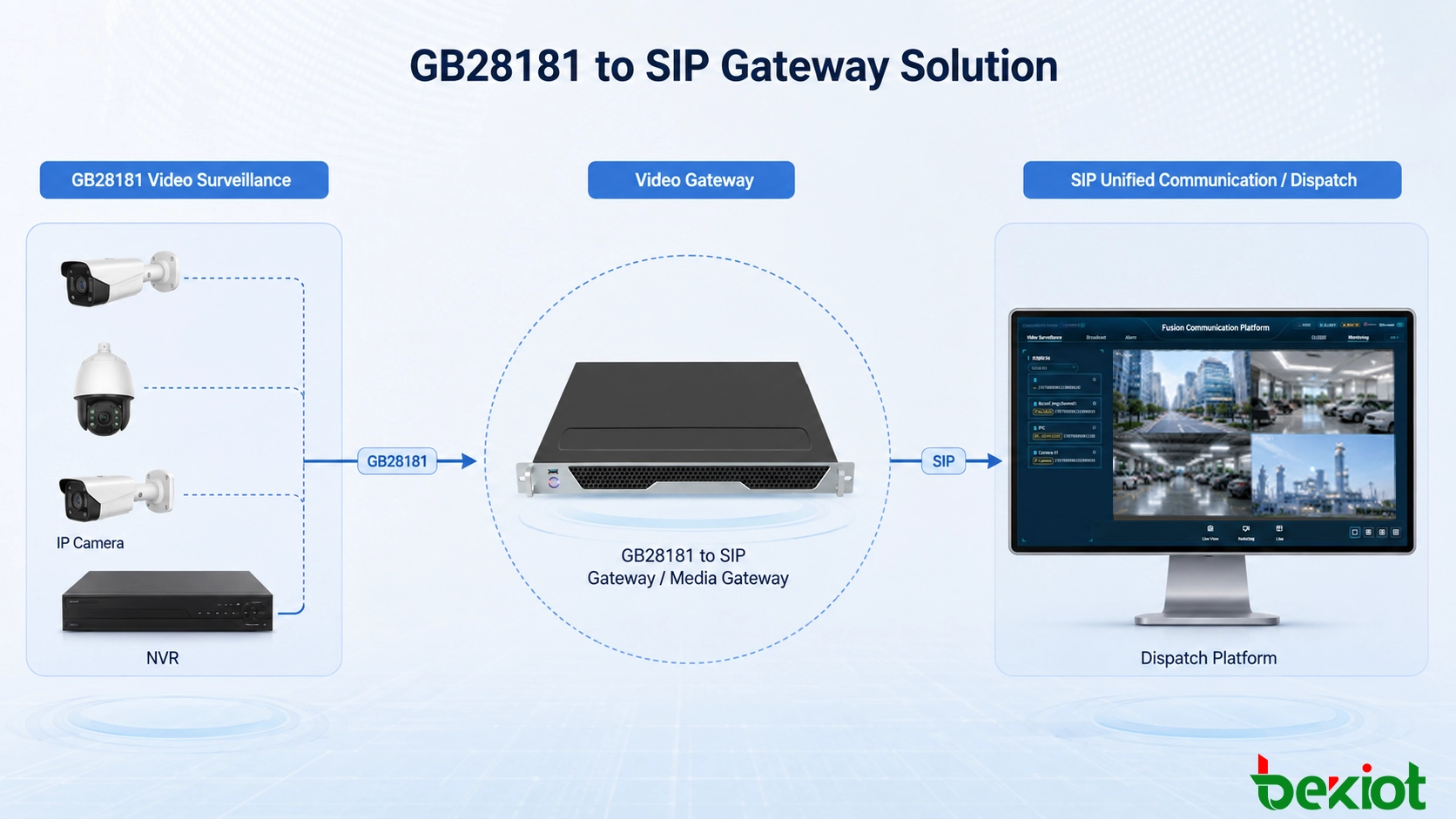
Protocol conversion is the central function of the solution. Instead of asking the unified communication system to directly understand the complete GB28181 surveillance structure, the gateway interprets the video resources on one side and presents the required channels to the SIP environment on the other.
The gateway can connect to an existing GB28181 platform and obtain its video resource structure. This is particularly useful for projects where a surveillance network has already been deployed and contains a large number of cameras. The existing platform remains responsible for surveillance organization, while the gateway selects and exposes the resources that need to participate in the communication system.
Camera resources can then be mapped into a form that the SIP platform can use. From the perspective of a dispatch system, a selected surveillance channel can behave more like a callable video endpoint. The dispatcher does not need to understand the underlying GB28181 signaling process every time video is required.
A typical interaction can be organized as follows:
The gateway connects to the existing GB28181 video platform and reads available surveillance resources.
Required cameras or video channels are mapped for use by the SIP communication environment.
A dispatch terminal or other authorized SIP endpoint initiates a standard communication workflow.
The gateway translates the request into the signaling required on the surveillance side.
The corresponding camera stream is obtained and delivered to the communication application.
This approach preserves the role of the existing surveillance platform while adding a controlled bridge into the communication system. It avoids the need to completely restructure camera management simply because video needs to appear inside a dispatch application.
Flexible Access to Existing Video Resources
A useful gateway should support more than one surveillance access method because real projects are rarely built around a single device type.
In a large deployment, the preferred method is usually to connect to the existing GB28181 platform. The platform may already contain thousands of surveillance resources and maintain its own device hierarchy. Instead of connecting each camera separately, the gateway can use that existing structure as the source of video resources.
This allows the project to retain the existing management relationship between cameras, NVRs and the monitoring platform. It also simplifies later expansion because newly managed video resources can continue to be organized through the surveillance system rather than being independently rebuilt inside the communication platform.
Other projects may not have a complete GB28181 platform at every site. In these cases, the gateway can also be used with NVRs or compatible IP cameras as access sources. This is useful for smaller remote sites, temporary monitoring locations or projects where only selected cameras need to be introduced into the unified communication environment.
The access architecture can therefore be selected according to the existing network:
Platform-level access: suitable for established GB28181 surveillance systems with centralized resource directories.
NVR-level access: suitable when multiple local camera channels are already concentrated in a recorder.
Camera-level access: suitable for selected compatible cameras that need direct integration.
This flexibility is important in retrofit projects because it reduces unnecessary replacement of equipment that is already operating normally.
Codec and Stream Adaptation Improve Compatibility
Protocol conversion alone does not guarantee that video will display correctly on every communication terminal. Surveillance systems and real-time communication applications can use different video encoding and playback capabilities.
H.264 and H.265 are both widely encountered in surveillance environments. H.265 can reduce bandwidth requirements for high-resolution surveillance video, but some communication applications or browser-based terminals may not support it in the same way as dedicated monitoring software.
The gateway can provide transcoding between H.264 and H.265 when necessary. This allows a camera to continue using an encoding mode suitable for the surveillance network while the receiving communication system obtains a stream it can decode.
Codec conversion is only one part of media adaptation. Different endpoints may also have different requirements for resolution, frame rate and bitrate. A surveillance camera may be configured for high-quality recording, while the same stream may be unnecessarily demanding when displayed in a small dispatch window over a constrained network.
By adapting these media parameters, the gateway can create a more suitable stream for the receiving system. This is particularly valuable when video is distributed to different endpoint types or when communication links have different available bandwidth.
The objective is not simply to reduce video quality. The purpose is to match the surveillance source with the capabilities and operating conditions of the receiving application so that the video remains usable throughout the communication workflow.
One Video Source Can Serve Multiple Applications
Video integration often extends beyond a single SIP call. Emergency command centers, browser applications, large-screen visualization systems and third-party business platforms may all need access to the same surveillance resource.
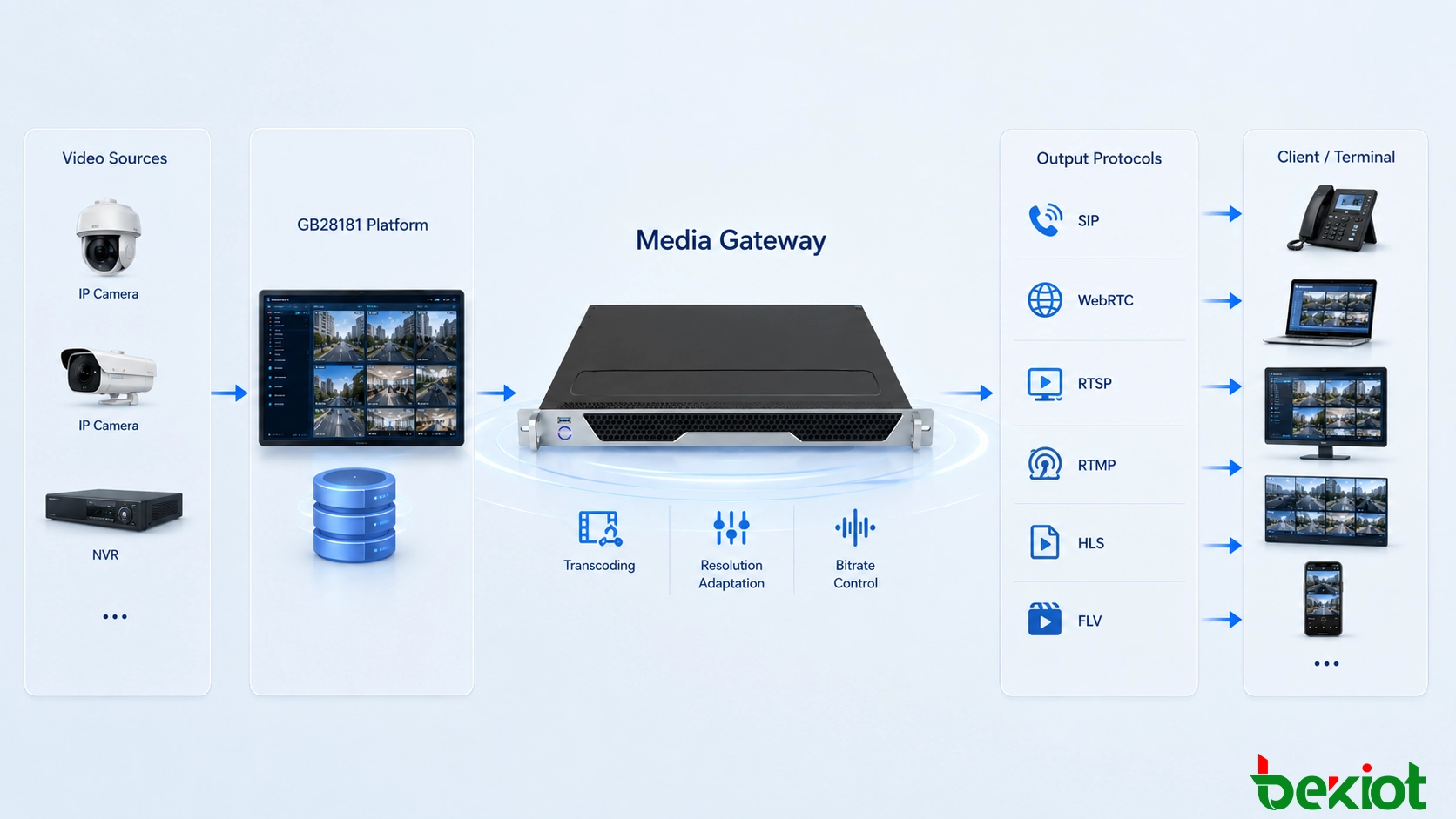
For this reason, a GB28181 to SIP gateway can also act as a media distribution point. In addition to GB28181 connectivity and SIP-oriented integration, the media layer can provide common streaming formats and protocols such as:
FLV for compatible web and streaming applications.
HLS for HTTP-based video distribution.
WebRTC for low-latency browser-based communication scenarios.
RTMP for streaming and publishing workflows.
RTSP for applications that require conventional real-time stream access.
GB28181 uplink where video resources need to continue participating in a standards-based surveillance hierarchy.
Multiple output options reduce the need to deploy separate conversion systems for every application. A single surveillance resource can be obtained from the existing video environment and then delivered in different forms according to the requirements of the receiving platform.
This is particularly useful in command-center projects where the same incident may be viewed simultaneously by a dispatch console, a browser-based application and a large visualization screen. Instead of rebuilding independent camera connections for every subsystem, the gateway can provide a common media integration layer.
Bringing Mobile Video into the Command Center
The same media gateway architecture can extend beyond permanently installed CCTV cameras. Emergency operations often use temporary and mobile video sources that need to be combined with existing surveillance resources.
Examples include drones, portable surveillance cameras and body-worn recording devices. These sources may be deployed temporarily at an incident location and can provide information that fixed cameras cannot capture.
A unified media access layer allows these streams to be introduced into the command workflow alongside conventional surveillance cameras. Operators can then view different sources through the same dispatch environment instead of opening a separate application for every device category.
Consider an emergency response scenario at an industrial facility. Fixed cameras can provide continuous views of entrances, production areas and surrounding roads. A portable camera can be positioned near the incident, while a drone provides an overview from above. Field personnel may also transmit video through wearable recording equipment.
When these video sources are connected through the media integration layer, the command center can combine them with SIP-based communication. A dispatcher can communicate with personnel while simultaneously reviewing the relevant video resources, improving situational awareness without forcing operators to move repeatedly between unrelated systems.
Designing the Integration as a Complete Workflow
A successful deployment should be designed around operational workflows rather than treating the gateway as an isolated protocol converter.
The first step is to identify where the existing video resources are managed. If a GB28181 platform already provides a complete directory, platform-level integration is usually more efficient than connecting hundreds of cameras individually. If only a small number of video resources are involved, direct NVR or camera access may be sufficient.
The next step is to determine how users will access video from the communication system. Some projects only need surveillance images embedded in a dispatch console. Others require SIP video calling, browser playback, large-screen display and third-party application access at the same time.
Codec compatibility should also be confirmed before deployment. The encoding used by the surveillance cameras should be compared with the decoding capabilities of dispatch terminals, browsers and other receiving applications. Where these capabilities differ, transcoding can be introduced only on the streams that need it rather than changing every camera.
Network capacity must be considered together with video adaptation. A camera stream suitable for local recording may consume more bandwidth than necessary when it is transmitted across a WAN. Resolution, frame rate and bitrate can therefore be planned according to how the video will actually be used.
Finally, commissioning should test the complete workflow. Engineers should verify not only that the gateway can obtain a camera stream, but also that authorized SIP users can access the correct channel, the expected codec is delivered, media playback is stable and the required external streaming interfaces operate correctly.
Where This Architecture Adds the Most Value
The solution is particularly useful when an organization already has independent surveillance and communication systems that need to work together without a complete platform replacement.
In an emergency command center, surveillance video can be associated with dispatch activities so that operators communicate while viewing the affected location. In an industrial facility, existing CCTV resources can be introduced into the communication console used for incident handling and operational coordination.
Multi-site organizations can retain their established GB28181 surveillance hierarchy while allowing selected resources to become available to a central communication platform. Temporary video sources can also be introduced when an incident requires additional visual coverage.
The main architectural advantage is that each existing system can continue performing its original role. The surveillance platform remains responsible for organizing video resources, while the unified communication system remains responsible for SIP communication and dispatch workflows. The gateway handles the protocol and media translation required between them.
Conclusion
A GB28181 to SIP gateway provides a practical way to bridge two systems that both involve IP video but use different communication models. It can connect with an existing GB28181 surveillance environment, obtain camera and NVR resources, convert selected video channels into SIP-accessible endpoints and adapt media when the source and destination use different encoding requirements.
Beyond basic protocol conversion, support for H.264 and H.265 transcoding, frame rate, bitrate and resolution adjustment helps solve real compatibility problems between surveillance devices and communication applications. Outputs such as FLV, HLS, WebRTC, RTMP, RTSP and GB28181 also allow the same video resources to serve a wider range of command and visualization applications.
For emergency command and converged communication projects, the value of the gateway is therefore not limited to connecting two protocols. Its more important role is to create a reusable video interoperability layer so that fixed cameras, NVR resources and mobile video sources can participate in the same operational workflow as SIP-based communication.
FAQ
Does introducing a gateway require replacing the existing video management platform?
Normally, no. The integration can be designed around the existing surveillance hierarchy, allowing the current platform to continue managing cameras while selected resources are exposed to other systems through the gateway.
Can access permissions remain different for surveillance and communication users?
They can be designed separately, depending on the surrounding platforms. Projects should define which video resources are allowed to pass through the integration layer instead of automatically exposing the complete surveillance directory to every communication user.
Should every video stream be transcoded?
Not necessarily. Transcoding is most useful when the source encoding cannot be decoded by the receiving endpoint or when the original media parameters are unsuitable for the target network or application. Avoiding unnecessary conversion can reduce processing requirements.
Can the gateway be used when video needs to appear in a web application?
Yes, when the selected gateway architecture provides a web-compatible media output such as WebRTC, HLS or FLV. The final choice depends on latency, browser compatibility and the way the application is designed.
What should be tested before connecting a large camera directory?
It is advisable to validate representative camera channels first, including different codecs and typical video profiles. This can reveal signaling, decoding and network compatibility issues before the integration is expanded to a much larger resource directory.







