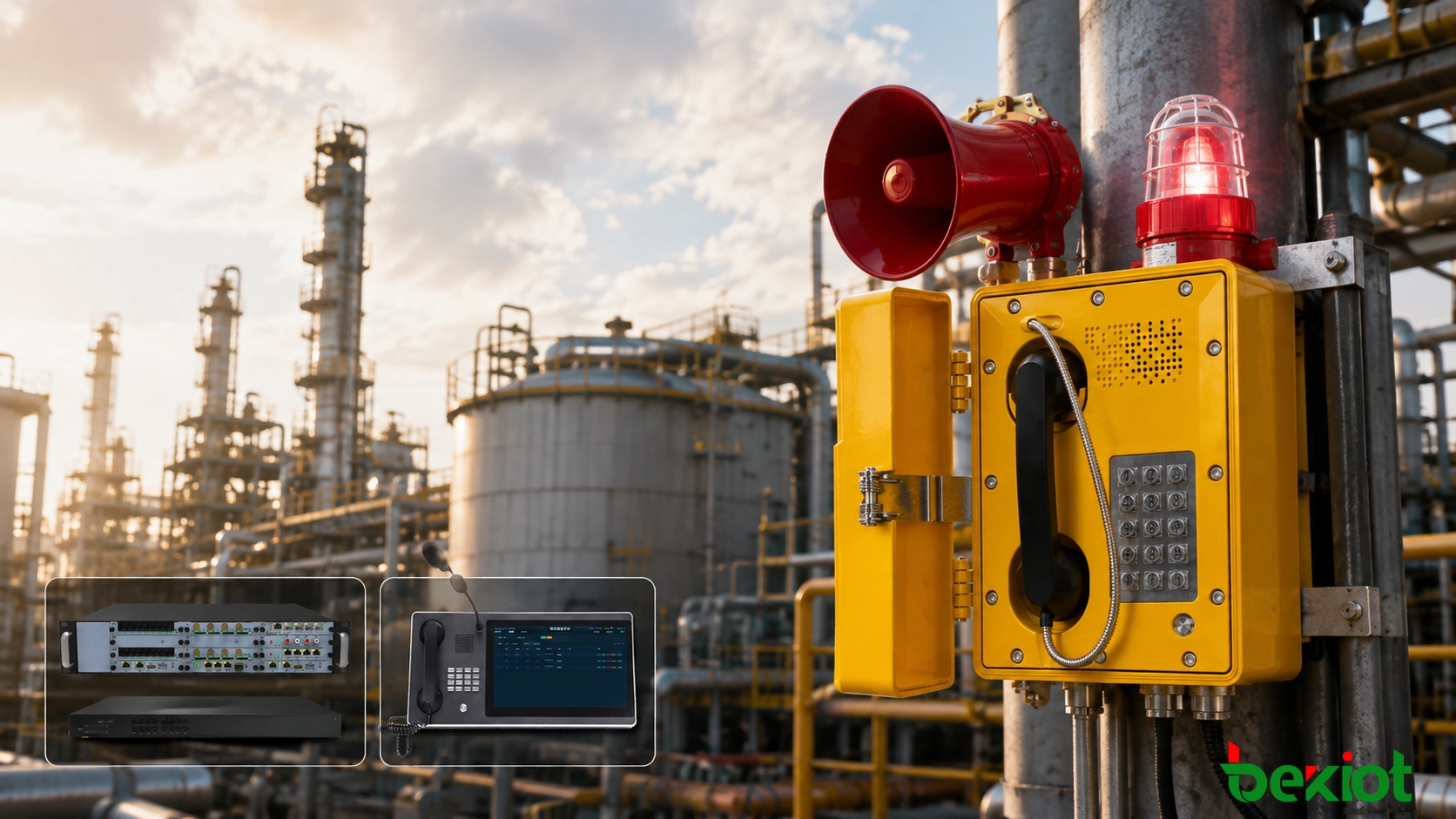
In petrochemical plants, natural gas facilities, coking plants, metallurgical sites, mines and underground utility tunnels, an emergency call often needs to be made within seconds. During a gas leak, equipment failure, fire or personnel injury, field workers should not have to search for a telephone number and enter it digit by digit.
This becomes even more important in high-noise areas, during night inspections or when operators are wearing protective gloves. For this reason, many industrial explosion-proof telephones provide emergency keys, speed-dial buttons or hotline functions that connect directly to a control room, dispatch center or duty station.
Configuring a one-touch call is relatively straightforward. Building a dependable emergency communication system, however, also requires proper call routing, backup answering positions, location identification, recording and integration with other communication systems.
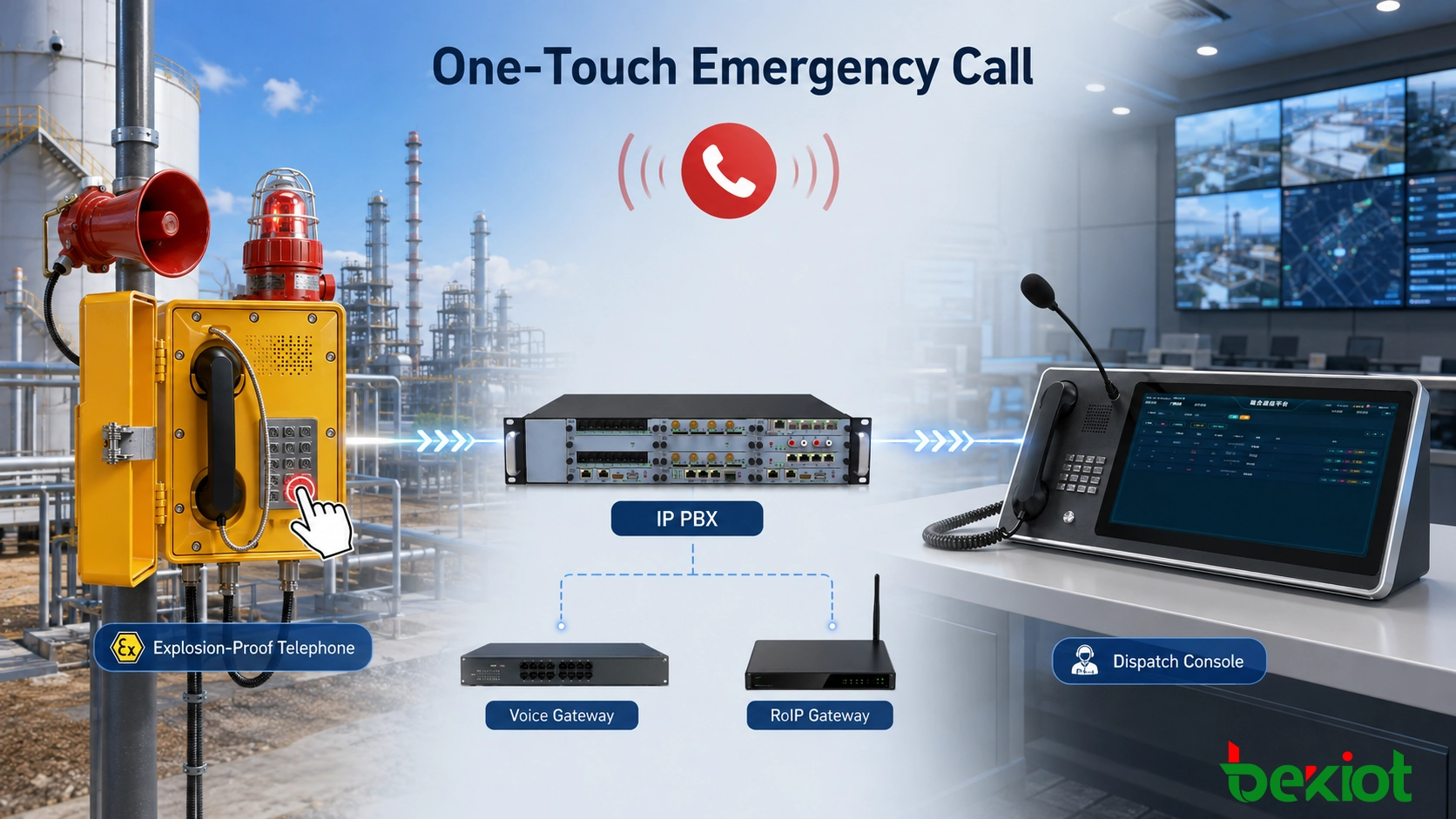
How One-Touch Emergency Calling Works on an Explosion-Proof Telephone
Consider a SIP explosion-proof telephone installed in a tank farm. The telephone may be assigned extension 6201, while the emergency dispatch center uses extension 8000. During commissioning, 8000 is programmed into the Emergency, SOS or dedicated speed-dial key.
When a field operator presses the button, the telephone automatically initiates a call to the IP PBX or SIP server. The communication platform then applies the routing rules configured for extension 8000 and delivers the call to a dispatch console, duty position or dispatch group.
From the operator's point of view, the entire action may consist of pressing a single button. Behind the scenes, the system processes the destination number, selects the call route, rings the appropriate workstation and establishes the voice session.
The dispatch platform can also associate extension 6201 with a meaningful device name such as “Tank Farm Explosion-Proof Telephone 03.” When the emergency call reaches the dispatch position, the operator immediately sees the installation area instead of receiving only an extension number.
This becomes particularly useful in large industrial facilities where dozens or even hundreds of fixed telephones may be connected to the same communication platform. Identifying the source of the call at the moment it arrives reduces the time needed to confirm the incident location.
Related Products: EX-BH621 Explosion-Proof SIP Telephone
Three Common Ways to Implement One-Touch Emergency Calling
The term “one-touch calling” does not always refer to the same operating method. Some projects use a dedicated SOS button, others require the telephone to call automatically when the handset is lifted, and some use a dispatch group so that several operators can answer the same emergency number.
Dedicated Emergency Button
A dedicated Emergency, SOS or Call key is one of the most common implementations. A fixed destination number is programmed into the button so that the user does not need to enter a complete telephone number.
For example, the emergency key can be assigned to extension 8000. Pressing the button immediately places a call to the dispatch center.
This design can be used on explosion-proof telephones with a full numeric keypad as well as simplified emergency telephones with only a few function keys. In industrial installations, the emergency button should normally be easy to identify and clearly separated from routine calling functions.
Off-Hook Hotline Calling
Some field positions communicate with only one control room. In these locations, even an emergency button may be unnecessary. The system can be configured so that lifting the handset automatically places a call to a predefined destination. This function is commonly referred to as Hotline or Auto Dial.
For example, a telephone installed in a gas valve station may always need to contact the utility control room. The operator simply picks up the handset and the call is placed automatically.
On SIP terminals, the hotline destination can be configured in the telephone or communication platform. In analog systems, the same logic can be implemented in the PBX or FXS voice gateway.
Dispatch Groups and Backup Answering Positions
Emergency communication design should also consider what happens when the primary dispatcher cannot answer the call.
Several dispatch positions can be assigned to the same call group. An incoming emergency call may ring multiple consoles at the same time, or the system can attempt the main dispatch position first and then continue to a backup console or duty telephone.
Projects operating with night shifts or multiple duty teams can also use timeout forwarding. If the primary position does not answer within a specified period, the IP PBX applies the next call-routing rule. The exact strategy should follow the facility's duty procedures and the capabilities of the selected platform.
Connecting SIP Explosion-Proof Telephones to an IP PBX and Dispatch System
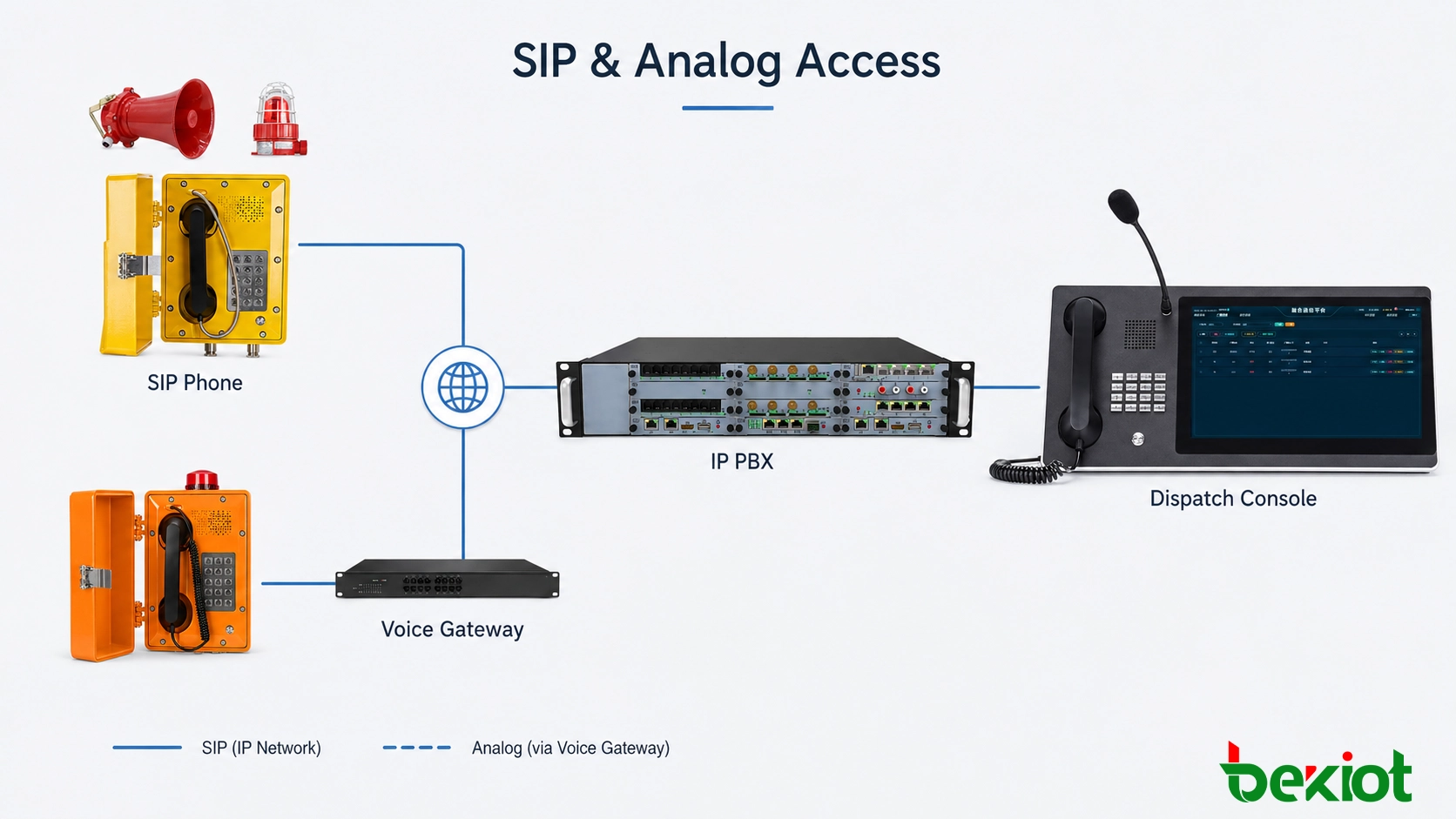
Many new petrochemical, energy and industrial projects use an IP network as the foundation for voice communication. A SIP explosion-proof telephone can connect directly to an industrial Ethernet switch and register with an IP PBX, SIP server or dispatch platform.
A typical system includes SIP explosion-proof telephones, industrial Ethernet switches, the plant IP network, an IP PBX and one or more dispatch consoles. Each field telephone is assigned an extension and can be managed according to workshop, process unit or plant area.
A simple numbering plan may look like this:
Tank Farm Explosion-Proof Telephone 03, extension 6201;
Pump Room Explosion-Proof Telephone 02, extension 6202;
Loading Area Explosion-Proof Telephone 01, extension 6203;
Production Dispatch Center, emergency extension 8000.
All three field telephones can use 8000 as the destination for their emergency buttons. Which dispatch positions actually answer extension 8000 can then be managed centrally in the IP PBX. Changes to duty personnel or dispatch arrangements do not necessarily require the field telephones to be reconfigured.
For projects requiring deeper dispatch integration, the platform can maintain additional information for each terminal, including its extension number, device name, operating area, installation location, associated camera and PA zone.
The numbering plan should ideally be finalized before installation and commissioning. Changing large numbers of extensions after field deployment may also affect dispatch labels, recording searches and other system relationships.
How Analog Explosion-Proof Telephones Can Support One-Touch Calling and IP Migration
Many older chemical plants, steel mills and energy facilities still operate two-wire analog explosion-proof telephones. In these systems, the field cabling may remain serviceable even though the existing PBX has reached the end of its useful life.
A modernization project does not always require the entire field infrastructure to be replaced. Existing analog explosion-proof telephones can remain connected through their original two-wire cables and terminate on an FXS voice gateway, which then connects to the plant IP network and the new IP PBX.
If the field telephone already supports speed dialing, the emergency number can be generated by the telephone itself. For a basic off-hook analog telephone, the hotline rule can instead be configured on the FXS port or IP PBX. Once the gateway detects that the handset has been lifted, the predefined control-room number is called automatically.
This approach reduces changes at the field level. Existing telephone wiring and some installed terminals can remain in operation while the equipment-room switching and dispatch infrastructure is upgraded first. Field devices can then be replaced gradually according to maintenance cycles, equipment condition and project budget.
Existing cabling should still be tested before the migration plan is finalized. Cable insulation, loop distance, junction-box condition and the operating condition of older explosion-proof telephones should be checked on site rather than assumed from historical drawings.
Integrating Emergency Calls with Recording, CCTV, PA and Audible/Visual Alarms
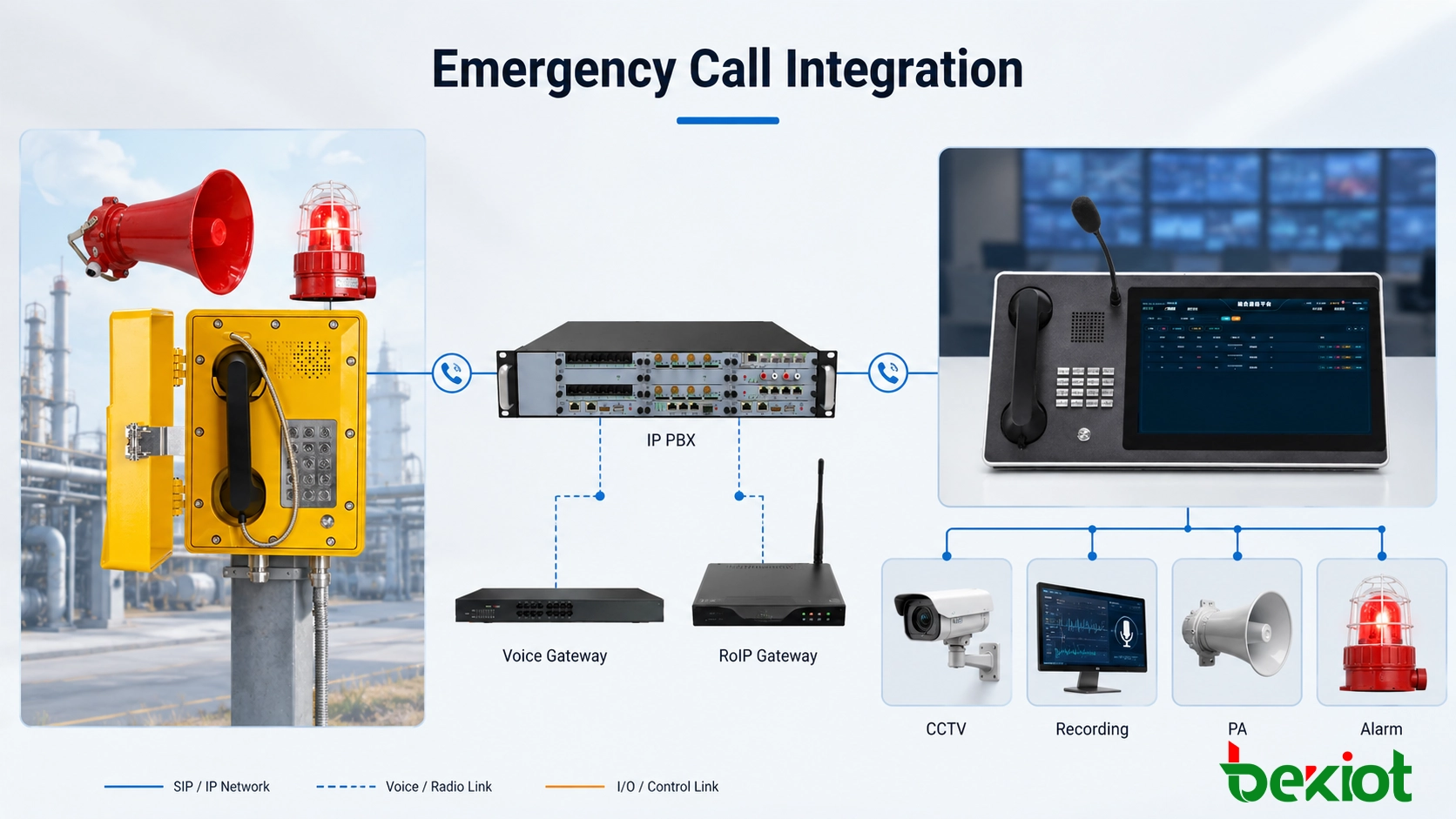
Once a field emergency call reaches the dispatcher, the next task is often to confirm the incident location, understand what is happening and notify other personnel. One-touch calling is therefore commonly used together with other dispatch and emergency communication resources.
Caller Identification on the Dispatch Console
When an incoming number is received, the dispatch platform can look up the corresponding terminal record. For example, a call from extension 6201 can be displayed as “Tank Farm Explosion-Proof Telephone 03” together with its plant area and device type.
Emergency calls can also be presented differently from routine internal calls on the dispatch interface. Map location, equipment status and other operational information depend on the level of integration between the dispatch platform and other plant systems.
Call Recording
The first report from the field often contains important information about the incident. When the IP PBX or dispatch platform is connected to a recording system, emergency calls can be recorded according to extension number, call group or communication policy.
Recordings can be used to review the initial field report, the timing of the call and subsequent dispatch instructions. Retention periods and playback permissions should follow the facility's own operating and security requirements.
CCTV Integration
Areas such as tank farms, loading stations and pump rooms often already have fixed CCTV cameras. The associated camera can be mapped to the telephone extension during system configuration.
When an emergency call reaches the dispatch console, the software can use the calling extension to open the corresponding camera view. The dispatcher can then speak with field personnel while checking the surrounding conditions on video.
This function requires an interface between the dispatch platform and the video management system, together with a configured relationship between telephone extensions and camera points.
Public Address and Audible/Visual Alerts
Once the field situation has been confirmed, the dispatcher may need to notify personnel beyond the location of the original caller. An industrial PA system can be used to send instructions to the affected process unit, workshop or evacuation area.
For example, after receiving a report of a gas leak, the dispatcher may select the relevant PA zone and issue an evacuation or operating instruction. Where prerecorded messages or text-to-speech are used, the message content and activation logic should follow the site's emergency procedures.
High-noise locations create a different problem. In compressor rooms, pump stations and metallurgical production areas, a normal telephone ringer may not be noticeable even when the incoming call itself is working correctly.
Explosion-proof horn speakers and audible/visual alarm devices can therefore be used to provide a stronger incoming-call indication. Depending on the terminal and system design, activation may use relay contacts, GPIO, auxiliary outputs or dedicated control interfaces.
What Should Be Checked When Deploying One-Touch Emergency Calling?
Programming an emergency key may take only a few minutes. Whether the complete system is suitable for emergency use depends much more on the numbering plan, routing design and field testing.
The first question is who should answer each emergency telephone. A coking control room, utility center, production dispatch center and plant emergency center may have very different responsibilities. Routing every field telephone to the same destination is not always the correct design.
Critical communication points should also have a defined fallback procedure. If the main dispatch console is unattended, busy or unavailable, the system should already know whether the call goes to another console, a backup duty position or a separate emergency group.
SIP explosion-proof telephones also depend on the plant network. Industrial Ethernet switches, core network equipment, the IP PBX and the power system all form part of the communication path. Depending on the project requirements, UPS power, network redundancy and server reliability may need to be considered.
The physical installation point should follow actual operator and inspection routes. A telephone that is technically compliant but difficult to reach during an incident provides limited practical value. In noisy areas, the ringer, horn speaker and beacon should also be tested under actual operating conditions.
During system acceptance, each field communication point should be tested by making an actual call rather than checking registration status only. The test should cover at least the following items:
Whether the emergency key or off-hook hotline is triggered correctly;
Whether the call reaches the correct control room or dispatch group;
Whether backup routing works when the primary position does not answer;
Whether the dispatch console displays the correct terminal name and location;
Whether two-way audio is clear at both ends;
Whether call recordings are created and can be retrieved;
Whether configured CCTV, PA and audible/visual alarm functions operate as designed.
The purpose of one-touch emergency calling is to give field personnel the shortest practical path to the correct communication point and to ensure that the call can continue through the dispatch process after it reaches the control room. SIP explosion-proof telephones can be integrated directly into IP communication systems, while existing analog telephone infrastructure can often be retained through FXS voice gateways.
Emergency buttons, call routing, backup dispatch positions, location identification and system integration should therefore be tested as one complete communication workflow rather than treating a successfully connected telephone call as the only acceptance criterion.
Becke Telecom provides explosion-proof telephones, industrial telephones, voice gateways, IP PBX systems and command-and-dispatch solutions for petrochemical, natural gas, metallurgical, mining and underground industrial applications. One-touch emergency calling and dispatch integration can be configured according to the site's existing cabling, network architecture and operational requirements.