


When Voice Input Needs Immediate Control
Microphone mute is a function that disables, suppresses, or blocks audio input from a microphone so that other users, applications, systems, or recording devices cannot hear the local speaker. It is commonly used in video meetings, conference phones, headsets, intercom systems, call centers, laptops, mobile devices, public address systems, dispatch consoles, classrooms, and smart devices.
The main purpose of microphone mute is to give users control over when their voice or surrounding sound is transmitted. In modern communication environments, this control is important for privacy, noise management, meeting order, speech clarity, and operational discipline.
Microphone mute is a small control with large practical value. It prevents unwanted audio from entering a communication session when the user does not intend to speak.
Basic Meaning of Microphone Mute
Microphone mute means turning off the microphone input path temporarily. When mute is enabled, the system stops sending live microphone audio to the remote side, meeting platform, recording channel, intercom session, or communication system.
Mute can be activated by a physical button, headset control, software icon, keyboard shortcut, conference room controller, touchscreen interface, mobile app, operating system setting, or administrator policy. In some professional systems, mute can also be controlled remotely by a host, operator, moderator, or system rule.
Input Control, Not Speaker Control
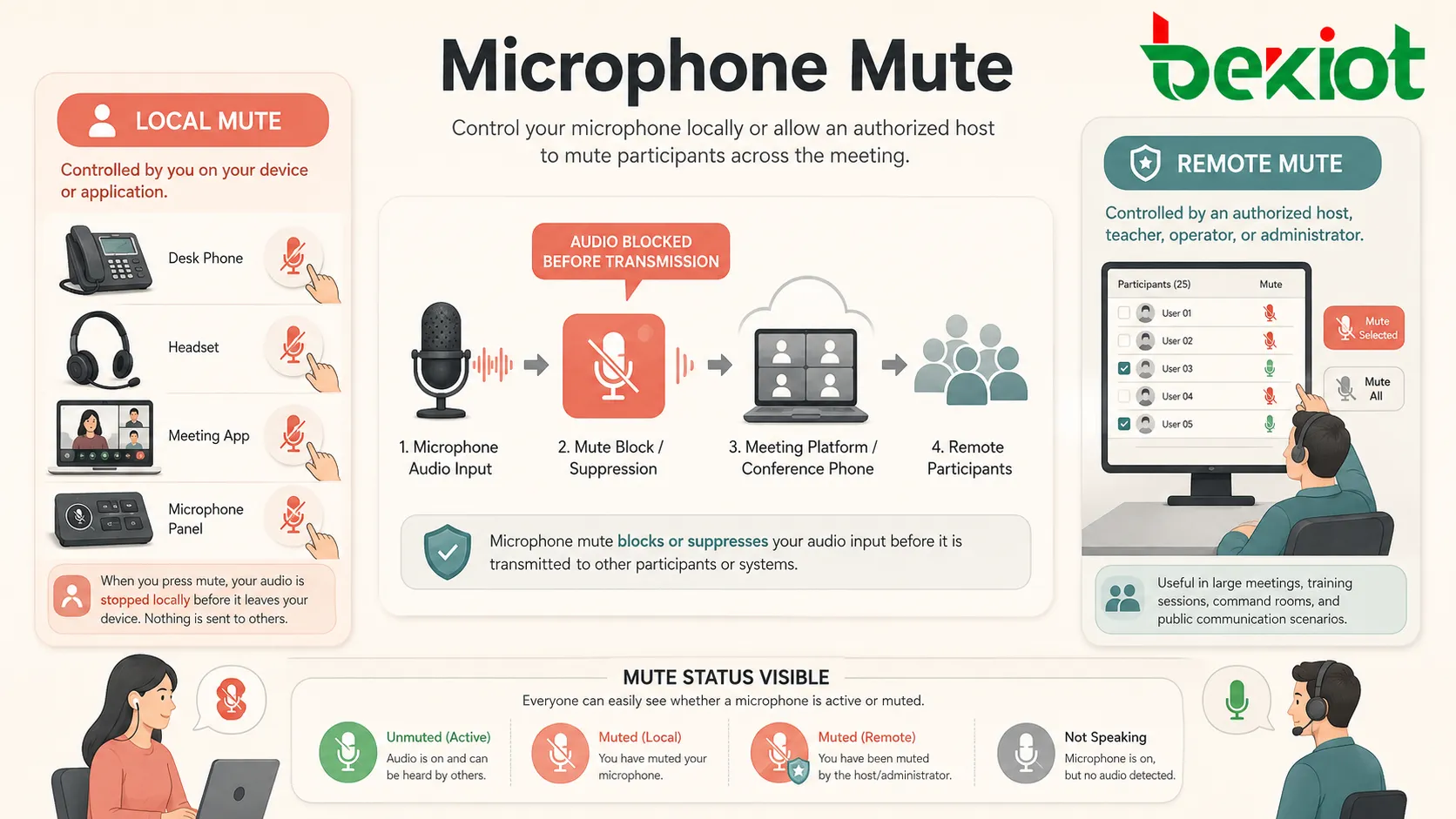
Microphone mute controls outgoing audio, not incoming audio. When a user mutes the microphone, they can usually still hear other participants through speakers or headphones. The mute function only prevents their own microphone signal from being transmitted.
This is different from speaker mute or volume mute, which controls sound playback. A user may mute the microphone while still listening, or mute the speaker while still sending microphone audio if the system allows it.
Local Mute and Remote Mute
Local mute is controlled by the user at the device or application side. The user presses a mute button on a phone, headset, meeting app, or microphone panel. Remote mute is controlled by another authorized party, such as a meeting host, classroom teacher, control room operator, or conference administrator.
Remote mute is useful in large meetings, training sessions, command rooms, and public communication scenarios where one person needs to manage many microphones. However, systems should make mute status visible so users understand whether their microphone is active.
How Microphone Mute Works
Microphone mute can work at different layers of a system. It may disable the physical microphone circuit, stop the operating system from passing audio to applications, mute the application input channel, or signal the communication platform to ignore the user’s audio stream.
The exact method depends on the device and software design. A hardware mute switch may physically disconnect or electronically block the microphone signal. A software mute button may only stop the current application from sending audio, while other applications may still have microphone access unless system permissions block them.
Hardware Mute
Hardware mute is implemented at the device level. It may use a physical switch, dedicated mute circuit, microphone disconnect design, headset button, conference microphone touch key, or privacy slider.
Hardware mute can provide stronger user confidence because it works close to the microphone input path. In professional conference rooms, call centers, and privacy-sensitive environments, visible hardware mute indicators are often preferred.
Software Mute
Software mute is controlled by an application, operating system, or platform. A user may click the mute icon in a meeting app, phone client, recording tool, softphone, web browser, or communication platform.
Software mute is flexible and easy to integrate with user interfaces. However, users should understand that muting one application may not always mute the microphone for every application on the device unless the operating system or hardware also blocks access.
Digital Signal Suppression
Some systems mute the microphone by replacing the audio stream with silence. Others pause audio transmission or mark the audio stream as muted in the communication protocol. In conferencing systems, the remote side may receive a muted status rather than simply receiving a silent signal.
This status information is useful because meeting platforms can show a mute icon, notify users when they speak while muted, or allow moderators to manage participant audio.
Main Features of Microphone Mute
A good microphone mute function should be fast, clear, reliable, and easy to recognize. Users should know whether the microphone is active or muted at any moment.
One-Touch Control
One-touch mute allows users to quickly turn microphone input on or off. This is important in meetings, calls, classrooms, dispatch centers, and customer service environments where users may need to respond quickly.
A slow or hidden mute control can create awkward communication. Users may accidentally transmit background noise, private conversation, keyboard sounds, or room discussion before finding the mute button.
Clear Status Indicator
Mute status should be visible. Common indicators include red LED lights, on-screen icons, color changes, microphone symbols, headset tones, button backlighting, or meeting platform notifications.
Clear indication prevents two common problems: users speaking while muted and users believing they are muted when the microphone is still active. Both situations can disrupt communication.
Push-to-Talk Mode
Push-to-talk is a related mute control mode. The microphone remains muted by default and only becomes active while the user holds a button. This is common in radio communication, dispatch systems, intercoms, gaming voice chat, and noisy operational environments.
Push-to-talk is useful when background noise is high or when only short voice messages are needed. It reduces accidental audio transmission and helps keep shared channels clean.
Host and Moderator Control
In large meetings, webinars, classrooms, and conference systems, hosts may need to mute participants. This helps prevent background noise, echo, interruptions, and unwanted side conversations.
Good moderator control should be balanced with user awareness. Participants should be able to see when they are muted and understand whether they can unmute themselves.
Mute Reminder
Some software systems detect when a muted user is speaking and display a reminder such as “You are muted.” This reduces communication mistakes in meetings and online classes.
Mute reminders use local audio detection without necessarily transmitting the audio to others. They are especially useful in remote work and hybrid meeting scenarios.

Benefits for Communication Quality
Microphone mute improves communication quality by reducing unwanted sound and giving users better control over voice input. It is especially important in group communication where many microphones may be active at the same time.
Lower Background Noise
Background noise can come from keyboards, fans, traffic, conversations, machinery, pets, paper handling, echo, or room reverberation. Muting microphones when users are not speaking reduces these distractions.
In large meetings, even small background noises from many participants can quickly reduce clarity. Encouraging users to mute when not speaking keeps the session cleaner and easier to follow.
Reduced Echo and Feedback
Echo and feedback may occur when microphones pick up sound from speakers and send it back into the communication system. Muting unused microphones reduces the number of active audio paths and lowers the risk of echo loops.
This is useful in conference rooms, classrooms, hybrid meetings, public address systems, and multi-device call setups where microphones and speakers may be close to each other.
Better Meeting Order
Mute control supports meeting discipline. When only the active speaker is unmuted, participants can focus on the discussion without accidental interruptions.
For webinars, online training, large conference calls, and remote classrooms, mute management helps the host control the flow of communication.
Improved Privacy
Mute helps protect private conversations and sensitive background information. Users can mute before discussing confidential details, speaking with someone nearby, or handling an unrelated task.
Privacy protection is especially important in healthcare, finance, legal services, government work, remote offices, shared homes, and open-plan workspaces.
Applications in Different Systems
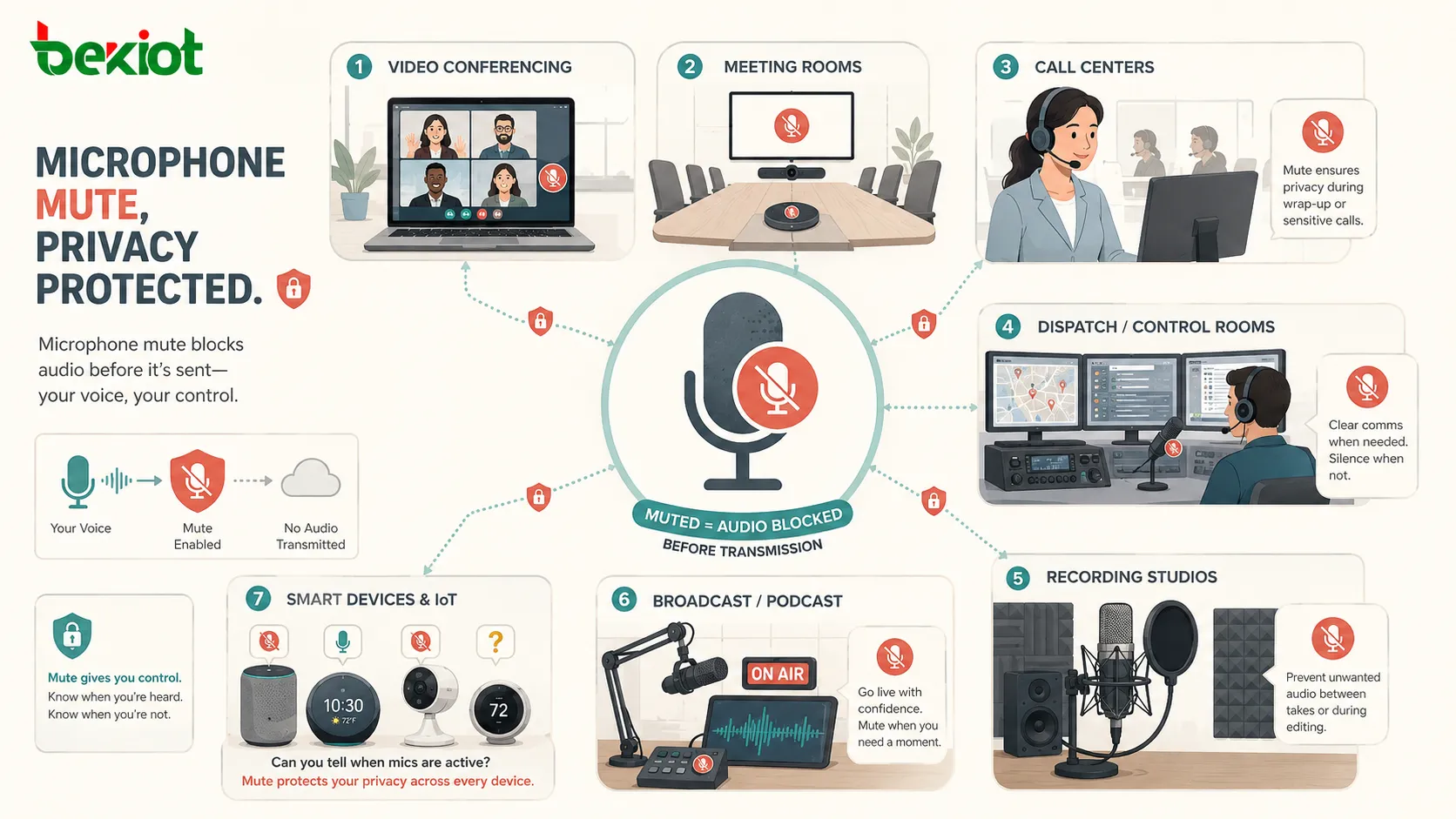
Microphone mute is used in many communication and audio systems. Its function is simple, but its operational value changes by environment.
Video Conferencing and Online Meetings
Video conferencing platforms rely heavily on microphone mute. Participants mute themselves when not speaking, hosts mute noisy participants, and meeting software shows microphone status to everyone.
In hybrid meetings, mute control is even more important because room microphones, laptop microphones, and remote participant microphones may all be active. Poor mute management can cause echo and confusion.
Conference Phones and Meeting Rooms
Conference phones and meeting room microphones usually include dedicated mute buttons with LED indicators. This allows room participants to control when the far end can hear the room.
Professional meeting rooms may use table microphones, ceiling microphones, DSP processors, and control panels. In these systems, mute status should be synchronized across all interfaces so users do not receive conflicting signals.
Call Centers and Customer Service
Call center agents use microphone mute to pause outgoing audio during consultation, supervisor support, coughing, typing, or internal discussion. It allows the agent to remain connected to the caller while temporarily blocking local sound.
Call center systems may also log mute usage for quality review. Excessive mute time may indicate training issues, workflow gaps, or agent difficulty handling calls.
Broadcast, Podcasting, and Recording
In recording and broadcast environments, mute controls help manage live microphones, prevent accidental transmission, and control when each speaker enters the mix.
Audio mixers, broadcast consoles, and podcast interfaces often provide channel mute buttons. These allow operators to manage multiple microphones without changing gain settings.
Intercom, Dispatch, and Push-to-Talk Systems
Intercom and dispatch systems often use push-to-talk or controlled microphone access. Operators speak only when needed, reducing open-channel noise and preventing accidental transmission.
In control rooms, industrial plants, transportation operations, and security environments, this supports clearer command communication and reduces channel clutter.
Smart Devices and Voice Assistants
Smart speakers, voice assistants, cameras, and IoT devices may include microphone mute or privacy switches. Users can disable listening functions when they do not want voice input captured.
For these devices, mute indicators and privacy design are important because users may not always know when the microphone is active.
Microphone Mute in System Design
When designing communication systems, microphone mute should be treated as part of the user experience, privacy model, and audio control strategy. It should not be an afterthought.
Physical Button Placement
The mute button should be easy to reach and easy to identify. On phones, headsets, conference microphones, and control panels, the button should be placed where users can operate it quickly without confusion.
In shared spaces, labels and visual indicators are important. A user should not need training to understand whether the microphone is muted.
Status Synchronization
In systems with multiple control points, mute status should stay synchronized. For example, a meeting room may have a table microphone mute button, wall touch panel, software interface, and DSP controller.
If one interface shows muted while another shows active, users may lose confidence in the system. Status synchronization prevents accidental audio transmission and user confusion.
Fail-Safe Behavior
Some privacy-sensitive systems may prefer fail-muted behavior. This means the microphone remains muted after reboot, disconnection, or system recovery until the user intentionally activates it.
Other systems may need microphones active by default, such as emergency intercoms or always-ready communication points. The correct behavior depends on the application and risk model.
Accessibility Considerations
Mute controls should be accessible to different users. Visual indicators are useful, but audio tones, tactile buttons, screen reader labels, keyboard shortcuts, and clear interface text may also be needed.
Accessibility improves usability for people with visual, hearing, mobility, or cognitive differences. It also improves general user confidence.
Privacy and Security Considerations
Microphone mute is closely related to privacy and security because microphones can capture sensitive speech and environmental sound. Users should be able to trust mute behavior.
Hardware Privacy Confidence
Hardware mute switches or physical microphone disconnect designs can increase user confidence because they operate close to the device input path. This is especially valuable for laptops, meeting equipment, smart speakers, and security-sensitive workplaces.
Software mute is convenient, but users may still worry about whether another application can access the microphone. Operating system-level permission controls can help address this concern.
Application Permissions
Microphone access should be controlled by permissions. Users should know which applications have access and should be able to revoke access when not needed.
Enterprises may enforce microphone permissions through device management policies, especially in regulated environments where recording, monitoring, or data leakage is a concern.
Mute Status Transparency
Users need clear feedback. If a microphone is active, the system should show it. If it is muted, the system should show that as well. Hidden microphone activity can damage trust and create privacy risk.
Modern operating systems often display microphone usage indicators to show when an application is accessing the microphone. This supports transparency beyond the application’s own mute button.
Common Problems and Mistakes
Microphone mute problems often come from unclear status, multiple audio devices, conflicting software settings, or poor user habits. These issues can affect meeting quality and privacy.
Speaking While Muted
One of the most common issues is speaking while muted. The user believes they are participating, but no one hears them. This wastes time and interrupts meeting flow.
Mute reminders, visible icons, headset tones, and good meeting habits can reduce this problem.
Believing Mute Is Active When It Is Not
The opposite problem is more serious for privacy. A user may think the microphone is muted when it is still active. This can transmit private conversations or background information.
Clear mute indicators and synchronized status across hardware and software reduce this risk.
Muting the Wrong Device
Many users have multiple microphones, such as laptop microphones, webcam microphones, headset microphones, and room microphones. Muting one microphone may not mute the one actually used by the application.
Users should check the selected input device in the communication app. Meeting rooms should be configured so the system uses the intended microphone source.
Host Mute Confusion
In large meetings, hosts may mute participants. If the user interface is unclear, participants may not know whether they can unmute themselves or whether the host must allow it.
Meeting platforms should provide clear controls and status messages to avoid confusion.
Best Practices for Use and Maintenance
Good microphone mute practice combines user habits, system design, and regular testing. The goal is to make mute control reliable and predictable.
Mute When Not Speaking
In group meetings, users should mute when they are not speaking. This reduces background noise and improves overall call quality.
For small conversations, always-on microphones may feel more natural. For large meetings, training sessions, and webinars, mute discipline is usually necessary.
Check Mute Before Sensitive Discussion
Before discussing private or confidential information, users should confirm mute status and microphone access. In high-risk situations, leaving the meeting or disabling microphone permission may be safer than relying only on application mute.
This habit is especially important in remote work, shared offices, customer calls, legal meetings, healthcare discussions, and executive communication.
Test Devices Before Meetings
Users should test microphones, mute buttons, headset controls, and selected audio devices before important meetings. This prevents delays and avoids confusion during live communication.
Meeting rooms should be tested regularly to confirm that hardware mute buttons, software mute status, DSP controls, and LED indicators work together correctly.
Maintain Physical Controls
Physical mute buttons, headset switches, conference microphones, and control panels should be kept clean and functional. Stuck buttons, damaged cables, worn indicators, or firmware issues can affect mute reliability.
For shared equipment, regular inspection reduces meeting failures and improves user confidence.
| Mute Type | Typical Use | Main Advantage |
|---|---|---|
| Hardware mute | Headsets, laptops, conference microphones, smart devices | Stronger physical control and visible privacy confidence |
| Software mute | Meeting apps, softphones, recording tools, web platforms | Flexible interface control and remote management |
| Push-to-talk | Dispatch, radio, gaming, intercom, noisy environments | Microphone stays inactive until intentionally pressed |
| Host mute | Webinars, classrooms, large meetings, training sessions | Centralized control over participant audio |
| System-level permission mute | Privacy-sensitive devices and managed endpoints | Blocks microphone access beyond one application |
FAQ
Can one app still use the microphone if another app is muted?
Yes. Muting inside one application may only stop that application from sending audio. Other applications may still access the microphone if they have permission. For stronger control, use operating system microphone permissions or hardware mute.
Why does my headset show muted but the meeting app does not?
This can happen when the headset mute state and software mute state are not synchronized. Some devices report mute status to the app, while others only mute locally. Updating firmware or using supported meeting software may improve synchronization.
Does microphone mute stop audio recording?
It depends on where mute is applied. If the recording software receives muted audio, the recording may contain silence. If another recording tool has separate microphone access, it may still capture audio unless system-level permission or hardware mute blocks it.
Should meeting rooms use hardware mute indicators?
Yes, especially in shared or professional rooms. Hardware indicators such as red LEDs help participants quickly confirm whether room microphones are active or muted, reducing privacy mistakes and meeting confusion.
Why do people still hear background noise after I mute?
The meeting may be using a different microphone than the one you muted, or another device in the room may be active. Check the selected input device, headset mute state, room microphone status, and whether multiple devices joined the same meeting.
Can organizations manage microphone mute through policy?
Yes. Managed devices and communication platforms can apply policies for microphone access, default mute behavior, host control, recording permissions, and application-level access. These policies are useful in privacy-sensitive or regulated environments.







