


A beacon is a device, signal source, or system element that sends out a recognizable signal so that people, machines, receivers, or software platforms can detect location, status, identity, presence, warning, or direction. Depending on the application, a beacon may use light, sound, radio waves, Bluetooth, Wi-Fi, GPS assistance, infrared, ultrasonic signals, or network-based messages.
The word “beacon” is used in many fields. In safety systems, it may refer to a flashing warning light. In wireless systems, it may refer to a small transmitter that broadcasts identification data. In navigation, it may guide ships, aircraft, vehicles, or rescue teams. In smart buildings and IoT systems, it may help detect nearby users, assets, equipment, or mobile devices.
A Signal That Tells Others Something Is There
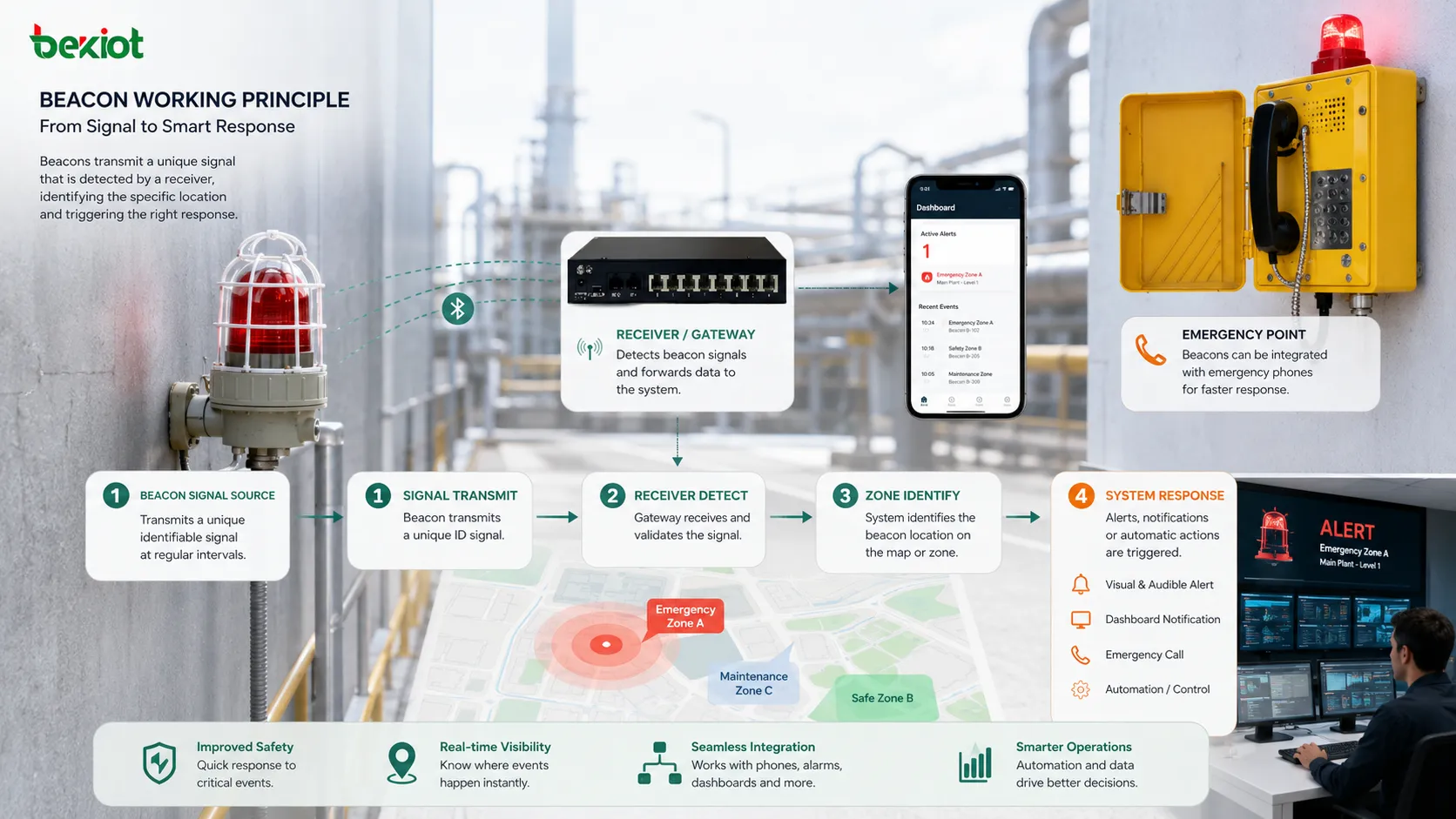
The basic working idea is simple: a beacon sends a signal repeatedly or when triggered. A receiving device detects the signal, reads its meaning, and performs an action. That action may be displaying an alert, locating an asset, opening an app function, logging a presence event, guiding a route, or triggering an emergency response.
The signal itself does not always carry complex data. In many cases, it only says, “I am here,” “this location matters,” “this device is active,” or “this event requires attention.” The intelligence often comes from the system that receives and interprets the signal.
For example, a flashing light on a machine may warn workers about a fault. A Bluetooth transmitter in a retail store may tell a mobile app that a customer is near a certain shelf. A rescue beacon may help search teams locate a person or vessel. The signal pattern and system context define the real meaning.
Main Types by Signal Method
Visual Signaling Devices
Visual types use light to attract attention or indicate status. They may flash, rotate, pulse, or change color. Common examples include strobe lights, tower lights, aviation obstruction lights, emergency warning lights, and machine status indicators.
These devices are useful where people need to notice an event quickly. A red flashing light may indicate danger, while a green light may show normal operation. In noisy industrial environments, visual signaling is often more reliable than sound alone.
Wireless Proximity Transmitters
Wireless types transmit short-range signals that nearby receivers can detect. Bluetooth Low Energy beacons are a common example. They usually broadcast an identifier that a phone, gateway, or tracking system can recognize.
They are used for indoor positioning, asset tracking, visitor guidance, proximity marketing, attendance, equipment location, and smart building automation.
Navigation and Location Markers
Navigation-related types help determine position or direction. They may be used in maritime, aviation, road, emergency rescue, and outdoor positioning systems.
Their role is to guide movement, mark hazards, support rescue, or help receivers determine where they are relative to a known reference point.
Acoustic and Ultrasonic Indicators
Some systems use sound or ultrasonic signals. Audible devices may alert people in an area, while ultrasonic transmitters may support indoor positioning or short-range detection.
Acoustic signaling is useful when visual attention cannot be guaranteed, but it may be limited by noise, echo, distance, and hearing protection.
Core Technical Elements
A beacon normally includes a signal source, power supply, control circuit, housing, and communication or trigger logic. The exact structure depends on the type.
A visual unit may include LEDs, optical lens, controller, mounting base, and power input. A wireless unit may include a radio chip, antenna, battery, firmware, broadcast interval setting, and identifier. A safety unit may include relay input, alarm trigger, weatherproof enclosure, and status feedback.
The technical design should match the environment. A device installed outdoors may need weather resistance. A unit in a factory may need dust protection and strong visibility. A wireless unit used for tracking may need long battery life and stable signal behavior.
Identification Function
One of the most important functions is identification. The signal can help a receiver know which object, area, device, or event it is detecting.
In wireless systems, the device may broadcast a unique ID. The management platform maps that ID to a real-world object such as a room, shelf, asset, vehicle, gate, or emergency point. The receiver does not need to understand everything locally; it only needs to detect the ID and send it to the system.
In visual systems, identification can be based on color, flash pattern, mounting location, or label. A specific color pattern may indicate a machine state, alarm type, or production condition.
Location and Proximity Awareness
Another key function is location awareness. The signal helps a system understand that a receiver is near a specific point.
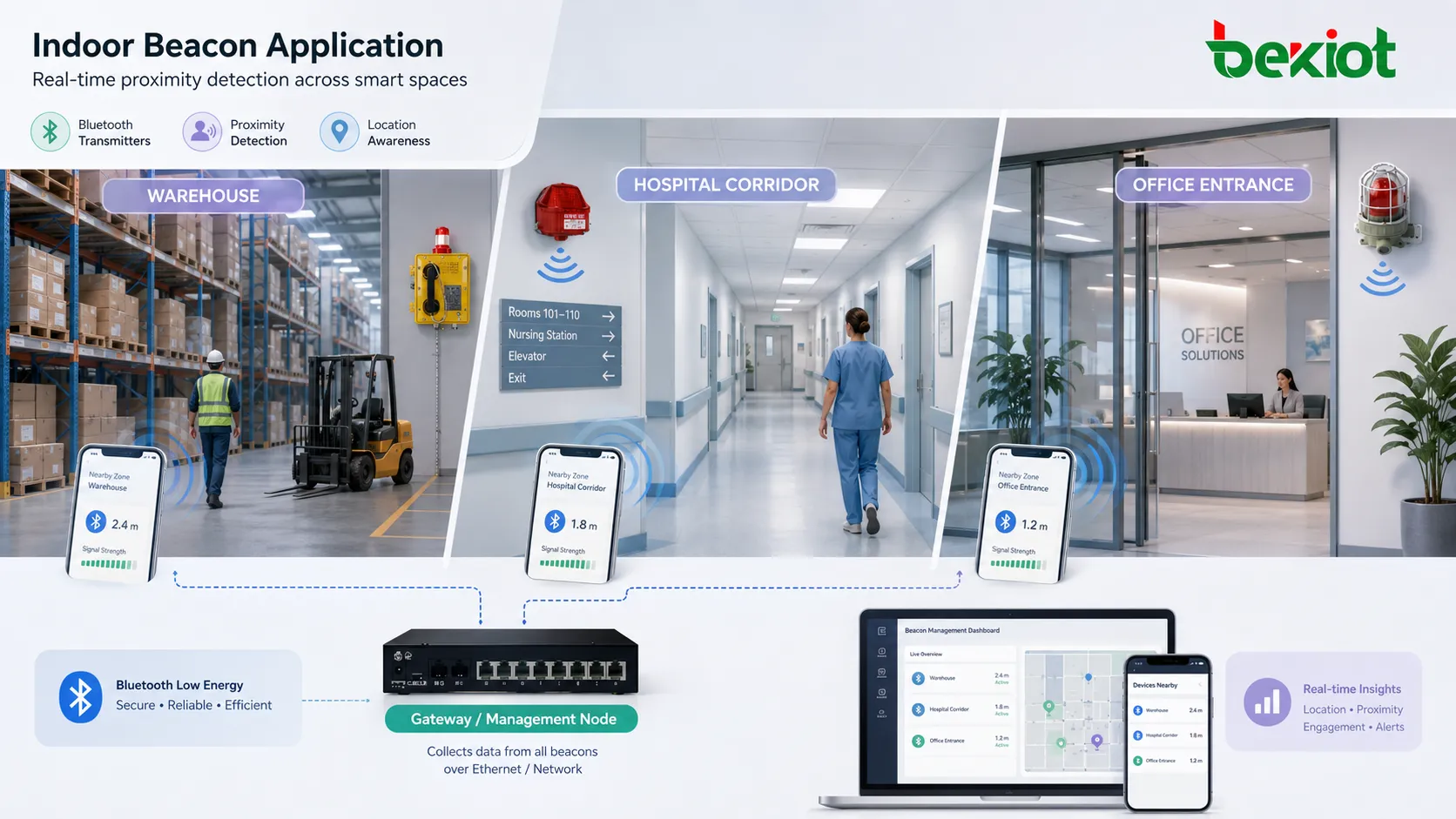
In indoor environments, GPS may not work well. Wireless transmitters can fill this gap by marking zones, rooms, corridors, equipment areas, or entrances. A mobile app or gateway can detect nearby signals and estimate location based on signal strength or known placement.
This is useful in warehouses, hospitals, museums, airports, factories, parking areas, campuses, and shopping centers. It supports navigation, asset search, staff positioning, visitor guidance, and location-based automation.
Warning and Alert Function
Warning is one of the oldest and most direct functions. A flashing light, audible alarm, or emergency transmitter can draw attention to danger, abnormal status, or urgent action.
In industrial safety, beacons may indicate machine faults, gas alarms, access violations, emergency calls, crane movement, vehicle approach, fire events, or evacuation instructions. The goal is to make the event visible and difficult to ignore.
The warning effect depends on brightness, sound level, color choice, flash pattern, placement, viewing angle, and environmental interference. A warning device placed in the wrong location may not be noticed even if it works technically.
Status Indication
Many systems use beacon-like indicators to show operating state. A machine tower light may display running, idle, warning, fault, or maintenance mode. A network device may use LEDs to show power, link, activity, or alarm state.
Status indication helps workers and technicians understand system condition without opening software dashboards. It is especially useful where quick visual inspection is required.
Color design should be consistent. If red means danger in one area and normal operation in another, users may misunderstand the signal. Standardized meaning improves safety and efficiency.
Tracking and Asset Management
Wireless transmitters are often used for asset tracking. A small device can be attached to tools, vehicles, medical equipment, containers, pallets, or high-value assets. Gateways or mobile devices detect the signal and update the asset location.
This helps organizations reduce search time, prevent loss, improve utilization, and maintain inventory accuracy. In hospitals, it can help locate medical devices. In warehouses, it can track movable equipment. In factories, it can follow tools and materials.
Accuracy depends on deployment density, receiver placement, signal strength, interference, battery life, and software algorithms.
Automation Trigger
A beacon can also act as a trigger. When a receiver enters a signal area, the system can perform an automated action.
For example, a mobile app may open a location-specific page. A warehouse system may confirm that a worker has entered a zone. A smart building platform may adjust lighting or access workflow. A museum guide may play content for a nearby exhibit.
This type of use connects physical location with digital services. It is valuable when the system needs to react to presence rather than wait for manual input.
System Value Comparison
| Function Area | Typical Use | System Value |
|---|---|---|
| Identification | Device ID, zone ID, asset ID, status pattern | Helps systems or people know what signal source is being detected |
| Location Awareness | Indoor positioning, proximity detection, navigation | Supports guidance, tracking, automation, and workflow records |
| Warning | Flashing light, audible alarm, emergency signal | Improves visibility of urgent events and abnormal conditions |
| Status Display | Machine condition, network state, service availability | Allows fast on-site inspection and operational awareness |
| Automation Trigger | App action, access flow, smart building response | Connects physical presence with digital workflows |
Deployment in Industrial Sites
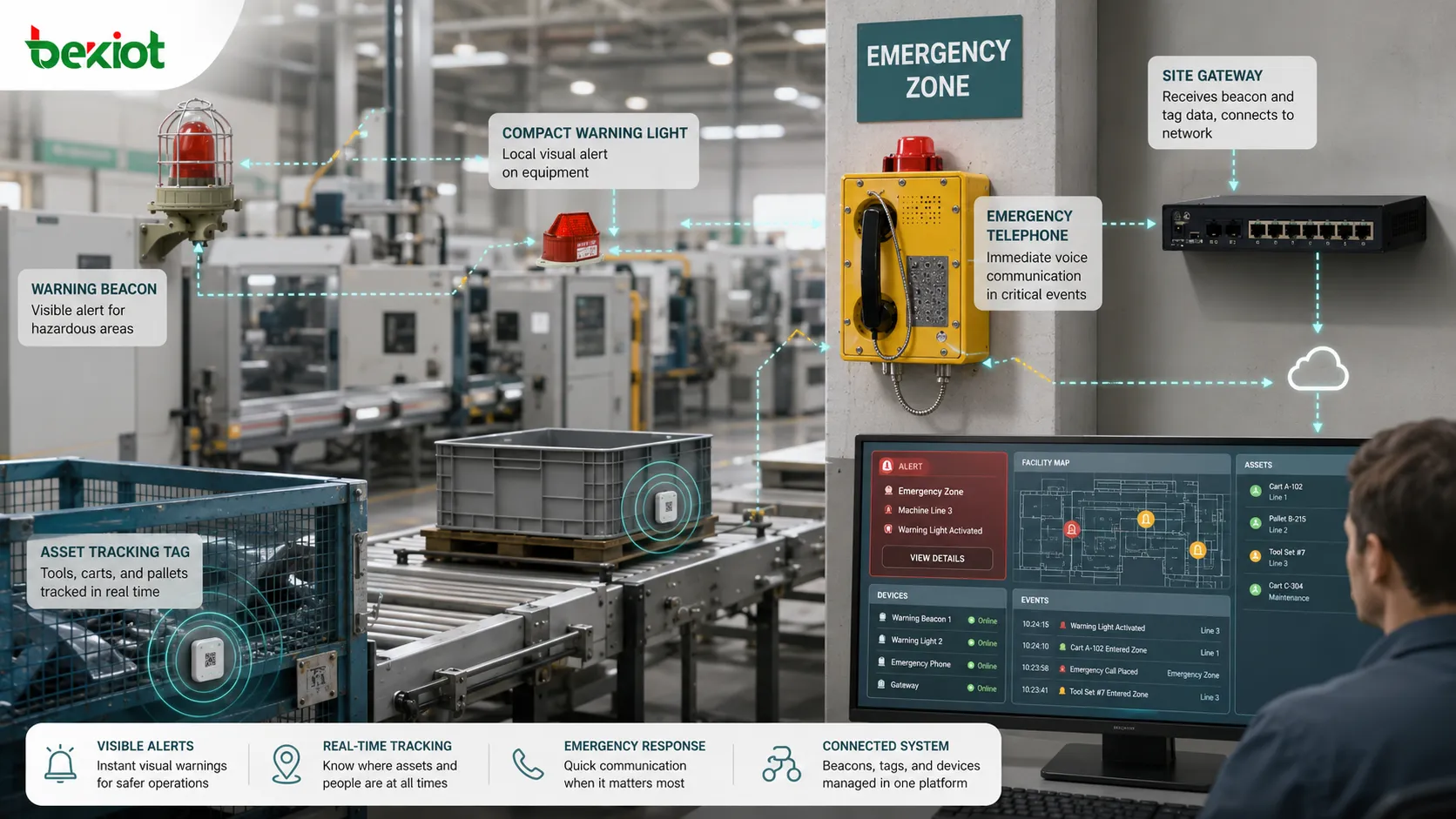
Industrial environments often use visual and audible units for safety and process awareness. They may be installed near machines, entrances, production lines, control cabinets, cranes, loading zones, emergency phones, or hazardous areas.
The deployment should consider visibility from normal working positions. A warning signal must be seen or heard by the people who need it. Mounting height, direction, color, lens type, ambient light, background noise, and obstruction all matter.
For wireless models used in factories, metal surfaces, machinery, moving vehicles, and electromagnetic interference can affect signal stability. Site testing is necessary before large-scale deployment.
Deployment in Smart Buildings
Smart buildings use wireless signals for access guidance, visitor services, space usage analysis, indoor navigation, maintenance tasks, and location-based automation.
For example, a maintenance worker may receive equipment information when approaching a machine room. A visitor app may guide people to meeting rooms. A facility system may collect anonymous movement patterns to improve space planning.
Privacy should be considered. If the system tracks people or mobile devices, clear policies, consent, data minimization, and access control may be required.
Deployment in Healthcare and Public Facilities
Hospitals may use wireless transmitters for locating mobile medical equipment, tracking staff workflows, guiding visitors, or supporting patient movement management. Visual warning devices may also be used for emergency rooms, nurse call systems, isolation areas, and equipment alarms.
Public facilities such as airports, museums, stations, campuses, and shopping centers may use them for navigation, information delivery, safety alerts, or service automation.
In these scenarios, reliability and user experience are both important. A poorly placed transmitter may trigger the wrong content or fail to guide users accurately.
Power and Battery Design
Power strategy is critical. Fixed visual devices may use AC or DC power. Wireless units may use batteries, USB power, solar assistance, or wired power depending on application.
Battery-powered models must balance broadcast interval, signal strength, battery capacity, and maintenance cost. A short broadcast interval may improve responsiveness but consume more power. A long interval saves battery but may reduce detection speed.
For large deployments, battery replacement planning can become a major maintenance task. Management platforms should report low battery status where possible.
Signal Range and Accuracy
Signal range depends on technology, output power, antenna design, placement, obstacles, interference, and receiver sensitivity. Longer range is not always better.
In proximity applications, too much range may cause false detection from nearby rooms or adjacent zones. In warning applications, visibility range must match the hazard area. In tracking applications, accuracy may require more receivers rather than stronger transmitters.
Deployment should be designed around the required detection area, not only the maximum technical range.
Security and Data Protection
Wireless signals can be copied, spoofed, or detected by unauthorized receivers if not protected properly. Some simple devices only broadcast an identifier, which may be enough for low-risk use but insufficient for sensitive applications.
Security design may include rotating identifiers, encrypted payloads, authenticated receivers, secure provisioning, access control, and monitoring for abnormal signals.
In applications involving people tracking, personal data protection is also important. Systems should avoid collecting unnecessary information and should define who can access location records.
Maintenance and Lifecycle Management
Maintenance includes physical inspection, battery replacement, signal testing, firmware updates, cleaning, mounting checks, lens inspection, and platform record review.
For visual units, check brightness, lens condition, mounting stability, and power input. For wireless units, check battery level, broadcast status, signal strength, ID mapping, and gateway reception.
A management system should keep records of installation location, device ID, battery status, maintenance date, firmware version, and responsible team. Without records, large deployments become difficult to maintain.
Common Design Mistakes
One mistake is using the same device type for every scenario. A warehouse asset tag, machine warning light, indoor navigation transmitter, and emergency signal marker may have very different requirements.
Another mistake is ignoring the environment. Metal shelves, thick walls, weather, dust, vibration, sunlight, and background noise can all affect performance.
A third mistake is placing devices based only on convenience. They should be placed according to visibility, signal coverage, workflow, safety requirement, and maintenance access.
A fourth mistake is not defining signal meaning clearly. Users must understand what each color, sound, flash pattern, or app notification means.
Selection Criteria
Select the device according to function first. Is the goal warning, location, tracking, navigation, identification, status display, or automation? Different goals require different technologies.
Then evaluate environment. Indoor or outdoor use, power availability, signal interference, mounting method, safety requirements, maintenance access, and expected lifetime should all be considered.
Finally, evaluate system compatibility. A wireless transmitter is only useful if receivers, apps, gateways, or management platforms can interpret it correctly. A visual unit is only useful if people can notice it and understand its meaning.
Future Development Trends
Beacon technology is moving toward lower power consumption, better location accuracy, stronger security, cloud management, multi-sensor integration, and AI-assisted event analysis.
In industrial and building systems, beacon signals may increasingly connect with digital twins, indoor maps, asset platforms, emergency management systems, and predictive maintenance tools.
The future value will come less from the signal device alone and more from how the signal is integrated into workflows, safety systems, data platforms, and automated responses.
Summary
A beacon is a signal source that helps people or systems detect identity, location, status, warning, or presence. Its functions include identification, proximity detection, navigation support, alerting, status indication, tracking, and automation triggering. The correct technology and deployment method depend on the environment, range, power strategy, security needs, and system integration requirements.
FAQ
Can a beacon work without the internet?
Yes. Many types can send local visual, acoustic, or wireless signals without internet access. Internet connectivity is only needed when data must be uploaded to a platform or managed remotely.
Is Bluetooth the only technology used for beacons?
No. Bluetooth is common for proximity and indoor location, but visual light, sound, RFID, Wi-Fi, GPS-related systems, infrared, and ultrasonic methods may also be used.
Why does signal range change in real environments?
Walls, metal objects, people, machinery, weather, interference, antenna direction, and receiver quality can all affect real signal range.
How often should battery-powered units be checked?
The interval depends on battery capacity, broadcast settings, temperature, and usage. Large deployments should use low-battery reporting or scheduled inspection plans.
What is the most important factor in deployment?
The most important factor is matching the device to the real purpose. A warning application needs visibility and attention; a tracking application needs reliable detection; a navigation application needs correct placement and software mapping.







