


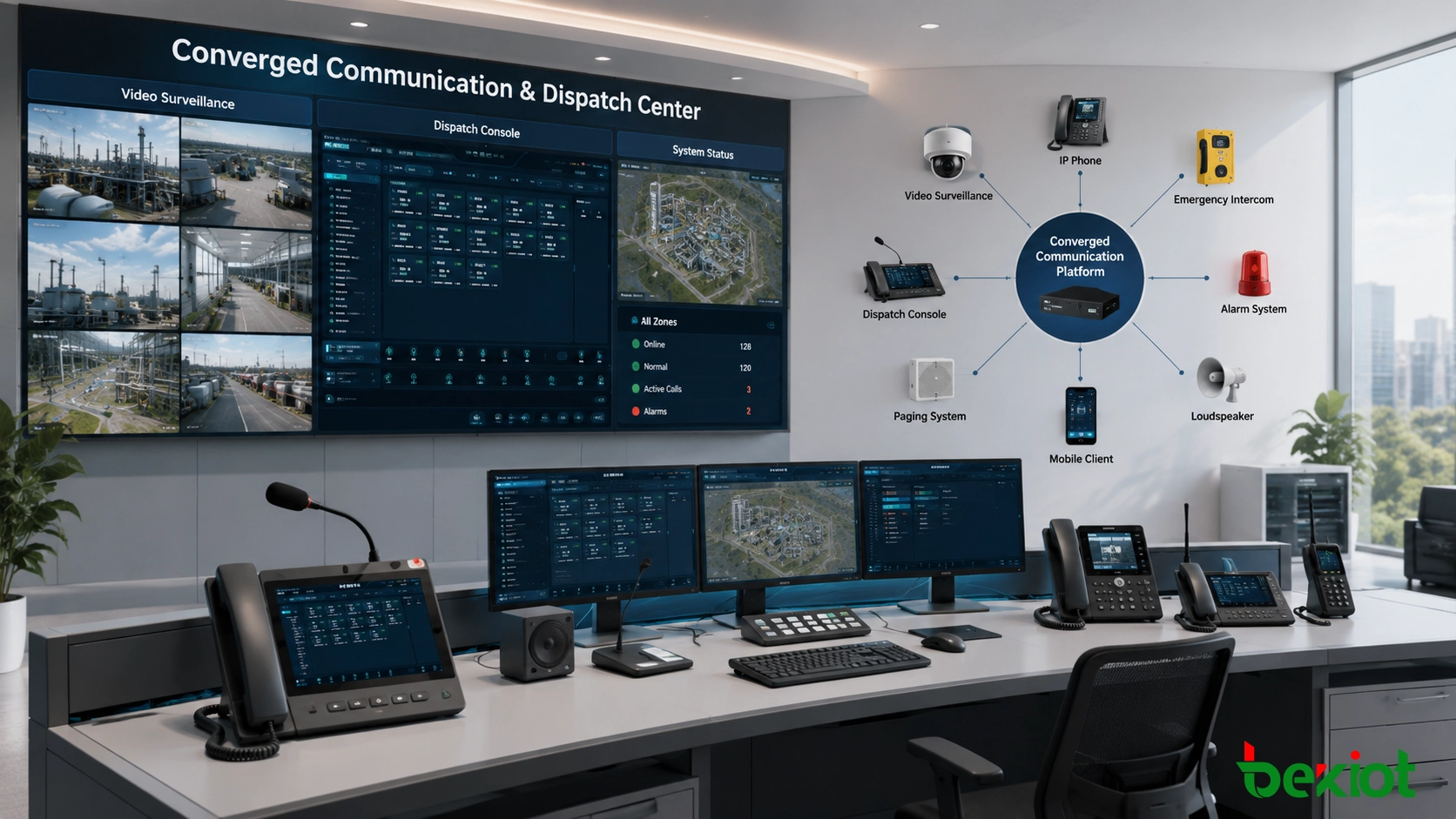
In many emergency communication and dispatch projects, voice is no longer enough. Operators often need to see the on-site situation while making calls, launching group announcements, handling alarms, or coordinating field teams. This is why video surveillance integration has become an important part of converged communication system design.
A converged communication platform is usually built around SIP-based softswitch architecture. It focuses on voice calls, intercom, dispatching, paging, recording, and emergency command. Video surveillance systems, however, are commonly designed for live viewing, recording, playback, camera management, and security monitoring. They often use protocols or access methods such as GB/T28181, RTSP, ONVIF, SDK interfaces, RTMP, and NVR platform integration. Because the two systems are built for different purposes, the project design must choose a suitable way to connect them.
Related system: Becke Converged Communication System
Why Video Access Matters in Dispatch Projects
In a traditional communication project, operators may only hear an alarm call or receive a voice report from the field. In a modern emergency command environment, the same operator may need to check nearby cameras, confirm the on-site condition, view a gate or tunnel entrance, identify a risk area, or support remote decision-making with live images.
This is especially valuable in industrial plants, transportation tunnels, utility networks, campuses, ports, mines, energy sites, public safety projects, and large building groups. When communication and video are handled separately, operators must switch between different systems. When they are integrated properly, the dispatch console can support voice, alarm, paging, and video verification in one workflow.
The key question is not only whether video can be viewed. The real question is how the video stream is accessed, whether it can be managed at scale, whether it works with SIP communication terminals, and whether the solution is suitable for long-term operation.
Method One: RTSP Stream Pulling
RTSP is one of the most common ways to view live video from cameras, NVRs, or surveillance platforms. Many IP cameras provide RTSP stream addresses so that other systems can pull and display the live video feed. In simple projects, this method is easy to understand: the dispatch console embeds an RTSP player, and each camera stream is configured with its corresponding address.
For example, a camera may provide an RTSP address that includes the camera IP address, channel information, stream type, and authentication details. Any compatible RTSP player can request the stream and display the live image.
However, RTSP is not the native communication protocol of a SIP-based converged communication system. SIP terminals, intercom endpoints, IP phones, and many dispatch communication devices cannot directly handle RTSP video in the same way they handle SIP calls. As a result, RTSP pulling is usually limited to dispatch console applications rather than full-system video communication.
Suitable Use Cases
RTSP stream pulling is suitable for small projects where only a limited number of cameras need to be viewed from a dispatch workstation. It can also be used when the project only needs live video preview and does not require complex camera control, video directory synchronization, SIP terminal access, or deep alarm linkage.
Main Limitations
The biggest limitation is management. When there are many cameras, configuring and maintaining individual RTSP addresses becomes time-consuming. If camera passwords, IP addresses, stream paths, or network segments change, the dispatch system must be updated manually.
Another limitation is functional depth. RTSP normally provides live video viewing, but many advanced surveillance functions remain outside the communication platform, such as PTZ control, recording search, alarm linkage, camera directory management, and video playback. In addition, RTSP access is often limited by network boundaries, which means it is usually practical only inside the project’s internal network.
Method Two: SDK-Based Camera Integration
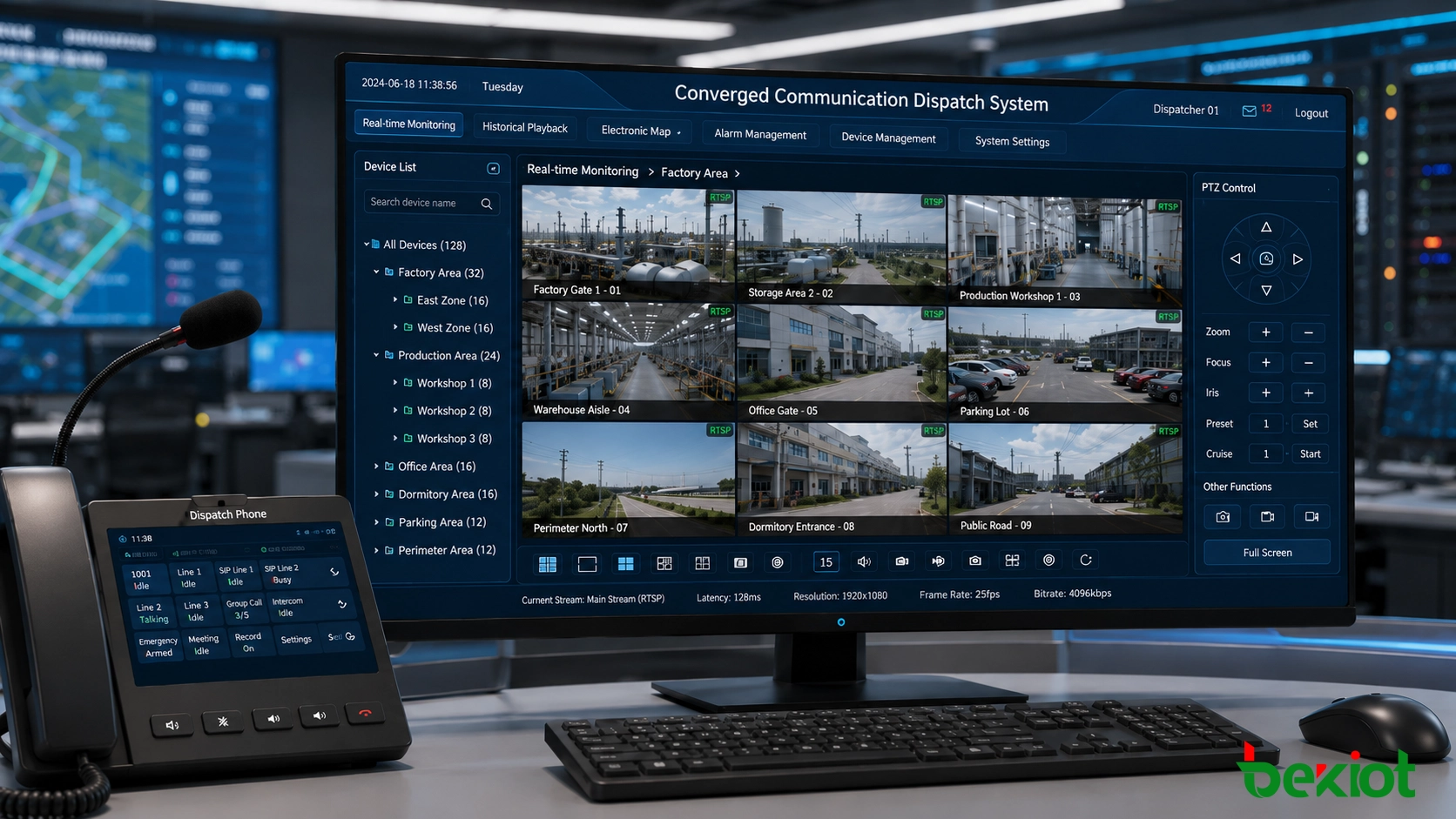
SDK integration is another common way to connect video surveillance with a dispatch or communication platform. Compared with direct RTSP pulling, SDK access may provide more camera-side capabilities, depending on the camera manufacturer or surveillance platform. For example, an SDK may allow the system to access live video, PTZ movement, snapshot capture, device status, alarm events, or certain management functions.
In converged communication projects, SDK integration is also mainly used at the dispatch console level. The software developer embeds the SDK into the command platform or dispatch client so that operators can view or control cameras from the same interface.
This approach can improve functionality compared with a basic RTSP player, but it also introduces development complexity. Different camera brands, NVR platforms, and video management systems may provide different SDKs, different authentication methods, different data structures, and different compatibility requirements. If a project uses multiple camera brands, integration work can become heavy.
Where SDK Access Works Well
SDK access is useful when a project has a fixed camera brand or a unified surveillance platform and requires deeper control than basic live preview. It can help the dispatch console provide a more complete operator experience, especially when the project needs camera control or alarm interaction from the video system.
Risks in Long-Term Maintenance
The main challenge is maintainability. SDK versions may change, operating system environments may be updated, and compatibility may depend on vendor-specific development support. For large projects or multi-brand environments, each additional camera platform may require separate adaptation work. This can increase project cost and make future upgrades more difficult.
Method Three: Video Access Gateway Integration
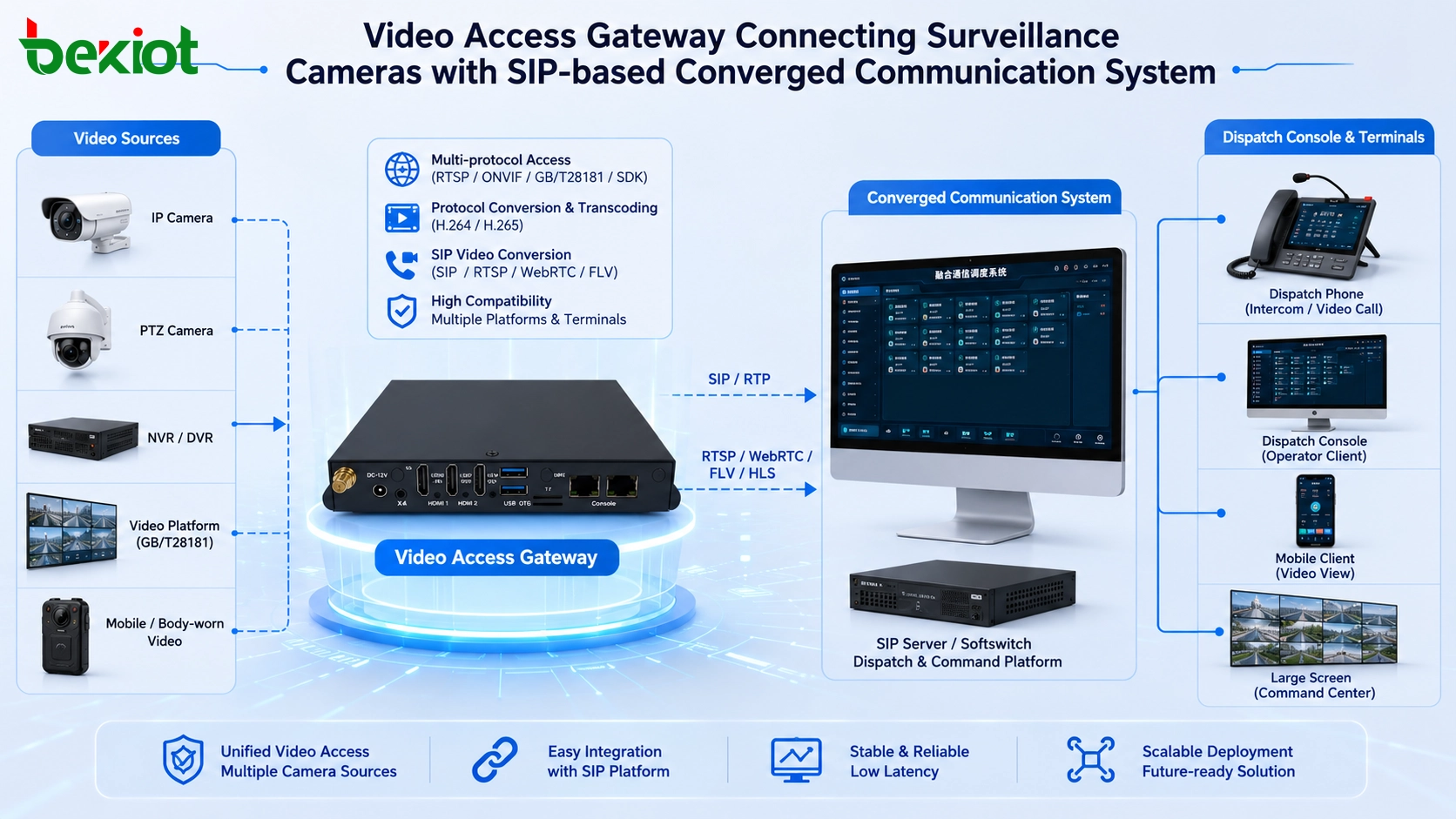
For large-scale projects, a dedicated video access gateway is often the more complete and scalable solution. Instead of asking the converged communication platform to directly manage every camera protocol, the gateway acts as a bridge between the video surveillance system and the SIP-based communication system.
The gateway can connect to cameras, NVRs, video management platforms, and other video sources through common access methods such as RTSP, ONVIF, RTMP, GB/T28181, SDK interfaces, or platform-level integration. After the video source is connected, the gateway converts or outputs video in formats that are easier for the communication and dispatch system to use.
The most important value is protocol conversion. A video access gateway can convert surveillance video into SIP-compatible video resources, allowing the converged communication system to call, view, or dispatch video more naturally. In practical applications, this makes it possible for a dispatch platform, command center, or supported terminal to access video resources through a more unified communication workflow.
Multiple Output Formats for Different Applications
A mature video gateway does not only serve SIP communication. It may also provide video output for web dispatch clients, large-screen command displays, GIS platforms, and integrated management systems. Common output methods can include FLV, RTSP, HLS, WebRTC, and SIP video streams, depending on the project architecture.
This is important because different display environments have different requirements. A browser-based command platform may prefer WebRTC or HLS. A large-screen visualization system may use another stream format. A SIP dispatch console may require video that can work inside a communication session. The gateway helps the project avoid repeated point-to-point integration.
Transcoding and Compatibility
Video codec compatibility is another major reason to use a gateway. Many surveillance cameras use H.265 to reduce bandwidth and storage usage, while some communication systems and terminals are more compatible with H.264. A video access gateway can provide transcoding between different video formats, helping the system match the decoding capability of dispatch consoles, SIP terminals, and integrated platforms.
The gateway can also adjust frame rate, bitrate, resolution, and stream quality according to network conditions and terminal capability. This allows the project to balance image quality, bandwidth consumption, and real-time performance.
Comparison of the Three Integration Approaches
RTSP pulling is simple and direct, but it is usually suitable for limited dispatch-console viewing. SDK integration can provide more functions, but it depends heavily on camera brands and development work. A video access gateway provides stronger compatibility, easier platform integration, and better scalability for large projects.
For a small site with several cameras, RTSP may be enough. For a project with one fixed surveillance brand and specific camera-control requirements, SDK integration may be practical. For a command center, industrial emergency platform, multi-site dispatch system, or public safety project, a gateway-based architecture is usually more suitable because it can standardize different video sources and make them available to the communication platform.
Beyond Fixed Cameras
Modern emergency and dispatch projects may not only connect fixed surveillance cameras. They may also need to access body-worn cameras, mobile video devices, drones, temporary deployment cameras, portable command units, live video sources, or field recording equipment.
This creates a broader requirement: the system should not be designed only around one camera type. It should support different video sources, different networks, and different emergency response scenarios. A gateway-based design is often better suited to this requirement because it separates video source adaptation from the main communication platform.
Design Considerations for Real Projects
When designing video integration for a converged communication system, engineers should evaluate the number of cameras, network structure, video protocol, codec format, dispatch workflow, terminal capability, alarm linkage requirements, and future expansion plan.
If the project only needs live preview at one workstation, a lightweight solution may be enough. If the project needs video linkage with emergency calls, alarm events, GIS maps, dispatch groups, large-screen displays, and multiple departments, the architecture should be designed from the beginning with unified access, permission control, stream conversion, and maintenance efficiency in mind.
Security should also be considered. Camera credentials, stream addresses, platform APIs, and video access permissions should be managed carefully. In industrial and public safety environments, video access should follow user roles, operating procedures, and network security policies.
Recommended Architecture for Emergency Communication
For emergency communication and command applications, the recommended design is usually a layered architecture. The front-end layer includes cameras, NVRs, body-worn devices, mobile video sources, and surveillance platforms. The access layer uses a video access gateway to normalize protocols and streams. The communication layer uses the SIP-based converged communication system for calls, intercom, paging, dispatching, and alarm handling. The application layer presents video, voice, alarms, maps, records, and dispatch tools to operators.
This structure avoids overloading the communication platform with too many camera-specific interfaces. It also gives the project more flexibility when new cameras, new sites, or new command applications are added later.
Key Takeaways
Video surveillance integration is becoming a standard requirement in converged communication and emergency dispatch projects. RTSP stream pulling is simple but limited. SDK integration can provide more camera functions but requires brand-specific development. A video access gateway offers better compatibility, easier expansion, stream conversion, and stronger support for large-scale command systems.
For projects that require stable emergency response, multi-source video access, SIP communication, dispatch console operation, and future scalability, gateway-based video integration is often the most practical solution. It helps turn separate voice and video systems into a more unified command environment.
FAQ
Can a SIP-based communication system directly play all surveillance camera streams?
Not always. Most surveillance cameras output video through RTSP, ONVIF, GB/T28181, SDK interfaces, or platform protocols. A SIP-based communication system usually needs a player, software integration, or a video access gateway to use those streams properly.
Is RTSP enough for emergency dispatch projects?
RTSP can be enough for simple live preview, but it is not ideal for large projects that require camera directory management, terminal access, alarm linkage, transcoding, or unified dispatch workflows.
Why is video transcoding important?
Different cameras and terminals may use different video codecs. For example, surveillance systems often use H.265, while many communication terminals and platforms are more compatible with H.264. Transcoding helps improve compatibility across the whole system.
Can video be linked with emergency calls or alarms?
Yes. With the right integration design, an alarm or emergency call can trigger related camera views on the dispatch console, helping operators verify the on-site situation faster and make better decisions.
What type of project benefits most from a video access gateway?
Large industrial sites, transportation systems, campuses, utility networks, public safety platforms, and multi-site command centers usually benefit most because they often need to connect many cameras, multiple video sources, and different communication endpoints.







