


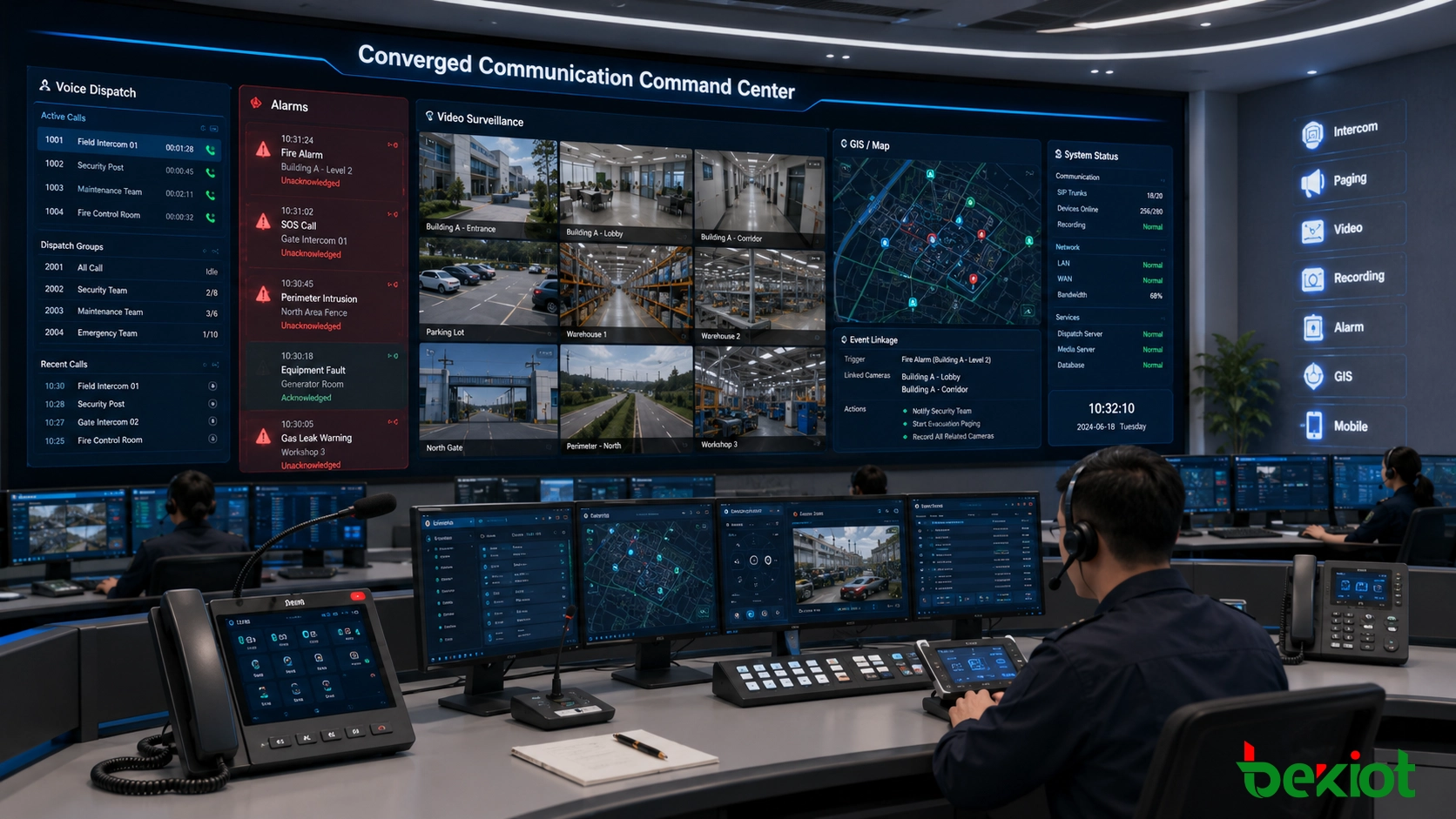
In many converged communication projects, voice dispatch alone is no longer enough. Emergency command centers, industrial control rooms, transportation operators, campuses, and public safety teams often need to combine voice calls, alarms, paging, video monitoring, and on-site response into one coordinated workflow. This makes the connection between video surveillance systems and converged communication platforms an important part of modern solution design.
For emergency command applications in particular, video access is often not an optional feature. Operators need to verify alarms visually, check on-site conditions before dispatching teams, view nearby cameras during emergency calls, and present live video on dispatch consoles or command-center screens. A well-designed integration method can make the whole system more practical, more responsive, and easier to expand.
The purpose of integration is not simply to display camera images on another screen. A good solution should connect video resources with communication events, alarm triggers, dispatch groups, user permissions, recording requirements, and emergency response procedures. When voice, video, and alarm information are organized around the same operational process, the command center can move from passive monitoring to active coordination.
Related solution: Becke Converged Communication System
Why Voice and Video Need to Work Together
A converged communication system is designed to bring different communication resources together. It may include SIP calls, dispatch consoles, emergency intercoms, IP phones, paging systems, mobile apps, radio gateways, alarm linkage, recording, and command-center management. Video surveillance systems, on the other hand, focus on camera access, live preview, recording, playback, video platform management, and security monitoring.
When these two systems operate separately, the operator has to switch between different screens and platforms. During routine operation, this may only reduce efficiency, but in an emergency, it can delay assessment and response. By integrating video surveillance into the communication workflow, a dispatcher can receive an alarm, make a call, check the related camera, start a group notification, and coordinate response teams through a more unified interface.
This type of integration is valuable in industrial plants, energy facilities, tunnels, rail transit stations, ports, mines, campuses, hospitals, utility networks, and large building groups. In these environments, communication and video are both critical resources, and the real value comes from making them cooperate.
For example, when an emergency intercom call is triggered at a gate, tunnel entrance, production workshop, or remote equipment room, the dispatcher should not need to search manually through a separate surveillance platform. The system can automatically present the related camera view, allowing the operator to confirm the scene, identify the risk level, and decide whether to start paging, call a response group, notify security staff, or escalate the incident to a command center.
RTSP Pull Stream Access
The simplest method is to use the RTSP stream provided by the surveillance camera, NVR, or video platform. In this design, the dispatch console pulls the RTSP video stream and displays the live camera image. For small projects, this method is direct and easy to understand because many IP cameras already support RTSP access.
RTSP pull stream access can meet basic live preview requirements. For example, when the operator selects a camera on the dispatch console, the system opens the corresponding stream address and displays the video. This can be useful for simple monitoring linkage, small control rooms, or projects with only a limited number of cameras.
However, RTSP access also has clear limitations. When a project includes a large number of cameras, configuring and maintaining stream addresses one by one can become difficult. If camera IP addresses, passwords, channels, or stream rules change, the dispatch system also needs to be updated. This increases maintenance workload.
RTSP access can also be affected by network conditions. In unstable networks, video may fail to open, freeze, become delayed, or show mosaic-like distortion. Cross-network or public-network access can be more complicated, especially when firewalls, NAT, bandwidth limits, or security policies are involved. Another limitation is that RTSP preview is usually controlled by the dispatch console only, so it does not naturally extend video access to other SIP terminals.
In engineering practice, RTSP is better understood as a lightweight preview method rather than a complete integration architecture. It is suitable for controlled environments where the camera list is small, the network is stable, and the operator only needs live viewing. Once the project requires multi-user access, video linkage, permission control, video distribution, or terminal-side viewing, a more structured access layer is usually required.
Using a Video Access Gateway
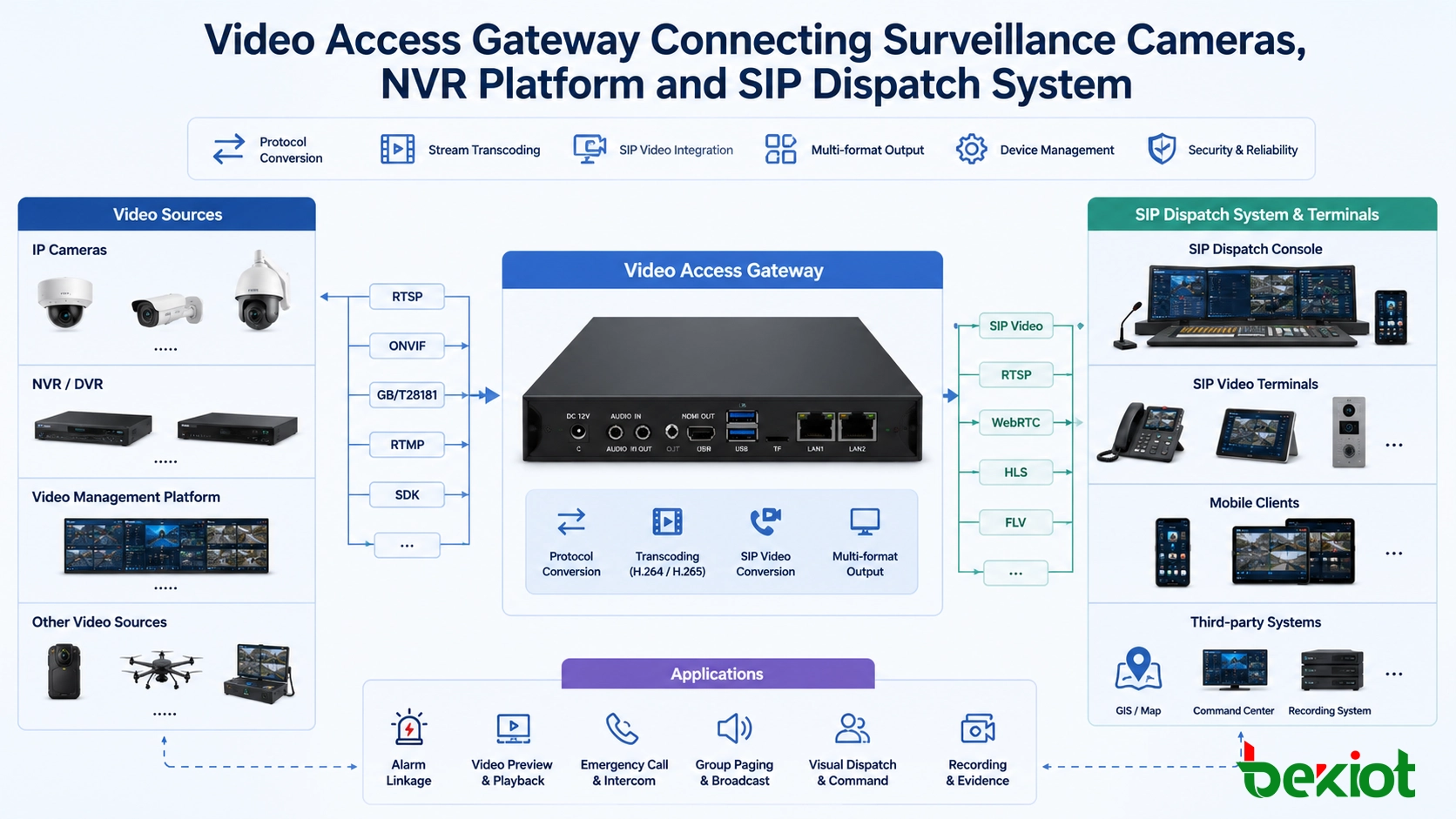
A more complete approach is to deploy a video access gateway between the surveillance system and the converged communication platform. The gateway acts as a protocol bridge and media processing layer. It can connect to cameras, NVRs, video recorders, and video management platforms through different access methods such as RTSP, ONVIF, and GB/T28181.
With this design, the communication system does not need to directly adapt to every camera model, stream rule, or platform interface. The video access gateway handles video input, stream conversion, protocol adaptation, and output format processing. This makes implementation easier and reduces the risk of compatibility problems.
For projects that need to integrate many cameras or different surveillance resources, the gateway-based method is usually more practical than direct stream pulling. It can simplify configuration, improve compatibility, and provide a cleaner structure for future expansion.
The gateway also helps separate system responsibilities. The surveillance platform continues to manage camera resources, recording, storage, and video security policies, while the converged communication platform focuses on calls, dispatch, intercom, paging, alarms, and emergency coordination. This division makes the overall system easier to maintain and reduces the need for repeated custom development.
Solving Codec and Display Problems
In real video integration projects, many display problems are not caused by the camera itself. They are often caused by codec mismatch, stream format differences, terminal decoding limitations, or network quality. Common symptoms include video not displaying, slow loading, freezing, mosaic images, or poor image quality.
A video access gateway can help solve these problems through built-in transcoding and stream adaptation. It can support conversion between H.264 and H.265, adjust frame rate, modify bitrate, change resolution, and output video streams that match the receiving platform or terminal.
This is important because surveillance systems often use H.265 to reduce storage and bandwidth, while some communication terminals, web clients, or dispatch platforms may have better compatibility with H.264. Without transcoding, the video source may exist, but the communication system may not be able to display it correctly.
By adding a transcoding layer, the project can improve cross-platform and cross-system compatibility. The system can also balance image clarity, bandwidth consumption, and real-time performance based on actual deployment conditions.
For emergency communication, real-time performance is especially important. A camera image that opens too slowly or has excessive delay may reduce its value during incident handling. Therefore, the solution should consider stream opening speed, end-to-end latency, concurrent viewing capacity, network bandwidth, and terminal decoding performance during the design stage instead of treating video as an isolated function.
Turning Cameras into SIP Video Resources
One of the key advantages of using a video access gateway is that surveillance video can be converted into standard SIP-based video resources. After conversion, a camera is no longer only a passive monitoring device. It can become a callable video resource inside the converged communication system.
This means supported SIP terminals can access surveillance images through the communication platform. A dispatch console, video IP phone, SIP video terminal, or mobile video application can establish a connection with a camera resource and view the live image when needed.
This design is useful for emergency communication because it brings video closer to the call workflow. For example, when a field intercom triggers an emergency call, the operator can quickly access the nearby camera. When a dispatcher needs to verify an incident, the related video source can be called or displayed without leaving the communication environment.
SIP video conversion also makes video resources easier to organize in a communication-oriented structure. Cameras can be associated with extensions, emergency call points, zones, departments, gates, substations, tunnels, workshops, or alarm sources. This allows the system to support more practical workflows, such as one-click video call-up, alarm-triggered video pop-up, camera linkage by zone, and video-assisted dispatch decision-making.
Multi-Format Output for Command Centers
Emergency command centers often need more than SIP video access. They may also need to display live video on a large screen, web-based dispatch platform, GIS map, one-map command interface, or integrated management dashboard. Different applications may require different stream formats.
A video access gateway can provide multiple video output methods such as SIP video, FLV, WebRTC, and other stream formats depending on the project design. This allows the same surveillance resource to serve different usage scenarios.
For example, the dispatch console may use SIP video for communication linkage, while a large-screen visualization system may use web-friendly streams for command-center display. This avoids repeated integration work and gives the project more flexibility.
In multi-department emergency management, this flexibility is important. Security teams, production supervisors, maintenance teams, control room operators, and command leaders may access the same incident from different terminals. Multi-format output allows each role to use the video source in the most suitable way without forcing all users into one display environment.
Integration with Large-Scale GB/T28181 Platforms
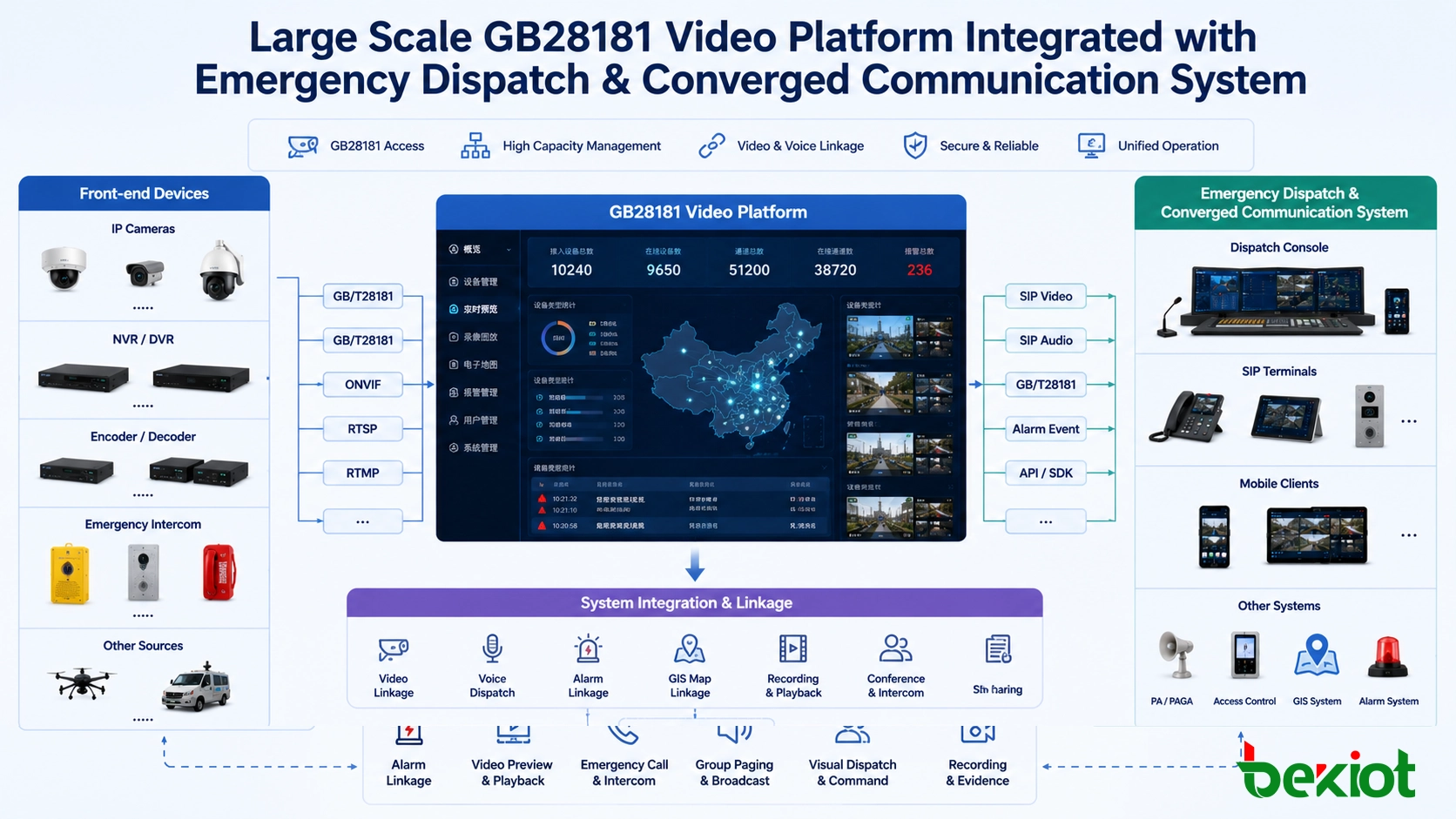
For large users, the surveillance system may already be built on a large-scale GB/T28181 platform. In this situation, it is often not efficient to connect each camera separately. A better method is to connect the video access gateway with the existing GB/T28181 video platform and obtain the camera directory structure from the platform.
After the directory is synchronized, the converged communication system can call the required camera resource on demand. In practical deployment, the operator does not need to rebuild the whole camera list manually inside the communication system. Instead, the gateway helps connect the existing video platform with the communication platform in a more organized way.
This method is especially suitable for large industrial parks, transportation networks, public safety platforms, city-level systems, and multi-site command projects. It reduces deployment risk, improves camera resource management, and supports on-demand video access during dispatch and emergency response.
When GB/T28181 resources are introduced through a gateway, the communication platform can use video resources without replacing the existing surveillance investment. This is useful for renovation projects where cameras, NVRs, platforms, and network structures are already in operation. The integration layer can protect existing assets while adding voice-video linkage, emergency call association, and command-center visualization.
Recommended Architecture for Practical Deployment
A practical solution can be divided into four layers. The front-end layer includes surveillance cameras, NVRs, video recorders, mobile cameras, body-worn devices, and existing video platforms. The access layer uses a video access gateway to connect these sources through RTSP, ONVIF, GB/T28181, or other supported methods.
The communication layer uses the converged communication system to manage voice calls, SIP terminals, paging, intercom, alarms, dispatch groups, and emergency workflows. The application layer presents video, voice, maps, alarms, and command tools to operators through dispatch consoles, web clients, large screens, or mobile terminals.
This layered structure keeps the system easier to maintain. Video adaptation is handled by the gateway, while the communication platform focuses on command, dispatch, and collaboration. When new cameras, new sites, or new display applications are added later, the project can expand without redesigning the entire system.
A professional deployment plan should also include account permission control, network segmentation, stream access security, device naming rules, camera-zone mapping, failover planning, and operation logs. These details are often overlooked in early design, but they directly affect long-term reliability and maintenance efficiency.
Application Value in Emergency and Industrial Projects
Connecting video surveillance with converged communication creates stronger operational value than using the two systems separately. In daily operation, dispatchers can check on-site conditions before making decisions. In abnormal events, alarms and emergency calls can be linked with nearby cameras. In command centers, live video can be displayed together with voice communication and response coordination.
This improves situational awareness, reduces manual switching between systems, and helps operators make faster decisions. It also makes the overall solution more competitive because the project is no longer only a communication system or only a video monitoring system. It becomes a unified emergency communication and visual command solution.
In industrial environments, the value is reflected in faster incident confirmation, clearer responsibility handover, stronger coordination between field and control room teams, and better evidence support after an event. In public safety or transportation projects, it can improve response visibility across multiple points and help operators coordinate personnel, broadcasts, calls, and camera resources from a single command workflow.
Conclusion
Video surveillance integration is an important part of modern converged communication design. Direct RTSP stream pulling can meet simple preview needs, but it becomes difficult to manage in large, cross-network, or multi-terminal projects. A video access gateway provides a more scalable approach by connecting cameras, NVRs, video platforms, and GB/T28181 systems, while also supporting transcoding, SIP video conversion, and multi-format output.
For emergency command, industrial dispatch, public safety, transportation, campus, and utility projects, the gateway-based architecture can make video resources easier to access, easier to present, and easier to link with communication workflows. It helps transform separate voice and video systems into a more complete command and response platform.
FAQ
Can video surveillance be linked with emergency calls?
Yes. With proper integration, an emergency call or alarm event can trigger related camera views on the dispatch console, helping operators verify the situation before taking action.
Is ONVIF the same as RTSP?
No. RTSP is mainly used for video stream access, while ONVIF is a broader device interoperability standard that can support camera discovery, configuration, and control depending on the device and platform.
Why do some camera streams fail to display on dispatch platforms?
Common reasons include codec mismatch, unsupported stream format, unstable network conditions, excessive bitrate, incorrect authentication, or decoding limitations on the receiving terminal.
Can one camera stream be used by different systems at the same time?
Yes. Through a video access gateway, the same camera source can be converted into different output formats for SIP terminals, web clients, large-screen displays, and command platforms.
What should be planned before deployment?
Engineers should confirm the number of cameras, video protocol, codec format, network path, bandwidth, access permission, display terminals, alarm linkage logic, and future expansion requirements.







