


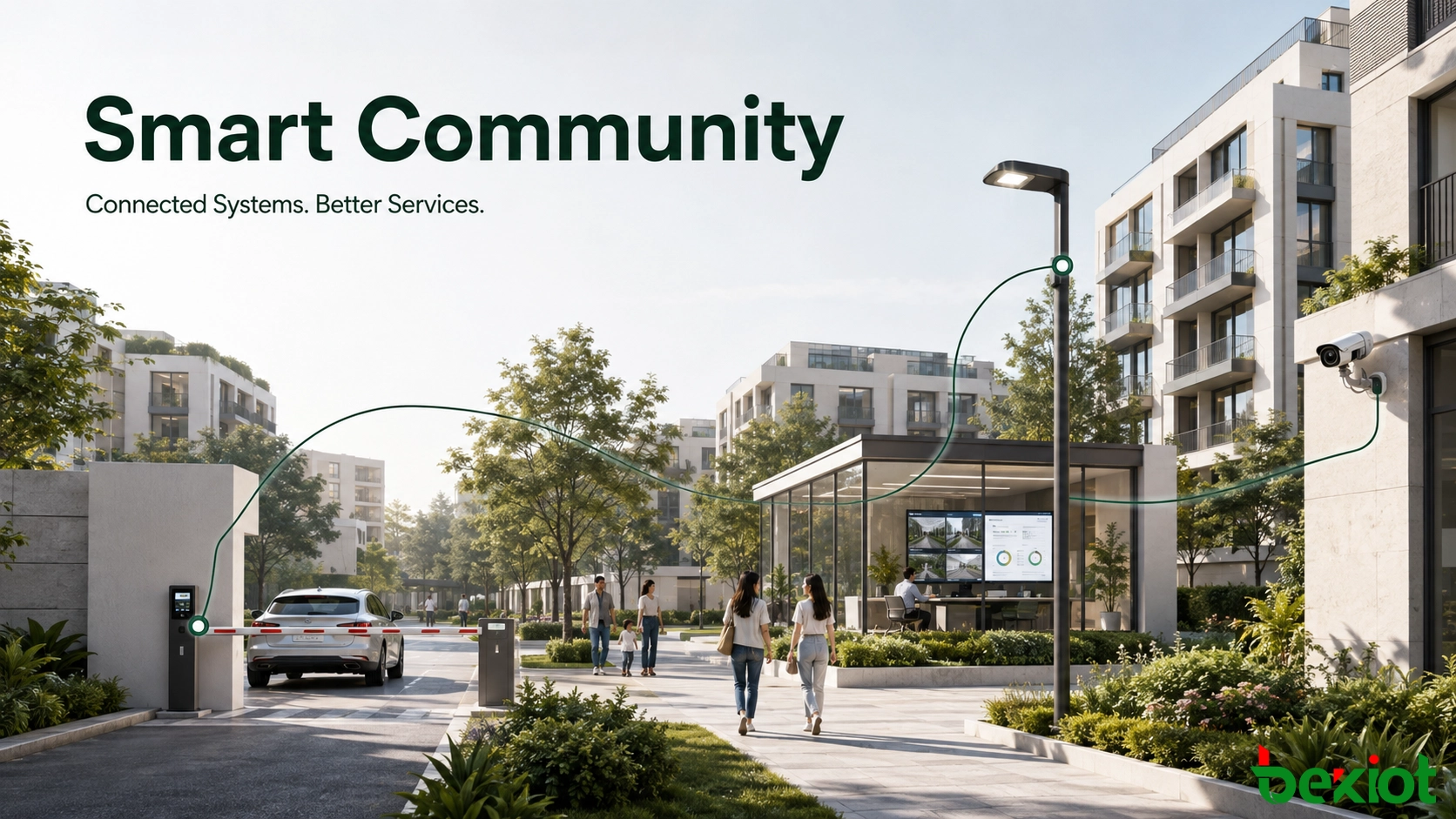
A smart community is not created by installing a few connected cameras, access terminals or mobile applications. It is created when infrastructure, security, mobility, energy, resident services and property operations can exchange useful information and support the same workflow. The objective is practical: identify problems earlier, coordinate the right people faster, reduce repetitive work and give residents a clear way to request and receive services.
The systems do not need to be deployed at the same time. In most projects, phased construction is more realistic. The important decision is to establish a common architecture from the beginning, so that an urgent first-stage project—such as parking, video surveillance or utility monitoring—does not become an isolated system that is expensive to integrate later.
A Digital Foundation Before Smart Features
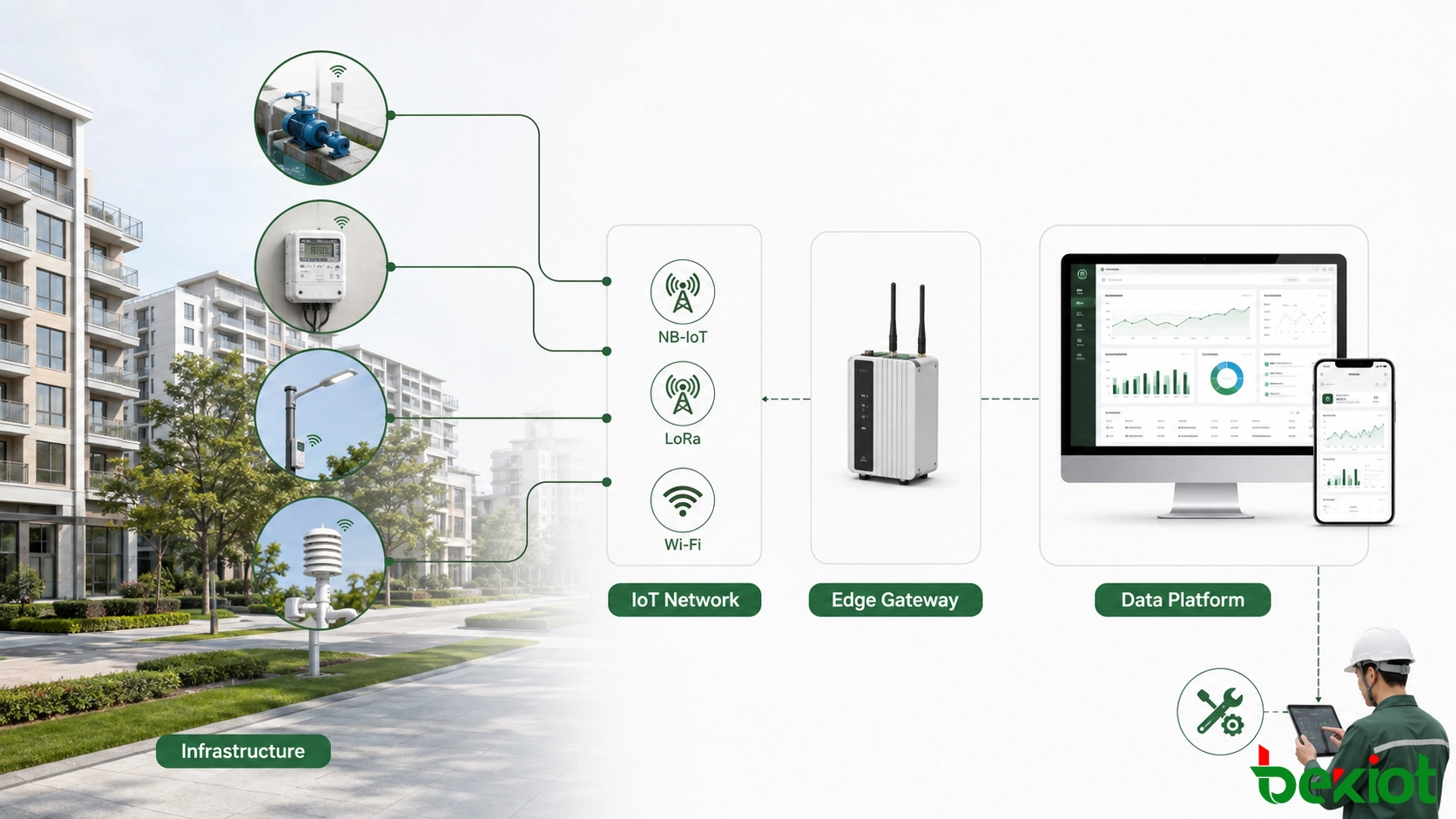
Community operations depend on a wide range of physical infrastructure: water supply and drainage, electricity, lighting, gas, heating, landscaping, elevators, pumps and other shared facilities. These assets are often maintained by different teams and may have very different inspection cycles. Adding sensors and connected controllers makes their condition visible without requiring every check to begin with a site visit.
The appropriate connection method depends on the device, distance, power supply and data volume. NB-IoT can suit low-power devices that send small amounts of data over a wide area. LoRa can support private, low-power sensor networks within a community. Wi-Fi or wired Ethernet may be more appropriate for devices that need higher throughput or already have reliable local power. No single access technology is the right choice for every endpoint.
A useful first phase normally focuses on equipment with clear operational value. Water levels, pump status, electrical consumption, lighting circuits and environmental conditions are common examples. The data should support an action rather than merely fill a dashboard. A high water level may create a maintenance ticket; abnormal electricity use may trigger an inspection; a failed lighting circuit may be routed to the responsible contractor.
Where Data Should Be Stored and Processed
Every connected service needs storage, computing and backup. A large residential development may justify a dedicated data center with multiple servers, professional networking and controlled equipment-room conditions. A smaller community may only need a compact local server environment. The choice should reflect the number of systems, retention requirements, availability targets and the operator's ability to maintain the infrastructure.
Cloud deployment offers another route. Computing resources can be scaled as additional communities, devices or applications are added, and the property operator does not need to build a large server room at every location. A hybrid model is also common: time-sensitive control and temporary buffering remain at the edge, while historical data, reporting and multi-site management run in the cloud. The design should follow business continuity and data-governance requirements rather than treating cloud or on-premises deployment as an automatic default.
Safety and Mobility Must Work as One System
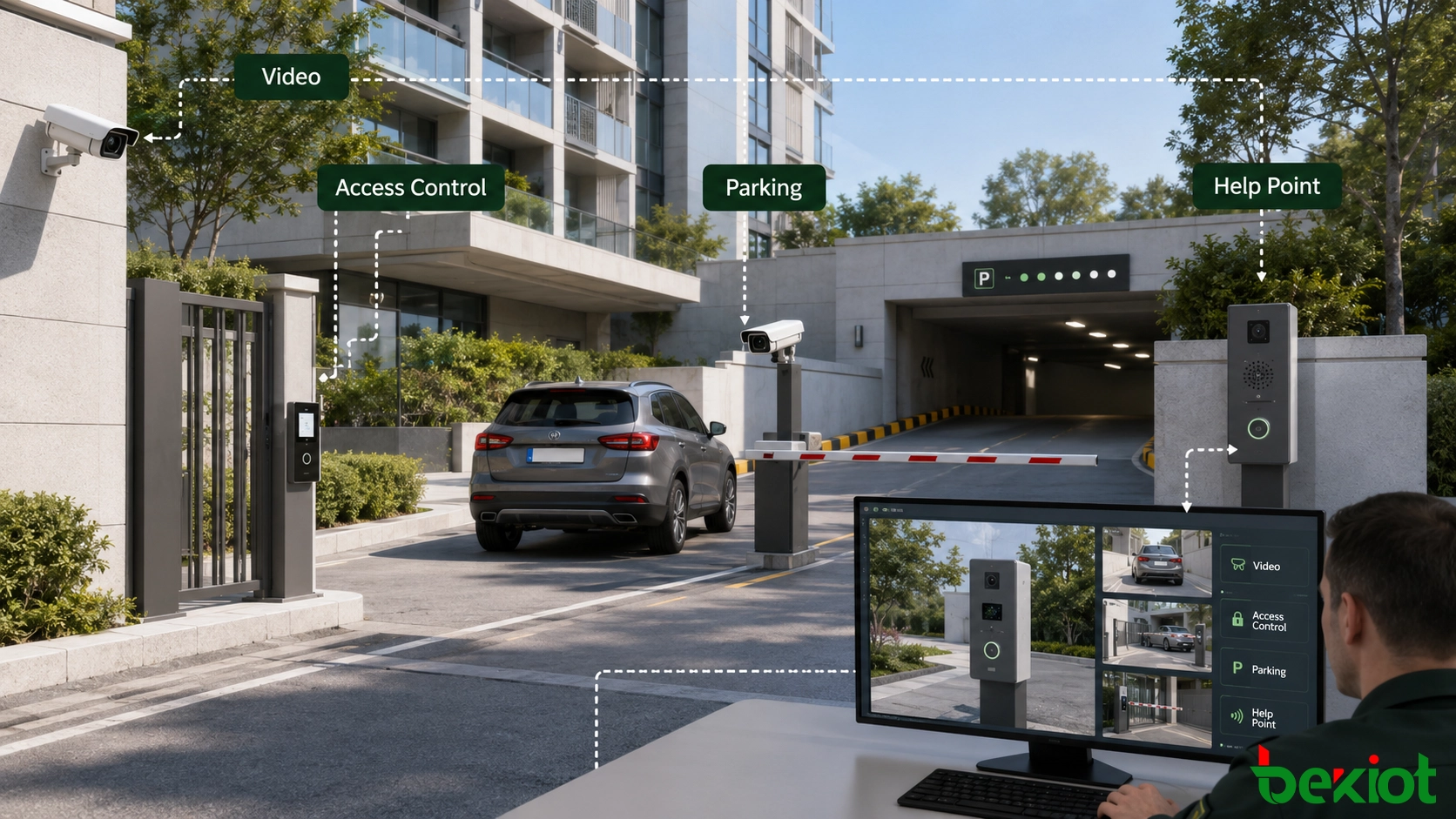
Video surveillance remains a major part of community security, but a smart project should not leave it as a separate wall of camera images. Video becomes more useful when another event can call up the correct camera, location and operating procedure. An access-control alarm, parking assistance call or perimeter event should guide the operator to relevant live and recorded video without requiring a manual search across several systems.
Existing camera platforms can be connected to the wider management environment through a video integration layer or gateway. Depending on the web, mobile and real-time viewing requirements, the integration may provide streams through HLS, FLV, RTMP or WebRTC and may also use SIP-based video for communication workflows. The selected method should match latency, browser compatibility, network capacity and security requirements. Converting every camera to every protocol is unnecessary; the project only needs the formats required by its actual applications.
Community security may also include intrusion detection, access control, facial verification and AI-assisted video analysis. Typical analytics include flame detection and the detection of objects thrown from high-rise buildings. These functions can run in an intelligent camera, an edge server or a cloud service. The choice affects bandwidth, response time and integration work, so the project team should confirm how alarms, snapshots, video clips and recognition results are exposed to the management platform before selecting an algorithm or device.
Parking is another system that benefits from cross-system coordination. A complete workflow may include space-occupancy detection, resident or visitor authorization, license-plate recognition, barrier control, parking guidance, timing and payment. When a driver requests help at an entrance or inside an underground garage, an intercom call can automatically present the relevant camera and gate status to the operator. The operator can speak to the driver, verify the situation and control the barrier from one interface.
Operations Become Measurable and Controllable
Energy management is valuable because cooling, public lighting, pumps, ventilation and other shared equipment operate every day. Smart meters and connected controllers can show when and where energy is being consumed. Historical comparison can reveal abnormal loads, inefficient schedules and equipment that runs outside its intended period.
Effective energy management does not mean automatically switching off equipment whenever consumption rises. The platform needs operating rules, comfort limits and manual override. For example, lighting can follow schedules and ambient conditions, while ventilation may respond to occupancy or air-quality readings. Operators should be able to review the reason for an automatic action and restore manual control when maintenance or an unusual event requires it.
Public facilities can be managed in the same operational model. Waste-collection points, charging facilities, shared rooms, elevators, landscape irrigation and other resources can report availability, operating status or maintenance needs. Instead of displaying these devices as unrelated icons, the platform should connect them to inspection plans, service tickets, contractor responsibilities and completion records.
This creates a closed loop:
An asset, sensor, resident or operator reports an event.
The platform identifies the location, asset and required response.
A task is assigned to the correct team or service provider.
The responsible person records the action and result.
Supervisors review response time, repeated faults and unresolved issues.
The value comes from this operating loop, not from the number of sensors shown on screen.
Resident Services Define the Real User Experience
Many community systems are designed primarily for property managers, but residents judge the result through daily service. A resident-facing portal may be delivered through a website, mobile application, messaging mini-app or a combination of channels. It can support payments, repair requests, complaints, visitor registration, community notices and service progress tracking.
A request should not disappear after submission. Residents need a reference number, current status and a clear completion result. Property staff need classification, priority, responsible team and escalation rules. Connecting the resident portal with the work-order platform prevents staff from copying the same information into a separate maintenance system.
Some requests are easier to handle through a conversation. A service center can combine automated assistance with human agents for enquiries, complaints and urgent help. Voice calls, intercom calls and digital messages should reach the same service record when they concern the same incident. This gives the next operator useful context and reduces the need for residents to repeat the entire problem.
Extending Services into the Home
The community platform can also connect selected in-home safety and access devices, including smart locks, residential intercoms, smoke detectors and carbon-monoxide sensors. A verified alarm can notify the resident and the appropriate management team. The system should distinguish an advisory notification from an event that requires immediate human confirmation, so that routine device messages do not overwhelm operators.
For elderly residents or people who need additional assistance, the service layer can connect emergency requests with meal delivery, transport, home visits or other authorized providers. This turns the platform into a coordination channel between residents, community staff and service organizations. Such services require clear consent and carefully controlled data access; convenience does not justify exposing household information to every connected provider.
One Management Layer Ties the Community Together
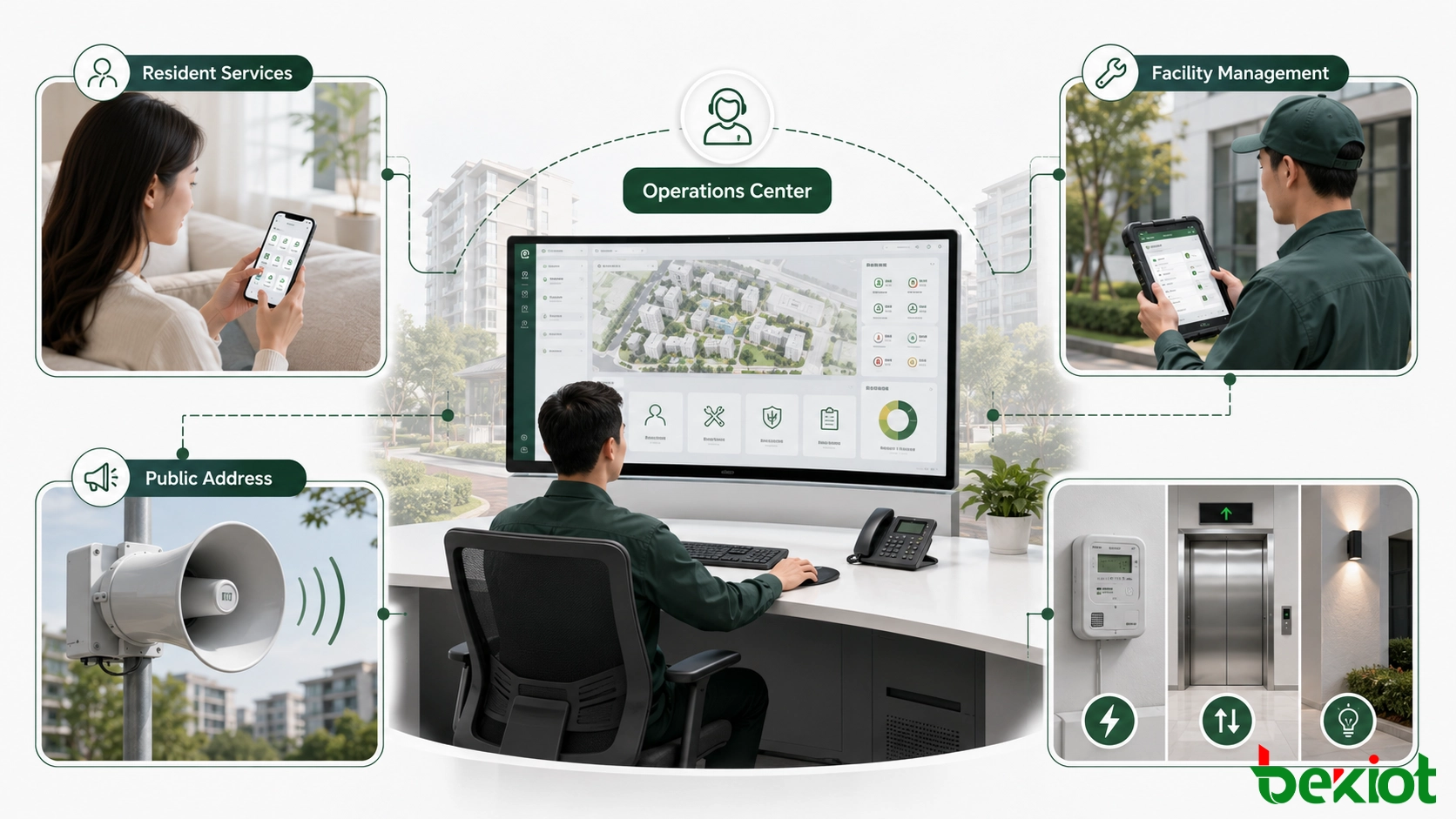
A smart community contains many specialist systems, and no single platform should attempt to replace every one of them. The management layer should provide a common view of people, places, assets, events and tasks while allowing specialist systems to continue performing the functions they handle best.
The central platform can combine resource management, dispatch, IP public address, help-point communication, alarms and service workflows. During a serious utility failure, for example, an operator may need to view the affected building, contact a maintenance team, notify selected residents and track recovery tasks. These actions use different systems but belong to one incident. A shared event record keeps the response coordinated.
Build in Stages Without Creating New Silos
A phased roadmap should begin with operational problems, not a long list of products. The first stage might address parking congestion, ageing infrastructure or slow service response. Later stages can add energy optimization, AI analysis, digital-twin visualization or multi-community management when the required data and operating processes are ready.
Each phase should still follow several common rules:
Use consistent identifiers for communities, buildings, floors, rooms, assets and residents.
Require documented interfaces for alarms, status, media, control and work orders.
Separate user roles so that viewing information does not automatically grant control permission.
Define how systems operate during network, server or cloud-service interruptions.
Test complete workflows from event detection to task closure, not only individual device connectivity.
Open interfaces and disciplined data design make later expansion more predictable. They also allow the operator to replace one subsystem without rebuilding the entire community platform. The result is not a single oversized application, but a coordinated service environment that can grow with the community.
FAQ
Which Functions Should Remain Available if the External Network Is Interrupted?
Life-safety notifications, essential access decisions and critical local equipment control should have an appropriate local operating or fallback method. The exact scope depends on the risk assessment and service-level requirements of the community.
How Should Resident Privacy Be Addressed Before Adding Video Analytics?
The operator should define the lawful purpose, authorized users, retention period, audit process and resident notice before deployment. Analytics should collect and retain only the information required for the approved operational purpose.
Which Indicators Can Show Whether the Project Is Delivering Value?
Useful indicators include incident response time, work-order closure time, repeated equipment failures, energy consumption by area, parking throughput, service adoption and resident satisfaction. The selected indicators should correspond to the original project objectives.
Can Older Building Systems Without Modern APIs Still Be Connected?
Often they can be connected through protocol adapters, edge gateways, database exchange or controlled input and output interfaces. The integration scope should be confirmed by testing because legacy systems may expose status without supporting safe remote control.
Who Should Own the Data Definitions and Interface Documentation?
The community operator or project owner should retain the authoritative asset model, event definitions and interface records. Keeping this information only with an individual supplier makes maintenance and future expansion unnecessarily difficult.







