



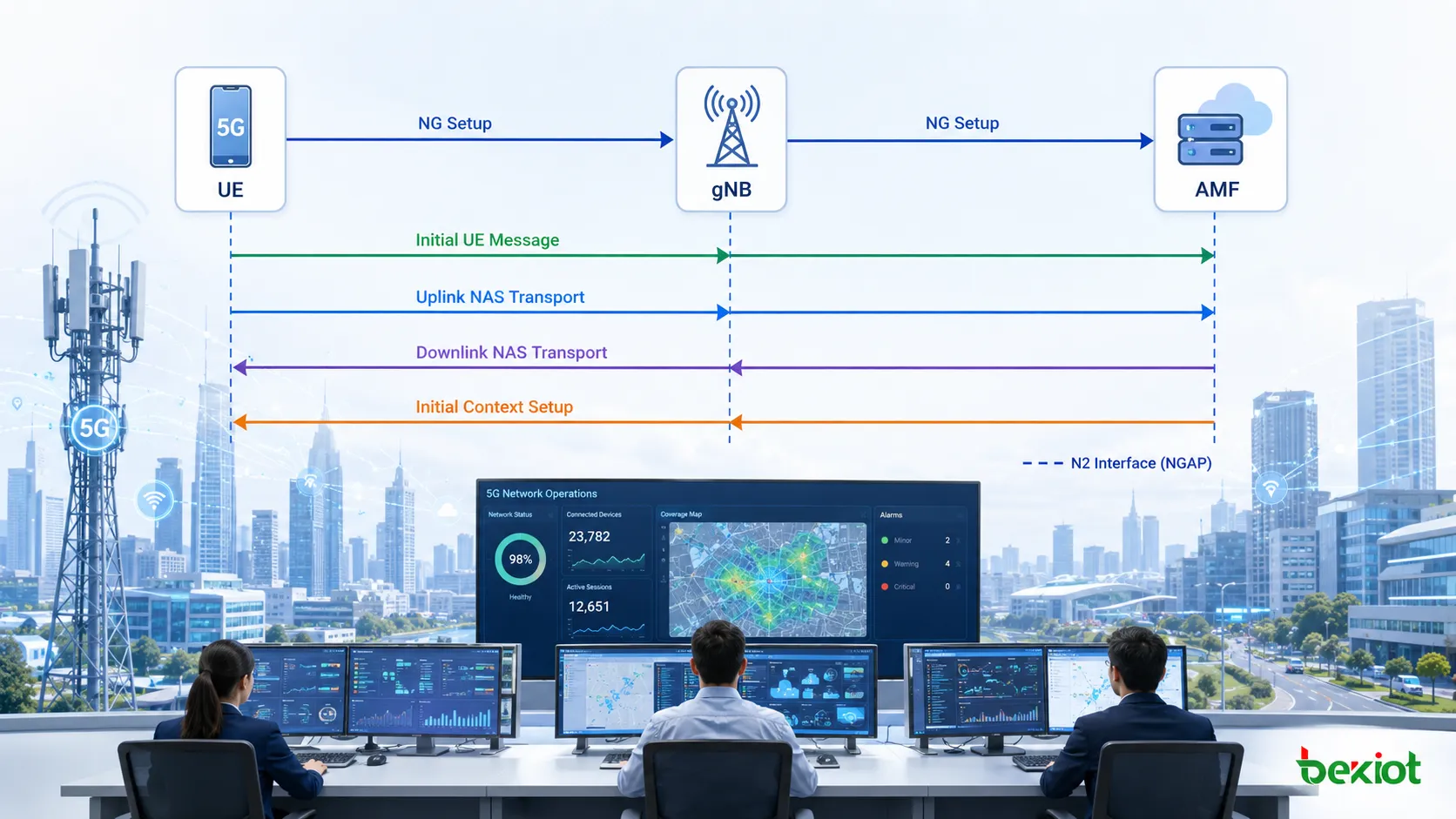
When capturing 5G registration signaling, it is common to see a sequence like this on the same N2 connection: an Initial UE Message appears first, followed by Uplink NAS Transport and Downlink NAS Transport, then Initial Context Setup, and once the UE actually starts establishing data connectivity, PDU Session Resource Setup appears. Understanding each individual message is not especially difficult. The harder part is understanding why they occur in this order and what NGAP is actually doing across the 5G control plane. A useful way to think about N2 is as a persistent control channel between the gNB and AMF. The network nodes establish their relationship first, then the UE context is created, and only after that are RAN resources prepared for the PDU Session. When the UE moves, enters idle state, or its service parameters change, additional NGAP procedures are triggered.
What Does the N2 Interface Actually Do?
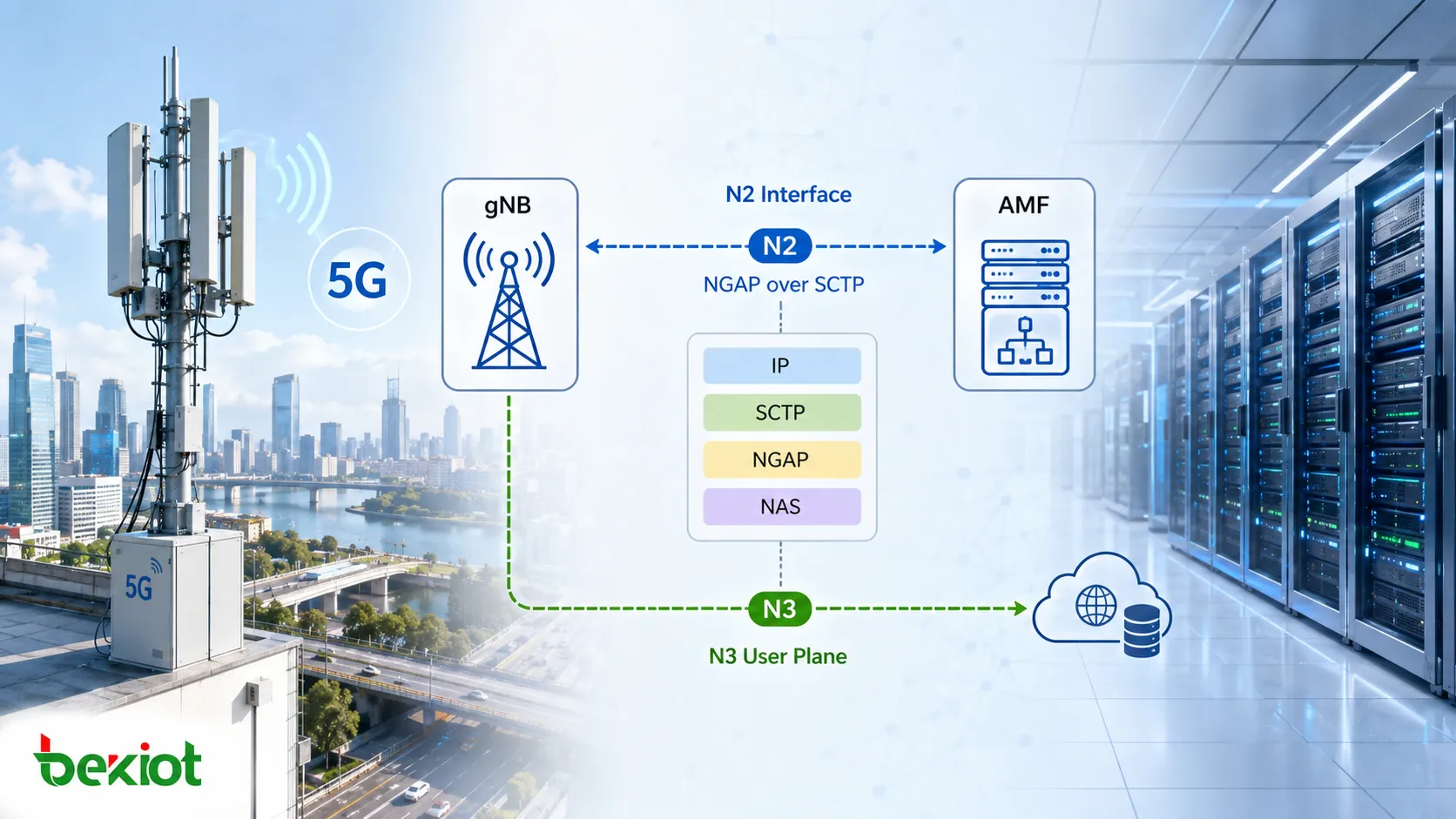
N2 is the control-plane interface between the gNB and AMF and uses NGAP, or the NG Application Protocol. From a functional perspective, it has some similarities to the S1-MME interface used in 4G, although it operates within the 5G system architecture.
SCTP is used as the transport layer for N2. NGAP runs over SCTP, while NAS messages exchanged between the UE and the 5G Core can be carried between the gNB and AMF through NGAP. A typical N2 protocol stack can therefore be viewed as follows: IP provides network reachability between the gNB and AMF, SCTP provides the N2 transport association, NGAP carries N2 control procedures and parameters, and 5G NAS is carried as a NAS-PDU when required.
NGAP itself does not carry the UE's normal user-plane traffic. Actual user data is generally transported over the N3 user plane. N2 is responsible for control functions such as establishing resources, managing UE context, transporting NAS signaling, and coordinating mobility. Functionally, N2 supports the establishment, maintenance, and release of NG-RAN resources associated with PDU Sessions, while also participating in UE context management, mobility management, NAS signaling transport, and user-plane resource control.
Why Are NGAP Procedures Divided into UE-Associated and Non-UE-Associated Procedures?
When first studying NGAP, jumping directly into dozens of procedures and message names can quickly turn into a memorization exercise. A more practical approach is to first determine whether the procedure relates to a specific UE.
UE-associated procedures operate around a particular user's context, session, or mobility state. Examples include PDU Session Resource management, UE Context management, Handover, Paging, NAS Transport, Location Reporting, and UE Radio Capability procedures. Non-UE-associated procedures, by contrast, primarily maintain the node-level relationship between the gNB and AMF. Typical examples include NG Setup, RAN Configuration Update, AMF Configuration Update, NG Reset, AMF Status Indication, and Overload Start/Stop.
This distinction is extremely useful when troubleshooting packet captures. If users across an entire gNB are affected, node-level procedures such as SCTP, NG Setup, Reset, AMF status, or overload handling should be checked first. If only one UE is affected, the investigation should instead follow that UE's NGAP IDs, NAS transport messages, context procedures, and PDU Session resource signaling.
NGAP procedures can also be divided into Class 1 and Class 2 depending on whether a response is required. Class 1 procedures typically include a Request and Response and may also include a Failure outcome. Class 2 procedures do not require a procedure-level response from the peer. In real troubleshooting, it is usually more useful to ask whether a procedure expects a successful or unsuccessful outcome than to memorize the class of every NGAP message.
How Does N2 Build State from gNB Startup to UE Registration?
Before any UE appears, the first issue the gNB must solve is not subscriber registration. It must first establish whether it can communicate properly with the AMF.
The first step is usually NG Setup. After the SCTP association between the gNB and AMF has been established, the gNB sends an NG Setup Request. If the AMF accepts the connection, it returns an NG Setup Response. In an AMF Pool deployment, the gNB may need to establish N2 relationships with multiple AMFs and obtain information used later for AMF selection. At this point, only the node-level relationship has been established; no specific UE context exists yet.
When a UE begins registration, the signaling moves to the next level. After receiving the UE's initial NAS message, the gNB can forward it to the AMF using Initial UE Message. Subsequent NAS signaling between the UE and AMF is typically carried over N2 using Uplink NAS Transport and Downlink NAS Transport. One important point is that the gNB does not need to interpret all NAS service logic. For much of the NAS signaling, its main responsibility is to identify the correct UE context and deliver the NAS-PDU to the appropriate AMF.
As registration progresses, the AMF also needs the gNB to establish the RAN-side UE context. This is where Initial Context Setup Request and Initial Context Setup Response appear. The Initial Context Setup Request can include important UE-related information such as Allowed NSSAI, GUAMI, UE Security Capabilities, Mobility Restriction List, and NAS-PDU. At this stage, the gNB is no longer simply forwarding NAS signaling. It is beginning to establish the state required to continue serving that UE.
How Does NGAP Establish PDU Session Resources When the UE Starts Using Data?
Successful registration does not mean that all user-plane resources for the UE are already available. When the UE needs access to a data network and establishes a PDU Session, N2 also participates in preparing the corresponding RAN resources.
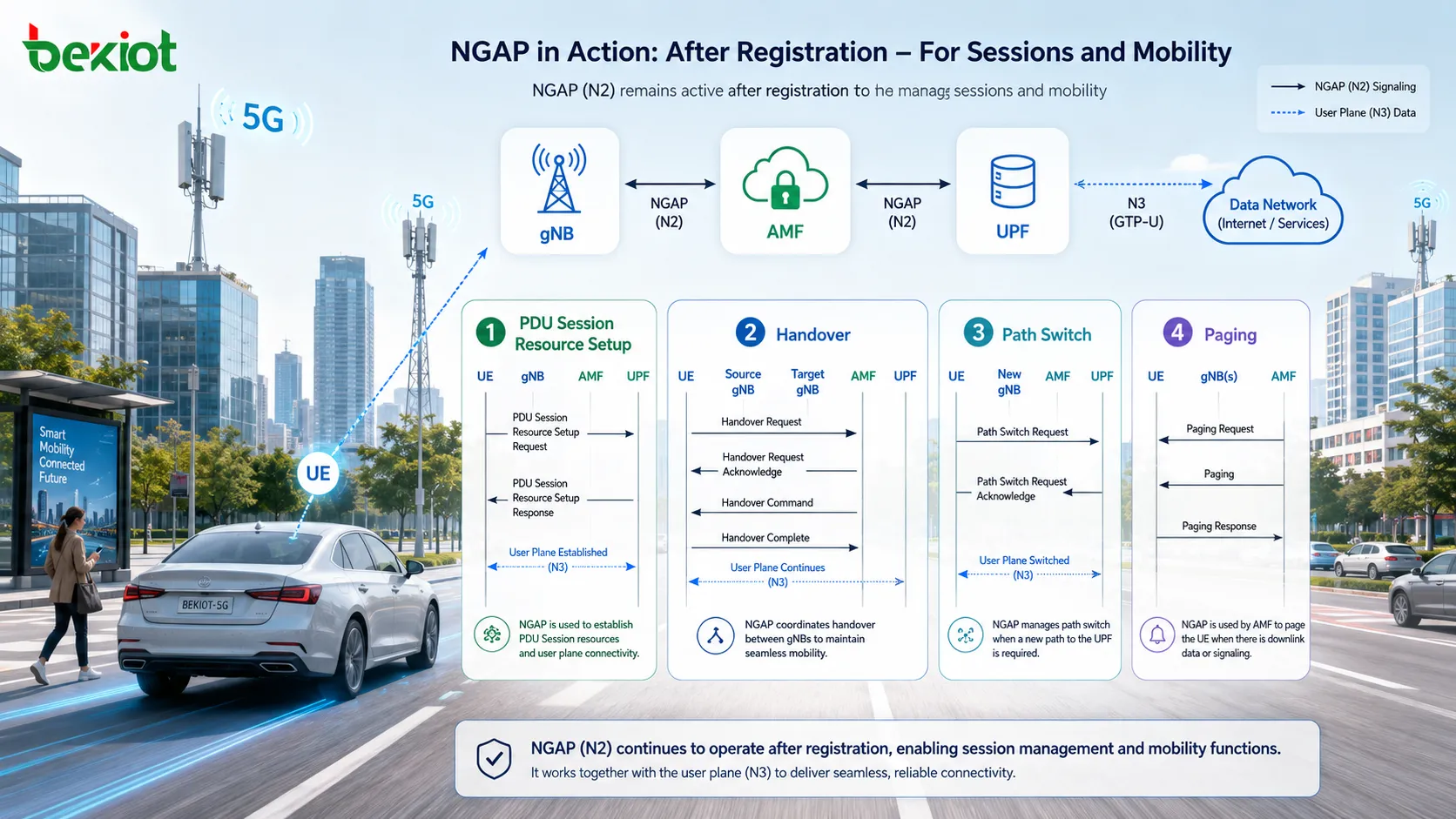
One of the key procedures is PDU Session Resource Setup. The AMF sends a PDU Session Resource Setup Request to the gNB. This message carries information associated with the PDU Session and its QoS Flows toward the NG-RAN, such as the PDU Session ID, S-NSSAI, user-plane tunnel information, and QoS Flow List. The gNB then allocates the required radio-side resources according to local conditions, for example by configuring the necessary DRBs for the QoS Flows and preparing the N3 user-plane connection.
Once the resource allocation is complete, the gNB sends a PDU Session Resource Setup Response to the AMF, indicating which resources were successfully established. The response can include gNB user-plane information and the QoS Flows that were successfully admitted.
This is where the roles of N1, N2, and N3 are often confused. N1 carries NAS-layer PDU Session information toward the UE. N2 coordinates the RAN and user-plane resources that the gNB must establish. N3 carries the actual user-plane traffic after those resources are ready.
For this reason, troubleshooting a failed PDU Session should not stop once the NAS layer returns an Accept message. If the N2 PDU Session Resource Setup procedure does not complete successfully, the UE may have received the session parameters while the user plane is still not operational.
N2 Continues Working After the PDU Session Is Established
NGAP does not stop once the PDU Session is active. As long as the UE remains in the network, changes in state or service conditions can trigger additional N2 procedures.
When the UE moves to another gNB, an N2-based or Xn-based handover may be triggered. An N2 handover can involve Handover Required, Handover Request, Handover Request Acknowledge, Handover Command, and Handover Notify. Once the new path is established, Path Switch Request and its response may follow, while the old UE context on the source gNB is released.
If the UE is idle and downlink traffic arrives, the AMF can send a Paging message to the NG-RAN through NGAP, after which the RAN performs the radio-side paging procedure. Paging is a typical one-way NGAP procedure. If the network needs to adjust QoS or other RAN resources, PDU Session Resource Modify can be triggered. When the session is no longer required, PDU Session Resource Release is used. The N2 lifecycle of a PDU Session therefore includes not only Setup, but also Modify, Release, Notify, and related Indication procedures.
In addition to UE-related service procedures, engineers may also see interface-management messages such as NG Reset, Error Indication, Overload Start, Overload Stop, AMF Status Indication, and configuration update procedures. These are especially useful when determining whether a problem affects one UE or reflects a broader change in the N2 node relationship.
What Is the Best Order for Troubleshooting an NGAP Packet Capture?
NGAP contains a large number of messages, but practical troubleshooting does not require checking the 3GPP message list from top to bottom. A better method is to follow the order in which network state is established.
The first step is to verify SCTP. If the Transport Network Layer Association between the gNB and AMF has not been established correctly, there is little value in analyzing the NGAP service procedures that should come afterward.
The second step is to check NG Setup and confirm that the node-level N2 relationship is healthy. If NG Setup has failed, it normally makes no sense to jump directly into UE registration troubleshooting.
The third step is to identify the specific UE. UE-associated NGAP messages normally contain the relevant UE-NGAP-ID values. Packet analysis should follow the same UE identifiers over time rather than filtering only by Message Type.
The fourth step is to confirm that NAS signaling is being transported correctly. Check whether Initial UE Message, Uplink NAS Transport, and Downlink NAS Transport form a continuous sequence. If the NAS-PDU has already reached the AMF but no response follows, the investigation direction is very different from a case where the gNB never delivered the NAS message in the first place.
The fifth step is to check UE Context establishment. If registration has progressed to Initial Context Setup, review the parameters in the Request and verify that the Response completes successfully.
The sixth step is to inspect PDU Session resources. If the UE is registered but cannot access the data network, focus on PDU Session Resource Setup Request/Response and the returned PDU Session and QoS Flow resource results.
If the problem occurs during mobility, shift the investigation toward Handover, Path Switch, and release of the old UE Context. If an idle UE cannot be reached by downlink traffic, focus on Paging.
Following the chain SCTP → NG Setup → UE identification → NAS → UE Context → PDU Session → Mobility is usually far more effective in real engineering work than trying to memorize dozens of NGAP message names.
FAQ
What Is the Relationship Between NGAP and 5G NAS?
NGAP is the application-layer protocol used on the N2 interface between the gNB and AMF, while NAS carries control signaling between the UE and the 5G Core. Many NAS messages are encapsulated as NAS-PDUs inside NGAP messages and forwarded by the gNB between the UE and AMF, so the two protocols operate at different layers.
Does the N2 Interface Carry the UE's Internet Traffic?
No. N2 is not used as the normal user-plane path for UE data. It carries control-plane signaling. User traffic is typically transported between the gNB and UPF over N3, while NGAP tells the RAN which related resources need to be established, modified, or released.
Does a Successful NG Setup Mean the UE Can Register Normally?
No. NG Setup establishes the node-level N2 relationship between the gNB and AMF. When a specific UE arrives, Initial UE Message, NAS transport, UE context establishment, and later PDU Session resource procedures still need to complete successfully.
Why Should NGAP Troubleshooting Not Rely Only on Message Type Filters?
A single gNB can process many UEs at the same time, and the same NGAP message types may appear repeatedly for different users. Filtering only by message name can easily mix together unrelated procedures. UE-specific troubleshooting should combine UE-NGAP-ID values, message timing, and the relevant NAS or PDU Session context.







