A common 5G user-plane troubleshooting case can be confusing at first: the PDU Session is established successfully, the UE receives an IP address, the PDR matches the expected traffic, the FAR contains FORW, and packets may even begin to flow. Yet the user still experiences video buffering, unexpectedly low download rates, or traffic that works in only one direction.
When this happens, checking only the PDR and FAR may not reveal the cause. The problem may not be related to whether the traffic was identified or where the packet was forwarded, but rather to which QoS policy the UPF applied after forwarding was allowed. Within the PFCP rule framework on the N4 interface, the QER (QoS Enforcement Rule) is responsible for enforcing these QoS policies in the UPF. It can control whether traffic is allowed through, limit uplink or downlink rates, associate traffic with a QoS Flow, and apply transport-level markings. PDR, FAR and QER therefore need to be considered together to understand the complete user-plane behavior.
Why Is QER Still Needed After PDR and FAR Are Working?
The easiest way to understand QER is to separate the responsibilities of the different UPF rules.
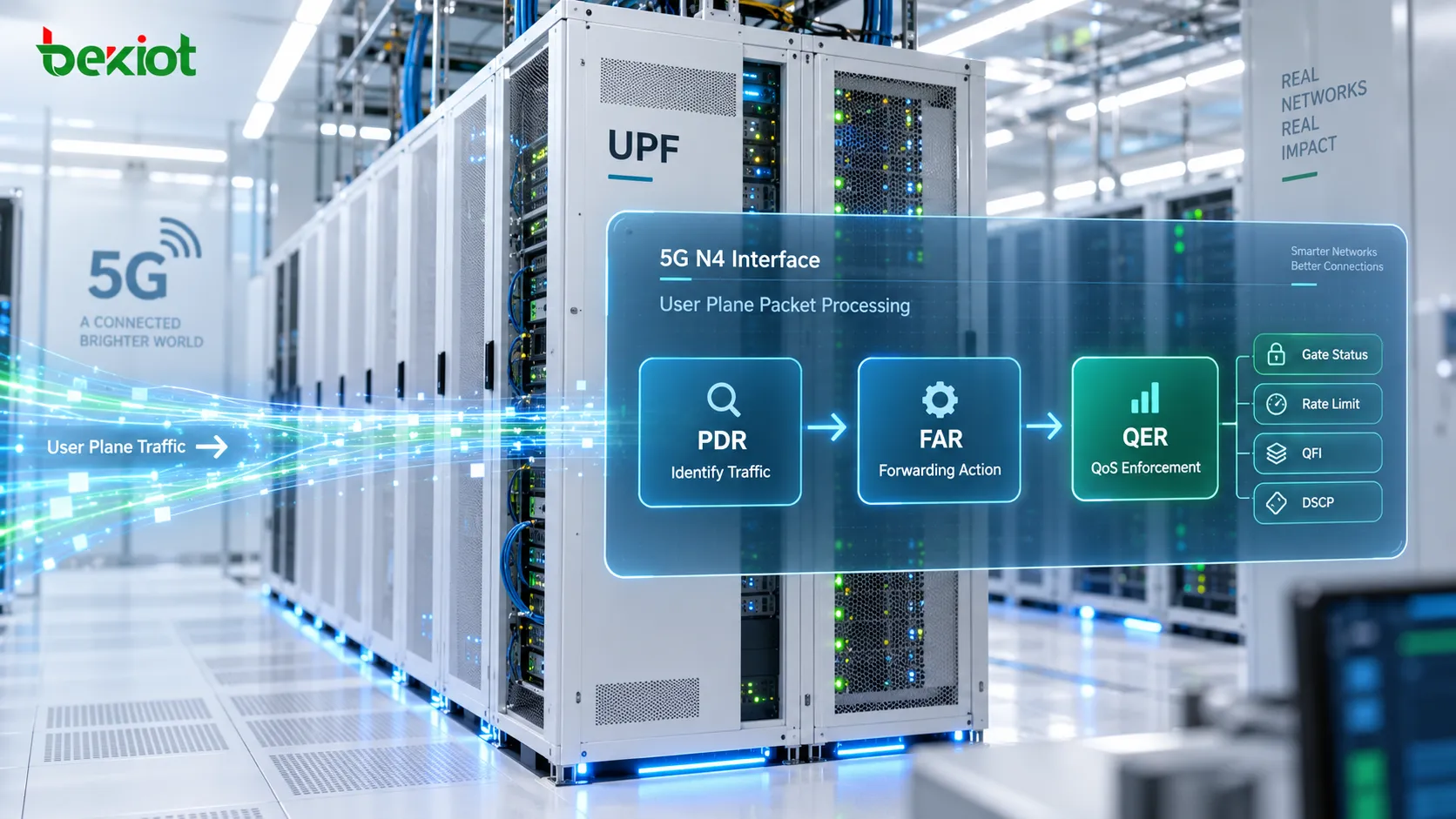
The PDR first answers the question, "What traffic is this?" It uses conditions such as PDI, UE IP address, F-TEID and SDF Filter to detect and classify packets. Once the traffic has been identified, the FAR answers the next question: "What should happen to this packet, and where should it be forwarded?"
But allowing a packet to be forwarded does not mean that it can be forwarded without restrictions. If the network still needs to control rate, gating, QoS Flow association or transport-level marking, the UPF must apply the associated QER.
A typical processing sequence can therefore be simplified as:
PDR identifies the traffic → FAR determines the forwarding action → QER enforces the QoS policy.
These rules do not replace one another; they work together. A packet may correctly match a PDR and be permitted by the FAR, while still being subject to rate limits or gating conditions defined by the QER. Without QER, the UPF may know that the packet should be forwarded, but it would not have the same policy information describing how that traffic should be treated from a QoS perspective.
When Is a QER Installed, and Why Can It Be Updated Later?
A QER is commonly provisioned by the SMF to the UPF during PFCP Session Establishment as part of the user-plane rules for a PDU Session. It is not a QoS rule created independently by the UPF after observing traffic. The control plane determines which QoS behavior should be enforced, while the UPF applies the resulting rule.
The QER does not necessarily remain unchanged for the entire lifetime of the session. If policy changes while the service is active, the SMF can update an existing QER through PFCP Session Modification. Changes in subscription policy, application policy or other control-plane decisions can therefore result in new rate limits, different gate states, a changed QoS Flow association or other QoS parameters.
For that reason, troubleshooting should not stop at the initial Create QER. If a QoS problem appears after the session has already been running for some time, subsequent Update QER information should also be examined and compared with the original values.
From a control-plane perspective, QoS policy used by the SMF may come from local configuration or policy information associated with the PCF. By the time the policy reaches the N4 interface, it is represented as PFCP rules that the UPF can enforce. Depending on the service design, QoS enforcement can apply at the PDU Session level, QoS Flow level, or to more specific SDF or application traffic.
How Can Gate Status Block Traffic Even When the Session Looks Normal?
Gate Status is one of the most direct QER parameters because it can immediately change whether traffic is allowed to pass.
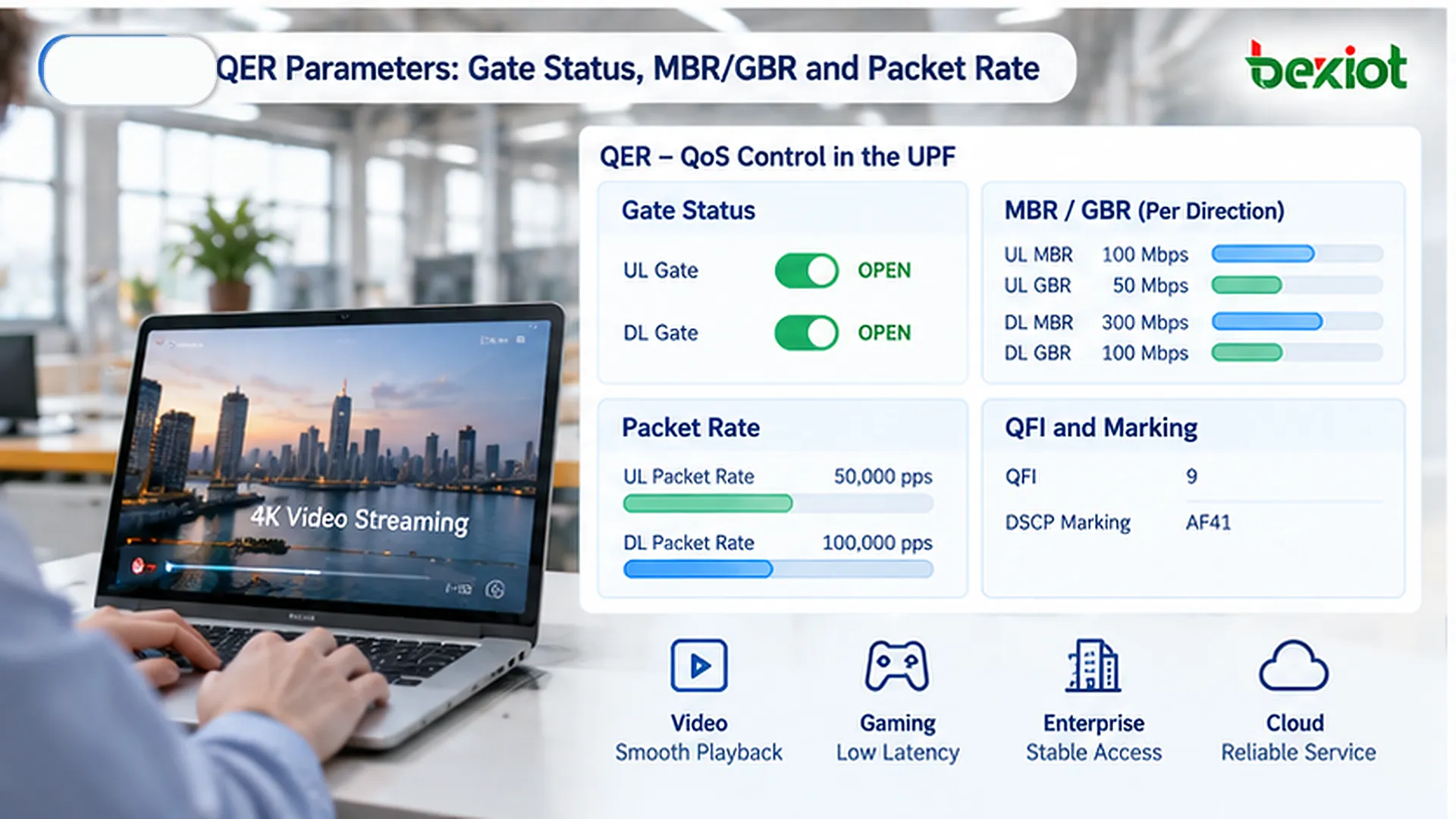
The uplink and downlink gate states can be controlled independently. When a gate is OPEN, traffic in that direction is permitted to continue. When it is CLOSED, traffic in that direction is blocked by the QoS enforcement rule.
A typical troubleshooting sequence may therefore look like this:
The PDU Session is established successfully;
The UE has received an IP address;
The PDR matches correctly;
The FAR contains FORW;
But application traffic still does not work.
At this point, the UL Gate and DL Gate in the associated QER should be checked. Because the two directions are controlled separately, one gate can be OPEN while the other is CLOSED. The resulting symptom may look like a one-way user-plane problem: the UE can receive downlink traffic but cannot successfully send uplink traffic, or vice versa.
This is why QER is an enforcement rule rather than simply a descriptive QoS attribute. Its settings can directly determine whether specific traffic is permitted to continue through the UPF.
What Do MBR, GBR and Packet Rate Control?
Gate Status answers the question, "Can the traffic pass?" Rate-related parameters answer a different question: "How much traffic can pass, and at what rate?" QER can enforce limits based on both bitrate and packet rate.
Maximum Bitrate (MBR)
MBR defines the maximum bitrate for matching traffic and can be configured separately for uplink and downlink directions. In a 5GC environment, the applicable limit may correspond to a session-level restriction, a particular QoS Flow, or a more specific traffic flow depending on the rule design.
When a user can access the service normally but throughput consistently stops near a repeatable ceiling, the MBR in the associated QER is one of the parameters worth checking.
MBR is easily confused with radio-side capacity. Good radio conditions and sufficient transport bandwidth do not guarantee that the application can use the full physical capacity. If the UPF has been instructed to enforce a lower MBR, user-plane throughput will remain subject to that limit. Troubleshooting low throughput should therefore include the N4 QoS rules rather than focusing only on radio performance.
Guaranteed Bitrate (GBR)
GBR describes the guaranteed bitrate associated with traffic that requires a defined level of resource assurance. It can also be specified separately for uplink and downlink.
GBR may be relevant to services that require more predictable performance, such as certain real-time voice, video or other QoS-sensitive applications. It should not be interpreted as an isolated number; the corresponding QoS Flow and the wider QoS policy also need to be considered.
Conceptually, MBR defines an upper bound on the allowed rate, while GBR describes the guaranteed-rate requirement associated with the service policy.
Packet Rate
Some traffic cannot be described adequately by bitrate alone. QER can also include Packet Rate parameters that restrict the number of packets allowed within a specified time period.
This can matter for workloads that generate many small packets, such as DNS transactions, IoT keepalives or signaling-style traffic. Their total bitrate may remain relatively low while the packet-per-second rate becomes high. In such cases, checking only MBR may not explain the observed QoS behavior.
If packet-rate enforcement is reached, the user may experience increased latency, slower responses or failed requests even though overall bandwidth consumption appears modest.
What Do QFI, Flow Level Marking and PPI Do in a QER?
QER is more than a rate limiter. In addition to Gate Status, MBR and GBR, it can carry parameters associated with QoS Flow identification and packet treatment. Together, these parameters help determine how traffic is handled across the user plane.
QoS Flow Identifier (QFI)
QFI identifies a QoS Flow. A single PDU Session can contain multiple QoS Flows so that different service traffic can receive different QoS treatment.
From a user-plane perspective, QFI identifies which QoS Flow a packet is associated with. Within the QER, that identifier can be used to associate the relevant QoS enforcement behavior with the corresponding QoS Flow.
If the QFI associated with a rule does not match the intended service design, the traffic can be associated with an unexpected QoS Flow even when the rate parameters themselves appear correct. That can lead to different resource treatment from what the service was designed to receive.
DL Flow Level Marking
QER can instruct the UPF to apply flow-level marking to downlink traffic, such as setting a DSCP value for the IP transport network.
This marking does not determine which 5G QoS Flow the packet belongs to. Instead, it affects how the packet may be identified and treated after it enters the IP transport network.
If the transport-layer marking is incorrect, 5G QoS may be configured correctly while the downstream transport network still handles the packet with an unintended priority.
Paging Policy Indicator (PPI)
PPI is related to paging-policy handling for downlink traffic. A QER can provide paging-policy-related information for applicable forwarding scenarios so that different traffic can be treated differently when paging behavior is involved.
For a UE that is not currently in an active user-plane state, different types of downlink traffic may have different paging implications. PPI provides information that can be used as part of that differentiated treatment.
Averaging Window
Rate enforcement cannot always be based on an instantaneous observation of one packet. Averaging Window defines the time window over which bitrate-related behavior is evaluated.
A shorter window reacts more quickly to burst traffic, while a longer window produces a smoother average and may tolerate short bursts differently. This is one reason why QER analysis should not focus only on QER ID and MBR. The resulting QoS behavior can depend on several parameters working together.
How Can PFCP Messages Be Used to Verify Whether QER Is Working as Expected?
The most useful way to analyze QER is not to memorize every Information Element, but to relate the PFCP rule to the actual service symptom.
For example, a Create QER may contain:
QER ID = 1;
UL Gate = OPEN;
DL Gate = OPEN;
UL MBR = 100000 kbps;
DL MBR = 150000 kbps.
These values are only an example, but they demonstrate an important point: an OPEN Gate does not mean that no QoS restriction exists. Traffic can be permitted to pass while still being subject to MBR enforcement.
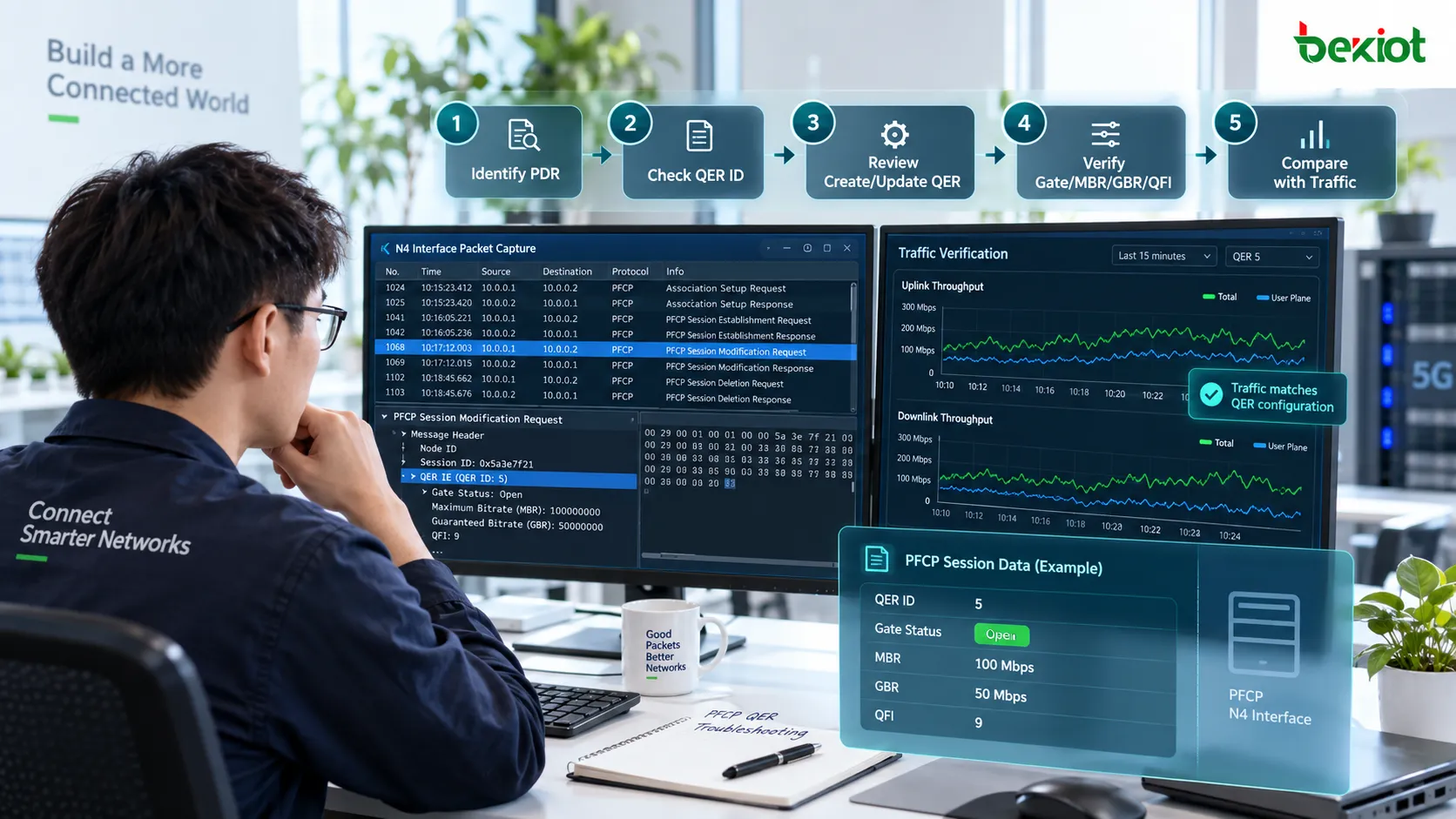
A practical troubleshooting sequence can follow these steps:
Identify the PDR first. Determine which PDR actually matches the affected traffic. If the wrong PDR is selected, the expected QER will not be applied correctly.
Check the QER ID referenced by the PDR. Do not inspect every QER in the PFCP session without context. First identify the QER that is actually associated with the traffic being analyzed.
Review Create QER and Update QER. Confirm whether the currently effective rule was changed by a later PFCP Session Modification. A QoS issue may be introduced by a later update rather than the original session setup.
Check Gate Status. Verify the uplink and downlink gate states separately. A closed gate in only one direction can produce a one-way service failure.
Check MBR, GBR and Packet Rate. Compare the configured limits with the observed throughput or packet behavior, especially if the service repeatedly stops near a fixed rate.
Check QFI and other QoS parameters. Verify that the intended QoS Flow, marking and paging-related settings match the service design.
Compare the rule with actual user-plane traffic. PFCP shows what the UPF is expected to enforce; throughput tests and packet captures show what actually happened. The difference between the two is often the most useful troubleshooting clue.
This method is more reliable than interpreting a single QER field in isolation. PFCP signaling tells us what the UPF should enforce, while user-plane testing shows the result that was actually observed. Comparing those two views is the key to determining whether QER is behaving as intended.
FAQ
What Is the Main Difference Between QER and FAR?
FAR primarily determines how a matched packet should be handled and where it should be forwarded, including actions such as FORW, DROP or BUFF. QER enforces QoS-related behavior such as gating, rate limits, QoS Flow association and transport-level marking. Both typically operate after the PDR has identified the traffic. A simple way to think about the relationship is: FAR determines where and how the packet is forwarded, while QER determines what QoS treatment applies to that traffic.
Why Can User Throughput Still Be Low When Gate Status Is OPEN?
OPEN only means that traffic in that direction is allowed to pass. It does not remove other QoS restrictions. MBR, GBR, Packet Rate and the associated QoS Flow should still be checked. If MBR is configured below the available radio or transport capacity, throughput can remain limited even though both gates are fully open.
Can a QER Only Be Created During PFCP Session Establishment?
No. A QER can be created during PFCP Session Establishment and later modified through PFCP Session Modification. If QoS behavior changes after the session has already been running, subsequent Update QER information should be reviewed rather than analyzing only the initial Create QER.
Are QFI and QER the Same Thing?
No. QFI is the identifier of a QoS Flow, while QER is a QoS enforcement rule applied by the UPF. A QER can contain or reference QFI information so that specific QoS treatment is associated with the corresponding QoS Flow. QFI identifies which QoS Flow is involved; QER defines how the traffic is enforced.
Why Can Traffic Still Fail When the PDR Matches and the FAR Allows Forwarding?
Because user-plane processing does not necessarily end with the FAR. After forwarding is permitted, the associated QER may still apply Gate Status, MBR, GBR, Packet Rate or other QoS constraints. Troubleshooting should therefore treat PDR, FAR and QER as a continuous processing chain. A mismatch at any one of these stages can affect the final service result.