


In a factory, school, office park, warehouse, hospital, station, hotel, campus, or public facility, paging is not just a speaker function. It is a routing rule for voice announcements. If the group is too large, irrelevant areas are disturbed. If the group is too small, important staff may miss the notice. If permissions are loose, anyone may broadcast incorrectly. If the network or endpoint configuration is incomplete, the announcement may fail when it is needed most.
The configuration method therefore needs more than adding several extensions into one list. A practical paging group must be planned, numbered, authorized, routed, tested, monitored, and maintained according to the site workflow.
Start from the announcement purpose
The first step is to decide what the paging group is meant to accomplish. Different groups have different communication purposes. A routine office announcement group is not configured in the same way as an emergency evacuation group. A warehouse loading group does not need the same permission level as a whole-campus broadcast group. If the purpose is unclear, the later configuration will become a collection of random members and unstable rules.
Common purposes include calling staff to a location, notifying one department, broadcasting to a floor, guiding visitors, coordinating field workers, issuing safety reminders, triggering emergency instructions, or sending after-hours service notices. Each purpose affects group size, member selection, priority, caller permission, audio level, scheduling logic, and fallback behavior.
The purpose should be written in operational language. Instead of naming a group only as “Group 1,” it is better to define it as “Warehouse loading bay paging,” “Security patrol area paging,” “Floor 3 office announcement,” “Production line maintenance call,” or “Emergency all-zone broadcast.” Clear purpose makes later maintenance easier because administrators can understand why the group exists.
This step also prevents over-broadcasting. Many sites create one large group because it is easier at the beginning. Later, every small notice plays everywhere, users become annoyed, and important announcements lose attention. A good paging group is not necessarily large. It is accurate.
Map the physical areas before creating rules
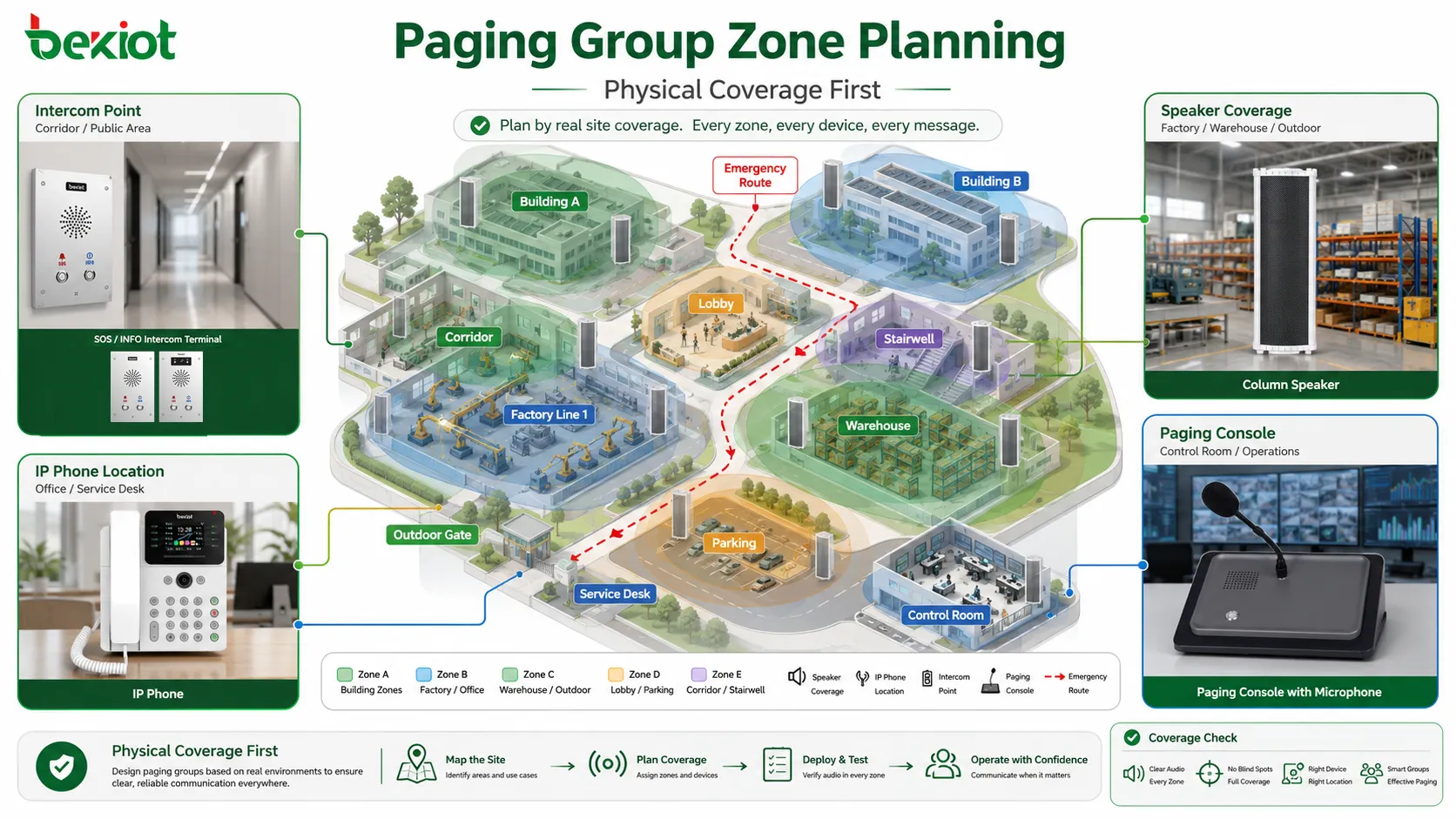
Paging groups should follow real site areas, not only organizational departments. A department may occupy several rooms, one floor, or multiple buildings. A physical area may contain people from different teams. Because paging is heard through space, the physical listening area must be mapped before configuration begins.
Useful planning information includes building names, floors, rooms, entrances, corridors, workshops, equipment areas, parking zones, outdoor yards, platforms, service desks, waiting areas, duty rooms, and emergency routes. If the system uses speakers, the coverage of each speaker should also be known. If the system uses IP phones or intercom terminals, their physical locations should be recorded.
The map should identify which areas need independent paging and which areas can share one group. A small office may use one group for an entire floor. A factory may need separate groups for each production line, warehouse, utility room, and outdoor loading area. A school may need groups by building, classroom block, playground, dormitory, and administration area.
Physical mapping also helps avoid missing points. A group may include all visible speakers but forget a corridor, stairwell, maintenance room, or outdoor gate. During routine announcements this may not seem serious. During emergency paging, a missed area may become a real safety problem.
Choose the group type according to workflow
After the areas are mapped, the next step is to choose the group type. In many systems, a paging group can be configured as a local group, department group, zone group, multi-zone group, emergency group, scheduled announcement group, or temporary event group. The exact names may vary by platform, but the logic is similar.
A local group covers a small area, such as one workshop, office floor, warehouse dock, or service desk zone. It is usually used for routine communication and can be assigned to local operators. A department group covers a team or function, such as maintenance, security, nursing, reception, or logistics. This may overlap with physical zones if the department is spread across several places.
A zone group is based mainly on location. It may include all speakers and devices in a floor, building, gate area, outdoor yard, or public hall. A multi-zone group combines several zones when one announcement needs to reach related areas at the same time. For example, all entrances may form one group, or all production areas may form another group.
An emergency group should be treated differently from ordinary groups. It may include larger coverage, higher priority, stronger permission control, and integration with alarm systems. It should be tested more carefully because its purpose is not convenience but response reliability.
| Group type | Typical use | Configuration focus | Main risk if poorly planned |
|---|---|---|---|
| Local area group | Small zone announcements | Accurate member selection and local permission | Message may miss nearby working points |
| Department group | Staff coordination by function | Role-based members and backup coverage | Physical areas may not match department structure |
| Multi-zone group | Announcements across related areas | Zone combination and audio synchronization | Unrelated areas may be disturbed |
| Emergency group | Safety warnings and evacuation instructions | Priority, authorization, testing, and monitoring | Critical messages may fail or reach wrong areas |
| Temporary event group | Short-term project or event coordination | Start time, end time, and cleanup process | Old rules may remain active after the event |
Prepare members, endpoints, and device status
A paging group is made of members. Members may be IP speakers, analog speaker zones through an amplifier, SIP phones, paging adapters, intercom terminals, soft clients, network amplifiers, audio gateways, or paging controllers. Before adding them into a group, each member should be checked for basic readiness.
For IP-based endpoints, readiness usually includes network connection, IP address, registration status, firmware compatibility, codec support, time synchronization, volume setting, multicast or unicast support, and management access. For analog speaker zones, readiness may include amplifier channel status, speaker line condition, impedance or load condition, audio input mapping, and cable labeling.
Each endpoint should have a clear name. Names such as “Speaker 01” or “Device 5” may work during installation but become confusing later. Better names include location and function, such as “B1 Lobby Speaker,” “Warehouse Gate Intercom,” “Line 2 Paging Horn,” “North Parking Help Point,” or “Admin Floor Corridor Zone.” Clear names reduce wrong selection during configuration and troubleshooting.
Device location should be recorded together with its technical identifier. The configuration may show an extension number, MAC address, IP address, SIP account, amplifier channel, or zone ID. Maintenance staff also need to know where the device is physically installed. A technical list without location information is incomplete.
Before group configuration, test each device individually. If a speaker cannot play audio as a single endpoint, adding it to a group will not fix the problem. Individual verification should confirm audio output, volume, clarity, network reachability, registration, and control response.
Assign a clear paging number or access code
Most paging groups need a dialing method or activation method. This may be a group extension number, feature code, speed dial key, console button, web control item, soft client group, or emergency trigger. The access method must be simple enough for users to remember and safe enough to prevent accidental activation.
For telephone-based paging, each group may be assigned a unique extension number. When an authorized user dials that number, the system opens the paging path to the group. For example, one number may page the warehouse, another may page the office floor, and another may page the entire site. The numbering plan should be consistent with the wider communication system.
For console-based paging, groups may be shown as buttons or selectable zones. In this case, the name and order of the groups matter. Frequently used groups should be easy to find. Emergency groups should be clearly separated from routine groups to avoid accidental operation. Color, icon, label, or confirmation prompts may be used depending on the interface design.
Access codes should avoid conflict with existing extensions, emergency numbers, outbound prefixes, voicemail access, feature codes, or service numbers. A paging group number that is too similar to another function may cause misdialing. Number planning should be reviewed before users are trained.
Set members and zone relationships
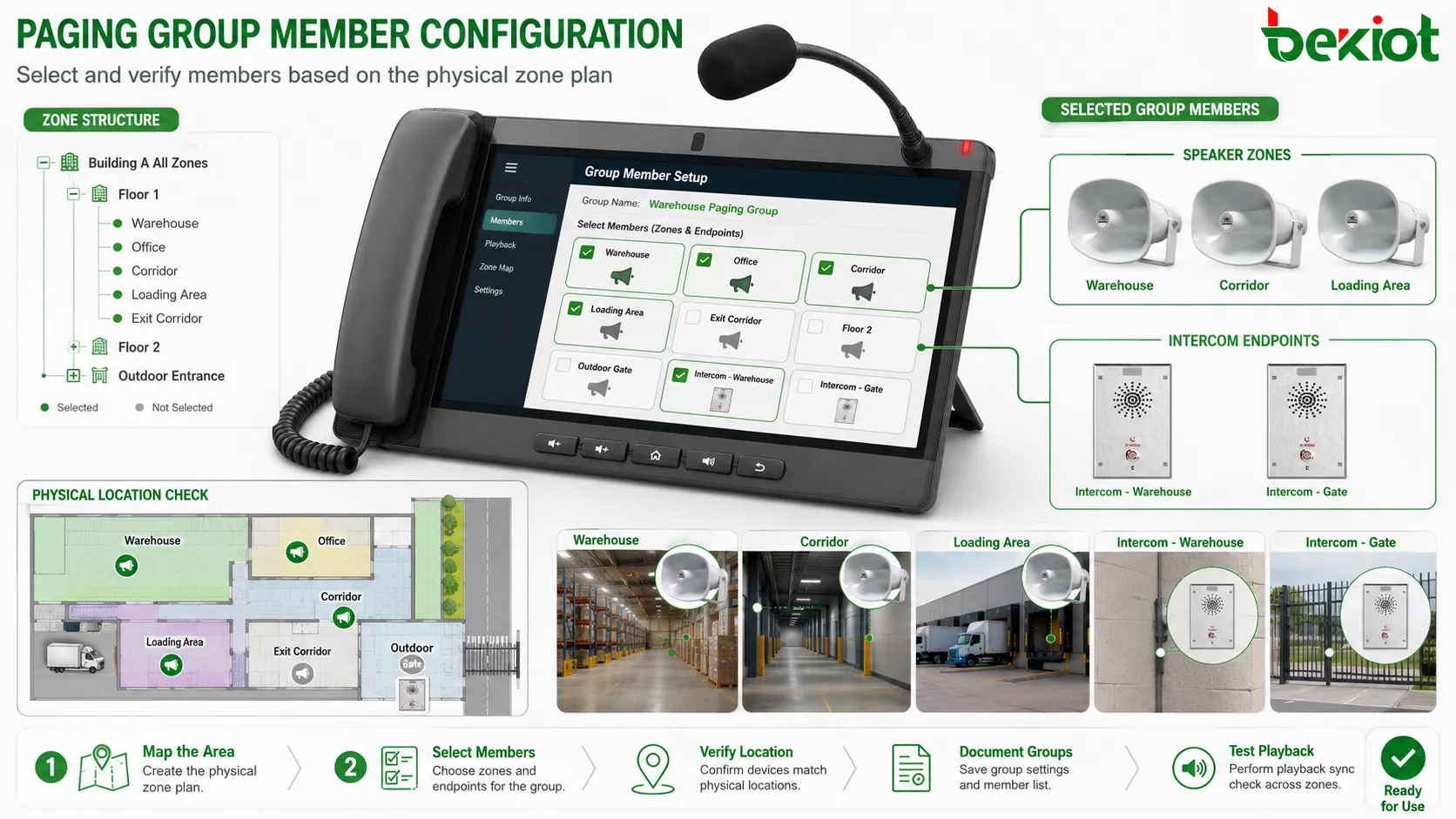
After the group number or access method is prepared, members can be assigned. The administrator should add the correct endpoints, speaker zones, or devices into the group according to the area plan. This sounds simple, but it is where many configuration mistakes happen.
Each group should be checked against the physical map. If the “Warehouse Paging” group includes office speakers by mistake, routine warehouse instructions may disturb office staff. If the “Emergency Exit Corridor” group misses one hallway speaker, people in that area may not hear the warning. Configuration should not rely only on memory.
Some systems allow nested groups or parent-child zone structures. For example, “Building A All Zones” may include “Building A Floor 1,” “Building A Floor 2,” and “Building A Outdoor Entrance.” This can be useful, but it must be managed carefully. A change in a child group may affect several parent groups.
Multi-zone groups should be documented clearly. If a group combines zones from different floors or buildings, the reason should be recorded. Otherwise, future administrators may remove members without understanding the operational purpose. Documentation is especially important for emergency, safety, and cross-department groups.
When adding members, consider audio delay and synchronization. If one group includes IP speakers, analog amplifier zones, and remote endpoints, playback timing may differ. For simple announcements, a small difference may be acceptable. For large public spaces, obvious delay can create echo or confusion. The system architecture should be tested in the actual listening area.
Define who is allowed to page
Paging permission is one of the most important parts of configuration. A paging group can affect many people at once, so not every user should be allowed to broadcast to every area. Permissions should match role, responsibility, and risk level.
Common permission roles include ordinary user, department operator, receptionist, security staff, maintenance staff, dispatcher, administrator, and emergency commander. An ordinary user may be allowed to page only a small local area. A department operator may page the department zone. Security or emergency staff may have broader authority. Administrators may configure the system but should not necessarily use every paging function in daily work.
Permission can be controlled by extension number, user account, console login, device identity, IP address range, role group, or feature code password depending on system design. The goal is to prevent misuse while keeping legitimate operation convenient.
Emergency paging requires special attention. It should be available quickly to authorized staff but protected against accidental activation. Some systems use confirmation prompts, protected buttons, physical key switches, password verification, or role-based control. The correct method depends on site risk and operating habits.
Permission review should be repeated when staff roles change. A user who moved to another department may still have old paging rights. A temporary contractor may still have access after a project ends. Paging permissions should be part of regular account and access audits.
Choose the audio delivery mode
The audio delivery mode determines how the paging sound reaches group members. Common methods include unicast, multicast, SIP-based paging, RTP audio stream, amplifier input, analog audio line, or platform-controlled broadcast. The correct choice depends on network design, device capability, group size, and required reliability.
Unicast delivery sends separate audio streams to each endpoint. It is easier to control in some networks and may pass through routers more predictably, but it consumes more bandwidth as the number of endpoints increases. For small groups, unicast may be simple and reliable. For large groups, it may place more load on the server or network.
Multicast delivery sends one audio stream that multiple endpoints can receive. It can be efficient for large groups, but it requires proper network support. Switches, routers, VLANs, IGMP snooping, multicast routing, and firewall policies may affect whether the stream reaches the endpoints correctly. If the network is not designed for multicast, paging may fail in some zones.
SIP-based paging is common in VoIP environments. A paging group may be called like an extension, and endpoints may automatically answer in speaker mode. This works well for SIP phones, intercoms, and certain IP paging devices. However, endpoint auto-answer behavior, codec compatibility, and registration state must be checked.
Analog or amplifier-based delivery remains common in public address systems. The paging platform may send audio to an amplifier channel, which then drives speaker lines. This can be reliable for large speaker zones, but it requires correct wiring, amplifier capacity, speaker load calculation, and audio level adjustment.
Configure codec, volume, and audio behavior
Audio configuration affects whether people can understand the announcement. The codec should be supported by the paging source and endpoints. In SIP or IP systems, common voice codecs may be used depending on device capability and network bandwidth. The codec choice should balance audio quality, compatibility, bandwidth, and processing delay.
Volume settings should be configured by area. A quiet office corridor does not need the same level as a factory workshop, loading dock, outdoor yard, or transport platform. If one group includes areas with very different noise levels, separate zones or different volume profiles may be needed.
Some systems support pre-announcement tones. A short chime before the message can attract attention and make listeners ready. However, tones should not be overused or too long. In emergency situations, the tone and message should follow the site’s safety communication procedure.
Automatic gain control, noise suppression, echo handling, and microphone level may also affect quality. If the operator microphone is too sensitive, background noise may be broadcast. If the level is too low, the message may be unclear. A paging system should be tested with real operators, not only with test tones.
Audio behavior should define what happens before, during, and after paging. Does background music stop? Does it resume automatically? Are lower-priority messages interrupted? Does the system play a confirmation tone to the operator? Does the endpoint return to previous volume after paging? These details affect user experience.
Set priority and interruption rules
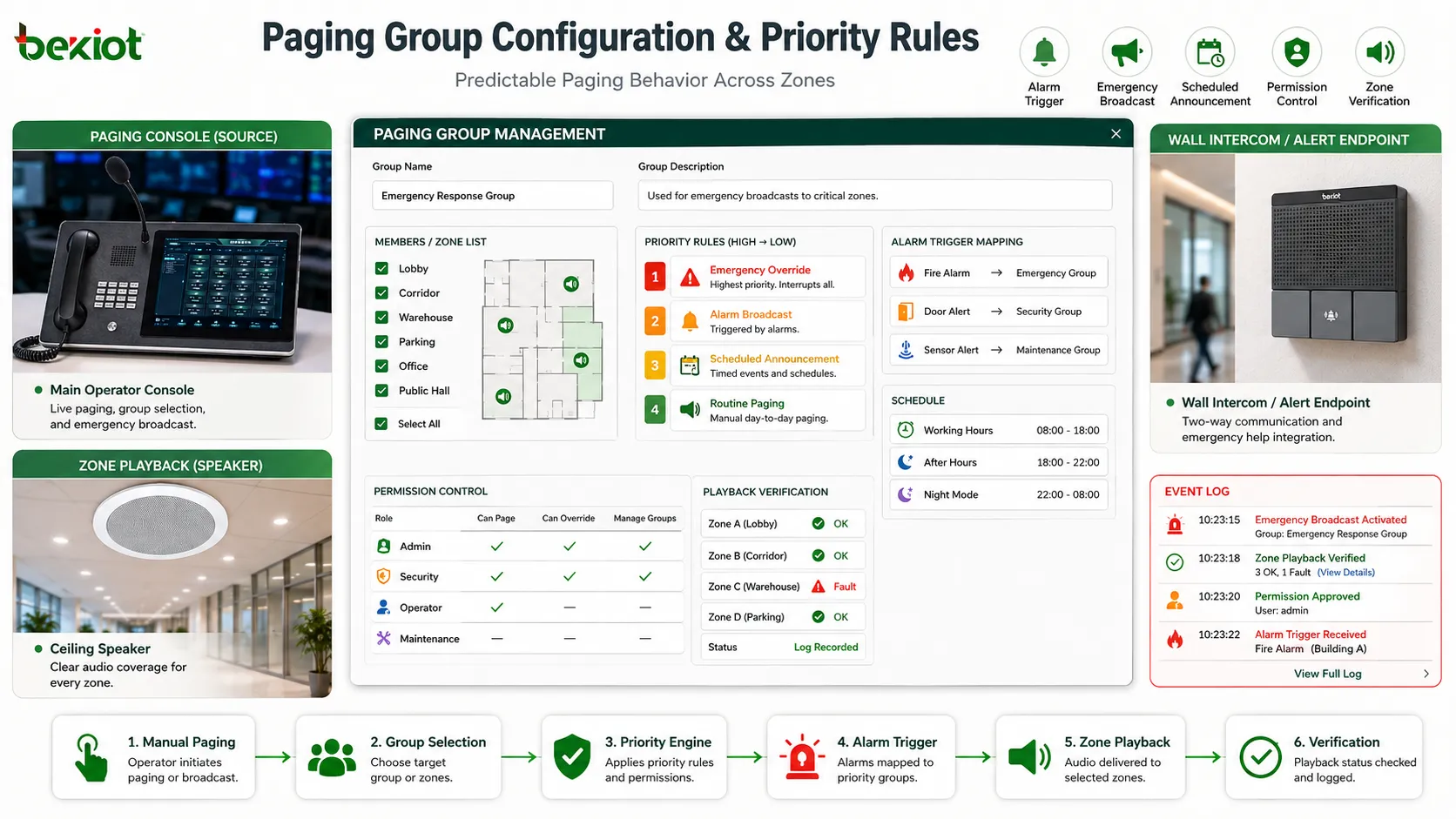
Priority rules decide which paging event wins when multiple audio events occur at the same time. Without priority configuration, a routine announcement may conflict with an emergency message, scheduled broadcast, background music, or another operator’s page. This can create confusion and reduce reliability.
A typical priority order may place emergency alerts at the top, followed by security announcements, dispatcher paging, department paging, scheduled announcements, and background music. The exact order should reflect site workflow. A hospital, airport, factory, school, and office building may use different priorities.
Interruption behavior should be defined clearly. When a high-priority page starts, lower-priority audio may be muted, paused, stopped, or faded out. After the high-priority message ends, the previous audio may resume or remain stopped. The right behavior depends on content type. Background music can usually resume. A safety message may not need to resume if it was interrupted by a higher-priority emergency message.
Priority should also control access. Not every user should be able to override all zones. If a local operator can interrupt emergency audio by mistake, the design is unsafe. Priority level should be tied to user role and group type.
Testing priority is essential. The team should simulate routine paging, scheduled audio, emergency override, and simultaneous calls to confirm that the actual behavior matches the configuration plan. Many systems look correct in the settings page but behave unexpectedly during real conflicts.
Plan time schedules and temporary rules
Some paging groups operate all day. Others should be available only during certain periods. Time schedules can define working hours, night mode, weekend mode, holiday mode, shift mode, event mode, or maintenance mode. This helps the system match real staffing and site usage.
For example, a reception paging group may be active during office hours and forward announcements to a duty group after hours. A school paging group may follow class schedules. A factory may use different paging groups for day shift and night shift. A hotel may reduce routine public announcements during quiet hours while keeping emergency groups active.
Temporary rules are useful for construction work, exhibitions, maintenance shutdowns, seasonal operations, or special events. A temporary event group can combine several areas for a defined period and then be removed. This prevents long-term configuration clutter.
When using schedules, administrators should pay attention to time zones, system clock synchronization, daylight saving behavior, holiday calendars, and manual overrides. A wrong system time can cause paging rules to activate at the wrong moment.
Schedules should not block emergency operation. Even if a routine group is disabled after hours, emergency paging should still follow safety requirements. The relationship between scheduled availability and emergency authority must be designed carefully.
Connect paging with alarms when needed
In some systems, paging groups are triggered not only by human operators but also by alarms or external systems. A fire signal, emergency button, access control event, sensor alert, monitoring platform, building management system, or security system may trigger a paging message to a predefined group.
Alarm-triggered paging should be configured with caution. The first step is to decide which events deserve automatic broadcast. Not every alarm should generate a public announcement. Low-priority technical alarms may be better sent to maintenance staff, while life-safety alarms may need immediate zone broadcast.
The trigger should map to the correct group. A smoke alarm in one building may need to page that building, neighboring corridors, or the entire site depending on procedure. A door forced-open event may need to page security staff, not all public areas. Mapping must follow real response rules.
Message content should also be prepared. Alarm-triggered paging often uses pre-recorded audio or text-to-speech. The message should be clear, short, and actionable. It should tell listeners what happened or what they should do without unnecessary technical details.
Integration testing is necessary. The team should confirm that the alarm event reaches the paging system, the correct group is selected, priority is applied, audio plays in the field, and logs are recorded. A trigger that appears in software but does not produce field audio is not acceptable for safety-related workflows.
Verify network and transport settings
For IP-based paging, network configuration is a major part of the method. Paging may involve SIP signaling, RTP audio, multicast streams, device registration, management traffic, or platform control messages. If the network blocks any required path, the group may not work even when the application settings look correct.
Basic checks include IP addressing, subnet, gateway, DNS, VLAN, firewall policy, routing path, port access, QoS policy, and device reachability. If endpoints are in different VLANs or buildings, the network must support the required traffic between them. Paging should not be assumed to work across network boundaries without testing.
Multicast paging requires special attention. Switches may need IGMP snooping configuration. Routers may need multicast routing. Wireless networks may handle multicast differently from wired networks. Firewalls may block multicast or RTP traffic. If multicast is not reliable, the system may need unicast delivery or a different architecture.
Quality of service may be important for real-time audio. Paging traffic should not be delayed behind large file transfers, video streams, backups, or low-priority data. In critical environments, voice or paging packets may need appropriate priority marking and network policy support.
Packet loss, jitter, and delay should be observed during testing. A paging group may work in a quiet network but become choppy during peak traffic. Real-time paging should be tested under conditions close to normal operation, not only during installation when the network is idle.
Configure monitoring and fault feedback
A paging group should not be treated as a static list after configuration. Devices may go offline, speakers may fail, cables may loosen, amplifiers may shut down, network routes may change, and permissions may become outdated. Monitoring helps administrators detect these issues before users complain or before an emergency occurs.
Monitoring can include endpoint online status, SIP registration, amplifier status, speaker line fault, network reachability, power state, playback result, group activation logs, permission changes, and alarm trigger records. The available details depend on the system architecture and device capability.
Fault feedback should be visible to the responsible team. A red icon on a management screen is not enough if no one checks it. Faults may need email alerts, dashboard notifications, system logs, SNMP traps, maintenance tickets, or duty staff notifications depending on operational requirements.
Group-level monitoring is useful because a single group may contain many devices. Administrators should be able to see whether the whole group is healthy or whether one member is offline. If a group is used for emergency paging, partial failure should not be ignored.
Monitoring also supports accountability. If a user reports that an announcement was not heard, the team can check whether the page was initiated, which group was selected, which members were online, whether audio playback started, and whether any higher-priority event interrupted it.
Test the group before releasing it to users
Testing is the step that turns configuration into confidence. A paging group should not be considered ready just because it appears in the system menu. The group must be tested from the user side, system side, and field listening side.
The first test is activation. An authorized user should initiate paging through the intended method, such as dialing a group number, pressing a console button, using a software panel, or triggering an alarm input. The system should accept the request and open the correct audio path.
The second test is coverage. Someone should listen in each target area to confirm that the message is audible and understandable. It is not enough to check that one speaker works. Large zones, corridors, outdoor areas, noisy rooms, and remote corners should be verified separately.
The third test is exclusion. Areas that should not receive the announcement should remain silent. This confirms that the group is not over-broadcasting. Exclusion testing is often ignored, but it is important for user comfort and message relevance.
The fourth test is priority behavior. Routine pages, scheduled messages, background audio, and emergency pages should be tested according to the planned priority rules. The team should confirm which message overrides which and whether interrupted audio resumes correctly.
The fifth test is logging and monitoring. The system should record who initiated the page, which group was used, when it happened, and whether there were faults. If the platform supports playback confirmation or device status, those records should be reviewed.
Train users on correct operation
A paging group can be configured well and still be used poorly. Users need to know which group to select, when paging is appropriate, how long to speak, what tone to use, and what messages should be sent through other channels instead. Training is part of the configuration process because it affects real performance.
Operators should understand the group names. If labels are unclear, they may page the wrong area. Names should match how the site talks about locations. For example, “North Dock” may be better than “Zone 7” if users normally refer to the area as North Dock.
Users should also know the difference between routine paging and emergency paging. Emergency groups should not be used for ordinary convenience. Routine groups should not be used for critical messages that require site-wide response. Clear rules prevent confusion.
Speaking practice matters. A good page is short, clear, and repeated when needed. Operators should avoid long explanations, unclear wording, shouting, or speaking before the paging channel is fully open. If the system plays a pre-tone, users should wait briefly before speaking.
Training should include what to do if paging fails. Users should know whether to retry, call a supervisor, use another communication channel, or report a fault. This prevents silent failure during important operations.
Document the configuration
Documentation is necessary for maintenance, troubleshooting, and future expansion. A paging group should have a record showing its purpose, group number, members, zones, permissions, priority level, schedule, audio mode, trigger rules, and responsible department.
Member documentation should include device name, physical location, IP address or extension, switch port where applicable, amplifier channel where applicable, and maintenance notes. This helps technicians locate faults quickly.
Permission documentation should show which users or roles can activate the group. If a user asks for access later, administrators can compare the request against the existing policy. If an incident occurs, the team can review whether the right people had the right authority.
Change records are also important. When members are added, removed, renamed, or moved, the document should be updated. Old records can cause serious confusion during fault handling. Documentation should match the actual system, not only the original design.
For emergency groups, documentation should include test history and approval records. It should be clear when the group was last tested, what result was observed, and whether any corrective action remains open.
Maintain and review the group regularly
Paging group configuration should be reviewed periodically. Sites change. Departments move. New rooms are added. Devices are replaced. Staff roles change. Network segments are adjusted. If the paging configuration does not follow these changes, the group slowly becomes inaccurate.
Regular review should compare the group list with the physical site. Are all speakers still installed? Are all endpoints online? Are zone names still correct? Are old temporary groups still active? Are emergency groups still mapped to the correct areas? Are permissions still appropriate?
Functional testing should be scheduled according to risk. Routine office groups may need occasional checks. Emergency groups, industrial safety groups, public facility groups, and transport guidance groups may need more formal testing. The test interval should match the importance of the communication function.
Maintenance should also review audio quality. A speaker may become weak, noisy, distorted, or blocked by new equipment. A microphone may become damaged. A network endpoint may show packet loss. These issues may not appear in a simple configuration screen.
Review results should lead to action. If a group is too broad, split it. If a group is rarely used, confirm whether it is still needed. If users often select the wrong group, rename it or reorganize the interface. If one area misses announcements, adjust membership or speaker coverage.
Common configuration mistakes
One common mistake is creating groups based only on organizational structure. A department list does not always match the physical areas where people need to hear announcements. Paging should be designed around listening zones and operational response, not only department names.
Another mistake is adding too many members into one group. A large group may seem convenient, but it can disturb unrelated areas and reduce attention. If people hear irrelevant announcements often, they may ignore important ones later.
A third mistake is ignoring permissions. If everyone can page everywhere, accidental or improper announcements become likely. If permissions are too strict, staff may not be able to communicate during urgent situations. The correct balance depends on role and risk.
Poor naming is also common. Names such as “Group A,” “Paging 2,” or “Zone 15” may be technically valid but difficult for users. Clear names reduce operational errors.
Failure to test field audio is another serious issue. A group may look correct in the software, but one speaker may be silent, one zone may be too quiet, or one remote endpoint may have delay. Field testing is necessary.
How to judge a successful configuration
A successful paging group configuration should meet several practical conditions. The group should match the physical area or operational role it is intended to serve. The correct users should be able to activate it. Unauthorized users should not be able to misuse it. The audio should reach all intended members clearly and without unnecessary delay.
The group should also avoid disturbing unrelated areas. This is a sign of good zone planning. A well-configured group is accurate enough to be useful and controlled enough to avoid noise pollution.
Priority behavior should be predictable. If an emergency page occurs, it should override routine audio as planned. If two users page at the same time, the system should handle the conflict according to rules rather than producing confusion.
The configuration should be visible and maintainable. Administrators should know which devices belong to the group, where they are located, who can page them, and how the group is tested. If no one can explain the group later, it was not documented well.
Most importantly, the configuration should support real work. A paging group is successful when staff use it confidently, listeners receive relevant messages, maintenance teams can manage it, and the system remains reliable after the installation team leaves.
Summary
The specific configuration method for a paging group begins with purpose and zone planning, then moves through endpoint preparation, group numbering, member selection, permission control, audio delivery mode, priority rules, schedules, alarm triggers, network settings, monitoring, testing, training, documentation, and regular review. Each step affects whether the group works reliably in real operation.
A paging group should not be treated as a simple list of speakers or extensions. It is a communication rule that connects people, areas, devices, and operational responsibility. When the group is planned clearly and tested in the field, it can support real-time announcements, safety coordination, service guidance, maintenance dispatch, and emergency response.
The strongest configurations are accurate, controlled, audible, documented, and maintainable. They reach the right zone without disturbing the wrong one, allow the right users to speak, protect urgent messages through priority, and remain reliable through monitoring and periodic testing.
FAQ
Should a paging group be configured by department or by physical area?
It depends on the purpose, but physical area is usually more important because paging is heard in a space. Department-based groups are useful when staff responsibility is the main concern, but they should still be checked against real locations.
What is the difference between a paging group and a paging zone?
A zone usually refers to a physical listening area, such as a floor or workshop. A group is a configuration object that may include one or more zones, endpoints, speakers, or terminals. In some systems the terms may overlap, but the planning logic should remain clear.
Why does multicast paging sometimes fail?
Multicast paging may fail if switches, routers, VLANs, firewalls, wireless networks, or IGMP settings do not support the required traffic path. Multicast should be tested across the actual network segments where endpoints are installed.
How should emergency paging groups be handled?
Emergency groups should have higher priority, stricter permissions, clear zone mapping, tested audio coverage, monitoring, documentation, and periodic functional testing. They should not be configured casually as ordinary announcement groups.
What should be tested after creating a paging group?
Testing should include activation method, member coverage, audio clarity, wrong-zone exclusion, priority behavior, schedule behavior, alarm trigger behavior where applicable, logs, monitoring status, and user operation process.







