


In industrial sites, information often needs to reach people who are not sitting in front of computers, not holding mobile phones, and not waiting for messages on a screen. Workers may be beside machines, moving through workshops, inspecting equipment rooms, loading materials, entering tunnels, checking utility stations, or responding to alarms. In these conditions, a voice announcement sent to the right physical area can be faster and more practical than calling individuals one by one.
An industrial paging system is built for this kind of environment. It sends live or pre-recorded voice messages to selected zones through speakers, horns, IP terminals, amplifiers, paging controllers, intercom points, or dispatch consoles. More advanced systems also support two-way intercom, emergency priority, alarm linkage, remote operation, device monitoring, and integration with control room workflows. Its value is not only that it can make sound; it can organize sound as a managed communication tool for operation, safety, and response.
From field demand to audible instruction
The working logic begins with a communication need. A control room operator may need to call a production area. A maintenance supervisor may need to notify a pump room. A security desk may need to speak to an entrance gate. A fire alarm or emergency button may need to trigger an evacuation message. A routine schedule may need to play a shift-change announcement. Each of these events becomes an audio task that the paging system must route to the correct destination.
The paging source can be a microphone, SIP phone, dispatch console, software client, web interface, mobile terminal, alarm input, automation platform, or pre-recorded message library. The source is where the message starts. In a live paging scenario, the operator speaks directly. In an automatic scenario, the system may select a stored audio file or text-to-speech message according to the event type.
After the message is created, the system checks where it should be delivered. This is where industrial paging differs from ordinary loudspeaker use. The message may need to reach one speaker, one workshop, one building, several outdoor areas, all emergency exits, a whole campus, or only the devices linked to a specific alarm. The system uses paging groups, zones, priority rules, schedules, and permissions to decide the route.
Once the route is determined, audio is transmitted through the appropriate path. In IP-based systems, the audio may move as network packets to IP speakers, network amplifiers, SIP terminals, or paging gateways. In traditional or hybrid systems, the audio may be sent to amplifiers and then to speaker lines. In intercom-integrated systems, the same platform may also open a two-way voice path between field terminals and operators.
The result is heard in the field. People in the selected area receive the instruction through speakers, horns, ceiling speakers, wall-mounted paging units, talkback stations, or industrial intercom terminals. A good system delivers the message clearly, quickly, and only to the intended area unless the event requires site-wide broadcast.
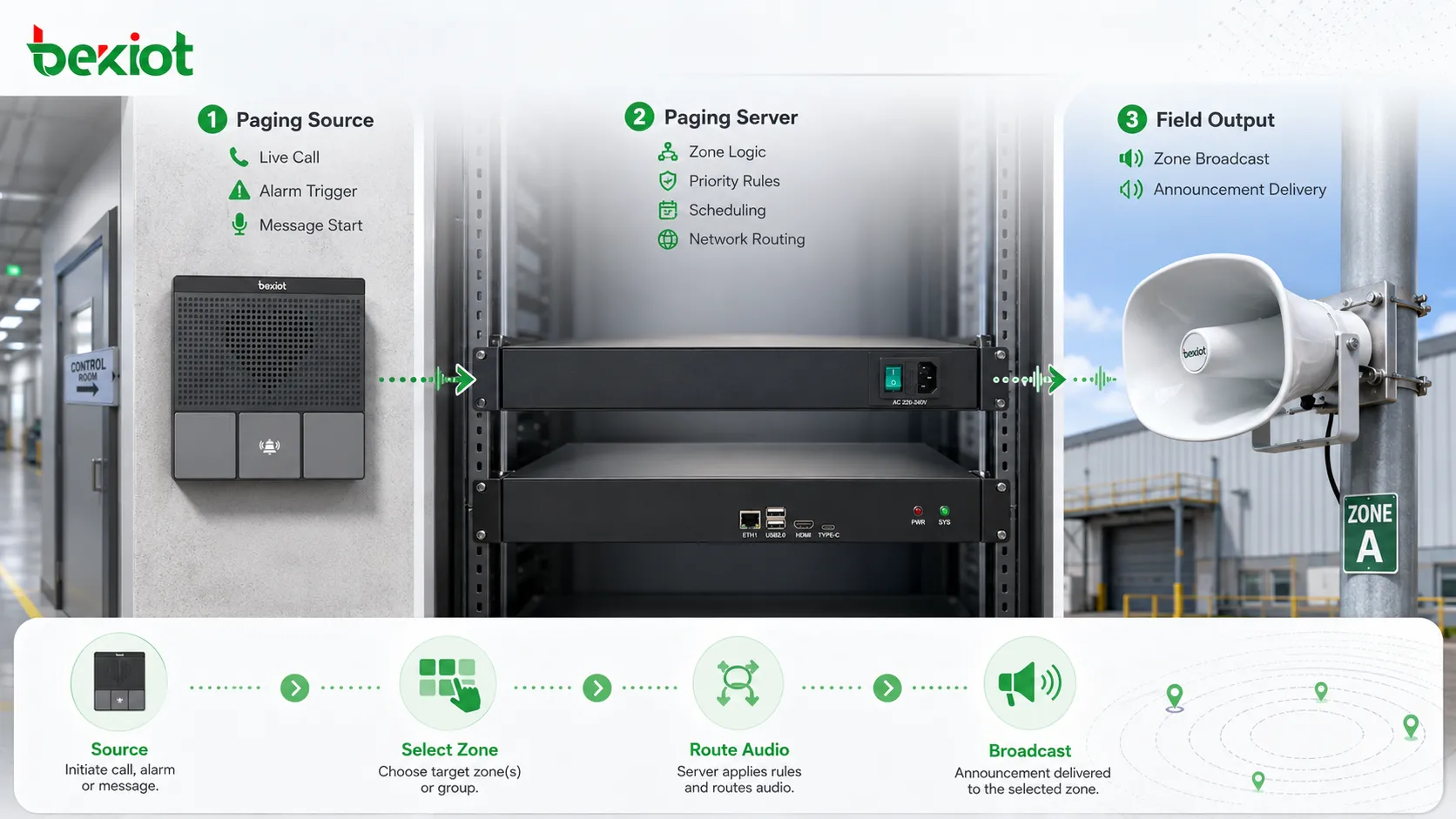
The architecture behind the broadcast path
A typical industrial paging architecture contains several layers. The first layer is the user or event source. This may include operators, dispatchers, security staff, maintenance personnel, alarm systems, access control events, sensors, or scheduled tasks. The second layer is the control platform, which manages routing, priority, users, zones, message files, logs, and integration rules.
The third layer is the transmission network. In modern projects, this is often an IP network that connects paging servers, switches, network amplifiers, SIP devices, IP speakers, gateways, and control consoles. In some sites, analog audio lines, speaker circuits, or amplifier zones are still used. Hybrid systems are common because many facilities need to connect new IP equipment with existing speaker infrastructure.
The fourth layer is the field output layer. This includes ceiling speakers, horn speakers, wall speakers, explosion-proof speakers, IP speakers, industrial intercom stations, paging adapters, amplifiers, and local audio devices. These devices determine how the announcement is actually heard in the field. Their placement, power, direction, and environmental protection affect the final result as much as the software platform.
The fifth layer is monitoring and feedback. A mature industrial paging system should not simply send audio and assume success. It should show device status, amplifier health, network connectivity, zone availability, broadcast records, fault alarms, and operation logs where supported. This allows maintenance teams to find problems before a critical message is missed.
In projects that combine paging and field intercom, the system may also include call stations, help points, wall-mounted intercom terminals, control room consoles, and event pop-up interfaces. A platform such as the Becke Telcom industrial paging and intercom system can be used as a reference example for this type of integrated architecture, where broadcast, intercom, emergency call, and dispatch response are handled as connected communication functions rather than isolated devices.
Related solution: Paging and Intercom Broadcasting System
How the system selects the right area
Zone selection is one of the most important working mechanisms. Industrial sites are rarely suitable for one full-site broadcast rule. A message for a loading dock should not disturb the office area. A maintenance instruction for one production line should not interrupt another line. An emergency warning near a hazardous area may need to reach surrounding zones but not necessarily the entire facility.
Zones can be created according to physical layout, operational function, safety level, or response responsibility. A factory may use zones such as workshop one, workshop two, warehouse, outdoor yard, power room, control room corridor, and main gate. A transport site may use platform zones, tunnel sections, ticket halls, staff rooms, and parking areas. A utility site may use pump rooms, switch rooms, chemical areas, outdoor tanks, and remote stations.
The system may support single-zone paging, multi-zone paging, all-zone paging, emergency-zone paging, and temporary group paging. Single-zone paging is used for local instructions. Multi-zone paging is used when related areas need the same message. All-zone paging is usually reserved for major announcements or emergency events. Temporary groups can support construction, maintenance shutdowns, special events, or short-term operational changes.
Good zone design prevents message fatigue. If people hear too many irrelevant announcements, they may stop paying attention. This is dangerous because the same system may later deliver important safety messages. Targeted zone paging keeps routine communication local and preserves attention for urgent broadcasts.
Zone naming is also important. Operators should see names that match real site language, not unclear codes. “North Loading Dock,” “Line 3 Assembly,” “Pump Room B,” or “Gatehouse Entrance” is easier to use than “Zone 08” unless the site already uses numbered zones in daily operation. Clear naming reduces wrong broadcasts.
Live paging and scheduled playback work together
Industrial paging systems usually support both live paging and scheduled playback. Live paging is used when information changes in real time. An operator speaks into a microphone, chooses a zone, and delivers an immediate instruction. This is useful for temporary hazards, maintenance coordination, production changes, visitor guidance, security response, and unexpected events.
Scheduled playback is used for routine messages. A factory may play shift-change notices, safety reminders, lunch break announcements, or start-of-work prompts. A campus may play class bells or public service reminders. A transport facility may play regular passenger guidance. A warehouse may play loading schedule reminders. Scheduled playback reduces manual workload and improves consistency.
The special value appears when both modes are coordinated. A scheduled announcement should not block a live emergency page. Background music should not cover a safety instruction. A routine reminder should not override a control room call. The platform should define which audio source has priority and what happens when two audio tasks occur at the same time.
Operators also need a simple way to interrupt or suspend routine playback. During an incident, manual control should be quick. If staff must search through complex menus to stop a scheduled message, the system becomes less effective. Strong paging design allows routine automation while keeping live command authority available.
Some systems also support message libraries. Approved audio files can be stored for repeated use, such as evacuation instructions, weather warnings, equipment shutdown notices, visitor guidance, and test announcements. This avoids wording mistakes and ensures that critical messages are delivered consistently.
Priority control protects urgent communication
Priority control is a special feature that gives the system operational discipline. Not every message should have the same right to occupy the audio path. Emergency alarms, safety announcements, evacuation instructions, and control room commands should have higher priority than background music, routine reminders, or low-level service notices.
Priority rules define what happens during conflict. If an emergency broadcast starts while music is playing, the music should stop or mute. If two operators page the same zone, the higher-priority user may take control. If a scheduled message is running and a live operator speaks, the scheduled message may pause. If a fire alarm triggers a voice message, lower-priority audio should not interfere.
The priority model should reflect site risk. A factory may prioritize emergency shutdown warnings, fire alarms, hazardous gas alerts, and production safety instructions. A transport facility may prioritize evacuation, platform safety, security response, and passenger flow control. A hospital may prioritize emergency staff calls, critical facility notices, and safety guidance while limiting unnecessary disturbance to patient areas.
Priority is not only a technical setting. It is also an operational policy. The organization must decide who can use high-priority paging, which events can trigger emergency override, how conflicts are logged, and whether the system requires confirmation before all-zone broadcast. Loose priority design can create confusion; overly strict priority design can slow response.
Testing is necessary. The system should be tested with simultaneous events, such as scheduled audio plus live paging, background music plus alarm trigger, and local page plus emergency page. The actual behavior should match the documented procedure.
Emergency override and alarm linkage
Emergency override allows critical announcements to take control of the audio system immediately. This feature is one of the main reasons industrial paging systems are used in safety-related environments. When a fire alarm, emergency button, gas detection event, security incident, or equipment hazard occurs, the system can broadcast a warning to the selected area or the whole site.
Alarm linkage can be manual or automatic. In a manual workflow, an operator receives an alarm, verifies the situation, and starts a live or stored announcement. In an automatic workflow, the alarm input directly triggers a prepared message. Some sites use a mixed method: automatic warning for high-risk events and operator confirmation for lower-risk events.
The trigger relationship must be designed carefully. Not every alarm should produce a public announcement. A minor device fault may need a maintenance notification, while a life-safety alarm may need immediate broadcast. If too many alarms trigger audio, people may become desensitized. The system should map alarm types to appropriate paging groups, messages, and priority levels.
Emergency messages should be short, clear, and actionable. A message such as “Please evacuate through the east exit” is more useful than a long technical description. In multilingual or public environments, message clarity becomes even more important. Audio files may need to be approved, tested, and stored in the system before use.
For emergency use, the complete path must be reliable. The alarm trigger, paging platform, network, amplifier, speaker, power supply, zone mapping, and message file must all work. Testing should include field listening, not only software confirmation. A screen showing “broadcast sent” is not enough if the message is not clearly heard in the area.
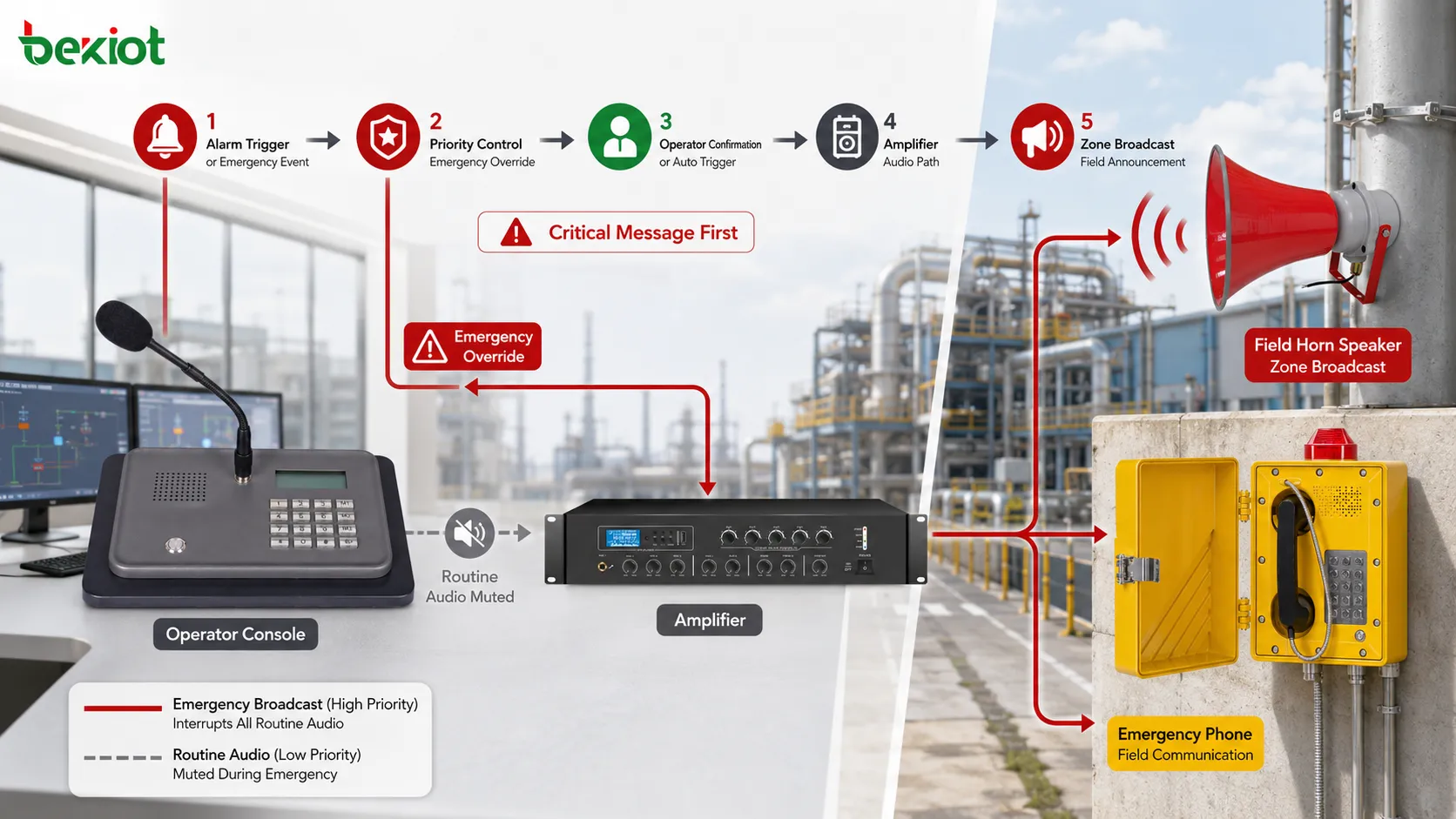
Intercom capability makes it more than one-way broadcast
Traditional paging is usually one-way: the operator speaks and the audience listens. Industrial environments often need more than that. A worker may need to reply, confirm a condition, request assistance, or explain what is happening at the field point. This is where paging and intercom begin to overlap.
Two-way intercom allows the field and control room to communicate directly. A help point can call the operator. A gate terminal can speak with security staff. A maintenance point can contact engineering. A control room can call back to a field device after an alarm. This gives the system a response loop instead of only a broadcast path.
The combination of paging and intercom is especially valuable during incidents. A sensor alarm may trigger a warning, but the operator may still need field confirmation. A public help point may request assistance, and the operator may then broadcast instructions nearby. A maintenance worker may call from a machine area, and the control room may page another team to respond. These actions are connected in real workflows.
Industrial intercom functions may include auto-answer, push-to-talk, full-duplex conversation, call queue, emergency call, hotline dialing, group call, call recording, relay control, video linkage, or location display. The exact feature set depends on system architecture and endpoint type.
For this reason, an industrial paging system with intercom capability should be planned as a communication network, not only as a loudspeaker system. The design should define who can talk to whom, which calls have priority, which field points support reply, and how call events are logged.
Audio distribution methods
Industrial paging can use different audio distribution methods. The simplest idea is that audio moves from a source to speakers, but the technical path can vary greatly. Some systems use analog amplifier circuits. Some use IP speakers. Some use SIP paging. Some use multicast audio. Some use hybrid gateways that connect IP control with analog speaker lines.
Analog speaker-line distribution is often used where many passive speakers are installed in fixed zones. An amplifier sends audio to the speaker circuit, and the zone is controlled by wiring, amplifier channels, or relay selection. This method can be stable and familiar, but it may be less flexible when many dynamic zones or remote locations are needed.
IP-based paging distributes audio through the network. IP speakers, network amplifiers, SIP terminals, and paging adapters can receive audio streams directly. This makes it easier to add zones, manage remote sites, monitor devices, and integrate with software platforms. It also allows field endpoints to combine paging, intercom, and device status in one networked system.
Multicast can be efficient for large groups because one stream can be received by many endpoints. However, it requires correct network support. Switches, routers, VLANs, wireless segments, and firewalls may affect multicast delivery. If multicast is not configured correctly, some zones may receive audio while others remain silent.
Unicast is simpler in some networks because the system sends a separate stream to each endpoint. It can be easier to control but may consume more bandwidth and server resources when many devices are included. The right method depends on group size, network design, endpoint capability, and reliability requirements.
| Distribution method | How it works | Suitable use | Key concern |
|---|---|---|---|
| Analog amplifier line | Amplifier sends audio to passive speaker circuits | Fixed zones, existing PA wiring, large speaker loops | Speaker load, cable quality, zone wiring, amplifier capacity |
| IP speaker or network amplifier | Audio travels through the IP network to smart endpoints | Distributed sites, flexible zones, remote management | Network quality, device registration, power, monitoring |
| SIP paging | Paging group is called through SIP signaling and audio stream | VoIP environments, phones, intercoms, dispatch platforms | Codec, auto-answer behavior, registration, dial plan |
| Multicast paging | One stream is delivered to multiple endpoints | Large zones with many IP endpoints | IGMP, VLANs, routing, firewall and switch support |
| Hybrid gateway mode | IP control connects to analog audio or legacy speaker circuits | Retrofit projects and phased upgrades | Interface matching, delay, level control, fault visibility |
Audio clarity is part of the working principle
A paging system does not work successfully unless the message can be understood. Industrial areas often include machinery noise, airflow, vehicles, echo, alarms, tools, pumps, motors, and outdoor sound. If audio design is poor, the system may technically broadcast but fail to communicate.
Audio clarity begins at the source. Operators should use suitable microphones, speak at a proper distance, avoid shouting, and wait until the paging channel is open. Pre-recorded messages should be recorded clearly, at consistent levels, and without unnecessary background noise. If the source audio is distorted, the field output will also be poor.
Speaker selection and placement are equally important. A horn speaker may be suitable for noisy outdoor or industrial areas. A ceiling speaker may be better for offices or corridors. A wall speaker may fit warehouses, service halls, or public areas. The direction, height, coverage angle, and sound pressure level should match the listening environment.
The system may also need volume zones. A workshop may require higher volume than an office. A hospital corridor may need moderate volume. A tunnel or station platform may require careful echo control. Uniform volume across all zones is rarely ideal.
For very noisy environments, audio may need to be combined with visual signals, flashing lights, local displays, sirens, or intercom confirmation. Paging is powerful, but it should be designed according to human hearing conditions in the actual site.
Special feature: centralized control with distributed reach
One special feature of an industrial paging system is the ability to control many distributed audio points from a central position. A control room, security office, dispatch desk, or facility management center can speak to local zones, remote buildings, outdoor areas, branch sites, or emergency points without sending staff physically to each location.
This centralized control reduces communication delay. When an event occurs, the operator does not need to call multiple people and hope the message spreads correctly. The system can deliver the instruction directly to the affected zone. This is especially useful in large plants, tunnels, campuses, stations, logistics parks, and utility networks.
Distributed reach also supports consistency. The same approved emergency message can be played across several areas. The same shift reminder can be delivered to multiple workshops. The same safety notice can be issued across a campus. This reduces dependence on local interpretation and improves communication discipline.
Central control should still allow local fallback where needed. If a central connection fails, a local operator may still need to page a building or area. Strong systems consider both centralized authority and local survivability. This is important in safety-related or remote environments.
Special feature: integration with field response
Industrial paging becomes more powerful when it is connected to response actions. A broadcast may be followed by a field call. An emergency button may trigger both a call and an announcement. A security event may open a camera view and prepare a zone page. A maintenance alarm may notify a workshop and create an operator log.
This response-oriented design turns paging into part of a workflow. The operator can see an event, page the affected area, speak with field staff, record the action, and track what happened. This is very different from a simple amplifier that only plays audio.
The Becke Telcom industrial paging and intercom system can be mentioned as an example of this integrated direction: industrial broadcast, field intercom, control room calling, and emergency response can be organized into one communication structure according to project needs. The key point is not only the product name but the deployment idea—paging should support action, not only sound output.
In real projects, response integration may involve dispatch consoles, video monitoring, alarm inputs, door control, device status, event pop-ups, audio recording, and maintenance logs. Each integration should be tied to a real operational purpose. Integration without workflow only makes the system more complex.
Special feature: priority-based safety communication
Priority-based safety communication is another special feature. In an industrial setting, a normal announcement and an emergency warning cannot be treated equally. The system must protect the audio path for the message that matters most at that moment.
Priority levels may be assigned to emergency override, fire alarm broadcast, security announcements, dispatch paging, local operator paging, scheduled messages, and background audio. The system then decides which message can interrupt another. This prevents a low-level message from blocking a safety instruction.
Priority also helps manage operator authority. A local user may page only one zone at routine priority, while a safety manager may page multiple zones at high priority. An alarm trigger may automatically use the highest level for a predefined message. This gives the system a structured operating hierarchy.
Priority rules should be simple enough for users to understand. If operators cannot predict which message will play, they may lose trust in the system. The design should define conflict behavior clearly and test it during commissioning.
Special feature: monitoring and fault awareness
A paging system must be ready before it is needed. If a speaker line is broken, an amplifier is offline, an IP speaker loses network connection, or a zone is muted, the failure may remain hidden until an important broadcast fails. Monitoring and fault awareness reduce this risk.
Depending on architecture, the system may monitor endpoint online status, amplifier faults, speaker line condition, network reachability, power state, call status, broadcast logs, and alarm trigger records. IP-based systems usually provide more device-level visibility than simple analog systems, although analog line monitoring can also be implemented in certain designs.
Fault visibility is especially important for emergency paging. A safety announcement should not rely on devices that no one has checked. Maintenance teams need alarms, logs, dashboards, or inspection reports to confirm that the system is healthy. A silent failure in a rarely used zone can become serious during an incident.
Monitoring should be supported by routine testing. A device may show online but still have poor audio output because of a damaged speaker, blocked grille, wrong volume, or local acoustic problem. Technical status and actual listening tests should be combined.
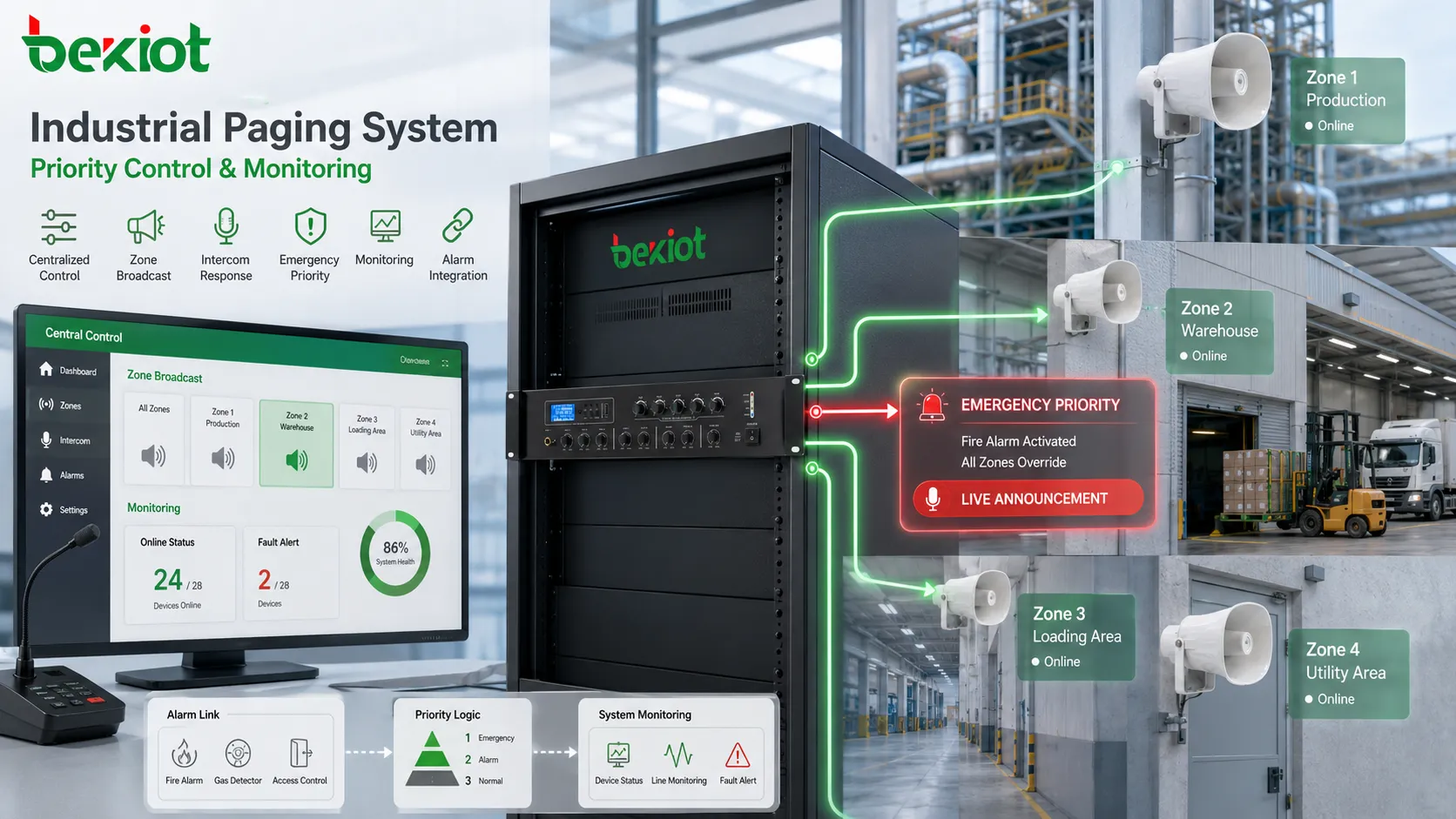
Application in factories and production sites
Factories and production sites use industrial paging for shift notices, production instructions, safety warnings, maintenance dispatch, emergency alerts, quality reminders, logistics coordination, and visitor guidance. Workers may be distributed across workshops, assembly lines, warehouses, utility rooms, control rooms, and outdoor yards. Paging helps supervisors reach areas rather than individuals.
On a production line, a supervisor may need to stop a process, request material preparation, call maintenance, warn about a blocked route, or announce inspection requirements. A live page can reach everyone in that line at once. If the message were sent only by phone, some workers might not receive it in time.
Factories also benefit from zone planning. One line may need a message that should not disturb another line. A safety warning may need to reach all production areas. A maintenance call may need to reach only engineering staff. The paging system should follow production layout and responsibility structure.
In noisy areas, speaker type and placement are critical. Horn speakers, higher-output devices, repeated messages, and visual indicators may be required. For quieter administrative areas, lower volume and different speaker types may be more appropriate. One audio design cannot serve every industrial zone equally.
Application in energy, utilities, and remote stations
Energy and utility sites often include substations, power plants, water treatment facilities, pumping stations, heating systems, pipelines, renewable energy sites, and remote equipment rooms. These environments require communication for safety, maintenance, inspection, switching operations, access control, and emergency handling.
Paging can help operators issue warnings before equipment operation, call field teams to a specific area, announce maintenance status, or coordinate emergency response. In large utility sites, a control room may not be physically close to the affected equipment. A broadcast system gives operators a way to reach the field immediately.
Remote sites may have fewer staff on site. Paging and intercom functions can support remote supervision, where a central operator communicates with a field point or broadcasts to a local area. If combined with monitoring and alarms, the system can help bridge the gap between centralized management and distributed equipment.
Reliability is important in these environments. Power backup, network redundancy, weather protection, surge protection, grounding, and device monitoring should be considered. A paging point at a remote pump station or substation must remain usable between maintenance visits.
Application in transportation and public infrastructure
Transportation environments require fast public and staff communication. Railway stations, metro systems, tunnels, airports, ports, bus terminals, parking facilities, highway service areas, and logistics hubs use paging for passenger guidance, platform changes, evacuation instructions, staff dispatch, security notices, and operational updates.
In public transport, information changes quickly. A platform may be changed, a route may be delayed, a gate may be closed, or passengers may need safety guidance. Real-time paging allows operators to speak directly to the affected area. Scheduled announcements can handle routine messages, while live paging handles changing events.
Tunnels and underground passages have special requirements. Mobile signals may be limited, distances may be long, and emergency response may depend on clear audio guidance. Paging zones should follow tunnel sections, emergency exits, equipment rooms, cross passages, and control points. Integration with fire alarm, video, and emergency phones may be required.
Public infrastructure also requires clear audio. Echo, crowd noise, vehicle noise, and large spaces can reduce intelligibility. Speaker layout, volume tuning, message length, and language selection should be tested from the listener’s position, not only from the control room.
Application in warehouses and logistics parks
Warehouses and logistics parks use industrial paging for loading dock coordination, vehicle dispatch, security notices, emergency alerts, equipment warnings, and shift communication. These sites often contain large spaces, high racks, moving forklifts, conveyor systems, outdoor yards, gates, and parking areas.
A paging system can call drivers to a dock, notify staff about incoming goods, request maintenance at a conveyor, warn workers about restricted movement, or guide visitors to the correct service point. Because workers are often moving, a site-wide messaging app may not be enough. Voice announcements reach the active work area directly.
Zone design should follow workflow. Dock areas, sorting areas, storage zones, office areas, security gates, and parking yards may need separate groups. A message for one dock should not necessarily disturb all warehouse staff. A safety warning, however, may need broad coverage.
Integration with intercom can be useful at gates and service points. Drivers or visitors can call the control desk, while staff can page the relevant area. This creates a more complete communication loop for logistics operations.
Application in campuses, hospitals, and commercial facilities
Campuses, hospitals, commercial buildings, office parks, hotels, and public facilities use paging for service guidance, emergency notices, staff coordination, visitor management, security response, and routine announcements. These environments often include both public areas and restricted areas, so zone control and permission management are important.
Hospitals require careful paging design because excessive announcements can disturb patients, but urgent staff coordination may still be necessary. Zones may be created by ward, department, corridor, waiting area, emergency entrance, or duty room. The system should balance clarity, urgency, and quiet operation.
Campuses and schools use paging for class schedules, safety drills, emergency alerts, event coordination, and public notices. Large campuses may need building-level, floor-level, outdoor-area, and all-campus groups. Emergency messages should have clear priority over routine bell or announcement functions.
Commercial facilities may use paging for customer service, lost-and-found notices, parking assistance, staff calls, closing reminders, and safety instructions. In customer-facing spaces, audio quality and message discipline matter. Too many announcements can reduce comfort, while unclear messages can create confusion.
Planning rules before deployment
Before deployment, the project team should define the purpose of the system. Is it mainly for routine announcements, emergency communication, production coordination, public guidance, intercom response, or a combination of these? Different purposes require different priorities, zones, devices, and integration methods.
The next step is to map physical areas. The system should follow buildings, floors, workshops, corridors, gates, yards, platforms, machine rooms, public halls, and emergency routes. Zone planning should involve both technical engineers and site operators because operators understand how people move and where messages are needed.
Device selection should match the environment. Indoor quiet areas may use ceiling speakers or wall speakers. Noisy industrial areas may need horn speakers. Outdoor or harsh environments may need weather-resistant or rugged devices. Field response points may need intercom terminals. Existing speaker lines may require amplifiers or gateways.
Network and power planning should be completed before installation. IP paging requires suitable VLANs, multicast or unicast decisions, QoS, switch capacity, firewall rules, and management access. Emergency paging may require backup power, protected circuits, or local fallback. Analog speaker systems require amplifier capacity, cable calculation, and line testing.
Operational procedures should also be prepared. Who can page? Which zones can each user access? Which messages have priority? Who approves emergency broadcast? How are messages recorded? How often are devices tested? These questions determine whether the system works in real use.
Commissioning and verification
Commissioning should test more than device power-on. Each source, zone, endpoint, amplifier, speaker, intercom point, alarm trigger, and priority rule should be verified. The system should be tested from the operator interface and from the field listening position.
Zone accuracy is a key test item. When the operator pages Zone A, only Zone A should receive the message unless the design says otherwise. When all-zone paging is activated, every required area should be checked. Wrong-zone playback can disturb operations, while missed-zone playback can create safety gaps.
Audio intelligibility should be tested during realistic conditions. If a factory line is normally noisy, test the page while equipment is running. If a station is crowded during peak hours, test the system under similar acoustic conditions where possible. A quiet commissioning test may not reveal real problems.
Priority behavior should be verified with conflict scenarios. Emergency broadcast should override routine messages. Live paging should behave according to policy. Scheduled playback should pause or stop as configured. Alarm-triggered messages should reach the correct zones.
Intercom functions should also be tested. Calls from field points should reach the correct operator. Location information should be accurate. Audio should be clear in both directions. If video, access, or alarm linkage is included, those workflows should be checked end to end.
Common mistakes in system design
One common mistake is using one large broadcast zone for every message. This may seem simple, but it quickly causes disturbance and message fatigue. People hear too many irrelevant announcements and may ignore important ones later. Zone planning should match actual site needs.
Another mistake is ignoring acoustic conditions. A speaker layout that looks sufficient on a drawing may fail in a noisy workshop, tunnel, warehouse, or public hall. Sound direction, echo, background noise, mounting height, and speaker type must be considered.
Network planning is also often underestimated in IP paging systems. Multicast may not pass between VLANs. Firewalls may block RTP streams. Wireless networks may not handle audio reliably. Switches may lack proper IGMP configuration. Paging traffic should be tested across the actual network.
Some projects focus on routine announcements but forget emergency behavior. If emergency override, backup power, alarm linkage, priority control, and regular testing are not planned, the system may not support safety communication when needed.
Maintenance is another common weakness. Speakers, amplifiers, IP endpoints, microphones, terminals, and cables can fail over time. Without monitoring and periodic testing, faults may remain hidden. Industrial paging should be maintained as a critical communication system, not as a passive audio accessory.
How to judge whether it works well
A well-designed industrial paging system should deliver the right message to the right area at the right time. The first judgment standard is zone accuracy. Operators should be able to select areas easily, and the field output should match the selection. Wrong or missed zones reduce trust in the system.
The second standard is intelligibility. People should understand the message under normal site conditions. This requires proper source audio, speaker selection, placement, volume, acoustic tuning, and message discipline. Loud but unclear audio is not successful paging.
The third standard is priority behavior. Critical messages should override routine audio. Emergency alarms should reach required zones. Operators should understand what happens during conflict. Priority should be tested, not only configured.
The fourth standard is response integration. If the system includes intercom, alarms, video, access, or dispatch functions, these workflows should help operators act faster. Integration is valuable only when it reduces response time or improves decision quality.
The fifth standard is maintainability. Administrators should be able to monitor device status, review logs, test zones, update messages, manage permissions, and locate faults. A system that works only on installation day but becomes difficult to maintain is not a strong industrial communication solution.
Key Takeaways
An industrial paging system works by converting live speech, scheduled messages, or alarm triggers into controlled audio delivery across selected zones. It uses sources, routing rules, paging groups, priority levels, transmission networks, amplifiers, speakers, intercom terminals, and monitoring functions to support real-time field communication.
Its special features include zone-based broadcast, emergency override, priority control, live and scheduled paging, intercom response, alarm linkage, centralized control, distributed reach, device monitoring, and flexible integration with industrial operation workflows. These features make it different from a simple loudspeaker or background audio system.
The value is strongest when the system is designed around real site conditions. Factories, energy sites, tunnels, transport facilities, warehouses, campuses, hospitals, commercial buildings, and public infrastructure all need different zone logic, audio design, device selection, and response procedures. When planning, commissioning, and maintenance are done carefully, an industrial paging and intercom system becomes a practical tool for safety, coordination, and operational continuity.
FAQ
Is an industrial paging system the same as a public address system?
They are related, but not identical. A public address system may focus on general announcements and background audio, while an industrial paging system usually adds zone control, priority, emergency override, intercom integration, alarm linkage, monitoring, and operational response features.
Why is zone planning so important?
Zone planning ensures that each message reaches the correct area without disturbing unrelated spaces. Good zones improve message relevance, reduce noise pollution, and make emergency communication more accurate.
Can the system support two-way communication?
Yes, if intercom terminals or talkback devices are included. Paging handles one-to-many announcements, while intercom allows field users and operators to speak with each other for confirmation, help requests, access control, or emergency response.
What affects the clarity of paging audio?
Audio clarity depends on microphone quality, speaker type, placement, background noise, volume setting, echo, network quality, amplifier performance, and message wording. Field testing under real conditions is essential.
What should be checked during maintenance?
Maintenance should include speaker output, amplifier status, endpoint connectivity, microphone operation, zone accuracy, emergency override, alarm linkage, logs, power supply, cable condition, and actual field audibility.







