


In IP-based voice communication, audio does not travel as one continuous sound wave from speaker to listener. It is captured, encoded, divided into packets, transmitted across a network, received, reordered, buffered, decoded, and played out again. During this process, packets may not arrive at perfectly equal intervals. Some arrive early, some arrive late, and some may be lost. This variation in packet arrival time is commonly called jitter, and it is one of the key factors affecting VoIP, IP paging, dispatch calls, intercom audio, video conferencing, and real-time communication quality.
The term “Jitter audio” should be understood carefully. Jitter itself is not an advantage. Excessive jitter can cause broken speech, uneven playback, missing syllables, robotic sound, delay, or call instability. The real value comes from jitter-aware audio processing: jitter buffers, adaptive playback, packet loss concealment, timestamp handling, QoS control, codec selection, and network monitoring. These technologies help audio systems remain understandable even when the network is not perfectly stable.
Why packet timing affects voice quality
Human conversation is sensitive to time. When people speak face to face, sound reaches the listener almost continuously. In packet networks, however, audio is carried in small blocks. A typical real-time voice stream may send audio packets at short intervals, such as every few milliseconds or tens of milliseconds, depending on codec and system configuration. The receiver expects these packets to arrive in a steady rhythm so it can play the audio smoothly.
Network paths are not always steady. A packet may wait in a router queue, pass through a congested link, take a slightly different route, or be delayed by wireless interference. Even if packets are sent at regular intervals, they may arrive irregularly. This irregularity is jitter. The problem is not only total delay, but inconsistent delay. A packet that arrives late may miss its playback time even if it eventually reaches the receiver.
If the receiver plays packets immediately as they arrive, the audio may sound unstable. Fast-arriving packets may bunch together, while delayed packets create gaps. If the receiver waits too long for late packets, conversation delay increases. Audio design must therefore balance smooth playback and low latency.
This balance is the core of jitter audio technology. The system must absorb reasonable timing variation without making the call feel slow. It must hide minor network irregularities while still keeping real-time interaction natural. In dispatch, emergency, intercom, and service environments, this balance directly affects communication effectiveness.
The role of the jitter buffer
The jitter buffer is the most important mechanism used to handle audio jitter. It temporarily stores received packets before playback. Instead of playing each packet immediately when it arrives, the receiver waits a short time, arranges packets in the correct order, and plays them at a stable rhythm. This helps smooth out packet arrival variation.
A fixed jitter buffer uses a predefined delay. It may work well when network conditions are stable, but it can be too small for unstable networks or too large for low-latency communication. If the buffer is too small, late packets may be discarded. If the buffer is too large, audio becomes delayed. This is why many real-time audio systems use adaptive jitter buffers.
An adaptive jitter buffer changes its size according to network behavior. When jitter increases, the buffer may grow slightly to absorb late packets. When the network becomes stable, the buffer may shrink to reduce delay. This dynamic adjustment helps preserve audio continuity without adding unnecessary latency.
The jitter buffer also helps with packet reordering. Packets may arrive out of order, especially in complex networks. If the sequence number and timestamp information are available, the receiver can place packets back into the correct playback sequence. Without this process, speech may become scrambled or distorted.
Jitter buffer design is one of the main technical differences between ordinary packet reception and professional real-time audio processing. A good jitter buffer does not simply delay audio. It makes continuous decisions about timing, order, late packets, missing packets, playback speed, and user experience.
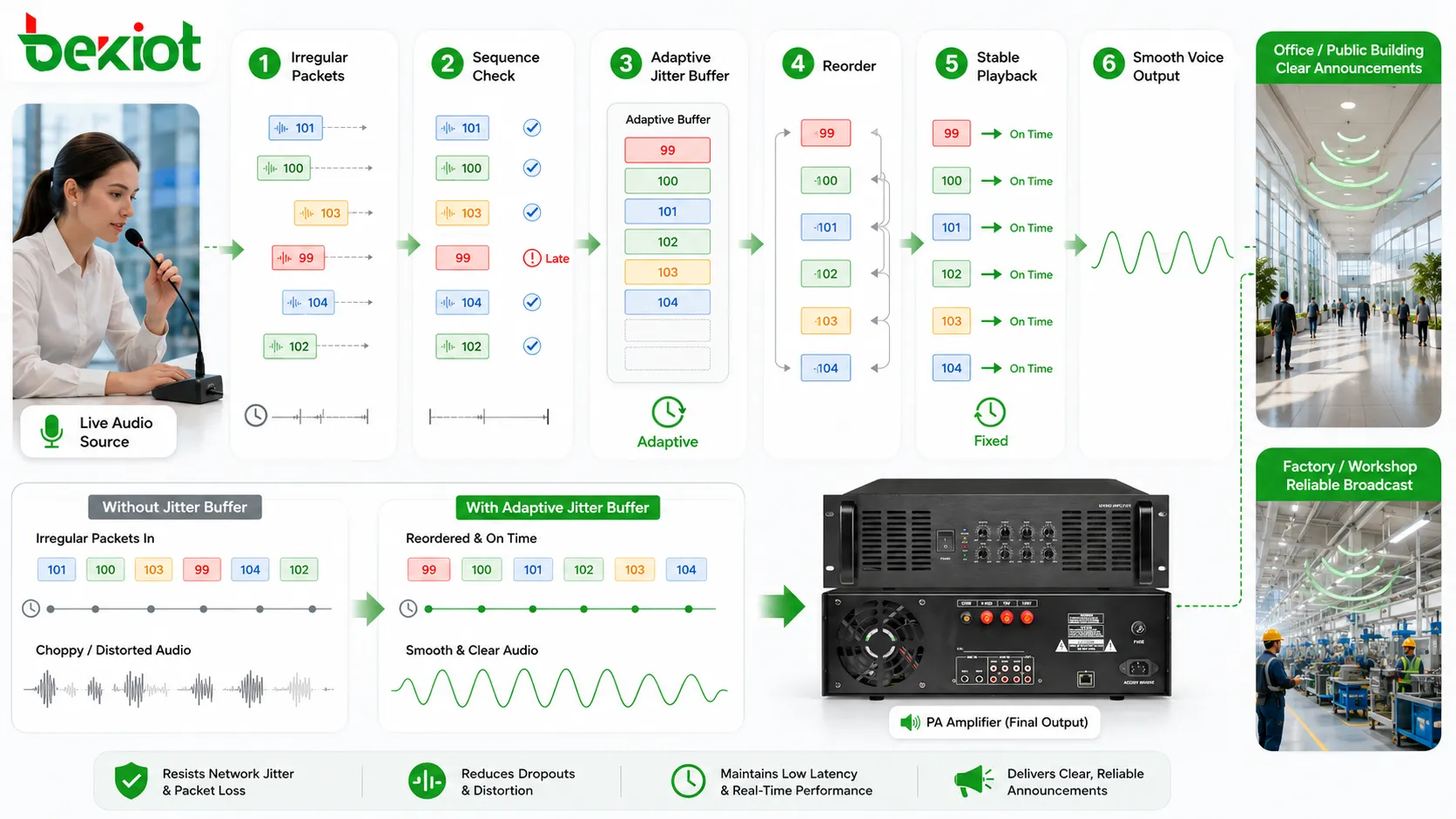
Adaptive playback keeps audio natural
Adaptive playback is closely related to jitter buffering. When packets arrive slightly early or late, the system may adjust playout timing to avoid noticeable breaks. It may slow down playback slightly, accelerate it slightly, expand comfort noise, compress silence, or use packet loss concealment when a packet is missing. These changes are usually small enough that users do not notice them directly.
The goal is not to change the meaning or pitch of speech. The goal is to maintain continuity. If a packet arrives too late for its original playback position, the system may decide to skip it and conceal the gap. If too many packets arrive early, the buffer may adjust timing to avoid growing too large. The receiver constantly manages the relationship between packet arrival and playback schedule.
Adaptive playback is important because real networks are dynamic. A call may begin on a stable wired network, then experience congestion. A wireless user may move between coverage areas. A dispatch system may share bandwidth with video, alarm data, or business applications. A static buffer cannot always handle these changes well.
When adaptive playback is designed properly, users hear fewer clicks, gaps, and abrupt changes. The conversation may remain understandable even when the network has moderate variation. This is one of the key advantages of jitter-aware audio processing.
Packet loss concealment supports continuity
Jitter and packet loss often appear together. A packet that arrives too late may be treated as lost because it can no longer be used for playback. Packet loss concealment, often shortened to PLC, is used to reduce the audible effect of missing audio packets.
PLC does not recover the original missing information perfectly. Instead, it estimates or generates replacement audio based on nearby speech patterns, previous samples, comfort noise, waveform continuation, or codec-specific concealment methods. The listener may hear a smoother continuation instead of a sharp gap.
For voice communication, small losses can often be concealed well enough that the conversation remains understandable. However, long bursts of packet loss are harder to hide. If several consecutive packets are missing, the system has less context and the artificial replacement becomes more noticeable.
PLC is valuable in VoIP calls, intercom sessions, push-to-talk communication, conference audio, and dispatch systems because it helps preserve speech flow. In emergency and industrial communication, even partial intelligibility is better than sudden silence or broken words. However, PLC should be treated as a recovery mechanism, not as a replacement for good network design.
The best result comes from combining jitter buffering, PLC, QoS, codec selection, network monitoring, and proper bandwidth planning. Each layer reduces a different part of the audio risk.
Timestamp and sequence control make reconstruction possible
Real-time audio packets usually carry timing and ordering information. Sequence numbers help the receiver detect whether packets arrive in order, whether a packet is missing, or whether a duplicate packet appears. Timestamps help the receiver understand when each packet should be played. These fields allow the receiver to reconstruct the audio stream more accurately.
Without sequence control, the receiver may not know whether a gap is caused by loss, delay, or reordering. Without timestamps, the system may not know the correct playback timing. Jitter processing depends on these markers. They turn packet arrival into a manageable timeline.
In RTP-based audio, this timing information is central to real-time media handling. The receiver uses it together with local clock behavior and buffer state to decide when audio should be played. If clocks drift, packets are misordered, or timestamps are generated incorrectly, the jitter buffer may behave poorly.
Accurate timestamp handling is especially important in systems that include recording, conferencing, bridging, media servers, gateways, or multiple audio sources. When audio streams are mixed or relayed, timing errors may accumulate. Professional systems must preserve or translate timing information correctly.
This technical layer is not visible to ordinary users, but it strongly affects what they hear. A clean user experience depends on invisible timing discipline inside the communication system.
QoS reduces jitter before it reaches the receiver
Jitter buffers handle packet timing variation after it occurs, but good network design tries to reduce jitter before packets reach the receiver. Quality of Service, or QoS, is used to prioritize real-time audio traffic over less time-sensitive data. This can reduce queuing delay, packet burst delay, and congestion-related timing variation.
Audio packets are small and time-sensitive. File downloads, backups, video uploads, software updates, and large data transfers can fill network queues. If voice packets wait behind large data packets, their arrival intervals may become irregular. QoS helps move voice packets through the network with more predictable timing.
Common QoS methods include traffic classification, priority queuing, bandwidth reservation, DSCP marking, VLAN design, traffic shaping, and congestion management. The exact approach depends on the network architecture. The important principle is that real-time audio should not compete equally with all other traffic in a congested network.
QoS is especially useful in enterprise networks, campuses, industrial sites, dispatch systems, multi-branch VoIP systems, wireless networks, and IP paging deployments. These environments may carry many traffic types on the same infrastructure. Without priority control, voice quality may change unpredictably when data traffic increases.
QoS is not a cure for every problem. It cannot fix a failing link, severely insufficient bandwidth, bad Wi-Fi coverage, overloaded endpoints, or incorrect codec settings. But it is an important part of jitter reduction and real-time audio stability.
Codec behavior affects jitter tolerance
Audio codec selection also affects how a system handles jitter and loss. A codec defines how audio is compressed, packetized, transmitted, decoded, and sometimes concealed when packets are missing. Different codecs have different bandwidth requirements, packetization intervals, delay characteristics, and PLC behavior.
Some codecs are designed for low bandwidth. They reduce network load but may add processing delay or be more sensitive to packet loss. Some codecs preserve higher audio quality but require more bandwidth. Some codecs include strong built-in packet loss concealment. Others rely more on the receiver or platform implementation.
Packetization interval is also important. If audio is packetized into very small intervals, more packets are sent per second. This may reduce the audible duration of each lost packet but increases packet overhead. If audio is packetized into longer intervals, fewer packets are sent, but losing one packet means losing a larger chunk of audio. The right setting depends on network quality, bandwidth, latency requirements, and system purpose.
For real-time voice, low delay is often more important than perfect fidelity. For broadcasting or one-way announcements, slightly more buffering may be acceptable if it improves smoothness. For interactive dispatch and intercom calls, excessive delay can make conversation awkward. Codec and jitter settings should match the communication scenario.
Codec choice should not be made only by looking at audio quality in a quiet lab. It should be tested under packet loss, jitter, network congestion, and real endpoint conditions. A codec that sounds excellent on a perfect link may perform poorly on an unstable network if concealment and buffering are weak.
Advantages in VoIP call quality
The first practical advantage of jitter-aware audio processing is improved VoIP call quality. When packet arrival varies, jitter buffering and adaptive playback can reduce choppy sound, broken words, and sudden gaps. This makes conversation smoother and easier to understand.
For office calls, this improves daily communication. Users do not need to repeat words as often. Transfers are clearer. Customer conversations feel more professional. Internal calls are less tiring. In multi-branch or remote working environments, jitter control is especially important because calls may travel over wide-area networks or public internet paths.
For SIP phones and softphones, jitter handling helps maintain call continuity when network conditions change. A user may move between Wi-Fi areas, share bandwidth with video meetings, or call across a VPN. A well-designed audio stack can absorb moderate variation and keep the call usable.
For enterprise PBX systems, jitter control also reduces support complaints. Many users describe audio problems in general terms such as “the voice cuts,” “the call sounds robotic,” or “the line is unstable.” These complaints may be caused by jitter, packet loss, delay, codec mismatch, or network congestion. Jitter monitoring helps administrators diagnose the issue more accurately.
Advantages in IP paging and public address
IP paging and public address systems also benefit from jitter-aware audio handling. In these systems, announcements may be sent from a server, microphone console, SIP phone, dispatch terminal, or scheduled message platform to many network speakers or amplifiers. If packet timing is unstable, announcements may sound uneven or delayed across zones.
A jitter buffer in the receiving endpoint can make playback smoother. This is especially useful when paging audio travels through switches, routers, wireless bridges, VPNs, or multi-site networks. The receiving device can absorb moderate packet arrival variation and produce more stable sound.
For one-way paging, the system may tolerate slightly more buffering than a two-way call because there is no conversational turn-taking. This allows the system to prioritize smooth announcement playback. However, emergency paging still requires reasonable delay control. A long buffer may make the message smooth but late.
In multi-speaker systems, timing consistency is important. If different speakers use different buffer behavior or network paths, listeners may hear echo or staggered playback. System design should consider synchronization, multicast behavior, endpoint buffering, and zone structure.
Jitter control improves the reliability of routine announcements, scheduled paging, staff calls, public guidance, and emergency messages. It helps IP-based audio systems behave more like dependable communication infrastructure rather than unstable network playback.
Advantages in dispatch and emergency communication
Dispatch and emergency communication require clear voice under pressure. A dispatcher may need to speak with field teams, security staff, emergency phones, intercom points, maintenance crews, drivers, gate operators, or public help points. If audio is broken or delayed unpredictably, response quality can suffer.
Jitter-aware processing improves intelligibility. It reduces the chance that key words such as location, hazard type, instruction, route, number, or equipment status are lost because of packet timing variation. In emergency communication, missing one word can change the meaning of the instruction.
It also improves operator confidence. Dispatchers need to trust the communication channel. If every call sounds unstable, they may repeat instructions unnecessarily, call through alternative channels, or delay decisions. Stable audio allows them to focus on the incident rather than the communication problem.
Emergency systems should balance jitter protection and latency carefully. A large buffer may improve smoothness but increase delay. In command communication, too much delay can interrupt natural conversation and slow response. The system should choose settings suitable for real-time interaction.
For critical deployments, jitter statistics should be monitored and reviewed. If a certain site, network segment, wireless link, or endpoint frequently shows high jitter, the problem should be fixed at the network or configuration level rather than only hidden by buffering.
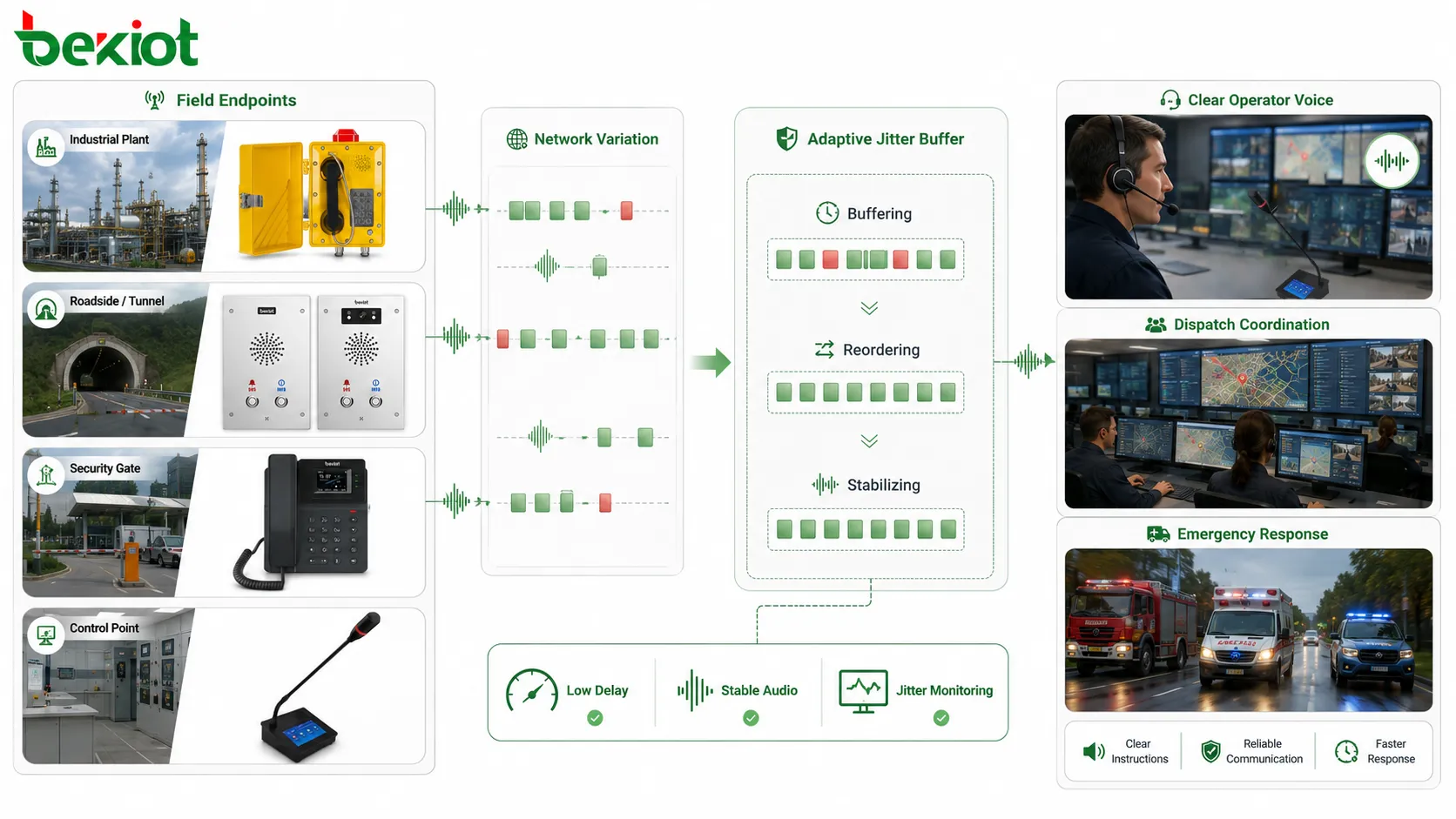
Advantages in video conferencing and remote collaboration
Video conferencing and remote collaboration systems depend on real-time audio more than many users realize. Video may freeze briefly and still be tolerable, but broken audio quickly makes a meeting ineffective. Jitter audio processing helps keep speech continuous when network conditions fluctuate.
In meetings, participants may use different networks, devices, microphones, Wi-Fi conditions, and internet paths. One user may be on a stable office link, another on home Wi-Fi, and another on mobile data. The conferencing platform must handle these differences while keeping conversation natural.
Jitter buffers, adaptive playback, PLC, echo control, and bandwidth adaptation work together to preserve speech flow. When packets arrive irregularly, the system can smooth playback. When a packet is missing, concealment may reduce the audible gap. When network conditions worsen, the platform may adjust bitrate or codec behavior.
The advantage is better collaboration. Participants interrupt each other less, repeat themselves less, and understand more of the conversation. In remote work, online training, telemedicine, customer meetings, and technical support, clear audio often matters more than high-resolution video.
However, conferencing systems must keep latency low. A meeting with very smooth but delayed audio feels unnatural. Good jitter audio design aims for the smallest buffer that still maintains acceptable continuity.
Advantages in wireless and mobile audio
Wireless networks often produce more variable packet timing than wired networks. Wi-Fi interference, roaming, signal strength changes, channel contention, power-saving behavior, and mobile movement can all increase jitter. Cellular networks may also introduce changing delay as users move or traffic load changes.
Jitter-aware audio processing is therefore important for wireless phones, mobile softphones, push-to-talk clients, handheld terminals, remote dispatch apps, and field communication tools. It helps maintain usable audio even when the radio environment is not perfectly stable.
Adaptive jitter buffers are particularly valuable in mobile scenarios because conditions change during a call. A user may walk from one access point to another, pass through a weak coverage zone, or move behind equipment. The system must adjust quickly without creating long audio delay.
Wireless design should still focus on coverage and capacity. Jitter processing can hide moderate variation, but it cannot fully compensate for poor signal, overloaded access points, heavy packet loss, or unstable roaming. Good wireless planning and audio processing must work together.
For field operations, mobile audio stability can affect safety and productivity. A worker who cannot hear instructions clearly may take the wrong action. A guard who misses a command may delay response. Jitter control helps make wireless communication more dependable.
Technical feature: delay and buffer balance
The most difficult technical feature of jitter audio processing is delay balance. A larger buffer absorbs more jitter, but it also increases latency. A smaller buffer reduces latency, but it may fail when packets arrive late. The system must find a practical compromise.
For interactive voice, low latency is important because people take turns speaking. If delay becomes too long, both sides may talk over each other or wait awkwardly. For one-way announcements, slightly more delay may be acceptable because there is no immediate response. For emergency messages, delay should still be controlled because timing matters.
Adaptive algorithms help by changing buffer size according to conditions. During stable network periods, the buffer can stay small. During unstable periods, it can expand slightly. When the network improves, it can shrink again. This approach avoids using a large fixed delay all the time.
Buffer behavior should be tested by scenario. The best setting for a video conference may not be the best setting for a dispatch intercom. The best setting for IP paging may not be the best setting for a music stream. Audio purpose determines acceptable delay.
Administrators should not assume that lower delay is always better. If latency is extremely low but the audio constantly breaks, the system is not useful. The correct goal is usable real-time communication, not the smallest numerical delay.
Technical feature: dynamic packet handling
Jitter audio systems must decide what to do with packets that are early, late, missing, duplicated, or out of order. These decisions happen continuously during playback. A packet that arrives slightly late may still be usable if the buffer has enough room. A packet that arrives too late may be discarded because its playback time has already passed.
Out-of-order packets can be reordered if they arrive before playback. Duplicate packets may be ignored. Missing packets may trigger concealment. Early packets may wait in the buffer. These actions allow the receiver to create a stable audio stream from unstable packet arrival.
Dynamic packet handling also includes timestamp comparison, sequence tracking, drift correction, and playout scheduling. The system must maintain a local playback clock that stays aligned with the sender’s media timing while adapting to network variation.
If packet handling is poorly designed, users may hear repeated sounds, missing syllables, clicks, robotic artifacts, or sudden speed changes. Good packet handling makes these corrections less noticeable.
This feature is especially important when audio passes through media servers, SBCs, gateways, conference bridges, or recording platforms. Each intermediate device may affect timing. End-to-end audio quality depends on the whole media path.
Technical feature: integration with QoS monitoring
Jitter processing should not be isolated from network monitoring. A system that only hides jitter without reporting it may leave administrators unaware of underlying network problems. Professional audio systems should measure and report jitter, packet loss, delay, and sometimes MOS or call-quality indicators.
Monitoring helps identify whether problems are local, network-related, endpoint-related, or caused by specific routes. For example, if calls between two branches always show high jitter, the WAN path may need QoS adjustment. If only Wi-Fi calls show problems, wireless coverage may need improvement. If one endpoint shows repeated jitter issues, its network connection or firmware may need review.
QoS monitoring also supports capacity planning. If jitter increases during busy hours, the network may be congested. If jitter appears when video traffic rises, traffic classification may be incorrect. If jitter occurs after a network change, routing or switch configuration should be checked.
In dispatch and emergency systems, monitoring is also useful for accountability. Communication quality can be reviewed after incidents. If an emergency call had poor audio, the system may show whether jitter or loss was present. This helps improve future reliability.
The best design combines automatic audio compensation with visible performance data. Users hear smoother audio, while administrators still see the network condition that needs attention.
Technical feature: endpoint and server cooperation
Jitter audio quality depends on cooperation between endpoints, servers, and network devices. A softphone, IP phone, speaker endpoint, dispatch terminal, conference bridge, media server, gateway, or SBC may all participate in the audio path. Each one must handle timing correctly.
The sender should generate stable RTP timestamps and packet intervals. The network should prioritize real-time traffic where possible. The receiver should buffer and play out packets intelligently. Media servers should avoid unnecessary transcoding or timing disruption. Gateways should translate between networks without adding excessive delay.
If one part of the path is weak, the whole call may suffer. A good endpoint cannot fully repair a severely congested network. A good network cannot fix a receiver with poor jitter handling. A good server cannot preserve quality if the source audio is already distorted. Jitter audio performance is a system-level result.
This is why testing should include the actual devices and network path used in deployment. Lab tests on a local network may not reveal jitter behavior across branches, VPNs, wireless links, or public internet routes.
Endpoint configuration also matters. Codec, packetization interval, jitter buffer mode, echo cancellation, gain settings, and network interface behavior can affect final audio. Administrators should keep configuration consistent across similar devices where possible.
Application in industrial communication systems
Industrial communication systems may include IP phones, rugged intercoms, emergency phones, paging speakers, dispatch consoles, control room servers, and remote field terminals. These devices may be connected across workshops, outdoor yards, substations, warehouses, tunnels, ports, or utility facilities. Network conditions may vary because of distance, electromagnetic environment, shared infrastructure, or harsh field conditions.
Jitter audio processing helps keep voice communication understandable in these environments. A maintenance worker calling from a remote area, a gate operator speaking with the control room, or a dispatcher paging a production zone may all depend on stable audio despite network variation.
Industrial systems should not rely only on endpoint buffers. Network design is equally important. Switches, VLANs, QoS, cabling, fiber links, wireless bridges, power stability, and device monitoring all affect audio quality. Jitter handling provides resilience, but the system should still reduce jitter at the source.
Emergency communication in industrial sites requires special care. If an emergency phone or paging endpoint experiences high jitter, instructions may become unclear. Critical paths should be tested under realistic network load and environmental conditions.
Jitter monitoring can also help maintenance teams. If one remote endpoint regularly reports high jitter, the issue may indicate a network path problem, cable fault, overloaded link, or wireless instability. Audio quality data becomes a diagnostic tool.
Application in IP intercom and access communication
IP intercom systems connect doors, gates, elevators, help points, parking entrances, service desks, and security rooms. These systems often use two-way audio and may include video, access control, recording, and event logs. Jitter can affect both user experience and security response.
When a visitor presses an intercom button, they expect clear conversation with the operator. If audio breaks, the operator may misunderstand the visitor’s name, purpose, or location. If the operator’s instruction is delayed or choppy, access decisions may be slowed. Jitter-aware audio processing helps keep the conversation usable.
Intercom systems may use local networks, building networks, VPNs, cloud platforms, or mobile clients. Each path has different jitter behavior. A door station connected by wired LAN may be stable, while a mobile guard client may experience wireless variation. The system should handle both.
Two-way intercom is sensitive to latency. A buffer that is too large can make conversation awkward. A buffer that is too small can produce broken speech. Adaptive jitter control is therefore valuable, especially when intercom calls cross variable networks.
Security applications should also record quality indicators where possible. If a call related to access or incident handling is unclear, administrators may need to review whether network jitter contributed to the problem.
Application in SIP trunking and gateways
SIP trunking and voice gateways often connect different networks, systems, or call paths. A call may move from an IP PBX to a carrier trunk, from an analog device to VoIP, from a radio gateway to a dispatch platform, or from one branch system to another. Each transition can affect timing.
Gateways and session border controllers may provide jitter buffering, packet timing repair, codec negotiation, transcoding, and media anchoring. These functions help stabilize calls that pass through mixed network conditions. However, every added media function may also introduce delay, so configuration must be balanced.
SIP trunk quality depends on the path between the enterprise and the service provider. If the link is congested or poorly prioritized, jitter may appear even when the local LAN is healthy. Monitoring at trunk interfaces helps determine where the problem occurs.
Gateways that connect analog or radio systems to IP networks must also handle timing carefully. Analog audio is continuous, while IP audio is packetized. The gateway must packetize, buffer, and play out audio in a way that preserves intelligibility.
For multi-site voice systems, jitter handling at gateways can improve call reliability between branches. Still, WAN QoS, bandwidth planning, and route stability are essential. A gateway buffer can reduce symptoms but cannot fully repair a badly designed network.
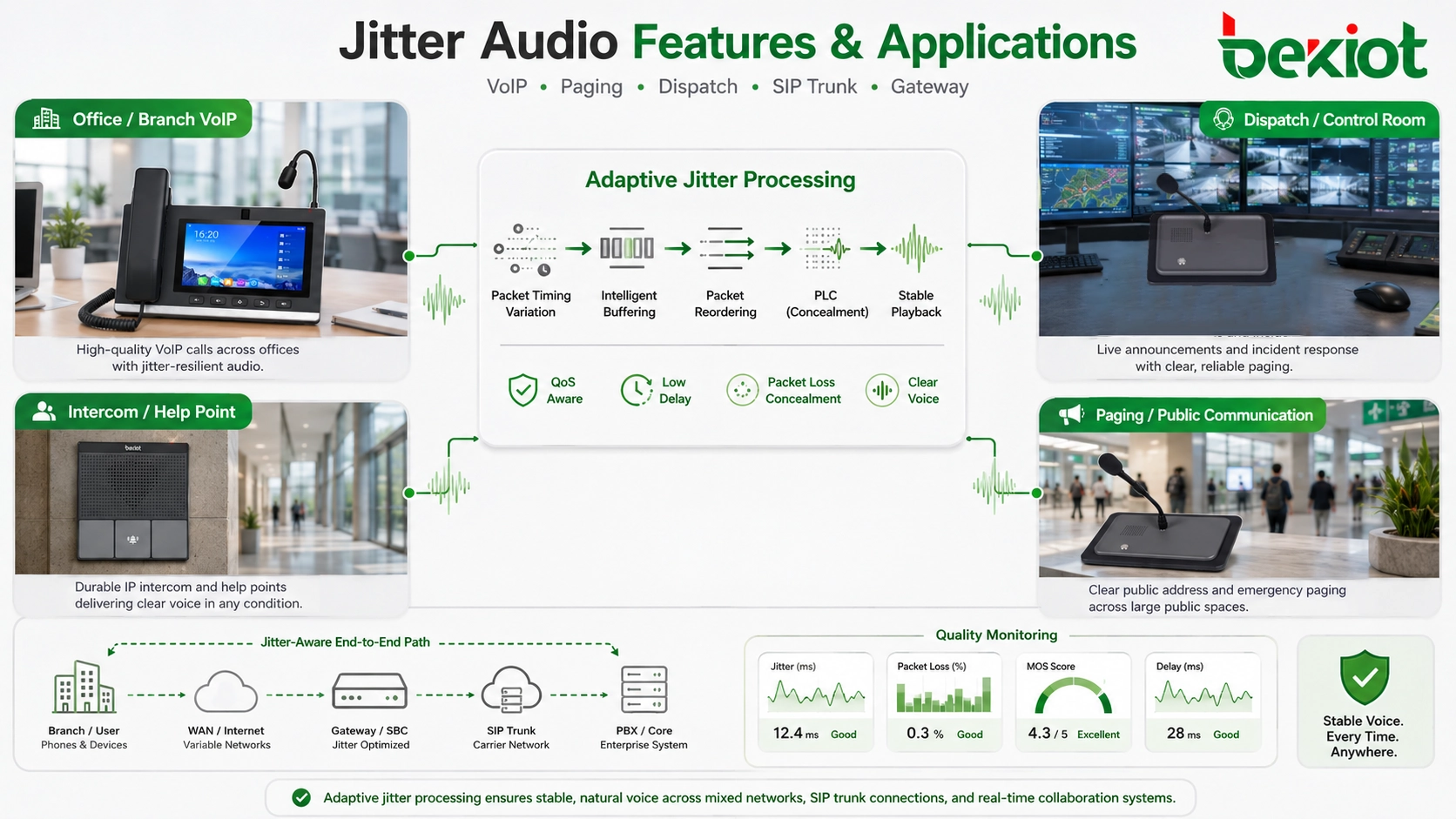
Application in recording and quality analysis
Audio recording systems may capture calls, paging messages, dispatch communication, intercom sessions, and conference audio. If jitter affects the live stream, it may also affect the recording. A recording with gaps or uneven timing can reduce the value of later review.
Recording platforms should handle packet timing properly. They may need to reorder packets, align timestamps, detect loss, and record quality metadata. If recording only stores decoded audio without quality information, reviewers may hear the problem but not know its cause.
Quality analysis can use jitter data together with packet loss, latency, codec, endpoint, route, and call event information. This helps administrators distinguish between user-side microphone issues, network timing problems, and server-side processing problems.
For contact centers, dispatch centers, and emergency systems, recording quality matters for accountability. If an important instruction is unclear in the recording, the organization may need to know whether the original call was also unclear. Jitter statistics can provide useful context.
Long-term quality reports can reveal trends. A branch with rising jitter, a wireless segment with unstable voice, or a trunk with periodic timing variation can be identified before users report severe problems. Jitter data becomes part of proactive maintenance.
Limitations of jitter audio processing
Jitter audio processing is valuable, but it has limits. A jitter buffer cannot create missing packets from nothing. PLC can conceal short gaps but cannot perfectly rebuild long lost speech. QoS can prioritize voice, but it cannot overcome a link with insufficient capacity. Adaptive playback can smooth timing, but it cannot remove all delay.
If jitter becomes excessive, the system must choose between delay and loss. A larger buffer may catch more late packets, but conversation delay increases. A smaller buffer keeps delay low, but more late packets may be discarded. There is no perfect setting for every condition.
Another limitation is that different applications have different tolerance. A one-way announcement can tolerate more buffering than a two-way emergency call. A music performance session needs much lower latency than a normal business call. A dispatch call requires clear and prompt interaction. The same jitter setting cannot serve every purpose equally well.
Jitter processing can also hide network problems temporarily. Users may not notice moderate jitter because the buffer compensates, but the underlying network may still be deteriorating. Monitoring is needed to detect problems before compensation is no longer enough.
For critical communication, system design should reduce jitter, not only absorb it. Proper network engineering, endpoint quality, QoS, routing stability, and bandwidth planning remain essential.
Common configuration mistakes
One common mistake is setting the jitter buffer too small because low latency looks attractive. This may work on a stable LAN but fail across wireless links, VPNs, or WAN paths. Users may then hear choppy voice even though measured delay is low.
Another mistake is setting the buffer too large. Audio becomes smoother, but conversation delay increases. Users may talk over each other, interrupt accidentally, or feel that the call is unnatural. In interactive communication, excessive delay can be as damaging as jitter.
Ignoring QoS is also common. Some teams rely entirely on endpoint jitter buffers while voice packets compete with heavy data traffic. If congestion is frequent, buffering alone will not provide stable quality. Network priority should be part of the solution.
Codec mismatch can create additional problems. Transcoding, unsupported codecs, poor packetization settings, or inconsistent endpoint configuration may increase delay or reduce concealment quality. Codec planning should be included in jitter audio design.
Finally, many systems lack monitoring. Without jitter, packet loss, and latency records, administrators guess the cause of audio complaints. Quality metrics help turn subjective complaints into technical diagnosis.
How to evaluate jitter audio performance
Jitter audio performance should be evaluated by both user experience and technical metrics. Users care about whether speech is clear, continuous, natural, and timely. Engineers care about jitter, latency, packet loss, buffer behavior, codec performance, and network path quality. Both perspectives are necessary.
The first evaluation point is intelligibility. Can users understand words correctly under normal network conditions? Are syllables missing? Does the audio sound robotic or clipped? Do users need to repeat themselves? These symptoms may indicate jitter, packet loss, or poor concealment.
The second point is latency. Does the conversation feel natural? Do users talk over each other? Is there a delay between speaking and hearing a response? A smooth but delayed call may still be unsuitable for dispatch, intercom, or emergency communication.
The third point is stability under load. The system should be tested when the network is busy, when multiple calls occur, when paging is active, when video traffic exists, or when wireless users move. A system that works only during light traffic may fail during real operation.
The fourth point is recovery behavior. What happens when packets are lost briefly? Does the audio recover smoothly? Does the call drop? Does the buffer grow too large and never shrink? Does the endpoint report quality data? Recovery behavior matters in real networks.
The fifth point is maintainability. Administrators should be able to view jitter statistics, adjust buffer policy where appropriate, monitor endpoints, check QoS markings, and trace problem paths. A system that hides all quality information is harder to maintain.
Best practices for stable jitter audio
Stable jitter audio begins with good network planning. Voice traffic should have enough bandwidth, low congestion, stable routing, and suitable QoS. Network switches, routers, wireless access points, firewalls, VPNs, and WAN links should be configured with real-time audio in mind.
Endpoint configuration should be consistent. Codec settings, packetization intervals, jitter buffer mode, echo cancellation, and transport behavior should match platform recommendations and application requirements. Random endpoint settings can create inconsistent audio quality.
Jitter buffer policy should match the scenario. Interactive calls need low delay with adaptive protection. One-way paging may allow slightly more buffering for smooth playback. Emergency systems need a careful balance between promptness and clarity. There is no universal best value.
Monitoring should be enabled where possible. Jitter, packet loss, latency, MOS-like indicators, endpoint registration, and call failure statistics help identify problems early. Reports should be reviewed regularly, especially for critical communication systems.
Field testing should be realistic. Test calls should use actual endpoints, actual network paths, normal traffic load, wireless movement where applicable, and real acoustic conditions. Jitter audio quality is ultimately judged by what users hear during real operation.
Final Review
Jitter audio technology should be understood as audio processing and network design used to manage packet delay variation in real-time communication. Jitter itself is not beneficial; excessive jitter damages audio quality. The advantage comes from the mechanisms that detect, buffer, reorder, conceal, and monitor irregular packet arrival so that voice remains clearer and more continuous.
The main technical features include jitter buffers, adaptive playback, packet loss concealment, timestamp and sequence control, QoS integration, codec behavior, dynamic packet handling, endpoint-server cooperation, and quality monitoring. These features help audio systems balance smoothness, delay, intelligibility, and reliability.
The applications include VoIP calls, IP paging, dispatch systems, emergency communication, video conferencing, wireless voice, mobile clients, intercom systems, SIP trunks, gateways, industrial communication, recording, and quality analysis. In each case, jitter control improves the ability of the system to deliver understandable audio under imperfect network conditions.
The strongest design does not rely on one mechanism alone. It combines stable network engineering, correct QoS, suitable codec selection, adaptive jitter buffering, packet loss concealment, monitoring, and realistic field testing. When these elements work together, jitter-aware audio processing becomes a practical foundation for reliable IP voice communication.
FAQ
Is jitter good for audio communication?
No. Jitter itself is not good. It means packet arrival timing is unstable. The advantage comes from jitter control technologies such as jitter buffers, adaptive playback, packet loss concealment, and QoS, which reduce the audible impact of jitter.
What does a jitter buffer do?
A jitter buffer temporarily stores incoming audio packets, reorders them when necessary, and plays them out at a steadier rhythm. This helps smooth packet arrival variation but may add some delay.
Why can excessive jitter cause choppy voice?
If packets arrive too late or out of order, the receiver may not be able to play them at the correct time. This can create gaps, missing syllables, robotic sound, or uneven speech unless the system can buffer or conceal the problem.
How is jitter reduced in a network?
Jitter can be reduced through QoS, bandwidth planning, stable routing, traffic prioritization, good wireless coverage, proper switch and router configuration, suitable codec settings, and avoiding congestion on voice paths.
What is the best jitter buffer setting?
There is no single best value for every system. Interactive calls need low delay, while one-way paging may tolerate more buffering. Adaptive jitter buffers are often preferred because they adjust to changing network conditions.







