


Video conferencing has become a standard collaboration tool for many enterprises, government departments, and large organizations. It delivers face-to-face interaction, screen sharing, visual discussion, and a stronger meeting experience. However, video meetings do not replace every communication need. In many real projects, audio conferencing still plays an important role because it is easier to access, less dependent on meeting rooms, and more resilient when network conditions are unstable.
A well-designed conferencing system should not force users to choose between video and phone access. Instead, it should allow both meeting methods to work together. When telephone participants can join a video conference by mobile phone, desk phone, SIP extension, or PSTN line, the meeting becomes more flexible, more inclusive, and more reliable.
For enterprise communication planning, the real question is not whether audio conferencing is outdated. The more practical question is how audio access can complement video collaboration. In large organizations, different users may join from headquarters, branch offices, vehicles, field sites, hotels, homes, or temporary command locations. A unified meeting design should support these different access conditions without interrupting the meeting workflow.
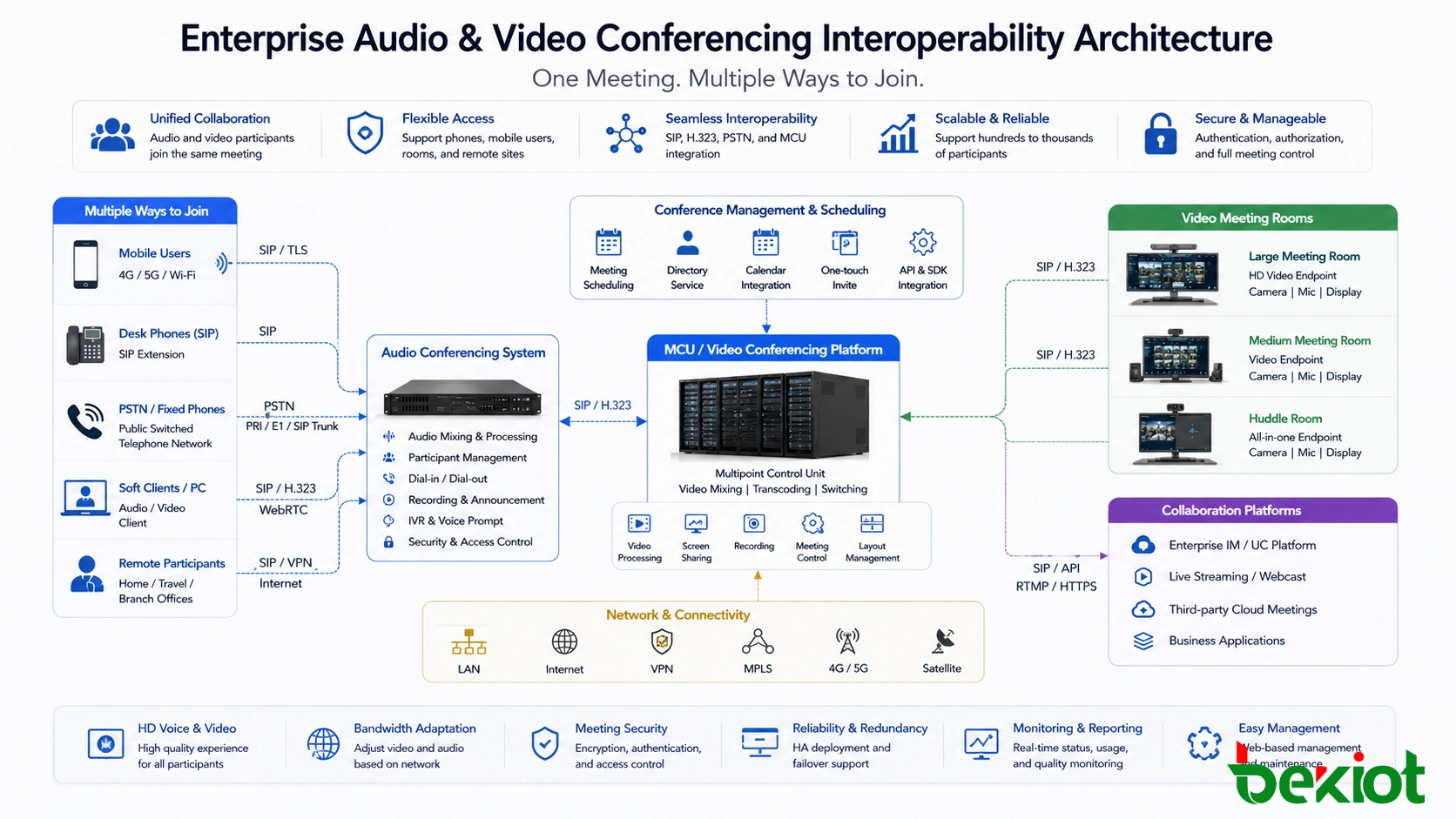
Why Enterprises Still Need Audio Access
Video conferencing provides a richer communication experience, but it also has higher operating requirements. A stable network, sufficient bandwidth, powered terminals, cameras, displays, microphones, software clients, and managed meeting rooms may all be required. When any of these conditions are missing, the user experience can drop quickly.
Audio conferencing is different. It is simple, familiar, and widely accepted. Most users already know how to join a phone call. A participant may use a mobile phone, a desk phone, or a traditional telephone line without entering a dedicated meeting room. In many organizations, this makes audio conferencing one of the most practical collaboration methods for daily coordination, emergency discussion, and large-scale notification.
This does not mean video conferencing is less important. It means that video and telephone access solve different problems. Video is excellent when visual interaction is needed. Audio is stronger when accessibility, fallback communication, and broad participation matter more than visual presence.
The Limits of Video-Only Meetings
A video-only meeting can fail when there is no power, no network, poor bandwidth, endpoint failure, camera failure, software login issues, or room scheduling conflict. High-quality video conferencing systems may also involve higher deployment and maintenance costs, especially when multiple branches, meeting rooms, and departments are involved.
These limitations become more visible in large organizations. Senior managers may be traveling. Field personnel may be outside the office. Some participants may only have mobile phone access. Remote branches may not have a complete video meeting room. Under these conditions, forcing every participant to join through video can reduce meeting efficiency rather than improve it.
For important meetings, public institutions, state-owned enterprises, transport operators, emergency teams, and production organizations often need a second path. Telephone access can act as that path. If a video terminal disconnects or the network becomes unstable, participants can continue the meeting through audio.
A Practical Way to Combine Both Systems
The most effective design is to connect the audio conferencing system with the video conferencing platform through standard communication interfaces. In many projects, the video side uses an MCU or video meeting platform, while the audio side provides PSTN, mobile, or SIP-based dial-in access. Interoperability allows the audio bridge to join the video meeting as an audio participant.
From the video conferencing side, the audio bridge can occupy only one audio endpoint or one meeting participant position. Behind that endpoint, many telephone users can dial in and speak with the video meeting room. This avoids the need to register every telephone participant as a separate video endpoint.
Depending on the existing environment, the connection may use SIP, H.323, PSTN trunks, PRI/E1 access, or a mixed gateway design. A typical audio conferencing capacity may start from 8 participants and scale to hundreds, such as 500 telephone participants, depending on trunk resources, conference processing capacity, and project configuration.
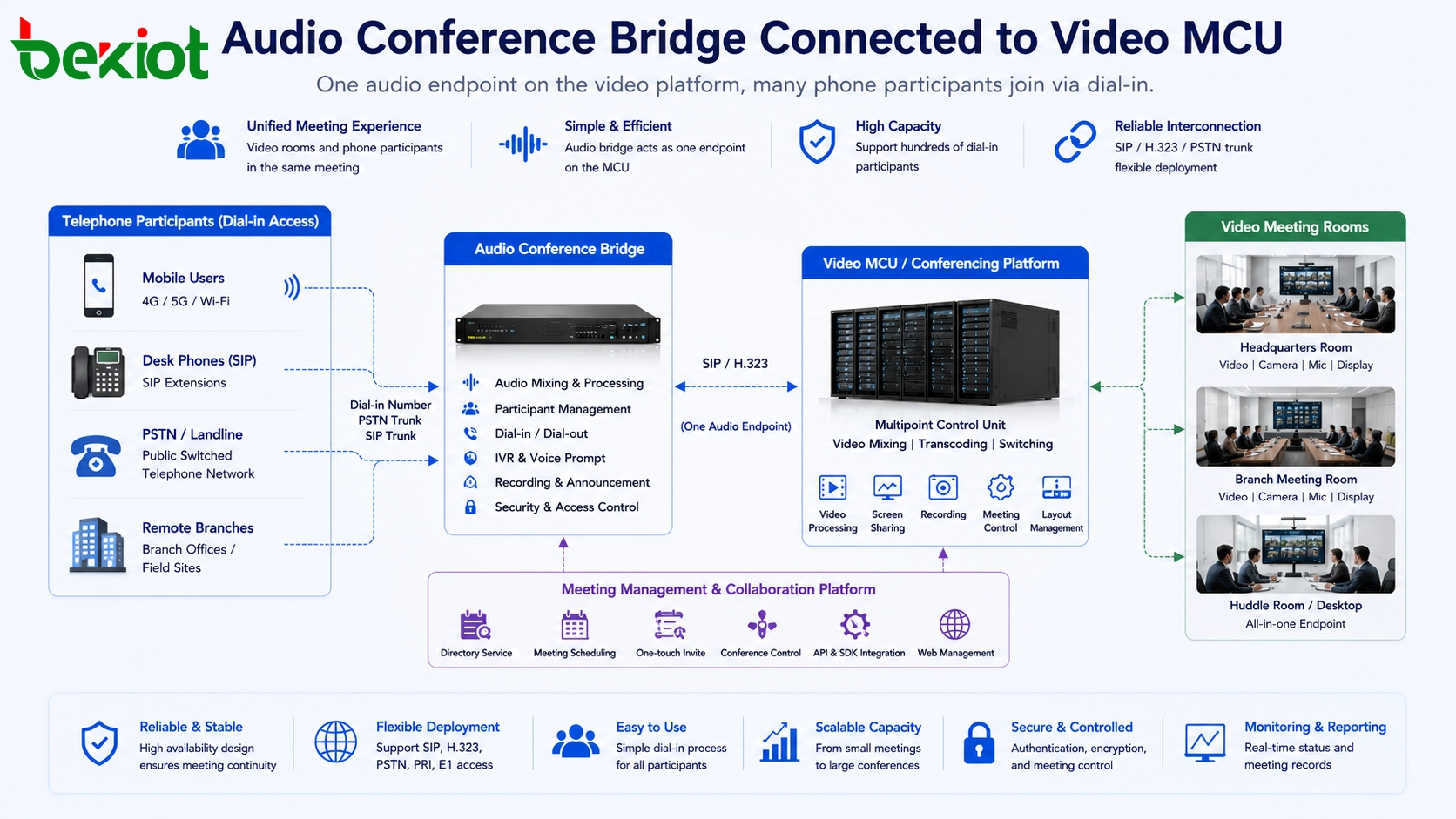
How the Interconnection Works
Audio Participants Join the Video Meeting
When the systems are interconnected, a user who cannot enter the video meeting room can dial a conference access number. After authentication or meeting code verification, the user joins the audio bridge. The bridge then connects the telephone audio stream to the video meeting platform.
In the video conference, phone users are heard as audio participants. They can speak with people in the meeting room, listen to the discussion, and continue participating even without a camera or video client. This is useful for mobile staff, external experts, branch offices, and participants in low-bandwidth locations.
The Audio Bridge Becomes a Shared Conference Endpoint
The video platform does not need to manage every telephone user separately. It only needs to connect with the audio bridge. The audio bridge manages dial-in users, call routing, joining, leaving, muting, and audio mixing on the telephone side.
This design reduces complexity. The video conference system continues to manage the visual meeting. The audio conference system manages phone access. The integration point between them becomes clear and controllable.
Fallback Can Be Triggered When Video Fails
For critical meetings, audio conferencing can also work as a backup channel. If a video terminal drops offline, the system can be configured to call the participant by phone or provide a quick dial-in path. This prevents the entire meeting from being interrupted by one video endpoint failure.
Such fallback design is especially valuable for command meetings, emergency coordination, government consultation, transportation dispatch, production scheduling, and executive communication. The goal is not only to improve convenience, but to protect meeting continuity.
Access Control and Meeting Security
When audio and video conferencing are interconnected, meeting access must be planned carefully. Telephone access is convenient, but it should not become an uncontrolled entry point. Enterprises should define access numbers, meeting IDs, passwords, host controls, waiting rooms, caller identification, and permission rules according to the importance of the meeting.
For internal meetings, SIP extensions and enterprise number plans can be used to identify users more clearly. For external participants, temporary meeting codes or operator-assisted joining can reduce the risk of unauthorized access. In sensitive meetings, the host should be able to mute participants, lock the meeting, remove callers, and monitor active audio channels.
Security planning should also include call recording policy, conference logs, access records, and privacy requirements. Audio conferencing improves reach, but it should be managed with the same seriousness as video conferencing, especially in government, finance, energy, healthcare, transportation, and emergency command environments.
Key Benefits for Large Organizations
The first benefit is broader access. Participants can join from meeting rooms, offices, homes, vehicles, field sites, or mobile environments. They do not need to wait until a video room is available.
The second benefit is improved reliability. If video quality declines because of unstable network conditions, users can continue by phone. This is important when the meeting cannot be delayed or restarted.
The third benefit is lower communication cost. Not every user needs a video endpoint. Audio access can extend meeting coverage without building a full video system for every department, branch, or temporary participant.
The fourth benefit is better resource reuse. Many organizations already have video conferencing rooms and telephone systems. Interconnection allows existing assets to work together instead of being operated as separate islands.
Planning Points Before Deployment
Before implementing audio and video interoperability, the project team should confirm the video platform type, MCU access method, available SIP or H.323 interfaces, PSTN trunk resources, meeting capacity, numbering plan, security policy, and user joining process.
Capacity planning is especially important. If the project expects dozens or hundreds of phone participants, trunk channels and audio conference resources must be sized properly. For example, PRI/E1 access may provide up to 30 simultaneous voice channels per circuit in many markets, while other telecom environments may use different trunk capacities.
Audio quality should also be tested carefully. Echo, delay, gain mismatch, double mixing, and poor microphone design can affect the meeting experience. The video meeting room, audio bridge, telephone trunk, and SIP media path should be tested together before formal delivery.
Numbering Plan and User Experience
A good conferencing solution should be easy to use. If users must remember complicated access numbers, long meeting IDs, or different joining rules for every meeting type, the system will create operational friction. Enterprises should design clear dial-in numbers, internal short codes, department access rules, and meeting templates.
For example, headquarters users may dial an internal short number to join the audio bridge, while external users may dial a public access number and enter a meeting code. Important meetings can be configured with host approval, while routine meetings can use simplified access rules. This balance keeps the system secure without making it difficult to use.
User training should also be included in the deployment plan. Meeting hosts should know how to invite phone users, mute noisy lines, manage participant entry, and switch to audio fallback when video conditions are poor.
Recommended Deployment Flow
A practical deployment usually starts with system assessment. The project team should list all video meeting rooms, conference platforms, telephone access methods, branch requirements, and expected participant scale. This step defines whether the main connection should use SIP, H.323, PSTN trunks, or a gateway-based mixed design.
The second step is interconnection testing. The audio bridge should be connected to the video platform as a controlled endpoint. Test cases should include dial-in, dial-out, mute control, participant joining, participant leaving, long meeting stability, video terminal disconnection, and fallback phone access.
The third step is workflow design. Users should know how to join by phone, when phone access should be used, how backup calling works, and who controls the audio bridge during a meeting. Without a clear workflow, the system may be technically connected but operationally confusing.
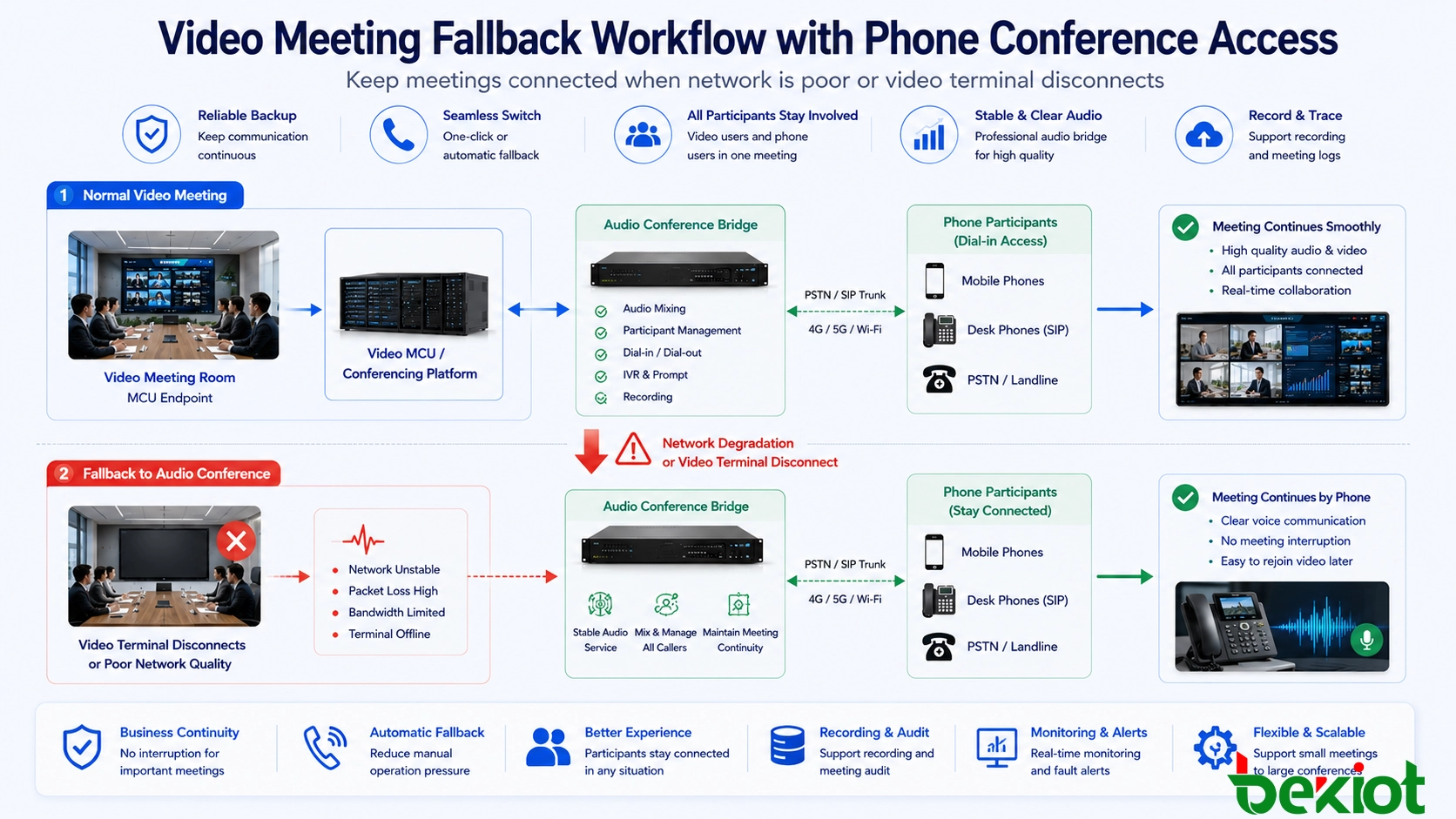
Operation and Maintenance Considerations
After deployment, the system should be monitored as a complete meeting service rather than two separate platforms. Administrators should track trunk usage, concurrent meeting capacity, SIP registration status, MCU connection status, audio bridge performance, packet loss, delay, and call failure records.
Regular testing is also important. Organizations should periodically verify phone dial-in, video platform access, fallback calling, recording, host controls, and emergency meeting templates. These checks help prevent hidden problems from appearing during important meetings.
For long-term operation, logs and reports can help managers understand meeting usage patterns. If phone access is frequently used by certain departments or branches, the organization may need to adjust trunk capacity, meeting room planning, or remote collaboration policy.
Suitable Application Scenarios
This solution is suitable for headquarters and branch collaboration, government meetings, emergency command, transportation coordination, enterprise management meetings, public institution consultation, energy operation centers, industrial production scheduling, remote expert support, and multi-site project communication.
It is also useful for organizations with mixed old and new systems. Some departments may already have video conference rooms, while others only have telephone access. Some participants may use mobile phones, while others join from fixed meeting rooms. Interoperability helps unify these different conditions under one meeting workflow.
For system integrators, this type of solution can make a conferencing project more competitive. Instead of selling video conferencing and telephone conferencing as separate systems, the project can deliver a more complete collaboration architecture with stronger continuity and wider access.
Implementation Value
Audio and video conferencing interoperability is not a temporary workaround. It is a practical communication architecture for organizations that need both rich visual collaboration and dependable voice access. Video brings presence and visual discussion. Telephone access brings convenience, reach, and backup capability.
When the two systems are connected through SIP, H.323, MCU audio access, PSTN trunks, or an audio bridge, meetings become more flexible. People who cannot reach the video room can still participate. Important meetings can continue when video conditions are poor. Existing meeting assets can be reused more efficiently.
For enterprises and public-sector organizations, the best conferencing solution is not always the most visually advanced one. It is the one that keeps people connected under different network conditions, locations, devices, and operational pressures.
FAQ
Can phone users speak in a video meeting?
Yes. When the audio bridge is connected to the video meeting platform, phone users can speak and listen through the bridge. They usually appear in the video meeting as an audio participant or shared audio endpoint.
Does every telephone participant consume a video endpoint license?
Not necessarily. In many designs, the audio bridge consumes one endpoint or one meeting connection on the video side, while multiple phone users are mixed on the audio side.
Is this solution only for legacy systems?
No. It is also useful for modern organizations that need mobile dial-in access, large audio participation, emergency fallback, or mixed meeting environments across different locations.
What is the most common problem during deployment?
Audio routing is often the most important issue. Echo, delay, incorrect gain, and unclear return audio should be tested before the system is officially used.
Can the system automatically call a user when video access fails?
Some deployments can support automatic or assisted phone fallback when a video terminal disconnects. This depends on the meeting platform, audio bridge capability, and project configuration.







