


An emergency command box is a portable field command system designed for temporary, mobile, and rapidly changing incident environments. It is often used as a forward command node when a fixed command center cannot directly cover the scene. In emergency rescue, public safety response, utility repair, flood control, industrial accidents, large-event security, and disaster management, the command team may need to collect video, voice, intercom, location, and coordination information from the field and send it back to the rear command center in real time.
The value of an emergency command box is not simply portability. A professional system must integrate video access, video fusion, lightweight transmission, cross-platform output, radio dispatch, local coordination, and backhaul communication into one compact field-ready unit. If the box only provides display, storage, or a single video input, it cannot meet the practical needs of modern emergency command. The real requirement is to turn scattered field resources into usable command information.
Field Conditions Define the System
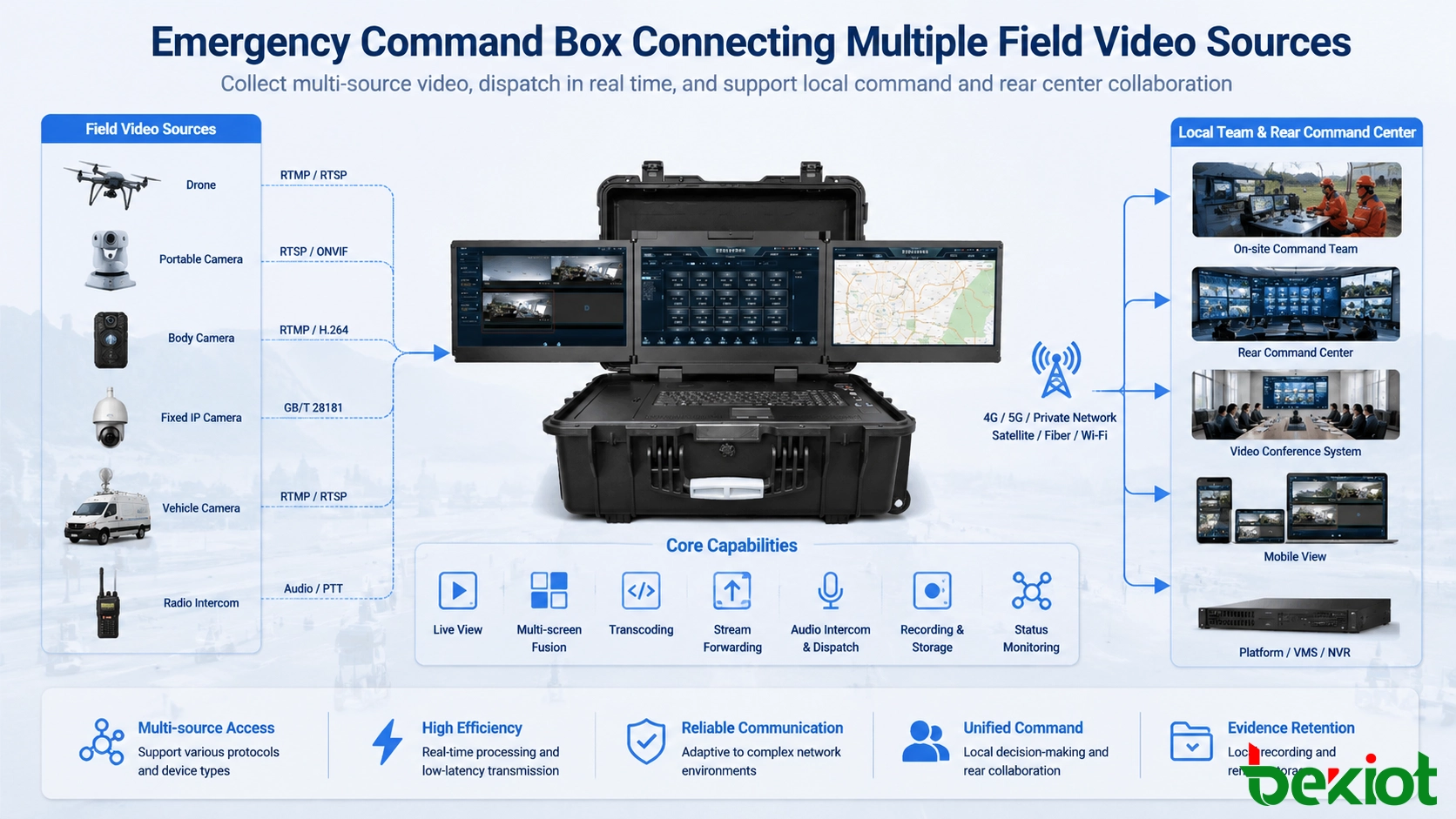
Emergency scenes are usually unstable. The command team may face limited network coverage, temporary power supply, mixed equipment brands, different video formats, and multiple departments working together. A rescue team may bring drones, body-worn cameras, portable surveillance units, vehicle cameras, conference terminals, and handheld radios. These devices may not use the same protocol, resolution, frame rate, or transmission method.
This is why an emergency command box must be designed as an integration point rather than a single communication device. It should receive different types of audio and video sources, process them locally, display them for on-site decision-making, and forward selected information to higher-level platforms. In many projects, the command box becomes the bridge between the field team, the command vehicle, the rear command center, and third-party emergency systems.
A weak design creates additional burden during an incident. Operators may need multiple devices to access different cameras, another system for video meetings, another gateway for radio communication, and another platform for video backhaul. This increases deployment time and reduces response efficiency. A well-designed command box reduces this complexity by integrating key functions into a unified workflow.
Comprehensive Video Access
Video is often the most direct information source at an emergency scene. A professional emergency command box should support comprehensive video access from drones, portable surveillance cameras, fixed IP cameras, body-worn recorders, vehicle-mounted cameras, video conference terminals, and temporary monitoring equipment. These video sources may come from wired networks, wireless broadband ad hoc networks, fiber links, private networks, 4G, 5G, or satellite links.
The system should not depend on only one input method. In real deployments, field devices may output video through RTMP, GB/T 28181, HDMI, RTSP, SIP-based video, or other streaming methods. A command box with multi-protocol access can receive these resources more flexibly and reduce the need for temporary protocol conversion devices.
Drone video access is a typical requirement. During flood control, forest fire monitoring, traffic rescue, or large-area inspection, drones provide fast aerial visibility. The command box should be able to receive drone video locally, display it on-site, and forward it to the rear dispatch platform at the same time. This allows local commanders and remote decision-makers to share the same visual information.
Local Display and Rear Backhaul
Emergency command is not only about seeing the video locally. Field information often needs to be transmitted to a rear command center, a dispatch platform, a video surveillance platform, or a video conference system. Therefore, the command box must support both local presentation and remote backhaul.
Local display helps the on-site team make quick decisions. Rear backhaul allows senior commanders, expert teams, and cross-department personnel to understand the situation without being physically present. In major incidents, this dual-output capability is critical because the field team and command center must work from the same operational picture.
A suitable system should allow operators to choose which video sources are displayed locally, which sources are forwarded, and which sources are combined before transmission. This prevents unnecessary bandwidth consumption and helps the rear platform receive the most important information rather than an uncontrolled stream of all field video.
Multi-Screen Fusion for Joint Consultation
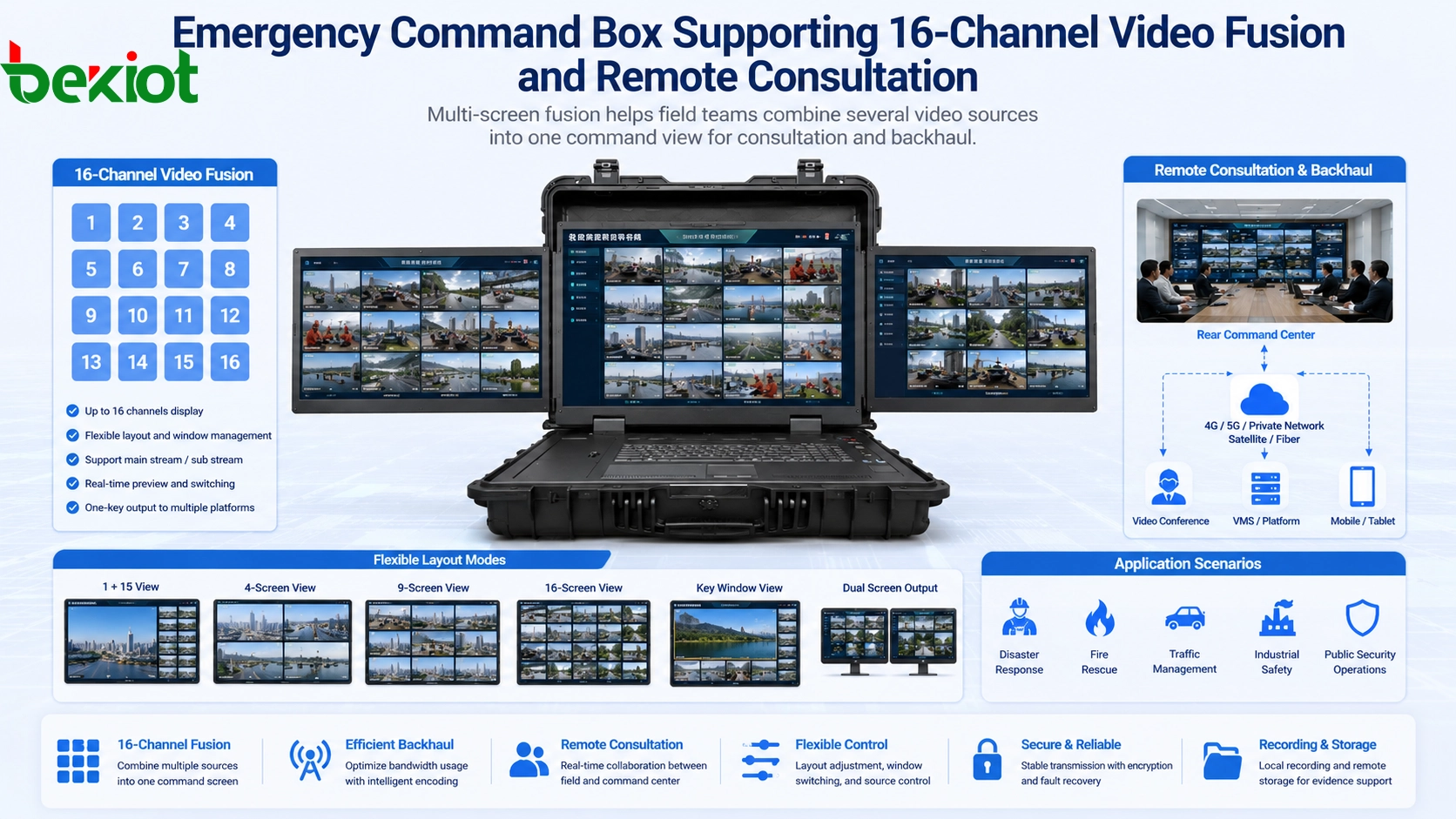
Emergency scenes often generate multiple video feeds at the same time. A drone may show the whole area, a body camera may show the rescue process, a portable camera may monitor a key entrance, and a video conference terminal may connect experts from the rear center. If these feeds are displayed separately without fusion, the command team may lose time switching between sources.
A professional emergency command box should support video fusion and multi-screen consultation. The system should be able to combine multiple video resources into one output screen and send the fused image to the command center or meeting platform. This is especially useful when the backhaul link has limited bandwidth, such as a satellite connection or a temporary wireless network.
For practical command applications, support for at least 16 channels of video fusion is an important reference point. A 16-channel layout can cover common field sources such as drone video, portable surveillance, fixed cameras, body-worn cameras, vehicle video, and local meeting feeds. Operators should be able to select, arrange, enlarge, hide, and combine video sources according to the incident workflow.
Bandwidth-Saving Video Processing
Bandwidth is one of the biggest challenges in field command. Emergency sites may rely on public mobile networks, private wireless links, microwave links, satellite communication, or temporary broadband systems. These links may be unstable, expensive, or limited in uplink capacity. When multiple HD video streams are transmitted at the same time, the network can quickly become overloaded.
This makes lightweight video transmission a required capability. The command box should support real-time video processing, including transcoding, bitrate adjustment, frame rate control, resolution adaptation, and stream packaging. Instead of forwarding every original stream directly, the system should optimize each video source according to network conditions and platform requirements.
One important example is conversion between H.264 and H.265. Under similar visual quality, H.265 can often reduce bandwidth consumption by about half compared with H.264. In weak-network environments, this can significantly improve transmission stability. The system should also allow dynamic adjustment of resolution, frame rate, and bitrate so that operators can balance video clarity, latency, and link reliability.
Cross-Platform Output
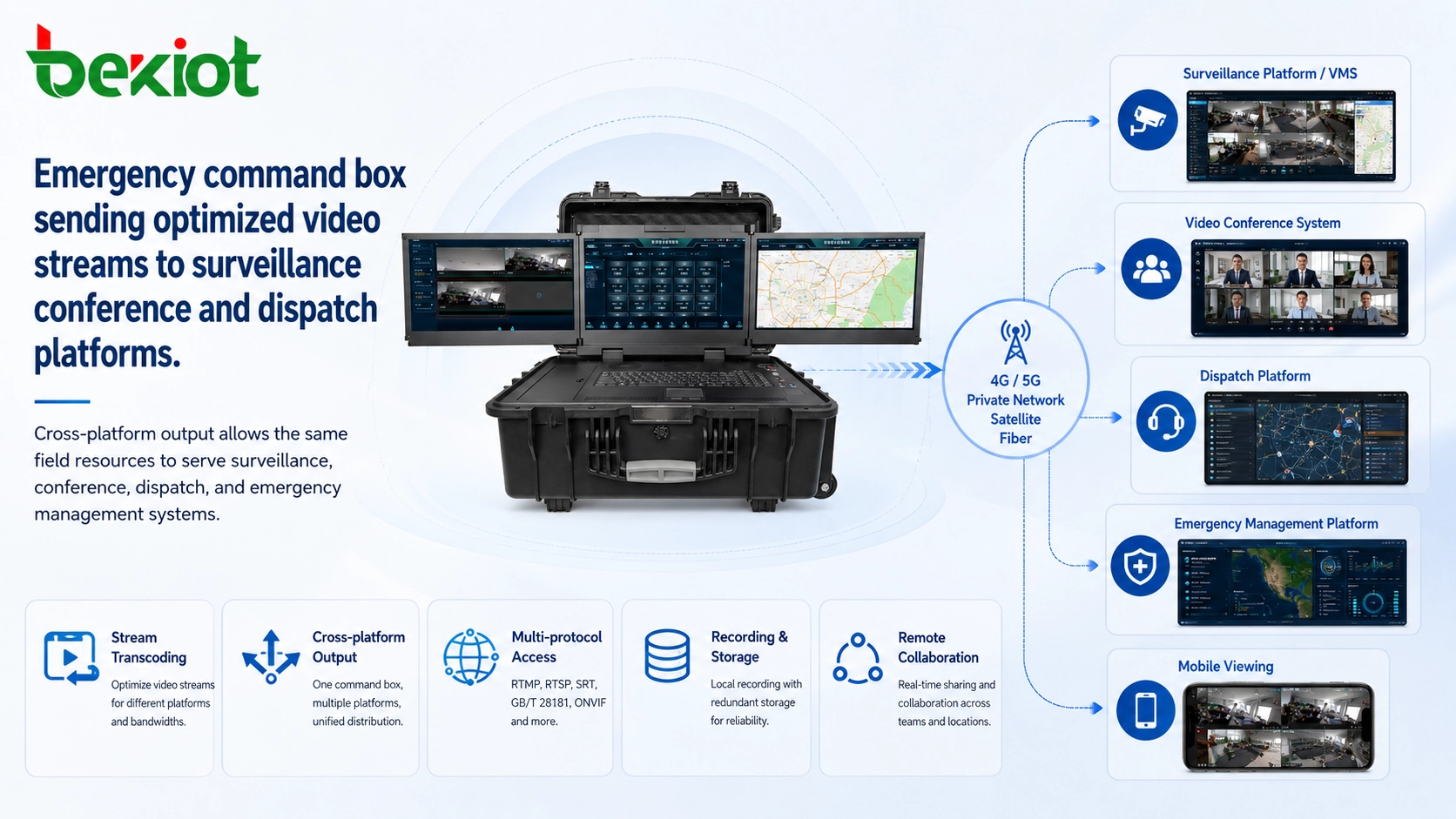
Many organizations do not rely on a single emergency platform. A command environment may include a video surveillance platform based on GB/T 28181, a unified communication dispatch platform, a video conference platform, a command center screen system, and an emergency management application. Each platform may require a different protocol, stream format, encoding method, or resolution.
A professional emergency command box should provide cross-platform output. It should send the same field resource to different systems in different formats when required. For example, one video feed may need to enter a surveillance platform through GB/T 28181, another may need to join a video conference session, and another may need to be pushed through RTMP or RTSP for web-based viewing.
This capability is important because emergency response usually involves multiple departments. Fire rescue, public safety, transportation, water conservancy, power, municipal management, and enterprise safety teams may use different platforms. Cross-platform output allows the command box to become a neutral field access node rather than a closed terminal that only works with one system.
Radio Dispatch Integration
Video is essential, but voice coordination remains the fastest command method in many emergency scenes. Field teams often use different types of radios, including trunked radios, private network radios, analog walkie-talkies, digital radios, or push-to-talk devices. If field radio communication cannot be connected to the command center, the rear team may lose direct contact with front-line personnel.
An emergency command box should support radio dispatch integration. The goal is to connect on-site radio audio with the rear command platform, dispatch console, or unified communication system. This allows commanders to monitor field radio traffic, issue voice instructions, coordinate teams, and maintain communication even when cellular voice services are unavailable or unreliable.
This function is especially valuable when several rescue groups operate in different areas. The command box can help bridge local radio groups with remote command personnel, improving command continuity and reducing information gaps between the field and the center.
Protocol and Format Adaptation
Different field devices often use different video protocols and media formats. A practical command box should support commonly used access and output methods such as RTP, RTSP, SIP, RTMP, GB/T 28181, FLV, WebRTC, and HDMI-based local input. It should also support common video coding formats such as H.264 and H.265.
The purpose of supporting multiple protocols is not to make the specification list longer. The real purpose is to reduce deployment risk. In emergency projects, equipment may come from different suppliers, different years, and different departments. If the command box can only accept one protocol, many useful field resources may not be connected during a real event.
Protocol adaptation also improves project compatibility. A command box that can receive, convert, and forward different media streams is easier to integrate with existing monitoring systems, conference systems, command platforms, and mobile applications.
Command Workflow and Operator Control
Technical capability must be matched with a clear operating workflow. During an incident, operators should not spend excessive time configuring complex parameters. The command box should support fast source selection, preview, screen layout adjustment, one-click stream forwarding, recording control, and simple status monitoring.
A good interface should show which sources are online, which streams are being transmitted, which platform is receiving data, and whether network conditions are stable. Operators should be able to quickly switch between full-screen view, multi-screen view, meeting view, and backhaul output view.
For emergency teams, operational simplicity is not a secondary feature. It directly affects response speed. A powerful command box that is difficult to operate may fail to deliver value during high-pressure field work.
Network Adaptability
Field command may use different network paths depending on the environment. In urban areas, 4G or 5G may be available. In remote mountains, forest areas, maritime sites, or disaster zones, satellite or wireless ad hoc networks may be required. In fixed emergency bases or command vehicles, fiber or private network access may be available.
The command box should adapt to these network conditions. It should support flexible uplink methods, multiple stream output strategies, and bandwidth-aware transmission. When network quality is good, the system can transmit higher-resolution video. When the link becomes weak, the system should reduce bitrate, lower frame rate, or transmit fused video instead of multiple independent streams.
This network adaptability is especially important for satellite communication. Satellite links can be expensive and may have higher latency. Sending many independent HD streams through satellite may not be practical. A command box with video fusion and lightweight transcoding can help reduce the total bandwidth requirement while preserving key visual information.
Recording and Evidence Support
Emergency operations often require evidence retention, post-event review, responsibility tracing, and training analysis. A command box should support local recording or coordinated recording with the rear platform. The system should record key video sources, fused command screens, voice communication, or important event segments according to the project requirement.
Recording is not only for legal evidence. It also supports after-action review. Teams can analyze response procedures, communication efficiency, decision-making accuracy, and equipment performance after an incident. This helps improve future emergency plans and training programs.
In some deployments, local recording is also a backup method. If the backhaul network is temporarily interrupted, the command box can continue to store important field information locally and upload it later when the connection is restored.
Power and Field Reliability
An emergency command box is often used in temporary field environments, so power design is important. The system may need to work with batteries, vehicle power, portable power stations, or temporary generators. Lower power consumption helps extend working time and reduces pressure on field logistics.
Reliability also includes heat management, shock resistance, cable organization, interface protection, and fast startup. In real emergency work, the equipment may be transported frequently, placed outdoors, or operated under time pressure. A command box should be easy to deploy, easy to recover, and stable under continuous operation.
For long-duration incidents, power planning should include video processing load, screen usage, radio connection, network devices, and external cameras. The system design should avoid unnecessary energy consumption while keeping critical communication services active.
Deployment Architecture
A typical emergency command box solution can be divided into five layers. The field acquisition layer includes drones, portable cameras, body cameras, fixed cameras, vehicle cameras, and radios. The access layer receives video, audio, and control signals through multiple protocols and physical interfaces. The processing layer handles video fusion, transcoding, stream adaptation, and layout management.
The transmission layer sends selected video and audio resources through 4G, 5G, satellite, private network, fiber, or wireless ad hoc networks. The application layer connects the rear command center, video surveillance platform, video conference system, dispatch platform, or emergency management platform.
This layered architecture helps the project team separate field collection, media processing, network transmission, and business application. It also makes future expansion easier. New video sources, new platforms, and new network paths can be added without redesigning the entire command workflow.
Common Deployment Scenarios
In public emergency response, the command box can be used for disaster rescue, fire response, flood control, earthquake rescue, traffic accidents, and temporary security operations. It helps connect front-line visual information with the command center and expert teams.
In industrial safety, it can support hazardous operation supervision, accident response, plant inspection, power grid maintenance, pipeline emergency repair, chemical site monitoring, and remote expert consultation. When an incident occurs in a large industrial area, the command box can quickly create a temporary communication and video hub.
In municipal and utility projects, it can be used for drainage emergencies, water conservancy monitoring, bridge inspection, tunnel incidents, road repair, and large public event support. These scenarios often involve scattered sites and temporary network conditions, which make portable integration valuable.
Selection Checklist
When selecting an emergency command box, project teams should evaluate whether the system can access multiple video sources, support common streaming protocols, process at least 16 video channels for fusion when required, perform real-time transcoding, and adjust bitrate, frame rate, and resolution according to network conditions.
The system should also support cross-platform output, radio audio integration, local display, rear backhaul, local recording, flexible network access, and simple operator control. These requirements are more important than the appearance of the box or a single hardware specification.
Compatibility testing is recommended before deployment. The project team should test drone access, portable camera access, GB/T 28181 platform connection, RTMP or RTSP forwarding, video conference integration, radio dispatch connection, weak-network transmission, and satellite link behavior if satellite communication will be used.
Why Integration Matters
Many field command problems come from system fragmentation. If drones, body cameras, radios, video platforms, and meeting systems cannot communicate with each other, operators must manually switch between tools. This slows down decision-making and increases the risk of missing important information.
An emergency command box should solve this integration problem. It should combine video, voice, network, platform access, and local control into one field workflow. When this is done well, the command box becomes a real forward command node rather than a simple portable display device.
For system integrators, this reduces project complexity. For command teams, it improves situational awareness. For project owners, it protects investment by making field resources reusable across different platforms and departments.
Final Review
A professional emergency command box must provide more than basic video display. It should support comprehensive video access, multi-screen fusion, lightweight transcoding, cross-platform output, radio dispatch integration, local recording, and network-adaptive backhaul. These functions directly affect whether the field team can transmit useful information to the rear command center under real emergency conditions.
The most important design idea is integration. Emergency sites are full of mixed devices, unstable links, and urgent coordination needs. A command box that can integrate drones, cameras, body-worn recorders, radio systems, video platforms, and conference systems into one workflow can significantly improve command efficiency.
For projects involving disaster response, industrial safety, utility repair, public event support, or mobile command deployment, the emergency command box should be treated as a field communication and video integration platform. The better it handles access, fusion, transmission, and platform connection, the more valuable it becomes in real operations.
FAQ
Is an emergency command box the same as a portable monitor?
No. A portable monitor only displays video. An emergency command box should receive, process, combine, transmit, and share video and voice resources between the field and command center.
Why is video fusion important in emergency operations?
Video fusion allows several field video sources to be combined into one command view. This helps reduce bandwidth usage and makes remote consultation easier when the network is limited.
Does every project need 16-channel video fusion?
Not every project needs to use all 16 channels at the same time, but 16-channel fusion is a useful reference for projects that involve drones, portable cameras, body cameras, vehicle video, and local meeting feeds together.
Why does H.265 matter for field transmission?
H.265 can often provide similar visual quality with lower bitrate than H.264. This is useful for satellite, 4G, 5G, and other field networks where uplink bandwidth may be limited.
Can radio communication be connected to the command center?
Yes. With proper radio dispatch integration, local radio audio can be connected to the rear command platform so that command personnel can monitor and coordinate field teams more effectively.
What should be tested before deployment?
Important tests include multi-source video access, protocol compatibility, video fusion, transcoding performance, weak-network transmission, platform output, radio dispatch connection, local recording, and operator workflow.







