


Emergency command projects often rely on unified communication platforms built around SIP. SIP is widely used because it supports open audio and video communication, flexible endpoint registration, dispatch integration, gateway access, and multi-system interoperability. However, real emergency command environments rarely contain only one communication standard. Many government, transportation, public safety, energy, and enterprise command centers still operate legacy H.323 video conferencing rooms, dedicated video network systems, or proprietary meeting platforms.
For a command platform to work as a unified coordination center, these existing video resources should not remain isolated. The key challenge is not whether video conferencing is useful, but how different conferencing systems can be connected without turning every project into a complex protocol development task.
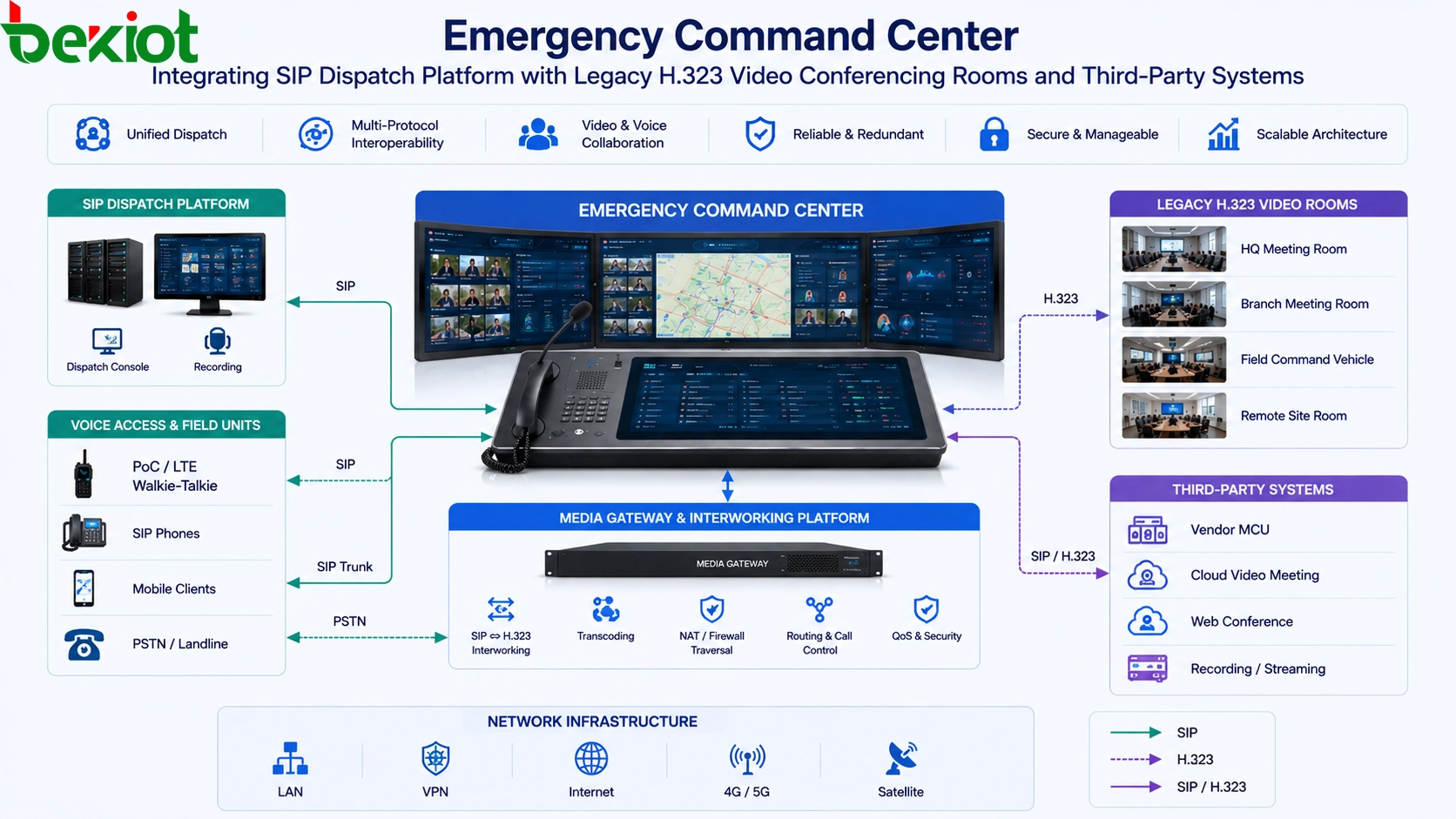
Why Video Conferencing Integration Becomes Difficult
Most modern emergency command platforms are designed with SIP as the communication foundation. This makes it easier to connect IP phones, dispatch consoles, intercom terminals, recording systems, paging systems, video terminals, mobile clients, and various media gateways. When all subsystems follow SIP, routing, calling, media negotiation, and management can be planned under one architecture.
In actual projects, video conferencing systems may come from different periods and different technical routes. Some older meeting rooms still use H.323. Some organizations use dedicated video network platforms. Others depend on proprietary or cloud meeting services, such as enterprise collaboration platforms, web meeting systems, or private meeting applications. These systems may not expose a standard SIP interface, or they may support SIP only under limited conditions.
This creates a practical problem for emergency command projects: the command center needs to call, view, join, or share video conference content, but the target system may not speak the same protocol as the dispatch platform. If this issue is not handled properly, video conferencing remains a separate island outside the command workflow.
Why Direct Protocol Development Is Not Always Practical
One possible method is to add an H.323 protocol stack directly into the unified communication platform. In theory, this allows the command platform to communicate with H.323 video conferencing systems at the protocol level. In practice, this is not a simple modification. H.323 signaling, media negotiation, address handling, call control, and compatibility testing can require deep protocol expertise.
Another method is to use an H.323-to-SIP conversion gateway. This can be useful when the project only needs to connect standard H.323 and standard SIP systems. However, such deployment still depends on protocol compatibility, endpoint behavior, codec negotiation, network configuration, and project-by-project debugging. The overall cost and technical risk can become high when the project environment is complex.
More importantly, protocol conversion gateways cannot solve every conferencing scenario. Proprietary video meeting platforms, private cloud meeting systems, and software-based collaboration tools may not provide full protocol-level access. Even if SIP or H.323 is partially supported, the available functions may not fully match the needs of emergency command, such as screen sharing, meeting room content capture, multi-party viewing, or stable audio routing.
A More Practical Gateway-Based Architecture
A practical approach is to deploy an external back-to-back video conferencing gateway between the emergency command platform and the third-party conferencing system. Instead of forcing every conferencing protocol into the command platform, the gateway acts as an intermediate bridge. On one side, it connects to the SIP-based command, dispatch, or unified communication system. On the other side, it connects to the existing video conferencing terminal, meeting room device, or software meeting environment through video and audio interfaces.
This architecture avoids heavy protocol customization. The command platform continues to use SIP for calling, scheduling, dispatching, and media access. The conferencing side can remain unchanged, whether it is H.323, a dedicated video network, or a proprietary meeting platform. The gateway handles the practical media connection between the two environments.
Common connection methods include HDMI input, HDMI output, and separate audio input and output interfaces. The video conference image can be captured from the meeting terminal or computer output, while audio can be exchanged between the command platform and the meeting system. This makes it possible for the command center to participate in or monitor an external conference without rebuilding the original conferencing system.
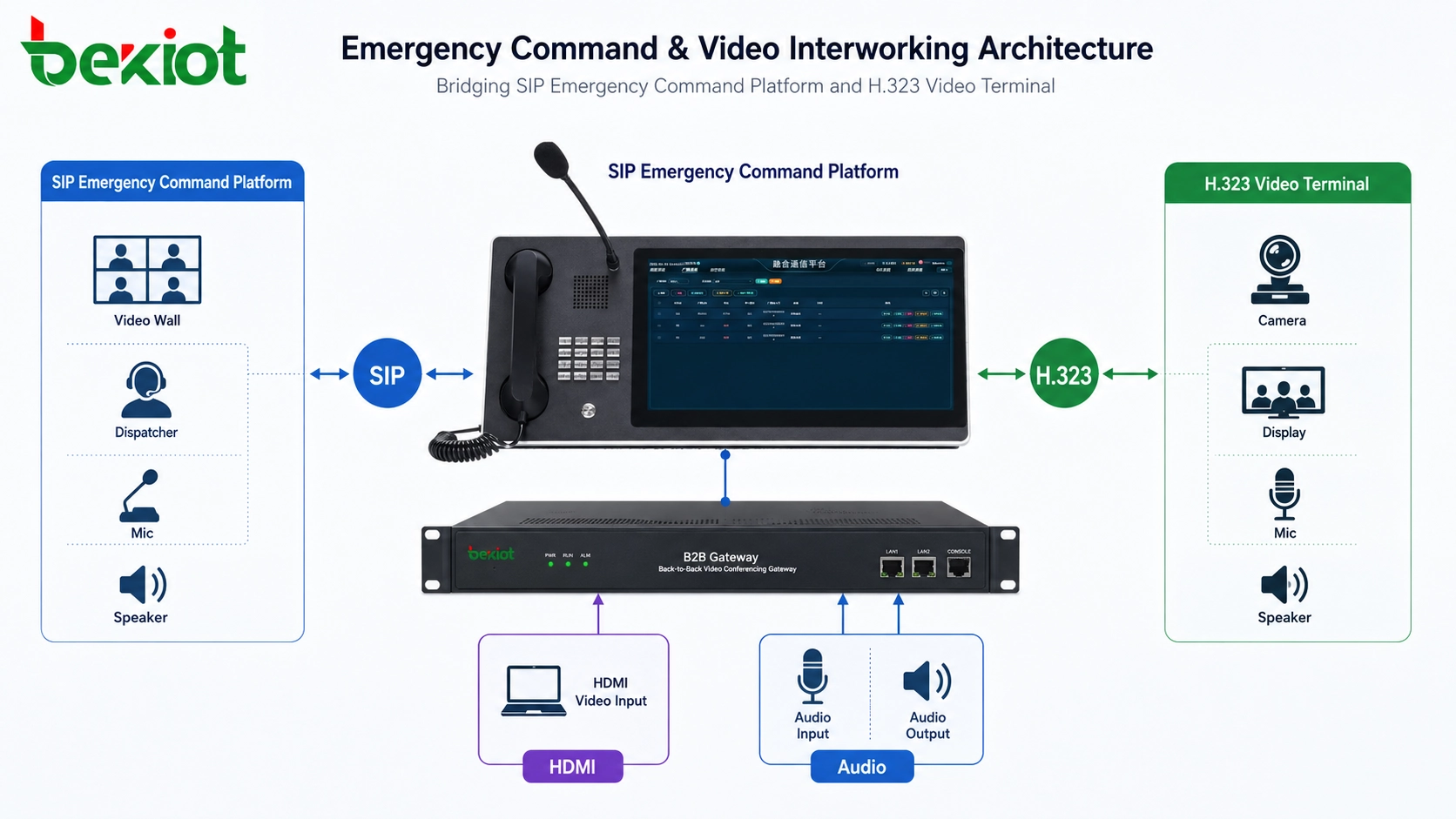
How the Connection Works in a Project
SIP Side Connection
The gateway registers or connects to the emergency command platform through SIP. From the command system perspective, it can be treated as a video endpoint, video access channel, or conferencing access point. Dispatchers can call the gateway, route it into a conference, record the session, or combine it with other command resources depending on platform design.
This keeps the emergency command architecture consistent. The command platform does not need to rebuild its signaling model around H.323 or a proprietary protocol. It only needs to manage the gateway as part of its SIP communication environment.
Conference Side Connection
On the conferencing side, the gateway connects to the existing video meeting terminal or meeting computer. If the target system is an H.323 room system, the gateway can capture the meeting output and provide audio interaction through standard interfaces. If the target system is a proprietary cloud meeting service, the same concept can be used by connecting the meeting host device through HDMI and audio cables.
This is especially useful when the third-party platform does not provide open protocol integration. Instead of developing a private adapter, the project can use physical media access to bring the meeting image and sound into the emergency command workflow.
Command Center Operation
Once connected, dispatchers can include the external meeting content in emergency consultation, cross-department coordination, incident review, remote expert support, and multi-site response communication. The gateway becomes a controlled access point between the command system and the external video meeting environment.
This approach is easier to deploy, easier to explain during system design, and easier to maintain after project delivery. It also reduces the chance that one difficult protocol compatibility issue delays the entire emergency command project.
Where This Architecture Is Most Useful
This gateway-based method is suitable for emergency command centers that need to integrate old and new video resources at the same time. It is especially valuable in projects where the dispatch platform is SIP-based but the user organization already owns H.323 video conference rooms, dedicated video conference networks, or proprietary online meeting tools.
Typical scenarios include public safety command centers, emergency management bureaus, transportation dispatch centers, highway and tunnel command rooms, energy operation centers, industrial park control rooms, airport and railway coordination centers, government multi-department consultation rooms, and emergency command vehicles.
In these scenarios, video conferencing is not only used for ordinary meetings. It may support incident consultation, expert access, remote command, field image review, cross-agency communication, and post-event analysis. Therefore, the integration method should be stable, understandable, and practical for long-term operation.
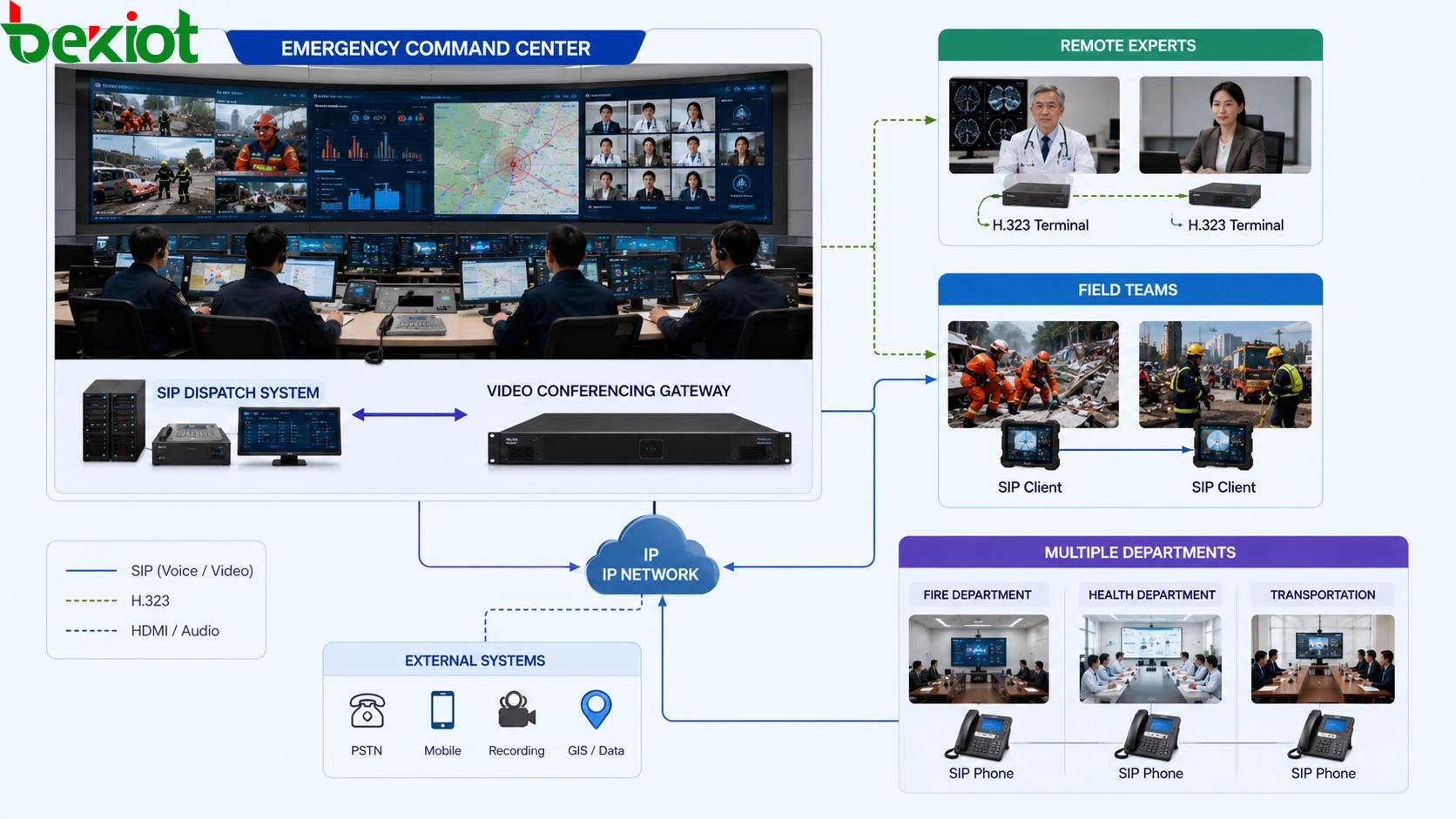
Key Advantages for Emergency Command Projects
The first advantage is simplified deployment. Instead of modifying the core command platform or developing a dedicated protocol stack, the project can use a gateway to connect the existing conferencing environment. This shortens the integration path and reduces uncertainty during commissioning.
The second advantage is broader compatibility. H.323 systems, proprietary meeting platforms, software meeting clients, and dedicated video terminals may all be difficult to integrate through one pure protocol method. A media-interface-based gateway can cover more real-world situations because it does not rely only on signaling compatibility.
The third advantage is lower technical risk. Protocol conversion often requires detailed debugging for each endpoint, codec, network condition, and meeting platform. A back-to-back connection reduces the number of variables that must be solved inside the command platform itself.
The fourth advantage is asset reuse. Many organizations already have functioning video conference rooms and meeting terminals. Replacing all of them with new SIP-native systems may not be realistic. A gateway approach allows the emergency command project to reuse existing video resources while still improving unified coordination.
Design Points That Should Be Checked
Before deployment, the project team should confirm the video source, audio path, meeting control method, resolution requirement, network position, SIP registration method, and recording requirement. The gateway should be planned as part of the command communication workflow, not as an isolated adapter.
Audio design is especially important. Emergency consultation requires clear two-way communication. Echo, delay, double pickup, incorrect gain, and wrong audio routing can affect the user experience. The meeting room audio output, gateway audio input, command platform audio output, and conference return audio should be tested together.
Video layout should also be confirmed early. Some projects only need to bring the external conference image into the command platform. Others need to send the command center image back to the meeting room. Some require screen sharing or large-screen display. These requirements determine how HDMI input, HDMI output, and display devices should be connected.
Project Deployment Workflow
A practical deployment can follow a clear workflow. First, identify all video conferencing systems that must be connected, including H.323 rooms, private video networks, cloud meeting tools, and dedicated terminals. Second, classify them by access method: protocol access, HDMI access, audio access, or mixed access. Third, define how the emergency command platform will call, view, record, and manage each video resource.
After that, the gateway should be installed and tested in a controlled environment. The project team should verify SIP registration, call establishment, video capture, audio send and receive, delay, resolution, display layout, recording behavior, and meeting stability. Only after these items are confirmed should the system be added to the formal command workflow.
This process helps avoid a common mistake: treating video conferencing integration as a simple cable connection. In emergency command projects, the final goal is not only to see a video image. The goal is to make external meeting resources usable inside real command, dispatch, consultation, and response procedures.
Final View
Connecting H.323 and proprietary video conferencing systems to an emergency command platform is not only a protocol issue. It is a system integration issue. SIP provides a strong foundation for unified communication, but many real projects must still deal with legacy room systems, dedicated video networks, and closed meeting platforms.
Direct protocol development or H.323-to-SIP conversion may work in some cases, but it can also increase cost, debugging time, and compatibility risk. A back-to-back video conferencing gateway offers a more practical route for many emergency command projects. By combining SIP access with HDMI and audio interfaces, it allows existing video conferencing resources to enter the command workflow without forcing every system to be rebuilt.
For project owners, integrators, and command platform providers, the best solution is often the one that balances openness, compatibility, deployment speed, and operational stability. A gateway-based design can help emergency command centers preserve existing investments while building a more unified and responsive communication environment.
FAQ
Can an H.323 video conferencing system be connected directly to a SIP command platform?
It can be done in some projects, but direct connection usually depends on protocol compatibility, endpoint behavior, codec support, and detailed configuration. For many emergency command projects, a gateway-based design is easier to deploy and maintain.
Does HDMI-based integration replace protocol integration?
No. HDMI-based integration is a practical option when protocol access is difficult, limited, or unavailable. If a conferencing system provides stable SIP or H.323 access, protocol integration may still be considered. The final choice depends on project requirements and system openness.
What should be tested before system handover?
The project team should test SIP calling, video display, audio routing, echo control, latency, recording, screen layout, conference return path, and long-session stability. Emergency command systems should be verified under real operational workflows, not only under basic connection tests.
Is this architecture suitable for cloud meeting platforms?
Yes, it can be suitable when the cloud meeting platform runs on a meeting computer or terminal that provides video and audio output. The gateway can bring that meeting content into the command system through media interfaces, even when the platform does not provide open protocol integration.







