


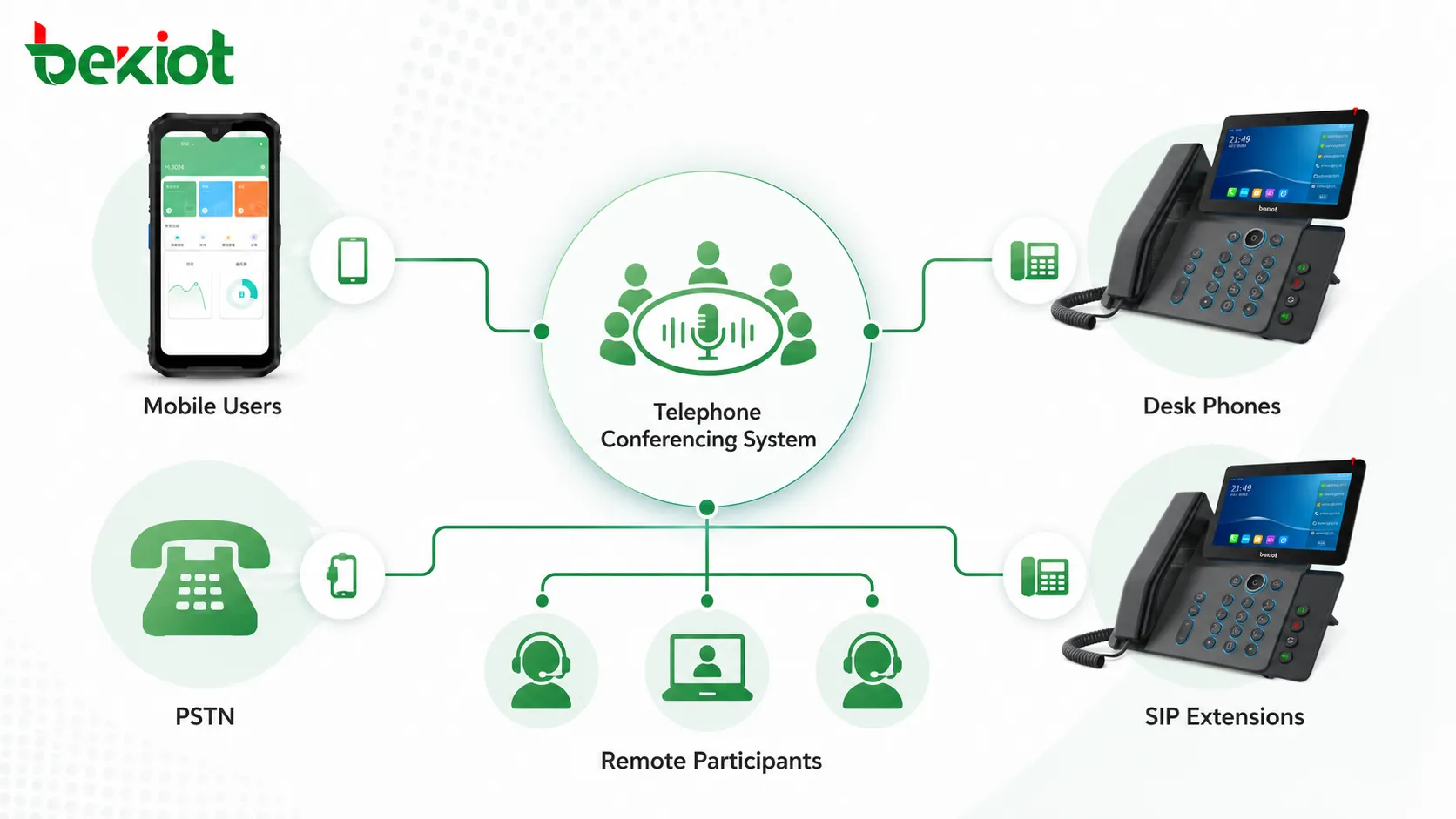
Telephone conferencing remains one of the most practical collaboration methods for enterprises, public organizations, emergency teams, and multi-branch operations. Even when video meetings and online collaboration tools are widely used, phone-based meetings still offer a unique advantage: participants can join from mobile phones, desk phones, fixed lines, SIP extensions, or external numbers without installing an app or entering a dedicated meeting room.
The value of a professional telephone conferencing system is not only the ability to connect several people into one call. A real enterprise-grade solution should provide stable audio mixing, full-duplex communication, flexible meeting scheduling, multiple meeting modes, access security, recording, reporting, API integration, and capacity planning support. These functions determine whether the system is suitable only for simple internal calls or capable of supporting daily coordination, large meetings, emergency communication, and long-term enterprise use.
Audio Quality Comes First
The first requirement of any telephone conferencing system is clear and stable audio. A conference call is used for discussion and coordination. If the audio quality is poor, other advanced features lose practical value. Problems such as noise, echo, howling, dropped calls, unstable volume, and unclear speech can quickly make a meeting unusable.
Audio quality is closely related to the system’s mixing capability. In early or low-end conferencing systems, some solutions used incomplete or simplified mixing methods. These systems may appear usable when only one person speaks, but they often perform poorly when several participants speak, interrupt, or keep their microphones open at the same time.
A professional telephone conferencing platform should support real full-duplex communication. This means participants can speak and listen naturally without constantly muting and unmuting microphones. If a system requires most participants to stay muted and only allows one active speaker because the audio becomes unstable otherwise, its mixing performance may not be sufficient for serious business use.
Mixing Performance Should Be Tested in Real Meetings
The more participants a conference has, the more demanding the audio mixing becomes. A small meeting with three to five people may not reveal system weaknesses. However, when dozens of users join the same meeting, poor mixing, echo cancellation, gain control, and media processing can cause obvious problems.
Before deployment, users should not rely only on product descriptions. A practical test should be arranged with real participants, real phones, real network paths, and realistic speaking behavior. During the test, participants should not all remain muted. The system should be evaluated under normal full-duplex meeting conditions.
Some weak systems may work normally for the first few minutes but begin to show problems after ten minutes or more. Typical symptoms include rising noise, echo, howling, audio distortion, unstable volume, participant drop-off, or delayed speech. These issues are especially risky for long meetings, executive discussions, emergency coordination, and customer-facing conference calls.
Flexible Meeting Creation and Management
A professional telephone conferencing system should provide flexible meeting creation and management methods. In enterprise environments, users do not only need one simple conference room. Different departments, project teams, managers, and external partners may need different access rules, schedules, permissions, and meeting workflows.
Web-based management is now a common and practical approach. Administrators and authorized users can create meetings, reserve conference rooms, manage participants, configure access rules, review records, and control meeting status through a browser. Multi-user login is also important because different users should be able to manage their own meetings without depending on one central administrator for every task.
The platform should also support multiple conference rooms running at the same time. In a large organization, the sales team, technical team, management team, and emergency duty team may all need meetings simultaneously. A system that can only support one active meeting room is not suitable for multi-department use.
Common Meeting Types
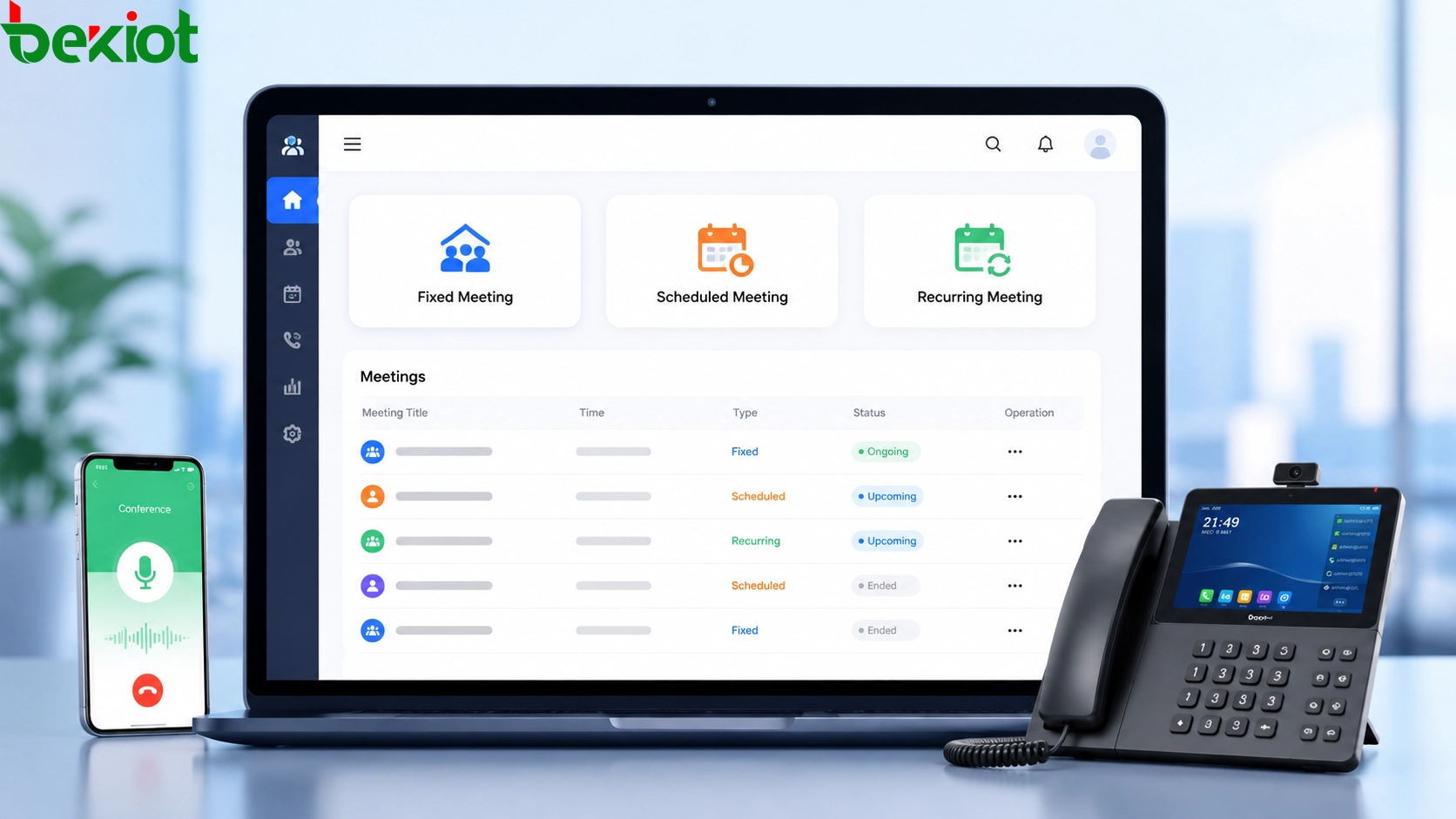
Telephone conferencing systems usually need to support several meeting types. A fixed meeting room is suitable for recurring internal discussions or always-available team communication. Users can enter the same meeting room at any time without creating a new session for every meeting.
A scheduled meeting is suitable for meetings that happen at a specific time in the future. Participants may only be allowed to enter during the defined time period. This helps prevent early, late, or unauthorized access and makes meeting management more orderly.
A recurring meeting is suitable for regular activities such as weekly briefings, daily production meetings, monthly management reviews, and routine coordination calls. For example, a Monday 9:00 meeting can be reserved as a recurring conference, and the system may automatically invite participants at the scheduled time if dial-out capability is configured.
Different Scenarios Need Different Rules
A professional system should not force every meeting to use the same behavior. In real organizations, a large announcement-style meeting is different from a small team discussion. An emergency coordination call is different from a routine weekly meeting. A public dial-in meeting is different from a private executive discussion.
Meeting scene configuration should allow users to define whether participants hear entry and exit prompts, whether the meeting plays waiting music, whether participants are muted by default, whether the meeting must be recorded, whether a password is required, and whether the host must join first.
For example, a large meeting may require participants to be muted by default, while a small project discussion may allow everyone to speak freely. A training session may need recording, while a quick internal coordination call may not. Flexible scene templates make the conferencing system more suitable for different departments and meeting types.
Access Security Is a Core Requirement
Security is essential for enterprise telephone conferencing, especially when the system is self-built or connected to PSTN, SIP trunks, mobile access, or external users. A simple meeting password is useful, but it is not enough for all scenarios.
A professional solution should support multiple security mechanisms. Meeting lock is one example. After a meeting starts, the host can lock the room so that no additional participants can join. This is useful for sensitive meetings where participant scope must be strictly controlled.
Private meeting access is another important function. The system can allow only specified phone numbers to join a meeting. Caller number verification, called number matching, temporary meeting rooms, and controlled access numbers can all help reduce unauthorized entry risks. For high-security meetings, access rules should be planned before deployment instead of added after a problem occurs.
Recording and Backup Support
Recording is a valuable function in many telephone conferencing projects. It supports meeting review, responsibility tracing, training, evidence retention, customer service quality control, and post-event analysis. A professional system should allow authorized users to record meetings and download recordings when needed.
In enterprise environments, recordings may also need automatic backup. Some organizations store meeting recordings on local storage, while others integrate with NAS or centralized file systems. The backup strategy should consider storage capacity, retention period, access permission, compliance requirements, and retrieval convenience.
Recording should not be treated only as an optional add-on. For emergency dispatch, government consultation, production scheduling, financial communication, legal discussion, and customer service meetings, recording can become an important part of the operational record.
Reporting Helps Capacity Planning
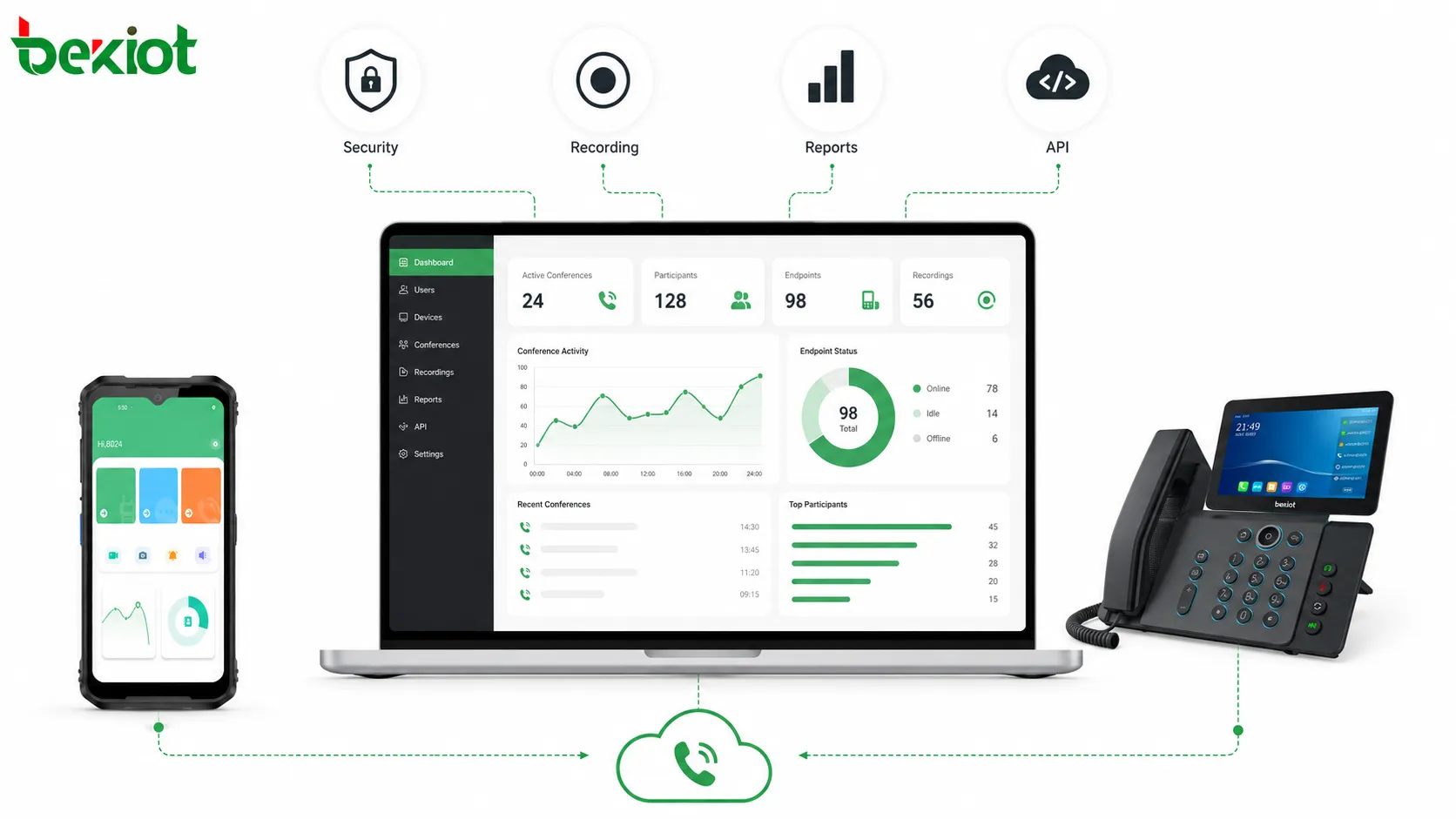
Many organizations pay attention to recording but ignore reporting. In fact, reporting is highly valuable for IT planning and operation management. A conferencing system should provide reports on meeting frequency, participant count, average meeting duration, peak concurrency, meeting room usage, call success rate, and resource occupation.
These data help administrators understand how the system is actually being used. If peak meeting concurrency is increasing, additional trunk channels or conference resources may be needed. If certain departments use conference rooms heavily, meeting templates or dedicated access rules may need to be adjusted.
Reporting also supports investment planning. Instead of expanding capacity based only on estimation, IT teams can use real usage data to decide whether the system needs more channels, more conference resources, better trunk access, storage expansion, or improved redundancy.
Capacity Should Match Real Usage
Telephone conferencing capacity should be planned according to the expected number of meeting rooms, participants, concurrent users, trunk channels, and media processing resources. A small internal system may only need a limited number of participants, while a large enterprise or public organization may require hundreds of users in one or more meetings.
In many enterprise projects, telephone conference capacity may start from small-scale meetings and expand to hundreds of participants. A system that can support up to 500 telephone participants may be useful for large announcements, emergency notification, branch coordination, and multi-department meetings, but the actual capacity depends on trunk resources, server performance, audio processing capability, and project configuration.
Capacity planning should not only focus on the maximum number shown in a specification. The project team should also evaluate how many meetings may run at the same time, how many users may speak, how many PSTN or SIP trunk channels are available, and whether recording or reporting will add system load.
API Integration Extends Business Value
Standard telephone conferencing functions may not meet every large organization’s requirements. Some enterprises need to integrate meetings with office automation systems, internal portals, enterprise communication platforms, customer service systems, emergency dispatch platforms, or mobile applications.
A complete API interface can make this integration easier. Through APIs, external systems may create meetings, invite participants, query meeting status, control meeting behavior, obtain recordings, retrieve reports, or connect conference workflows with business processes.
For example, an organization may want users to launch a conference from an OA approval page, a duty management system, a customer record, or an emergency command platform. API capability reduces manual operation and shortens the development cycle for system integrators.
Not the Same as Basic IPPBX Conferencing
Some IPPBX systems provide simple conference calling. This can be useful for small internal discussions, but it is not always the same as a professional telephone conferencing system. Basic IPPBX conference features may lack advanced mixing, multi-room management, flexible meeting scheduling, security control, detailed reporting, large-capacity support, and API integration.
For a small office, basic conferencing may be enough. For enterprises, public-sector organizations, emergency teams, call centers, industrial operations, and multi-branch groups, a dedicated conferencing platform is often more suitable because it is designed around meeting management rather than only call switching.
The selection should depend on the actual use case. If the requirement is occasional small internal calls, a basic function may work. If the requirement includes scheduled meetings, recurring meetings, hundreds of participants, recording, access security, reports, and integration with business systems, a professional conferencing solution should be considered.
Deployment Planning
Before building a telephone conferencing system, the project team should define who will use the system, how many meetings may run at the same time, whether external users need dial-in access, whether meetings require passwords, whether recordings must be kept, and whether business system integration is required.
Network and trunk resources should also be reviewed. If users join through SIP extensions, SIP trunks, PSTN, mobile phones, or fixed lines, the system must have enough channels and stable media paths. If participants are distributed across multiple branches, routing, numbering, firewall traversal, and audio quality should be tested in advance.
Operational workflow is equally important. Users should know how to create meetings, join meetings, invite participants, control mute status, lock rooms, download recordings, and check reports. Without a clear workflow, even a powerful conferencing system may be underused.
Suitable Application Scenarios
Telephone conferencing is suitable for daily office meetings, headquarters and branch coordination, emergency communication, duty scheduling, customer coordination, production dispatch, remote expert consultation, public-sector meetings, transportation operation, energy management, and multi-site project communication.
It is especially useful when participants are widely distributed or when video access is not always available. A field engineer, traveling manager, external consultant, branch office user, or emergency duty staff can join by phone without waiting for a video room or installing a software client.
For organizations that need both convenience and control, telephone conferencing provides a practical balance. It keeps the joining process simple while still allowing administrators to manage meeting rules, security, recording, reports, and system integration.
Final Review
A professional telephone conferencing system should be evaluated from audio quality, mixing capability, full-duplex performance, meeting management, scenario configuration, access security, recording, reporting, capacity planning, and API integration. These functions directly affect whether the system can support real enterprise communication rather than only basic multi-party calls.
The most important point is that telephone conferencing should remain easy to use while being manageable in the background. Users care about joining quickly and hearing clearly. Administrators care about security, capacity, logs, recordings, and maintenance. A good system must satisfy both sides.
For enterprises and public organizations, telephone conferencing is still valuable because it uses the broad reach of the telephone network and the familiarity of phone access. When designed properly, it can support daily collaboration, emergency coordination, large meetings, and long-term communication management.
FAQ
Can telephone conferencing work without installing an app?
Yes. One of its main advantages is that participants can join through ordinary mobile phones, desk phones, fixed lines, or SIP extensions without installing a dedicated application.
Why is full-duplex audio important?
Full-duplex audio allows participants to speak and listen naturally at the same time. It is important for real discussion, interruption, confirmation, and fast coordination.
Should every meeting be recorded?
Not necessarily. Recording should depend on meeting type, compliance requirements, business rules, and privacy policy. Important meetings may require recording, while routine discussions may not.
How can unauthorized participants be prevented?
Common methods include meeting passwords, meeting lock, caller number verification, private meeting lists, temporary meeting rooms, host control, and access logs.
Is reporting useful for small organizations?
Yes. Even small organizations can use reports to understand meeting frequency, duration, user behavior, and whether conference capacity is enough for future needs.
When is API integration necessary?
API integration is useful when telephone conferencing needs to connect with OA systems, enterprise communication tools, emergency dispatch platforms, customer systems, or other business applications.







