


In a multi-extension telephone system, the most common communication delay often comes from not knowing whether another person is available. A receptionist may transfer a call to an extension that is already busy, a supervisor may try to reach an agent who is still on another call, a dispatcher may need to know which duty phone is ringing, and a team member may waste time dialing several colleagues before finding someone free. Busy Lamp indicator technology is designed to make this call status visible before the next action is taken.
The Busy Lamp indicator, commonly associated with BLF or Busy Lamp Field functions, uses visual indicators on IP phones, operator consoles, softphones, attendant panels, or dispatch interfaces to show the real-time state of monitored extensions, lines, users, or call resources. Instead of relying only on trial dialing, users can check whether a target is idle, ringing, busy, held, offline, unavailable, or in a special state, then choose the correct action such as calling, transferring, picking up, waiting, or escalating.
Why visible call status changes daily communication
Voice communication is fast only when the caller can reach the right person at the right time. In small offices, people may simply look around and see whether someone is on the phone. In larger organizations, branch offices, service centers, hotels, hospitals, factories, campuses, dispatch rooms, and remote teams, this is no longer possible. Extensions may be distributed across several rooms, buildings, departments, or sites. The user needs a system-level way to understand call availability.
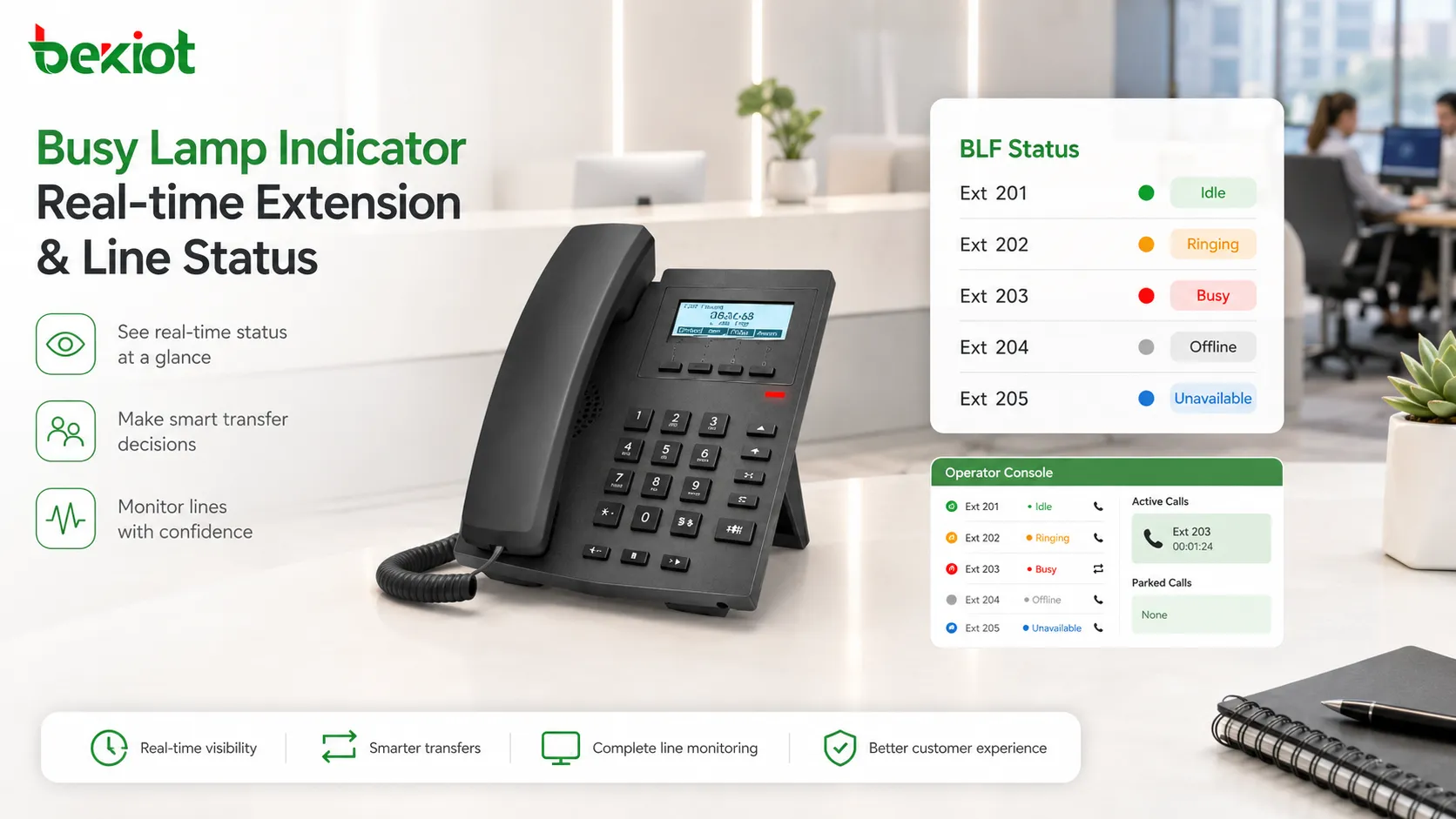
A Busy Lamp indicator provides this awareness. It turns invisible call state into a visible signal. When an extension is idle, the indicator may show one color or icon. When it rings, it may flash. When it is busy, it may change to another color. When the monitored endpoint is offline or unreachable, the indicator may become gray or inactive. The exact display style depends on the device and platform, but the purpose is the same: users can make decisions before interrupting or misrouting calls.
This is especially useful for people who handle many calls. Receptionists, attendants, dispatchers, call center supervisors, customer service teams, nurse stations, hotel front desks, property management desks, security offices, and technical support teams need to know extension status quickly. A visual status field shortens judgment time and reduces unnecessary dialing.
The system value is also psychological. When staff can see that a colleague is busy, they are less likely to repeatedly call or transfer blindly. When they can see a line ringing, they can pick it up before the caller waits too long. When they can see available agents, they can route calls more smoothly. Busy Lamp indicators bring order to what would otherwise be a sequence of guesses.
The working signal behind the indicator
A Busy Lamp indicator does not work by simply guessing whether a phone is being used. It relies on status information from the communication system. In many IP phone and PBX environments, the phone or console subscribes to the status of another extension or line. The server then sends updates when that status changes. This allows the indicator to reflect events such as idle, ringing, in call, on hold, unavailable, or offline.
In SIP-based systems, BLF behavior is commonly implemented through presence or dialog state mechanisms. The monitoring device subscribes to a monitored extension, and the communication server reports state changes through signaling messages. The indicator on the phone then changes according to the state information it receives. Although the technical implementation may vary between platforms, the principle is based on event subscription and status notification.
The indicator itself may be a physical LED key, a screen icon, a color block, a contact list marker, a softphone badge, or a dispatch panel field. On desk phones, BLF keys are often programmable buttons beside the screen. On operator consoles, many monitored extensions may appear as a grid. On softphones, the status may appear next to names or numbers. On dispatch systems, status may be combined with call control and group communication.
Accuracy depends on the platform’s ability to track call state. If the PBX or communication server does not know the real status of the endpoint, the indicator may become inaccurate. If the network is unstable, updates may be delayed. If a device is registered through unusual routing, the monitored status may not display correctly. Busy Lamp indicators are simple for users, but they depend on correct signaling, registration, permissions, and endpoint behavior behind the scenes.
Core feature: extension status monitoring
The most basic feature is extension status monitoring. A user can monitor one or more extensions and see whether each extension is free, ringing, busy, or unavailable. This function is widely used on IP phones with programmable keys, attendant consoles, receptionist panels, and dispatch terminals.
For example, a receptionist may monitor the extensions of sales, technical support, finance, warehouse, and management departments. Before transferring an external call, the receptionist can check whether the target extension is available. If the extension is busy, the receptionist may offer voicemail, transfer to another colleague, place the caller on hold, or take a message.
Supervisors can use the same feature to observe team availability. A service manager may see which agents are on calls, which are idle, and which are ringing. A duty officer may see whether an emergency desk phone is active. A hotel front desk may monitor housekeeping, engineering, security, and restaurant phones. The monitored status helps route communication more intelligently.
Extension monitoring also reduces repeated dialing. Without BLF, users may call a colleague, hear busy tone, wait, call again, transfer incorrectly, or ask someone else to check. With BLF, they can see the status first and choose a better action. This improves both caller experience and internal efficiency.
Core feature: ringing awareness and call pickup
Busy Lamp indicators are not limited to showing that someone is busy. They can also show when a monitored extension is ringing. This creates an important operational function: call pickup. If a colleague is away from the desk and their extension rings, another authorized user can see the flashing BLF indicator and answer the call on their behalf.
Call pickup is valuable in reception desks, small teams, service counters, clinics, warehouses, and shared offices. When a phone rings unattended, the call does not have to be missed. A nearby user can press the BLF key or use a pickup function to answer. This reduces abandoned calls and improves service continuity.
In many phone systems, BLF and directed call pickup are combined. The user sees the ringing indicator and presses the same key to pick up the call. This makes the process fast and intuitive. Instead of remembering pickup feature codes or dialing the ringing extension manually, the user interacts with the visible status key.
Pickup permissions should be controlled. Not every user should be allowed to pick up every ringing phone. A team member may be allowed to pick up calls within the same department, while a receptionist may have wider access. Sensitive departments may restrict pickup. The Busy Lamp indicator provides visibility, but call control should still follow organizational rules.
Ringing awareness also helps supervisors. If a call rings too long, the supervisor can see the delay and intervene. If several phones ring at once, the team can distribute response. In high-volume service environments, visual ringing indicators provide quick situational awareness.
Core feature: faster and cleaner call transfer
Call transfer is one of the most common applications of Busy Lamp indicators. A user who receives a call often needs to send it to another extension. If the target extension is busy, transferring blindly may frustrate the caller. The call may return, go to voicemail, enter a queue, or wait without explanation. BLF helps the user choose a better transfer method.
Before transferring, the user can check whether the target is idle. If the indicator shows idle, a direct transfer may be suitable. If it shows busy, the user may choose an attended transfer, another destination, a queue, voicemail, or a callback arrangement. This reduces failed transfers and improves caller experience.
Attended transfer also becomes more efficient. The user can call the target extension only when the status suggests availability. If the target is ringing or busy, the user can avoid interrupting. In service environments, this helps maintain a smoother caller flow.
For receptionist and attendant roles, BLF transfer keys can act as a visual directory. Each key represents a person, department, or line. The receptionist can see status and transfer quickly without typing numbers. This is especially useful when handling many incoming calls.
Clean transfer is not only about speed. It also reduces confusion. A caller is less likely to be sent to an unavailable person. The receiving staff member is less likely to be interrupted during another call. The organization appears more professional because calls are routed with awareness rather than guesswork.
Core feature: speed dial with presence awareness
Many BLF keys also work as speed dial keys. When the monitored extension is idle, pressing the key can call that extension directly. When it is ringing, pressing the key may pick up the call if permitted. When it is busy, the user may choose not to call. This combination makes a single key more useful than a normal speed dial button.
Presence-aware speed dial improves daily internal communication. A team member can see whether a colleague is available and call with one press. A supervisor can quickly contact an idle agent. A receptionist can call a department without typing an extension number. A dispatcher can reach field or duty positions from a console.
This feature is useful in teams with frequent internal coordination. Sales teams, service desks, medical stations, hotel front desks, warehouse offices, engineering teams, security desks, and operations centers often call the same internal contacts repeatedly. BLF keys reduce dialing time and improve accuracy.
The difference from ordinary speed dial is status context. A normal speed dial only stores a number. A BLF speed dial shows whether that number is a good target at the moment. This makes the button a decision tool, not only a shortcut.
For large teams, screen-based BLF lists may be more practical than physical keys. The interface can allow searching, grouping, filtering, or scrolling through many monitored users. The same principle applies: status visibility and quick action are combined.
Core feature: supervisor visibility
Busy Lamp indicators provide supervisors with a simple view of team call activity. A supervisor can see which team members are idle, which are on calls, which calls are ringing, and which endpoints are unavailable. This does not replace detailed reporting, but it gives a quick real-time view.
In customer service teams, supervisors may use BLF to identify available agents, support overloaded staff, or notice unanswered calls. In technical support, the supervisor can check whether specialists are free before transferring urgent issues. In dispatch environments, duty supervisors can see whether key positions are already engaged.
Supervisor visibility helps manage workload informally. If one person is always busy while others remain idle, the supervisor may adjust routing, training, or task distribution. If an important extension is often unavailable, the team may need backup coverage. BLF makes these patterns visible during operation.
However, BLF is not a full workforce management system. It shows current call state, not the complete reason behind the state. A busy indicator does not explain call quality, customer mood, issue complexity, or after-call work. Supervisors should use BLF as a real-time signal, not as the only basis for performance evaluation.
When combined with call queues, reports, recording, and wallboard data, Busy Lamp indicators become part of a broader service management picture. They provide immediate visual awareness while deeper analytics provide historical insight.
Functional characteristic: real-time response
The value of a Busy Lamp indicator depends on timely status updates. If the indicator changes several seconds too late, users may still transfer calls incorrectly or miss pickup opportunities. Real-time or near-real-time response is therefore a key functional characteristic.
In normal use, the indicator should change quickly when an extension starts ringing, answers a call, ends a call, goes offline, or becomes available again. This allows the user to act confidently. If status display lags behind real call state, users may stop trusting the feature.
Real-time response depends on the communication server, endpoint subscription, network quality, and device processing. A poorly configured server may not send updates correctly. A congested network may delay notifications. A phone with too many monitored keys may update slowly. System design should consider the scale of monitoring.
For large deployments, administrators may need to limit the number of monitored extensions per device or use attendant consoles designed for high-volume BLF display. Monitoring hundreds of extensions from many endpoints can create signaling load. A good system balances visibility with performance.
Status freshness should be tested during deployment. Users should verify that indicators change correctly during ringing, answer, hold, transfer, hang-up, offline, and failover scenarios. Real-time display is not only a feature claim; it must be confirmed in the actual system.
Functional characteristic: simple visual language
Busy Lamp indicators are useful because they communicate status quickly. This requires a simple visual language. Users should not need to study complex menus to know whether an extension is available. Color, flashing behavior, icon shape, or label text should make the status easy to understand at a glance.
Common designs may use green for available, red for busy, flashing red or flashing light for ringing, gray for offline, and amber or another state for held or unavailable. The exact color pattern depends on the device, but consistency is important. If different phones or consoles use different meanings, users may become confused.
Visual language should also consider accessibility. Some users may have difficulty distinguishing colors. Systems that combine color with labels, icons, flashing patterns, or text status are easier to use. On screen-based interfaces, the status can be shown with both color and words.
In busy environments, visual indicators should be easy to see without becoming distracting. A receptionist may monitor many extensions at once. Too many flashing indicators can become visually noisy. Grouping, filtering, and clear naming help users focus on relevant status.
The best visual design is practical. It should support fast decisions: call, transfer, pick up, wait, or choose another destination. If the indicator does not lead to a clear action, its value is reduced.
Functional characteristic: permission-based monitoring
Busy Lamp indicators involve visibility into other users’ call status. This means permission control is important. Not every employee should necessarily monitor every extension. Some departments may handle sensitive calls. Some executives, medical departments, legal offices, HR teams, or security lines may require restricted visibility.
Permission-based monitoring defines who can subscribe to whose status. A receptionist may monitor general department phones. A supervisor may monitor team members. A department user may monitor colleagues in the same group. A central attendant may monitor many public extensions. Sensitive extensions may be hidden or limited.
Permission control also applies to actions. A user may be allowed to see that an extension is ringing but not allowed to pick it up. Another user may be allowed to pick up within a group. A supervisor may be allowed to monitor status but not barge into calls. Visibility and control should be separated where needed.
This separation prevents misuse. BLF should support communication efficiency, not create unnecessary surveillance. Organizations should define which status information is appropriate to share and which call actions are allowed. In some environments, privacy policy or compliance requirements may affect how BLF is configured.
Administrators should review permissions periodically. Staff roles change, departments move, and temporary permissions may remain after projects. Outdated BLF permissions can expose call status unnecessarily or allow unauthorized pickup.
Functional characteristic: integration with call control
Busy Lamp indicators are most valuable when they integrate with call control. Seeing that a phone is ringing is useful; being able to pick it up quickly is more useful. Seeing that a colleague is idle is useful; pressing the key to call or transfer is more efficient. The indicator should support action, not only observation.
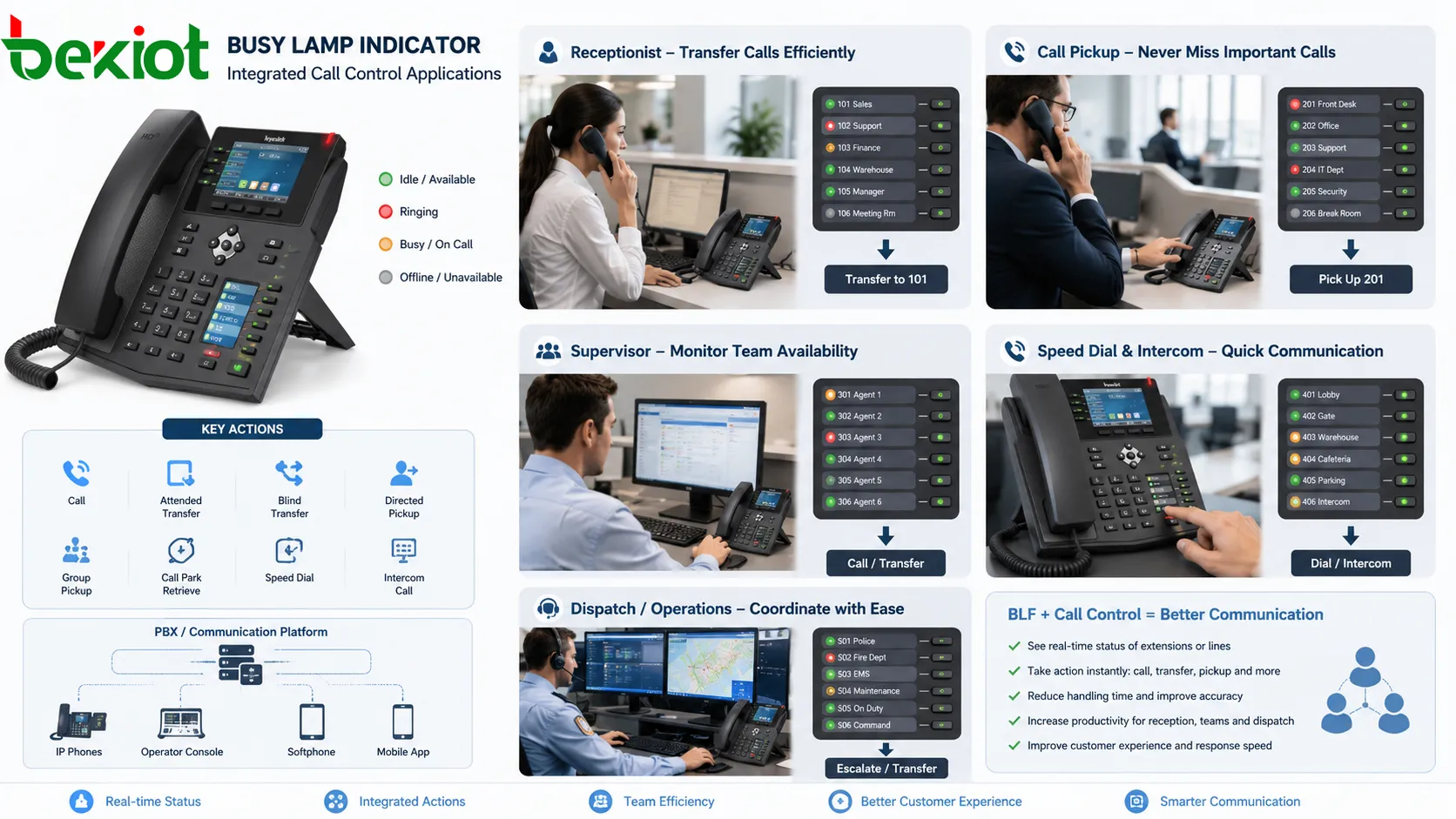
Common integrated actions include direct call, attended transfer, blind transfer, directed pickup, group pickup, call park retrieval, speed dial, intercom call, and sometimes presence-based routing. The available actions depend on the phone model, PBX platform, and configuration.
For receptionists, BLF plus transfer is a major productivity feature. The user can answer an incoming call, check the target status, and press the target key to transfer. If the target is busy, the receptionist can choose another action. This reduces call handling time and improves accuracy.
For teams, BLF plus pickup helps prevent missed calls. If a colleague’s phone rings and they are away, another user can answer. This is useful in small departments, service counters, medical stations, and shared support groups. The visual signal and action key work together.
For dispatch or operations centers, BLF can be part of a larger control interface. The operator may see extension status, call a duty position, transfer an incident call, pick up an unattended line, or escalate to another role. Integration turns BLF into a practical operation tool.
Application in reception and attendant service
Reception desks and attendant positions are classic application scenarios for Busy Lamp indicators. These users handle incoming calls and need to route them quickly. Without BLF, the receptionist may transfer to busy extensions, call people manually, or ask callers to wait while checking availability. This slows service and increases frustration.
With BLF, the receptionist can see extension status before transferring. If the sales manager is busy, the call can be routed to another sales extension. If the engineering desk is idle, the call can be transferred immediately. If the target is ringing and unanswered, the receptionist can choose whether to pick up or redirect.
In hotels, reception staff may monitor housekeeping, engineering, security, restaurant, reservation, and management phones. In office buildings, attendants may monitor departments, executives, meeting rooms, and service desks. In property management, front desks may monitor maintenance, security, customer service, and duty phones.
The system value is better call flow. Callers spend less time waiting, fewer calls return from unavailable extensions, and the receptionist makes routing decisions with real-time information. This improves the public-facing image of the organization.
Application in call centers and service teams
Call centers and service teams use Busy Lamp indicators to improve internal coordination. Supervisors may monitor agent extension status, team leaders may check available support staff, and agents may see whether specialists are free before transferring a customer. This reduces blind transfers and unnecessary hold time.
In small service teams, BLF can be a simple alternative to complex workforce dashboards. A supervisor can see who is on a call and who is free. A team member can pick up a colleague’s ringing phone if permitted. A shared service group can maintain coverage even when individuals step away.
In larger contact centers, BLF is often combined with queue status, agent state, wallboards, recording, CRM pop-ups, and supervisor tools. BLF does not replace these systems, but it adds immediate visual awareness for extension-level call state.
For escalation handling, BLF helps agents identify available supervisors or specialists. Instead of transferring to a busy expert, the agent can choose someone idle or send the call to a proper queue. This improves first-contact handling and reduces customer frustration.
Call center use should distinguish between phone status and work status. An agent may be idle on the phone but busy with after-call work. Some platforms combine BLF with presence or agent state to provide a more accurate view. The configuration should match the service process.
Application in dispatch and emergency communication
Dispatch and emergency communication systems use Busy Lamp indicators to show the availability of duty phones, operator positions, field terminals, intercom points, and response groups. In these environments, knowing who is already on a call can affect response speed and command coordination.
A dispatch operator may need to call a field station, security gate, maintenance room, emergency desk, or supervisor extension. BLF helps the operator see whether the target is free, busy, or ringing. If one duty phone is busy, the operator can choose another route instead of wasting time.
In emergency response, BLF can help show which command positions are active. A supervisor can see whether a dispatcher is handling a call. A control room user can see whether an emergency extension is ringing. A help point call may appear as a visual status that prompts immediate action.
BLF should not be the only emergency indicator. Critical systems may also require alarms, pop-ups, audio prompts, recording, incident logs, and priority routing. However, BLF adds a useful layer of real-time call awareness, especially when multiple communication positions are involved.
Dispatch use requires careful permissions. Operators may monitor operational extensions, but sensitive or private lines should be excluded unless there is a clear reason. In emergency systems, visibility should support response without creating unnecessary exposure.
Application in healthcare and nurse station communication
Healthcare environments use telephone and intercom systems across nurse stations, wards, reception points, emergency departments, laboratories, pharmacies, administration offices, and service teams. Busy Lamp indicators can help staff see whether key extensions are available before calling or transferring.
At a nurse station, BLF may show the status of nearby stations, duty rooms, doctors’ offices, service desks, or emergency phones. If one extension is busy, staff can choose another path. If a phone is ringing unattended, authorized staff may pick it up. This helps reduce missed calls in busy clinical environments.
Healthcare communication often includes sensitive information, so BLF should be configured carefully. Monitoring may be limited to operational status rather than detailed call information. Call pickup permissions should be controlled. Some departments may need restricted visibility.
BLF can also support service coordination. Reception areas can check whether departments are available before transferring patients or external callers. Technical maintenance teams can see whether duty phones are active. Security or facility staff can monitor key service extensions.
The value in healthcare is practical: shorter call handling, fewer failed transfers, faster internal coordination, and better coverage for important phones. However, privacy and workflow rules should guide deployment.
Application in hotels, campuses, and public facilities
Hotels use Busy Lamp indicators at front desks, concierge desks, back offices, and service centers. Staff may monitor housekeeping, engineering, security, restaurant, reservation, guest service, and management extensions. This helps route guest requests quickly and avoid transferring calls to busy departments.
Campuses use BLF for administration offices, security desks, dormitory reception, classroom support, maintenance teams, and service centers. A campus operator can check whether a department extension is available before transferring students, parents, visitors, or staff calls.
Public facilities such as government buildings, museums, stadiums, transport terminals, and commercial complexes may use BLF in service desks and control rooms. Operators can monitor key extensions, help points, security lines, facility management phones, and duty positions.
In these environments, the Busy Lamp indicator supports public service quality. People who call the facility expect quick routing. BLF helps staff avoid repeated transfers and unanswered extensions. It also helps service teams cover each other during busy periods.
Because these facilities often involve public-facing communication, naming and layout are important. BLF keys should be labeled clearly by department, role, or location. A confusing status panel can slow down the operator instead of helping.
Application in enterprise and multi-branch communication
Enterprises with many departments or branches use Busy Lamp indicators to improve internal call coordination. Employees may monitor team members, department lines, executive assistants, service desks, and shared extensions. In multi-branch systems, BLF can help users see remote extension status if the PBX or unified communication platform supports it.
This is useful for distributed teams. A headquarters receptionist may transfer calls to branch offices. A branch supervisor may monitor several service extensions. A manager may check whether a colleague in another location is on a call. BLF reduces uncertainty across physical distance.
Multi-branch BLF requires stable network connectivity and consistent extension management. If branch systems are connected through SIP trunks, VPNs, or unified PBX architecture, status exchange must be supported and secured. Network delay or registration problems can affect indicator accuracy.
Enterprises should avoid excessive monitoring. Monitoring hundreds of extensions may create clutter and signaling load. BLF should focus on users and lines that are regularly needed for call handling. Department groups, attendant panels, and searchable directories can help manage scale.
The enterprise value is smoother collaboration. Employees spend less time dialing unavailable colleagues, receptionists route calls more accurately, and shared service teams handle ringing calls more effectively.
Application in small teams and shared offices
Small teams may not need a complex contact center system, but they often benefit from Busy Lamp indicators. In a small sales office, service desk, clinic, workshop office, logistics office, or support team, users frequently answer calls for each other. BLF shows who is available and whose phone is ringing.
In a shared office, one person may step away while their phone rings. A colleague can see the ringing indicator and pick up the call. If a customer asks for a specific person who is busy, the caller can be offered another option immediately. This makes small-team service more responsive.
BLF also supports informal coordination. Team members can avoid interrupting colleagues who are already on calls. They can call idle colleagues with one key. They can notice if a shared line is constantly busy and adjust coverage. These small improvements add up during daily operation.
For small teams, simplicity matters. The BLF configuration should not be overly complex. A few carefully chosen keys are often more useful than a large panel of rarely used extensions. The goal is practical visibility, not excessive monitoring.
Configuration points that affect performance
Busy Lamp indicators require correct configuration. The monitored extension must exist, the monitoring user must have permission, the phone or console must subscribe to the correct status, and the communication server must send updates. If any part is wrong, the indicator may not work or may display inaccurate status.
Administrators should check extension numbers, SIP accounts, feature codes, pickup groups, BLF key settings, phone templates, permissions, and server support. In some systems, BLF keys are configured manually on each phone. In larger deployments, provisioning templates or centralized management tools can push settings automatically.
Scale is an important consideration. Each monitored extension may create signaling traffic. If many phones monitor many extensions, the server must handle a large number of subscriptions and notifications. Excessive BLF configuration can increase load. Administrators should monitor system performance and avoid unnecessary subscriptions.
Network quality also matters. If phones are remote, connected through VPNs, or located across branches, BLF updates may depend on routing, NAT behavior, firewall rules, and SIP signaling paths. Incorrect network design can make BLF unreliable even if phone configuration is correct.
Testing should include several call states. Administrators should verify idle, ringing, busy, hold, transfer, hang-up, offline, and pickup behavior. They should also test what happens after phone reboot, PBX failover, network interruption, and user logout. Stable BLF behavior requires real scenario testing.
Limitations and possible risks
Busy Lamp indicators are useful, but they have limitations. The indicator shows call state, not full availability. A person may appear idle but be away from the desk. A person may appear busy but still be able to answer another channel. A phone may be offline due to network issues, not because the user is unavailable. Users should interpret BLF as a communication signal, not as complete human presence.
There may also be privacy concerns. Some users may not want their call status visible to unrelated departments. In sensitive environments, BLF can reveal whether a person is on a call or whether a department is active. Permission design should reflect privacy expectations and operational needs.
Over-monitoring can create clutter. If a phone has too many BLF keys or a console displays too many extensions without grouping, users may find it difficult to locate the right contact. Good interface design focuses on relevant extensions and clear labels.
Status errors can occur. A device may remain showing busy after abnormal call termination. Network delay may cause stale status. Server configuration may fail to clear a state. Users should have a way to refresh, report, or troubleshoot inaccurate indicators.
Finally, BLF should not replace proper call routing. It helps users make decisions, but queues, hunt groups, voicemail, failover, pickup groups, and routing rules are still needed. BLF is one part of a complete communication system.
Common mistakes in deployment
One common mistake is configuring BLF for too many extensions. Users may ask to monitor an entire company, but this often creates clutter and system load. It is better to monitor the extensions that are genuinely needed for daily call handling.
Another mistake is ignoring permissions. If every user can monitor and pick up every extension, privacy and call handling problems may appear. Monitoring rights and pickup rights should be designed separately.
Poor labeling is also common. A BLF key labeled only with an extension number may not be useful to a receptionist or supervisor. Labels should include names, roles, departments, or locations where possible. Good labels make the status panel understandable.
Some deployments fail to test transfer and pickup behavior. The light may show status correctly, but the key action may not work as expected. A user may press the key expecting pickup but instead call the extension. Each action should be tested and explained to users.
Another mistake is not updating BLF after staff changes. When employees move departments, change extensions, or leave the organization, BLF keys may become outdated. Configuration maintenance should be part of extension management.
How to evaluate a good Busy Lamp indicator design
A good Busy Lamp indicator design should begin with real user workflow. The question is not how many extensions can be monitored, but which statuses help users make better decisions. A receptionist needs transfer targets. A supervisor needs team visibility. A nurse station needs nearby service points. A dispatcher needs duty positions and critical lines. The design should match the role.
The second evaluation point is accuracy. Indicators should update quickly and correctly during ringing, call answer, busy state, hold, hang-up, offline status, and call pickup. If users cannot trust the status, they will stop using the feature.
The third point is action integration. The indicator should support the next logical step, such as call, transfer, pickup, or wait. A status light that does not connect to call handling may be less useful than a BLF key with integrated control.
The fourth point is permission control. Users should see and control only what they are allowed to manage. Monitoring and pickup should not expose sensitive lines unnecessarily. Role-based configuration keeps the feature practical and responsible.
The fifth point is maintainability. BLF configuration should be easy to update when extensions change. Large deployments should use templates or centralized provisioning. Logs and troubleshooting tools should help administrators identify stale status or failed subscriptions.
Closing Notes
The Busy Lamp indicator is a practical call-status visibility function used in telephone, PBX, IP phone, dispatch, attendant, and service communication systems. It shows whether monitored extensions, lines, users, or endpoints are idle, ringing, busy, offline, or unavailable. By turning call state into a visible signal, it helps users make better call handling decisions.
Its main functional features include extension monitoring, ringing awareness, call pickup, cleaner transfer, presence-aware speed dial, supervisor visibility, real-time status update, simple visual language, permission-based monitoring, and integration with call control. These features reduce blind transfers, shorten response time, prevent missed calls, and improve internal communication efficiency.
Its application value appears in reception desks, call centers, dispatch rooms, healthcare stations, hotels, campuses, public facilities, enterprises, branch offices, and small shared teams. When configured with accurate status updates, proper permissions, clear labels, and practical call actions, the Busy Lamp indicator becomes a small but important part of a reliable communication system.
FAQ
Is Busy Lamp indicator the same as BLF?
In most telephone and PBX contexts, Busy Lamp indicator is closely related to BLF, or Busy Lamp Field. BLF usually refers to programmable keys or screen indicators that show the status of monitored extensions or lines.
Can a Busy Lamp indicator be used to pick up calls?
Yes, if the phone system supports call pickup and the user has permission. When a monitored extension is ringing, the BLF key may flash, and an authorized user can press the key or use a pickup function to answer the call.
Does BLF show whether a person is truly available?
Not always. BLF mainly shows phone or extension status. A user may appear idle while away from the desk, or busy while still reachable through another channel. It should be treated as call-state visibility, not complete human presence.
Why do some BLF indicators update slowly?
Slow updates may be caused by server load, too many monitored extensions, network delay, SIP signaling issues, remote branch connectivity, phone processing limits, or incorrect subscription configuration. Testing and capacity planning are important.
Who should be allowed to monitor BLF status?
Monitoring should follow role and business need. Receptionists, supervisors, attendants, dispatchers, and team members may need BLF visibility for specific extensions. Sensitive departments or private lines may require restricted monitoring and pickup permissions.







