


In a paging, public address, intercom, dispatch, or emergency communication system, several broadcast requests may appear at nearly the same time. A live operator may start a zone announcement, a scheduled reminder may be ready to play, an emergency alarm may trigger a warning message, another operator may attempt to page the same area, and the system may need to retry a failed broadcast. If these tasks are not managed in an orderly way, audio may overlap, important messages may be delayed, routine notices may block emergencies, and operators may lose control of the communication process.
A paging queue is the system mechanism used to organize these paging requests before and during playback. It places paging tasks into a controlled order according to priority, trigger time, source authority, destination zone, playback status, and conflict rules. In practical systems, the paging queue helps determine which message plays first, which message waits, which message is interrupted, which message is discarded, and which message should be retried or logged for review.
From direct paging to queued communication
In a very small paging system, the logic can be simple: one operator speaks into one microphone and the audio is played through one speaker zone. There may be no need for a queue because only one paging source exists. As soon as the system grows, this simplicity disappears. A facility may have several operators, multiple paging groups, scheduled announcements, alarm triggers, intercom calls, background music, and emergency broadcast rules. Each audio task competes for system resources and listener attention.
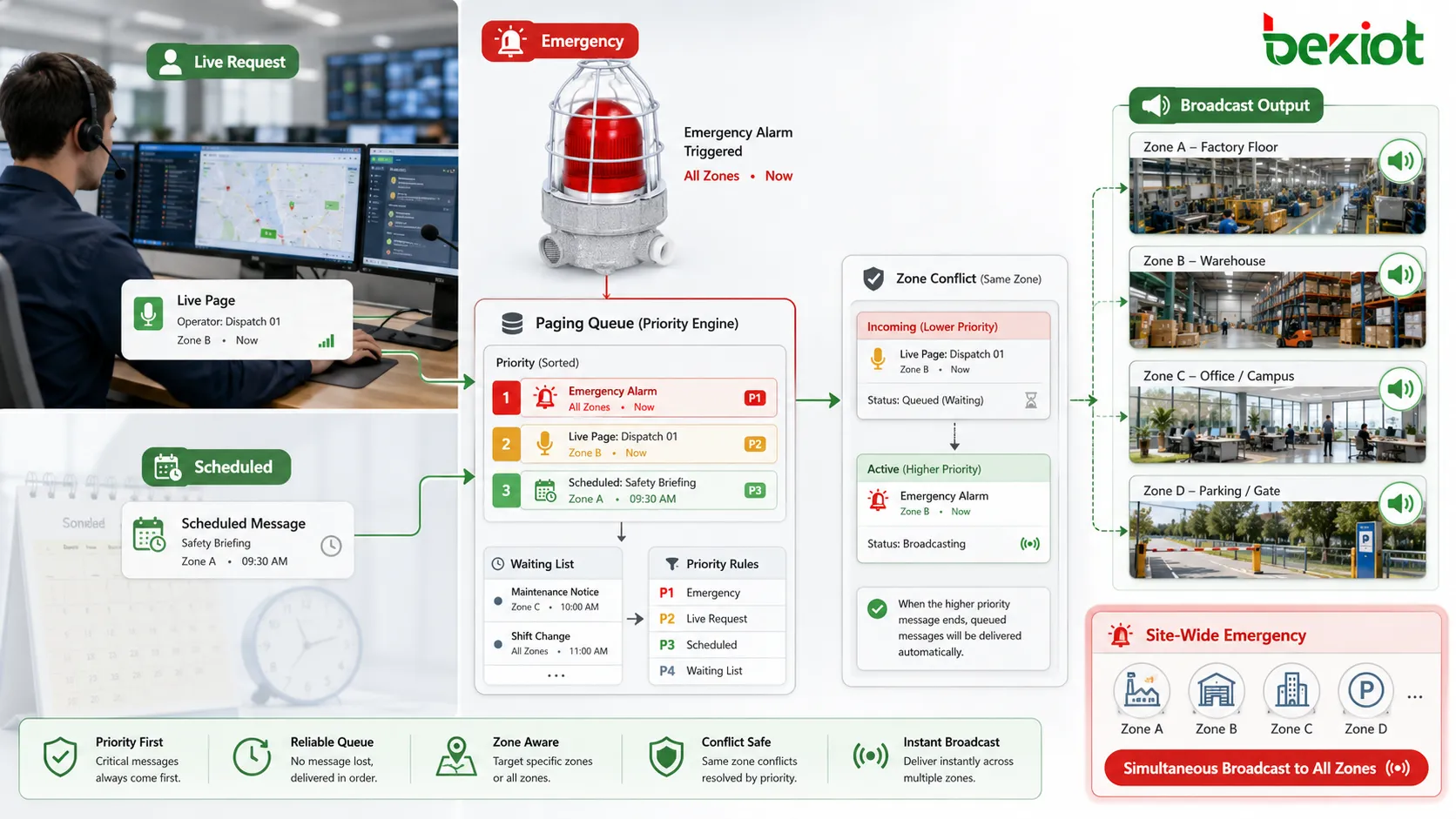
A paging queue provides an organized waiting and decision layer. When a paging request enters the system, it is not always played immediately. The system first checks whether the requested zone is free, whether another message is already playing, whether the new request has higher priority, whether the user has permission, whether the destination devices are online, and whether the message conflicts with other tasks. The queue helps manage this decision process.
This makes paging more predictable. Operators can understand why a routine announcement is waiting, why an emergency message interrupts another message, or why a scheduled announcement was skipped. Without a queue, paging behavior may appear random. With a queue, the system follows defined rules and produces records that administrators can review.
The queue is especially important in systems that combine live paging and automation. A human operator may expect immediate control, while the system may also be running scheduled messages, event-triggered alerts, alarm-linked announcements, and playback retries. The queue prevents these functions from colliding in an uncontrolled way.
How a paging request enters the queue
A paging request can come from many sources. It may be started by an operator console, SIP phone, microphone station, web platform, mobile client, intercom terminal, dispatch desk, schedule engine, alarm input, access control event, sensor platform, or emergency button. Each source sends a request that includes basic information about what should be broadcast and where it should go.
The request usually includes the paging source, target zone or group, audio type, priority level, requested start time, message duration, user identity, and optional event association. A live paging request may include a microphone stream. A scheduled request may include a stored audio file. An alarm request may include a predefined emergency message. An intercom-linked request may include a call event or location identity.
When the request arrives, the system checks its validity. The user or source must have permission to page the selected group. The message file must exist if playback uses a stored file. The destination zone must be valid. The system may also check whether the source device is registered, whether the network path is available, and whether the zone is currently locked by another high-priority event.
If the request is valid and can play immediately, the queue may send it directly to execution. If it cannot play immediately, it may remain in the waiting list. If it is invalid, the system may reject it and generate a log. This distinction is important because a rejected task is different from a waiting task. Waiting means it may still play later; rejection means it will not proceed unless the request is corrected or resubmitted.
The queue decides order through priority and time
The most basic ordering factor is time. A task that enters first may play first if all tasks have the same priority and target different resources are not available. This simple first-in-first-out behavior is easy to understand, but it is not enough for dispatch and emergency systems. In real use, the importance of the message matters more than arrival order.
Priority is therefore the core rule in many paging queues. Emergency warnings, evacuation instructions, fire alarm broadcasts, security alerts, and control room commands may have higher priority than routine reminders, background audio, or low-level service announcements. If a high-priority request enters the queue, it may move ahead of lower-priority tasks or interrupt them if they are already playing.
The queue may also consider source authority. A control room commander may have higher authority than a local operator. A fire alarm trigger may have higher authority than a schedule engine. A security dispatch console may have higher priority for security zones than a general reception desk. These rules prevent low-authority sources from blocking critical communication.
Destination conflict is another factor. If two messages target different zones, they may be able to play at the same time. If they target the same zone, the queue must decide which one has the right to use that zone. A site-wide emergency message may also occupy all zones, causing lower-priority local tasks to wait, pause, or cancel.
The queue may also apply time limits. A request may remain valid only for a certain period. For example, a short loading dock notice may not be useful if delayed for ten minutes. An emergency warning, on the other hand, may remain urgent until cleared. Expiration rules prevent outdated messages from playing after their meaning has passed.
Queue status shows what is happening inside the system
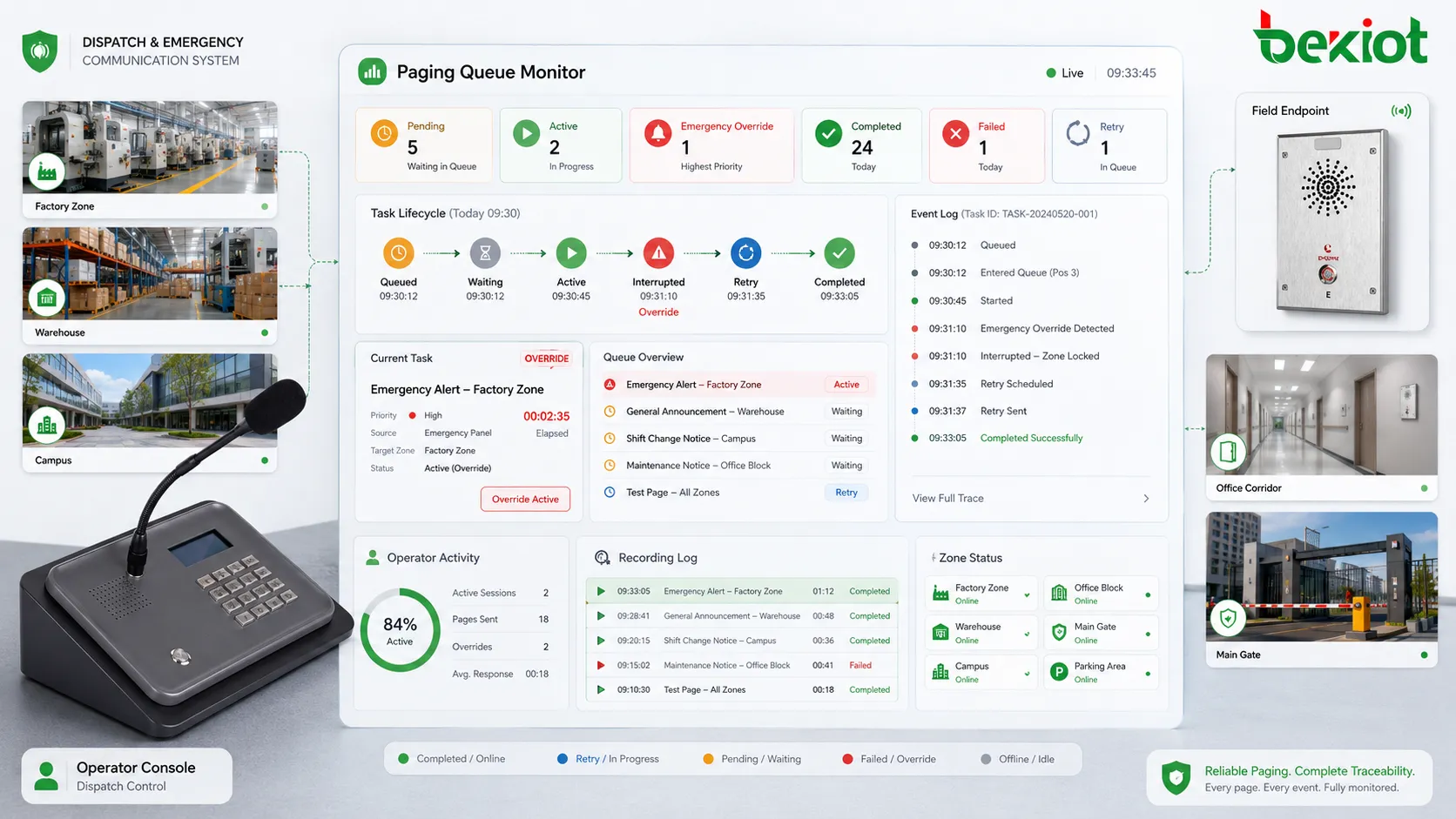
A paging queue is not only an invisible technical process. In a well-designed system, operators and administrators should be able to see queue status. This helps them understand whether a message is waiting, playing, interrupted, completed, failed, expired, or canceled. Queue visibility is important for dispatch environments where timing and communication accountability matter.
Common status labels may include pending, ready, playing, paused, interrupted, skipped, completed, failed, retried, canceled, or expired. The exact wording depends on the system. The important point is that each task should have a clear lifecycle. A message should not simply disappear without explanation.
For operators, visible queue status reduces uncertainty. If a scheduled announcement is waiting because an emergency message is active, the operator can see why. If a live page fails because the destination zone is unavailable, the operator can take another action. If a task is delayed by a higher-priority page, the system can show that conflict instead of leaving the user guessing.
For administrators, queue records support troubleshooting. If a user reports that an announcement did not play, the queue log can show whether the request entered the system, whether it was accepted, whether it waited, whether it was interrupted, whether devices were offline, or whether it expired. This makes fault analysis more accurate.
Main use in preventing audio conflicts
One of the most important uses of a paging queue is conflict prevention. Without queue control, two audio tasks may try to play in the same zone at the same time. This can create overlapping speech, unclear messages, distorted sound, or confusing instructions. In emergency communication, such conflicts can be dangerous.
The queue prevents conflict by controlling access to each zone or audio resource. If Zone A is already playing a routine announcement and a higher-priority emergency message arrives, the system can interrupt the routine message and play the emergency warning. If a lower-priority message arrives while a critical message is playing, the system can place it in waiting status or skip it.
Conflict prevention also applies to shared amplifiers, paging channels, multicast streams, SIP sessions, speaker circuits, or intercom endpoints. Even if two messages target different logical groups, they may still compete for the same physical or network resource. The queue helps the system avoid resource collisions.
In large systems, conflict rules should be carefully defined. If rules are too simple, urgent messages may be delayed. If rules are too aggressive, routine messages may be canceled unnecessarily. The best queue design matches the site’s real communication hierarchy.
Main use in emergency override
Emergency override is one of the clearest uses of a paging queue. When an emergency request enters the system, it should not wait behind routine tasks. The queue must recognize the emergency priority and move the task to the front or immediately take control of the required zones.
Emergency queue behavior may include stopping background music, interrupting scheduled announcements, pausing low-priority paging, locking selected zones, triggering warning tones, playing predefined emergency audio, and preventing unauthorized lower-priority messages from entering the same zone until the emergency state is cleared.
This function is valuable because emergency communication is time-sensitive. A fire evacuation message, hazardous gas warning, security lockdown instruction, severe weather alert, or equipment danger notice may lose value if delayed. The queue ensures that emergency messages are not treated like ordinary announcements.
Emergency queue logic should also be predictable. Operators should know whether a lower-priority message will resume after an emergency broadcast, whether it will be canceled, or whether it must be restarted manually. Different sites may choose different rules, but the behavior should be documented and tested.
In safety-related deployments, emergency queue behavior should be verified through drills. The team should test what happens when emergency paging occurs during scheduled playback, live paging, background music, and another high-priority event. The queue should behave according to the emergency response plan.
Main use in scheduled message management
Paging queues are also used to manage scheduled announcements. A schedule engine may create several playback tasks during the day: shift reminders, class bells, safety prompts, visitor notices, cleaning reminders, closing announcements, or service guidance messages. These tasks enter the queue at their planned times.
If the target zone is free and no higher-priority event is active, the scheduled message can play immediately. If the zone is busy, the queue decides whether to delay, skip, pause, or cancel the message. This prevents scheduled messages from interrupting more important communication.
Some scheduled messages remain useful after a short delay. A safety reminder may still make sense if played one minute later. Other messages may be time-critical. A class bell or transport notice may become meaningless if delayed too long. The queue can use expiration rules to decide whether delayed scheduled tasks should still play.
Scheduled queue management is especially useful in sites with many recurring messages. Without queue control, several scheduled tasks may overlap at the top of the hour. The system needs a way to sequence them, separate zones, or resolve conflicts. The queue provides this control layer.
Main use in multi-operator dispatch
In dispatch systems, more than one operator may have paging authority. A security desk, control room, maintenance center, reception desk, emergency commander, and local supervisor may all initiate paging. The queue helps manage these simultaneous human requests.
When multiple operators page different zones, the system may allow simultaneous playback. When they page the same zone, the queue uses priority, authority, or timing rules to decide what happens. A higher-priority dispatcher may override a local user. Two routine users may be handled in arrival order. A blocked user may receive a message explaining that the zone is busy.
This improves operational fairness and clarity. Operators know that their requests are being processed according to rules instead of random system behavior. The queue can also prevent repeated button pressing because users can see that a task is waiting rather than failed.
Multi-operator dispatch also requires accountability. The queue log should show which user initiated each task, which zone was selected, and what happened. This helps supervisors review communication actions and resolve disputes about who broadcast which message.
Main use in zone locking and resource control
Zone locking is a related queue function. When a high-priority page is playing in a zone, the system may lock that zone so that lower-priority tasks cannot enter. This prevents interference and protects important messages. Zone locking is especially useful for emergency broadcasts, evacuation messages, or command announcements.
Resource control goes beyond zones. Some systems have limited amplifier channels, audio streams, network bandwidth, SIP sessions, or processing capacity. The queue ensures that the system does not start more simultaneous tasks than it can handle. If resources are full, tasks wait or fail according to policy.
Resource control helps prevent performance problems. Without it, too many simultaneous pages may overload the platform, create audio dropouts, delay packet delivery, or cause device registration problems. The queue acts as a traffic controller for audio tasks.
This function is especially important in large IP paging systems, multi-building systems, transport facilities, campuses, and industrial sites with many zones. The larger the system, the more important it becomes to control when and how audio tasks use shared resources.
Main use in retry and failure handling
Paging requests may fail for many reasons. A device may be offline. A network path may be blocked. A speaker zone may be unavailable. A scheduled file may be missing. A SIP endpoint may not answer. An amplifier may report a fault. A higher-priority event may interrupt playback. The queue can help manage these failure conditions.
Retry logic may be applied to certain tasks. If a routine scheduled message fails, the system may retry once after a short delay. If an emergency message fails in one zone, the system may attempt an alternative route, notify the operator, or escalate to another group depending on design. Not every failure should be retried automatically, but some should not be silently ignored.
Failure handling should be tied to priority. A failed low-priority routine announcement may only require a log. A failed emergency broadcast may require immediate alarm, operator notification, and maintenance escalation. The queue helps classify the failed task and trigger the next action.
Retries should avoid creating repeated noise. If a device remains offline, continuous retry may overload the system or annoy users in zones that are partially working. Retry count, interval, expiration, and escalation should be controlled.
Main use in recording and event traceability
Paging queues support recording and event traceability because each task has a lifecycle. The system can record when the task entered the queue, when it started, whether it waited, whether it was interrupted, when it ended, and what result occurred. This creates a clearer record than a simple audio file alone.
For dispatch and emergency systems, queue records are valuable during incident review. They can show whether an emergency message was delayed by another task, whether it properly preempted lower-priority audio, whether the correct zone was locked, whether a scheduled message was skipped, and whether an operator retried a failed page.
Queue logs also help connect paging with alarm records, video records, intercom calls, and dispatch tickets. When an incident timeline is reconstructed, the queue record can show the exact communication sequence. This helps determine whether the system and operators acted according to procedure.
Traceability also supports training. Supervisors can review how operators used paging during busy periods, whether they selected appropriate priorities, and whether queue conflicts occurred frequently. Repeated conflicts may suggest that schedules, permissions, or group design need adjustment.
Main use in protecting listener attention
A paging queue also protects listener attention. This may seem less technical, but it is important. If too many announcements play too closely together, listeners may become irritated or stop paying attention. If routine messages interrupt each other, people may not understand any of them. If emergency instructions are mixed with low-value notices, the authority of the system is weakened.
The queue can space messages, delay low-priority tasks, suppress repeated announcements, or prevent overlapping audio. It helps create a cleaner listening experience. In hospitals, offices, schools, stations, factories, and public buildings, this can improve comfort and message effectiveness.
Listener attention is a limited resource. A paging system should not treat every message as equally important. The queue helps enforce that discipline by making lower-priority tasks wait while more important communication is handled first.
Good queue design therefore improves both safety and daily user experience. People are more likely to respond to paging when the system is relevant, orderly, and not constantly noisy.
Application in industrial production
In industrial production, paging queues are used to manage announcements from control rooms, supervisors, maintenance teams, scheduled shift reminders, alarm systems, and emergency triggers. Production sites often have several zones operating at the same time, and many messages may compete during busy periods.
A queue can ensure that a safety warning overrides a routine shift reminder. It can delay a maintenance notice until a live emergency page is complete. It can prevent two supervisors from paging the same production line at the same time. It can record whether a loading instruction waited behind a higher-priority event.
Industrial sites also benefit from retry and failure handling. If a workshop speaker zone is offline, the queue can log the failed task and alert maintenance. If a scheduled message cannot play because the zone is locked by emergency paging, the system can skip or reschedule it according to policy.
In production environments, queue design should reflect process importance. Safety-related pages should have higher priority than routine operational notices. Production dispatch may have higher priority than background music. Maintenance reminders may have expiration times because they lose value if delayed too long.
Application in emergency command
Emergency command systems use paging queues to protect urgent communication. During an incident, multiple actions may happen at once: alarms trigger, operators speak, scheduled messages run, field teams call in, and public address instructions are issued. The queue ensures that emergency messages are processed first.
For evacuation, the queue can give the evacuation message the highest priority and lock affected zones. It can interrupt ordinary announcements and prevent lower-priority pages from interfering. It can also record the timeline of each emergency paging action for later review.
In command centers, queue visibility helps operators understand system state. They can see whether an emergency page is active, which zones are occupied, whether follow-up messages are waiting, and whether any task failed. This visibility supports better decision-making during stress.
After the incident, queue records help review whether communication was timely and correct. If a message was delayed, the log may show why. If a scheduled message was skipped, the log may show that an emergency override was active. This supports accountability and improvement.
Application in public address and transport systems
Transport hubs and public address systems often handle many announcements: scheduled passenger notices, live operator updates, emergency alerts, platform changes, service reminders, crowd guidance, and security messages. A paging queue helps manage this high announcement volume.
In a station, a scheduled platform notice may be ready to play while an operator needs to issue a live delay update. If a safety warning is triggered, it should override both. The queue determines the order and avoids overlapping announcements that passengers cannot understand.
In airports, metro systems, bus terminals, ports, parking facilities, and tunnels, messages may target different zones. Some can play simultaneously in different areas, while others require shared resources. Queue management helps keep public communication orderly and intelligible.
Public address systems also need message discipline. Too many announcements can create noise fatigue. The queue can delay, suppress, or sequence messages so that listeners receive clearer information instead of a constant stream of competing audio.
Application in campuses, hospitals, and commercial buildings
Campuses use paging queues to manage class bells, safety drills, live announcements, emergency alerts, event notices, and building-specific messages. The queue can prevent a routine bell from blocking an emergency lockdown announcement or severe weather alert.
Hospitals require careful queue design because many areas need quiet operation. A routine public notice should not interrupt a critical emergency message. Staff call announcements, emergency alerts, and scheduled reminders may need different priorities depending on zone and time of day.
Commercial buildings use queues to manage opening notices, closing announcements, parking guidance, customer service messages, security alerts, and facility management broadcasts. The queue helps avoid overlapping messages in customer-facing areas and supports a more professional listening environment.
In all these settings, queue design should consider both urgency and user comfort. The system should deliver important messages quickly while avoiding unnecessary disturbance.
Key characteristics of a strong paging queue
A strong paging queue should have clear priority logic. Emergency messages, high-risk alarms, and command instructions should be processed ahead of routine messages. The priority model should be easy to understand and consistent with site procedures.
It should also support zone awareness. A task affecting one zone should not unnecessarily block unrelated zones. If two messages target different zones and system resources allow it, they may run at the same time. If they target the same zone, the queue should resolve the conflict.
Visibility is another key characteristic. Operators should be able to see pending, active, interrupted, completed, failed, and canceled tasks. Administrators should be able to review queue logs. A hidden queue is difficult to trust when communication timing matters.
Failure handling is also important. The queue should not silently drop important tasks. It should log failures, alert operators when needed, and apply retry or escalation rules according to priority.
Finally, a strong queue should remain configurable. Different sites have different priorities. A factory, hospital, campus, transport station, and emergency command center should not be forced into the same queue behavior. The system should allow rules that match real operation.
Common design mistakes
One common mistake is treating every paging task equally. If a routine reminder and an emergency warning share the same priority, the system may delay critical communication. Priority levels should reflect real risk and responsibility.
Another mistake is using simple first-in-first-out behavior for all situations. Arrival order is not enough in dispatch and emergency systems. Importance, source authority, zone conflict, expiration, and event type must also be considered.
A third mistake is hiding queue status from operators. If users cannot see whether a message is waiting or blocked, they may repeat requests, create more conflicts, or assume the system has failed. Queue visibility improves confidence.
Poor expiration rules are also common. A message that was useful at 10:00 may be meaningless at 10:10. Delayed routine messages should not always play late. Expiration rules help prevent outdated announcements.
Finally, some systems do not log queue behavior clearly. Without logs, administrators cannot explain why a message was skipped, interrupted, delayed, or failed. This weakens troubleshooting and incident review.
How to evaluate whether a paging queue is effective
An effective paging queue should make system behavior predictable. Operators should understand which messages play immediately, which messages wait, which messages can interrupt others, and which messages expire. If behavior surprises users often, the queue rules may be unclear or poorly designed.
The queue should protect urgent communication. Emergency announcements should not wait behind routine tasks. Safety messages should override low-priority audio. The queue should support the site’s emergency procedure rather than only process tasks in order.
It should also reduce audio conflict. Listeners should not hear overlapping announcements in the same zone. Scheduled messages, live paging, and alarm broadcasts should be sequenced or prioritized so that each message remains understandable.
The queue should provide useful records. Logs should show request time, source, destination, priority, status, interruption, failure, retry, and completion. These records support maintenance, training, and incident review.
Most importantly, the queue should fit the site’s real operation. A public transport system, industrial plant, hospital, campus, warehouse, and emergency command center all have different communication priorities. The queue is effective when it supports that operational reality.
Final Notes
A paging queue is the control mechanism that organizes multiple paging tasks before and during broadcast. It manages live announcements, scheduled messages, emergency triggers, retry tasks, intercom-linked pages, and zone-based audio requests according to priority, time, source authority, destination conflict, system resources, and task status.
It is mainly used for preventing audio conflict, protecting emergency override, managing scheduled messages, supporting multi-operator dispatch, controlling zone access, handling failures and retries, preserving event traceability, and improving listener experience. In complex paging systems, the queue is what keeps communication orderly when many requests compete for attention.
The value of a paging queue is strongest in industrial production, emergency command, public address, transport facilities, hospitals, campuses, commercial buildings, and large facility management systems. When the queue is designed with clear priority, zone awareness, visibility, failure handling, and reliable logs, it becomes a key foundation for safe, predictable, and manageable paging communication.
FAQ
Is a paging queue the same as a paging group?
No. A paging group defines who or which zones receive a message. A paging queue controls the order, priority, status, and conflict handling of paging tasks before or during playback.
Why does a paging system need a queue?
A queue is needed when multiple paging requests may occur at the same time. It prevents audio overlap, protects emergency messages, manages scheduled playback, and helps operators understand task status.
Can emergency messages jump ahead in the queue?
Yes, if priority rules are configured correctly. Emergency messages can move ahead of routine tasks, interrupt lower-priority audio, or lock selected zones until the emergency broadcast is complete.
What happens to delayed scheduled messages?
It depends on configuration. A delayed message may wait, play later, be skipped, expire, or be canceled if a higher-priority task occupies the zone. The system should log the reason clearly.
What information should a paging queue log include?
Useful logs include request time, source, user, target group, priority, status, start time, end time, interruption reason, failure cause, retry count, completion result, and related alarm or dispatch event.







