


In paging, public address, dispatch, and emergency communication systems, many announcements do not need to be spoken manually every time. A factory may need shift reminders at fixed hours, a school may need class bells, a transport station may need routine passenger guidance, a hospital may need controlled service notices, and a warehouse may need repeated loading instructions during operating periods. Page scheduling is used to turn these repeatable communication tasks into planned, automatic, and manageable broadcast actions.
Page scheduling does not replace real-time paging. Instead, it works beside live paging, emergency override, zone broadcast, intercom response, and operator dispatch. Its main purpose is to make routine announcements more consistent, reduce manual workload, avoid missed notices, and keep communication aligned with time, zone, priority, and site workflow. When configured properly, it becomes an important part of daily operation rather than a simple timer function.
From manual reminders to planned communication
In many facilities, repeated announcements are part of everyday operation. Staff may need reminders before a shift change, visitors may need closing notices, students may need class signals, passengers may need regular boarding guidance, workers may need safety prompts, and maintenance teams may need timed equipment checks. If every message depends on a person remembering to speak at the right time, the result can be inconsistent.
Page scheduling solves this problem by allowing administrators to define when a message should play, where it should play, how often it should repeat, which audio source should be used, and what priority it should have. The system then executes the broadcast automatically according to the schedule. This creates a controlled communication routine that is less dependent on memory and less affected by operator workload.
The concept is similar to a calendar for audio communication, but it is more specialized than a normal calendar reminder. It must understand zones, paging groups, speakers, intercom endpoints, message libraries, priority rules, holidays, shift patterns, emergency interruption, playback logs, and user permissions. A scheduled page is not only a time event; it is a broadcast action with a destination and an operating rule.
This is why page scheduling is widely used in environments where order, timing, and repeatability matter. It helps transform routine voice communication from a manual habit into a structured system function. The better the schedule matches the real workflow, the more useful the system becomes.
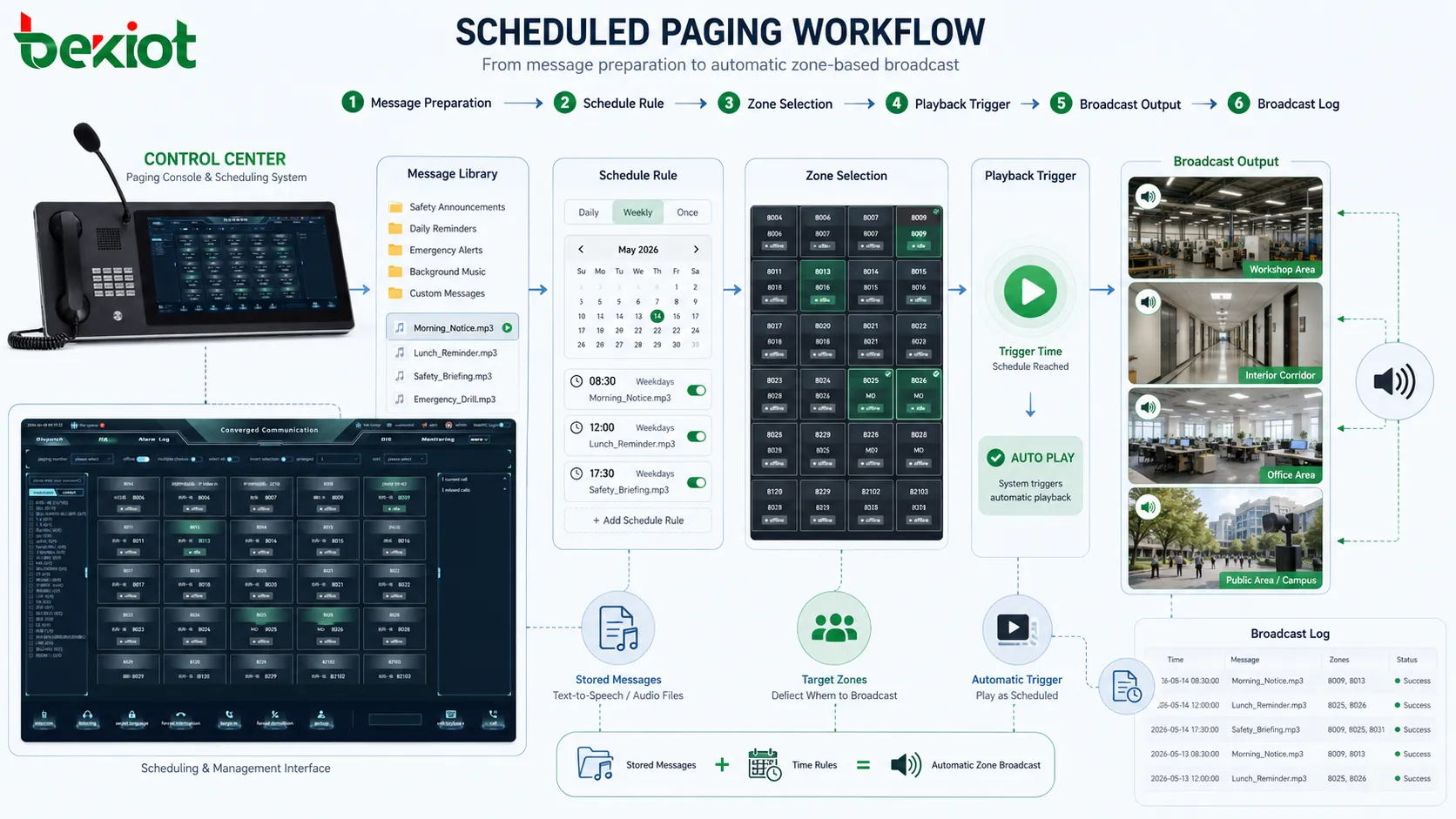
How a scheduled page is created
A scheduled page usually begins with message preparation. The message may be a pre-recorded audio file, a text-to-speech announcement, a chime, a bell signal, a warning tone, a combined audio sequence, or a stored voice prompt. The administrator selects or creates the message according to the purpose of the schedule.
The next step is destination selection. A scheduled announcement may go to one speaker, one room, one floor, one workshop, one building, several paging zones, outdoor areas, parking areas, service counters, production lines, or all areas. The destination must be defined carefully because scheduled messages repeat over time. A wrong zone selection can disturb unrelated areas every day.
After the message and destination are selected, the time rule is configured. This may be a single time, daily schedule, weekly schedule, monthly schedule, shift-based schedule, holiday schedule, seasonal schedule, or event-based schedule. Some systems also support multiple time periods in one rule, such as morning, noon, evening, and night announcements.
The system then stores the schedule and waits for the trigger time. When the scheduled time arrives, it checks whether the rule is active, whether the destination is available, whether a higher-priority event is occurring, and whether playback should start. If conditions are met, the system sends the audio to the selected zones.
After playback, the system may generate a log. A useful log should show the schedule name, message name, start time, end time, destination zones, playback result, interruption status, operator or administrator, and any related fault. This helps maintenance teams and managers verify whether the scheduled communication actually occurred.
Message libraries make automation practical
Page scheduling depends heavily on message libraries. A message library stores reusable audio content such as safety reminders, shift notices, visitor guidance, class bells, closing announcements, cleaning notices, equipment prompts, evacuation drills, or operational instructions. Instead of recording the same content repeatedly, administrators can prepare approved files and reuse them in different schedules.
A good message library improves consistency. The same announcement is played with the same wording, tone, and audio quality every time. This is useful when the message must follow an approved procedure, such as safety instructions, public service guidance, or emergency drill announcements. It reduces the chance that different operators will use different wording for the same situation.
Message libraries also simplify schedule maintenance. If a factory changes a shift reminder, the administrator can update one audio file or rule rather than retraining every operator. If a campus changes a class bell sequence, the schedule can be adjusted centrally. If a public facility needs a new closing notice, the message can be added to the library and assigned to the correct zones.
Text-to-speech can extend this function. Instead of recording every message manually, the system may generate voice from text. This is useful for dynamic information such as room names, platform numbers, dates, queue instructions, equipment IDs, or temporary notices. However, text-to-speech should be checked for pronunciation, clarity, language support, and suitability for public or emergency use.
Message naming should be clear. Labels such as “Audio 01” or “Message B” become confusing over time. Better names include purpose, area, language, and version, such as “Warehouse Shift Start Reminder,” “Campus Evening Closing Notice,” “Platform Safety Reminder English,” or “Fire Drill Instruction Version 2.” Clear naming reduces wrong assignment.
Zone-based scheduling avoids unnecessary disturbance
One of the strongest characteristics of page scheduling is zone control. A scheduled announcement should not always be sent everywhere. A notice for one workshop should not disturb the office building. A class bell should not play in administrative areas unless required. A warehouse loading reminder should not interrupt a hospital waiting area. Zone-based scheduling makes the system more precise.
Zones may be defined by physical layout, department, function, safety area, public area, or operational responsibility. A facility may create zones such as lobby, production line, warehouse, parking area, outdoor gate, service counter, meeting area, platform, corridor, ward, classroom block, or equipment room. Scheduled rules can then target only the areas that need the message.
This reduces message fatigue. If people hear too many irrelevant announcements, they begin to ignore the system. Over time, even important messages may lose attention. Targeted scheduling keeps routine messages local and preserves attention for critical announcements.
Zone-based scheduling also supports different operating rhythms. A production workshop may run on shift schedules, while offices follow business hours. A hospital ward may require quiet periods, while public corridors may allow regular guidance announcements. A transport station may schedule different messages for different platforms. A single system can support these different rhythms if zones and schedules are planned correctly.
The challenge is accuracy. Zones should be tested before schedules are released. If the wrong speaker is included in a recurring schedule, the mistake will repeat automatically. Commissioning should include both target-zone verification and wrong-zone exclusion.
Time rules are more than fixed clock points
Page scheduling often starts with fixed time points, but mature systems usually support more complex time logic. A simple rule may play a message at 08:00 every day. A more advanced rule may play only on weekdays, skip holidays, follow shift calendars, repeat every hour during a time window, or use different schedules for different seasons.
Daily schedules are useful for routine operation. They can play opening notices, closing notices, shift start messages, safety reminders, cleaning prompts, or equipment inspection reminders. Weekly schedules are useful when certain announcements happen only on specific days. Monthly schedules may support inspection reminders, maintenance notices, or public service messages.
Shift-based scheduling is important in industrial sites. A factory may have day shift, night shift, rotating shift, and weekend shift. Each shift may need different start, break, meal, handover, and safety messages. If the system supports shift calendars, announcements can follow the real production rhythm rather than a generic office timetable.
Holiday and exception rules are also important. A school bell should not play during holidays. An office closing notice may change before a public holiday. A factory may use a special maintenance shutdown schedule. Without exception rules, administrators may need to manually enable and disable schedules, which increases the risk of mistakes.
Time synchronization matters. If the paging server time is wrong, scheduled messages may play early, late, or on the wrong day. Systems used across multiple buildings or sites should use reliable time synchronization so that schedules remain consistent.
Priority handling protects urgent messages
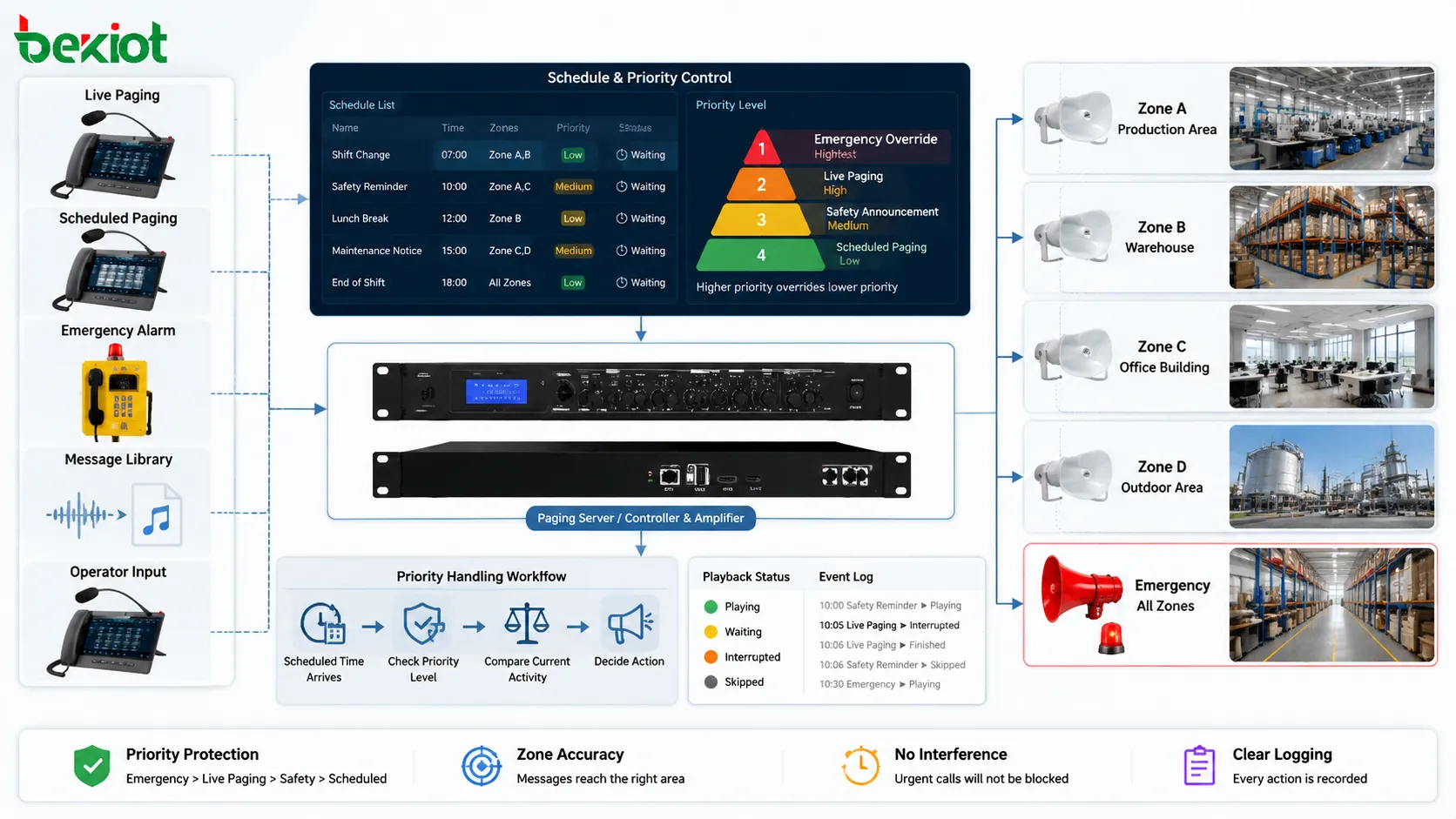
Scheduled paging must not block urgent communication. In dispatch, industrial, public address, and emergency systems, live paging, emergency override, fire alarm announcements, security warnings, or control room instructions may be more important than routine scheduled playback. Priority handling ensures that the right message takes control when conflicts occur.
A scheduled message usually has a defined priority level. Routine reminders may have low priority. Safety prompts may have medium priority. Emergency drill messages may have higher priority. True emergency override should normally take the highest priority. The system uses these levels to decide whether a scheduled page can play, wait, pause, stop, or be interrupted.
For example, if background music is playing and a scheduled safety reminder starts, the music may fade or stop. If the scheduled reminder is playing and an emergency broadcast begins, the emergency message should override it. If a live operator pages the same zone at higher priority, the scheduled message may be paused or canceled. These rules should be predictable.
Priority handling prevents confusion. If two messages overlap, listeners may understand neither. If a routine announcement blocks an emergency message, the risk is serious. If scheduled playback always interrupts operators, users may lose trust in the system. Clear priority design keeps scheduled communication useful without weakening real-time control.
The system should log priority events. If a scheduled message was skipped because an emergency announcement was active, the log should show that. If a scheduled message was interrupted, the log should record whether it resumed. This helps administrators understand why a message did or did not play.
Recurring automation reduces manual workload
One of the most obvious characteristics of page scheduling is automation. Repeated announcements no longer depend on an operator watching the clock. This reduces workload in control rooms, reception desks, security centers, schools, factories, warehouses, hospitals, transport stations, and commercial buildings.
Automation also reduces missed announcements. A busy operator may forget a routine reminder during an incident or shift handover. A scheduled rule does not forget as long as the system is active and healthy. This is especially useful for messages that must happen at the same time every day.
However, automation should not create blind operation. Administrators should still review whether schedules remain relevant. A message that was useful during one phase of operation may become unnecessary later. If outdated schedules continue to play, users may become annoyed or confused.
Good page scheduling includes lifecycle management. Each schedule should have a purpose, owner, start date, review date, and possibly an end date. Temporary schedules should be removed after events, construction work, emergency drills, or seasonal operations. Without cleanup, the system can accumulate old rules.
Automation is most effective when it supports real work rather than replacing judgment. Routine messages can run automatically, while operators remain available for live instructions and emergencies. The balance between automation and manual control is a key characteristic of a well-designed scheduled paging system.
Consistency improves communication quality
Scheduled paging improves consistency because the same message can be delivered at the right time, in the same wording, to the same zone, and with the same audio level. This is valuable when communication affects safety, public service, production order, or customer experience.
In safety communication, consistent wording helps avoid misunderstanding. If a daily safety reminder is spoken differently by different operators, some versions may be too vague or too long. A prepared scheduled message can use approved wording and avoid unnecessary variation.
In public facilities, consistency supports service quality. Passengers, visitors, patients, students, or tenants receive clear and repeated guidance. If messages change randomly, people may become confused. Scheduled audio makes the facility sound more organized.
In industrial operation, consistency helps enforce routine. Shift reminders, inspection prompts, cleaning notices, and equipment check messages can become part of the work rhythm. Workers learn to associate certain signals or announcements with specific actions.
Consistency should not mean excessive repetition. If a message plays too often, people may ignore it. Schedule design should consider frequency, length, importance, zone relevance, and listening comfort. The goal is regularity, not noise.
Flexible rules support different site rhythms
Different sites have different time structures. A factory may run around the clock. A school follows class periods. A hospital operates continuously but may require quiet hours. A transport station changes by timetable and passenger flow. A commercial building may follow opening and closing hours. Page scheduling must be flexible enough to reflect these rhythms.
Flexible rules may include multiple daily time points, repeated intervals, effective dates, weekday selection, holiday exceptions, seasonal schedules, temporary event rules, shift calendars, manual enable or disable, and priority-based skipping. These options help administrators create schedules that match real operation instead of forcing all sites into one pattern.
For example, a warehouse may schedule loading reminders every 30 minutes during peak dispatch hours but not during night storage hours. A campus may use different bell schedules for weekdays and exam periods. A hospital may restrict routine announcements at night while keeping emergency paging active. A transport terminal may adjust announcements during holiday passenger peaks.
Flexibility should be controlled through clear management. Too many overlapping rules can become hard to understand. Administrators should avoid creating several schedules that affect the same zone at nearly the same time unless the priority and sequence are clear. Complex schedules should be documented.
A flexible system should also allow quick temporary adjustment. During maintenance, an event, a weather incident, or a service disruption, an operator may need to pause, modify, or override scheduled pages. The interface should support this without forcing users to delete and recreate rules.
Scheduling and live paging must coexist
Page scheduling is strongest when it coexists smoothly with live paging. Scheduled messages handle predictable communication. Live paging handles changing conditions. Both are necessary in real facilities. If the system favors only automation, it may respond poorly to unexpected events. If the system relies only on live operation, routine messages may become inconsistent.
The coexistence depends on priority and interface design. Operators should see whether a scheduled message is currently playing, which zone it affects, and whether it can be paused or overridden. If a live announcement is needed, the operator should not be blocked by a low-priority scheduled task.
The system should also prevent accidental conflict. If an operator starts a live page seconds before a scheduled message, the system should decide whether to delay the schedule, interrupt it, or cancel it. The behavior should be known in advance. Unexpected overlap can create poor audio and operational confusion.
In emergency systems, live paging and emergency override must always have clear authority over routine schedules. A scheduled lunch reminder should never interfere with an evacuation message. A background music schedule should never delay a fire alarm broadcast. These rules should be tested during commissioning.
Good coexistence makes the whole communication system more reliable. Routine messages become automatic, while human operators keep control over exceptions, incidents, and urgent instructions.
Event-based scheduling adds operational intelligence
Some page scheduling is based not only on time but also on events. An event-based schedule may play a message when a door opens, a sensor triggers, a train arrives, a queue reaches a threshold, a production line changes state, a visitor presses a call button, or an alarm enters a specific status. This creates a more intelligent communication response.
Event-based paging is useful when fixed time is not enough. A loading dock announcement may depend on vehicle arrival. A station announcement may depend on platform status. A factory notice may depend on machine operation. A building message may depend on access control events. The system can connect communication with real operational signals.
Event rules must be designed carefully. If every minor event triggers a message, the site may become noisy. The system should filter events by importance, location, frequency, and response need. Some events may trigger operator notifications instead of public paging. Others may trigger automatic broadcast only after confirmation.
Event-based scheduling can also support escalation. If a message plays once and no response is recorded, the system may repeat the message, page another zone, notify a supervisor, or create a dispatch task. This turns scheduled paging into part of a wider workflow.
The record of event-based scheduling should include the trigger source. If a message played because of a sensor, access control event, or alarm, the log should show that relationship. This helps later review and troubleshooting.
Applications in industrial operation
Industrial facilities use page scheduling for shift changes, production reminders, safety prompts, maintenance notices, cleaning schedules, inspection calls, work permit reminders, and emergency drill announcements. These messages support routine order across workshops, warehouses, utility rooms, control areas, and outdoor yards.
In production environments, scheduled announcements can help maintain work rhythm. A shift-start message can remind workers to check safety equipment. A break reminder can coordinate movement. A maintenance notice can alert a specific area before planned shutdown. A cleaning prompt can support hygiene or process control requirements.
Industrial scheduling should follow real shifts, not only office time. If the site operates 24 hours, messages may need different rules for day shift, night shift, weekends, and holidays. A production line that runs only during certain periods should not receive messages outside its active window.
Noise and environment should also be considered. A scheduled message in a noisy workshop may need a different speaker type, volume, repetition strategy, or visual support compared with an office area. The schedule defines when and where to play; acoustic design determines whether people understand it.
Applications in transport and public facilities
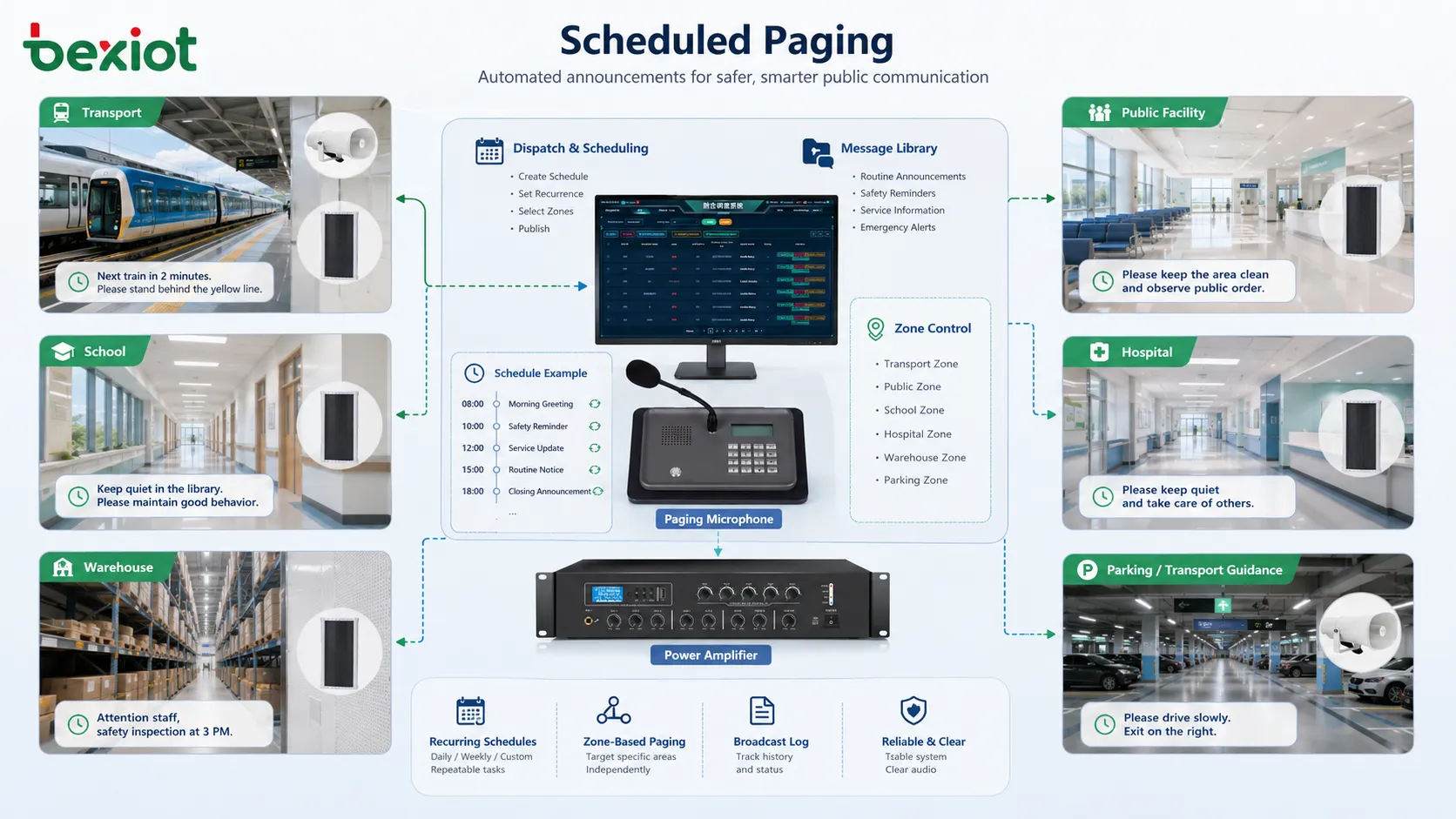
Transport and public facilities use scheduled paging for passenger guidance, platform reminders, safety notices, closing announcements, queue management, parking instructions, service updates, and public order messages. These locations often serve people who are unfamiliar with the site, so repeated guidance can reduce confusion.
Scheduled messages can support predictable events, such as boarding reminders, service interval notices, security reminders, no-smoking announcements, elevator guidance, or facility closing prompts. Live paging can then be used for disruptions, delays, emergencies, or changing conditions.
Public facilities must pay attention to message frequency and clarity. If scheduled announcements are too frequent, visitors may feel disturbed. If they are too vague, they do not help. If they are too quiet or affected by echo, users may not understand them. The schedule should be paired with audio design and message editing.
Transport sites may need multilingual scheduling. Different messages may play in different languages or in a repeated sequence. The system should manage message order and avoid overlap. In international or public environments, translation quality and pronunciation should be reviewed before deployment.
Applications in schools, campuses, and healthcare facilities
Schools and campuses often use page scheduling for bells, class period signals, safety reminders, event notices, dormitory announcements, library closing notices, and emergency drill messages. The system helps maintain time order across buildings and outdoor areas.
Campus scheduling may vary by weekday, exam period, holiday, and special event. A normal teaching day may use one schedule, while sports events, exams, or holiday periods may require different rules. A flexible scheduling function reduces manual adjustment and helps avoid wrong bell times.
Healthcare facilities use scheduled paging more cautiously. Hospitals may need staff reminders, facility operation notices, visitor guidance, and emergency drills, but they also need quiet patient environments. Scheduling should be zone-based so that public areas, staff areas, corridors, and patient zones can be managed differently.
Quiet hours are especially important in healthcare and residential environments. Routine messages may need to be limited during night periods, while emergency paging remains active. The system should allow routine schedules to pause while keeping critical communication available.
In both campuses and healthcare facilities, schedule review is important. Academic calendars, department use, ward layouts, and public service procedures can change. The paging schedule should be updated when the facility changes rather than left as a fixed old rule.
Applications in commercial buildings and warehouses
Commercial buildings use page scheduling for opening notices, closing reminders, visitor guidance, parking instructions, event announcements, safety messages, and background audio control. Shopping centers, hotels, office parks, exhibition halls, and service buildings often need repeated announcements that sound professional and consistent.
In customer-facing spaces, the message should be carefully written and timed. Too many announcements can reduce comfort. Poorly recorded messages can harm the facility image. Page scheduling should support the service atmosphere rather than turn the building into a noisy environment.
Warehouses use scheduled paging for loading reminders, shift notices, safety prompts, equipment checks, truck queue guidance, and zone coordination. In fast-moving logistics environments, scheduled voice prompts can support workflow discipline without requiring every worker to check a screen.
Warehouse schedules should match actual operating peaks. Loading docks may need frequent reminders during dispatch windows. Storage zones may need fewer messages. Outdoor yards may need different volume and speaker types. A good schedule reflects movement patterns and work cycles.
Security and permission control
Page scheduling can affect many people repeatedly, so permission control is necessary. Not every user should be allowed to create, modify, delete, or activate scheduled announcements. A wrong schedule can disturb operations, cause confusion, or interfere with emergency communication.
User roles may include administrator, dispatcher, facility manager, security supervisor, department operator, and viewer. Administrators may configure system rules. Department users may manage local schedules. Security staff may control safety-related schedules. Ordinary users may only view schedules or start approved messages.
Approval workflow may be useful in larger facilities. A user may create a new scheduled message, but a supervisor must approve it before it becomes active. This prevents inappropriate public announcements, wrong zones, excessive repetition, or unapproved wording.
Permission control should also apply to message libraries. If anyone can upload or replace audio files, scheduled messages may change without review. Approved messages should be protected from unauthorized editing. Version control helps ensure that old and new messages can be identified.
Security logs should record schedule changes. If an announcement played unexpectedly, administrators need to know who created the rule, when it was modified, which message was assigned, and which zones were selected. Audit records are important for operational accountability.
Monitoring, logs, and playback confirmation
Scheduling is only useful if playback actually happens. A schedule may be configured correctly, but a speaker may be offline, an amplifier may fail, a network path may be blocked, or a higher-priority event may interrupt the message. Monitoring and logs help confirm what occurred.
A basic log should show schedule name, playback time, selected message, destination zone, duration, status, and result. A more advanced system may also show endpoint status, interruption reason, priority conflict, device fault, or playback confirmation. This helps administrators troubleshoot missed announcements.
Logs are also useful for management review. If a user says a scheduled notice did not play, the log can show whether the system triggered it. If a message disturbed the wrong area, the log can show which zone was selected. If a message was skipped because of emergency override, the log can show the priority conflict.
Monitoring should include system health. If the schedule engine is stopped, server time is wrong, storage is full, network endpoints are offline, or the message file is missing, administrators should receive alerts. Silent scheduling failure can create operational problems.
Playback confirmation should be understood carefully. Some systems can confirm that a command was sent. Others can confirm that an endpoint received or played the audio. These are different levels of evidence. Critical applications may need stronger confirmation and routine field testing.
Common configuration mistakes
One common mistake is creating schedules without clear ownership. If no department owns a schedule, no one knows whether it is still needed. Old announcements may continue playing after the process has changed. Every schedule should have a responsible person or team.
Another mistake is using broad zones for every scheduled message. This may be convenient during setup but creates long-term disturbance. Routine schedules should be targeted. All-zone schedules should be reserved for messages that truly affect the whole site.
Overlapping schedules are also common. Two messages may play at nearly the same time in the same area. If priority rules are unclear, one may interrupt the other or both may create confusion. Administrators should review time conflicts before releasing schedules.
Poor message quality can weaken the system. A schedule may be correct, but the audio may be unclear, too long, too quiet, too loud, or poorly worded. Message files should be reviewed before use, especially in public or safety-related environments.
Finally, some sites forget to test the schedule in the field. A message may play correctly from the software perspective but be inaudible in the actual area. Field listening tests should be part of commissioning, especially for important schedules.
How to evaluate a good page scheduling design
A good page scheduling design should match the site’s real operating rhythm. The system should play the right message at the right time, in the right zone, with the right priority, and with understandable audio. If it only plays messages automatically without considering relevance, it may become noise rather than communication.
The design should be easy to manage. Administrators should be able to create schedules, modify time rules, assign messages, select zones, set priorities, pause temporary schedules, review logs, and remove outdated rules. A scheduling function that is too complicated may lead to configuration errors.
The system should also support exception handling. Holidays, maintenance shutdowns, special events, emergency situations, and temporary operations should not require risky manual workarounds. Flexible enable and disable rules make scheduling safer.
Priority behavior should be predictable. Routine schedules should never block emergency communication. Live operator paging should be able to override or pause low-priority schedules when necessary. The behavior should be documented and tested.
Finally, the schedule should remain maintainable over time. A review process should check whether schedules are still useful, whether zones are still correct, whether message files are current, and whether playback logs show recurring faults. Good page scheduling is not a one-time setup; it is an ongoing communication management function.
Closing Notes
Page scheduling is the planned automation of paging or broadcast messages according to time, zone, priority, event, and operational rules. It is used to manage repeatable announcements such as shift reminders, class bells, safety prompts, public guidance, facility notices, loading instructions, inspection reminders, and scheduled service messages.
Its main characteristics include automatic playback, zone-based delivery, recurring schedules, message library management, priority handling, flexible calendars, event-based triggers, permission control, logs, monitoring, and coexistence with live paging and emergency override. These features make it more advanced than a simple timer or manual announcement habit.
The strongest page scheduling design is practical, controlled, and easy to review. It should reduce manual workload without creating noise, support routine communication without blocking urgent messages, and remain aligned with the real rhythm of the site. When planned carefully, it becomes an important tool for operational order, public guidance, safety reminders, and communication consistency.
FAQ
Is page scheduling the same as live paging?
No. Live paging is spoken or activated manually in real time, while page scheduling plays planned messages automatically according to time, zone, or event rules. They should work together in the same communication system.
What types of messages are suitable for scheduling?
Shift reminders, class bells, opening and closing notices, safety prompts, public guidance, cleaning notices, inspection reminders, maintenance notices, warehouse loading prompts, and routine facility announcements are common examples.
Can scheduled paging be interrupted by emergency messages?
Yes, if priority rules are configured correctly. Emergency broadcasts, alarm-triggered messages, or high-priority live paging should be able to interrupt, pause, or override routine scheduled messages.
Why is zone control important for page scheduling?
Zone control ensures that scheduled messages play only where they are needed. This reduces unnecessary disturbance, improves message relevance, and prevents routine announcements from becoming background noise.
What should be checked during maintenance?
Maintenance should check schedule accuracy, message files, zone assignments, priority behavior, system time, playback logs, device status, speaker output, endpoint connectivity, and whether old or temporary schedules should be removed.







