


In a factory, a warning may need to reach a production area immediately. In a transport station, passengers may need updated guidance within seconds. In a hospital, staff may need to coordinate quickly across departments. In a warehouse, a loading team may need instructions without stopping work to check a screen or phone.
Real-time paging is designed for these situations. It turns voice instructions, alerts, and operational notices into immediate, area-based communication that can reach people through speakers, terminals, intercom points, dispatch consoles, or network-connected paging devices.
When immediate voice delivery becomes necessary
Real-time paging is valuable because many work environments cannot rely only on email, mobile messages, desktop notifications, or scheduled announcements. These channels are useful, but they often depend on the user looking at a screen, carrying a device, opening an application, or checking a message at the right time. Paging works differently. It pushes the message directly into the physical environment where people are working, moving, waiting, or responding.
The most important feature is immediacy. When an operator speaks into a microphone, selects a zone, presses a paging key, or triggers a live announcement from a console, the message can be delivered instantly to the selected area. This makes it suitable for operational instructions, emergency warnings, production coordination, visitor guidance, service reminders, security notices, and temporary workflow adjustments.
Unlike ordinary background audio or scheduled broadcast, live paging is driven by current conditions. It can respond to what is happening now: a gate change, a machine stop, a fire drill, a missing person notice, a queue adjustment, a maintenance warning, a security incident, a weather alert, or a service request. The communication is not prepared hours in advance; it is created at the moment the information is needed.
This is why real-time paging remains important even in highly digital environments. Screens and mobile systems can carry detailed information, but voice broadcast can reach a wider group faster, especially when recipients are not sitting at desks. In many workplaces, people are moving, wearing gloves, operating equipment, assisting visitors, or handling field tasks. A clear voice announcement can cut through this complexity and deliver the instruction directly.
How live paging moves from operator to audience
The working process usually begins with a paging source. This source may be a microphone, dispatch console, IP phone, SIP terminal, intercom station, software client, mobile app, web interface, control panel, or automation trigger. The source converts the operator’s live voice or selected message into an audio stream or paging signal.
The system then determines where the message should go. This may be a single speaker, one paging zone, several zones, a whole building, a floor, a workshop, a station platform, a warehouse area, a campus section, or an emergency broadcast group. Zone selection is one of the core capabilities because not every announcement should be sent everywhere.
After the destination is selected, the system routes the audio through the paging platform, network, amplifier, speaker line, IP speaker, intercom endpoint, or broadcast controller depending on the architecture. In IP-based environments, packets may travel over Ethernet or wireless networks. In traditional audio systems, line-level or amplified audio may be distributed through speaker circuits. Many modern systems combine both approaches.
Finally, the message is played in the target area. In a well-designed system, the audio should arrive quickly, play clearly, and avoid unnecessary delay. The recipient does not need to answer a call or open a device. The message is heard directly in the space where action is required.
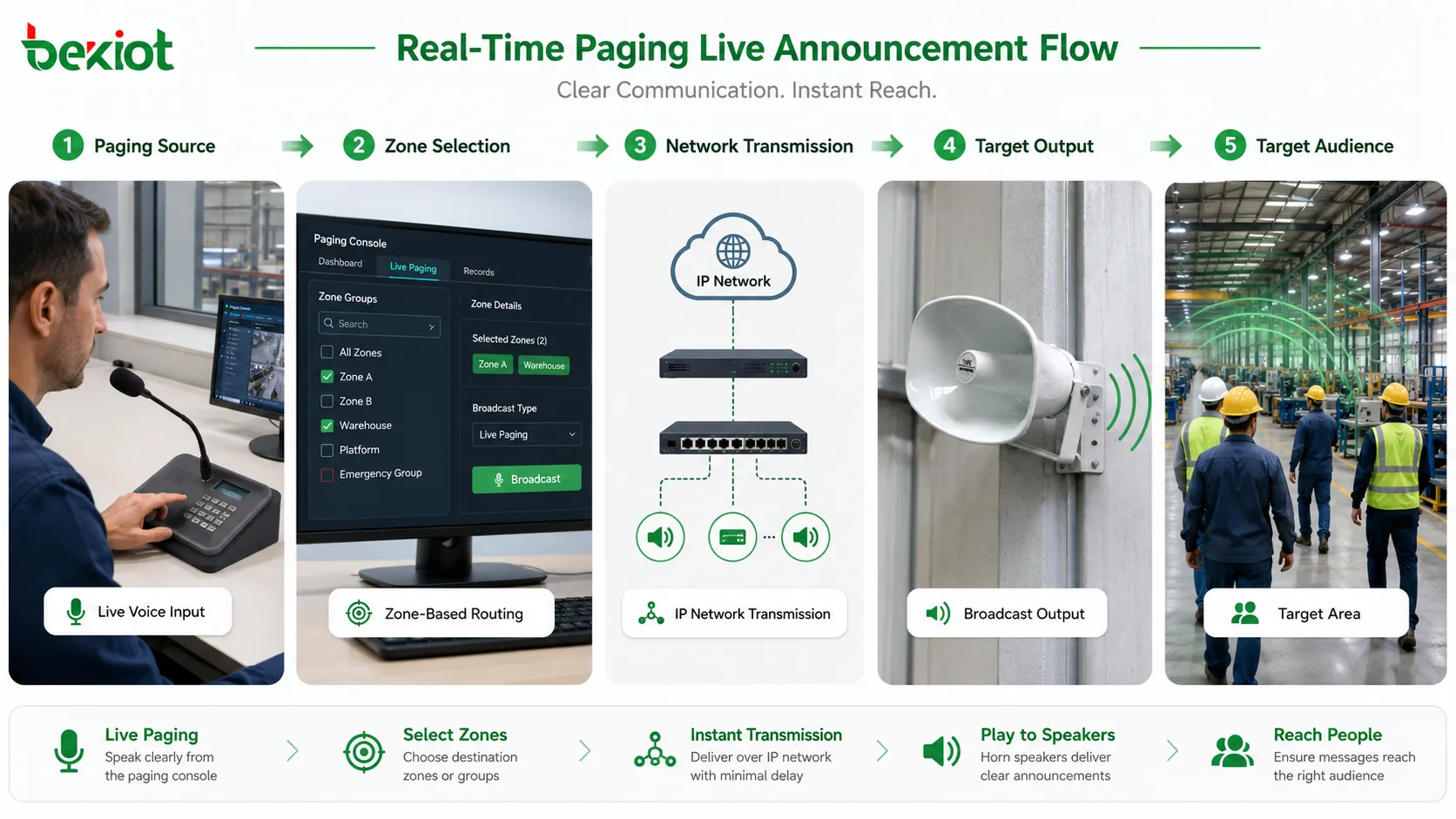
Instant broadcast is the core capability
The strongest feature of real-time paging is its ability to deliver messages immediately. In daily operations, this allows supervisors, reception staff, security teams, dispatchers, maintenance managers, and service coordinators to speak directly to one or many areas without making individual calls.
Instant broadcast is different from calling people one by one. A phone call is useful when two parties need a conversation, but it is inefficient when one instruction must reach many people at the same time. Paging solves this by using one-to-many communication. One operator can speak once, and the message reaches all selected listening points simultaneously.
This feature is especially useful when the message is short, action-oriented, and time-sensitive. Examples include “Please clear the loading lane,” “Maintenance team to pump room,” “Platform change for train arrival,” “Security staff to entrance B,” or “Production line three, stop operation and wait for inspection.” These messages do not require a long discussion. They require immediate awareness.
Instant broadcast also reduces dependency on personal devices. In many sites, not every worker carries a company phone or radio. Visitors, passengers, patients, contractors, students, and temporary staff may not be part of internal messaging groups. Paging reaches the physical area rather than a private contact list, which gives it a unique advantage in shared environments.
Zone selection makes messages more accurate
A powerful paging system should not treat the whole site as one listening area. Zone selection allows operators to target the right area without disturbing unrelated spaces. A message for a warehouse dock does not need to interrupt an office. A notice for a hospital ward should not play in every department. A maintenance warning for one production line should not stop the whole plant.
Zones can be designed by building, floor, room, department, outdoor area, gate, platform, workshop, equipment zone, parking area, service desk, or emergency route. The exact structure depends on the site layout and communication purpose. Good zone planning makes paging more useful because messages become relevant to the people who hear them.
Zone selection also reduces noise pollution. If every announcement is sent everywhere, people may begin to ignore the system. Over-broadcasting weakens attention and makes important messages less effective. Targeted paging keeps routine messages local while preserving site-wide broadcast for major notices and emergencies.
Multi-zone paging adds flexibility. An operator may select several related areas at once, such as all entrances, all warehouses, all passenger platforms, or all outdoor yards. This supports real operational needs because many events affect more than one area but do not require a full-site announcement.
Some systems also support dynamic groups. Instead of fixed zones only, paging groups can be created based on shift, event type, service responsibility, emergency role, or temporary project area. This gives administrators more control when the same physical site has changing workflows.
Priority control prevents message conflict
In busy environments, several paging events may happen at the same time. A receptionist may make a service announcement, a security desk may send a warning, a scheduled message may be playing, and an emergency trigger may activate. If the system does not manage priority, messages may overlap, interrupt each other incorrectly, or confuse listeners.
Priority control defines which message should be heard first. Emergency broadcast may take the highest priority. Fire alarm integration may override background music and ordinary paging. Security announcements may override routine service notices. Scheduled messages may have lower priority than live operator instructions.
This feature is essential because not all messages are equal. A lunch reminder should not block an evacuation announcement. A routine parking notice should not cover a safety warning. Priority control ensures that urgent communication receives the audio path, attention, and system resources it needs.
Priority design should be clear before deployment. The system should define which sources have higher priority, whether lower-priority audio is paused or stopped, whether interrupted messages resume, and how conflicts are logged. Without this logic, operators may not understand why a message did or did not play.
Good priority control also reduces human error. During an emergency, staff should not need to manually silence every other audio source. The system should automatically suppress lower-priority audio and allow critical messages to pass. This is one of the reasons real-time paging is widely used in safety-related and public facility environments.
Emergency override gives the system a safety function
Emergency override is one of the most important features of real-time paging. It allows critical warnings to take control of the audio system immediately, even if other content is playing. This may include fire evacuation messages, severe weather warnings, hazardous gas alerts, security threats, equipment danger notices, or public safety instructions.
The purpose of override is not only loudness. It is authority. When an emergency message begins, the system should make it clear that the current instruction is more important than ordinary announcements. Background music, routine paging, scheduled advertisements, or low-priority notices should be interrupted or muted.
Emergency override may be activated manually by an authorized operator or automatically by a connected alarm system. For example, a fire alarm, emergency button, access control event, environmental sensor, or security system may trigger a specific paging message. The exact integration depends on site requirements and system design.
This capability must be tested carefully. The emergency message must reach the intended zones, play clearly, override lower-priority audio, and stop or reset according to procedure. A system that looks correct on the control screen but fails to play in the field is not reliable. For safety-related use, routine testing and documentation are essential.
Emergency override also requires message discipline. Critical messages should be short, clear, and actionable. Long or confusing instructions can delay response. The system provides the delivery path, but the message content must still be designed for real people under stress.
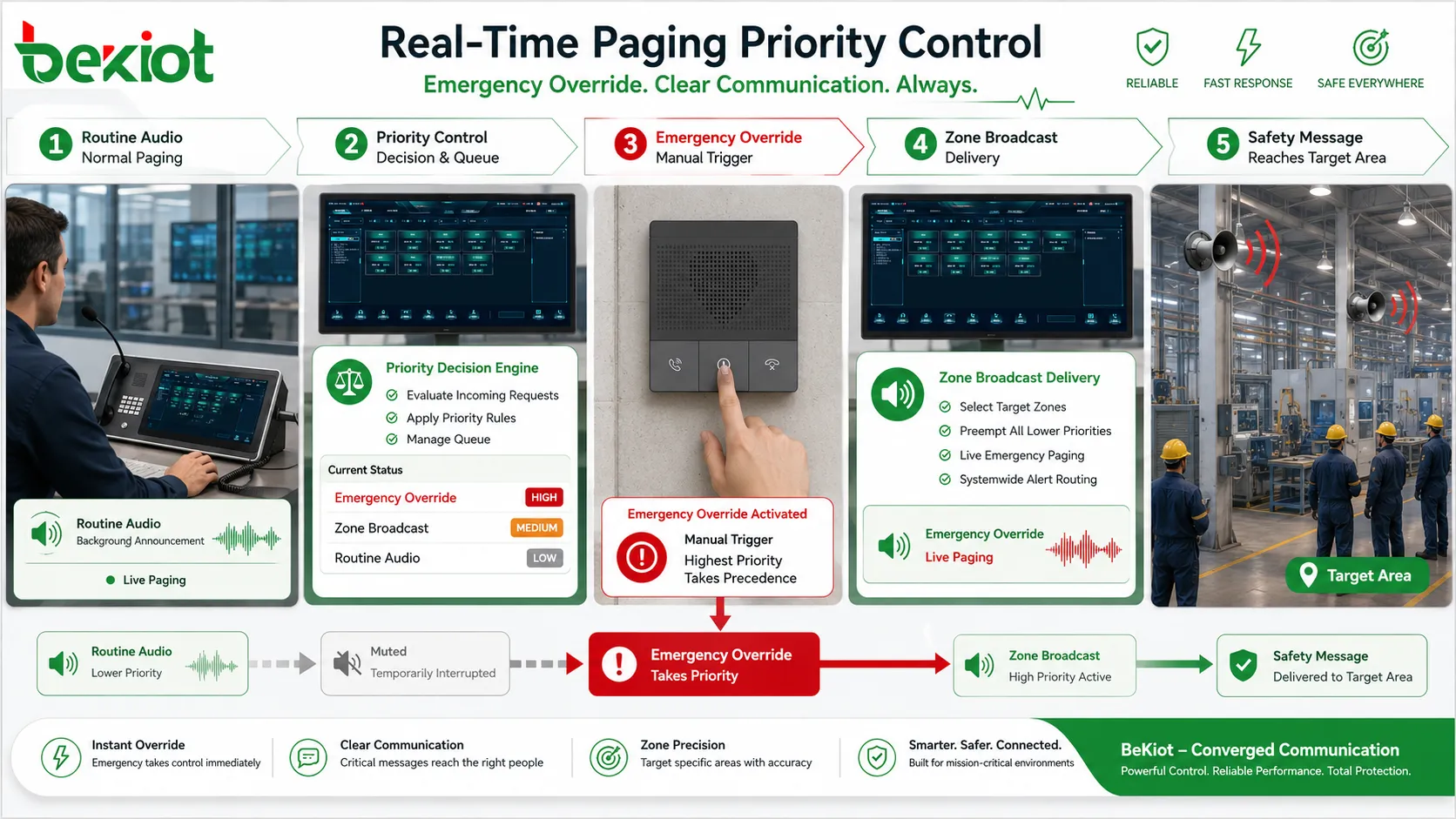
Live operator control supports flexible response
Pre-recorded messages are useful for standard situations, but not every event follows a prepared script. Live operator control allows staff to respond to conditions as they happen. A dispatcher can guide people away from a blocked corridor. A station operator can explain a temporary platform change. A warehouse supervisor can coordinate a loading delay. A security team can issue instructions during a developing incident.
This feature gives paging a human layer. The operator can adjust wording, tone, timing, and destination according to the actual situation. In complex environments, this flexibility is valuable because not all events are predictable enough for automated messages.
Live control can be provided through a paging microphone, dispatch console, IP phone feature key, software panel, intercom master station, or mobile client. The interface should be simple. Operators should be able to select zones, confirm status, speak, and end the page without navigating through confusing menus.
For critical environments, authorization is important. Not every user should be able to broadcast to all zones. User roles, access permissions, priority levels, and audit records help prevent misuse. A general staff member may be allowed to page a local area, while only supervisors or emergency staff can page the whole site.
Training also matters. A powerful live paging feature can be weakened by unclear operating habits. Operators should know how to choose zones, how long to speak, how to repeat important information, and when to use pre-recorded messages instead of live speech. Good operation makes the technology more effective.
Pre-recorded and live messages can work together
Real-time paging is not limited to live voice. Many systems combine live paging with pre-recorded announcements. This creates a balance between speed, consistency, and flexibility. Live voice is best for changing situations. Pre-recorded messages are best for repeatable instructions that must be consistent every time.
Pre-recorded messages are useful for evacuation instructions, shift reminders, safety notices, public guidance, visitor announcements, closing reminders, school bells, station alerts, and routine operational messages. They reduce the chance of operator wording mistakes and ensure that important instructions are delivered in the approved form.
Live paging can be used when the situation changes or when a prepared message is not enough. For example, a pre-recorded alarm may instruct people to evacuate, while a live operator provides additional route guidance. A scheduled announcement may tell passengers about service rules, while live paging explains a delay.
The strongest systems allow operators to choose between live speech, stored audio, text-to-speech, scheduled playback, and triggered messages according to need. The feature set should match the site’s communication workflow. A small facility may need only live paging and a few stored messages, while a transport hub or industrial complex may need multi-layer message management.
Integration with alarms and management systems
Real-time paging becomes more powerful when it is connected with other systems. Alarm integration allows specific events to trigger announcements automatically. Access control integration may support door or visitor guidance. Fire alarm integration may activate evacuation zones. Video monitoring integration may help operators verify a situation before broadcasting. Building management systems may trigger environmental warnings.
Integration turns paging from a manual speaking tool into part of a wider operational response. When an alarm appears, the system can help notify the right area immediately. When a sensor detects a dangerous condition, the paging system can broadcast a warning without waiting for a manual call chain. When a security desk receives an event, the operator can combine camera verification and voice instruction.
Integration should be designed carefully. Not every alarm should trigger a broadcast. False alarms, low-priority warnings, maintenance tests, or repeated technical events can create unnecessary noise if they are connected directly to paging. The system should classify events and decide which ones deserve automatic announcement.
Another important issue is fail-safe behavior. If the management platform fails, can manual paging still work? If the network is partially down, are local emergency zones still reachable? If an alarm trigger is cleared, does the announcement stop automatically or require operator confirmation? These questions should be answered during design and commissioning.
| Feature area | What it enables | Operational advantage |
|---|---|---|
| Live paging | Operator speaks directly to selected zones | Supports immediate response to changing conditions |
| Zone broadcast | Messages are sent to specific areas or groups | Reduces disturbance and improves message relevance |
| Priority control | Urgent messages override lower-priority audio | Protects critical communication during conflicts |
| Alarm integration | Events can trigger automatic announcements | Shortens response time and improves safety coordination |
| Status monitoring | Devices, zones, links, and playback states can be checked | Improves maintenance and reduces hidden failures |
Network-based delivery expands coverage
Traditional paging systems often depended on fixed amplifier lines and local audio wiring. These systems can still work well, but large or distributed sites may need more flexible coverage. Network-based paging allows audio to travel through IP networks, making it easier to reach multiple buildings, remote areas, branch sites, campuses, stations, and outdoor points.
IP-based delivery can connect paging servers, SIP devices, IP speakers, network amplifiers, dispatch consoles, software clients, and management platforms. This makes the system more scalable. A new zone may be added through network configuration and device installation rather than rebuilding a large analog audio path.
Network-based paging also supports remote operation. An authorized operator may page a branch location from a central office. A security center may broadcast to multiple buildings. A facility manager may manage announcements across a campus. This is useful for organizations that operate more than one physical area.
However, network-based paging depends on network quality. Delay, packet loss, multicast configuration, VLAN design, quality of service, firewall rules, and bandwidth planning can all affect performance. A paging message should not be treated as ordinary background traffic if it is used for operational or emergency communication.
Good deployment separates design questions clearly. Which zones need live low-delay audio? Which messages can tolerate a slight delay? Which endpoints support multicast or unicast? Which network segments are allowed to carry paging traffic? How will the system behave during network interruption? These questions determine whether network-based delivery is reliable in practice.
Audio clarity determines whether the message works
Paging is useful only when people can understand the message. Loud sound is not the same as clear sound. A message may be loud enough but still difficult to understand because of echo, background noise, poor speaker placement, wrong volume balance, low-quality microphones, bad compression, or overlapping announcements.
Audio clarity begins with the source. A good paging microphone, proper speaking distance, noise control, and clear operator speech all improve intelligibility. If the source audio is distorted, the system cannot fully repair it later. Operators should avoid shouting into the microphone or speaking too quickly during important announcements.
Speaker placement is equally important. Speakers should cover the intended area evenly without creating excessive echo or dead zones. In large halls, tunnels, factories, stations, warehouses, or outdoor yards, acoustic conditions vary greatly. The design may need multiple speakers, directional placement, suitable power levels, and zone tuning.
Volume control should match the environment. An office corridor does not need the same sound level as a machine hall. A quiet hospital area requires different handling from a transport platform. If the volume is too low, messages are missed. If it is too high, people may feel disturbed and may ignore announcements over time.
For noisy industrial environments, paging may need to work together with visual indicators, flashing lights, local displays, or repeated message strategies. Voice alone may not be enough if workers wear hearing protection or machines generate high background noise. The feature should be considered as part of the whole notification method.
Two-way interaction adds confirmation value
Some paging systems are one-way only: the operator speaks and the audience listens. This is suitable for many announcements, but some situations require feedback. A field team may need to confirm that a message was received. A guard may need to answer after being paged. A technician may need to report status after hearing an instruction.
Two-way interaction can be supported through intercom endpoints, talkback speakers, SIP terminals, dispatch consoles, or local call buttons. The operator can page an area and then receive a response from a field point. This transforms paging from broadcast-only communication into a coordination tool.
Confirmation is especially useful in maintenance, security, emergency response, and industrial operation. A control room can call a workshop area, announce an instruction, and then receive a voice reply. A security center can page a gate and confirm whether staff are present. A hospital desk can page a department and receive a quick response through an intercom point.
This feature must be planned carefully because open microphones and talkback channels can create privacy, noise, or feedback issues. The system should define who can initiate talkback, which areas support response, whether conversations are recorded, and how audio conflicts are handled.
Status monitoring prevents hidden failure
A paging system may look ready until the moment it is needed. A speaker may be disconnected, an amplifier may be offline, an IP endpoint may lose network registration, a cable may be damaged, a zone may be muted, or a power supply may fail. If the system has no monitoring, these problems may remain hidden.
Status monitoring helps operators and maintenance teams see whether devices, zones, links, amplifiers, speakers, controllers, and servers are working. The system may report online status, fault alarms, power state, connection state, audio path condition, or playback status depending on design. This allows problems to be found before a critical announcement is required.
Monitoring is especially important for distributed sites. A campus, factory, station, tunnel, or public facility may have many paging endpoints spread across wide areas. Manual inspection alone can be slow. Central status visibility helps maintenance teams prioritize faults and confirm recovery after repair.
Event logs also support accountability. If a message did not play, the team can check whether the command was sent, which zone was selected, whether the device was online, whether another higher-priority message interrupted it, and whether the audio path reported a fault. This reduces guesswork during troubleshooting.
For emergency use, monitoring should be paired with routine testing. A status screen is helpful, but actual playback tests confirm that the field output works. The strongest maintenance practice combines automated monitoring with scheduled functional verification.
Recording and logs support management
In many organizations, paging is not only a live action. It is also an operational record. Managers may need to know who made an announcement, when it happened, which zones received it, whether it was live or pre-recorded, and whether it was interrupted by another event. Logs help answer these questions.
Recording may be useful for incident review, service quality, safety management, training, and dispute handling. For example, after an evacuation drill, the team may review whether the correct message was used and whether the timing matched the response procedure. After a customer complaint, a facility manager may check whether a service announcement was made.
Logs also help improve system design. If one zone receives frequent urgent pages, the workflow may need adjustment. If certain announcements are often repeated, a pre-recorded message may be more efficient. If operators frequently page the wrong zone, the interface or zone naming may need improvement.
Recording and logging should follow privacy and policy rules. Not every environment allows unrestricted voice recording. Organizations should define which announcements are recorded, how long records are stored, who can access them, and how they are protected. The management value of logs should be balanced with privacy and compliance requirements.
Remote and multi-site operation
Real-time paging becomes more powerful when operators can manage multiple areas from one place. A central security office may broadcast to different buildings. A transport operation center may page several stations. A school district may send messages to multiple campuses. A logistics company may coordinate warehouses from a regional office.
Remote operation reduces the need for local staff to handle every announcement. It also supports consistent communication across sites. If a weather warning, safety drill, system outage, or service notice affects several locations, the central team can issue coordinated messages rather than relying on each site to act separately.
Multi-site paging requires careful permission design. A local operator may control only one building, while a central supervisor may control all sites. Emergency staff may have higher priority than ordinary users. Without role control, remote paging can create confusion or accidental cross-site announcements.
Network reliability also matters. A remote paging design should consider backup paths, local fallback, survivability, and manual override. If the central connection fails, local staff may still need to page their own site. A strong architecture avoids making the entire paging capability dependent on one remote link.
Scheduling and real-time control can coexist
Although real-time paging focuses on immediate communication, it often works alongside scheduled announcements. Many sites need routine messages at fixed times: shift changes, class bells, closing reminders, safety tips, visitor notices, station updates, cleaning reminders, or background music changes. Scheduling reduces manual workload.
The important point is that scheduled audio should not weaken real-time control. If a live operator needs to speak, the system should allow live paging to interrupt, pause, or override scheduled content according to priority rules. Routine automation should serve operation, not block it.
Scheduling can also support consistency. Approved messages can be played at the same time every day, reducing dependence on individual memory. In schools, factories, hospitals, transport hubs, and commercial facilities, consistent announcements can improve routine order.
Real-time control remains necessary because schedules cannot predict everything. A delivery delay, safety incident, equipment fault, visitor issue, security event, or weather change may require immediate human instruction. The strongest systems combine scheduled reliability with live flexibility.
Application value in industrial sites
Industrial environments use paging for production coordination, safety reminders, maintenance dispatch, emergency alerts, visitor control, logistics instructions, and shift communication. Workers may be spread across workshops, warehouses, outdoor yards, utility rooms, machine areas, and control stations. Paging allows supervisors to communicate with areas rather than searching for individuals.
In production areas, a live announcement can instruct workers to pause a process, wait for inspection, prepare materials, clear a route, or report to a location. In maintenance scenarios, the system can call technicians to a machine, pump room, power room, or control point. In safety scenarios, paging can deliver warnings about restricted areas, chemical handling, high-temperature work, or emergency evacuation.
The feature value depends on zoning. A message for one workshop should not necessarily disturb the entire plant. A safety warning may need to reach all affected areas at once. Industrial paging should therefore be planned according to process layout, risk areas, workflow paths, and response responsibility.
Noise is a major challenge. Speaker selection, placement, volume, repeated messages, and visual warning integration may be necessary. In high-noise areas, paging may need to complement radios, intercoms, flashing lights, and local indicators. The goal is not simply to play sound, but to make the instruction understood.
Application value in transport and public facilities
Transport hubs depend on timely public guidance. Airports, railway stations, metro platforms, bus terminals, ports, tunnels, parking facilities, and highway service areas use paging for passenger information, platform changes, boarding notices, delay explanations, emergency instructions, lost item announcements, and crowd management.
In these environments, real-time paging helps operators respond to changing conditions. A platform may close temporarily. A train may arrive at a different track. A queue may need to move to another gate. A security incident may require controlled movement. Voice broadcast reaches both regular users and visitors who may not be using the facility’s app or display system.
Public facilities also require message clarity. Announcements should be understandable to people who are distracted, unfamiliar with the site, carrying luggage, or moving through a crowd. The system should avoid excessive echo, unclear zones, and overlapping messages. In large spaces, audio design and zone planning are just as important as control software.
For safety applications, paging may work with evacuation signs, fire alarm systems, public address, video monitoring, and staff response procedures. The feature becomes part of a larger public safety and crowd guidance strategy.
Application value in healthcare, education, and commercial spaces
Healthcare environments use paging for staff coordination, emergency response, visitor guidance, department notices, and facility operations. Hospitals, clinics, laboratories, nursing homes, and medical campuses may need to reach specific wards, waiting areas, duty rooms, corridors, or service departments quickly.
In healthcare, the message must be targeted and controlled. A notice for maintenance staff should not disturb patient areas unnecessarily. An emergency instruction should reach the right staff immediately. Privacy and calmness also matter. The system should support precise zones, appropriate volume, and clear operating permissions.
Educational environments use paging for class changes, campus notices, emergency drills, security warnings, event coordination, and daily schedules. A school or university may need to page one building, one outdoor area, several classrooms, or the entire campus. Real-time paging helps staff communicate quickly without relying only on classroom phones or mobile messages.
Commercial spaces such as shopping centers, hotels, office parks, exhibition halls, and retail stores use paging for service calls, visitor announcements, emergency guidance, parking notices, staff coordination, and background audio override. These environments need a balance between operational usefulness and customer experience. Announcements should be clear but not excessive.
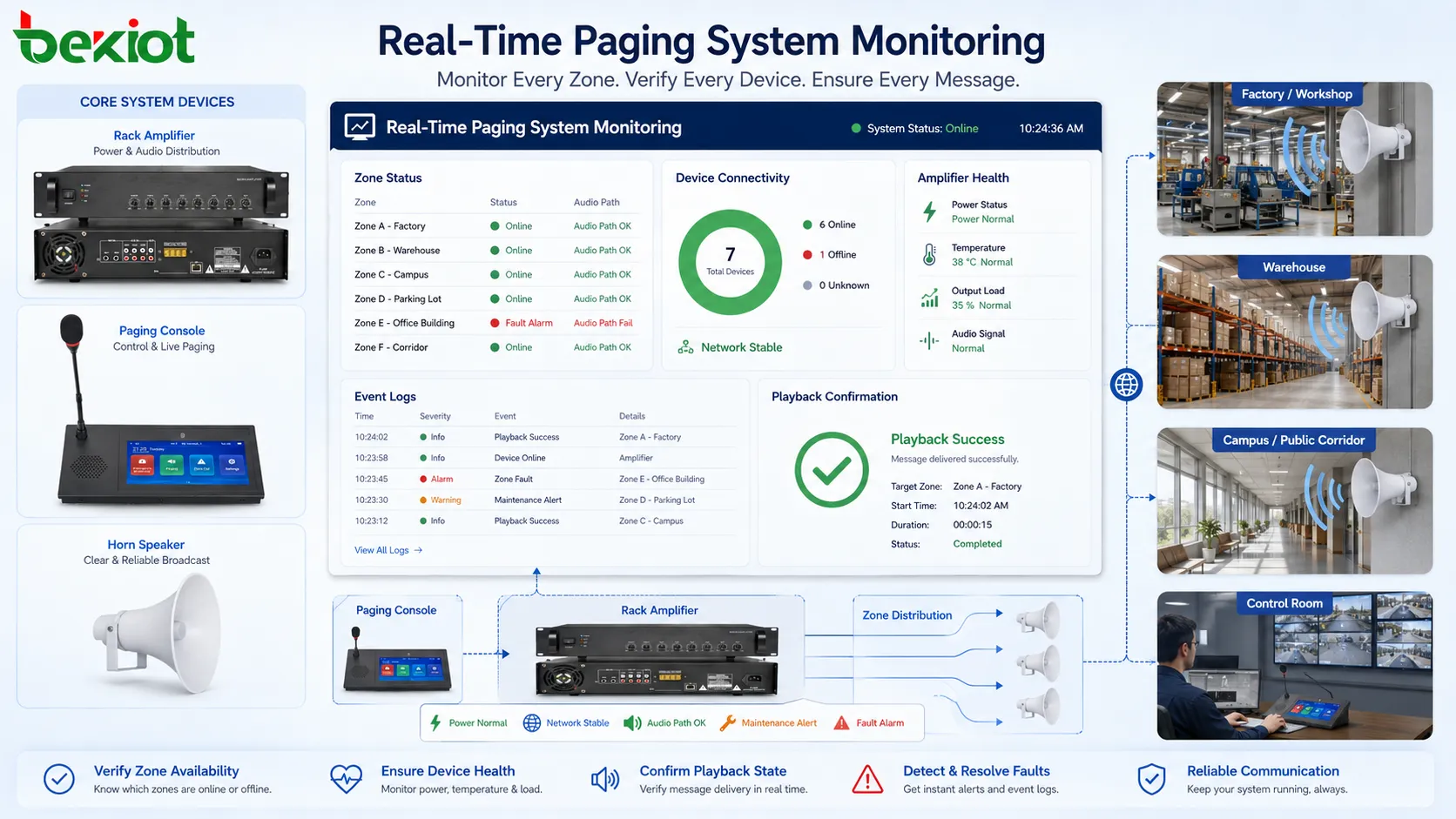
Security and access control for paging authority
A paging system can affect many people at once, so access control is important. Unauthorized paging can cause confusion, disturb operations, spread incorrect information, or create safety risk. The system should define who can page which zones and under what priority.
User roles may include local operator, department user, security staff, facility manager, emergency commander, system administrator, and maintenance engineer. Each role should have appropriate permissions. A receptionist may page a lobby area, while an emergency commander may page the whole facility. A maintenance engineer may test a zone but not issue public announcements.
Authentication is also important when paging can be performed from software clients, IP phones, mobile apps, or web interfaces. User accounts, passwords, device registration, network access, and audit logs help prevent misuse. In some environments, physical microphone stations should also be protected against unauthorized access.
Access control should not make emergency use too difficult. During urgent events, authorized staff must be able to broadcast quickly. The best design combines normal restrictions with clearly defined emergency permissions and simple operating procedures.
Design mistakes that weaken real-time performance
One common mistake is poor zone planning. If zones are too broad, many people hear irrelevant messages. If zones are too narrow or confusing, operators may choose the wrong area. Zone names should match real site language, such as building names, floor numbers, gate labels, production areas, or department names.
Another mistake is treating paging as only an audio device problem. Real-time performance depends on the whole path: microphone, console, server, network, amplifier, speaker, power, priority logic, and operator procedure. A weak link in any part can affect delivery.
Excessive announcements can also reduce effectiveness. If people hear too many routine messages, they may stop paying attention. Important paging should be clear, relevant, and controlled. Background music, advertisements, routine reminders, and emergency messages should not compete without priority rules.
Ignoring acoustics is another frequent issue. A system may be technically connected but difficult to understand in the field. Echo, reverberation, machinery noise, speaker direction, and volume imbalance should be checked during commissioning. Testing from the operator desk is not enough; the message must be heard in the actual listening area.
Finally, some projects forget maintenance. Speakers, amplifiers, IP endpoints, microphones, cables, and power supplies need inspection. A real-time system must remain ready over time, not only on installation day.
How to evaluate feature strength
A strong real-time paging system should be evaluated by practical performance rather than by feature names alone. The first question is whether it can deliver the message quickly to the correct area. If zone selection is slow, unclear, or unreliable, the system will not serve real-time needs well.
The second question is whether people can understand the message. Audio intelligibility, speaker coverage, volume balance, and noise handling should be tested in the actual environment. A paging system that is loud but unclear does not meet its purpose.
The third question is whether urgent messages receive priority. Emergency override, conflict handling, and priority rules should be tested. It should be clear what happens when a scheduled message, live announcement, background audio, and emergency trigger occur at the same time.
The fourth question is whether the system is manageable. Administrators should be able to configure zones, users, priorities, schedules, logs, device status, and integrations. Operators should be able to use the system without complex steps. Maintenance staff should be able to identify faults quickly.
The fifth question is whether the system fits the site’s real workflow. A factory, hospital, transport hub, school, commercial building, and warehouse do not use paging in the same way. The feature set should support the actual communication path, not only a generic list of capabilities.
Overall View
Real-time paging is powerful because it delivers immediate voice communication to the right physical areas. Its strongest features include live broadcast, zone selection, priority control, emergency override, alarm integration, remote operation, status monitoring, recording, scheduled-message coordination, and clear audio delivery.
The technology is valuable where people must be reached quickly without depending on individual devices. Industrial sites, transport facilities, hospitals, campuses, commercial buildings, warehouses, public facilities, and emergency response environments all benefit from fast, targeted, and manageable voice announcements.
The real strength of real-time paging comes from design quality. Zones must match the site, priority must protect urgent messages, audio must be understandable, permissions must be controlled, and devices must be monitored. When these conditions are met, paging becomes more than a loudspeaker function. It becomes an active communication tool for coordination, safety, and daily operations.
FAQ
Is real-time paging the same as public address broadcasting?
They are related, but not always the same. Public address broadcasting can include scheduled messages, background music, and general announcements. Real-time paging focuses on immediate voice delivery from an operator or system trigger to selected zones.
Why is zone selection important?
Zone selection prevents unnecessary disturbance and improves message relevance. It allows operators to send announcements only to the areas that need them instead of broadcasting every message to the whole site.
Can real-time paging be used for emergency communication?
Yes, if the system is designed, tested, and maintained for that purpose. Emergency use usually requires priority control, override capability, reliable power, clear audio coverage, proper procedures, and regular functional testing.
What affects paging audio clarity the most?
Audio clarity depends on microphone quality, operator speaking habits, speaker placement, background noise, volume settings, acoustic conditions, cable or network quality, and system tuning. Loudness alone does not guarantee intelligibility.
Should paging systems be monitored?
Yes. Monitoring helps detect offline devices, amplifier faults, network issues, zone failures, and playback problems before a critical announcement is needed. Functional testing should also be included in maintenance routines.







