


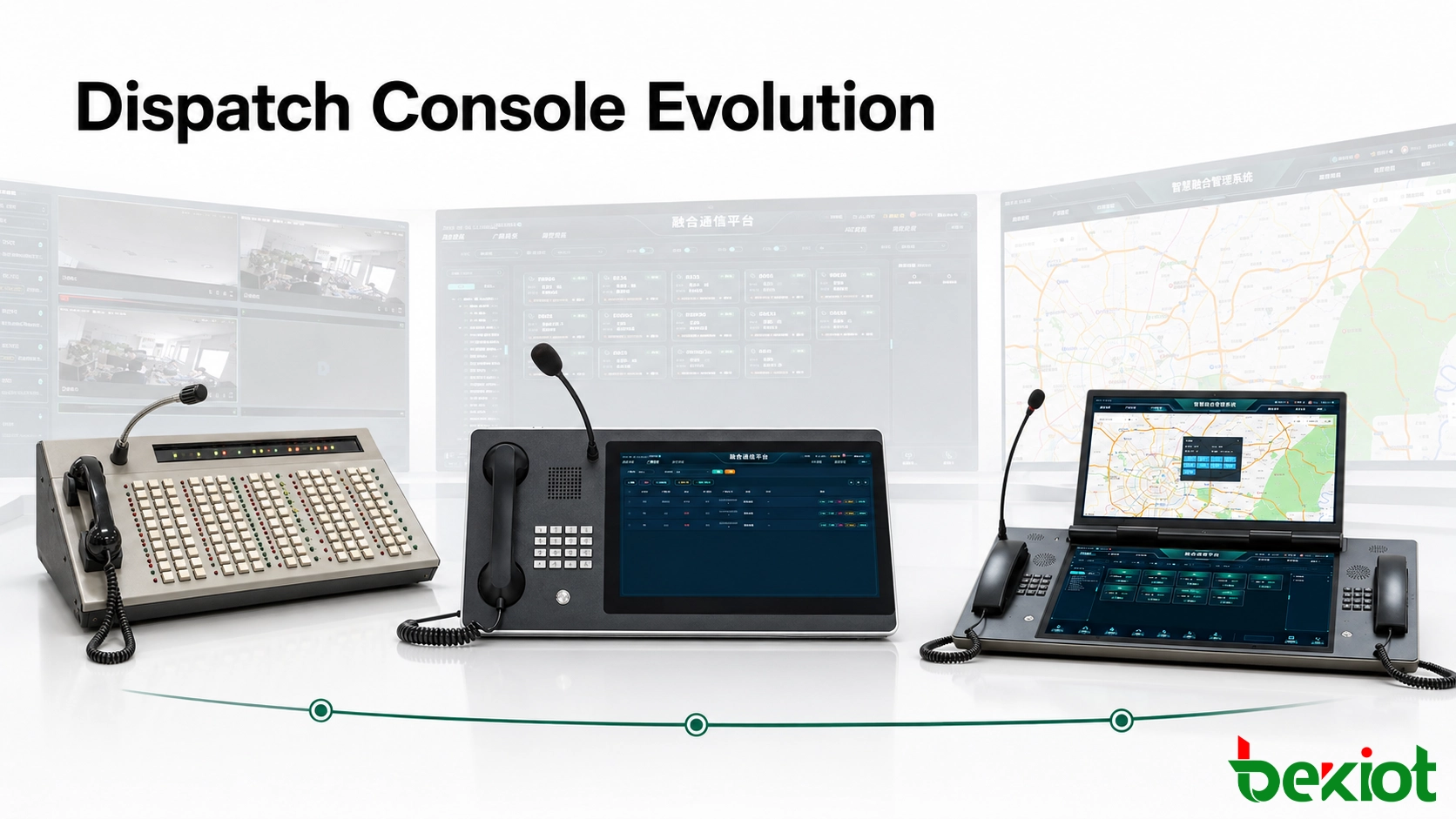
A dispatch console is the operator-facing control point of a command and dispatch system. It allows a dispatcher to monitor communication resources, contact field personnel, manage active calls and coordinate responses from one working position. Dispatch consoles are widely used in industrial plants, transportation networks, energy facilities, public safety operations and emergency command centers.
Their appearance has changed considerably over time, but the development was not driven by screen size alone. Each generation reflects a broader change in communication technology: manual telephone switching gave way to programmable exchanges, telephone lines moved toward VoIP, and voice-centered systems expanded into integrated environments containing video, radio, GIS, alarms and operational data.
From call switching to command workflows
Early telephone communication often depended on an operator who manually connected one caller to another. The introduction of program-controlled telephone exchanges automated much of this process. Users could dial a number directly, while the exchange handled call routing according to programmed rules.
As private telephone systems became common in enterprises and industry, organizations began asking for more than ordinary extension calling. Dispatchers needed to see which lines were active, reach important departments quickly, transfer calls, join an existing conversation and disconnect a call when operational control required it.
A standard telephone keypad offered only the digits and a small number of function buttons. That was enough for routine calling but inefficient for an operator managing dozens of extensions and several simultaneous conversations. The dispatch console emerged as a dedicated control surface that placed frequently used communication actions directly in front of the operator.
From that point, dispatch console development followed three broad stages:
Programmable physical-key consoles designed mainly for telephone dispatch
Touchscreen consoles that moved controls into software and added multimedia functions
Multi-screen workstations built for converged communication and command-center operations
These stages should not be viewed as a simple sequence in which every new design makes the previous one unusable. Physical keys, integrated touchscreens and multi-screen workstations are still deployed today because different operator roles require different levels of control, visibility and integration.
Stage one: direct control through physical keys
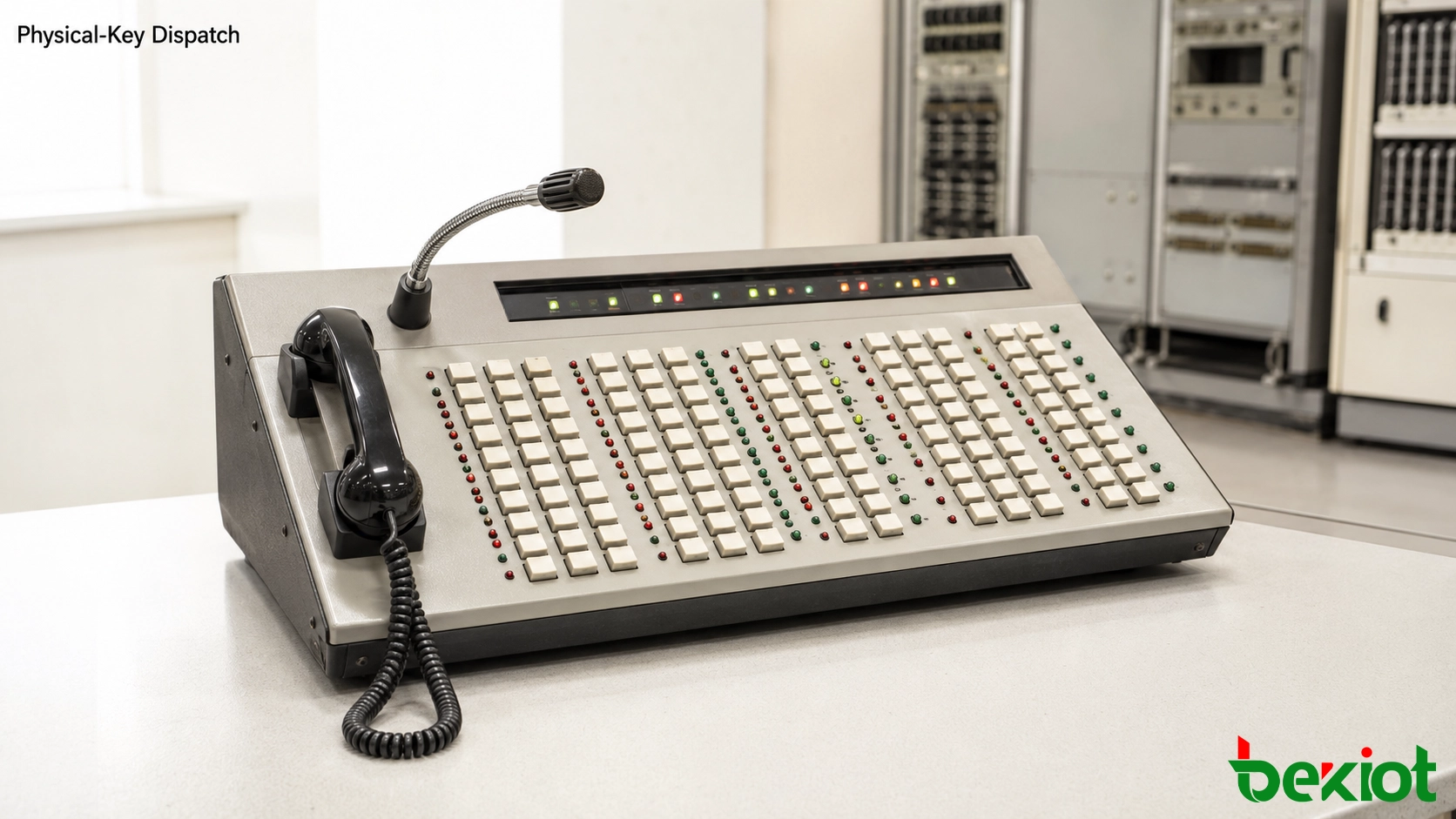
The first generation was closely connected to enterprise telephone exchanges. Its defining feature was a large programmable keyboard. Smaller consoles could provide several dozen keys, while more advanced units could contain more than one hundred.
Each key could be assigned to an extension, department, outside line or dispatch action. Instead of dialing a number for every operation, the dispatcher could press a dedicated key to reach a user or activate a function. Indicator lamps or compact status panels showed whether a line was idle, ringing, busy or connected.
Why the design worked
The physical layout gave operators a stable relationship between location and function. A frequently used department could remain on the same key every day. After repeated use, experienced dispatchers could perform common actions with limited visual attention.
Typical functions included:
One-touch calling to assigned extensions
Visual indication of active and idle lines
Call answering, holding and transfer
Joining or overriding an active conversation when authorized
Forced release of a call under defined dispatch permissions
Rapid access to emergency or priority contacts
This operating model was particularly effective where the resource list changed infrequently and voice was the main communication medium. Operators could learn the key arrangement and work quickly without navigating software menus.
Where the limitations appeared
The same fixed layout that made the console predictable also limited its flexibility. Adding departments or changing responsibilities could require reprogramming keys and replacing labels. A larger resource list demanded more physical buttons, increasing the size of the console and making the panel harder to organize.
These consoles were primarily voice devices. Computer processing, IP networking and digital video were not yet mature enough to place maps, surveillance images, messages and communication controls in the same workspace. The operator could manage telephone traffic efficiently, but other information normally remained in separate systems.
Stage two: software moves onto the touchscreen
The second stage emerged as computer technology, IP networking and VoIP changed the architecture of telephone systems. Voice no longer had to remain on dedicated telephone wiring. It could be carried across an IP network and handled by software-based communication platforms.
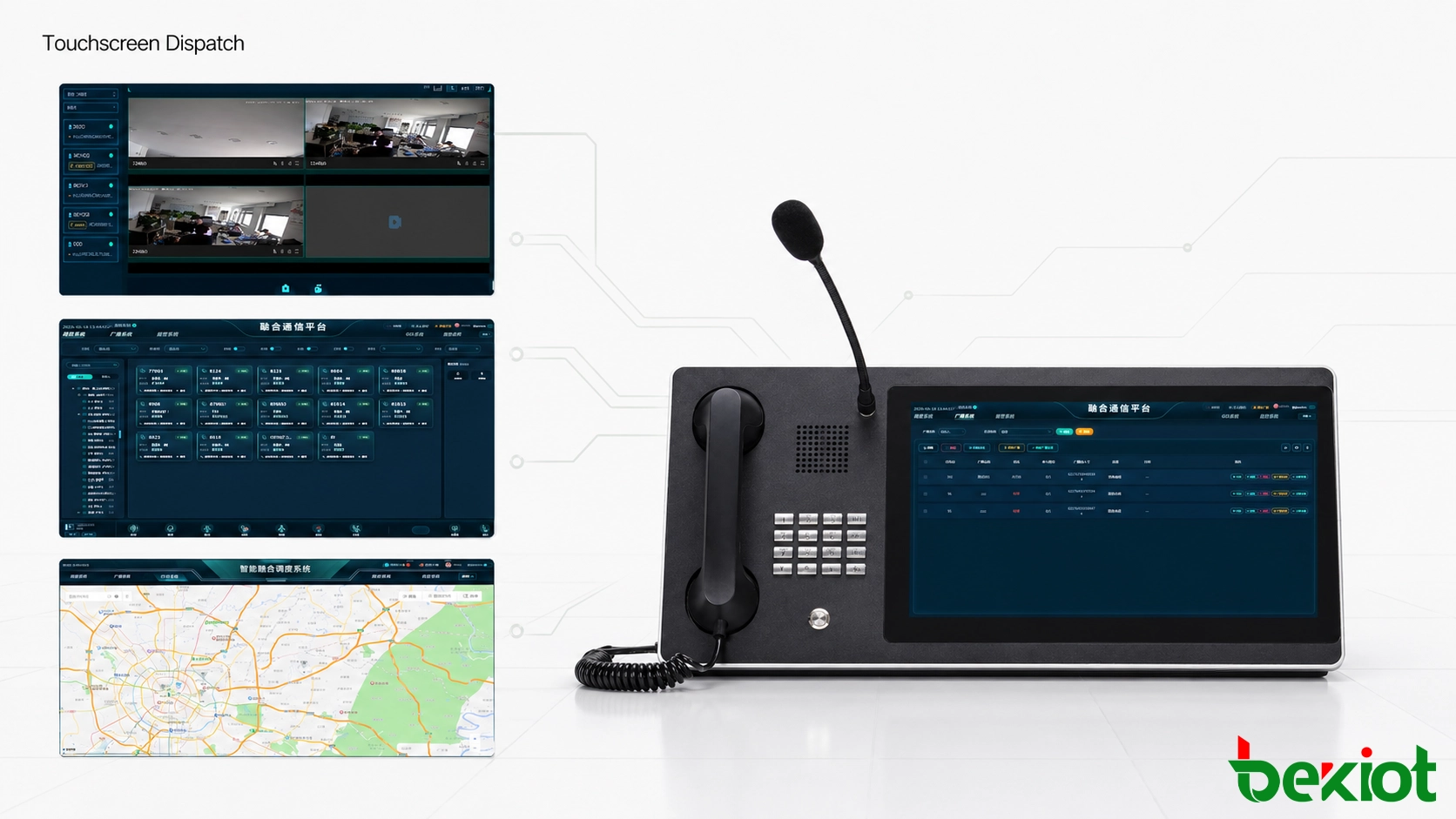
This change allowed the dispatch interface to move from a fixed hardware panel to a graphical touchscreen. The familiar extension keys were still present, but they appeared as configurable elements on a screen rather than permanent physical buttons.
A more adaptable operator interface
Software controls could display more information than a lamp beside a physical key. A single resource tile could show the user name, department, extension, current status and available actions. Colors, icons and layouts could change according to call state or operator permissions.
The screen could also support multiple pages and dynamic groups. A dispatcher might open separate views for production, maintenance, security and emergency contacts without requiring hundreds of keys to remain visible at the same time.
Because the console was effectively a purpose-built computer, changes could be made through configuration rather than physical reconstruction. Administrators could add users, reorganize departments, adjust permissions or create role-specific interfaces as operating requirements changed.
Communication expands beyond telephone audio
The touchscreen stage also made multimedia dispatch practical. Once the console and communication platform operated over an IP network, the same workspace could begin to support:
SIP voice and video calls
Group calls and audio conferences
Private radio or push-to-talk integration
Instant messaging and dispatch instructions
GIS location and personnel positioning
Video surveillance access
Call recording and operation logs
Alarm and IoT event integration
This was a major shift in the operator’s role. The console was no longer limited to connecting telephone calls. It became a software-controlled coordination point capable of linking communication with location, video and operational events.
Physical controls did not disappear completely. Many integrated consoles retained a handset, gooseneck microphone, speakers and programmable buttons for actions that operators performed repeatedly. The touchscreen provided flexibility, while dedicated audio hardware preserved the direct handling expected at a professional dispatch position.
Stage three: a wider workspace for converged operations
Modern command systems have moved well beyond their telephone origins. Voice calling remains important, but it is now one resource among many. A dispatcher may need to follow telephone and radio activity, view live cameras, locate field personnel, acknowledge alarms, read incident information and coordinate several departments during the same event.
Placing all this information on one screen can create a crowded interface. Operators may have to switch repeatedly between windows or hide one source of information to see another. Multi-screen workstations developed in response to this visibility problem.
Dividing information by operational purpose
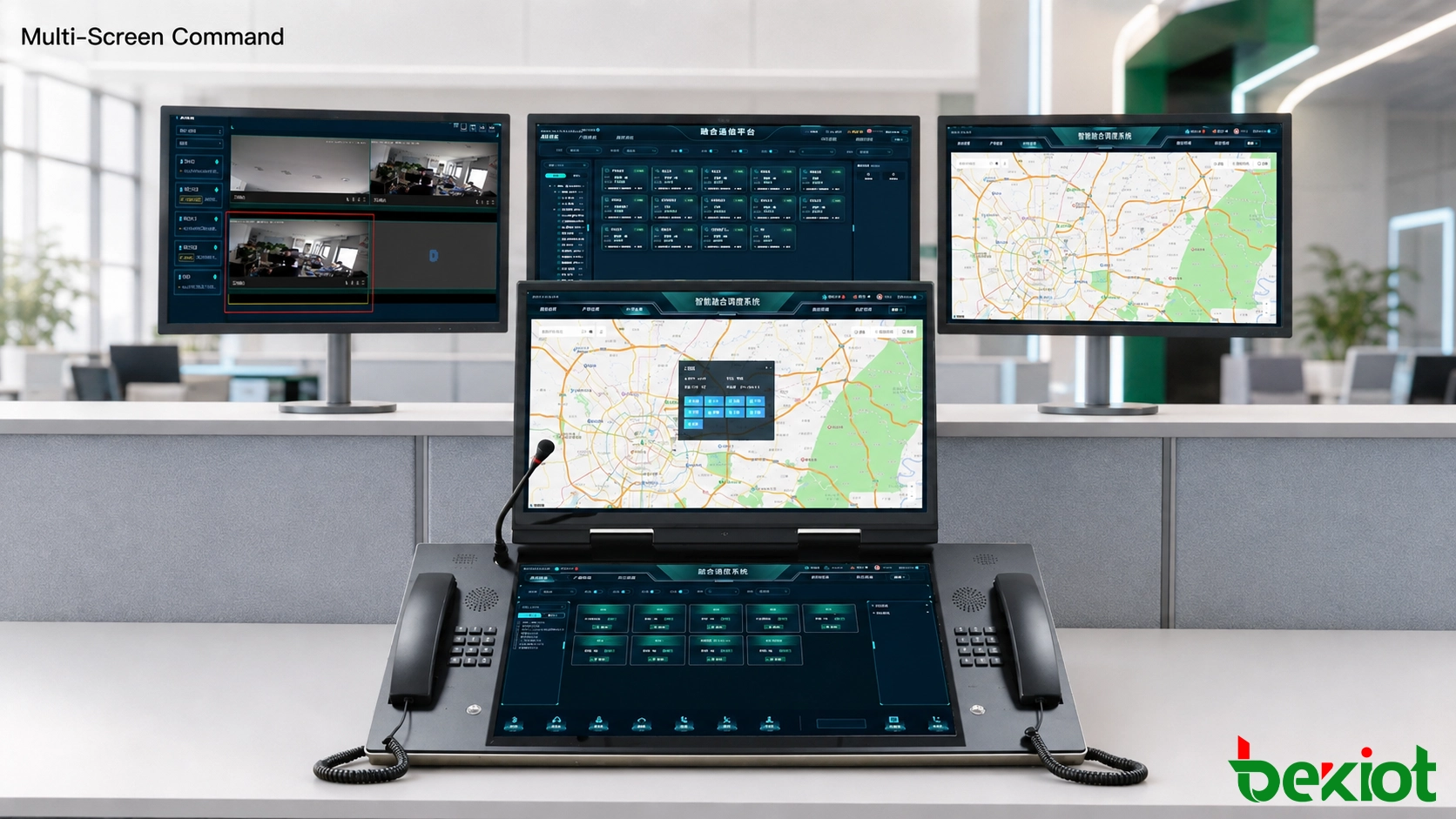
A professional workstation may use three screens, while larger command positions can use six or more. The displays should not simply duplicate the same interface. Each screen can be assigned a clear operational role.
For example:
One screen displays voice, radio and active communication resources
A second screen presents GIS maps and field-terminal locations
A third screen shows video surveillance and live mobile video
Additional screens display alarms, incident records, IoT data or operational dashboards
This arrangement gives the operator a broader view without forcing unrelated information into one panel. Active calls can remain visible while the dispatcher checks a camera or follows a field team on the map.
Working with command-center infrastructure
Multi-screen dispatch consoles are often installed alongside video walls, visualization processors and KVM systems. A KVM environment allows the operator to access several computers or application sources through one keyboard, pointing device and workstation arrangement. Selected maps, camera feeds or incident dashboards can also be sent to a shared command-center display.
Voice communication may still use a dedicated handset, desktop microphone, headset or IP phone. This separation can be useful: communication hardware remains immediately accessible, while the screens are reserved for software control and situational information.
The third stage is therefore not defined only by the number of displays. Its main characteristic is the ability to organize several communication and information systems around one operational workflow. Video surveillance, conferencing, radio, personnel positioning, drones, industrial control, alarms and smart-building systems can contribute information without becoming isolated operator tools.
Choosing the right design for the operator role
The latest and largest console is not automatically the best choice for every position. A gatehouse operator managing a small number of calls may work faster with a compact console and dedicated keys. A plant control room may benefit from an integrated touchscreen with a handset and microphone. A regional command center coordinating radio, video, maps and alarms may require a multi-screen workstation.
Selection should be based on the operator’s actual workload:
How many communication resources must remain visible?
How often does the operator transmit or answer calls?
Are physical PTT, handset or microphone controls required?
Does the position need video, GIS, alarms or IoT information?
Will several applications be displayed at the same time?
Do different shifts or departments require separate layouts?
Is the console used continuously in a 24-hour control room?
Physical-key consoles remain valued for direct and predictable operation. Touchscreen units balance compact hardware with configurable software. Multi-screen workstations provide the visibility needed for complex command environments. The most successful design often combines elements from all three generations: physical voice controls, a configurable interface and enough screen space to maintain situational awareness.
Related product: Explore Becke Dispatch Consoles for integrated touchscreen and multi-screen command positions.
The development of dispatch consoles shows how command work has changed from connecting calls to coordinating complete operational processes. What makes a console effective is not whether it looks modern, but whether the operator can recognize an event, reach the correct resource and complete the required action without unnecessary delay.
Frequently Asked Questions
Can remote backup operators use the same dispatch resources?
Yes, if the platform supports remote operator seats and the network, security policy and media routing are designed for it. A backup seat should receive the correct user permissions and resource assignments without exposing administrative functions that the remote operator does not need.
How can a legacy console be replaced without interrupting service?
A practical migration keeps the existing console active while the new position is configured and tested in parallel. Extensions, radio resources, priority contacts and call-control permissions should be mapped before the cutover. Operators can then complete trial shifts on the new interface before the old console is removed.
What cybersecurity controls are important for an IP-based console?
The console should use role-based access, strong authentication, network segmentation, encrypted management access, operation logging and controlled software updates. Unused services and accounts should be disabled, and administrative access should be separated from daily dispatch operation.
How should operators be introduced to a new console layout?
Training should follow real tasks rather than software menus. Operators should practice answering priority calls, selecting communication groups, transferring incidents, recovering from mistakes and using fallback procedures. Interface changes should be tested with the people who operate the console during normal and high-pressure conditions.







