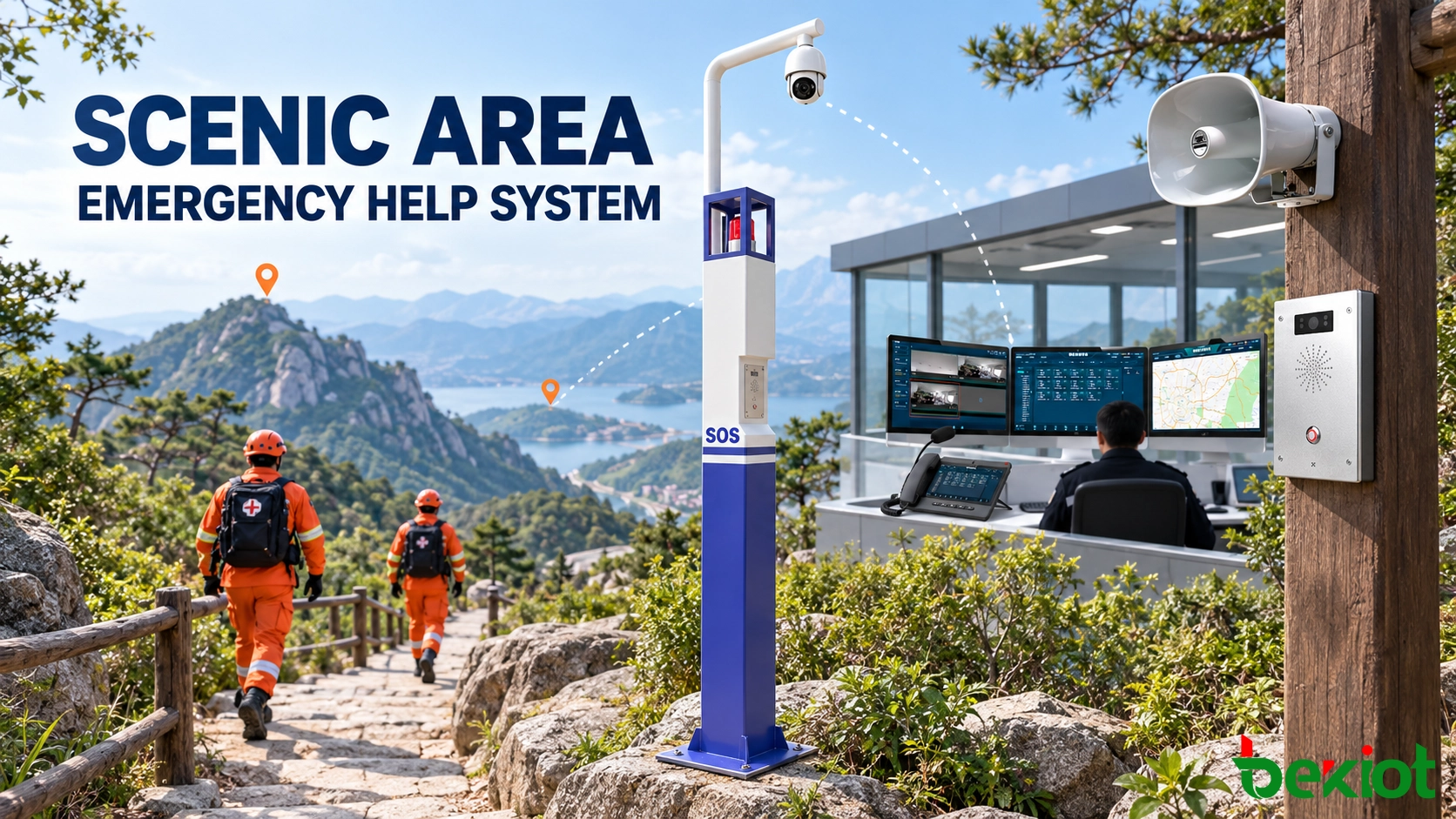
A visitor who slips on a mountain path may not know the name of the trail or the nearest access point. Someone reporting smoke from a cableway station may have only a few seconds to explain the situation. In these cases, the speed of the response depends on more than making a telephone call. The control center must identify the location, understand the incident and contact the team that can reach it.
A scenic area emergency help system connects fixed SOS points with an electronic map, video surveillance, radio dispatch and public address facilities. Each request enters a defined handling process, allowing operators to move from the initial call to field coordination without relying on separate contact lists or unrelated control screens.
Select Help-Point Locations from Visitor Routes and Risks
Emergency terminals are most useful where visitors may have difficulty finding staff, describing their position or obtaining reliable mobile coverage. The design therefore begins with an assessment of how people move through the site rather than a fixed spacing rule.
Main entrances, visitor centers and transport stations usually have staff nearby, but they still benefit from visible call points after normal operating hours. More remote locations require closer attention. Typical examples include trail intersections, steep steps, waterfront platforms, cableway stations, isolated car parks and routes affected by seasonal weather.
Historical incident records help identify practical priorities. If a viewing platform has frequent medical cases, or visitors regularly lose their way at a particular junction, the help point at that location may require video, two-way speech and direct routing to a continuously staffed position. A terminal near a service entrance may only need voice communication with security.
Give Every Terminal an Operational Identity
Numbering a device as “SOS 03” provides little information to an operator who manages a large park. A name such as “North Trail–Waterfall Junction” immediately indicates the area and gives the dispatcher a useful reference when contacting a patrol team.
The equipment record can contain the terminal name, geographic coordinates, nearby landmark, access route, closest camera and responsible rescue group. For mountain routes, it is also useful to record whether the location can be reached by vehicle, on foot or only through a particular service path.
This information needs to remain consistent across the dispatch platform, electronic map, maintenance register and site drawings. When a trail is renamed or redirected, the corresponding device records must be updated at the same time.
Match the Hardware to the Installation Point
Equipment installed outdoors may face rain, condensation, dust, direct sunlight, low temperatures and accidental impact. Coastal parks and waterfront attractions can also expose terminals to salt and corrosion. The enclosure, cable entries, mounting hardware and power arrangement must suit the actual location.
The user interface needs to remain simple. A clearly marked SOS button, a visible call-status indicator and understandable operating instructions are usually more effective than a full telephone keypad. Audio design also matters: the microphone must capture speech in wind and crowd noise, while the speaker needs enough output for the visitor to understand the operator.
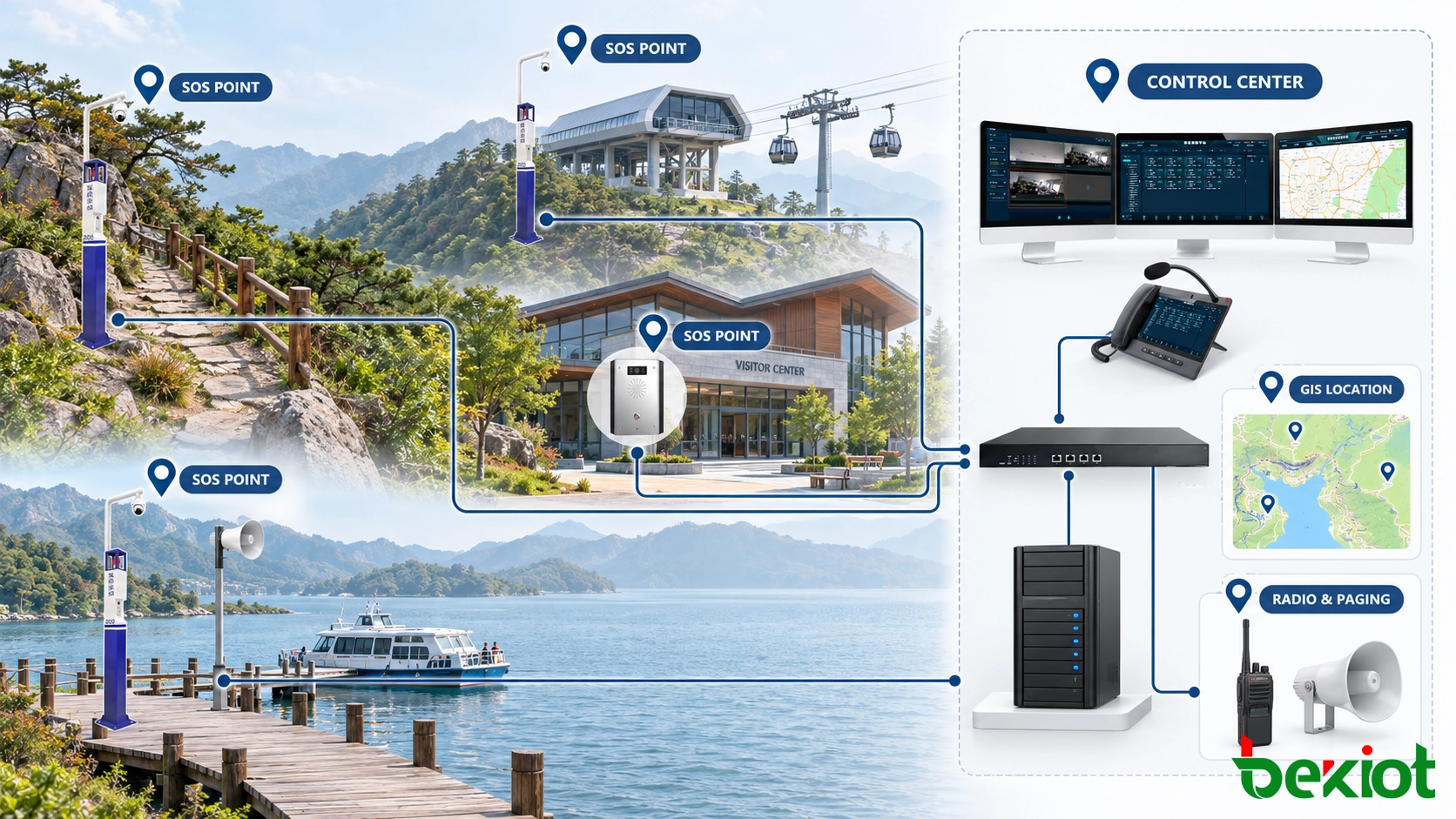
SOS points placed along visitor routes connect to the control center through the available fixed or wireless network.
Turn an SOS Call into a Managed Incident
When the emergency button is pressed, the control-room screen can display the help-point name, map position and call time before the operator answers. This removes the need for a distressed visitor to explain an unfamiliar location at the beginning of the conversation.
The operator first confirms what has happened and whether anyone is in immediate danger. The next action depends on the event. A minor injury on a paved route may require the nearest first-aid team. A fall on an isolated mountain trail may involve rescue personnel, a suitable access route and continuous contact with the caller. Smoke near a cableway station may also require local announcements and operational shutdown procedures.
Route Unanswered Calls to an Available Position
An SOS request cannot be treated like an ordinary extension call. If the primary operator does not answer within the configured period, the request can ring additional seats, enter a visible emergency queue or transfer to a backup control center.
During the day, calls may be handled by the local visitor-service or security center. After closing time, the same terminals can route to a central duty room. The destination may change, but the terminal identity, location information and emergency status must remain attached to the call.
Visual and audible alerts help distinguish new emergency requests from routine communication. The event stays active until an operator accepts responsibility, preventing an unanswered call from disappearing among completed tasks.
Use Incident Templates Without Restricting Operator Judgment
Preconfigured response templates give operators a reliable starting point. Separate templates may be prepared for medical assistance, missing children, lost visitors, severe weather, fire, equipment failure and public-security incidents.
Each template can display the relevant contact groups, nearby resources and approved announcements. It can also suggest whether video verification or area paging is appropriate. The operator still decides which steps match the actual situation; a template is a guide rather than an automatic replacement for incident assessment.
Escalation follows the changing event. A fallen tree may initially affect one trail section. If it blocks an evacuation route or creates a wider safety risk, the operator can notify adjacent zones, close additional paths and involve site management.
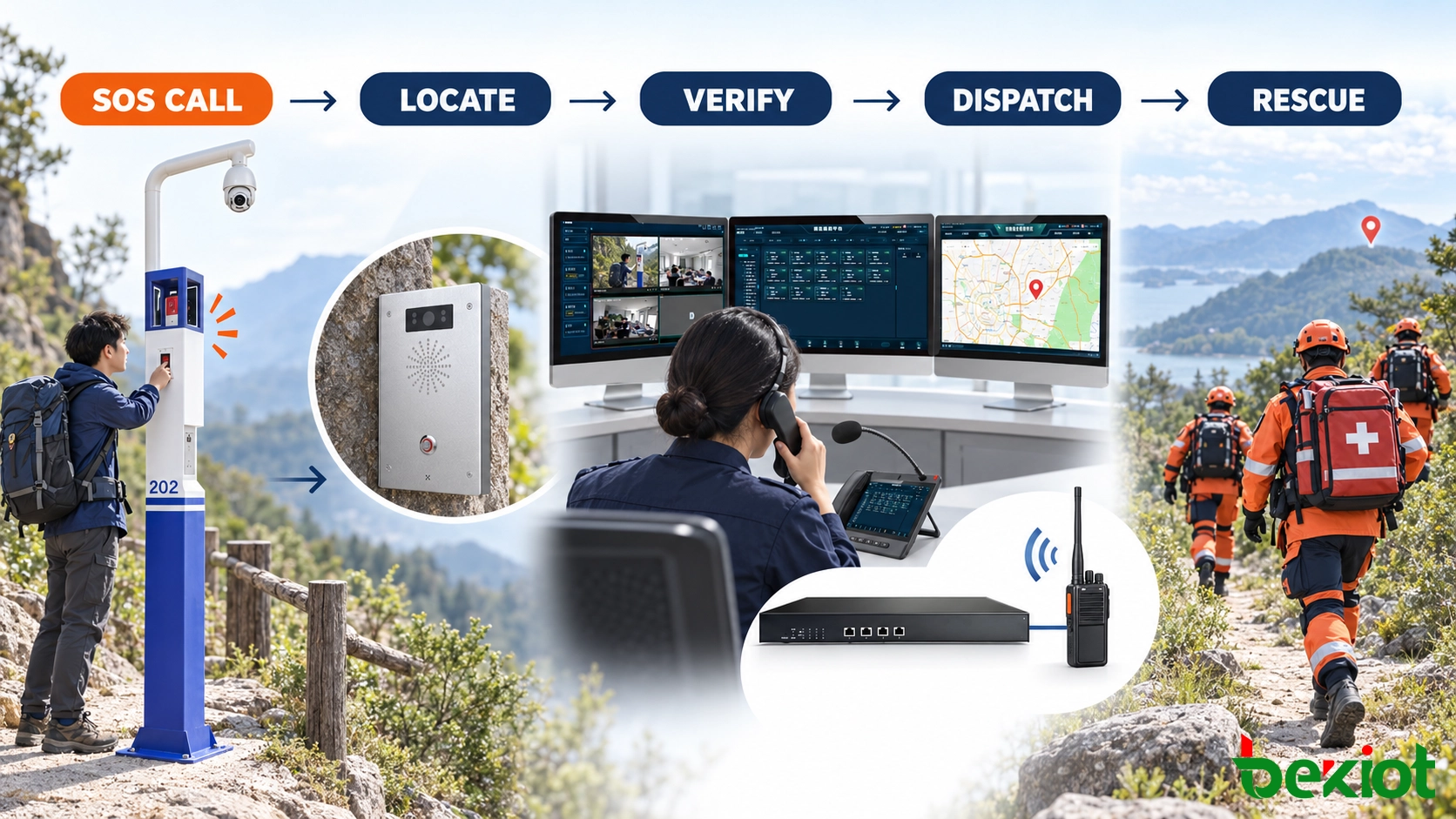
A help request becomes a managed incident covering location confirmation, field communication and response tracking.
Bring Video, Radio and Public Address into the Workflow
Different communication resources answer different questions. The SOS call explains what the visitor is experiencing. Video provides a view of the surrounding conditions. Radio reaches mobile personnel, while the public address system warns other visitors who may be approaching the affected area.
Connecting these resources through the dispatch interface reduces unnecessary switching between systems. It does not mean that every alarm must automatically trigger every available channel.
Associate Cameras with Relevant Locations
A help point near a cableway entrance might be associated with cameras covering the queue, platform and access road. A trail terminal may only have one nearby camera, or no usable view because of terrain and vegetation.
When a call arrives, the operator can open the available camera group from the event screen. This is useful for checking crowd density, visible smoke, weather conditions or an obstructed route. At night or during heavy rain, the image may be limited, so voice and field confirmation remain essential.
Camera associations require maintenance. Adding a camera, changing its viewing direction or modifying a route may make the original linkage inaccurate even though both systems continue to operate normally.
Contact Mobile Teams Through Radio Dispatch
Patrol officers, medical staff, maintenance teams and rescue personnel often use portable radios because they work while the user is moving. Selected radio channels or talk groups can be presented at the dispatch console through a compatible radio interface or RoIP gateway.
Instead of broadcasting the request to every team, the dispatcher contacts the group responsible for the incident zone. The message can include the help-point name, incident type, number of people involved and recommended access route.
For a complex rescue, the dispatcher may establish a controlled conference between the caller, a field team and another specialist. Access to operational and emergency radio groups remains limited by role so that routine users do not occupy critical channels.
Keep Announcements Relevant to the Location
Zoned public address prevents a local problem from disrupting the entire attraction. If rockfall closes one walking route, the first announcement may cover that route, nearby intersections and the closest shuttle stop. Other areas continue normal operation.
The broadcast range can expand if conditions worsen. During lightning, wildfire or a major evacuation, announcements may extend to cableway stations, parking areas, visitor centers and all outdoor zones.
Pre-recorded messages provide consistent wording for recurring events, while live paging allows operators to communicate changing instructions. Emergency tasks receive higher priority than background music, promotional audio and scheduled visitor information.
Maintain Service Across Mountains, Forests and Waterfronts
Large tourist sites rarely depend on one transmission method. Buildings and nearby facilities may use fibre or industrial Ethernet, while distant help points connect through wireless bridges, cellular networks or industrial wireless links. Digital radio continues to support mobile teams beyond the reach of fixed terminals.
Terrain surveys and on-site measurements determine which combination is suitable. A wireless link that appears clear on a map may be obstructed by seasonal vegetation, new structures or changes in water level. Holiday crowds can also affect public mobile network capacity.
Limit the Effect of Shared Failures
Service availability depends on the entire path between the visitor and the operator. A backup server offers limited protection when both servers share the same switch, power circuit and building connection.
The design review needs to follow each dependency: central servers, databases, core switches, field gateways, wireless links, operator workstations, power supplies, authentication services and time synchronization. High-priority locations may use redundant uplinks, UPS power or an alternative call destination.
Remote zones can retain a local warning method for periods when the central connection is unavailable. Depending on the site, this may be a local paging controller, emergency microphone, radio channel or a terminal with predefined fallback calling.
Provide Suitable Power for Remote Installations
PoE is convenient where the cable distance and switch capacity allow it. More isolated points may rely on local mains power, solar panels, batteries or a hybrid arrangement.
The power calculation has to include every device at the site, not only the SOS terminal. Cameras, wireless equipment, heaters and local loudspeakers can consume more energy than the call point itself. Battery performance also changes with temperature and age.
Reporting low voltage, battery faults or charging failures to the maintenance platform allows staff to intervene before a help point becomes unavailable.
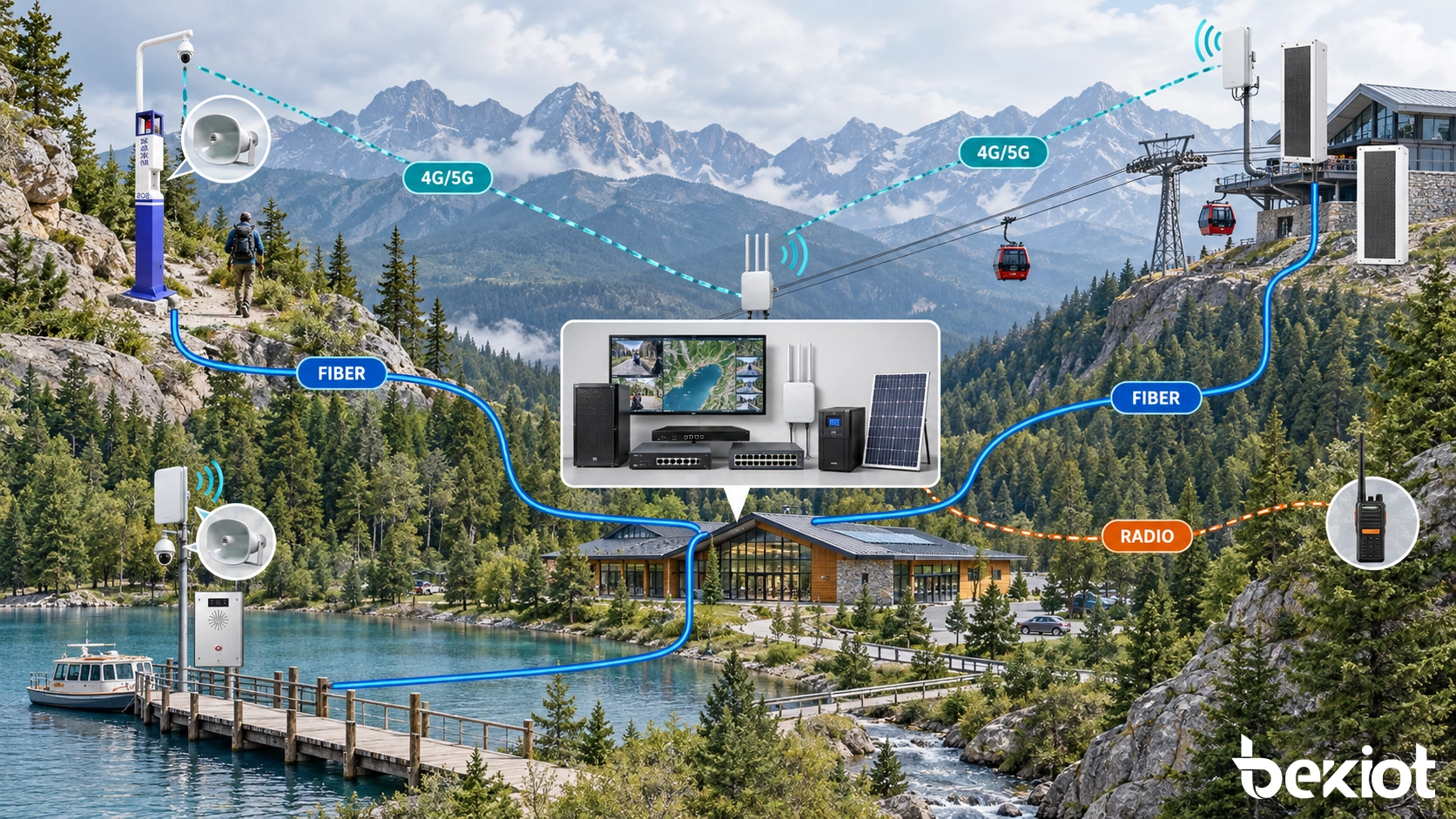
Fixed and wireless links extend emergency communication into remote areas, with local fallback and backup power protecting essential functions.
Manage Permissions, Records and Preventive Maintenance
The system may be used by visitor services, security, first-aid teams, maintenance personnel and management. Giving every user full administrative access makes accidental changes more likely and weakens accountability.
Operational permissions can be separated by responsibility. Visitor-service personnel answer calls and contact routine patrol groups. Security operators handle higher-priority events and wider paging zones. Maintenance users inspect equipment status, while administrators manage accounts, network parameters and system interfaces.
Preserve a Useful Event History
An incident record can link the initial request with the terminal location, operator actions, radio contacts, paging tasks and final outcome. Timestamps show when the call arrived, when it was answered and when the field team reported completion.
Voice recordings and video references may be retained where local regulations and organizational policy permit. Access, export and deletion permissions require separate control, particularly when the incident includes personal information about a visitor.
Records also support operational improvement. A pattern of repeated calls at the same intersection may indicate poor route signage. Long response times in one zone may reveal an unsuitable patrol arrangement or difficult access route.
Test the Functions That Status Icons Cannot Confirm
An online icon confirms communication with a terminal, but it cannot prove that the microphone, loudspeaker or emergency button is working. Remote monitoring therefore needs to be supported by scheduled physical inspections.
A field test includes pressing the SOS button, checking two-way speech, confirming the map location and verifying the selected camera. Technicians can also inspect the enclosure, labels, cable entries, mounting hardware and power condition.
Test frequency depends on weather exposure, visitor volume and the importance of the location. Equipment installed on a remote cliff path or waterfront platform may require a different inspection schedule from a terminal inside a staffed visitor center.
Related Solution: Becke Alarm System
Verify the Visitor-to-Rescue Chain Before Opening
Commissioning works best when it reproduces realistic situations. Test calls can be placed from a busy entrance, an exposed viewing platform, a remote trail and a transport station. The aim is to confirm that each location produces the correct response, not simply that all devices appear online.
Acceptance testing covers:
Emergency-button operation and call-status indication
Two-way speech under wind, traffic and visitor noise
Correct help-point name and electronic map position
Escalation when the primary operator does not answer
Access to the intended camera group
Radio contact with the team responsible for the zone
Live and pre-recorded messages in the selected paging area
Emergency priority during routine announcements
Operation after a server, network or power interruption
Voice testing needs complete spoken instructions rather than a short tone. A visitor may hear that the speaker is active but still fail to understand the operator because of wind, echo or insufficient output. Tests conducted during normal visitor activity provide more useful results than checks carried out in an empty site.
The final handover package records terminal locations, coordinates, network addresses, power sources, nearby cameras, radio groups, paging zones and escalation destinations. It also identifies where routing and linkage settings are stored, allowing future changes to be made without leaving conflicting information in different systems.
The effectiveness of a scenic area emergency help system is measured by the response it enables. A well-positioned terminal identifies where assistance is needed, keeps the visitor in contact with the control center and gives rescuers the information required to reach the scene.
FAQ
Can Existing Analog Emergency Call Points Be Reused?
A compatible analog gateway may connect existing call points to an IP-based platform. Before reuse, the project team needs to check caller identification, button behaviour, audio quality, cable condition, power availability and fault reporting.
How Many Simultaneous SOS Calls Should the System Support?
Capacity depends on peak visitor numbers, the size of the site and control-room staffing. The calculation should include concurrent voice sessions, video access, radio activity and paging tasks. Testing several calls at once also confirms whether operators can distinguish and prioritize separate incidents.
How Should Accidental SOS Activations Be Handled?
The operator can verify the situation and close the event with an appropriate result code. The activation should remain in the history because repeated false calls may reveal unclear instructions, poor button placement or equipment damage.
Is Call Recording Mandatory?
Recording requirements vary by jurisdiction and organizational policy. Where recording is used, visitors may require appropriate notice, and the system owner needs documented rules covering access, retention, export and deletion.
Can the System Expand When New Trails or Attractions Open?
Yes. Additional SOS terminals, cameras, paging endpoints and communication groups can be incorporated into a modular IP architecture. Expansion planning also needs to consider network capacity, power, software licensing, operator workload and responsibility for the new response zone.