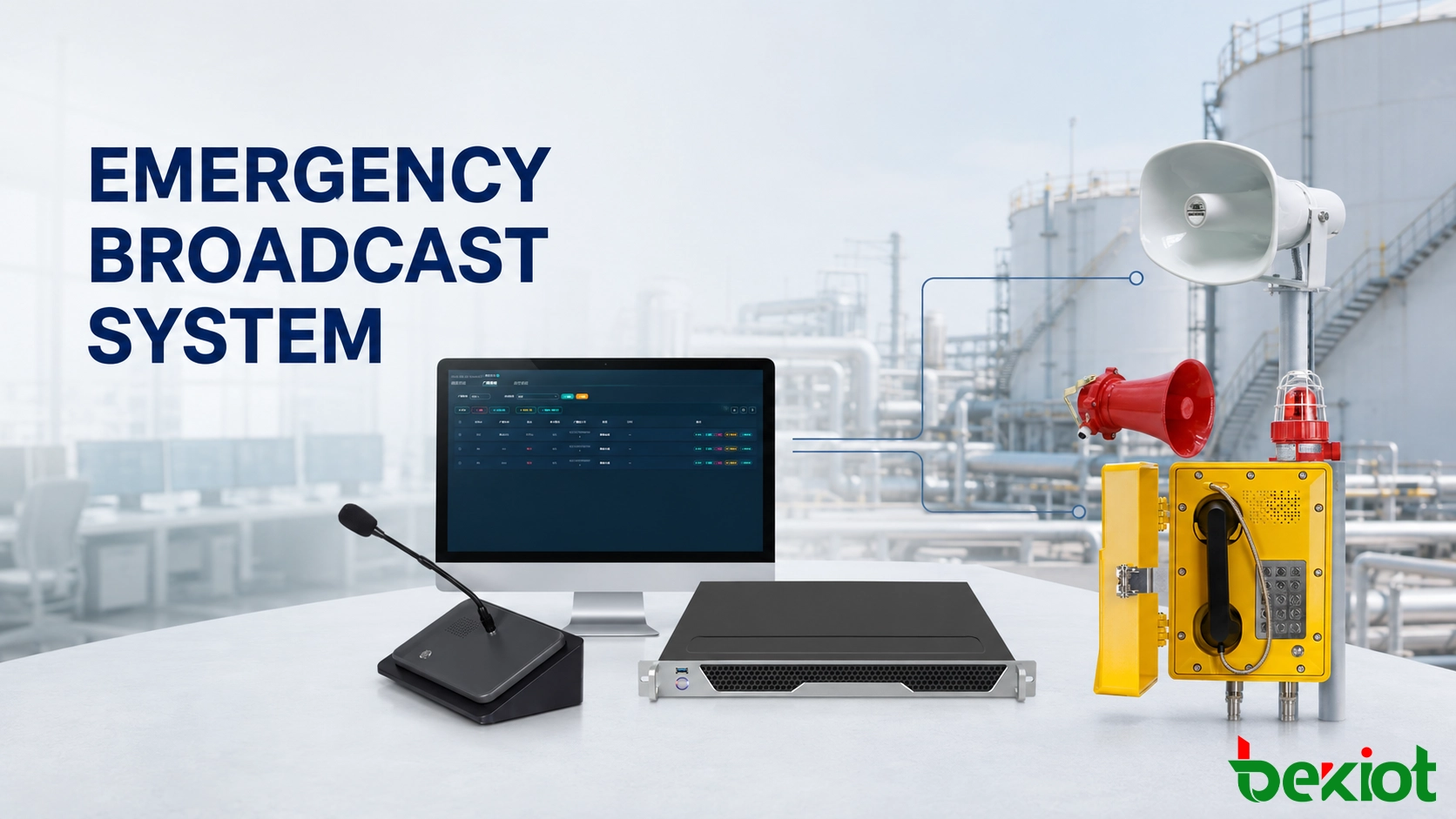
A gas detector reports a leak near Tank Farm 2. Workers inside the affected area need immediate instructions, personnel in the adjacent loading zone may need to prepare for evacuation, and employees in distant buildings do not yet need to be interrupted.
The control room must turn that alarm into a clear voice message and deliver it to the correct locations. If the leak spreads or an evacuation route becomes unavailable, the operator must be able to change the message, extend the broadcast area and coordinate with personnel at the scene.
Becke Telcom addresses this process through a SIP-based emergency broadcast system that connects alarm inputs, broadcast management, paging microphones, dispatch consoles, amplifiers and field speakers. Instead of treating these devices as separate products, the system organizes them around the way an incident is detected, communicated and managed.
The same infrastructure can be used for production notices, maintenance reminders and scheduled announcements. When an emergency source is activated, predefined priorities interrupt lower-level audio and make the emergency message the active task.
Related solution: SIP PA and Emergency Broadcast System
Alarm-to-Voice Workflow
An emergency broadcast begins with a known event source. This may be a fire-alarm contact, gas detector, equipment controller, emergency button or command from an authorized operator. Each source needs a clear identity so that the platform can associate it with the correct site, area and response rule.
In the Tank Farm 2 example, the alarm should arrive as a recognizable event such as “TF2 Gas Detection,” rather than an unexplained input number. The configured linkage identifies the first broadcast zones, selects the appropriate message and applies the required priority.
Whether the message starts automatically or waits for operator confirmation depends on the site’s cause-and-effect plan. A confirmed gas signal may immediately activate a local warning, while a lower-confidence equipment alarm may first appear on the control-room interface for assessment.
Once the broadcast begins, the initial sequence may include:
The alarm input reports the event and its source location.
The platform matches the input with a configured response rule.
A prerecorded gas warning is assigned to Tank Farm 2.
Routine audio in that zone is interrupted.
The warning is sent through the configured audio path.
The control room receives the event and broadcast status.
The dispatcher remains involved after the automatic action. From the control position, the operator can repeat the message, add the loading area, make a live announcement or stop an incorrect broadcast according to assigned permissions.
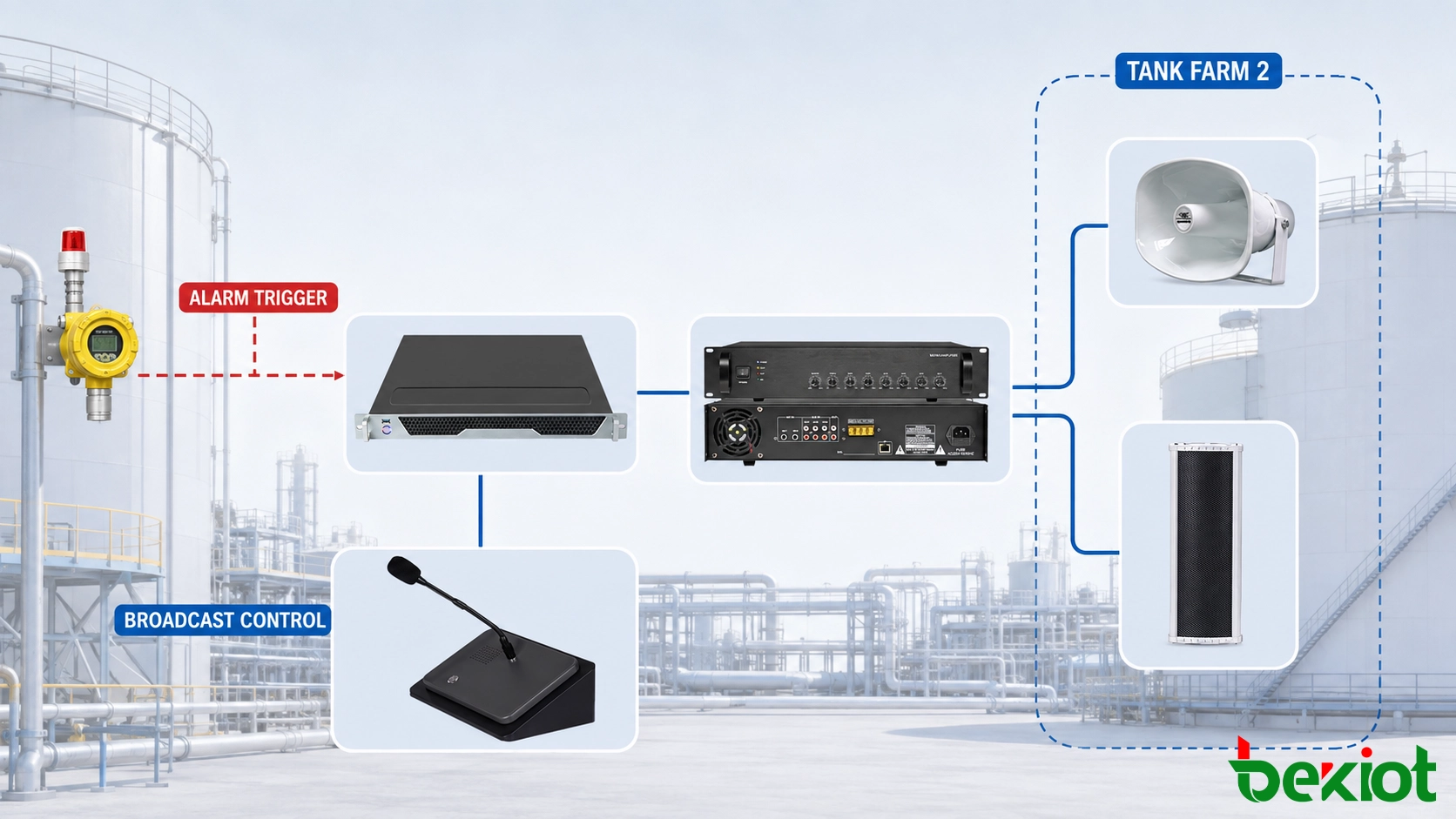
Control and Audio Path
The equipment arrangement depends on the site layout and its existing audio infrastructure. A compact installation may use a paging microphone and several SIP speakers. A larger plant may combine central management, multiple operator positions, network amplifiers, paging gateways and different types of field speakers.
In a Becke Telcom deployment, products can be arranged by operational responsibility rather than placed into one fixed package. The broadcast platform manages rules and zones; operator terminals initiate or take over a broadcast; audio devices deliver the message in each area.
| System Position | Typical Equipment | Operational Role |
|---|---|---|
| Management layer | Broadcast server and management software | Maintains zones, users, priorities, messages, schedules and event rules |
| Paging position | GP600V PA paging microphone | Selects zones and provides live voice announcements |
| Control-room position | DSC-173 IP paging and dispatch console | Combines paging control with call and dispatch operations |
| Network audio distribution | SIP paging gateway or IP amplifier | Routes network audio to compatible amplifier inputs or passive speaker circuits |
| Local amplification | PA-BGS-60W or PA-W120W SIP amplifier | Provides audio power for speakers assigned to a building or operating zone |
| Field audio | SIP horn, column, pendant or ceiling speaker | Delivers the announcement to personnel in the covered area |
| Field warning | Audible and visual alarm device | Adds visible and tonal warning where voice alone may be insufficient |
Direct SIP endpoints
A SIP speaker or network amplifier can be registered as an addressable endpoint. The platform can assign it to one or more named zones and send audio through the IP network. This method is useful for new buildings, remote areas and projects that require flexible zone management.
Gateway-based access
Existing amplifiers and passive speaker circuits may be retained when their condition and electrical characteristics meet the project requirements. A SIP paging gateway provides the audio interface between the network platform and the conventional PA input.
Reuse should be confirmed by checking amplifier inputs, speaker loads, cable condition, audio quality and monitoring requirements. Connecting an old amplifier to a network gateway does not correct weak coverage or damaged field wiring.
Field equipment
The same plant may require several speaker types. Offices can use ceiling or wall speakers, workshops may need horn speakers, and long outdoor areas may use weatherproof column speakers. Hazardous zones require equipment selected for the applicable environmental and certification conditions.
On the operator interface, these different devices are presented as operational names such as “Tank Farm 2,” “Loading Area” and “North Assembly Point.” The dispatcher does not need to identify an amplifier channel or IP address before issuing a warning.
Zone and Message Logic
Broadcast zones should follow the emergency-response plan rather than the convenience of the speaker wiring. Buildings, production units, hazardous areas, evacuation routes and assembly points need clear names that are consistent across the broadcast platform, site drawings and control-room procedures.
Tank Farm 2 may contain several speaker circuits, but the operator can manage them as one functional zone. The nearby loading road can remain separate so that it receives a preparation warning without immediately receiving the same evacuation order.
| Incident Stage | Broadcast Area | Message | Operator Action |
|---|---|---|---|
| Initial gas detection | Tank Farm 2 | Stop work and await instructions | Check the alarm source and contact the area |
| Leak confirmed | Tank Farm 2 and loading road | Leave through the designated route | Add adjacent zones and notify responders |
| Incident expanding | Downwind areas | Evacuate or shelter according to the site plan | Select zones according to current conditions |
| Site-wide escalation | All required areas | Plant-wide emergency instructions | Take live control and coordinate the response |
Priority control
Routine paging, scheduled playback and emergency communication may share the same field speakers. The configured priority decides which source is heard when tasks overlap.
Emergency live speech may be placed above prerecorded warnings when the operator needs to correct an evacuation route or provide changing instructions. Both should take priority over routine announcements and background audio. The final order must match the approved operating procedure.
Priority tests should use more than one active source. Engineers need to confirm that the emergency message interrupts lower-level audio in the selected zone, that unrelated zones behave as intended and that the interrupted content does not restart unexpectedly.
Message design
A prerecorded warning should identify the affected location, state the required action and avoid explanations that delay the instruction. “Gas detected in Tank Farm 2. Stop work and leave by the east access road” is more useful than a general message stating only that an emergency has occurred.
Where several languages are required, the playback order and repetition count should be defined in advance. A long sequence may delay the instruction for later language groups, so wording needs to remain concise.
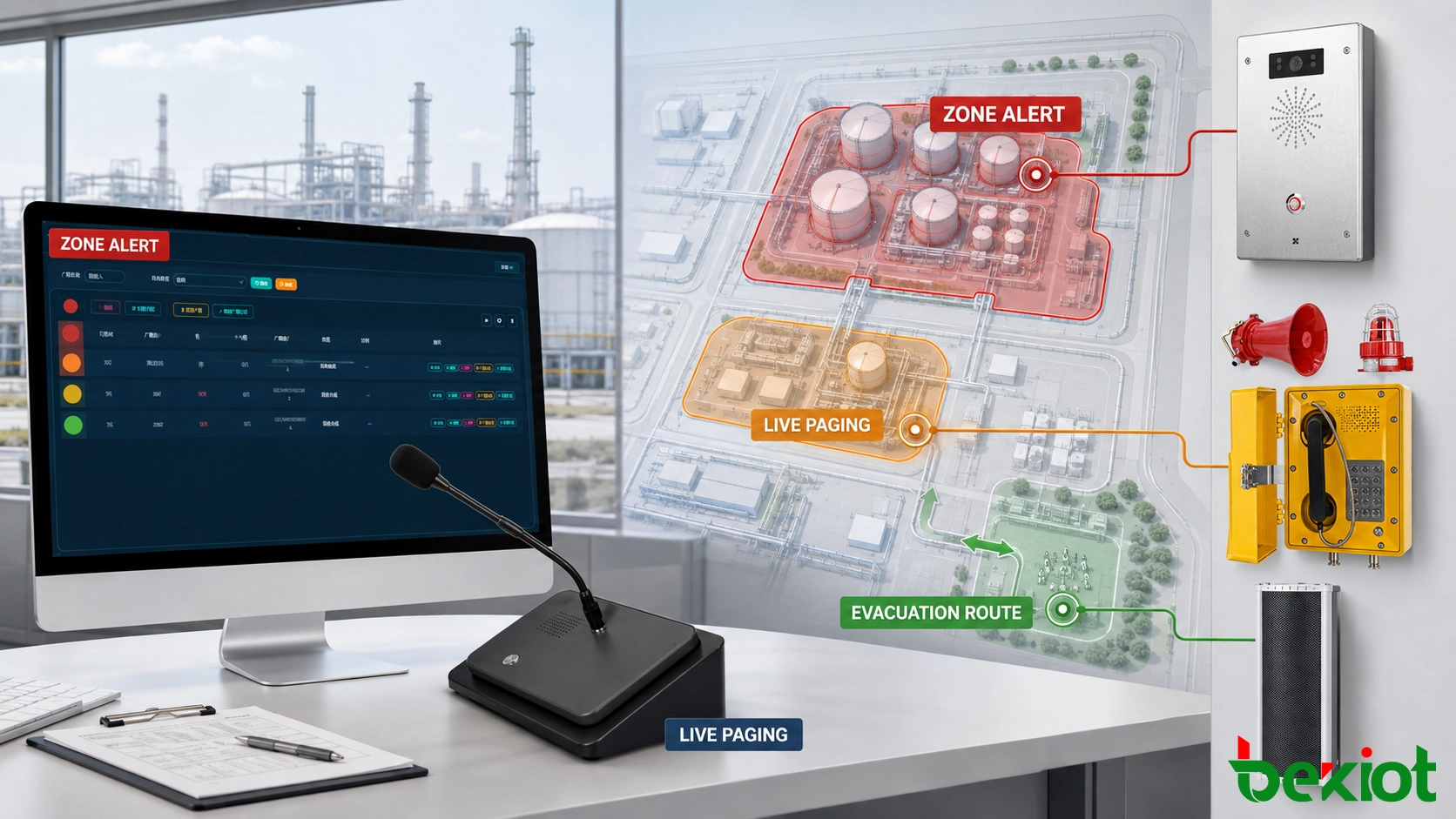
Live Command and Feedback
A prerecorded message handles the first known instruction, but the control room may need to change the response within minutes. Wind direction may shift, an exit may be blocked or the incident may extend into another operating area.
Through a dispatch console or paging microphone, the operator can select additional zones and make a live announcement. If the east access road becomes unsafe, the dispatcher can interrupt the recorded evacuation message and direct personnel toward the western assembly point.
The live call should reach only the zones selected by the operator. All-call broadcasting remains available for site-wide events, but it should not be the default response to every alarm.
Field communication
Broadcasting sends one message to many listeners. It does not confirm what is happening at the alarm location. Industrial telephones, SIP intercoms and emergency call stations provide a return path to the control room.
A worker near the tank farm can report whether gas is visible, whether personnel have cleared the area or whether the planned exit is blocked. The operator can then adjust the broadcast without relying solely on the first detector signal.
Fixed field stations should use recognizable identities. When a call arrives, the control room should see a location such as “Tank Farm 2 – Pump Entrance” rather than an unexplained extension number. This allows the call and the active broadcast event to be understood as parts of the same incident.
Event records
The broadcast platform should record the trigger source, message, selected zones, start time and operator action according to the functions included in the project. Connected communication and recording systems should use a common time source so that calls, broadcasts and control-room actions can be reviewed in the correct order.
These records are useful after an incident, but they also support routine maintenance. If one zone did not receive the expected message, engineers can compare the configured rule, operator action and equipment status instead of relying only on recollection.
Fault Handling and Testing
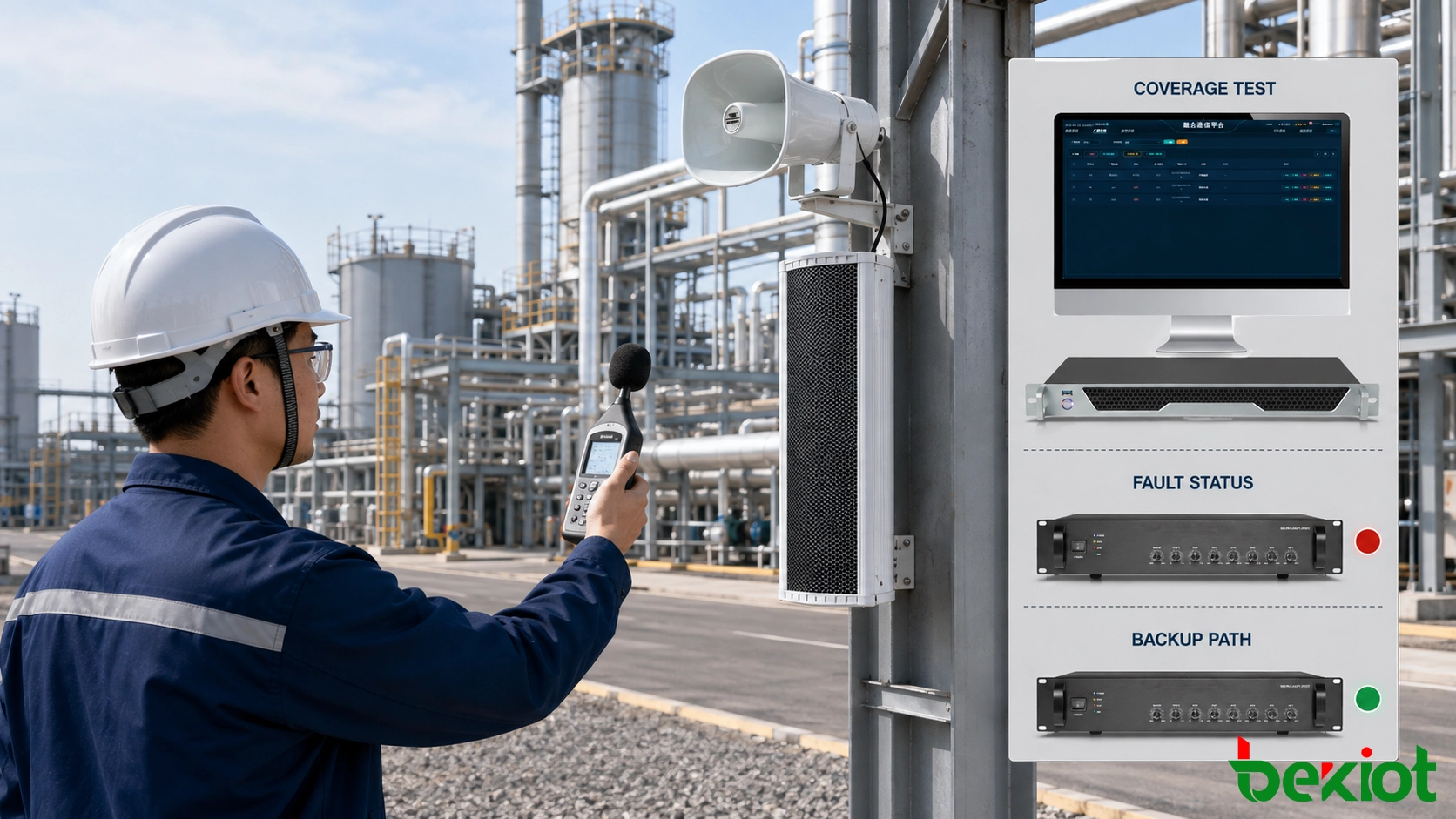
A broadcast path may appear normal while a speaker circuit, amplifier channel or remote network connection is unavailable. Monitoring should identify the affected part of the installation in terms that maintenance personnel can trace.
A useful fault message identifies the building, zone, device or circuit involved. “Loading Area amplifier offline” gives the control room a clearer response path than a general communication error.
Failure response
The project design should define what remains available after each expected fault. Depending on the required level of resilience, this may involve backup power, standby servers, alternative network links, spare amplifier capacity or locally stored messages.
A single fault does not always leave every function unchanged. Some installations enter a controlled degraded mode. The operator needs to know which zones remain available, which broadcast path has been lost and whether an alternative method is required.
| Test | Required Check |
|---|---|
| Alarm input | The correct event name, message and first zone appear |
| Zone selection | Audio reaches the selected area without entering unrelated zones |
| Priority | Emergency audio interrupts the intended lower-level source |
| Live takeover | The authorized operator can replace or update a recorded message |
| Main power loss | Backup operation follows the project’s required behaviour |
| Network interruption | The interface shows the affected connection and available fallback path |
| Amplifier or circuit fault | The fault is identified without disabling unaffected zones |
| Field audio | Speech remains understandable at representative listening positions |
Coverage testing
Each required area should be tested from the initiating device to the field speaker. Boundary points, stairways, equipment rooms, loading bays and locations near operating machinery deserve particular attention.
High sound level alone does not guarantee an understandable message. Speaker direction, distance, background noise and reverberation all influence speech clarity. Where the project specifies an intelligibility target, testing should use the required measurement method and calibrated equipment.
Handover records
The acceptance record should identify the tested event, zone, device, expected result, actual result and pass-or-fail status. Failed items require corrective action and a documented retest.
The final handover package should include the zone list, alarm-to-broadcast matrix, message files, equipment configuration, account permissions, network information and recovery procedure. Site changes such as speaker relocation, amplifier replacement or revised evacuation routes should trigger a review of the corresponding records.
The gas-leak example shows why emergency broadcasting must be planned as an operational path. The alarm identifies the incident, the platform applies the response rule, field equipment delivers the warning, and the dispatcher adjusts the message as new information arrives.
Becke Telcom brings these functions together through SIP paging equipment, broadcast management, dispatch terminals, audio gateways, amplifiers and industrial field devices. The equipment combination and control logic can be adapted to the existing infrastructure, site layout and emergency procedures of each project.
FAQ
Does every alarm input need to start an automatic broadcast?
No. High-confidence alarms may activate a predefined message immediately, while other events may first require operator confirmation. The decision should be documented in the site’s alarm and broadcast cause-and-effect plan.
Can an operator expand the broadcast area after an alarm is triggered?
Yes. An authorized operator can add zones, issue a different prerecorded message or take over with live speech. The available actions depend on the configured permissions and priority policy.
What information is needed before system configuration?
The project should provide site drawings, broadcast-zone definitions, alarm-source identities, response rules, message content, priority requirements, operator roles, existing audio equipment details and expected failure behaviour. These records determine how the devices should be connected and controlled.