


A SIP speaker is an active network audio endpoint used to receive paging, announcement and alert audio over an IP network. Unlike a passive loudspeaker connected only to an amplifier circuit, it can participate directly in a SIP-based communication system and be addressed from an IP PBX, paging server, dispatch console, SIP phone or another compatible source.
SIP mainly handles the signaling needed to establish and control a communication session. Once a page is established, the actual voice stream is commonly carried as RTP audio using parameters negotiated for the session. Many network speakers can also receive multicast audio, allowing the same announcement to reach a large group of endpoints without creating a separate media stream for every speaker.
This architecture makes the device useful wherever voice announcements need to share the same Ethernet infrastructure as telephones, intercoms, paging consoles and other IP communication equipment. The important design questions are therefore not limited to speaker wattage. Call routing, audio transport, multicast behavior, network configuration and acoustic coverage all affect how the system performs.

Where Network Speakers Fit into an IP Paging System
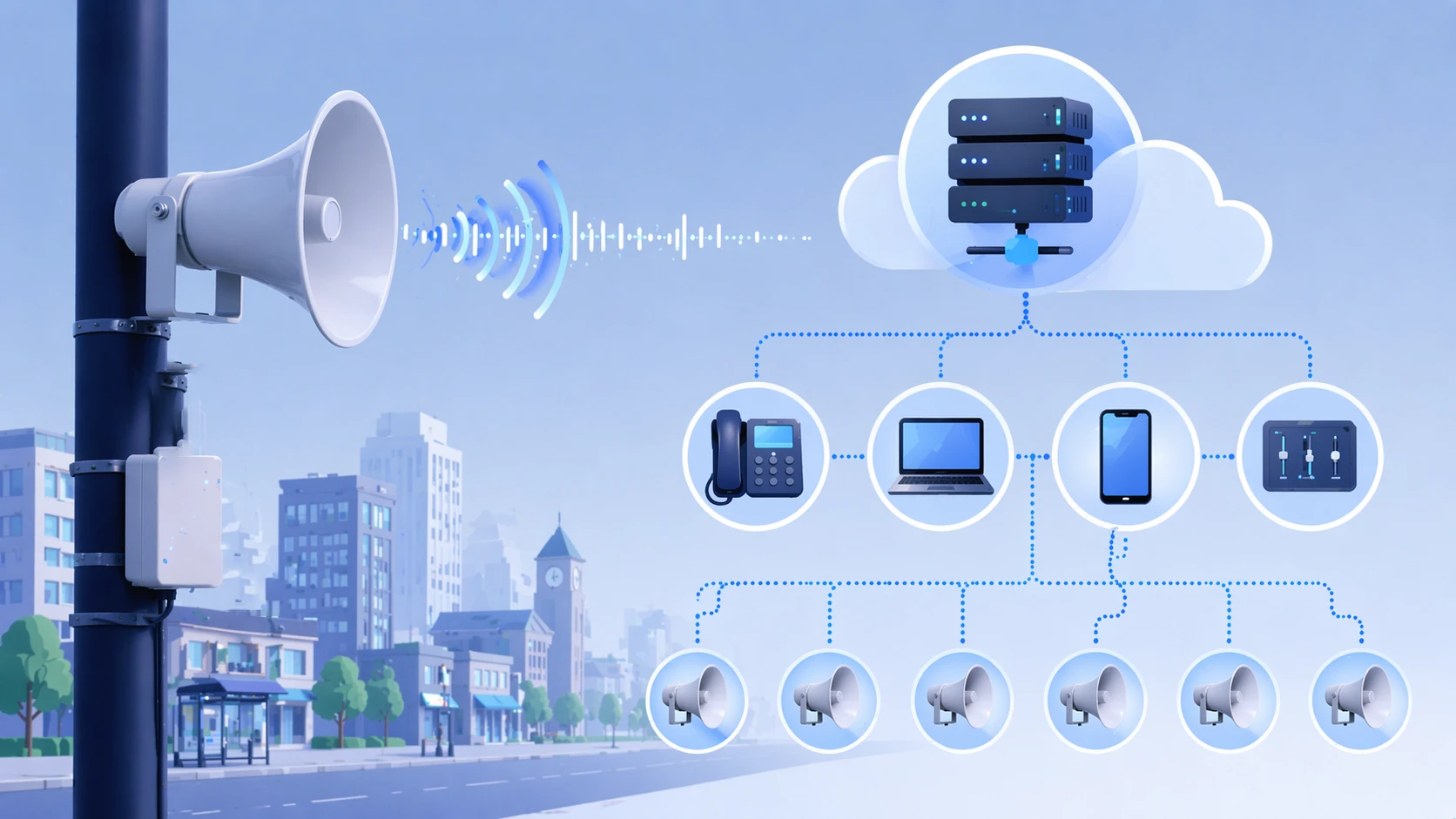
A typical paging path starts with an operator or an automated event. The source may be a desk phone with a paging key, an IP paging microphone, a dispatch console, an intercom terminal, a software application or an alarm platform. The request is then routed through the site's SIP or paging environment toward one speaker, a predefined paging group or a wider broadcast zone.
When speakers are registered as SIP endpoints, each device can have an extension or other logical identity. The PBX or paging server can then determine which destination should receive a call. A control room might dial one number for a production area and another for a warehouse, while a site-wide emergency number can target several zones according to the configured paging logic.
Speaker hardware also changes the traditional audio path. Many IP models contain their own network interface, decoder and amplifier, so Ethernet carries the network connection directly to the endpoint. PoE-capable models may receive data and electrical power through the same cable. Higher-output models can require PoE+, another power standard or an independent power supply depending on their amplifier requirements.
Existing analog loudspeakers do not need to be removed simply because SIP is introduced. Where a building already has useful speaker circuits, a SIP paging adapter or network amplifier can provide the IP connection while retaining the downstream analog speaker lines. New IP speakers and existing PA infrastructure can therefore operate within the same project when the architecture is planned accordingly.
How Signaling and Audio Reach the Speaker
In a registered SIP deployment, the speaker first connects to the network and authenticates with the configured SIP server or IP PBX. After registration, the call-control system knows where the endpoint can be reached. Some devices can also operate in direct IP or multicast modes without relying on a conventional PBX for every type of announcement.
When an operator starts a page, SIP signaling establishes the session. The request identifies the destination and normally includes media information through SDP so that both ends know which audio format and network parameters should be used. Once the session is accepted, the speaker automatically opens the paging channel rather than waiting for someone to answer it manually.
The spoken message is then normally transported as an RTP media stream. The speaker receives the packets, decodes the selected codec and sends the resulting audio to its internal amplifier and loudspeaker. When the source ends the announcement, SIP signaling closes the session.
Separating signaling from media is important when troubleshooting a project. A device may register correctly but still produce no audio if RTP is blocked, directed to the wrong address or affected by firewall and network configuration. Likewise, unstable packet delivery can lead to gaps or poor intelligibility even though the SIP call itself was successfully established.
Voice paging does not normally require the same bandwidth as video, but latency, packet loss and jitter still matter. On a busy network, voice VLANs and QoS policies can help maintain predictable packet delivery. Network design therefore becomes part of the audio system rather than an unrelated IT task.
Direct SIP Paging, Multicast and Group Calls Serve Different Needs
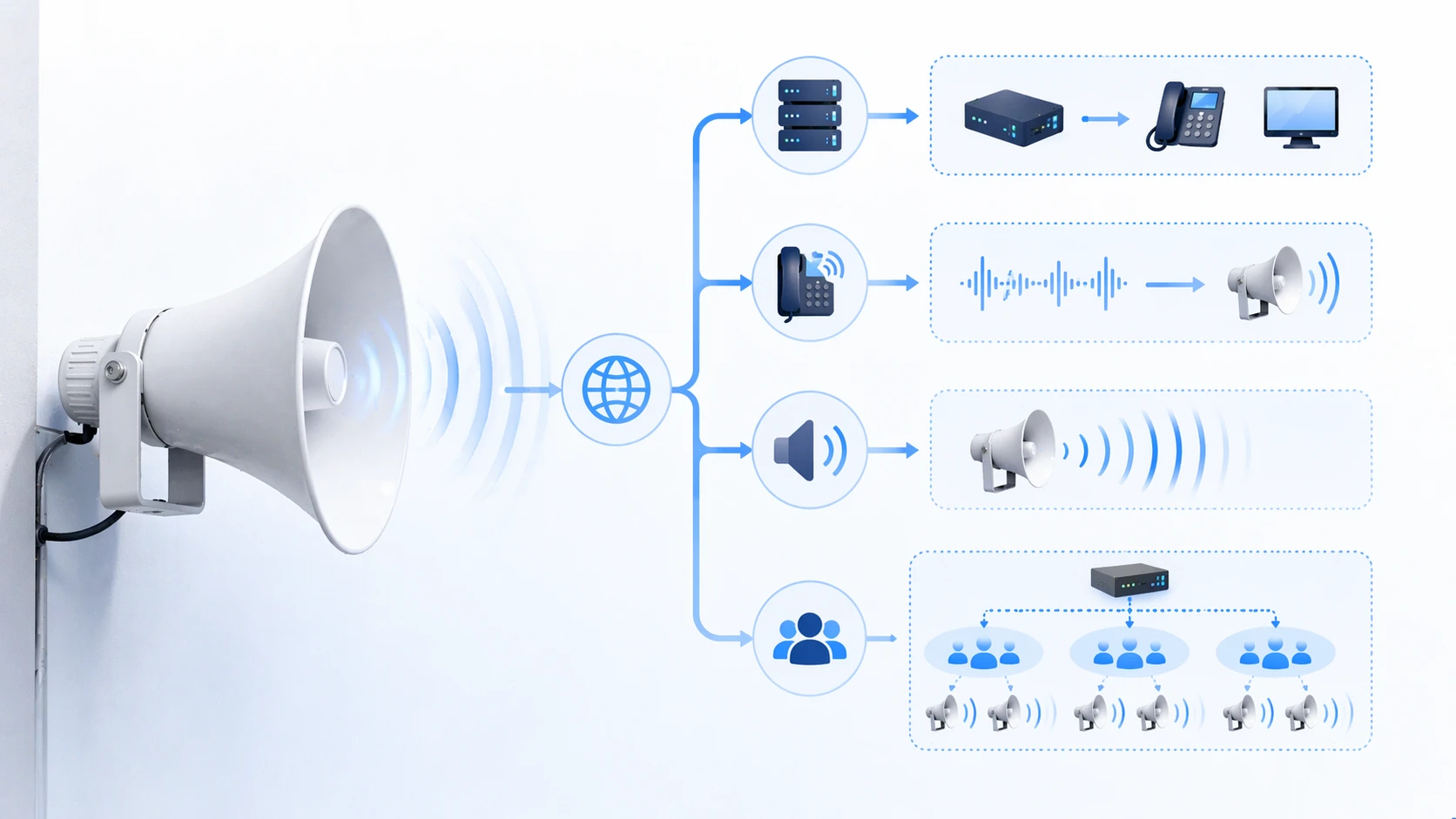
A single speaker can often be reached through a normal SIP page. In this arrangement, call signaling is directed to that endpoint and the associated RTP stream is sent specifically to it. This works well for individual rooms, entrances, workshops or other locations where the destination must be addressed separately.
Group paging can also be created at the SIP platform. A paging number may represent several registered endpoints, allowing an operator to call one extension while the server distributes the page to multiple destinations. This approach keeps group management inside the call-control system, but very large groups can create additional signaling and media sessions.
Multicast approaches one-to-many audio differently. Instead of transmitting an independent stream to every receiver, audio is sent to a multicast address that subscribed speakers can monitor. Dozens of endpoints can therefore receive the same message from a common stream when the network has been configured to handle multicast traffic correctly.
The two methods are often combined. An operator may initiate a normal SIP page while a paging server, gateway or suitable endpoint converts the incoming session into multicast audio for a larger speaker group. SIP then provides a convenient method of starting the page, while multicast handles efficient distribution across the target zone.
Large multicast deployments should be coordinated with the network configuration. IGMP snooping can prevent multicast packets from being unnecessarily delivered to every switch port. If announcements need to cross routed network segments, the routing design must also support the required multicast path.
Paging priority deserves similar attention. Routine announcements, scheduled messages and emergency warnings should not compete on equal terms when the application requires urgent audio to interrupt lower-priority traffic. Priority handling can be implemented at the paging platform, speaker or multicast channel level depending on the equipment used.
System Architecture Depends on the Size and Existing Infrastructure
A small office may require only an IP PBX, a PoE switch, a paging telephone and several ceiling or wall speakers. Each speaker registers to the communication platform, and extension numbers or paging groups determine where announcements are heard. The architecture remains relatively simple because the number of zones and endpoints is limited.
A larger campus, industrial plant or transport site usually needs a more structured design. Paging servers can manage zones and priorities, dedicated VLANs can separate communication traffic, multicast can distribute site-wide messages, and different speaker types can be installed according to the acoustic conditions in each area.
Network resilience becomes more important as paging takes on an operational or emergency role. PoE speakers depend on the network switches that power them, so switch redundancy, UPS backup and suitable power budgets have to be considered. A speaker may remain physically intact during a power event yet still become unavailable if the upstream switch has lost power.
Hybrid architecture is common in sites that have operated conventional PA systems for many years. A SIP paging gateway or network amplifier can connect the IP communication platform to existing amplifier channels or 70/100 V speaker circuits. New buildings or remote zones can then use native IP speakers while usable legacy wiring remains in service elsewhere.
This staged approach is often more practical than replacing every amplifier and loudspeaker at the same time. The network layer can be modernized first, while field audio equipment is migrated according to renovation schedules, acoustic requirements and available project budget.
How IP Speakers Differ from Traditional Analog PA Speakers
Both architectures can deliver clear announcements when they are designed correctly, but the location of the intelligence is different. An analog loudspeaker is generally a passive part of an audio circuit. Control, amplification and zone selection occur elsewhere in the PA system. An IP speaker moves more of that functionality to the network endpoint.
| Design Area | SIP / IP Speaker | Traditional Analog Speaker |
|---|---|---|
| Connection | Ethernet network | Dedicated speaker cable |
| Endpoint control | Addressable through SIP, paging or network configuration | Controlled mainly by upstream amplifier and zone circuits |
| Audio transport | RTP, multicast or other supported IP audio methods | Amplified analog audio |
| Power | PoE, PoE+ or local power depending on model | Usually supplied through the amplifier circuit |
| Zone changes | Often handled through software and network configuration | Usually dependent on amplifier channels and physical wiring |
| Integration | Can interact directly with SIP phones, PBXs, intercoms and paging platforms | Usually requires an interface or gateway to join an IP communication system |
Neither design is automatically suitable for every project. A building with extensive working speaker circuits may gain little from replacing every endpoint with Ethernet hardware. A new campus with structured cabling and many independently controlled zones may benefit from putting more audio endpoints directly on the IP network.
The decision is usually driven by the installed infrastructure, number of zones, power availability, monitoring requirements, future expansion plans and the cost of installing new cable. Hybrid systems remain useful where these factors differ from one part of a site to another.
Matching the Speaker Type to the Installation
Ceiling and wall speakers
Ceiling models are commonly used where even indoor coverage and unobtrusive installation are important, such as offices, classrooms, hospitals and corridors. Wall-mounted models can provide more directional coverage when ceiling installation is difficult or when announcements need to be aimed toward a specific occupied area.
Horn and high-output speakers
Warehouses, loading areas, workshops and outdoor locations often require greater sound pressure and more focused projection. Horn speakers are better suited to these conditions than typical indoor ceiling speakers. Outdoor models may also require suitable ingress protection, corrosion resistance and operating temperature specifications.
Column and distributed audio endpoints
Corridors, platforms and other elongated spaces can require a different coverage pattern. Column-style speakers can be useful where audio needs to travel along a defined direction without relying on a single high-output horn. The acoustic layout should be based on the area to be covered rather than on the network protocol alone.
Audio intelligibility matters more than nominal wattage alone
Selecting a larger amplifier does not automatically produce clearer speech. Ambient noise, mounting height, speaker direction, distance between endpoints and reverberation all affect intelligibility. Industrial machinery can mask speech even when the measured sound level is high, while reflective halls can make excessive volume reduce clarity.
Coverage calculations should therefore consider the background noise level and listening distance. Multiple correctly positioned speakers can sometimes provide better results than a smaller number of high-power devices driven at higher volume.
Check codec and platform compatibility before deployment
SIP compatibility does not guarantee that every endpoint will work with every PBX feature or paging method. The project should confirm supported audio codecs, registration method, DTMF requirements, multicast format, paging priority and any vendor-specific provisioning features before large quantities of hardware are installed.
The same applies to PoE. The network switch must provide the power standard and total power budget required by the selected devices. A high-output network horn may have different requirements from a small ceiling speaker even though both use Ethernet.
Emergency use requires attention beyond normal paging
When the system carries evacuation instructions or urgent warnings, availability becomes more important than convenience. Designers should consider power backup, network redundancy, priority interruption, endpoint supervision and the behavior of the system when part of the network is unavailable.
Regulatory requirements can also differ by country and application. A general-purpose SIP paging speaker should not automatically be assumed to satisfy the requirements of a certified voice evacuation or life-safety system. The required standards and approvals need to be confirmed for the specific project.
FAQ
Does SIP carry the actual speaker audio?
SIP is primarily used to establish and control the communication session. In a typical SIP paging call, SDP identifies the media parameters and RTP carries the real-time audio stream between the source and the speaker.
Can a network speaker work without an IP PBX?
It depends on the model and the required paging method. Some devices support direct SIP calls, peer-to-peer operation or multicast reception without a conventional PBX. A PBX or paging server is still useful when the project requires extensions, authentication, paging groups, routing rules or centralized management.
Does every SIP speaker support multicast?
No. Multicast is common in network paging products, but support and implementation vary by model. The multicast address format, channel count, priority behavior and supported audio codecs should be checked before the speaker is specified for a group paging system.
Does an IP speaker need a separate amplifier?
A self-contained active IP speaker normally includes its own amplifier and does not need a separate central amplifier for that endpoint. A SIP paging adapter, network amplifier or IP-to-analog interface is required when the system needs to drive conventional passive loudspeakers instead.
Can SIP paging be added to an existing analog PA system?
Yes. A SIP paging gateway or network amplifier can receive audio from the IP communication system and feed existing amplifier inputs or analog speaker circuits. This allows older PA infrastructure and newer SIP endpoints to operate within a hybrid design.
What should be checked before installing speakers across a large site?
The main checks include acoustic coverage, ambient noise, network topology, VLAN and QoS configuration, multicast handling, PoE capacity, codec compatibility, paging priorities and backup power. Outdoor or industrial locations may also require appropriate environmental protection and operating temperature ratings.







