


An SOS intercom is a dedicated emergency communication device that allows a person to quickly contact a control room, security desk, help center, or dispatch platform when urgent assistance is needed. In most cases, the user simply presses a clearly marked call button and starts hands-free two-way communication with an operator or response team.
Unlike a standard intercom used mainly for routine communication, an SOS intercom is designed for fast activation, simple operation, and reliable performance during stressful situations. In modern deployments, it often works with video, paging, alarm handling, and dispatch software, turning a basic help point into a much more capable emergency response communication node.
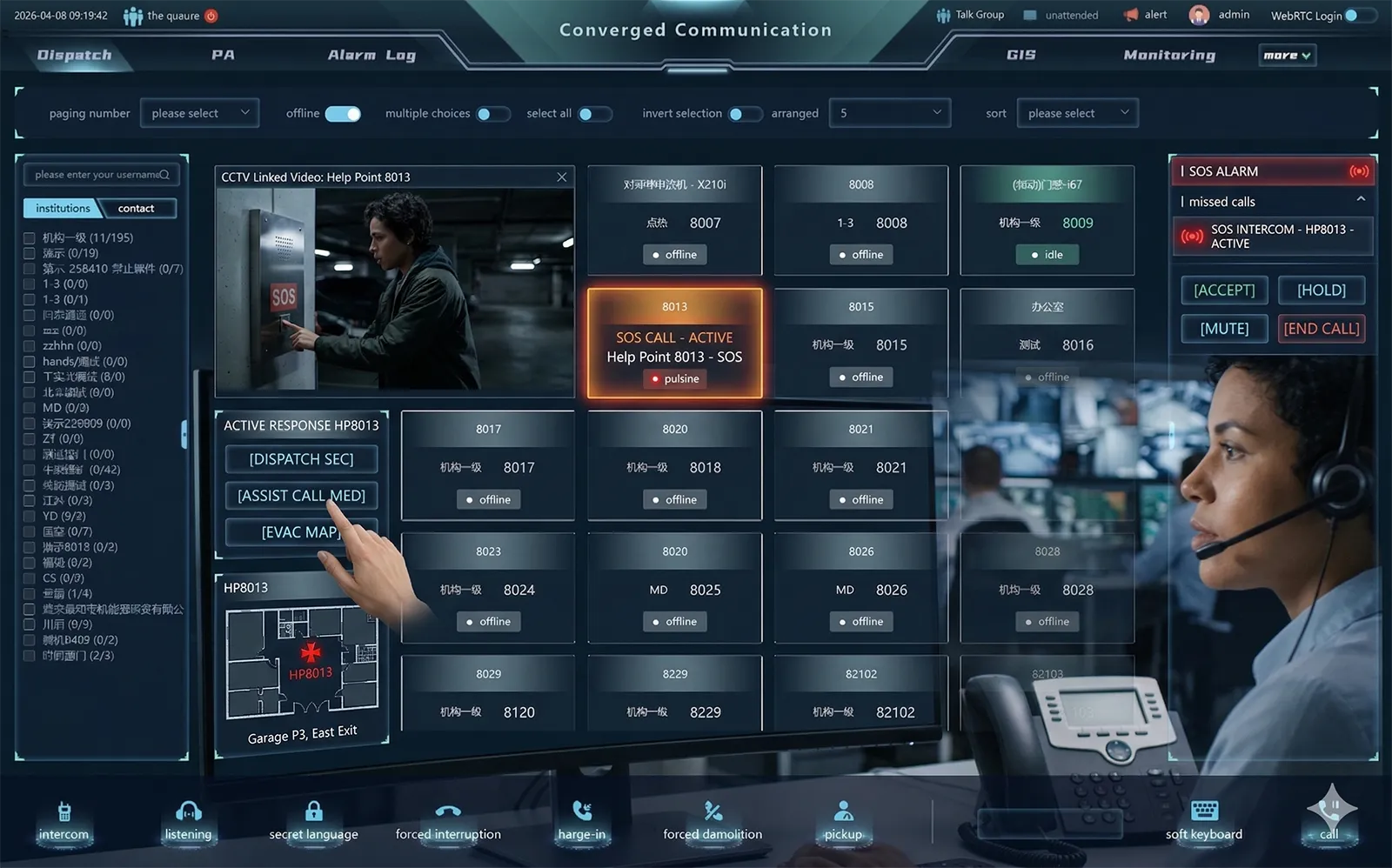
What Is an SOS Intercom
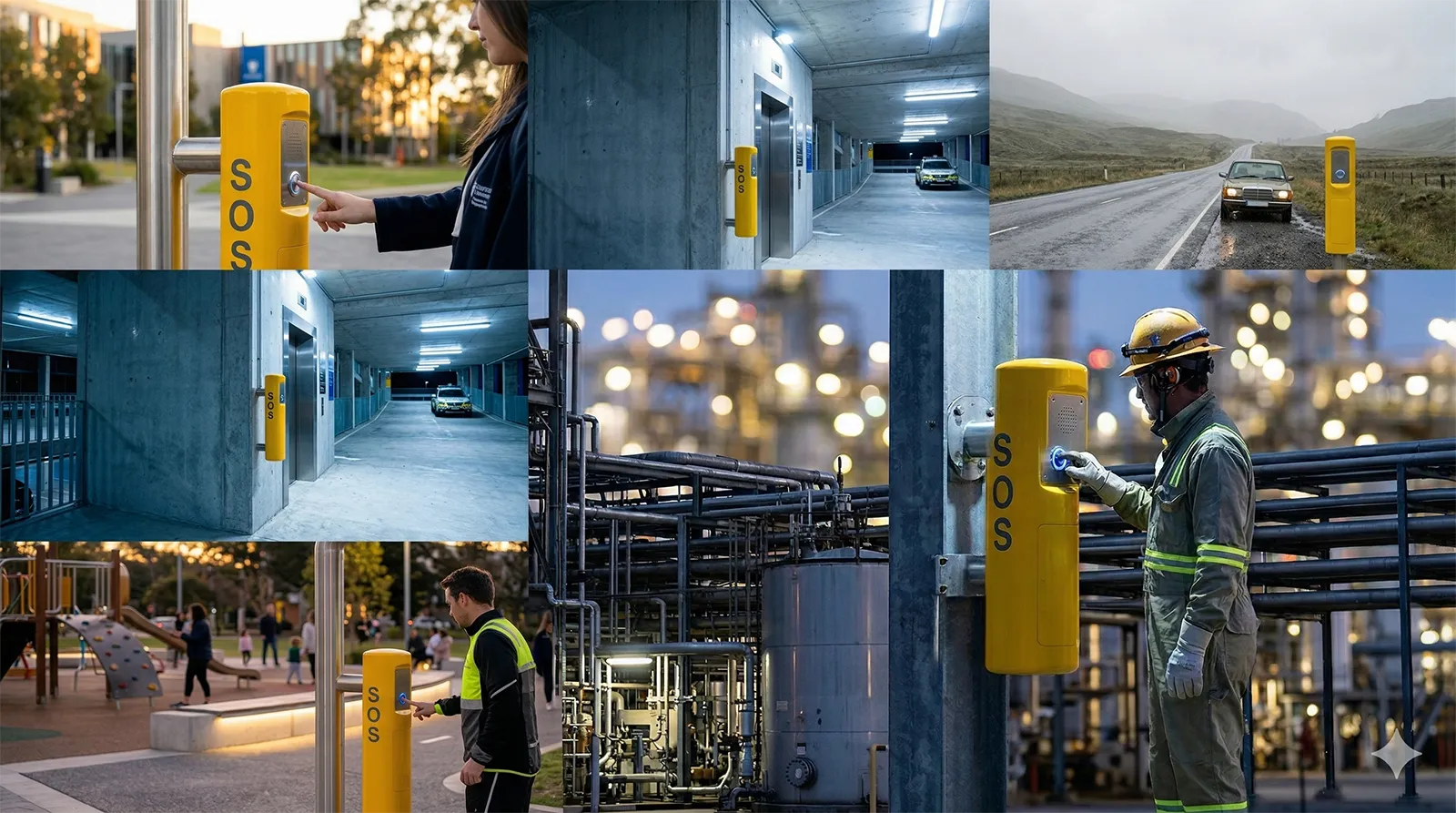
An SOS intercom is an emergency help communication endpoint installed in places where people may need immediate assistance. It is commonly found in campuses, parking areas, public spaces, transport facilities, entrances, industrial sites, scenic locations, and other areas where a fast fixed-point call for help can improve safety and response time.
At its core, an SOS intercom is built to make emergency contact easy. The user does not need to search for a phone number, unlock a mobile device, or explain where to connect. The intercom provides a direct communication path to the people or systems responsible for assistance, monitoring, or incident handling.
Why SOS Intercom Systems Are Used
Emergency communication has to work under pressure. In many real situations, a person may be injured, under stress, unfamiliar with the site, or unable to make a normal phone call. An SOS intercom solves this problem by offering a simple and highly visible way to request help immediately.
These systems are also used because they improve operational visibility for the response team. Instead of relying only on outside phone calls, organizations can create fixed safety communication points that link directly to internal operators, security teams, control rooms, or dispatch platforms. This makes response faster, more structured, and easier to manage across a site or network of locations.
An SOS intercom is not just a call button. It is a fixed emergency communication point designed to speed up response, improve situational awareness, and support coordinated action.
How Does an SOS Intercom Work
Step 1: The user activates the intercom
The process usually starts when a person presses the emergency call button on the SOS intercom. In some cases, the system may also support other trigger methods such as a help key, alarm linkage, or event-based activation. The goal is always the same: create the fastest possible path to assistance.
Because the device is intended for urgent use, the interface is normally simple and direct. A single action should be enough to start the request for help without requiring technical knowledge or multiple steps.
Step 2: The system sends the call to the response point
Once activated, the intercom sends the call through the communication network to a designated endpoint. This may be a security desk, a control room phone, a video paging console, a help center, or a software-based dispatch platform. In IP-based systems, this often happens through a SIP communication architecture that allows the intercom to function as part of a wider voice network.
Depending on the system design, the call may go to one operator, a defined group, or a backup destination if the first point does not answer. This makes the intercom more reliable in busy or multi-level response environments.
Step 3: Two-way communication begins
After the call is answered, the user and the operator begin hands-free two-way communication. In a well-designed SOS intercom, this conversation should be clear, immediate, and natural. Full-duplex communication is especially useful because both sides can speak and listen without awkward interruptions.
This stage is critical because the operator uses the live conversation to understand the situation, calm the caller if necessary, and determine the right next step. Strong audio processing, echo control, and speech clarity make a major difference in how effective this communication is.
Step 4: The system can link video, alarms, or location information
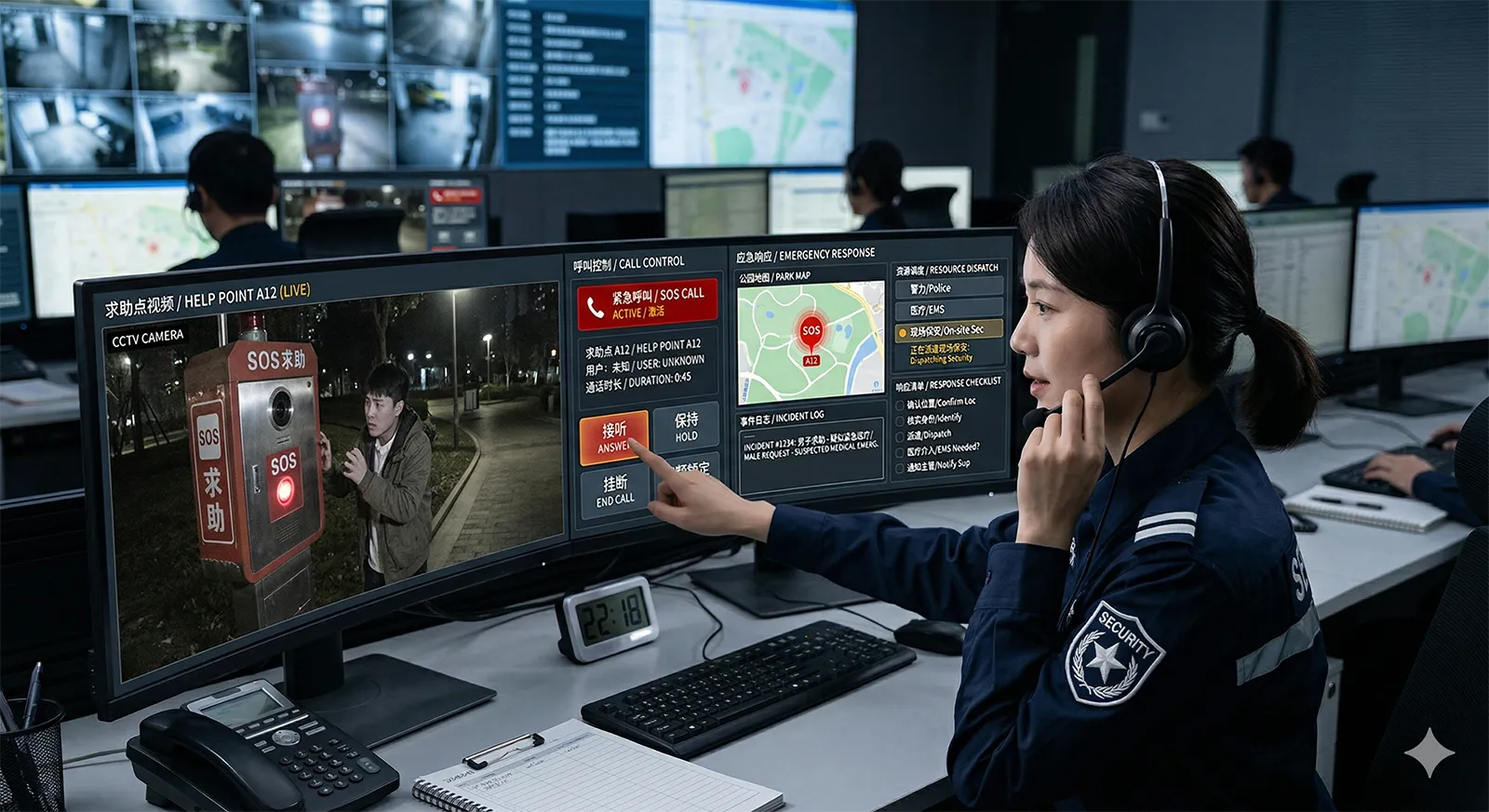
In more advanced SOS intercom systems, the voice call is only part of the workflow. Once the call is triggered, the platform may also display a linked camera view, show the device location on a map, generate an alarm popup, or open the related event screen in the dispatch software.
This gives the operator more than just a voice conversation. It provides context. With video, location, or alarm information available at the same time, the operator can make faster and more accurate decisions about what kind of response is required.
Step 5: The operator escalates or coordinates the response
After understanding the event, the operator may take further action through the wider platform. That can include calling a supervisor, transferring the intercom call, notifying a mobile response team, making a live announcement, triggering zoned paging, or connecting security, maintenance, or emergency personnel into the incident workflow.
This is why modern SOS intercom systems are often integrated with dispatch and communication tools rather than used as stand-alone devices. The value does not end with answering the call. The real value comes from what the operator can do next.
Main Functions of an SOS Intercom System
One-touch emergency calling
The most fundamental function of an SOS intercom is immediate help calling. The user should be able to trigger a request quickly and without confusion. In emergency design, simplicity is not a minor detail. It is one of the most important safety features.
That is why many systems use a prominent call button, direct call logic, and visible installation positions. The objective is to reduce hesitation and shorten the time between the incident and the first contact with support staff.
Hands-free two-way communication
Once the call is established, the SOS intercom should provide natural two-way communication without requiring the caller to hold a handset or manage controls during the conversation. This is especially important in public areas, roadside locations, and high-stress situations where the user may need to move, gesture, or respond while keeping both hands free.
Good hands-free performance also improves accessibility and usability. It makes the system easier to use for a wider range of people, including visitors, staff, and anyone unfamiliar with the site.
Video verification
Many modern SOS intercom systems support video either directly in the intercom endpoint or through camera linkage. This allows operators to see the area around the device, identify the nature of the event, and assess whether the situation requires immediate intervention, remote assistance, or escalation.
Video can also reduce uncertainty. Instead of relying only on spoken descriptions, the operator can review the live scene and respond more confidently. In many environments, this helps improve both safety and service quality.
Broadcast and paging support
Some emergencies require communication to more than one person. If the system supports paging or broadcast functions, operators can issue live announcements, send zoned instructions, or play emergency messages to nearby areas. This is particularly useful in transport sites, campuses, industrial facilities, and large public spaces.
Broadcast capability expands the role of the SOS intercom. It changes the device from a private call point into part of a wider safety communication network that can support both individual assistance and group instruction.
Call transfer and escalation
An effective SOS intercom system should not depend on one single operator position. If the primary destination is busy, unavailable, or not the right handling point, the system should support forwarding, transfer, or escalation to another extension, mobile number, control room, or response role.
This matters in real operations because incidents do not always happen when staffing is ideal. Structured call handling helps make sure important calls still reach someone who can act.
Recording and event traceability
Many professional systems support recording of calls, linked audio, or video events. This helps create a clear record of what happened, what was said, and how the incident was handled. For site operators, this can be useful for review, training, quality control, and post-event analysis.
Event traceability also supports stronger operational management. It makes the system more than a live communication tool by turning it into part of a documented response process.
What Technologies Are Behind an SOS Intercom
IP and SIP communication
Many SOS intercom systems today are based on IP networking and SIP communication standards. This allows the intercom to function as part of a wider communications environment that may include IP phones, paging consoles, communication servers, and dispatch systems.
This standards-based approach is important because it helps the system integrate more easily with other communication resources. It also supports future expansion and reduces dependence on isolated or closed architectures.
Audio processing and voice optimization
Emergency communication must work in difficult acoustic conditions. Outdoor wind, traffic, machinery noise, or echo-prone spaces can make poor systems hard to understand. That is why professional SOS intercom platforms often rely on audio processing technologies such as echo cancellation, noise reduction, and wideband voice handling.
These technologies are not just marketing details. They directly affect how well the operator and caller can understand each other during urgent events, which in turn affects how fast the right help can be delivered.
Video and software integration
Modern SOS intercom systems often work together with cameras, operator software, maps, and event management interfaces. This makes it possible to turn a voice call into a more complete incident workflow that includes verification, decision-making, and team coordination.
The more connected the system is, the more useful it becomes in real operation. For many sites, this integration is what transforms a basic emergency device into a true part of a larger safety platform.
Where Are SOS Intercom Systems Commonly Used
Campuses and schools
Educational sites often use SOS intercoms to provide fast help points for students, staff, and visitors. These systems may be installed in corridors, open public areas, entrances, and outdoor spaces to connect directly with security or administration teams.
They are especially useful because they support quick communication in familiar daily environments where emergencies, assistance requests, and safety concerns can all occur.
Parking lots and entrances
Parking facilities, unattended gates, access points, and building entrances often use SOS intercoms to provide assistance, verify situations, and support remote operator handling. In these locations, video and access-related coordination may be especially valuable.
These deployments help improve both security and user experience by making help available without requiring full-time staff at every point.
Highways, tunnels, and roadside help points
Transport infrastructure is one of the most common use cases for SOS intercom systems. Drivers, passengers, or field personnel may need a fast way to request help in places where mobile access is unreliable, response urgency is high, or fixed-location assistance is operationally important.
In these projects, the intercom often works together with control room communications, emergency broadcast, patrol teams, and camera systems to support coordinated incident handling.
Scenic areas and public spaces
Parks, tourist areas, open public destinations, and large visitor environments often benefit from SOS intercom help points because visitors may not know where to go or whom to contact during an emergency. A clearly visible help point improves confidence and shortens the path to assistance.
These environments also benefit from integration with paging and operational staff communication because the response may involve both customer support and security handling.
Industrial facilities and utility sites
Factories, energy sites, infrastructure environments, and utility projects often use SOS intercom systems as part of a larger operational safety architecture. Here the intercom may need to work with broadcast, dispatch, industrial telephony, alarm systems, and mobile maintenance teams.
In such settings, reliability, integration, and long-term manageability are often just as important as the basic emergency call function.
SOS Intercom vs Standard Intercom
A standard intercom is usually designed for routine communication such as visitor calls, internal communication, or access control interaction. An SOS intercom, by contrast, is designed specifically for urgent assistance, simple activation, and operator-led response handling.
The difference is not only about the button label. It is about the workflow behind the device. SOS intercoms are usually expected to support emergency response logic, faster operator action, stronger visibility, and closer integration with safety or dispatch operations.
Why Modern SOS Intercom Systems Are Part of a Larger Safety Platform
Today, the most effective SOS intercom systems are rarely stand-alone products. They are often connected with control room phones, video feeds, paging resources, software-based dispatch tools, mobile responders, and management platforms. This creates a much stronger safety workflow than voice calling alone.
When an SOS intercom works as part of a larger platform, operators can receive the call, verify the event, contact the right teams, notify people nearby, and record the full process from one operational environment. That is why modern SOS intercom systems are increasingly treated as part of an integrated emergency communication solution rather than a single hardware endpoint.
The real strength of a modern SOS intercom system is not only that it starts a call. It helps connect people, operators, information, and response tools in one faster emergency workflow.
Conclusion
In simple terms, an SOS intercom is more than a help button. It is a dedicated emergency communication point designed to connect people in distress with the operators, teams, and systems that can respond. By making contact fast and direct, it helps reduce delay and improve the way incidents are handled.
As systems become more connected, the role of the SOS intercom continues to expand. With voice, video, paging, recording, and dispatch integration, it becomes an important part of a modern safety and emergency communication solution for public, commercial, transportation, and industrial environments.
FAQ
What does SOS intercom mean?
An SOS intercom is an emergency communication device used to request help quickly. It usually connects a person directly to a control room, security desk, help center, or dispatch operator through hands-free two-way communication.
How does an SOS intercom work?
It works by sending an emergency call when the user presses a button or activates the device. The call is delivered to an operator or response point, where two-way communication begins. In more advanced systems, video, alarms, maps, and dispatch actions may also be linked.
Where are SOS intercoms used?
SOS intercoms are commonly used in campuses, parking areas, entrances, highways, tunnels, scenic areas, industrial sites, and public spaces where a fixed emergency communication point can improve safety and response time.
What is the difference between an SOS intercom and a regular intercom?
A regular intercom is typically used for routine communication. An SOS intercom is designed specifically for urgent assistance and usually supports faster activation, emergency handling logic, and tighter integration with safety, video, or dispatch systems.
Can an SOS intercom system include video and paging?
Yes. Many modern SOS intercom systems can work with video cameras, paging speakers, recording platforms, and dispatch software. This allows operators to verify incidents, communicate clearly, and coordinate response more effectively.







