



Choosing between HLS and HTTP-FLV is not simply a matter of deciding which format is newer. The right choice depends on what viewers need to do, where they watch, how many concurrent connections the platform must support, and how much delay the application can tolerate. A public webcast, a browser-based monitoring console, and a mobile live-view application may start with the same video source but require different delivery paths.
This guide explains the role of each technology and shows how to combine them in a practical streaming architecture. It retains the essential distinction: HLS is designed for reliable, adaptive delivery over standard HTTP infrastructure, while HTTP-FLV sends a continuous FLV stream over HTTP and is commonly selected when browser playback must stay closer to live.
Start by separating protocol, transport and container
The terms HLS, FLV, HTTP-FLV and RTMP are often used as if they describe the same layer. They do not.
HLS, or HTTP Live Streaming, is a media delivery protocol originally developed by Apple. It uses playlists and a sequence of media segments delivered through HTTP or HTTPS.
FLV, or Flash Video, is a container format that can carry encoded audio and video. FLV by itself does not define how a stream travels across the network.
HTTP-FLV keeps the FLV stream open over an HTTP connection. The player receives media continuously instead of requesting a playlist and separate segments.
RTMP is a separate streaming protocol historically associated with Flash. It remains common on the contribution or ingest side, even when viewers receive HLS or another output format.
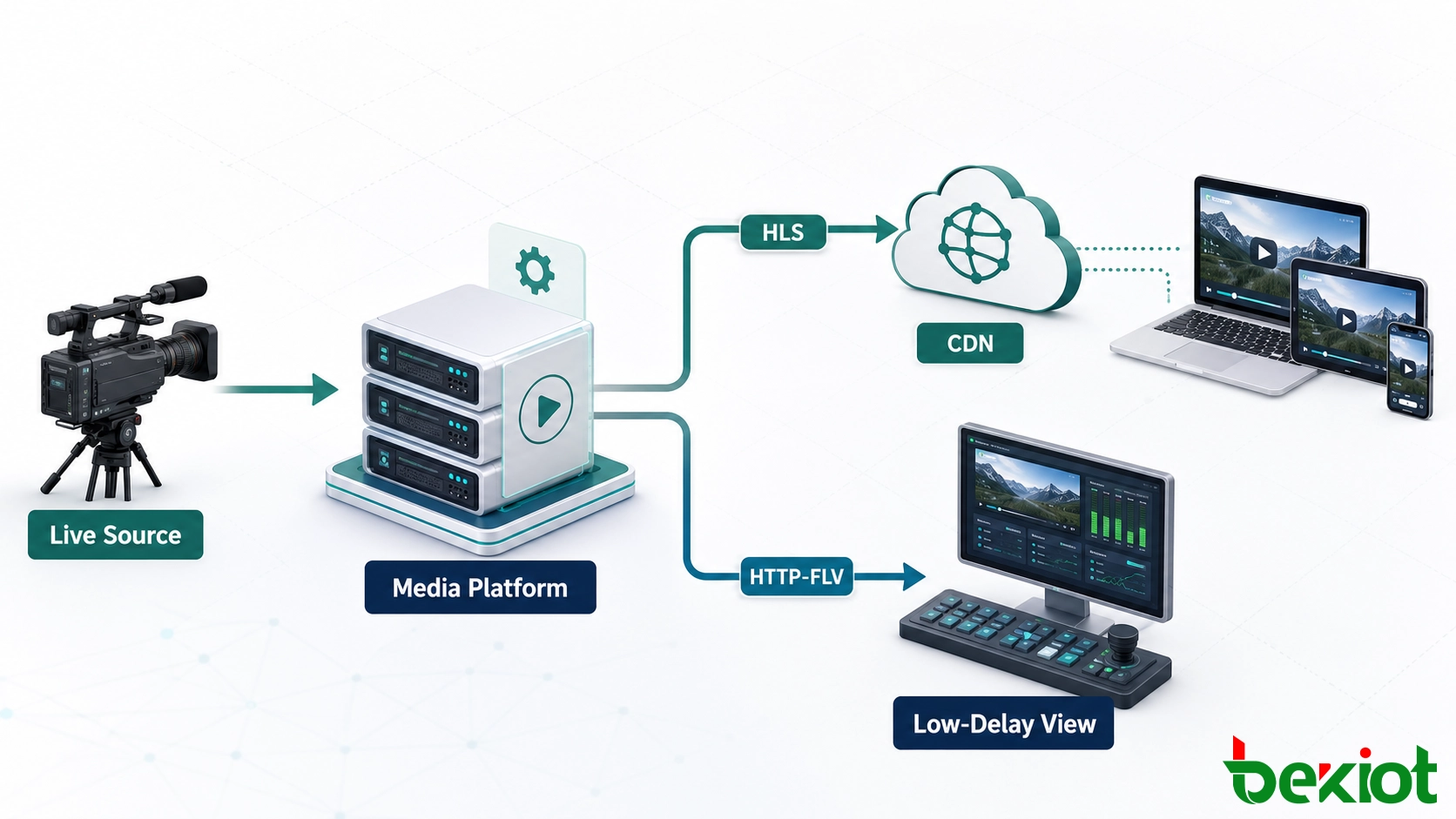
This distinction matters during system design. A platform can accept RTMP from an encoder, process the source once, and publish HLS and HTTP-FLV outputs for different groups of viewers. Selecting a delivery method therefore does not necessarily require changing the camera, encoder or upstream contribution protocol.
Why segmented delivery works well at scale
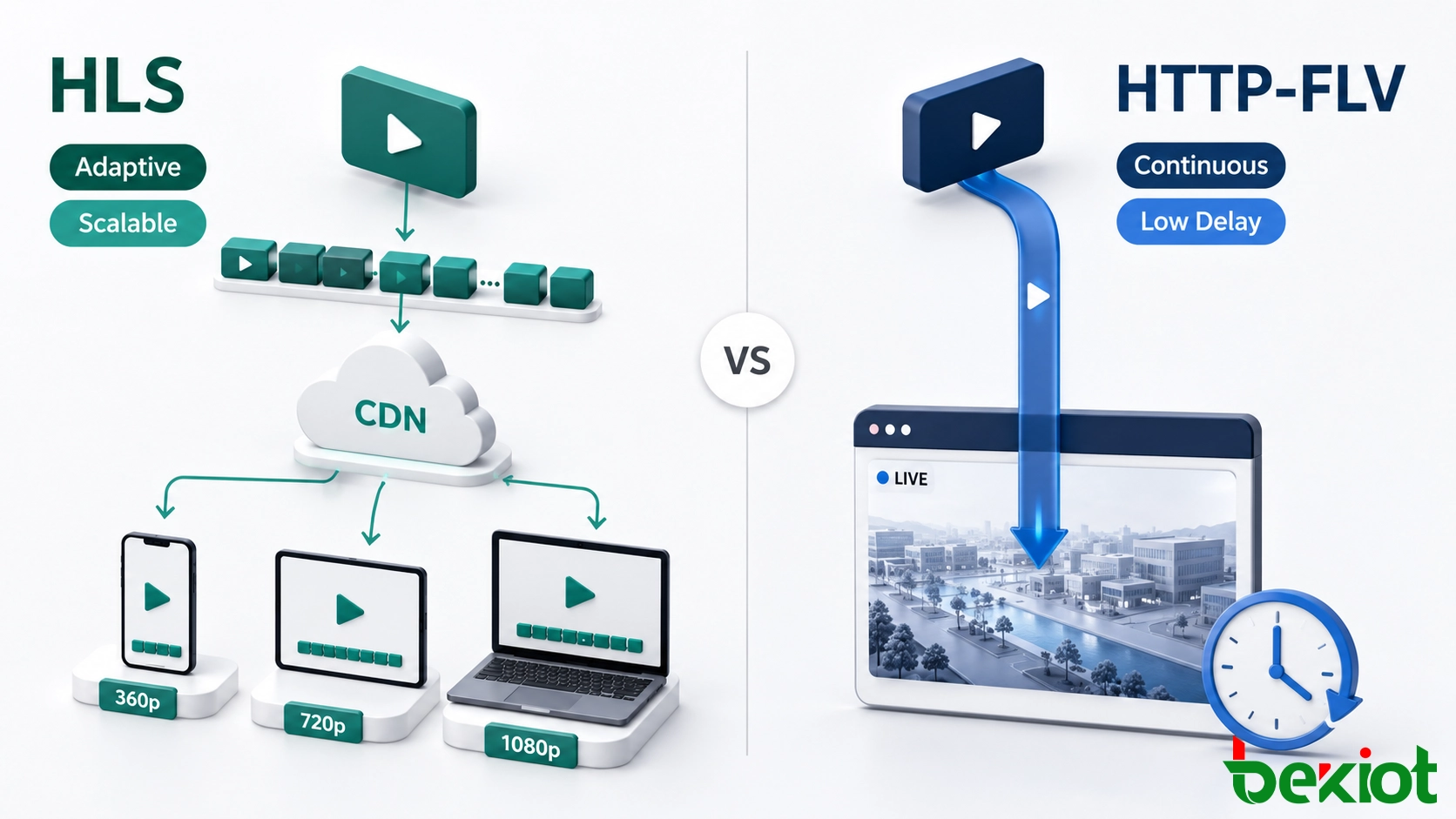
HLS divides a live or on-demand program into media segments and lists them in an M3U8 playlist. Traditional deployments commonly use MPEG-2 Transport Stream segments, usually identified by the .ts extension. Modern HLS can also use fragmented MP4, often called fMP4, which provides a practical foundation for contemporary encoding and packaging workflows. Audio and subtitles can be offered as separate renditions alongside the video.
Because playlists and segments are ordinary HTTP resources, they can be served by standard web servers, reverse proxies and content delivery networks. Edge caches can hold popular segments close to viewers, which reduces repeated traffic to the origin. This makes HLS a strong fit for public live events, training portals, mobile applications and services with geographically distributed audiences.
Adaptive bitrate delivery is another central advantage. The platform prepares several renditions of the same program at different resolutions and bitrates. Based on current throughput, buffer status and device capability, the player can move between these variants to keep playback stable. A viewer on a changing mobile connection may receive a lower rendition instead of experiencing a complete interruption.
The trade-off is that conventional HLS playback normally waits for segment creation, playlist updates and a playback buffer. The actual delay depends on segment duration, playlist design, player settings and network conditions. Low-Latency HLS can reduce this delay, but it requires coordinated support across the packager, origin, CDN and player. It should be treated as an end-to-end design choice rather than a switch added at the last stage.
Segment duration should be selected against the service goal. Shorter segments can help the player discover new media sooner, but they also increase playlist updates, object requests and packaging overhead. Longer segments reduce request frequency and may improve delivery efficiency, yet they can increase startup time and make quality changes less responsive. The encoder's keyframe interval must follow the packaging plan so every rendition exposes clean switching points at the same positions.
Where a continuous HTTP stream still makes sense
HTTP-FLV sends FLV tags through a long-lived HTTP response. Once playback begins, the media data continues to arrive over the same connection. There is no segment playlist to refresh, so a correctly tuned system can usually remain closer to the live source than a conventional segmented workflow.
This behavior is useful in operator-facing applications where people must observe events and react quickly: video monitoring pages, production dashboards, equipment supervision, remote inspection and internal live-view systems. It can also simplify delivery through networks that already permit HTTP or HTTPS traffic.
However, HTTP-FLV should not be confused with native browser video support. The end of Adobe Flash Player removed the old plug-in playback path: Adobe ended Flash Player support on December 31, 2020 and began blocking Flash content on January 12, 2021. Modern HTTP-FLV playback therefore relies on an HTML5 player, typically using JavaScript to parse the FLV stream and a browser media API to feed supported audio and video codecs into the decoder.
This creates a compatibility dependency. The browser must support the required media API and the codecs carried inside the FLV container. HTTP-FLV is consequently better suited to controlled web clients and dedicated applications than to an unrestricted public audience. A large number of continuous connections can also place more sustained pressure on the delivery server and intermediary network devices than cache-friendly segmented objects.
Match the delivery path to the viewing requirement
A protocol decision should begin with operational requirements, not a feature checklist. The following comparison provides a useful starting point.
| Decision factor | HLS | HTTP-FLV |
|---|---|---|
| Delivery model | Playlist plus media segments | Continuous FLV stream over HTTP or HTTPS |
| Typical priority | Stable playback and broad distribution | Lower delay for live observation |
| Adaptive bitrate | Built into the protocol through variant streams | Not inherent; usually requires application-specific stream switching |
| CDN efficiency | High, because segments can be cached as HTTP objects | More limited, because each viewer maintains a continuous response |
| Client reach | Strong across Apple devices, mobile platforms, smart devices and web player ecosystems | Best in controlled browsers or dedicated applications with a compatible player |
| Network variation | Handles changing bandwidth well when multiple renditions are available | More sensitive unless the application supplies its own quality-switching logic |
| Operational fit | Public live streaming, mobile viewing, video portals and large audiences | Monitoring consoles, internal systems and low-delay browser viewing |
Use HLS as the primary output when audience size is unpredictable, viewers use a wide range of devices, playback continuity matters more than immediacy, or CDN delivery is part of the plan. Use HTTP-FLV when the platform controls the web player, the audience is known, the number of simultaneous viewers is manageable and reducing live-view delay has clear operational value.
Before approving either path, define a delay budget for each stage: capture, encoding, network ingest, media processing, distribution, player buffering and decoding. This prevents the delivery protocol from being blamed for delay introduced elsewhere. A low-delay output cannot compensate for an encoder with a long GOP, an overloaded transcoder or a player configured with a large safety buffer. Measure the result on the actual endpoint and network used in production.
Neither option is suitable for every form of real-time communication. If users must hold a two-way conversation or operate a device with extremely tight interaction timing, a real-time communications technology may be more appropriate. The important point is to separate one-way video distribution from interactive media before selecting the delivery architecture.
A hybrid design covers more users without duplicating the source
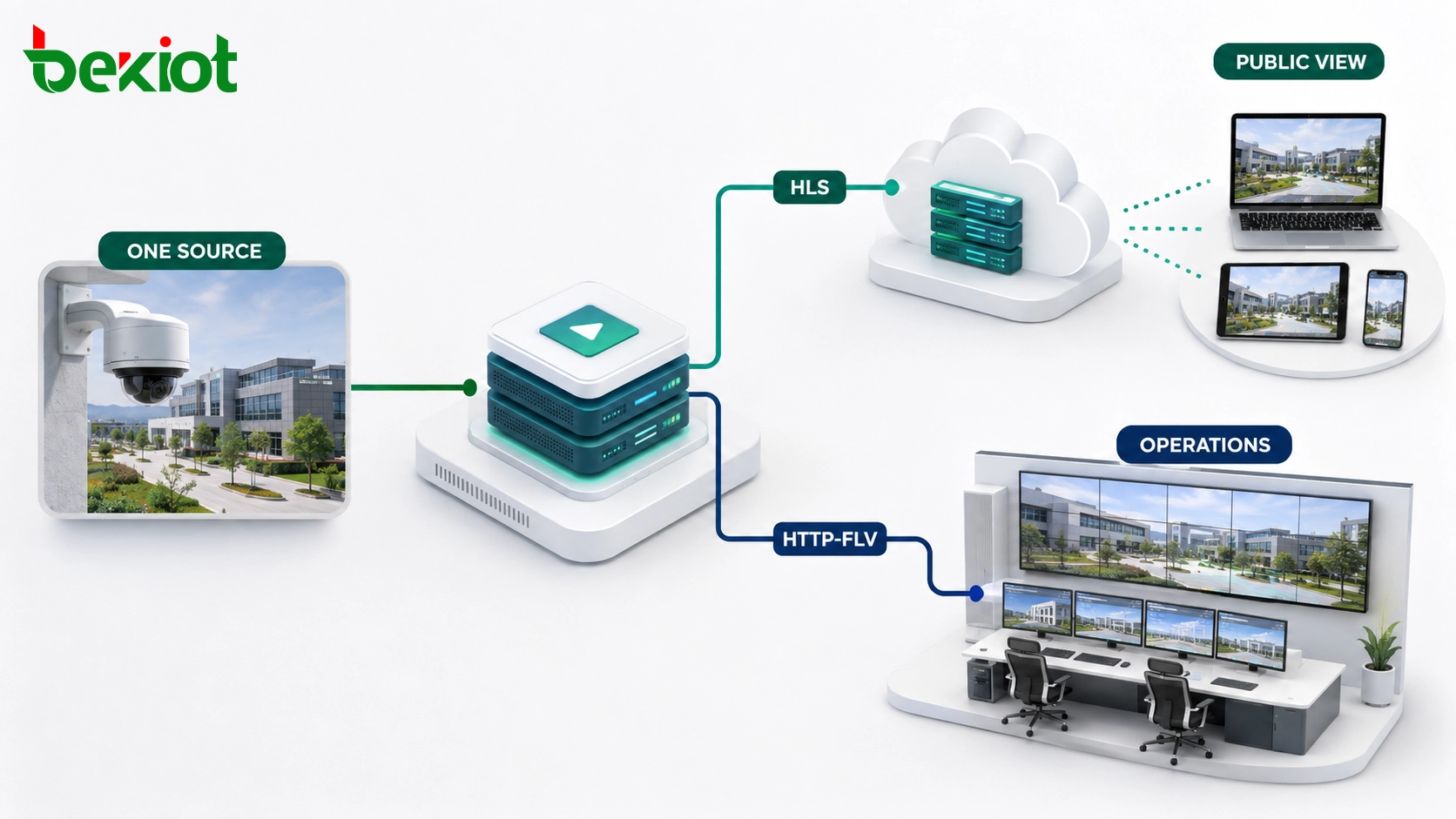
Many projects do not need an either-or decision. A hybrid platform can ingest one source, normalize timestamps and codecs, then package separate outputs for different clients.
Acquire the source. Receive live video from a camera, encoder, gateway or upstream platform through the contribution protocol supported by the field device.
Inspect the media. Verify codec, resolution, frame rate, audio format and timestamp continuity before deciding whether the stream can be repackaged or must be transcoded.
Create delivery renditions. Produce an adaptive bitrate ladder for HLS. Generate an HTTP-FLV output only for clients that need it and can decode its media profile.
Separate audience paths. Send HLS through an origin and CDN for external or large-scale viewing. Route HTTP-FLV through a controlled delivery cluster for operations users.
Apply access controls. Use HTTPS, short-lived authorization, origin protection and session policies appropriate to each path.
Measure the complete chain. Monitor ingest continuity, transcoding load, packaging errors, first-frame time, buffering, disconnects and end-to-end delay.
This model avoids forcing every client onto the same compromise. Public viewers receive a resilient, scalable stream, while operators can use a lower-delay path. The media platform also becomes the point where legacy source formats are converted into outputs that current browsers and applications can consume.
Choose between repackaging and transcoding
If the incoming codecs already match the delivery profile, the platform may only need to repackage the compressed media. Repackaging changes the container or output structure without decoding and encoding every frame, so it usually consumes fewer processing resources and preserves source quality. It is appropriate only when codec support, timestamps, keyframe placement and audio parameters are already suitable for the target players.
Transcoding is required when the source codec cannot be decoded by the intended client, when several resolutions and bitrates are needed, or when frame rate, audio format and keyframe structure must be normalized. It adds compute cost and processing delay, so capacity should be calculated for peak simultaneous channels rather than average use. Hardware acceleration can increase channel density, but output quality and behavior must still be tested with the selected player.
Production systems should also remove single points of failure. Use redundant origins, controlled player reconnection and tested failover rules without creating aggressive retry loops that amplify an outage.
Deployment checks that prevent avoidable failures
Protocol selection alone does not guarantee a reliable service. Before launch, verify the complete media and network path.
Confirm codec support at the endpoint. A transport can reach the player successfully while playback still fails because the browser cannot decode the audio or video profile.
Keep timestamps continuous. Broken or non-monotonic timestamps can cause stalls, audio drift and failed quality switches.
Align keyframes with packaging rules. HLS renditions should use coordinated keyframe boundaries so the player can switch quality without visible disruption.
Plan HTTPS from source to player. Secure pages should not request insecure media, and certificates must be valid across the origin and distribution layers.
Test real network conditions. Validate startup, recovery and quality changes under limited bandwidth, packet loss and short interruptions rather than testing only on a local network.
Size for connection behavior. HLS capacity planning focuses heavily on segment requests, storage and cache hit rate. HTTP-FLV planning must account for long-lived concurrent connections and sustained egress.
Provide a fallback policy. If the preferred player or format is unavailable, the application should return a supported alternative or a clear error instead of retrying indefinitely.
For most outward-facing services, HLS is the safer default because it combines adaptive bitrate playback with mature HTTP distribution. HTTP-FLV remains useful where a managed player and lower delay are more important than universal reach. A hybrid architecture is often the most practical answer when the same live source must serve both groups.
Frequently asked questions
Can captions be added to a live delivery workflow?
Yes. Captions may be generated upstream or inserted during media processing. For HLS, WebVTT subtitle renditions are a common option. A custom HTTP-FLV player may need a separate timed-text channel and its own synchronization logic.
Can viewers rewind while a live event is still running?
They can if the service maintains a sufficiently long live window and the player exposes time-shift controls. The retention window, storage capacity and content rights should be defined before enabling live rewind.
Can a player fall back to audio when video bandwidth is unavailable?
Yes, provided the platform publishes an audio-only rendition or a separate audio stream and the player is configured to select it. This can preserve critical commentary or instructions on highly constrained connections.
Can analytics distinguish a viewer exit from a network failure?
Not from a single disconnect event alone. Combine player events, heartbeat intervals, session identifiers, retry behavior and server connection logs to classify exits with greater confidence.
What should happen to a live URL after an event ends?
The platform can close the live session, publish an end slate, or redirect users to an archived program after processing is complete. Define the transition in advance so embedded players and shared links do not fail without explanation.







