


When IP cameras are connected to a video surveillance platform, one common configuration question is whether video should be transmitted over TCP or UDP. Many network cameras and monitoring platforms support both options, but the two protocols behave very differently when packet loss, delay, congestion or unstable network conditions occur.
There is no single protocol that is automatically better for every surveillance project. TCP places greater emphasis on reliable and ordered delivery, while UDP reduces transmission overhead and is generally better suited to situations where low latency is the priority. The right choice depends on the network path, the importance of real-time viewing, the stability of available bandwidth and how much packet loss the application can tolerate.
This distinction becomes increasingly important as surveillance systems expand beyond a single local network. A camera installed in the same building as the monitoring center may operate under stable and predictable conditions, while another camera connected through a wide-area or Internet link can experience changing bandwidth, packet loss and temporary congestion. Using the same transport setting in both environments does not always produce the same result.
Why the Transport Method Matters
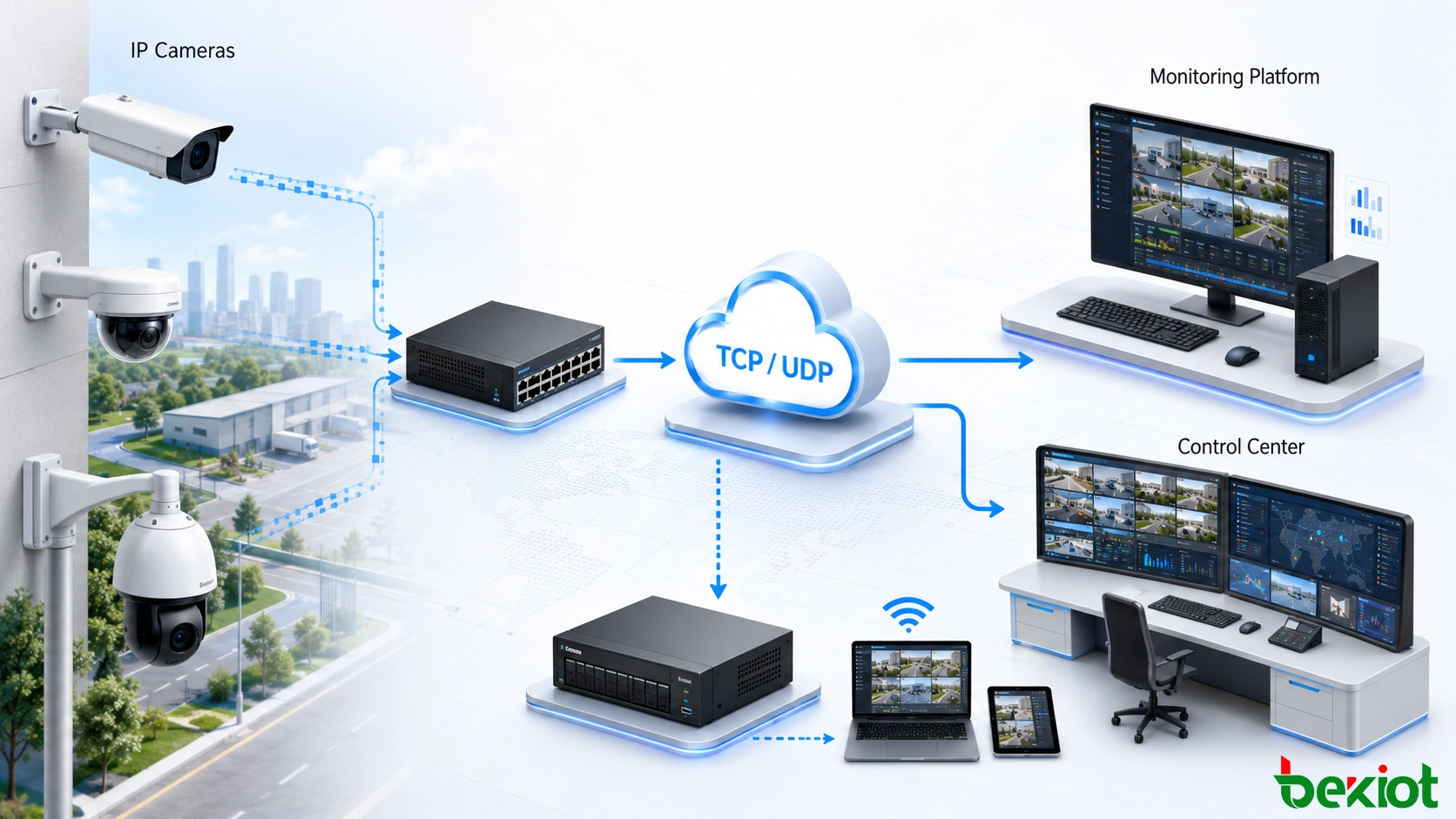
A surveillance camera continuously generates video data that must travel from the field device to a monitoring platform, recording system or remote viewing point. The way this data is transported can affect how quickly the video arrives and how the system behaves when the network becomes unstable.
In a controlled local network with sufficient bandwidth and relatively stable connectivity, transmission may remain smooth despite small short-term fluctuations. Once the same video must cross wider networks or Internet links, however, packet loss, congestion and changing network conditions become more important.
Video surveillance also differs from ordinary file transfer because the value of the data is closely related to time. During live monitoring, an operator normally needs to see what is happening now rather than several seconds later. A protocol that spends additional time recovering missing data may improve completeness but can also increase the delay between an event and its appearance on the monitoring screen.
TCP and UDP respond to these conditions differently. TCP attempts to maintain reliable delivery, while UDP prioritizes direct transmission without waiting for acknowledgement of every packet. This difference is the foundation for most practical protocol-selection decisions in video surveillance.
For this reason, protocol selection should be considered as part of the overall surveillance network design rather than as an isolated camera setting. Camera quantity, transmission distance, network quality, concurrent viewing requirements and the importance of real-time response all influence the final result.
How TCP Handles Video Transmission
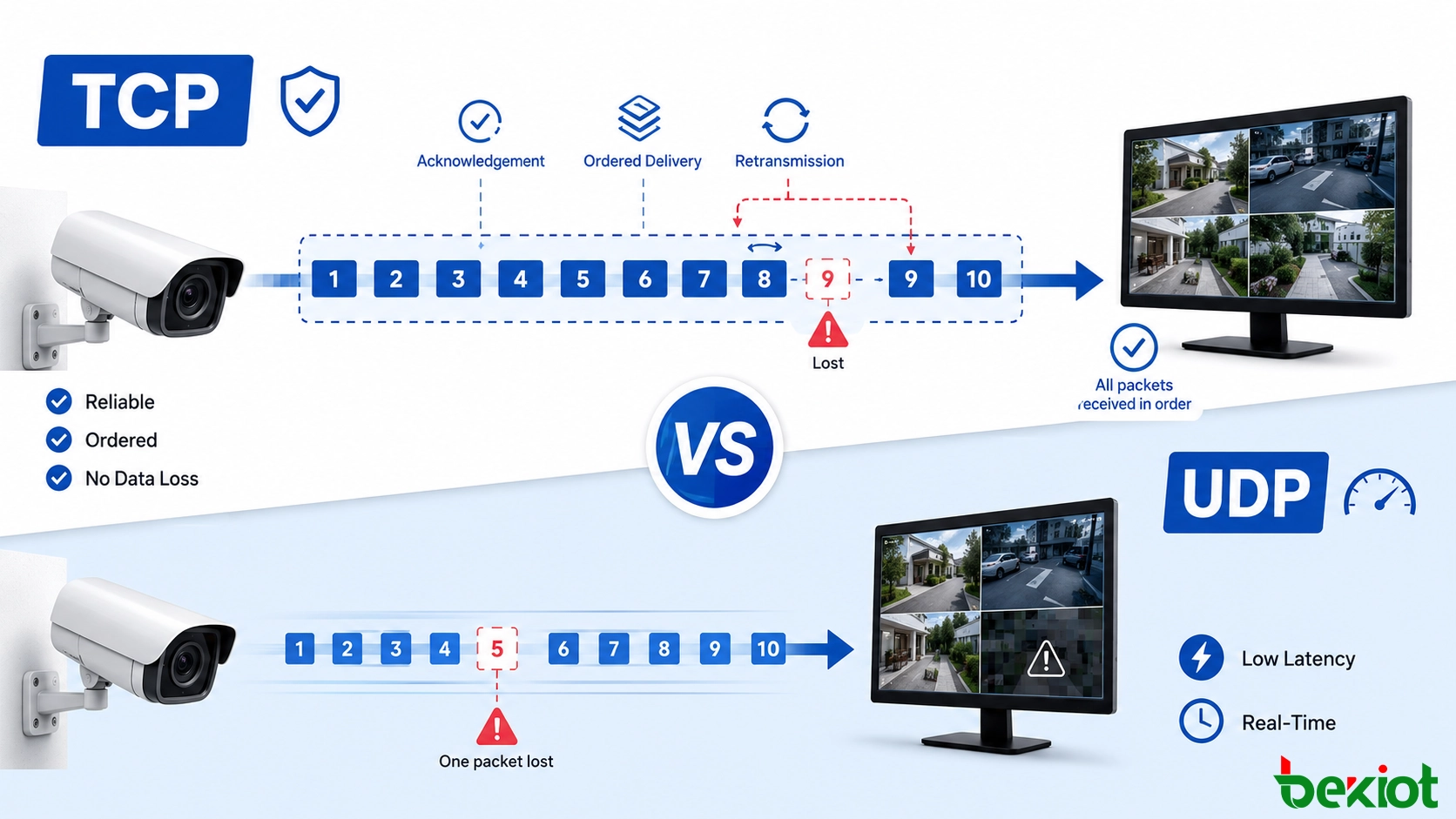
TCP, or Transmission Control Protocol, is connection-oriented. Before normal data transmission begins, a connection is established between the communicating endpoints. TCP then manages the delivery of data so that information reaches the destination reliably and in the correct order.
If packets are lost or damaged during transmission, TCP can retransmit the missing information. Acknowledgement mechanisms allow the sender to determine whether data has been received successfully. This makes TCP useful when data integrity and reliable delivery are important.
Ordered delivery is another important characteristic. If data packets arrive in an unexpected sequence, TCP can reorganize them before presenting the data to the receiving application. From a reliability perspective, this behavior is valuable because the receiving side is not simply left with an incomplete sequence when individual packets are lost or delayed.
The trade-off is additional transmission overhead. Establishing and maintaining the connection, confirming received data and retransmitting lost packets can introduce delay. When network conditions deteriorate, waiting for retransmitted information may further increase the time between the live event and the video displayed at the monitoring side.
This effect becomes more noticeable when the network repeatedly loses packets. A small amount of retransmission may have little visible impact, but continued loss can cause data to wait while the protocol tries to recover missing information. In a live surveillance application, this can appear as delayed playback, temporary pauses or an increasing difference between the actual event and the displayed video.
TCP also uses congestion-control mechanisms to adjust its transmission behavior according to network conditions. This helps traffic coexist on busy networks, but variations in available bandwidth can lead to changing transmission delay.
For surveillance applications, TCP can therefore be considered when the network path is less predictable and reliable delivery is more important than achieving the lowest possible latency. It can be particularly useful when the project can tolerate some additional delay in exchange for a more controlled response to packet loss.
Where UDP Has an Advantage
UDP, or User Datagram Protocol, works differently. It is connectionless, so data can be sent directly toward the destination without first establishing and maintaining a persistent transport connection.
UDP does not provide the same acknowledgement, retransmission and ordering guarantees as TCP. Packets may be lost, and packets can potentially arrive in a different order. Any required handling of these conditions must be performed elsewhere in the communication process or application.
Removing much of the connection management and retransmission overhead gives UDP an important advantage: lower transmission delay. For real-time applications, receiving the latest information quickly may be more useful than waiting for a missing packet to be sent again.
In practical live monitoring, this means the stream can continue moving forward even when an individual packet is lost. Instead of delaying later information while waiting for recovery, the system can continue receiving newer video data. Where occasional loss can be tolerated, this behavior can help maintain a more immediate relationship between the field camera and the operator's screen.
This characteristic makes UDP well suited to applications such as real-time audio and video transmission, online interactive services and live monitoring where some packet loss can be accepted in exchange for more immediate delivery.
UDP does not provide TCP-style congestion control at the transport layer. If the network becomes congested, packets can continue to be transmitted at the configured rate, which may increase packet loss and can also affect other traffic sharing the same network. Network capacity therefore remains an important part of UDP-based surveillance planning.
UDP should not be interpreted as a solution for poor network quality. Its lower overhead can help reduce delay, but if the available bandwidth is consistently below the amount required by the camera streams, packet loss can become significant. A properly designed surveillance network still needs sufficient capacity for the expected number of cameras and concurrent video sessions.
Comparing Reliability, Delay and Bandwidth
The practical difference between TCP and UDP becomes clearer when the requirements of a surveillance network are compared directly.
| Comparison Area | TCP | UDP |
|---|---|---|
| Connection method | Connection-oriented | Connectionless |
| Delivery reliability | Provides acknowledgement and retransmission | Does not guarantee packet delivery |
| Packet ordering | Maintains ordered delivery | Packets may arrive out of order |
| Transmission delay | Can increase because of acknowledgement and retransmission | Usually lower because less transport control is required |
| Congestion handling | Uses congestion-control mechanisms | No TCP-style congestion control |
| Response to packet loss | Attempts to recover missing data | Continues transmission without transport-layer retransmission |
| Typical priority | Reliable and complete delivery | Real-time and efficient delivery |
| Surveillance consideration | Useful when transmission reliability is the greater concern | Useful when low latency is more important and some loss is acceptable |
These differences explain why protocol selection should not be based only on camera specifications. The same camera may perform differently depending on whether it is transmitting across a stable local network, a heavily shared network or a less predictable remote connection.
It is also important to distinguish occasional network fluctuation from continuous bandwidth shortage. TCP may recover individual lost packets, but repeated retransmissions can increase delay. UDP may avoid waiting for retransmission, but continuous congestion can result in more discarded packets. Neither approach eliminates the need to provide adequate network resources.
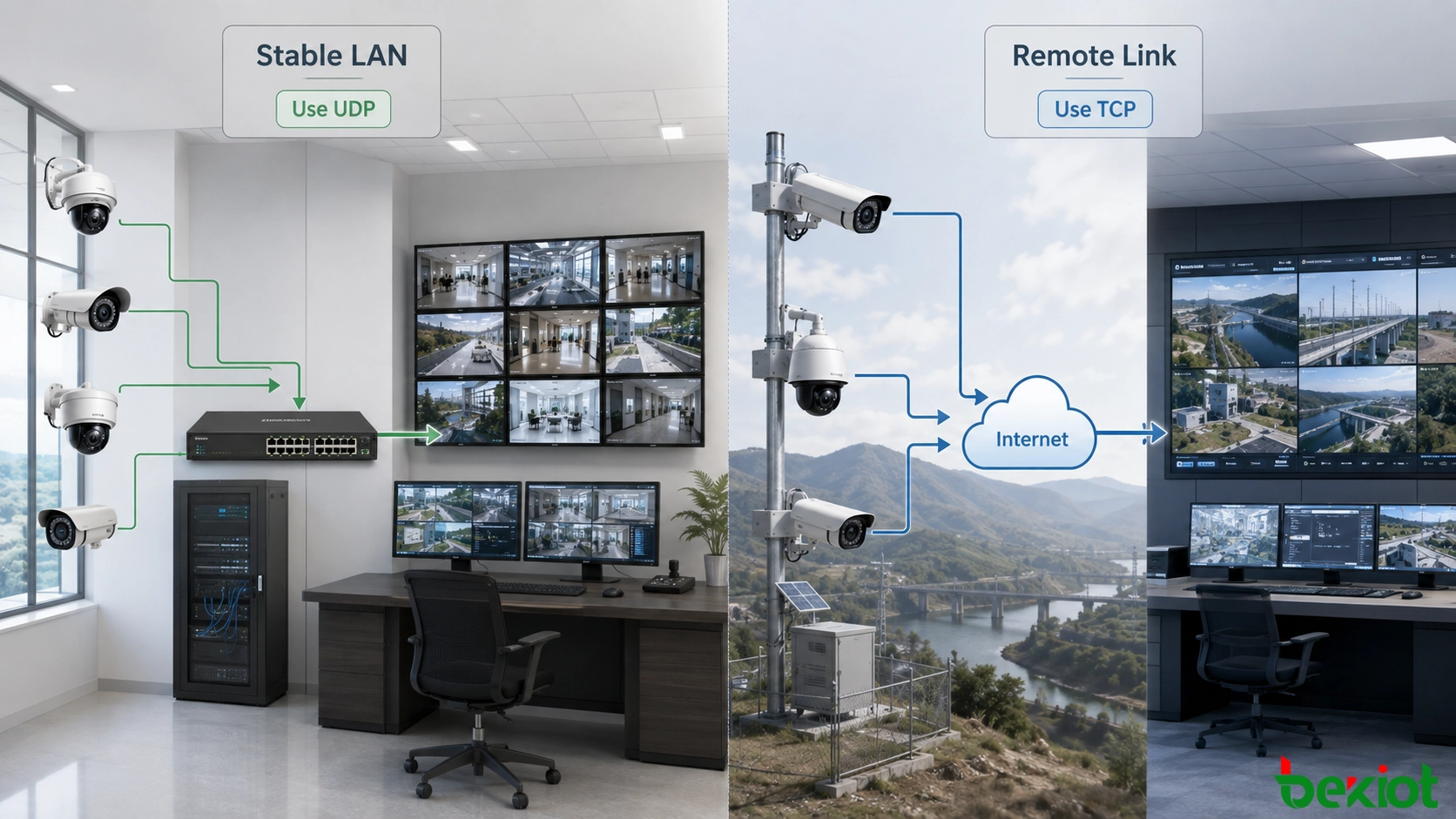
Deployment Recommendation: Use UDP when the network is stable and low latency is the priority; consider TCP when video crosses a less stable Internet connection and reliable delivery becomes more important.
Choosing a Protocol for Real Projects
Protocol selection should begin with the actual network environment rather than with a fixed rule that every camera must use TCP or every live stream must use UDP.
In a well-managed surveillance LAN with good network conditions, UDP can be an effective option. Its lower protocol overhead supports real-time video delivery without waiting for retransmission of every lost packet. This can be particularly useful where operators need to observe events with as little delay as possible.
A local network normally gives administrators more control over switches, bandwidth allocation and the number of connected devices. When the transmission route is short and network conditions remain predictable, the risk associated with UDP packet loss can be easier to manage.
The situation can change when cameras transmit video over the Internet or through a network path that is not consistently stable. Packet loss or temporary network fluctuations can affect UDP streams because lost packets are not automatically retransmitted by the transport protocol.
Remote surveillance links may also change during the day as other applications compete for the same bandwidth. A stream that performs normally during low traffic may show different behavior during busy periods. This is why a protocol should not be selected only after a short test under ideal conditions.
In these circumstances, TCP may be worth testing. Its acknowledgement and retransmission mechanisms can improve delivery reliability, although the resulting video may experience more delay when packets have to be sent again.
Reliability should therefore be weighed against real-time performance. If complete and ordered delivery is the main requirement, TCP has a clear advantage. If low delay is more important and occasional packet loss can be tolerated, UDP is usually the more natural choice.
The available bandwidth also needs to be considered. A protocol change cannot compensate for a network that is consistently overloaded. Camera quantity, concurrent streams and other traffic sharing the same connection all influence the final result.
As the number of cameras increases, planners should consider not only the bandwidth generated by an individual camera but also the total traffic reaching the monitoring center. Multiple operators opening live streams at the same time can further increase network load. Protocol selection should therefore be evaluated together with expected system scale rather than separately from it.
A Practical Deployment Approach
For a new surveillance networking project, the most useful approach is to evaluate the transmission path before deciding on the protocol.
Start by identifying whether cameras communicate mainly inside a stable local network or whether video must cross remote and Internet-based links. Local networks with predictable bandwidth provide more favorable conditions for low-latency UDP transmission, while unstable external paths may place greater emphasis on TCP reliability.
The next consideration is the operational purpose of the video. Live monitoring places greater value on timely image delivery because operators need to understand what is happening now. Applications that prioritize stable delivery may accept additional delay in exchange for retransmission of missing packets.
Network testing should also examine what happens when the link is no longer ideal. Instead of checking only whether a camera can connect successfully, the project team should observe whether video remains usable when bandwidth becomes busy, multiple streams are opened or temporary packet loss occurs.
Comparing TCP and UDP under the same conditions can reveal which trade-off is more acceptable. If TCP maintains a more stable stream but introduces noticeable delay, the project must decide whether reliability is more important than immediate response. If UDP remains sufficiently smooth with lower delay, it may be better suited to live viewing.
Testing both options under realistic traffic conditions is especially useful when cameras and the monitoring platform support both protocols. A configuration that performs well in an empty network may behave differently during peak traffic, so protocol selection should reflect normal and high-load operating conditions rather than laboratory conditions alone.
Large deployments may also benefit from evaluating different types of links separately. Cameras inside the same facility do not necessarily need to follow the same protocol decision as remote sites connected through external networks. The final architecture can be based on actual communication conditions rather than applying one setting to every camera.
Finally, the transport protocol should be treated as one part of the surveillance network design. Network stability, available bandwidth and the quality of the communication path remain fundamental. TCP and UDP respond differently to network problems, but neither protocol can remove an underlying capacity or connectivity problem.
Conclusion
TCP and UDP serve different priorities in network video surveillance. TCP provides connection-oriented, reliable and ordered transmission with acknowledgement and retransmission mechanisms, making it suitable when data delivery reliability carries greater weight. Its additional control mechanisms, however, can increase delay, especially when packet loss repeatedly triggers retransmission.
UDP uses a simpler connectionless approach that reduces transmission overhead and supports lower-latency delivery, which is valuable for real-time monitoring. The compromise is that packet delivery and ordering are not guaranteed, so network stability and available bandwidth become particularly important.
For practical surveillance projects, UDP is often a suitable choice when the network is stable and real-time performance is the main concern. When video must travel through a less stable Internet connection and packet delivery becomes more important, TCP can be tested as an alternative. The final decision should be based on actual network conditions, operational requirements, camera scale and real-world transmission tests rather than relying on a universal protocol setting.
FAQ
Do all cameras need to use the same transport protocol?
No. If the camera and monitoring platform provide both options, different transmission paths can be configured according to their network conditions. A local camera and a remotely connected camera do not necessarily have the same transmission requirements.
Why can a camera work normally on a LAN but become unstable during remote viewing?
A local network is usually easier to control, while remote transmission may cross multiple network segments with changing bandwidth, congestion or packet loss. The protocol setting therefore needs to be evaluated together with the complete transmission path.
Can changing from UDP to TCP solve every unstable video problem?
No. Protocol selection changes how data is transported, but it does not create additional network capacity or repair an unreliable connection. Persistent bandwidth shortages, overloaded links or network faults should be addressed separately.
Should protocol selection be tested before large-scale camera deployment?
Yes. Testing representative cameras under realistic network load can show whether latency, packet loss or retransmission has a greater effect on the required application. This is more reliable than applying one protocol setting to every site without validation.
Can TCP and UDP be used differently across the same surveillance project?
Yes. When the equipment and platform allow protocol selection, local and remote transmission paths can be evaluated independently. A stable internal network may favor low-latency transmission, while another link with different network conditions may require a different balance between reliability and delay.







