


Voice announcements are still essential in offices, factories, schools, hospitals, warehouses, transport sites, and public facilities. A well-designed paging solution helps teams deliver operational notices, safety reminders, visitor calls, shift instructions, emergency messages, and area-based alerts without building a completely separate communication network.
For many small and medium projects, the most practical method is to connect paging devices to the existing IP phone system. Instead of deploying a full standalone public address platform with dedicated servers, microphones, amplifiers, and complex cabling, SIP-based speakers or a SIP paging gateway can register to the IP PBX as extensions. Users can then make announcements by dialing a number from an IP phone, softphone, dispatch console, or compatible communication terminal.
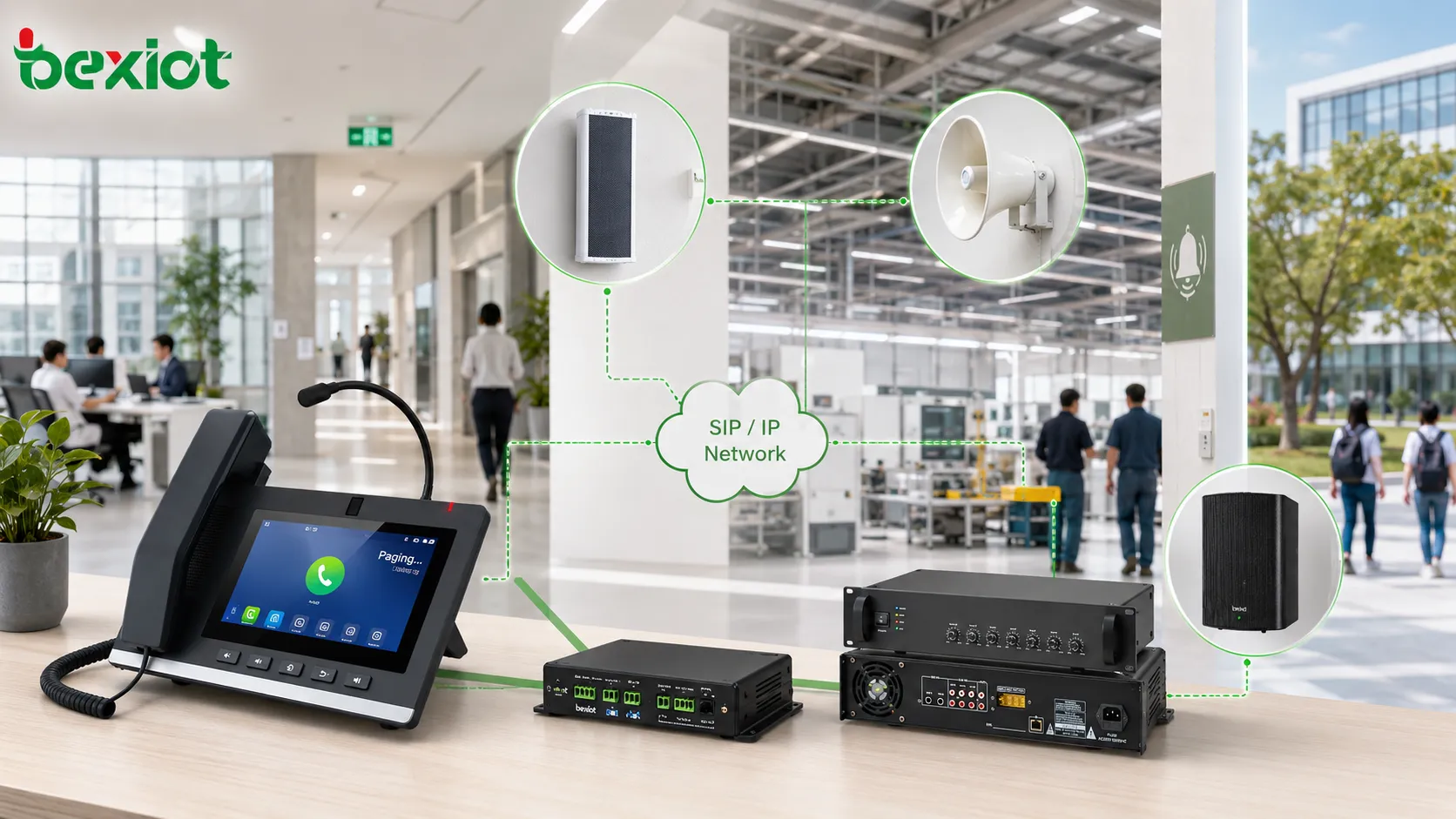
Why Voice Announcements Still Matter in Modern Facilities
Although mobile apps, instant messaging, and digital displays are widely used, audio paging remains one of the fastest ways to reach people who are moving, working with equipment, wearing gloves, or not looking at a screen. In many facilities, announcements are used for daily operations as well as urgent response.
Traditional public address systems usually include a paging server, microphone station, power amplifier, loudspeakers, and dedicated wiring. This architecture is useful for large projects, but it may be too complex for smaller spaces or sites that already have an IP telephone system and network infrastructure.
By integrating paging endpoints into the IP phone environment, a facility can reuse existing network resources, extension management, call permissions, and operational habits. The result is a simpler solution that supports fast deployment and easier maintenance.
A Practical Route for Small and Medium Sites
The basic idea is straightforward: treat paging equipment as part of the communication system. When a SIP speaker or SIP paging gateway is registered to the PBX, it receives an extension number just like an IP phone. A user only needs to call that extension to start a live announcement.
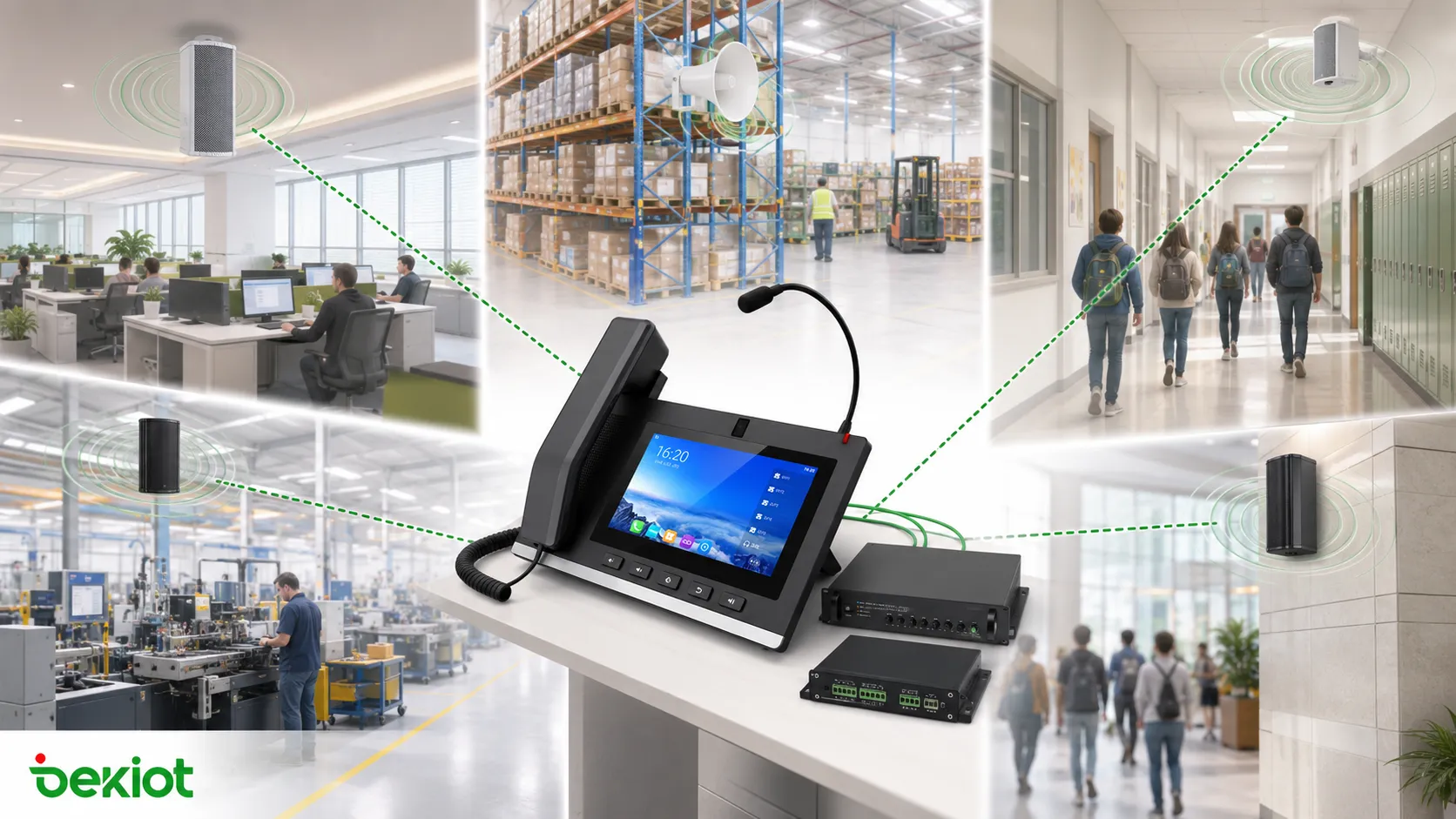
This approach is especially suitable for offices, workshops, retail areas, school corridors, warehouses, parking areas, service counters, machine rooms, small factories, and branch facilities. It allows public announcements to be added without changing the entire communication architecture.
Use SIP speakers as callable endpoints
SIP speakers are IP-based audio devices that support the Session Initiation Protocol. They can be configured with a SIP account, server IP address, port, authentication password, and related network parameters. After registration, the speaker becomes a callable endpoint inside the IP phone system.
When a user dials the speaker extension, the call is answered by the speaker and the voice is played through the built-in audio output. This makes paging as simple as placing a phone call. In practical projects, SIP speakers are available in several formats, including ceiling speakers, desktop speakers, column speakers, horn speakers, and wall-mounted audio terminals.
Use a gateway when existing speakers must stay
Some sites already have analog speakers, amplifiers, horns, or a traditional PA system. Replacing all of them with SIP speakers may not be necessary. In this case, a SIP paging gateway can be used to bridge the IP phone system and the legacy audio equipment.
The gateway registers to the IP PBX as a SIP extension and outputs audio through wired interfaces to an amplifier, speaker line, or existing broadcast input. When the extension is called, the voice from the phone system is converted into audio output for the connected paging system.
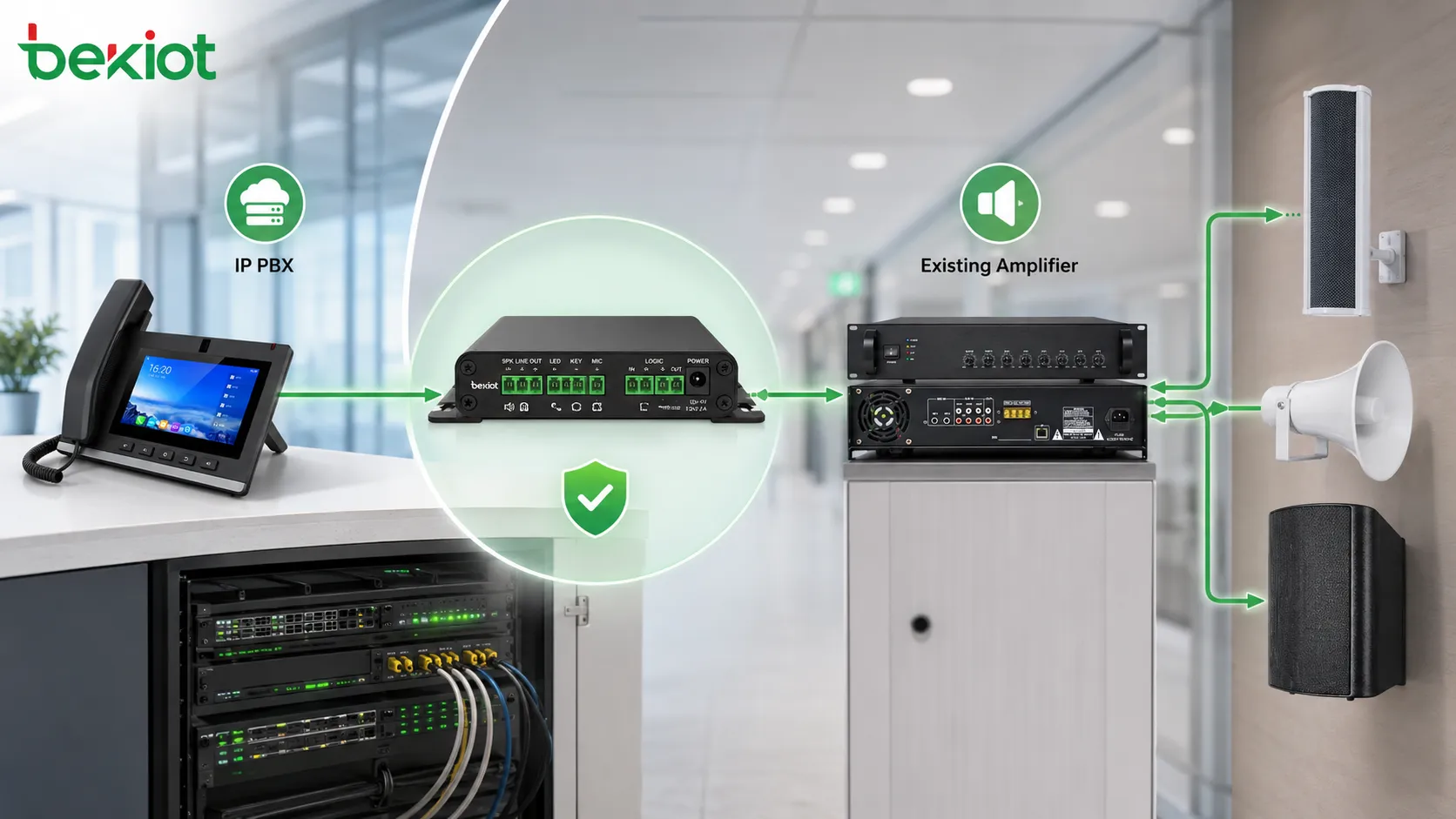
What the System Needs Before Deployment
To connect paging functions with a telephone system, two core conditions must be met. First, the telephone system should be an IP-based system that supports SIP. Second, the paging endpoint should also support SIP or be connected through a SIP-compatible paging gateway.
Once these two conditions are met, the deployment becomes much easier. The PBX assigns an extension number, the paging device completes SIP registration, and users can call the assigned number for announcements. This keeps the paging workflow familiar for employees who already use office phones, dispatch phones, or softphone clients.
SIP registration and extension planning
Each SIP speaker or gateway should have a clear extension number, device name, location label, and call permission rule. For example, a warehouse speaker may be assigned one extension, while an office floor, entrance area, or production line may use different extensions.
In larger sites, paging groups can be planned by area, floor, department, or emergency zone. This helps operators avoid broadcasting to the wrong area and makes daily operation more efficient.
Audio wiring and equipment matching
When SIP speakers are used, the network cable usually carries the IP connection, and PoE may simplify installation if the speaker supports it. When a SIP paging gateway is used, the audio output must match the amplifier or PA system input. Engineers should check signal type, connector format, cable distance, grounding, and noise control.
For traditional speaker systems, the gateway does not replace the entire amplifier chain. Instead, it provides a SIP-to-audio bridge so that phone calls can trigger announcements through the existing broadcast path.
Recommended Architecture for Existing Facilities
A flexible design can include IP PBX or unified communication server, SIP phones, softphones, dispatch consoles, SIP speakers, SIP paging gateways, amplifiers, and existing speaker lines. The final architecture depends on whether the site prefers direct IP speakers, legacy speaker reuse, or a hybrid model.
For a newly built office or small site, SIP speakers may be the cleanest choice. For factories, warehouses, campuses, and buildings with existing PA equipment, a gateway-based solution often reduces cost and avoids unnecessary reconstruction.
Calling workflow
The typical workflow is simple. An operator picks up an IP phone, dials the extension of a SIP speaker or paging gateway, and speaks after the call is connected. The voice is then played through the selected speaker or connected PA equipment.
This workflow can also be extended to dispatch platforms, emergency call stations, access control systems, alarm systems, and building management platforms when integration is required.
Device choices for different spaces
Ceiling speakers are often used in offices, corridors, schools, hospitals, and commercial spaces where appearance matters. Horn speakers are suitable for noisy areas, outdoor locations, loading zones, workshops, and industrial sites. Column speakers can be used in halls, platforms, and public areas where clearer directional sound is needed.
Where older amplifiers and speaker circuits are still working well, a paging gateway allows the site to protect existing investment while adding SIP control from the phone system.
Where This Approach Works Best
Phone-based paging is useful in many environments where quick voice delivery is more important than complex audio programming. Typical scenarios include staff calls, visitor guidance, shift change notices, production reminders, warehouse dispatching, security alerts, maintenance notifications, and emergency voice messages.
It is also suitable for sites that need phased upgrades. A facility can first connect one paging zone to the phone system, then expand to more speakers, gateways, or zones as requirements grow.
Deployment Notes That Improve Reliability
Before installation, engineers should confirm network quality, SIP compatibility, device power supply, audio coverage, volume level, echo behavior, and emergency operation requirements. A paging endpoint may register successfully, but the final user experience still depends on clear audio and stable network performance.
For safety-related announcements, backup power, redundant network paths, priority calling, and controlled access should also be considered. Not every employee should be allowed to broadcast to all zones, so extension permissions and call rules are important.
In industrial or outdoor sites, device housing, weather resistance, corrosion protection, cable entry, mounting height, and acoustic coverage should be reviewed together. The best solution is not only about SIP registration; it also needs to fit the real operating environment.
Related Product for Paging Integration
The BPA2S Paging Gateway is designed for projects that need to connect an IP phone system with traditional audio equipment, amplifiers, or existing public address infrastructure. It helps convert SIP calls into paging audio output, allowing users to make announcements from IP phones or dispatch terminals without replacing the whole broadcast system.
Related product solution: BPA2S Paging Gateway
For projects that already have analog speakers or a conventional PA system, this type of gateway can reduce deployment work and support a smoother transition toward SIP-based communication.
Solution Value for Operators and Integrators
Adding paging to an IP phone system can simplify communication management, reduce duplicated infrastructure, and make announcements easier for daily users. Operators do not need to switch to a separate microphone console for every basic announcement; they can use a phone, extension number, or dispatch interface that is already part of their workflow.
For system integrators, the solution is also flexible. SIP speakers can be used where direct IP audio endpoints are preferred, while SIP paging gateways can be used where existing amplifiers and speakers need to remain in service. This creates a practical path for both new installations and renovation projects.
Most importantly, the open nature of SIP gives the system strong compatibility with IP PBX platforms, softswitch systems, unified communication servers, dispatch systems, and other voice communication platforms. This makes phone-based paging a useful option for customized projects across many industries.
FAQ
Can one phone system control multiple paging areas?
Yes. Multiple paging endpoints can be assigned different extension numbers or paging groups. Users can call a specific area, several areas, or a predefined group depending on the PBX and device configuration.
Does phone-based paging require a dedicated microphone?
Not always. A normal IP phone, softphone, or dispatch terminal can be used to make announcements. A dedicated microphone station may still be useful for reception desks, control rooms, or command centers that make frequent announcements.
Can this solution support emergency messages?
It can support emergency voice announcements, especially when combined with call priority, alarm linkage, backup power, and controlled access. For life safety applications, the design should be reviewed according to local codes and project requirements.
Is a SIP paging gateway only for old PA systems?
No. It is often used with legacy amplifiers and speakers, but it can also be used in hybrid systems where IP phones, dispatch platforms, analog audio inputs, and existing broadcast equipment need to work together.
What should be tested before handover?
Testing should include SIP registration, call connection, audio clarity, speaker volume, zone selection, network stability, power recovery, user permissions, and emergency operation steps. For noisy or outdoor areas, field audio coverage testing is especially important.







