


Paging and broadcast systems are widely used in offices, factories, campuses, warehouses, hospitals, hotels, transport facilities, parks, commercial buildings, and public service areas. They help deliver voice announcements, emergency notices, shift reminders, visitor information, safety instructions, and operational messages to specific zones or entire sites.
In the past, many broadcast systems were built as independent public address systems with dedicated servers, paging microphones, amplifiers, speakers, cabling, and control equipment. A complete PA system can be powerful, but it also requires planning, installation, commissioning, network design, and ongoing maintenance. For small and medium paging needs, a simpler approach is often possible: connect paging terminals to the existing IP phone system and use the current network to complete voice broadcast deployment.
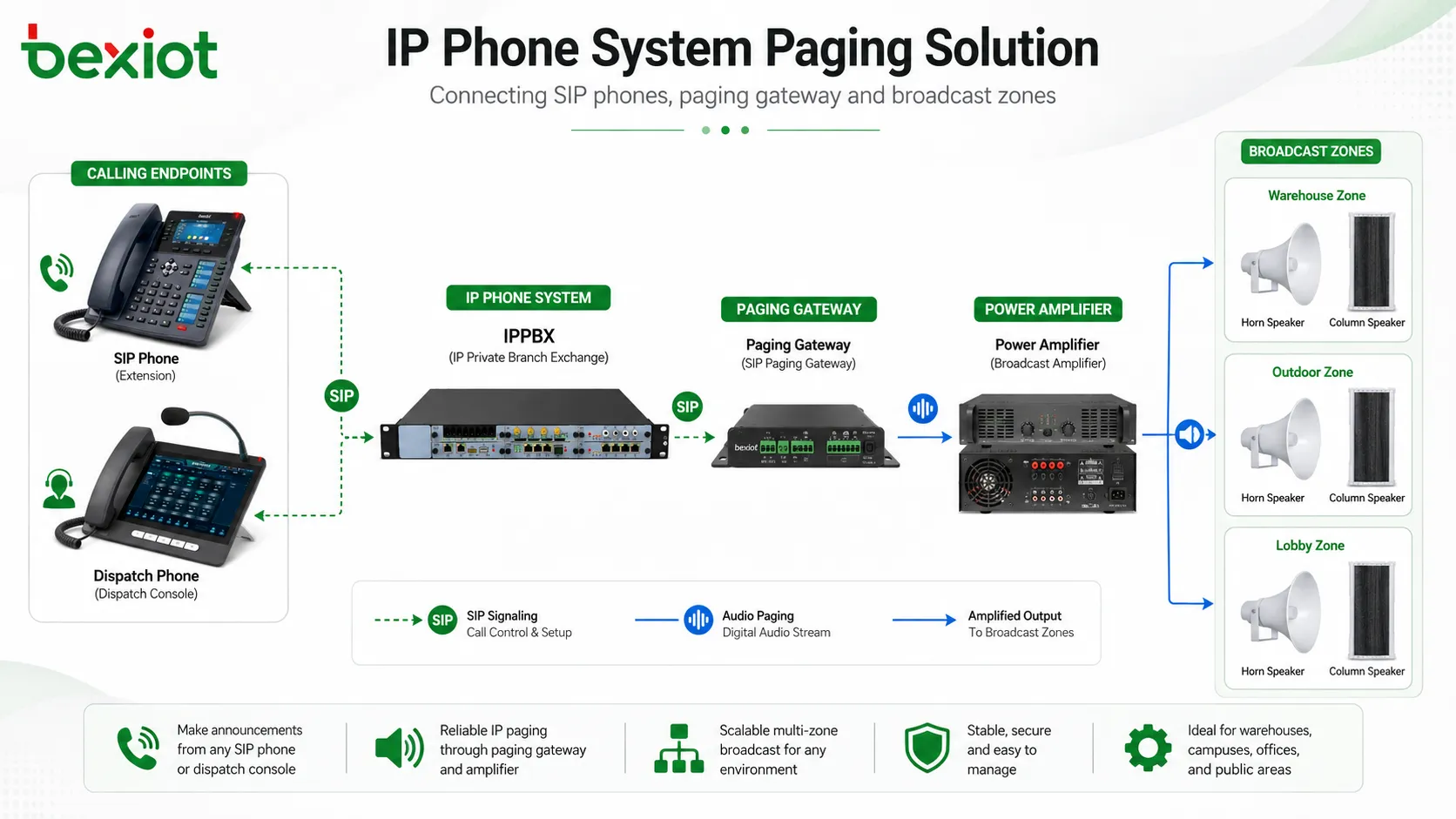
This solution works especially well when the site already has an IP PBX, SIP server, softswitch, or unified communications platform. By adding SIP-compatible paging endpoints, users can make announcements from desk phones, dispatch phones, operator consoles, or softphones without building a completely separate broadcast infrastructure.
When Phone-Based Announcements Make Sense
Phone-based paging is suitable for scenarios where users need quick voice announcements but do not want to deploy a full independent PA system. For example, a warehouse supervisor may need to call a loading area, a school office may need to notify a corridor, a factory control room may need to broadcast to a workshop, or a service desk may need to call a waiting area.
Instead of walking to a dedicated microphone or operating a separate broadcast console, the user can dial a specific extension number from the phone system. Once the call is connected, the voice is played through the connected speaker or paging zone. This makes the broadcast process familiar, simple, and easy to train.
The main advantage is resource reuse. Existing SIP phones, network switches, IP PBX resources, extension numbering plans, and Ethernet cabling can be used as part of the paging solution. This reduces deployment complexity and helps teams add broadcast capability without changing the entire communication architecture.
Two Basic Conditions for Integration
To connect broadcast functions with a phone system, two basic conditions must be met. First, the phone system should be an IP-based telephone system that supports SIP. This may be an IP PBX, hosted PBX, softswitch, SIP server, or unified communication platform.
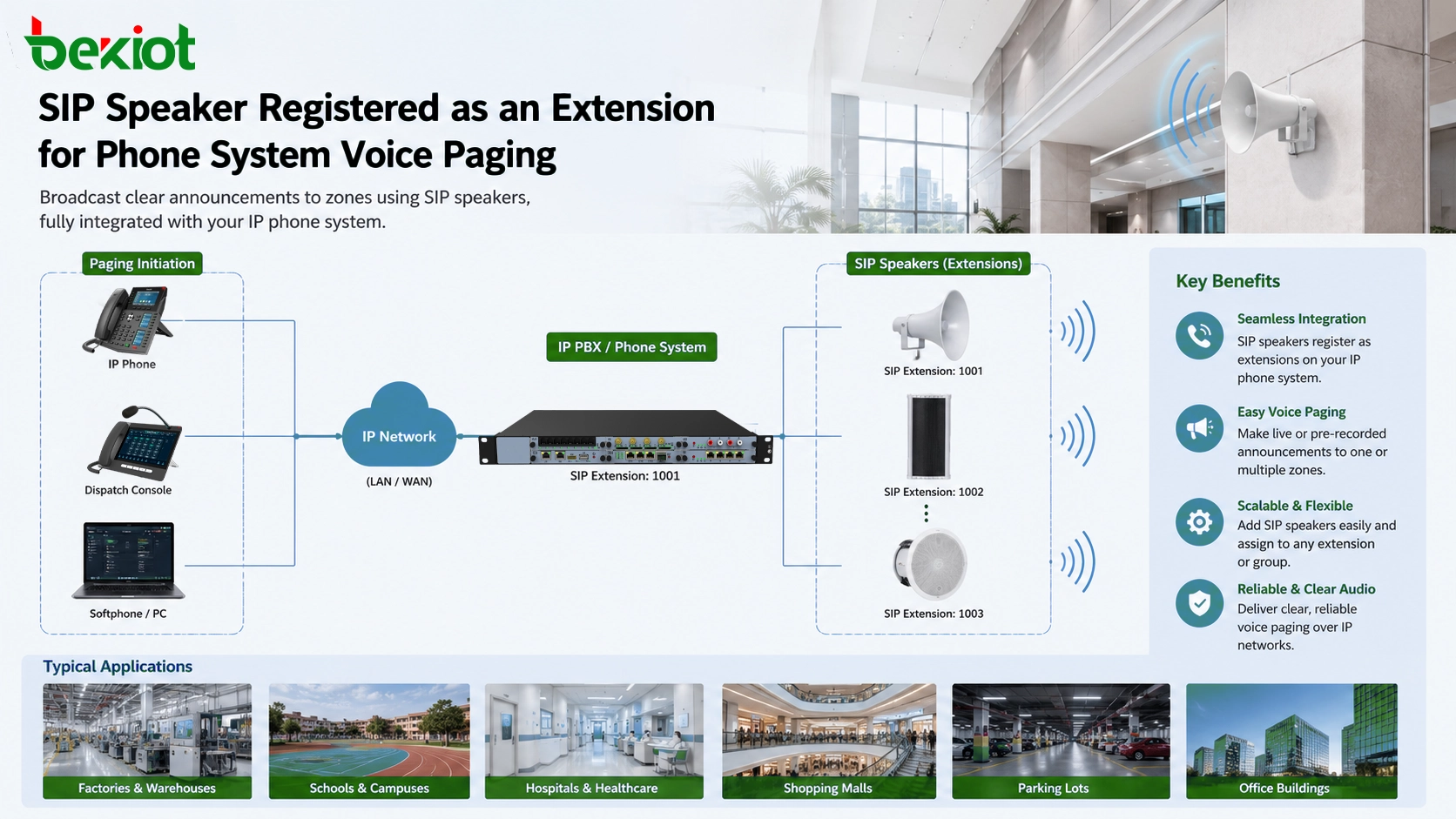
Second, the broadcast terminal must also support SIP. A SIP speaker or SIP paging gateway can register to the phone system just like a normal extension. Once registered, the paging device becomes part of the same communication network and can be reached by dialing its assigned number.
This SIP-based method is practical because SIP is widely used in IP communication systems. It allows paging devices to interconnect with many phone systems, softswitch platforms, dispatch systems, and communication servers. For projects that require flexible integration, SIP offers a more open and scalable path than closed proprietary broadcast wiring.
Using SIP Speakers as Paging Endpoints
A SIP speaker is one of the most direct ways to add broadcast capability to an IP phone system. It combines a network interface, SIP registration capability, audio decoding, and speaker output into one device. After configuration, the speaker behaves like an extension in the phone system.
The typical setup is straightforward. The installer configures the SIP account, SIP server address, port, authentication information, and related audio settings on the speaker. After registration, any authorized extension can dial the speaker number to start a paging call.
SIP speakers are available in several physical forms, including ceiling speakers, wall-mounted speakers, desktop speakers, column speakers, and horn speakers. This makes them suitable for offices, corridors, classrooms, workshops, outdoor entrances, parking areas, production lines, warehouses, and other environments.
For a small area, one SIP speaker may be enough. For a larger area, multiple SIP speakers can be assigned different extension numbers or zones. The phone system can then support targeted paging, such as calling only the warehouse, only the office floor, or only the loading bay.
Connecting Traditional Speakers Through a Gateway
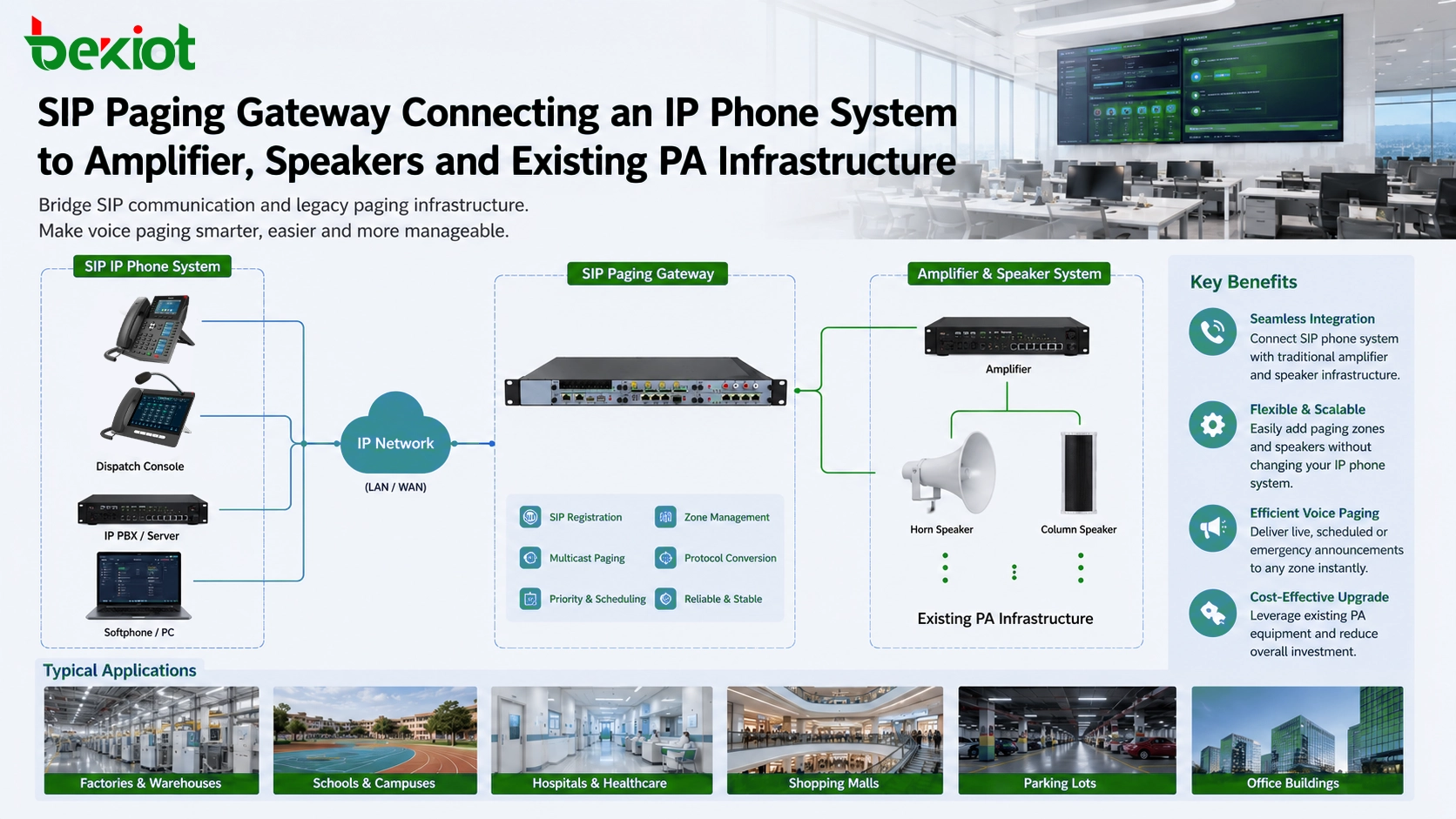
In some projects, SIP speakers are not the best fit. The site may already have traditional speakers, analog horns, amplifiers, or an existing public address system. Replacing all of these devices may be unnecessary or too expensive. In this case, a SIP paging gateway can be used as a bridge between the IP phone system and conventional audio equipment.
A SIP paging gateway registers to the IP phone system as a SIP extension. When a user dials that extension, the gateway receives the SIP call and converts the voice into an audio output that can be sent to an amplifier, speaker line, audio mixer, or existing PA input interface.
This design is especially useful for retrofit projects. The existing speaker network can remain in place, while the paging control method is upgraded to SIP dialing. Users can make announcements from the phone system, and the voice can still be played through the existing broadcast equipment.
For sites with multiple zones, the gateway design should be planned according to the number of audio outputs, amplifier inputs, paging zones, call routing requirements, and whether announcements need to be sent to one area or several areas at the same time.
Related Product Introduction: BPA2S Paging Gateway
Reusing Existing PA Infrastructure
Many buildings already have a traditional PA system. It may include amplifiers, ceiling speakers, horn speakers, zone selectors, and audio input ports. A SIP paging gateway can connect to the audio input of this system through the proper audio cable and interface method.
After the gateway is connected and registered to the phone system, a phone call can activate the existing PA system. This allows the project team to keep the original speaker coverage while adding SIP-based control. It is a practical path for schools, factories, office buildings, hotels, warehouses, and community facilities that want to modernize paging without removing the existing audio network.
During design, the installer should confirm the audio input type, impedance, signal level, amplifier capacity, speaker load, grounding condition, and cable route. These details help ensure that voice announcements are clear, stable, and free from unnecessary hum, distortion, or volume imbalance.
How the Calling Workflow Works
The calling workflow is simple. A SIP speaker or paging gateway is assigned an extension number in the phone system. A user dials that extension from a desk phone, IP phone, softphone, or dispatch terminal. Once the call is connected, the user's voice is played through the speaker or PA system.
This familiar dialing method reduces training costs. Staff do not need to learn a new broadcast console for basic announcements. They only need to know which extension number corresponds to which paging area.
For more advanced use, the phone system can support paging groups, ring groups, speed dial keys, programmable DSS keys, or dispatch shortcuts. This allows one-button paging to a specific area, multiple areas, or all-call broadcast depending on the system design.
Planning Zones and Call Permissions
A good paging solution should not only connect devices; it should also define who can broadcast and where the broadcast should go. In a small office, all users may be allowed to call one paging speaker. In a factory or campus, paging permission should be more carefully controlled.
For example, the security office may be allowed to page all zones, while a warehouse team leader may only page the warehouse. A reception desk may only page the lobby, and an emergency operator may have access to high-priority announcements. These rules can be planned through extension permissions, dial plans, paging groups, or platform-level control.
Zone planning also helps avoid unnecessary noise. Instead of broadcasting every message to the whole building, users can send announcements only to the relevant area. This improves communication efficiency and reduces disturbance to other departments.
Network and Audio Quality Considerations
Since the paging endpoint uses the IP network, network stability directly affects broadcast quality. A reliable deployment should consider PoE availability, switch capacity, VLAN planning, SIP server reachability, firewall rules, and network delay.
Audio quality is also important. The speaker position, amplifier gain, acoustic environment, microphone pickup quality, and codec settings can all influence the final broadcast effect. In noisy workshops or outdoor areas, horn speakers or higher-output audio systems may be more suitable than standard indoor speakers.
For critical announcements, the system should be tested under real working conditions. A paging solution that sounds clear in a quiet office may perform differently in a production area, parking lot, machine room, or large warehouse.
Where This Solution Is Commonly Used
SIP-based paging through a phone system can be used in many environments. Office buildings can use it for visitor notices and department announcements. Factories can use it for production reminders, safety messages, and shift coordination. Warehouses can use it for loading instructions and logistics dispatch.
Schools and campuses can use it for class-change reminders, office announcements, and emergency instructions. Hotels and commercial buildings can use it for service coordination and public area notices. Parking lots, parks, and community facilities can use it for information broadcast and site management.
In many of these scenarios, the key requirement is not a large-scale professional PA platform, but a practical and easy-to-operate announcement function. That is why SIP speakers and SIP paging gateways are often chosen as flexible additions to an existing phone system.
Choosing Between a Speaker and a Gateway
The choice depends on the site condition. If the project is new and the area only needs a few broadcast points, SIP speakers may be the fastest option. Each speaker can be connected to the network and registered as an extension.
If the site already has amplifiers and speakers, or if the speaker layout must cover a larger area, a SIP paging gateway may be more suitable. It allows the phone system to use existing PA equipment instead of replacing it.
In mixed projects, both methods can be used together. SIP speakers can serve new areas, while the paging gateway connects legacy audio zones. This hybrid design allows gradual system expansion and reduces unnecessary reconstruction.
Integration Value for Unified Communications
SIP speakers and SIP paging gateways are part of a wider SIP terminal ecosystem. Because they rely on SIP signaling, they can be integrated with many IP PBX systems, softswitch platforms, call control servers, dispatch systems, and unified communication solutions.
This compatibility gives project teams more flexibility. Paging can be connected with daily office phones, emergency call handling, dispatch command, access control events, scheduled announcements, or alarm linkage when the platform supports these functions.
Instead of treating paging as an isolated system, SIP-based integration allows broadcast to become part of the communication workflow. A phone call can become an announcement. An operator key can become a paging shortcut. A communication platform can become the control point for multiple voice channels.
Implementation Checklist
Before deployment, the project team should confirm the existing phone system type, SIP support, extension capacity, network condition, paging zone quantity, speaker coverage, amplifier interface, and user operation method. These details determine whether SIP speakers, a SIP paging gateway, or a hybrid design should be used.
After installation, testing should include SIP registration, extension dialing, voice delay, speaker volume, zone coverage, call permission, emergency dialing rules, and recovery after network interruption. A clear acceptance process helps ensure that the paging system works reliably in real use.
Conclusion
Adding broadcast functions to an IP phone system is a practical way to build a lightweight paging solution. When the phone system supports SIP and the paging endpoint also supports SIP, speakers and gateways can be registered as extensions and used through familiar phone dialing.
SIP speakers are suitable for direct IP paging points, while SIP paging gateways are useful when traditional speakers, amplifiers, or existing PA systems need to be connected. Together, these options allow offices, factories, campuses, warehouses, commercial buildings, and public facilities to add paging capability without rebuilding the entire communication system.
For many projects, the best solution is not the most complex one. It is the one that reuses existing infrastructure, supports clear voice announcements, keeps operation simple, and leaves enough room for future expansion.
FAQ
Can analog phones start a SIP paging broadcast?
Yes, if the analog phone is connected to an IP PBX through an analog gateway or PBX extension interface. The user can dial the paging extension just like calling another phone.
Can scheduled announcements be added later?
Yes, but scheduled announcements usually depend on the PBX, broadcast platform, or external scheduling software. The paging endpoint provides the audio output path, while scheduling is handled by the control system.
What is the difference between live paging and background music?
Live paging is real-time voice from a caller or operator. Background music usually requires a continuous audio source and different priority control. Some systems support both, but the design should confirm priority behavior.
Can one phone call broadcast to multiple speakers?
Yes. This can be achieved through paging groups, multicast paging, PBX group calling, or platform-controlled zones. The best method depends on the phone system and endpoint capabilities.
What should be checked if the paging volume is too low?
Check the endpoint output level, amplifier gain, speaker impedance, cable connection, codec setting, and microphone input level from the calling phone. Acoustic testing should be done at the actual installation site.







