


Smart transportation projects are no longer limited to traditional video surveillance. In highway management, traffic command centers, urban road networks, tunnel operation, emergency response, and transportation supervision, video resources are increasingly connected with AI analysis, dispatch communication, IoT sensing, big data platforms, and web-based command systems.
This creates a practical challenge: different subsystems are usually provided by different vendors, built with different protocols, and deployed in different phases. A single project may include video monitoring platforms, intelligent analysis systems, communication dispatch platforms, IoT platforms, data centers, and large-screen visualization systems. To make these systems work together, video convergence becomes a key part of the overall solution.
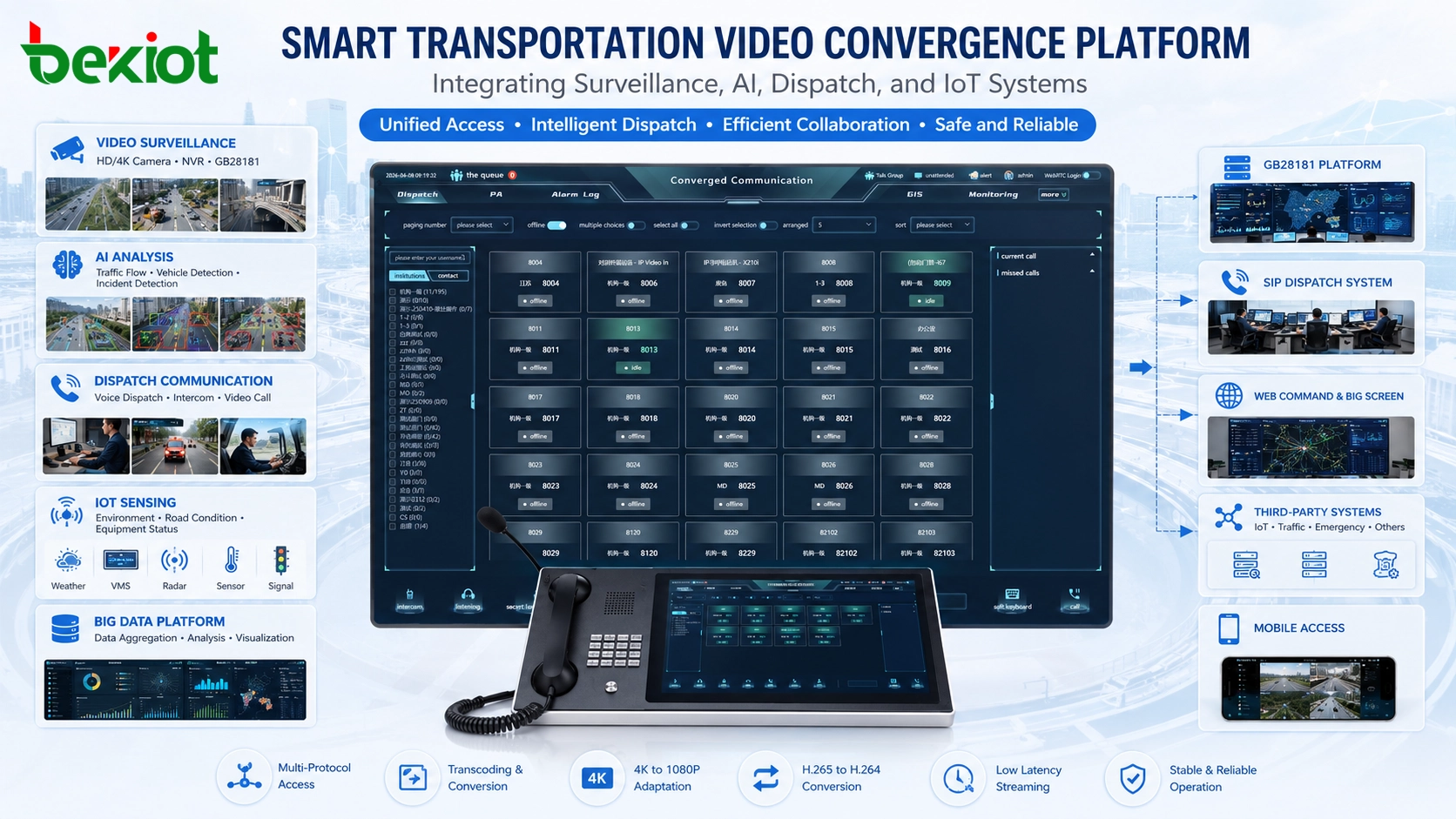
From Standalone Monitoring to Integrated Traffic Operations
In earlier traffic monitoring projects, video systems were mainly used for live preview, recording, and playback. The camera captured the image, the platform stored the stream, and operators reviewed the video when needed. This model is still important, but modern transportation systems require much more.
Today, video may be used by AI systems for event detection, by command centers for emergency dispatch, by communication platforms for visual coordination, by web dashboards for large-screen display, and by data platforms for traffic analysis. The same camera stream may need to serve multiple business systems at the same time.
This means the value of video is no longer only in the camera or the storage platform. The real value appears when video can flow between systems, match different display terminals, and support cross-platform operations. Without video convergence, each platform may only see its own resources, and the whole smart transportation project becomes fragmented.
Why Compatibility Problems Appear During Project Delivery
Many smart transportation projects face cross-system video incompatibility during implementation. The problem is not simply that one device is faulty or one platform is poorly designed. It often comes from differences in system architecture, video protocols, encoding formats, resolution capability, and terminal decoding performance.
For example, many highway projects have deployed 4K cameras to obtain clearer road images, license plate details, tunnel scenes, intersection conditions, and long-distance monitoring views. At the same time, to save transmission bandwidth and storage space, many systems use H.265 video encoding. This is reasonable from the perspective of surveillance storage and high-definition monitoring.
However, many display devices, dispatch terminals, communication platforms, web clients, and fusion communication systems still have limited support for H.265 or 4K video. Even when a platform can theoretically support a certain video format, the actual client terminal may not decode it smoothly. The result may be stream pulling failure, delayed preview, image freezing, black screen, or the inability to display video in the command system.
The Core Issue: Encoding, Resolution, and Protocol Mismatch
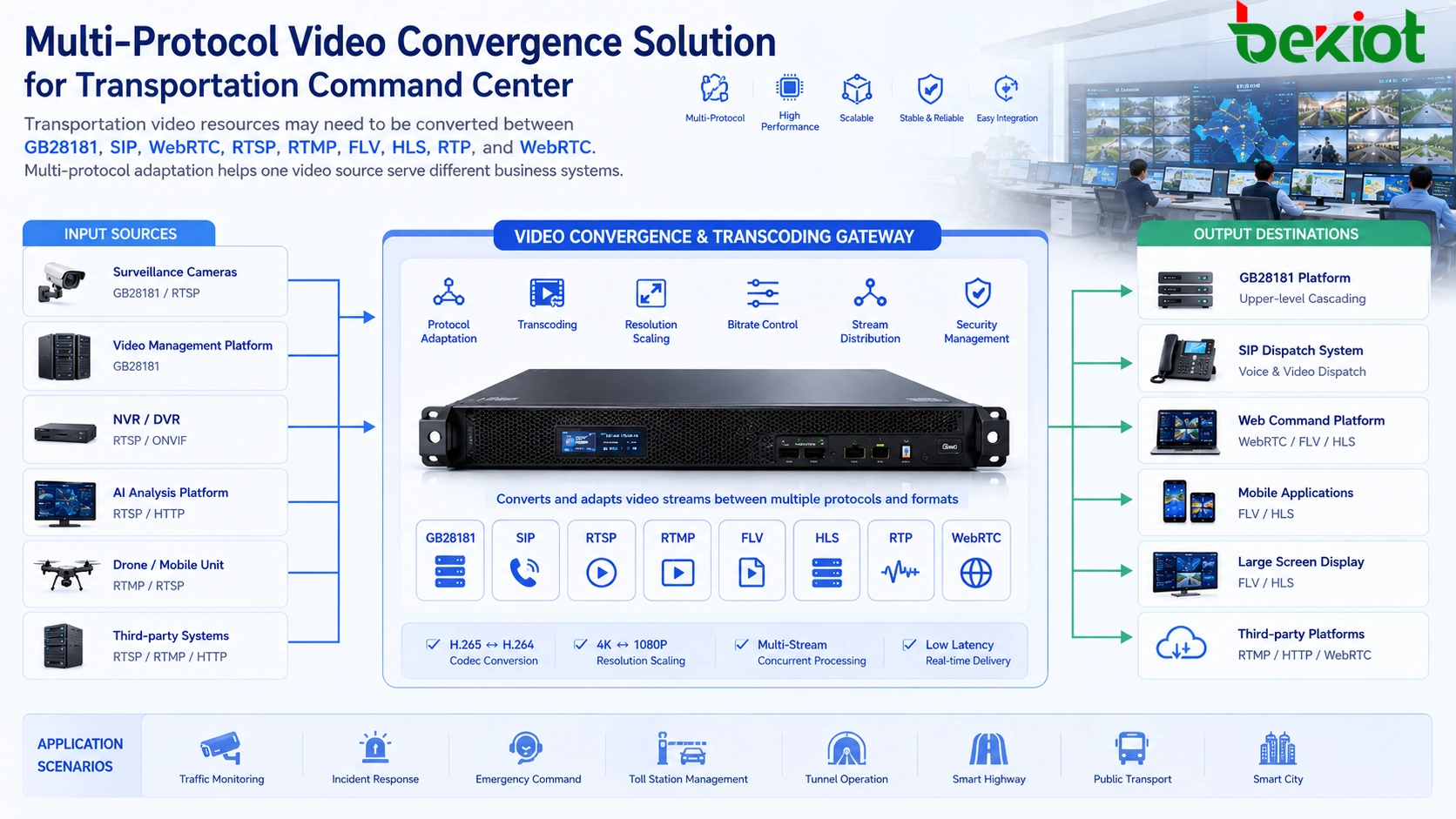
In real projects, video convergence problems usually come from three layers. The first layer is encoding mismatch, such as H.265 video needing to be converted to H.264 for compatibility with more platforms and terminals. The second layer is resolution mismatch, such as 4K video needing to be converted to 1080P for dispatch screens, web interfaces, or SIP video terminals. The third layer is protocol mismatch, such as GB28181 video needing to be output as SIP, WebRTC, FLV, RTMP, HLS, or other formats.
These problems are closely connected. A platform may be able to pull a GB28181 stream but may not support the original H.265 encoding. A browser-based command page may support WebRTC but cannot directly play H.265. A SIP dispatch platform may need video in a standard SIP media session but the original source comes from a national-standard video platform. Without conversion, the video resource exists, but it cannot be used effectively.
Therefore, video convergence is not only about connecting platforms. It also requires video transcoding, stream conversion, resolution adjustment, frame rate control, bitrate optimization, and protocol adaptation.
Why Software Transcoding Is Often Not Enough
For a small number of low-resolution streams, software transcoding may be acceptable. Some platforms can convert several channels from H.265 to H.264 using CPU resources, especially when the resolution is not high and the frame rate is moderate. However, smart transportation projects often involve high-definition and multi-channel video.
When the input video is 4K, the workload increases sharply. Real-time decoding, format conversion, re-encoding, and output streaming require strong computing resources. A general software platform may struggle to process many 4K streams continuously, especially when multiple output formats are required at the same time.
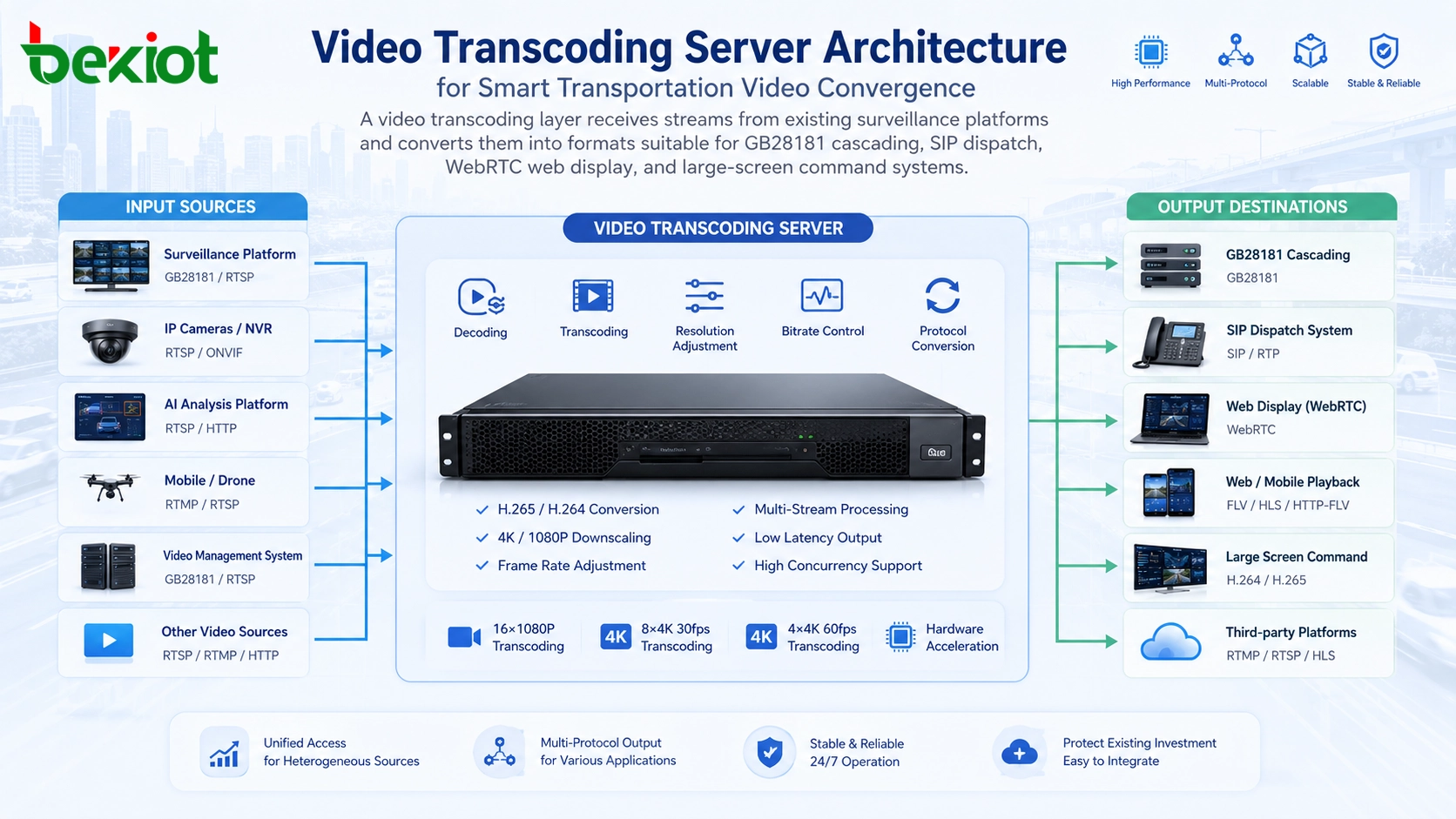
This is why hardware-assisted transcoding is often used in smart transportation video convergence. A dedicated transcoding server with GPU or video acceleration capability can process multiple channels more efficiently. In a practical reference design, such a system may be planned for workloads such as 16 channels of 1080P video transcoding, 8 channels of 4K 30 fps transcoding, or 4 channels of 4K 60 fps transcoding, depending on configuration, codec settings, and output requirements.
| Challenge | Typical Cause | Recommended Handling Method |
|---|---|---|
| Black screen or failed preview | Client or platform cannot decode H.265 or 4K streams | Convert H.265 to H.264 and reduce 4K to 1080P when needed |
| Slow or unstable stream pulling | Multiple systems request video from different sources | Use a centralized video access and distribution layer |
| Web dispatch page cannot play video | Browser playback does not support the original stream format | Output FLV, WebRTC, HLS, or other web-friendly formats |
| SIP dispatch system cannot use camera video | GB28181 video does not directly match SIP media workflow | Convert GB28181 streams into standard SIP-compatible media |
| Upper-level platform cannot receive compatible video | GB28181 cascading exists but encoding or bitrate is unsuitable | Adjust encoding, resolution, frame rate, and bitrate before forwarding |
A Hardware Transcoding Layer for Complex Video Resources
A dedicated video transcoding layer can sit between the source platforms and the business applications. On the input side, it can receive video from GB28181 platforms, cameras, NVRs, video management systems, RTSP streams, RTMP push streams, or other video sources. On the output side, it can provide streams suitable for upper-level platforms, dispatch systems, web applications, and large-screen visualization systems.
The advantage of this architecture is that the original video source does not need to be changed. Existing cameras, platforms, and storage systems can continue to operate in their original way. The transcoding layer handles the compatibility work, including codec conversion, resolution adjustment, frame rate reduction, bitrate control, and protocol conversion.
For project delivery, this is important because transportation systems often involve existing assets. Many cameras and platforms have already been deployed. Replacing them would be expensive and disruptive. A video convergence layer helps protect the existing investment while making the video usable by new smart transportation applications.
GB28181 Cascading for Multi-Level Platform Networking
GB28181 is widely used in video surveillance networking. In transportation projects, lower-level video platforms may need to send selected video resources to higher-level command platforms, city-level supervision systems, provincial traffic platforms, or third-party national-standard systems.
In this scenario, the transcoding layer can support GB28181 upper-level and lower-level networking. It can pull video from mainstream GB28181 platforms and forward the processed streams to another GB28181 platform. During this process, the system can adjust video encoding, resolution, frame rate, and bitrate according to the requirements of the receiving platform.
This solves an important problem: GB28181 connection alone does not guarantee smooth video use. If the upstream platform receives a stream that it cannot decode, cannot display, or cannot process efficiently, the connection is not truly successful. A proper video convergence design should ensure that the receiving platform obtains video in a format it can actually use.
Bridging Surveillance Video into SIP Dispatch Systems
Many smart transportation command systems are built around SIP-based fusion communication. These platforms may support voice dispatch, video calls, intercom, conference, emergency communication, and command coordination. However, their media workflow is different from a traditional GB28181 surveillance platform.
When a highway project needs to bring GB28181 camera video into a SIP dispatch system, direct access may not be enough. The video may need to be converted into a standard SIP-compatible media session. At the same time, H.265 may need to be converted to H.264, and 4K video may need to be converted to 1080P so that dispatch terminals, video phones, command clients, or large-screen systems can display the video smoothly.
This capability is useful for visual command. For example, when an operator handles an incident on a highway, the system may need to display nearby cameras inside the dispatch platform, start voice communication with field personnel, and share visual information with command users. By converting national-standard video into SIP-compatible video resources, surveillance and communication can work together in the same operational workflow.
Making Video Available for Web-Based Command Screens
Many modern dispatch systems use web-based interfaces. Command dashboards, large-screen visualization systems, traffic operation panels, and emergency management pages are often built with web technologies. This makes deployment easier because users can access the system through browsers or web clients.
However, browser video playback has limitations. WebRTC is widely used for low-latency web video communication, but WebRTC itself does not directly support H.265 in many common deployment environments. If the source video is H.265, a web dispatch interface may not be able to play it directly.
A video transcoding layer can output web-friendly formats such as FLV, WebRTC, HLS, or other supported streaming methods. This allows the same surveillance source to be displayed in a web command dashboard after conversion. For transportation projects, this is especially useful when the platform needs to show camera video, traffic events, AI analysis results, and dispatch controls on the same web page.
Protocol Adaptation for Different Business Systems
A smart transportation video convergence solution should not rely on only one protocol. Different systems may require different access methods. GB/T28181 is important for national-standard video networking. SIP is useful for communication dispatch and video intercom. RTSP is common for camera and local stream access. RTMP can be used for push and pull streaming. FLV over HTTP or WebSocket is often used in web display. HLS is useful for broad compatibility. RTP and WebRTC are valuable for real-time media applications.
Because of this, a practical convergence layer should support multiple input and output protocols. It should not only convert video encoding, but also transform the media into the format required by each business platform. This allows the same video source to serve monitoring, dispatch, AI analysis, large-screen display, mobile access, and web application scenarios.
In some projects, the transcoding layer may also need simple communication capabilities, such as built-in SIP registration or softphone-style interaction, so that it can participate in communication workflows instead of only forwarding streams. The exact requirement depends on whether the project is focused on monitoring, dispatch, emergency response, or multi-system collaboration.
Lowering Integration Complexity During Delivery
One reason hardware-based video convergence is attractive is deployment simplicity. Compared with custom software transcoding or GPU card development, an integrated transcoding device can reduce code-level tuning and driver-level adaptation. A graphical management interface also makes configuration easier for project engineers.
This does not mean planning is unnecessary. The project team still needs to confirm input sources, output protocols, stream quantity, resolution targets, codec requirements, bitrate limits, frame rate requirements, network routes, and receiving platform compatibility. However, an integrated management interface can reduce the workload of low-level development and make the system easier to deliver.
For system integrators, this can be a major advantage. Smart transportation projects often have tight schedules and many participating vendors. Reducing custom development helps shorten debugging cycles and lowers the risk of unstable video access during acceptance testing.
Recommended Architecture for Smart Highway Projects
In a smart highway project, cameras may be deployed along roads, tunnels, toll stations, service areas, bridges, intersections, and traffic control points. These cameras may already be connected to an existing video platform. The command center may also have a separate dispatch communication platform, large-screen display system, AI analysis platform, and web-based traffic management dashboard.
A recommended architecture is to add a video convergence and transcoding layer between the existing video platform and the upper business systems. This layer pulls or receives selected video resources, converts them according to business requirements, and then distributes them to the corresponding platform. GB28181 streams can be cascaded upward, SIP-compatible video can be sent to dispatch systems, and WebRTC or FLV streams can be provided to web dashboards.
This layered architecture avoids direct point-to-point integration between every system. Instead of asking each platform to understand every camera, codec, and protocol, the convergence layer becomes the central adaptation point. This improves maintainability and makes future expansion easier.
Operational Benefits for Traffic Command Centers
When video convergence is properly designed, operators gain a more consistent viewing and dispatch experience. A video source from the highway monitoring system can appear in a command dashboard, a SIP dispatch console, a web large screen, or an upper-level GB28181 platform after conversion. Operators no longer need to switch between isolated systems just to view the same road scene.
The command center can also respond faster during traffic incidents. When congestion, accidents, road hazards, tunnel emergencies, or abnormal events occur, video can be delivered to the platform that needs it most. The dispatch team can combine live video, voice communication, event data, AI alerts, and traffic information in one workflow.
For management departments, the value is not only technical compatibility. It also improves system efficiency, protects existing investment, reduces duplicate construction, and supports future platform expansion.
Key Planning Points Before Deployment
Before deploying a video convergence solution, the project team should list all source systems and receiving systems. This includes camera platforms, GB28181 platforms, AI analysis servers, SIP dispatch platforms, web dashboards, mobile clients, recording systems, and third-party command systems.
The next step is to define stream conversion rules. Some video may only need protocol conversion. Some may need H.265 to H.264 transcoding. Some may need 4K to 1080P scaling. Some may need bitrate reduction to match network capacity. Some may need frame rate adjustment for web display or AI processing.
Finally, testing should include real stream load. A single-channel demonstration is not enough for transportation projects. Engineers should test multi-channel concurrency, 4K transcoding load, GB28181 cascading stability, SIP video compatibility, WebRTC playback, network latency, and long-term operation before final acceptance.
FAQ
Why do 4K traffic cameras sometimes fail in dispatch systems?
Many dispatch systems and terminals are not designed to decode high-resolution 4K streams directly, especially when the video uses H.265. Converting the video to a more compatible resolution and codec can solve this issue.
Is protocol conversion the same as video transcoding?
No. Protocol conversion changes how the stream is delivered, such as from GB28181 to WebRTC. Video transcoding changes the codec, resolution, frame rate, or bitrate. Many projects need both.
Can a GB28181 platform send video to another GB28181 platform without transcoding?
It can in some cases, but if the receiving platform cannot handle the original codec, resolution, frame rate, or bitrate, transcoding is still required for stable viewing.
Why is WebRTC difficult with H.265 video?
Many browser-based WebRTC environments do not support H.265 playback directly. Converting the source stream to a more widely supported format is often necessary for web command dashboards.
What should be tested before project acceptance?
Important tests include multi-channel stream access, H.265 to H.264 conversion, 4K to 1080P conversion, GB28181 cascading, SIP video output, web playback, long-duration stability, and network bandwidth usage.
Does a video convergence layer replace the original surveillance platform?
No. It usually works between existing video platforms and business applications. The original surveillance platform can remain in use, while the convergence layer adapts video for dispatch, web display, AI analysis, and upper-level sharing.







