


A keyboard is one of the most common input devices used to enter text, control software, trigger commands, operate terminals, and interact with computers or embedded systems. It may appear simple, but in daily work environments, it directly affects typing efficiency, user comfort, data entry accuracy, device control, and long-term workstation reliability.
Keyboards are used in offices, control rooms, call centers, schools, hospitals, factories, service counters, public terminals, laboratories, retail stores, warehouses, and home workspaces. Their value is not limited to typing. They can support shortcuts, secure login, function control, multilingual input, industrial operation, accessibility needs, and workflow automation.
Why This Input Device Still Matters
Touchscreens, voice input, gesture control, and mobile devices have changed how people interact with technology. However, physical key input remains important because it is precise, fast, familiar, and suitable for long-form work. For many users, it is still the most efficient way to write, code, search, operate systems, and handle structured data.
In professional environments, a stable input device can reduce errors. A call center agent entering customer information, a warehouse operator scanning and confirming goods, a nurse updating patient notes, or an engineer entering commands into a terminal all need reliable input.
The deployment decision should therefore consider more than appearance. Layout, size, switch feel, connection method, durability, hygiene, cleaning method, software compatibility, and user environment all affect the final experience.
Basic Types and Their Practical Differences
Standard Office Models
Standard office models are designed for general typing, email, document editing, browser use, and business software. They usually include a full key layout with function keys, number pad, arrow keys, and shortcut keys.
This type is suitable for administrative work, finance teams, customer service, education, and ordinary desktop use. Its advantage is familiarity and broad compatibility.
Compact Layouts
Compact models reduce size by removing the number pad or compressing navigation keys. They are useful where desk space is limited or where users prefer a shorter hand movement distance between typing and mouse operation.
However, compact layouts may not suit users who frequently enter numbers, use spreadsheets, or depend on dedicated function keys.
Mechanical Designs
Mechanical versions use individual switches under each key. They are often preferred by users who want stronger tactile feedback, longer key life, and a more defined typing feel.
They can be suitable for coding, writing, gaming, control rooms, and heavy input work. Noise level should be considered in shared offices or quiet environments.
Membrane and Scissor-Switch Designs
Membrane models are common, affordable, and quiet. Scissor-switch designs are often used in laptops and low-profile desktop models. They provide shorter key travel and a slim structure.
These designs are practical for offices, reception desks, mobile workstations, and environments where quiet operation is preferred.
Industrial and Washable Versions
Industrial, rugged, sealed, silicone, or washable models are used where dust, liquid, cleaning chemicals, oil, gloves, or frequent disinfection may be present. They may have sealed surfaces, antimicrobial materials, waterproof construction, or special mounting options.
These are common in healthcare, food processing, laboratories, factories, public terminals, and harsh operating areas.
Deployment Advantages in Different Workplaces
Efficiency for Repetitive Tasks
Many jobs require repeated input. Function keys, hotkeys, shortcuts, macros, and numeric keypads can greatly improve task speed. Users can complete actions faster than clicking through menus repeatedly.
For example, support agents can use shortcut keys to open records, warehouse users can confirm entries quickly, and office workers can move through spreadsheets more efficiently.
Accuracy and Tactile Feedback
Physical keys provide clear feedback when pressed. This helps users type without constantly looking down and reduces uncertainty during data entry.
In environments where accuracy matters, such as finance, healthcare, industrial control, and logistics, the feel and layout of the keys can affect input reliability.
Compatibility with Many Systems
Most operating systems and devices support standard USB or wireless input devices. This makes deployment easy across desktops, laptops, thin clients, embedded terminals, kiosks, and control stations.
Universal compatibility also helps during device replacement. A standard keyboard can often be moved from one workstation to another with little configuration.
Support for Accessibility
Different layouts, key sizes, wrist positions, and assistive features can help users with different physical needs. Large-print keys, ergonomic shapes, programmable keys, low-force switches, and alternative layouts can improve usability.
Accessibility should be considered during deployment, not treated only as an afterthought.
Connection Choices and Deployment Planning
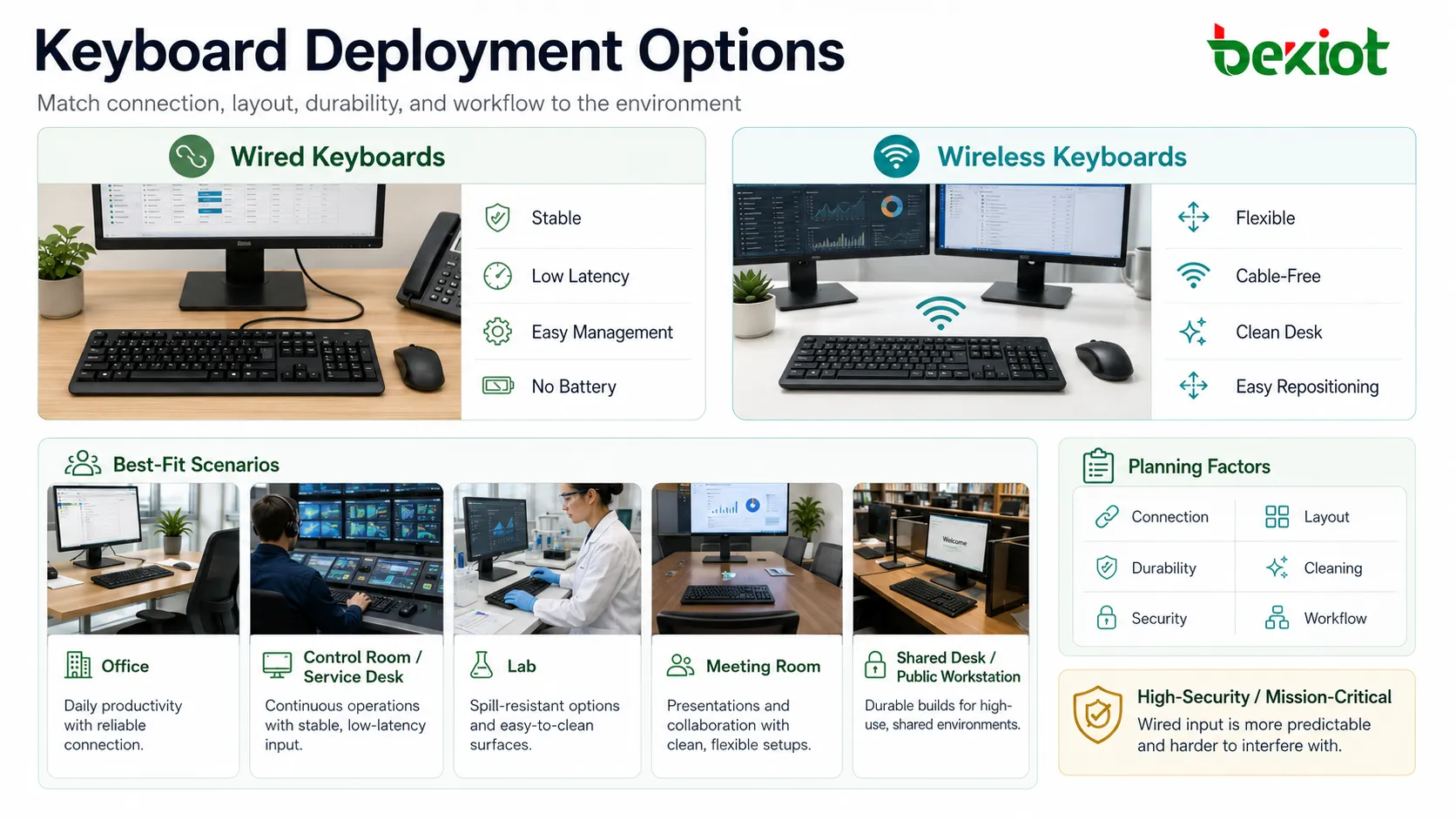
Wired models are preferred where stable connection, low latency, simple management, and no battery maintenance are priorities. They are common in offices, control rooms, service desks, laboratories, and fixed workstations.
Wireless models reduce cable clutter and support flexible desk layouts. They are useful for meeting rooms, presentation areas, shared desks, reception counters, and spaces where cable routing is difficult.
However, wireless deployment requires attention to battery life, pairing security, interference, receiver placement, and device inventory. In high-security or mission-critical areas, wired input may be more predictable.
Ergonomics and Daily Comfort
Height and Wrist Position
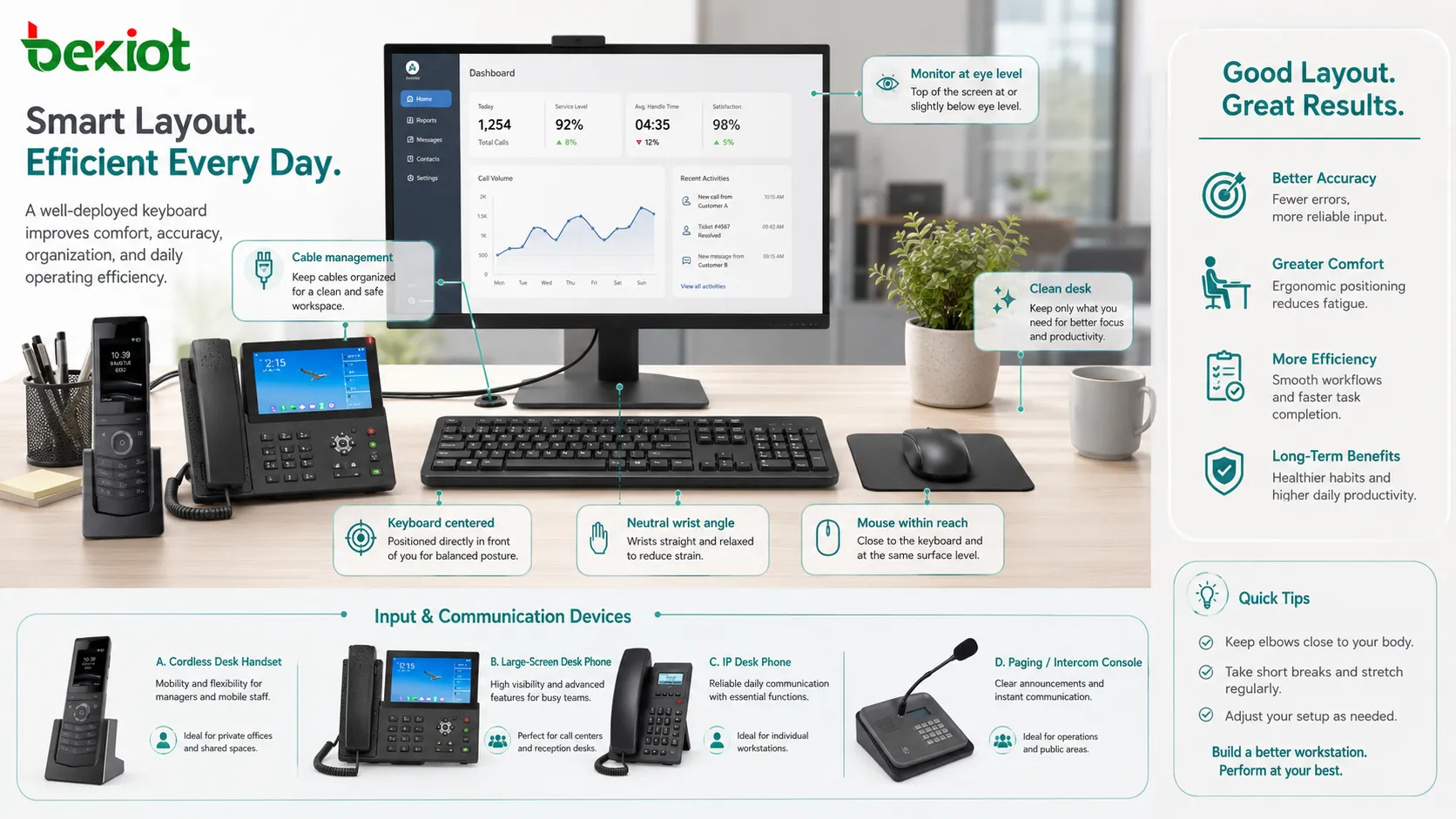
The device should be placed at a height that allows relaxed shoulders and neutral wrists. If it is too high, users may raise their shoulders. If it is too far away, users may overreach.
A wrist rest may help some users, but it should not force the wrist into an awkward angle. The best setup depends on desk height, chair adjustment, arm position, and typing style.
Distance from the User
The input area should be close enough for comfortable typing while leaving space for documents, mouse movement, and other tools. In many workstations, placing the keyboard directly in front of the monitor improves alignment.
If the user frequently switches between mouse and keys, a compact layout may reduce shoulder movement.
Noise Level
Typing noise can affect shared environments. Mechanical switches with strong click sounds may disturb nearby workers, while quieter designs may be better for call centers, libraries, hospitals, classrooms, and open offices.
Noise should be considered before large-scale purchasing, especially if many users work in one area.
Maintenance Starts with Clean Use Habits
Most long-term problems come from dust, crumbs, liquid spills, oil, skin residue, worn legends, loose cables, and rough handling. Good daily habits can prevent many failures.
Users should avoid eating directly above the keys, placing drinks beside the workstation without protection, pulling cables sharply, pressing keys with excessive force, or using the device as a storage surface.
For shared workstations, cleaning is also a hygiene issue. Reception counters, healthcare stations, public terminals, training rooms, and call centers should have clear cleaning rules.
Cleaning and Care Techniques
Surface Cleaning
For ordinary models, turn off or disconnect the device before cleaning. Use a soft, slightly damp cloth to wipe the surface. Avoid dripping liquid into key gaps, ports, or seams.
Strong chemicals may damage legends, coatings, plastic surfaces, or rubber parts. Cleaning materials should match the product type and workplace hygiene requirements.
Dust Removal
Loose dust and particles can be removed with a soft brush, gentle air blower, or approved cleaning tool. If compressed air is used, it should be applied carefully to avoid forcing debris deeper into the mechanism.
Turning the keyboard upside down and gently tapping can remove loose particles, but this should be done carefully and not with rugged force.
Keycap Care
Some mechanical models allow keycaps to be removed for cleaning. This should be done with a proper keycap puller and only when the user understands the structure.
For laptops, low-profile models, and scissor-switch designs, removing keys may damage the mechanism. Cleaning should follow manufacturer guidance.
Spill Response
If liquid is spilled, disconnect power immediately. Do not continue typing. Turn the device over to drain liquid where appropriate and allow it to dry completely before reuse.
Sticky liquids such as coffee, soda, or juice may leave residue and cause long-term key failure. In business environments, replacement is often safer than uncertain repair.
Security and Management Considerations
Input devices can affect security in subtle ways. Shared workstations should prevent unauthorized macro devices, unknown wireless receivers, and unapproved USB input tools. In restricted environments, device control policies may be needed.
Wireless models should use secure pairing methods and be tracked as assets. Lost receivers, unknown Bluetooth pairing, or unmanaged devices can create support and security problems.
For public terminals, the keyboard should be physically secured, easy to clean, and resistant to tampering. Kiosks and unattended systems may require sealed or vandal-resistant designs.
Applications Across Work Scenarios
Office and Administrative Work
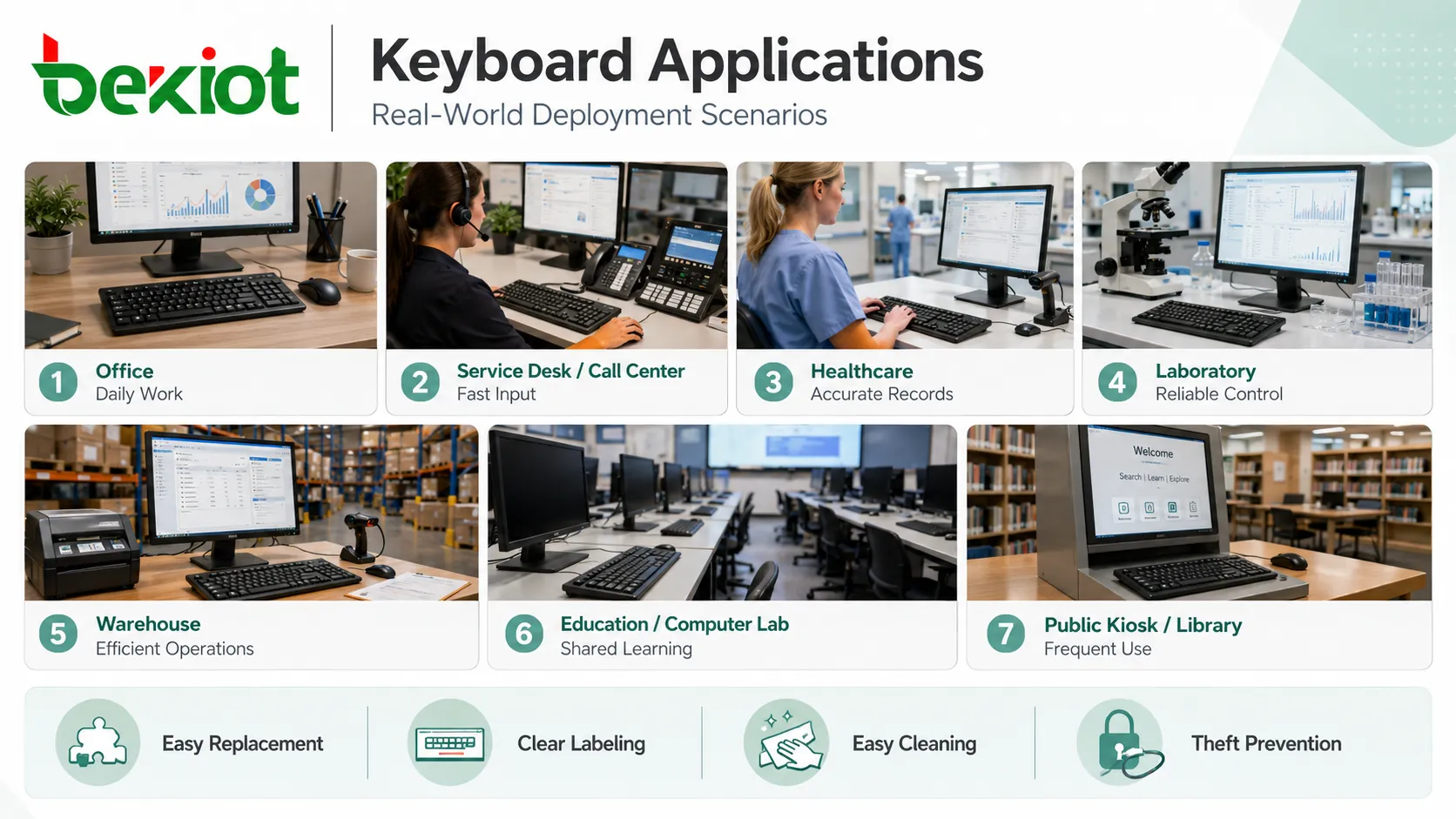
Office users need comfortable typing, shortcut support, numeric input, and reliable connectivity. Full-size layouts are common for finance, administration, writing, and data processing.
Quiet operation, ergonomic placement, and easy cleaning are practical priorities in shared office spaces.
Call Centers and Service Desks
Agents often enter customer information while speaking. The input device must be comfortable, quiet, and responsive. Shortcut keys can speed up CRM actions, call notes, and service workflows.
Durability matters because these environments may operate for long hours with many repeated keystrokes.
Healthcare and Laboratory Areas
Hospitals, clinics, laboratories, and clean areas may require washable or sealed models. These environments focus on hygiene, disinfectant compatibility, and reduced contamination risk.
Readable key legends and stable operation with gloves may also be important.
Industrial and Warehouse Terminals
Factories, warehouses, logistics hubs, and maintenance areas may expose devices to dust, vibration, gloves, oil, or temperature variation. Rugged construction and simple cleaning are often more important than visual style.
Mounting method, cable protection, and compatibility with scanning devices should be considered.
Education and Public Access
Computer labs, libraries, training rooms, and public kiosks need devices that can withstand frequent users. Easy replacement, labeling, cleaning, and theft prevention are practical deployment concerns.
Long-Term Reliability Checks
Periodic checks should include key response, cable condition, wireless battery status, receiver pairing, stuck keys, worn legends, unstable connection, and physical damage. In managed IT environments, replacement cycles can be planned before failure affects users.
For high-use areas, spare units should be available. A failed input device can stop a workstation even when the computer itself is working normally.
Inventory records are useful when many devices are deployed. Tracking model, location, purchase date, warranty, cleaning requirements, and replacement history helps improve support planning.
Common Mistakes to Avoid
Choosing Only by Price
Very low-cost units may be acceptable for temporary use, but they may wear quickly in high-volume work areas. Lifecycle cost should include durability, support calls, user comfort, and replacement frequency.
Ignoring the Actual Workload
A compact model may look tidy but may slow down spreadsheet users who rely on numeric input. A loud mechanical model may feel good to one user but disturb an open office.
Using the Wrong Cleaning Method
Too much liquid, harsh chemicals, or forced key removal can damage the device. Cleaning method should match the product design.
Forgetting Cable and Receiver Management
Loose cables and missing wireless receivers are common support problems. Labeling and cable organization can reduce unnecessary downtime.
Not Testing with Real Users
A technically compatible device may still be uncomfortable. Before large-scale deployment, test with users who represent the actual workload.
A keyboard deployment is successful when the device fits the user’s task, desk layout, hygiene needs, connection method, maintenance process, and long-term reliability expectations.
FAQ
How often should shared keyboards be cleaned?
The interval depends on usage, hygiene requirements, and environment. Shared desks, public terminals, healthcare areas, and food-related workplaces usually need more frequent cleaning than personal office desks.
Is a wireless keyboard suitable for business workstations?
Yes, if battery management, pairing security, receiver tracking, and interference control are handled properly. For critical fixed stations, wired models may be simpler.
Why do some keys become unresponsive over time?
Common causes include dust, liquid residue, worn switches, damaged membranes, loose cables, failing wireless batteries, or internal circuit wear.
Can disinfectant damage the keys?
Some chemicals can fade legends, soften coatings, or damage plastic and rubber parts. Use cleaning agents compatible with the device material and workplace policy.
What should be considered before buying keyboards in bulk?
Check layout, noise level, durability, cleaning needs, user comfort, connection type, operating system compatibility, warranty, spare availability, and the actual workload of each department.







