


Link Layer Discovery Protocol, commonly abbreviated as LLDP, is a vendor-neutral Layer 2 discovery protocol used by network devices to advertise information about themselves to directly connected neighbors. It helps switches, routers, wireless access points, IP phones, servers, industrial network devices, and management platforms understand what is connected to each physical port.
The protocol does not route traffic, assign IP addresses, authenticate users, or replace network monitoring systems. Its primary purpose is visibility. By periodically sending discovery messages on local links, devices can share identity, port description, system capability, management address, VLAN information, power requirements, and other operational details.
Executive Summary
LLDP solves a practical network operations problem: administrators need to know which device is connected to which port, even when cabling records are incomplete or the network has changed over time. In large buildings, campuses, data centers, factories, branch offices, and communication rooms, manually tracing every cable is slow and error-prone.
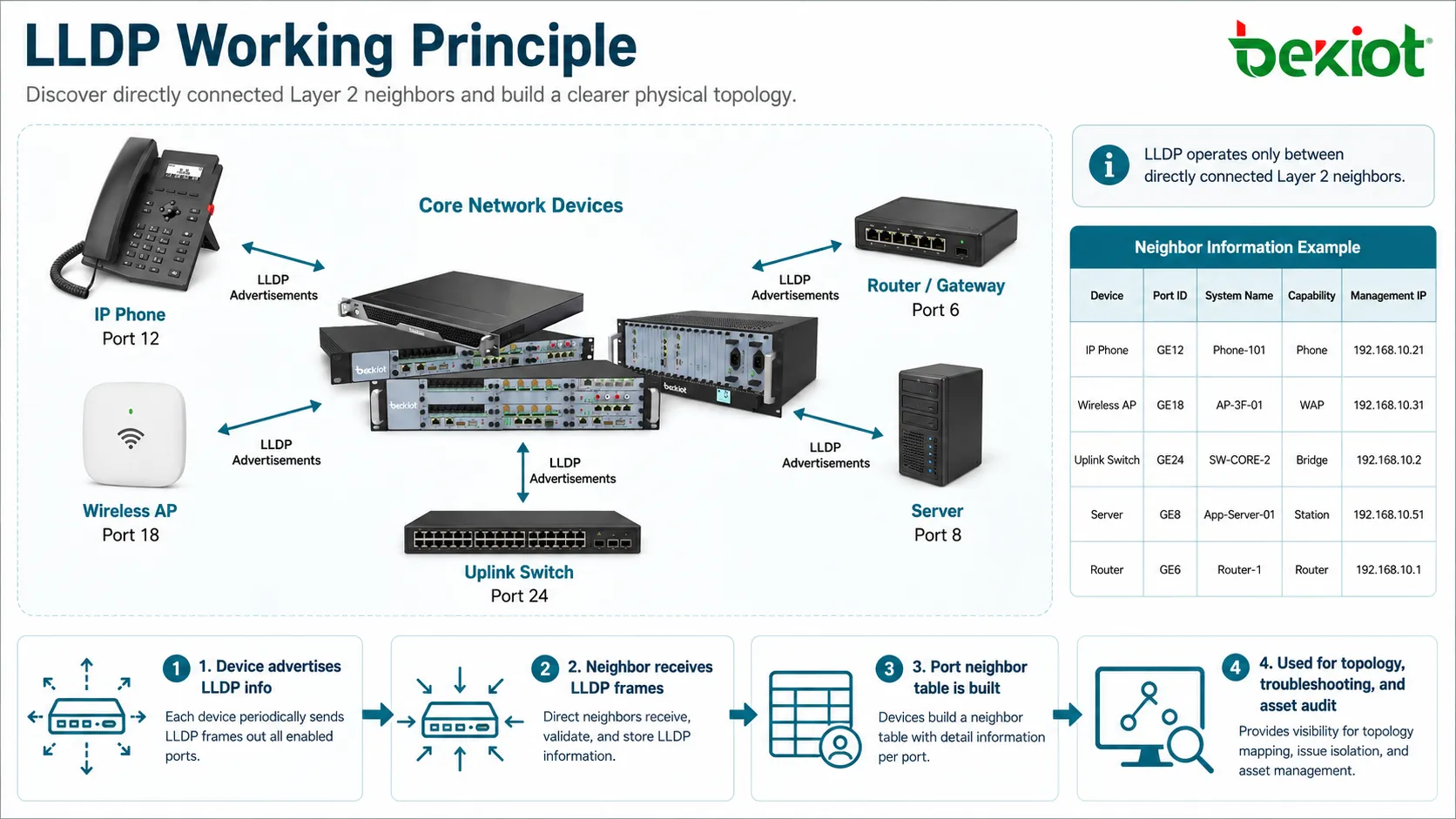
With LLDP enabled, each device can announce structured neighbor information. A switch can show that an IP phone is connected to port 12, a wireless access point is connected to port 18, and an uplink switch is connected to port 24. This makes topology discovery, troubleshooting, asset verification, and configuration auditing much easier.
The most important point is that LLDP works only between directly connected Layer 2 neighbors. It is not designed to discover devices several hops away in one message. Each device collects information from its immediate links and exposes that data through command-line output, SNMP, network controllers, or monitoring systems.
Protocol Position in the Network Stack
LLDP operates at the data link layer. It uses Ethernet frames to carry discovery information between neighboring devices. Because it works at Layer 2, it can function even before higher-layer services such as IP routing, DNS, DHCP, or application communication are fully configured.
This makes it useful during commissioning, physical installation, and early troubleshooting. A switch may be able to identify a connected device even when the endpoint has no valid IP address or cannot reach the management network.
However, the same Layer 2 nature also limits its scope. LLDP frames are not normally forwarded through switches like ordinary data traffic. They are intended to be received and processed by the directly connected device on the same link.
Message Exchange Model
Periodic Advertisement
Devices send LLDP advertisements at regular intervals. Each advertisement contains information about the sending device and the local port. The receiving neighbor stores this information in a local neighbor table.
The protocol is not based on session establishment. Devices do not need to negotiate a connection before sending information. They simply advertise their presence and update neighbor information over time.
Local Neighbor Table
When a device receives an LLDP frame, it reads the included information and records it as neighbor data. A switch may store the neighbor system name, chassis ID, port ID, port description, management address, system capabilities, and optional extension values.
Administrators can then view this table to understand what is connected to each interface. Network management platforms can also collect these records to create topology maps.
Time-to-Live Aging
LLDP information includes a time-to-live value. If a device stops receiving advertisements from a neighbor before the timer expires, the neighbor entry ages out and is removed from the table.
This mechanism helps the topology remain current. If a cable is unplugged, an endpoint is moved, or a device is powered off, the old information will not remain forever.
Core Frame Structure
LLDP messages are built with TLV fields. TLV means Type, Length, and Value. Each information item is carried as a structured field, making the message extensible and easy for devices to parse.
Mandatory TLVs provide the basic identity and validity of the advertisement. Optional TLVs add more operational detail. This structure allows basic discovery to work across many vendors while still supporting additional information for specific use cases.
| TLV Category | Typical Information | Operational Value |
|---|---|---|
| Chassis ID | Identifies the sending device. | Helps distinguish one switch, router, server, or endpoint from another. |
| Port ID | Identifies the sending interface. | Shows which remote port is connected to the local link. |
| Time to Live | Defines how long received information remains valid. | Removes stale neighbor records when links change. |
| System Information | Name, description, capability, and management address. | Improves device recognition and remote administration. |
| Extension TLVs | VLAN, power, media, location, or protocol-specific details. | Supports voice, wireless, PoE, and infrastructure automation use cases. |
Identity Discovery Mechanism
The identity discovery process begins with the sending device preparing a discovery frame for each enabled interface. The frame contains the device identity and the port identity from which the message is sent.
The receiving device does not need to know the sender in advance. It reads the frame, extracts the TLVs, and adds the neighbor to the local table. If new advertisements arrive later, the entry is refreshed or updated.
This model is especially useful when cabling has changed. If a technician moves a phone, access point, server, or uplink cable to another port, LLDP can show the new physical relationship after the next update cycle.
What Information Can Be Advertised
Device Name and Description
The system name and system description help administrators identify the neighbor. Instead of seeing only a MAC address, the switch may show a readable hostname, model description, or software information.
Clear naming standards make this feature more useful. If every device uses vague names or default labels, discovery data becomes less meaningful.
Port Details
Port ID and port description help identify the exact remote interface. This is useful when troubleshooting uplinks, patch panels, access switches, distribution switches, server NICs, and multi-port devices.
For example, a switch may show that its local port connects to another switch’s GigabitEthernet1/0/48. This is much faster than tracing the cable manually.
Management Address
A device can advertise a management address so that administrators or management systems know how to reach it. This may be an IPv4 or IPv6 address depending on configuration.
Management address information is useful for inventory and monitoring, but it should be reviewed from a security perspective because it reveals reachable management targets.
System Capabilities
Capabilities indicate whether the neighbor behaves as a bridge, router, WLAN access point, telephone, station, repeater, or other device type. This helps management platforms classify network assets.
Capability information is also useful for detecting unexpected devices. If a port intended for a phone shows a bridge or router, administrators may need to investigate.
Voice, VLAN, and Power Awareness
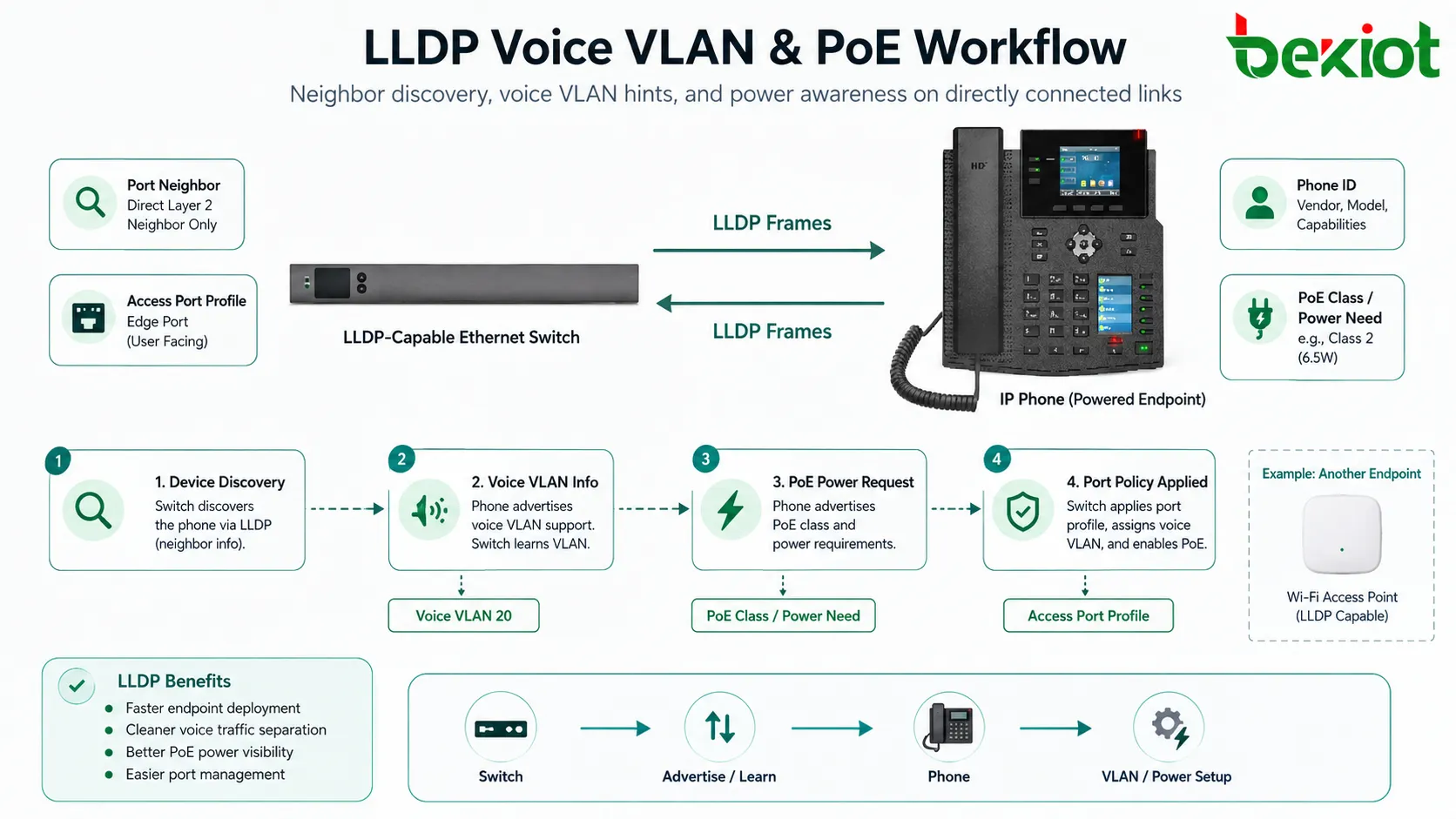
Many real deployments use LLDP to support endpoint configuration. IP phones, access points, cameras, and other powered devices may receive useful network hints from the switch through LLDP extensions.
For voice systems, LLDP can help advertise voice VLAN information so a phone can place voice traffic in the correct VLAN. This reduces manual endpoint configuration and supports cleaner traffic separation.
For PoE environments, LLDP can also support power negotiation or power requirement reporting. A powered device may communicate its power needs to the switch, helping the switch manage available power budget more intelligently.
Operational Value in Network Management
Topology Mapping
Network management systems can collect neighbor information from multiple devices and generate a physical topology map. This helps administrators understand how access switches, distribution switches, routers, wireless devices, servers, and endpoints are interconnected.
Topology mapping is especially valuable when documentation is outdated or when a site has grown over many years.
Faster Troubleshooting
When a device loses connectivity, LLDP can help determine whether it is still connected to the expected port. If the neighbor table changes, the issue may be related to cabling, patching, device replacement, or an unexpected move.
It can also help diagnose wrong-port problems, mistaken uplinks, duplicate connections, and undocumented network changes.
Asset Verification
Discovery data helps confirm what is actually connected to the network. This supports inventory management, compliance review, branch audits, endpoint tracking, and lifecycle planning.
It is not a complete asset management system by itself, but it provides useful evidence at the physical connection layer.
Configuration Validation
Administrators can compare expected port roles with discovered neighbors. If an access point appears on a port configured for a printer, or a switch appears on a user access port, the configuration may need review.
This helps detect operational drift before it becomes a larger problem.
Deployment Scenarios
Enterprise Campus Networks
Campus networks often include many access switches, wiring closets, wireless access points, IP phones, printers, cameras, and user devices. LLDP helps teams identify endpoint locations and maintain accurate topology records.
When buildings or departments move, neighbor data helps verify that devices are connected to the correct switches and ports.
Data Centers
Data centers use discovery information to map server-to-switch connections, top-of-rack uplinks, storage networks, out-of-band management links, and device redundancy paths.
This is useful during server replacement, rack migration, network expansion, and troubleshooting of multi-homed systems.
VoIP and Unified Communication Systems
IP phones may use LLDP to detect voice VLANs and advertise device identity. This reduces manual phone configuration and helps network teams identify where phones are connected.
It is also useful when troubleshooting voice quality issues because the switch can show the port, VLAN, power status, and neighbor identity.
Industrial Ethernet Environments
Industrial networks may include switches, PLCs, HMIs, gateways, cameras, controllers, sensors, and edge devices. LLDP helps maintenance teams understand physical topology in cabinets, production lines, substations, plants, and utility facilities.
Because industrial networks often require high availability, accurate link visibility is important during maintenance and fault isolation.
Wireless Infrastructure
Wireless access points connected to switches can advertise identity, model, port details, and power needs. Controllers or management platforms can use this information to verify access point placement and switch connectivity.
This is helpful when deploying many access points across offices, hotels, campuses, warehouses, or public buildings.
Security Considerations
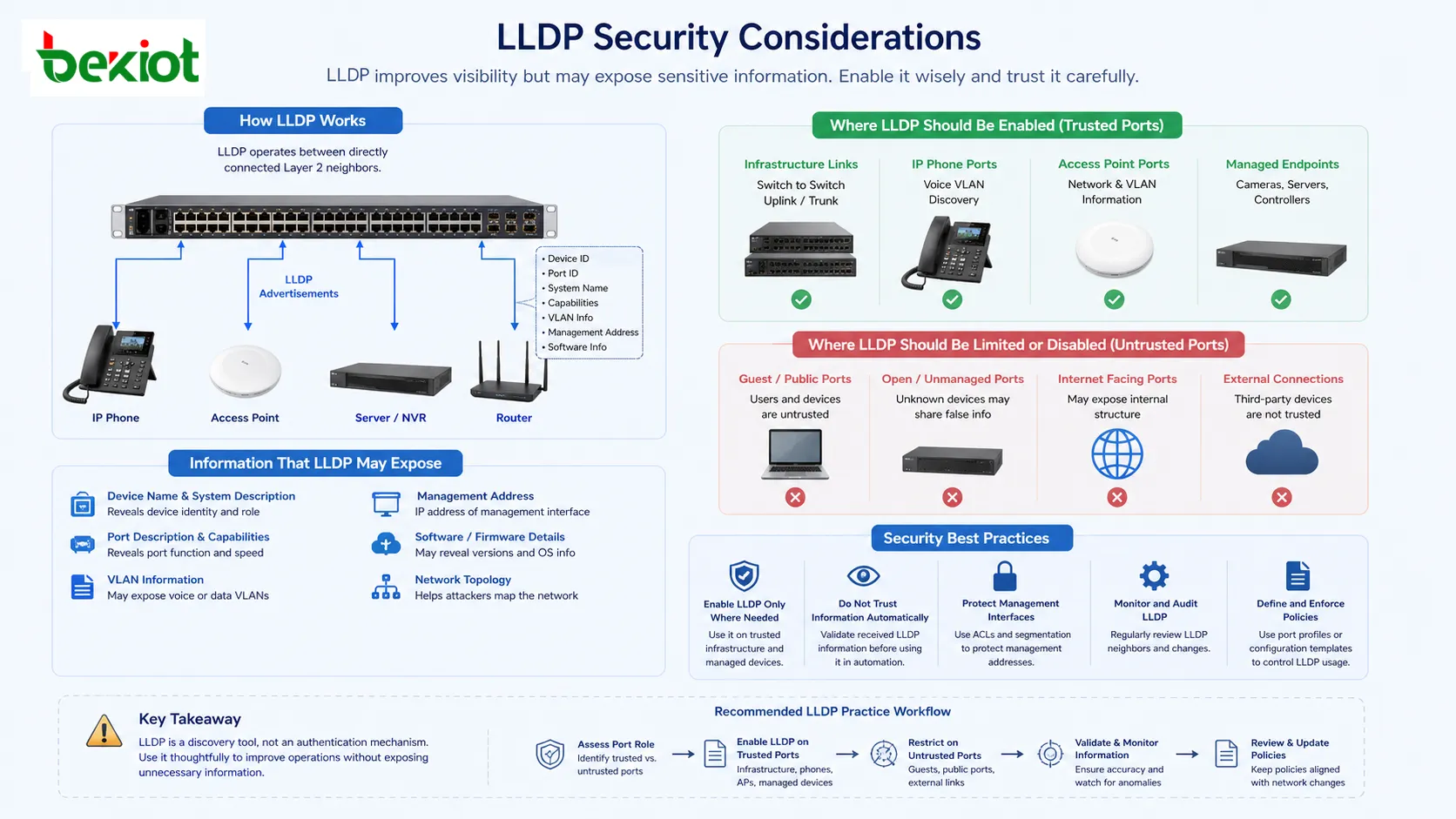
LLDP shares useful operational information, but that same information can be sensitive. If enabled on untrusted ports, it may expose device names, port descriptions, VLAN hints, management addresses, software details, or network structure.
For this reason, organizations should decide where discovery is necessary. It may be appropriate on infrastructure links, phone ports, access point ports, and managed endpoint ports, but unnecessary on guest ports, public-facing ports, or unmanaged external connections.
Security teams should also consider whether received LLDP information should be trusted automatically. A connected device may advertise false information. LLDP is mainly a discovery tool, not a strong authentication method.
Configuration and Control Practices
Most managed switches allow LLDP to be enabled globally and controlled per interface. Administrators can decide which ports transmit information, receive information, or do both.
On infrastructure links, both transmit and receive modes are often useful. On endpoint ports, administrators may enable discovery only where needed, such as IP phone, access point, or managed device ports.
Timers should be selected carefully. Very short intervals may create unnecessary control traffic, while very long intervals delay topology updates. Default values are often acceptable for general networks, but sensitive environments may need policy adjustment.
Port descriptions should be maintained. LLDP becomes much more valuable when interfaces are labeled with clear location or function names, such as “AP-Floor-3-East,” “Uplink-Core-01,” or “Phone-Reception-Desk.”
Comparison with Vendor-Specific Discovery
Before vendor-neutral discovery became common, many networks used proprietary discovery protocols. These protocols worked well within one vendor ecosystem but offered limited value when devices from different vendors were connected.
LLDP addresses this limitation by providing a standardized discovery method. It is especially useful in mixed-vendor environments where switches, routers, phones, access points, servers, industrial devices, and monitoring tools may come from different manufacturers.
Vendor-specific protocols may still provide extra features in some environments, but LLDP is often preferred for interoperability and broad visibility.
Limitations Found in Real Networks
Only Direct Neighbors Are Shown
LLDP does not show the full network path in one message. It only reveals directly connected neighbors. A management platform must collect and correlate data from many devices to build a wider topology.
Information Depends on Configuration
If a device has LLDP disabled, misconfigured, or blocked, it may not appear in the neighbor table. Some endpoints may support only partial information.
Data May Be Outdated for a Short Time
Because information ages out according to timers, a recently moved or disconnected device may remain visible until the time-to-live expires.
It Does Not Replace Security Controls
LLDP can identify a neighbor, but it does not prove that the neighbor is authorized. Access control still requires 802.1X, MAC authentication, port security, NAC, VLAN policy, or other security mechanisms.
Testing and Verification Methods
Administrators can verify operation by checking whether local interfaces are sending and receiving discovery information. Most switches provide commands or management views that show neighbor entries by port.
Packet capture tools can also confirm whether LLDP frames are present on a link. This is useful when troubleshooting endpoints that do not appear in the neighbor table.
For voice and PoE deployments, testing should include whether the endpoint receives the expected VLAN and power information. A phone that registers correctly may still be using the wrong VLAN if discovery settings are incomplete.
For documentation audits, compare the LLDP neighbor table with cable records, patch panel labels, and asset inventory. Differences often reveal undocumented changes.
Report Findings and Practical Recommendations
LLDP is most effective when treated as part of network operations rather than as a hidden default feature. It should be included in topology documentation, device onboarding, endpoint deployment, and troubleshooting procedures.
Organizations should enable it where it provides clear value, such as infrastructure interconnects, VoIP ports, access point ports, data center links, and managed industrial networks. They should restrict or disable it where information exposure creates unnecessary risk.
Clear naming, accurate port descriptions, controlled timers, management integration, and regular audits significantly improve its usefulness. Poor labeling or inconsistent configuration reduces the value of the protocol even when it is technically working.
LLDP works by exchanging structured Layer 2 discovery information between directly connected devices, giving administrators a practical view of physical topology, neighbor identity, port relationships, and endpoint capabilities.
FAQ
Can LLDP discover devices across a router?
No. It is intended for directly connected Layer 2 neighbors and is not routed across Layer 3 boundaries.
Why does a connected device not appear in the neighbor table?
The device may not support LLDP, the feature may be disabled, the port may be configured to receive only or transmit only, or a policy may be blocking discovery frames.
Is LLDP required for IP phones?
Not always, but it is commonly used to advertise voice VLAN and power information, making phone deployment easier and more consistent.
Can LLDP create network loops?
No. It does not forward user traffic or build paths. Network loops are usually related to switching topology issues, not LLDP itself.
Should LLDP be enabled on guest or public ports?
Usually it should be limited or disabled on untrusted ports because it may reveal network details that are not needed by guest devices.







