


Call Forwarding on Busy, commonly abbreviated as CFB, is a telephony feature that automatically redirects an incoming call when the called party is already engaged in another call or the line is considered busy by the system. Instead of allowing the caller to hear only a busy tone or fail the call, the system sends the call to a predefined destination such as another extension, voicemail, a hunt group, an attendant, a mobile number, a call queue, or a backup service desk.
In modern communication systems, CFB is not only a convenience feature. It supports service continuity, caller retention, employee availability, customer experience, team collaboration, emergency fallback, and workflow automation. It is widely used in IP PBX systems, hosted VoIP platforms, contact centers, enterprise phone systems, hotel telephony, healthcare desks, branch offices, service hotlines, and technical support environments.
Why Busy-State Routing Matters
In a simple telephone setup, a busy user creates a dead end. The caller either hears a busy signal, waits without guidance, or abandons the attempt. This is inefficient for businesses because the call may represent a customer request, urgent task, sales opportunity, internal coordination need, or support escalation.
Busy-state routing changes that experience. The system recognizes that the primary destination cannot answer because it is already occupied, then applies a forwarding rule to keep the communication moving. This makes the call flow more resilient and prevents important calls from being lost just because one user is unavailable at that moment.
The value is especially visible in high-call-volume environments. Reception desks, sales teams, support agents, maintenance hotlines, nurses’ stations, dispatch desks, and administrative teams often receive overlapping calls. CFB helps distribute those calls without requiring the caller to redial manually.
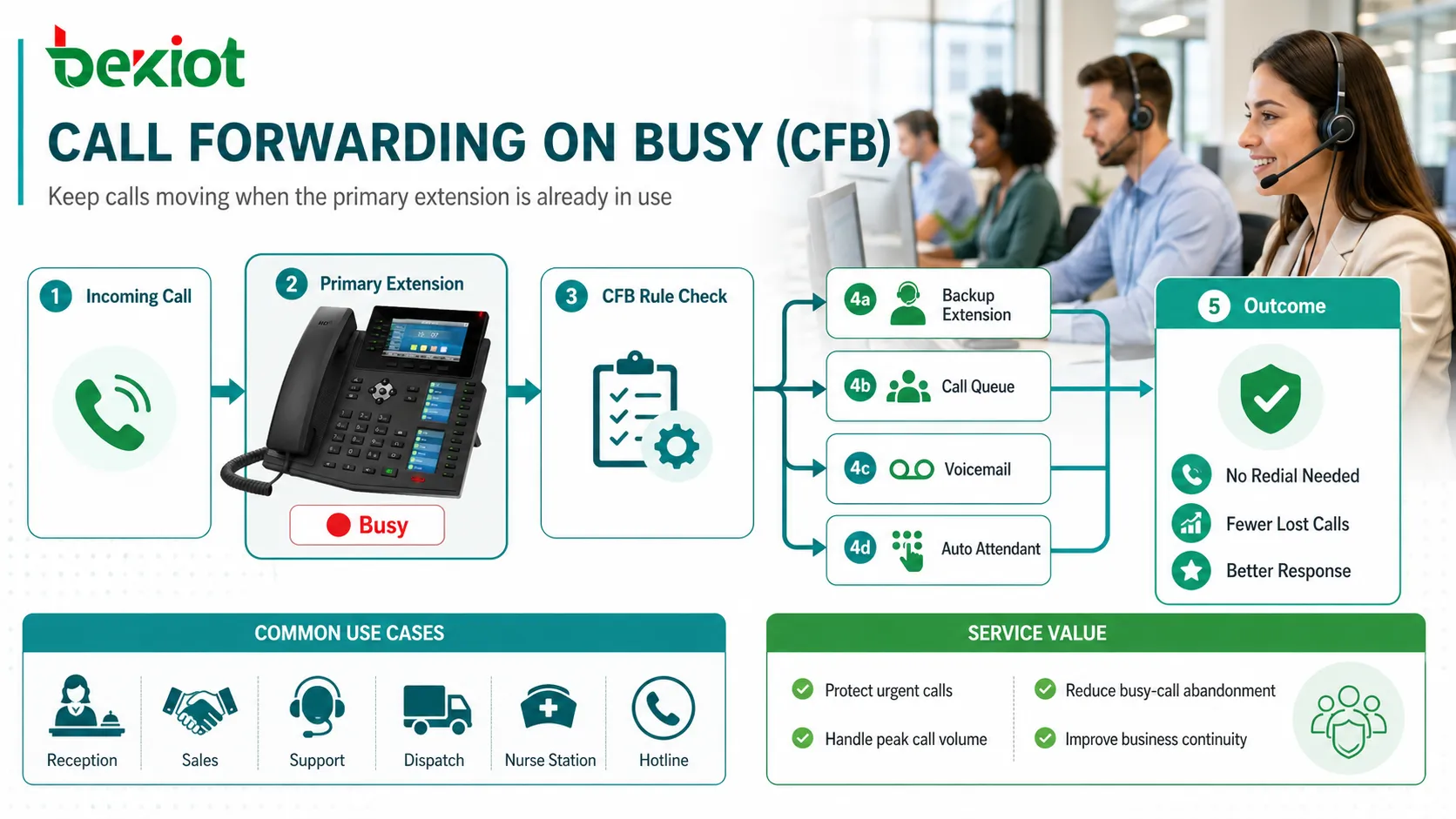
How the Routing Logic Works
Busy Detection
The system first determines whether the called destination is busy. In traditional systems, this may mean the line is physically occupied. In IP-based systems, the definition may depend on registration status, active call count, device state, presence information, call waiting settings, channel limits, or user policy.
For example, one user may be allowed to receive a second call through call waiting, while another user may be treated as busy after one active call. A call center agent may be busy when assigned to an active session, even if the phone technically supports multiple calls.
Rule Matching
After the busy condition is detected, the platform checks whether a forwarding rule exists. The rule may be configured at the user level, extension level, department level, device level, trunk level, or service group level.
The rule defines where the call should go. It may also include conditions such as business hours, caller type, number pattern, call source, department, priority level, or failover order.
Destination Selection
The forwarding target can be simple or advanced. A basic setup may send calls to voicemail. A more advanced setup may send VIP callers to a senior agent, internal calls to an assistant, external calls to a queue, and after-hours calls to a mobile number.
This flexibility allows the feature to reflect real business responsibility instead of applying one fixed behavior to every call.
Call Completion
Once the destination is selected, the system attempts to connect the caller. Depending on platform design, the caller may hear ringback, an announcement, queue music, voicemail greeting, or transfer tone.
If the forwarding destination is also unavailable, additional rules may apply, such as cascading to another user, returning to an attendant, or sending the call to voicemail.
| Technical Stage | System Behavior | Operational Purpose |
|---|---|---|
| Busy Detection | Checks active call state, line status, device policy, or channel limit. | Determines whether the original destination can answer. |
| Rule Lookup | Searches forwarding settings for the user, group, or service route. | Applies the correct handling policy instead of rejecting the call. |
| Target Routing | Sends the call to voicemail, assistant, queue, mobile, or backup extension. | Keeps the caller connected to a useful response path. |
| Fallback Handling | Uses secondary routing if the first forwarding target fails. | Improves reliability during overlapping busy conditions. |
Powerful Features in Real Systems
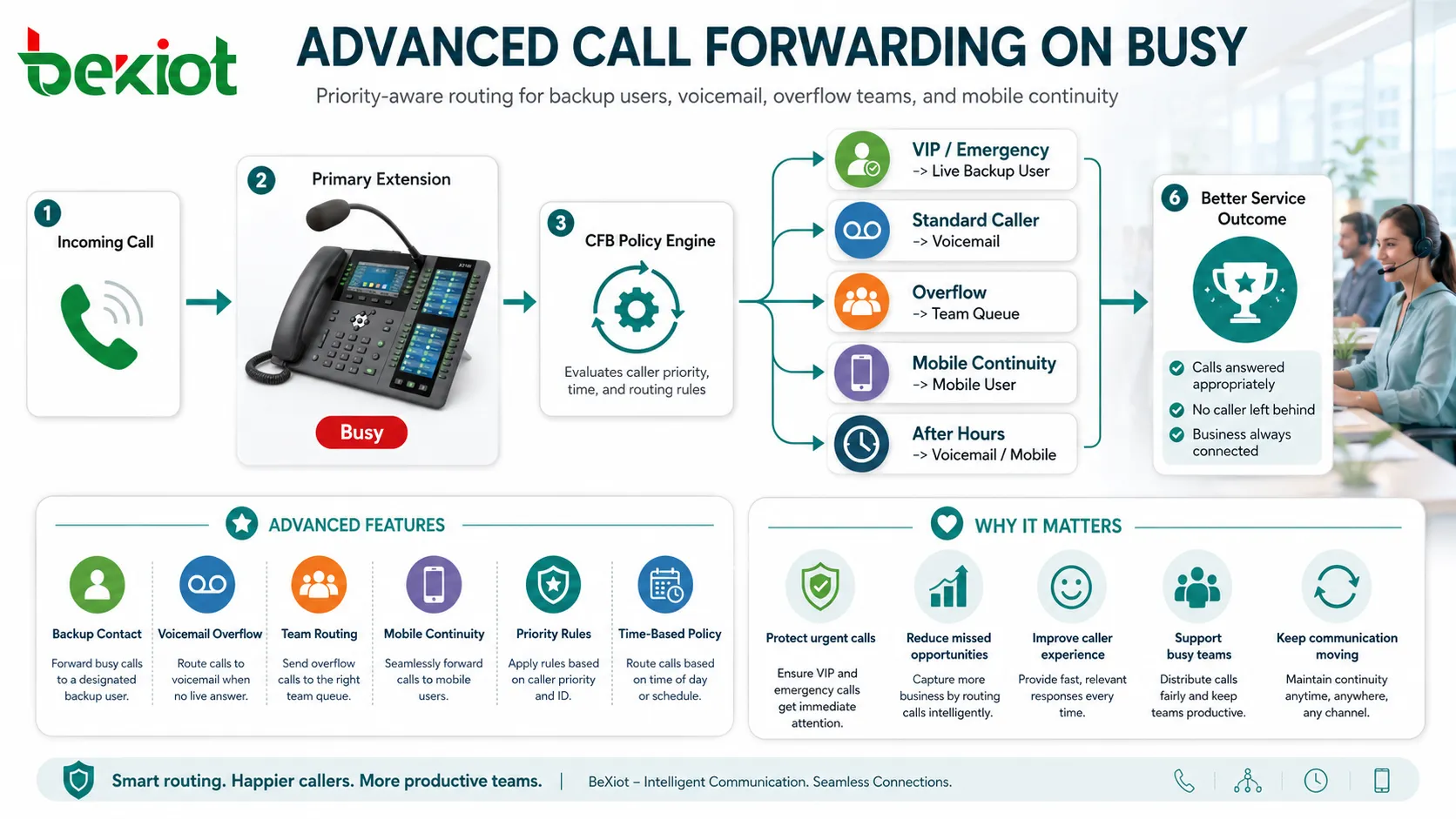
Automatic Backup Contact
One of the most practical capabilities is automatic backup routing. If an employee is already on a call, the incoming caller can be directed to a colleague, assistant, team leader, or shared service group.
This is valuable when the call should not wait for the original user. Sales inquiries, reception calls, customer complaints, dispatch requests, and internal urgent coordination can all benefit from backup contact routing.
Voicemail Protection
When no human backup is available, voicemail is often the next best option. Instead of hearing a busy tone, the caller can leave a message with time, identity, and request details.
Voicemail also creates a record. The called user can review the message later and call back with better context than a missed busy attempt would provide.
Team-Based Overflow
In team environments, busy calls can overflow to a group. A support team, sales group, reception pool, nurse station, or maintenance desk can share the load. If one member is busy, another available member can answer.
This improves responsiveness without forcing every caller to know multiple numbers. The main number remains simple, while the system manages internal distribution.
Mobile Continuity
Some users prefer busy calls to forward to a mobile phone. This can help managers, field engineers, service coordinators, and remote employees remain reachable when their desk extension is occupied.
Mobile forwarding should be configured carefully to avoid privacy issues, high call costs, long answer delays, or calls reaching personal voicemail instead of business handling.
Priority-Based Routing
Advanced systems can apply different forwarding behavior based on caller priority. A normal caller may go to voicemail, while a VIP customer or emergency contact may be routed to another live person.
This approach improves service quality because not every busy condition is treated the same way.
Difference from Similar Call Features
CFB is often confused with other forwarding and transfer functions. Call Forwarding Unconditional sends all calls to another destination regardless of user state. Call Forwarding No Answer sends calls after the user does not answer within a defined time. Call Transfer occurs after a call is already answered and manually or automatically moved to another party.
Busy-based forwarding is more specific. It activates only when the called party cannot accept the call because the system considers the destination busy. This makes it useful for preserving normal direct calling while adding protection during overlap periods.
Call Waiting is also different. Call Waiting alerts the user about a second incoming call while already on another call. If the user or organization does not want interruptions, CFB can be used instead to send the second call elsewhere.
Applications in Business Communication
Reception and Front Desk
Reception numbers often receive multiple calls at once. If the receptionist is already speaking with a visitor, vendor, customer, or internal user, another call should not simply fail.
CFB can route the second call to a backup receptionist, operator group, voicemail box, or automated attendant. This improves the caller experience while reducing front-desk pressure.
Sales Teams
Sales calls may be time-sensitive. A missed call from an interested buyer can mean lost opportunity. Busy-based forwarding can send overlapping calls to another salesperson, sales queue, or mobile number.
For account-based sales, calls may first go to the assigned representative. If that person is busy, the call can be sent to a team member who can still help.
Technical Support
Support teams need to handle incoming issues without leaving callers blocked by busy agents. A call may forward to a support queue, escalation group, or standby engineer if the primary support extension is busy.
This is especially useful for service desks with limited agents but high variability in call arrival times.
Healthcare and Service Desks
Appointment desks, nurse stations, pharmacy lines, and administrative offices often receive overlapping calls. Busy-based routing can reduce missed contact attempts and help callers reach a backup role.
Because healthcare calls may include sensitive or urgent matters, routing destinations should be selected carefully and reviewed for privacy and workflow suitability.
Hotels and Multi-Department Facilities
Hotels, campuses, property offices, and building service centers can use the feature to keep guest and tenant communication flowing. A busy housekeeping desk may forward to the front desk, while a busy maintenance line may forward to a supervisor or service queue.
This improves service continuity without requiring guests or tenants to understand internal department structure.
Impact on Call Handling Efficiency
Fewer Lost Calls
The most direct efficiency gain is reducing lost calls caused by busy lines. When calls are forwarded to another useful destination, callers are less likely to abandon the interaction or call repeatedly.
This can lower repeat call volume and reduce frustration for both callers and staff.
Better Use of Available Staff
If one user is occupied, another available person can handle the call. This distributes workload more evenly and prevents service from depending too heavily on one extension.
Team-based routing is especially useful for shared responsibilities where more than one person can answer the same type of request.
Shorter Response Time
Busy-based rules can connect callers to backup resources immediately instead of making them wait or retry. This shortens the path to a response and improves perceived service quality.
For urgent calls, even a small reduction in waiting can be important.
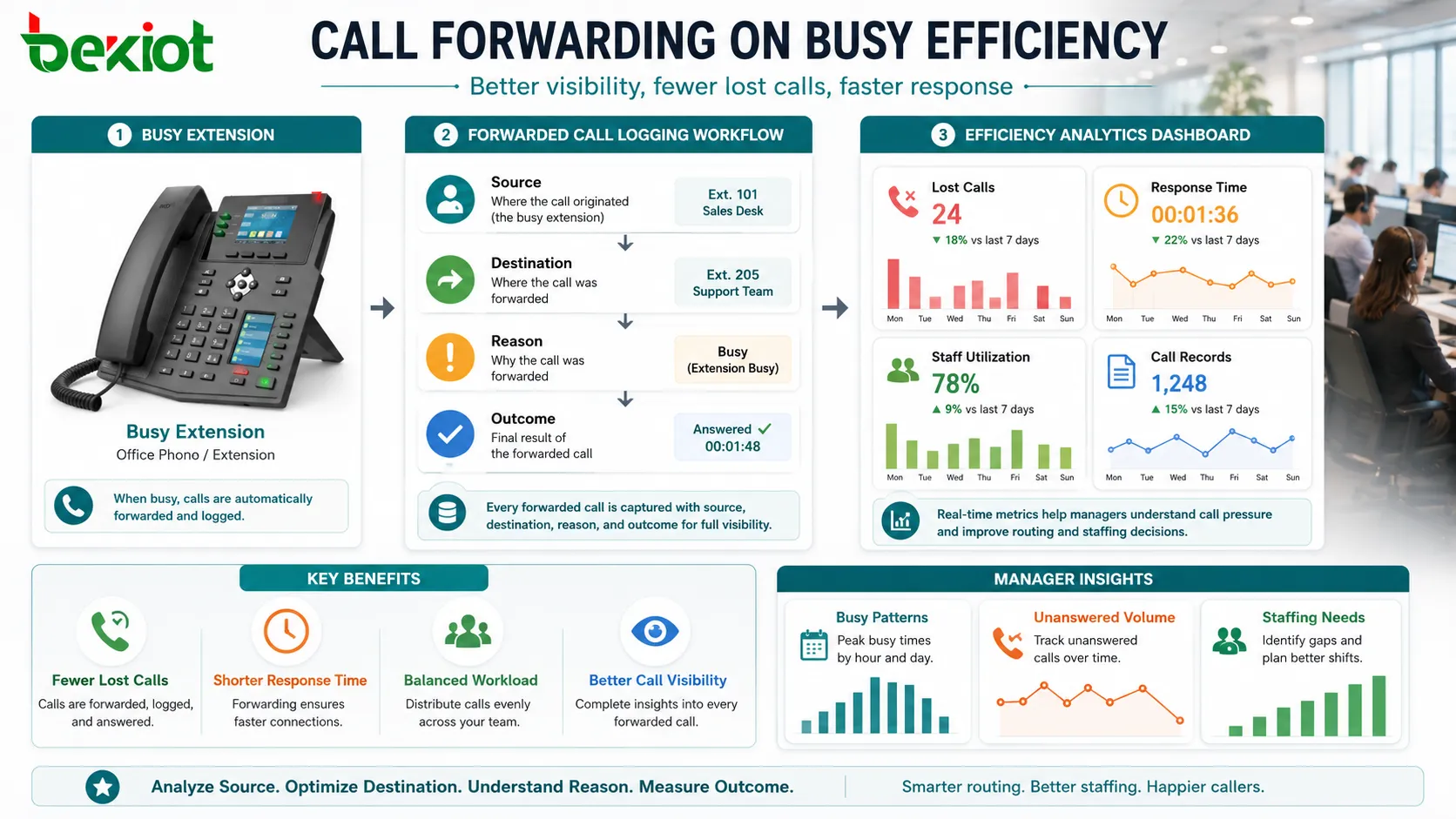
Cleaner Call Records
Forwarded calls can be logged with source, destination, reason, and final outcome. This helps managers understand call pressure, busy patterns, unanswered volumes, and staffing needs.
Call records also help identify whether certain users or teams need more capacity, different routing, or better availability planning.
Configuration Design Considerations
Start by defining what “busy” means for each user or group. Some users may handle multiple simultaneous calls, while others should be treated as busy after one active call. Call waiting, shared line appearance, agent status, and device capacity all affect this definition.
Next, choose the forwarding destination according to business responsibility. A backup number should be able to solve the caller’s issue, not merely receive the call. If the destination cannot help, the caller may experience another transfer or delay.
Time-based rules are also useful. During office hours, busy calls may go to a teammate. After hours, they may go to voicemail or an on-call number. During holidays, they may go to an announcement or emergency contact.
Finally, test every route. A forwarding rule that looks correct in configuration may fail because of permission restrictions, trunk limits, voicemail settings, mobile network delays, or loop prevention rules.
Common Risks and How to Avoid Them
Forwarding Loops
A loop can occur when extension A forwards to extension B, while extension B also forwards back to extension A or to a group that includes A. Systems often have loop prevention, but administrators should still design routes carefully.
Wrong Backup Destination
If calls are forwarded to someone who cannot handle the request, the feature may increase transfers instead of improving efficiency. Backup destinations should be chosen by role and skill.
Hidden Mobile Voicemail
When calls forward to mobile numbers, they may end up in personal voicemail if unanswered. This can create inconsistent customer experience and may move business records outside the company system.
No Visibility into Forwarded Calls
If reports do not show forwarding reason and final destination, managers cannot evaluate whether the rule is helping. Logging and analytics should be enabled where possible.
Too Many Cascading Steps
Multiple forwarding steps can increase delay and confuse callers. A short, clear path is usually better than a long chain of backup numbers.
Best Practices for Technical Deployment
Use clear naming for backup destinations. Labels such as “Sales Overflow,” “Reception Backup,” “Support Queue,” or “Maintenance Standby” are easier to manage than unexplained extension numbers.
Apply separate rules for internal and external callers when necessary. An internal colleague may be routed to a user’s assistant, while an external customer may be routed to a service queue.
Review busy reports regularly. If one extension constantly triggers forwarding, the user may need call waiting, additional staff support, queue redesign, or workload adjustment.
Protect emergency and critical lines with tested fallback destinations. These routes should be verified periodically, not only configured once.
Keep users informed. Staff should know where their busy calls go and how to change settings if policy allows. Confusion about forwarding behavior can create missed follow-up.
CFB is powerful because it turns a busy destination from a call failure point into a controlled routing decision that preserves communication continuity.
FAQ
Can CFB work if the user’s phone is offline?
Not always. Offline handling may use a different rule such as unavailable forwarding, failover routing, or no-registration routing, depending on the phone system.
Will the original user know that a call was forwarded?
This depends on system reporting. Some platforms show missed or forwarded call logs, while others require call detail records or notifications to track it.
Can different callers have different busy destinations?
Yes, many advanced platforms can route based on caller number, customer group, trunk, IVR selection, schedule, or priority rule.
Does CFB affect outbound calls?
No. It normally affects incoming calls to a busy destination. Outbound calling behavior is controlled by separate dialing, trunk, and permission rules.
What should be checked if forwarding does not trigger?
Check whether the line is truly treated as busy, whether call waiting is enabled, whether the forwarding rule is active, whether the destination is allowed, and whether the call source matches the configured condition.







