


Zero Trust is a cybersecurity architecture based on the idea that no user, device, application, network segment, or workload should be trusted automatically. Every access request must be verified, evaluated, authorized, monitored, and continuously reassessed, whether it comes from inside the corporate network or from an external location.
This model is different from older perimeter-based security thinking. Traditional networks often assumed that users and devices inside the internal network were relatively trusted. Zero Trust removes this assumption. It treats identity, device status, access context, application sensitivity, behavior, and risk level as the basis for every security decision.
From Network Boundary to Access Decision
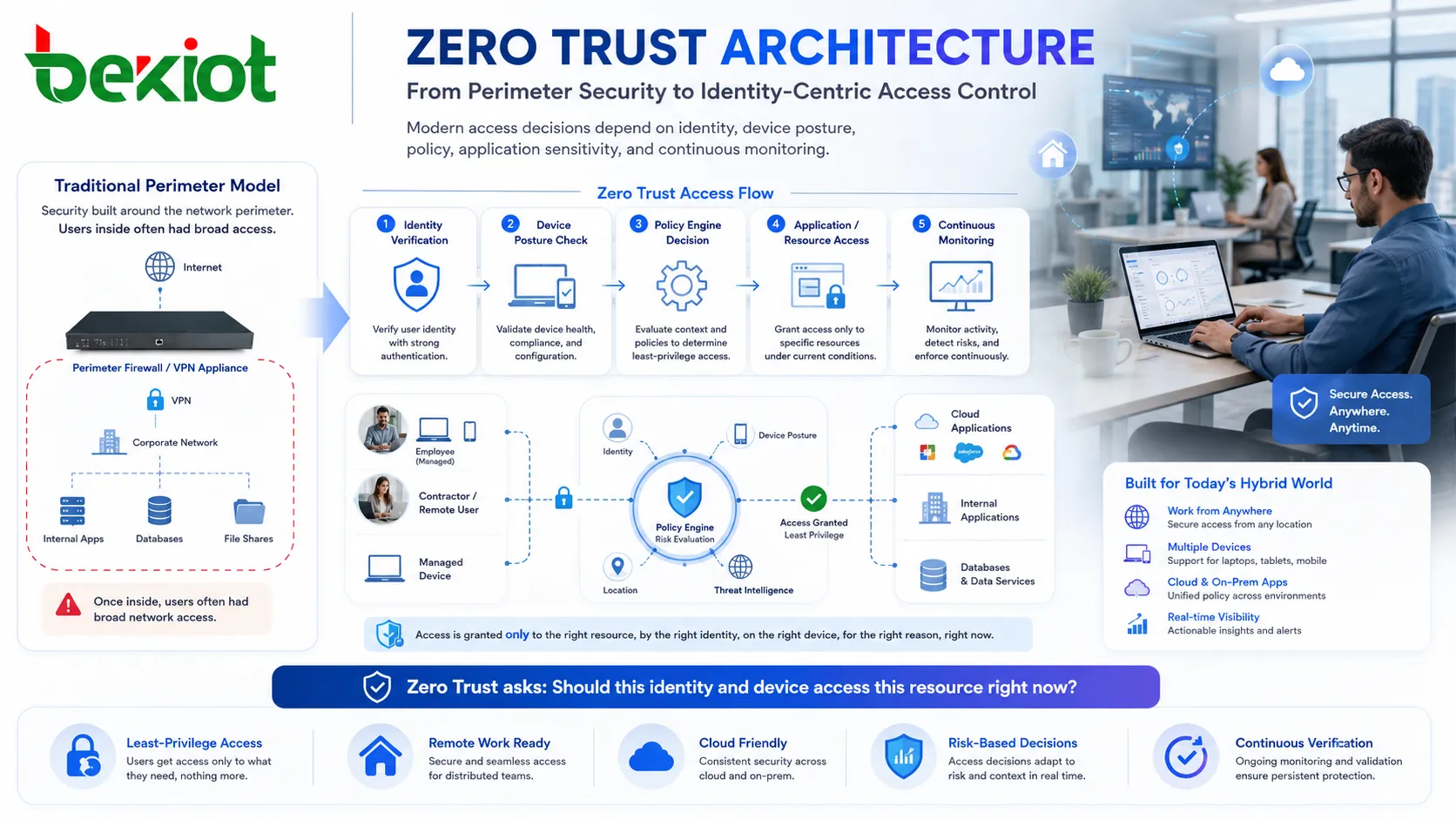
Older security designs were often built around a strong outer boundary. Firewalls, VPNs, gateway appliances, and internal network zones created a protected perimeter. Once users crossed that perimeter, they often had broad access to internal resources.
Modern environments are more distributed. Employees work remotely, cloud applications sit outside the office, mobile devices connect from different networks, contractors need temporary access, and workloads move across private data centers and public cloud platforms. A single network boundary is no longer enough.
Zero Trust changes the question from “Is this user inside the network?” to “Should this specific identity and device access this specific resource right now under these conditions?” This shift is the foundation of the entire model.
Identity Becomes the First Control Point
Identity is central to this security model. Users, service accounts, devices, APIs, workloads, and administrators must be clearly identified before they receive access. Authentication is not only a login step; it becomes an ongoing trust signal.
Multi-factor authentication is commonly used to reduce the risk of stolen passwords. Strong identity governance, single sign-on, privileged access management, certificate-based authentication, and user lifecycle control also support the model.
Good identity design includes timely removal of inactive accounts, role changes after employee transfer, separation of ordinary and administrative accounts, and monitoring of unusual login behavior. If identity is weak, the rest of the architecture becomes fragile.
Access Is Granted by Need, Not Convenience
A major principle is least privilege. Users and systems should receive only the access required to perform their work, and only for the time and scope needed. This reduces the damage that can happen if an account, device, or application is compromised.
For example, a finance employee may need access to accounting software but not engineering repositories. A contractor may need access to one project folder but not the full file server. A service account may need to call one API but not query unrelated databases.
Least privilege must be practical. If access is too restrictive, users may face delays or create unsafe workarounds. The goal is to match permissions with real business tasks and adjust them when roles change.
Continuous Verification in Daily Operation
Context-Based Evaluation
Each request can be evaluated using context. This may include user identity, device health, location, network type, time of access, application risk, data sensitivity, authentication strength, and recent behavior.
A login from a managed office laptop during normal hours may be treated differently from a login from an unknown device in a new country at midnight. The system can require stronger verification, limit access, or block the request.
Device Posture Checking
Device condition matters. A trusted user on an unmanaged, infected, outdated, or jailbroken device can still create risk. Device posture checks may include operating system version, patch status, endpoint protection, disk encryption, firewall status, certificate validity, and management enrollment.
This makes device security part of the access decision instead of a separate IT task.
Session Reassessment
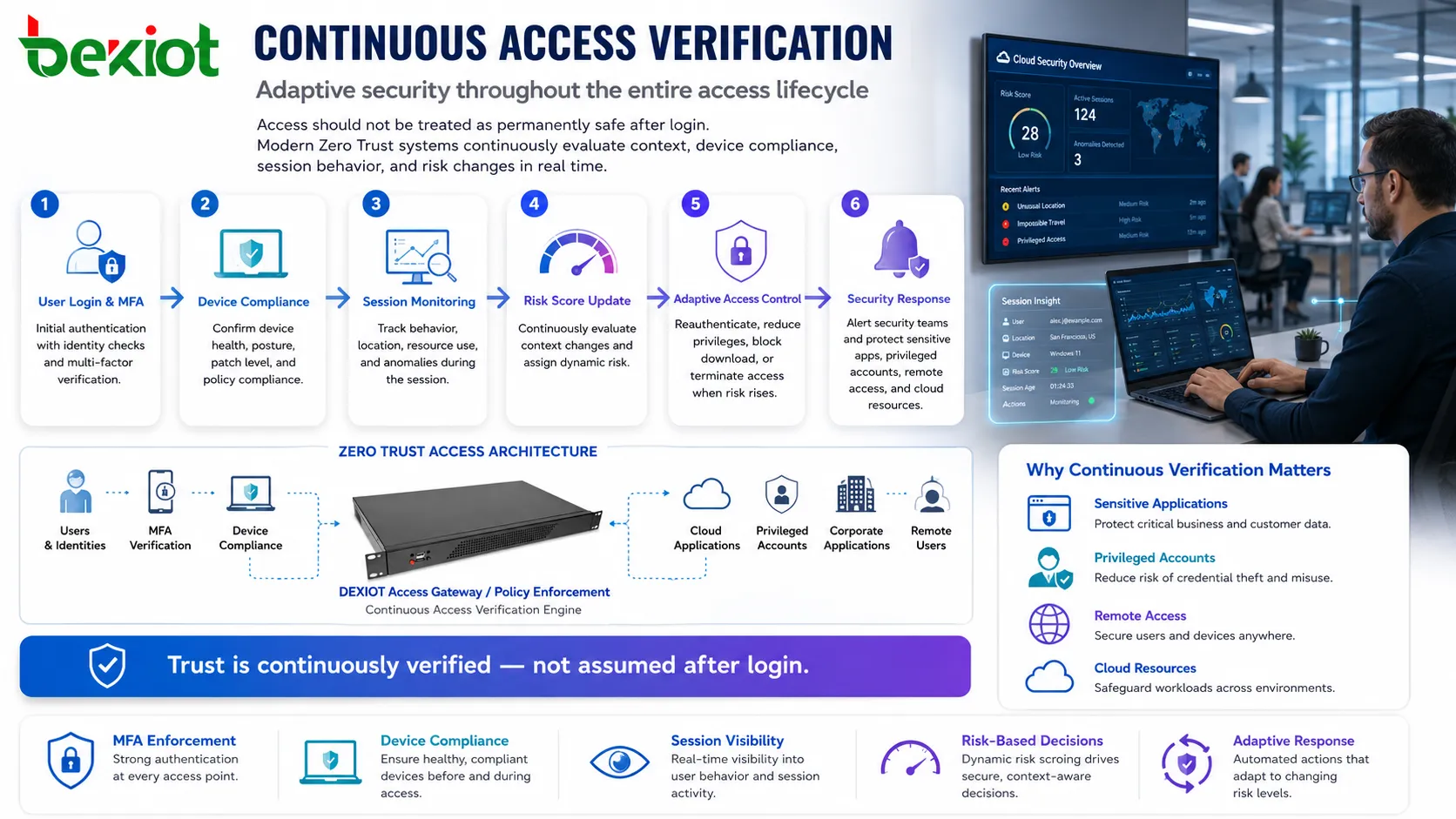
Access should not be treated as permanently safe after login. If risk changes during a session, the system may require reauthentication, reduce privileges, block download, terminate the session, or alert security teams.
This is especially useful for sensitive applications, privileged accounts, remote access, and cloud resources.
Micro-Segmentation Limits Lateral Movement
After attackers compromise one account or device, they often try to move laterally across the network. Traditional flat networks make this easier because many internal systems can communicate freely.
Micro-segmentation reduces this risk by dividing the environment into smaller protected zones. Access between zones is controlled by policy rather than assumed internal trust. Workloads, applications, servers, databases, and user groups can each have specific communication rules.
This approach does not prevent every breach, but it can reduce the blast radius. If one endpoint is compromised, the attacker should not automatically gain access to file shares, databases, domain controllers, admin tools, or production systems.
Policy Engine and Enforcement Points
Zero Trust usually depends on a decision-making layer and enforcement points. The policy engine evaluates request context and determines whether access should be allowed, denied, limited, or challenged. Enforcement points apply that decision at applications, gateways, endpoints, networks, cloud services, or identity platforms.
The decision may use signals from identity providers, endpoint security tools, SIEM systems, data classification platforms, network telemetry, threat intelligence, and behavior analytics.
This structure allows security policy to become dynamic. Instead of one static firewall rule, access can be adjusted according to real-time risk and business context.
| Control Area | What It Checks | Security Value |
|---|---|---|
| Identity | User, role, account status, authentication strength, and privilege level. | Reduces unauthorized access from stolen or misused credentials. |
| Device | Patch level, encryption, endpoint protection, certificate, and management state. | Blocks or limits risky devices before they reach sensitive resources. |
| Application | Resource type, sensitivity, session behavior, and permitted actions. | Protects high-value systems with more precise access rules. |
| Network | Segment, traffic path, source, destination, and connection behavior. | Limits lateral movement and reduces exposure between systems. |
| Data | Classification, sharing rules, download permission, and usage pattern. | Helps prevent data leakage and misuse after access is granted. |
Advantages Shown in Practical Security Outcomes
Reduced Implicit Trust
The first advantage is the removal of automatic trust. Internal access no longer means unrestricted access. Users, devices, and applications must prove they meet policy requirements before interacting with resources.
This is valuable because many attacks begin with a compromised internal account or device. If internal trust is too broad, attackers can move quickly.
Better Support for Remote and Cloud Work
Remote work, SaaS applications, cloud workloads, and mobile endpoints are now normal. This model supports access based on identity and context rather than forcing every connection to depend only on a traditional office network.
Users can work from different locations while security teams still apply consistent policies.
Smaller Attack Impact
Segmentation, least privilege, and continuous verification reduce the damage of a single compromised account or device. Attackers may still enter one part of the environment, but their ability to expand should be limited.
This makes incident containment faster and lowers the chance that one breach becomes an organization-wide compromise.
Improved Visibility
Every access request, policy decision, device status, and unusual behavior can generate useful telemetry. This improves monitoring, investigation, compliance reporting, and threat detection.
Security teams gain a clearer picture of who accessed what, from where, with which device, and under which conditions.
Stronger Data Protection
Data access can be controlled more precisely. Sensitive records, customer information, intellectual property, administrative tools, and regulated data can receive stronger policies than ordinary resources.
Controls may include download restrictions, step-up authentication, session recording, watermarking, data loss prevention, or conditional access.
Application Scenarios
Enterprise Remote Access
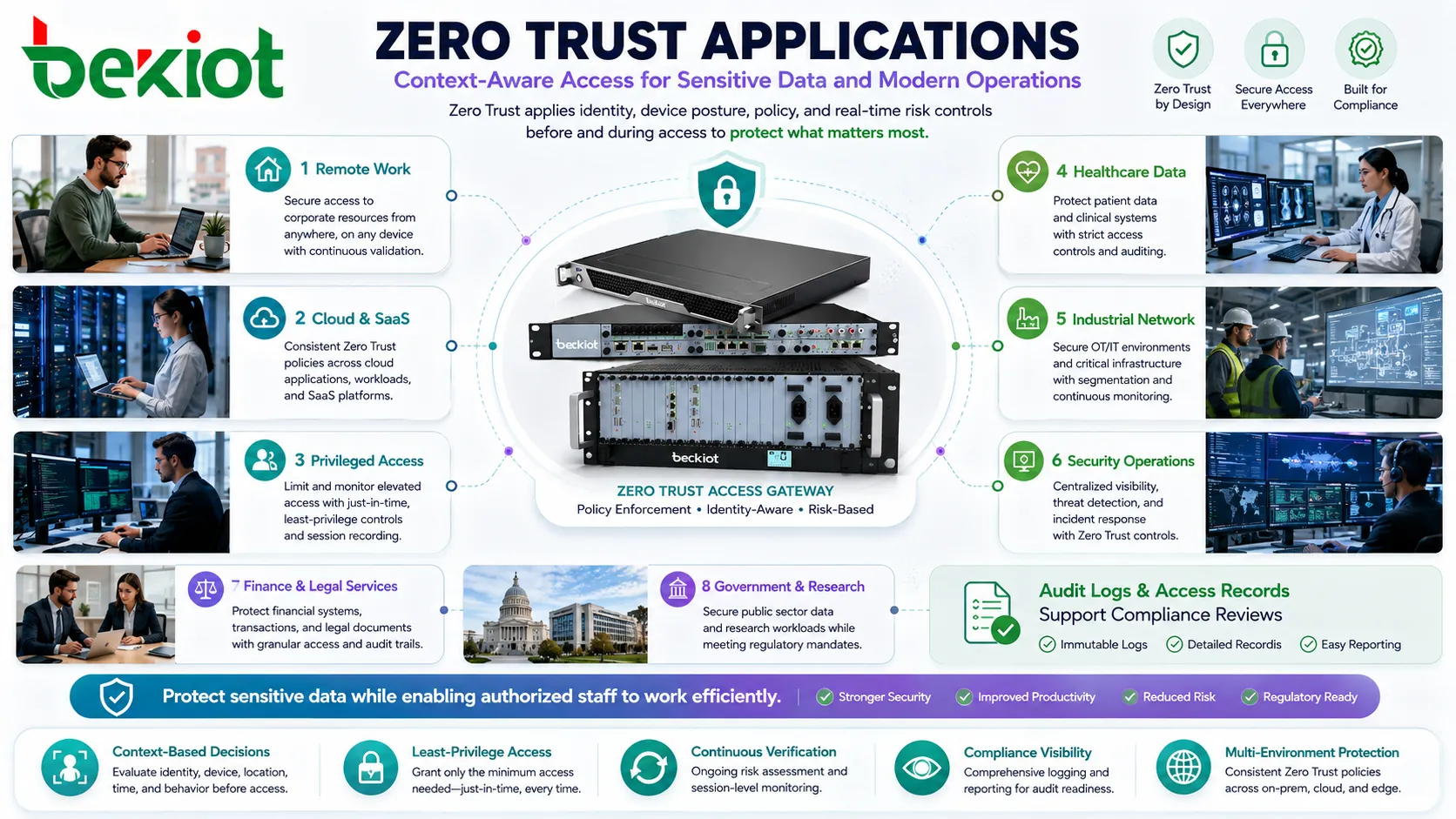
Organizations can replace broad VPN access with application-specific access. Instead of connecting users to an entire network, the system grants access only to approved applications and services.
This reduces exposure and makes remote access easier to govern.
Cloud and SaaS Environments
Cloud applications need identity-based control, device checks, session monitoring, and data protection. Zero Trust helps apply consistent rules across SaaS platforms, cloud storage, collaboration tools, and business systems.
It also helps organizations manage shadow IT risks by monitoring and controlling access to external services.
Privileged Administration
Administrator accounts are high-value targets. A Zero Trust approach can require stronger authentication, just-in-time access, approval workflows, session recording, and command monitoring for privileged tasks.
This reduces the risk of permanent overprivileged accounts.
Industrial and Operational Systems
Factories, utilities, energy sites, transport systems, and critical infrastructure can use segmentation and strict access control to separate business IT from operational technology environments.
Because operational systems may include legacy equipment, the design should be planned carefully to avoid disrupting production or safety processes.
Healthcare and Regulated Data
Healthcare, finance, legal services, government, and research organizations often handle sensitive information. Context-based access control helps protect data while allowing authorized staff to work efficiently.
Audit logs and access records also support compliance reviews.
Implementation Path Without Overcomplication
A practical rollout usually begins with asset and identity inventory. Organizations need to know which users, devices, applications, data stores, APIs, and services exist before they can apply precise policy.
The next step is prioritization. High-risk resources such as administrative systems, financial applications, customer data, cloud consoles, production systems, and remote access paths should be addressed first.
Then access rules can be refined. Start with multi-factor authentication, device compliance checks, least privilege, conditional access, segmentation, logging, and privileged account control. It is usually better to improve in phases than to attempt a complete transformation at once.
Testing is essential. Overly strict rules can block legitimate work, while weak rules may provide a false sense of security. Pilot groups help refine policies before broad deployment.
Common Design Mistakes
Treating It as a Single Product
Zero Trust is not one device or one software package. It is an architecture that combines identity, endpoint, network, application, data, monitoring, and governance controls.
Ignoring User Experience
If users face constant prompts, slow access, or unclear errors, they may resist the system or seek workarounds. Good design applies stronger checks where risk is higher and keeps low-risk access smooth.
Keeping Excessive Permissions
Some organizations enable multi-factor authentication but leave old broad permissions untouched. This weakens the model. Privilege review is necessary.
Skipping Device Health
User identity alone is not enough. A legitimate user on an unsafe device can still expose sensitive systems.
Failing to Monitor Policy Results
Policies should be reviewed after deployment. Logs may show blocked legitimate work, unused permissions, suspicious access attempts, or gaps in coverage.
Zero Trust is demonstrated through repeated access decisions: verify identity, check device health, evaluate context, grant minimum access, monitor behavior, and adjust when risk changes.
FAQ
Can small companies use this security model?
Yes. Small organizations can start with multi-factor authentication, device management, least privilege, cloud access policy, and regular account review.
Does this approach remove the need for firewalls?
No. Firewalls still matter, but they are no longer the only security boundary. Identity, device posture, application access, and data protection also become control points.
Will users need to verify themselves every time?
Not always. Adaptive policies can reduce prompts for low-risk situations and require stronger verification only when risk increases.
What should be protected first?
Start with privileged accounts, remote access, cloud admin consoles, financial systems, customer data, sensitive file stores, and critical business applications.
How can implementation success be measured?
Track reduced excessive permissions, fewer unmanaged devices accessing resources, improved MFA coverage, better segmentation, faster incident containment, and clearer access audit records.







