


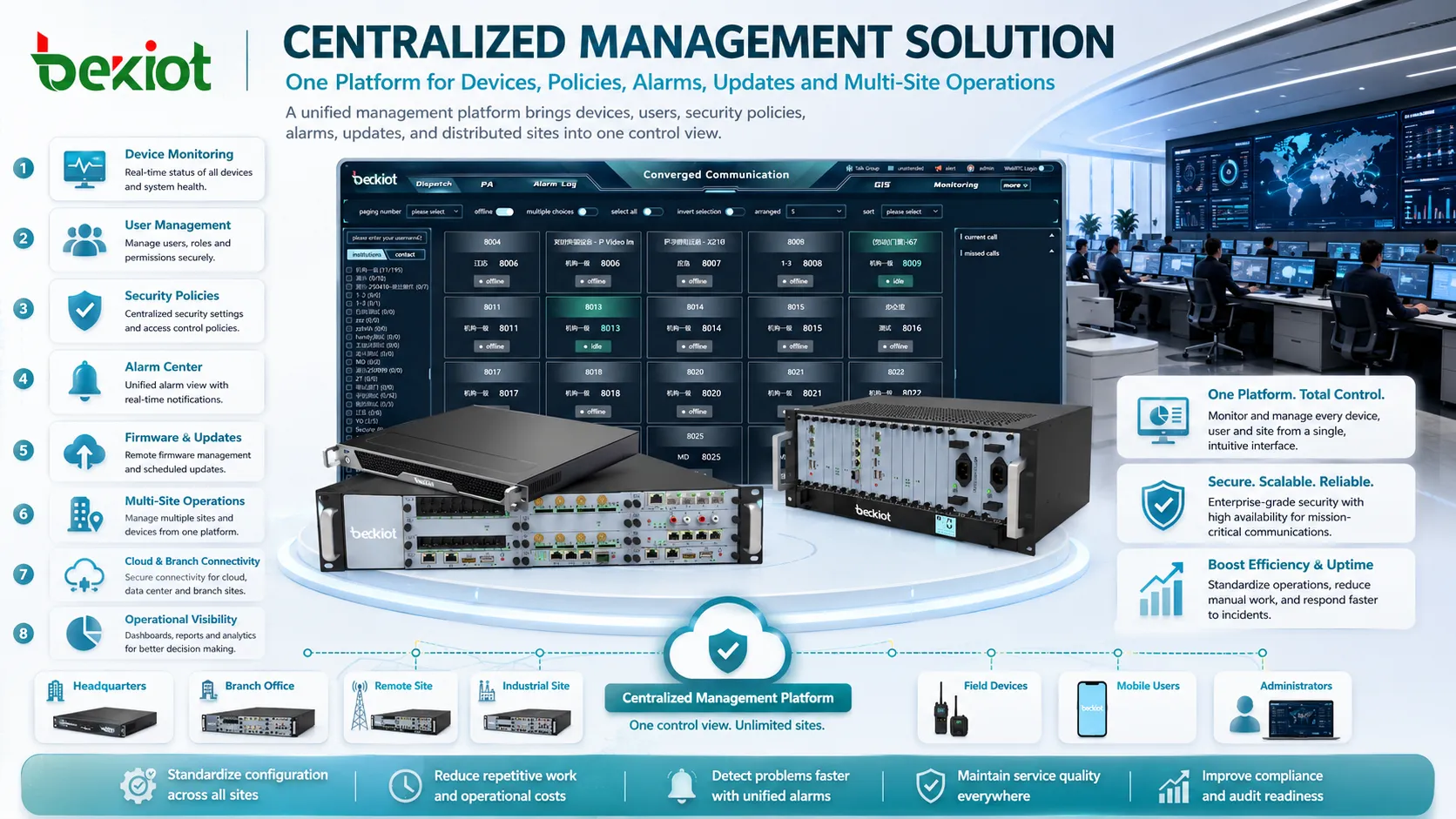
Centralized management solutions are platforms, tools, or system architectures that allow organizations to manage distributed resources from one unified control point. These resources may include devices, users, servers, applications, network equipment, security policies, software updates, access permissions, alarms, logs, assets, workflows, and remote sites.
The value of this approach becomes clear when an organization has many endpoints, many locations, many users, or many systems that must work under consistent rules. Instead of configuring each device or department separately, administrators can use a central platform to monitor status, push settings, enforce policies, collect reports, and coordinate maintenance.
Why Unified Control Becomes Necessary
When a business is small, manual management may seem acceptable. A technician can log in to one device, update one system, or check one site at a time. As the environment grows, this method becomes slow, inconsistent, and risky. Different sites may use different settings, old firmware may remain unnoticed, alarms may be missed, and support teams may lack a complete operational view.
A unified platform changes the working model. It brings scattered systems into one management structure, making it easier to detect problems, standardize configuration, reduce repetitive work, and maintain service quality across many locations.
This is especially important in modern environments where offices, cloud services, mobile users, industrial systems, branch networks, IoT devices, and security platforms often operate at the same time.
Enterprise IT and Endpoint Operations
One of the most common application fields is enterprise IT. Companies use unified management tools to control desktops, laptops, tablets, mobile phones, printers, servers, software packages, user accounts, and security settings. This helps IT teams support employees across offices, branches, and remote working environments.
Endpoint management often includes software deployment, patch control, antivirus status, disk encryption, device inventory, remote troubleshooting, access policy, and compliance reporting. Without a central view, it is difficult to know which devices are updated, which ones are risky, and which users need support.
For large organizations, centralized IT management also improves onboarding and offboarding. New employees can receive devices and access rights faster, while leaving employees can have accounts and permissions removed more safely.
Network Infrastructure and Connectivity
Network teams use centralized tools to manage switches, routers, firewalls, wireless access points, VPN gateways, SD-WAN devices, load balancers, and network monitoring systems. This is important because connectivity issues can affect many business services at once.
Through a central platform, administrators can check link status, traffic usage, device health, configuration changes, firmware versions, security rules, and performance alerts. In multi-branch networks, this reduces the need to visit every site physically.
Unified network management is also useful for configuration consistency. If every branch firewall or access switch is configured differently, troubleshooting becomes difficult and security gaps may appear.
Cybersecurity and Access Governance
Security operations require visibility. Centralized security management helps teams monitor threats, enforce policies, manage identities, review logs, control access, detect abnormal behavior, and respond to incidents.
Common systems include SIEM platforms, endpoint detection and response, identity and access management, privileged access control, vulnerability management, firewall policy control, and cloud security monitoring.
This field depends heavily on correlation. A suspicious login, malware alert, unusual data transfer, and firewall event may look unrelated if viewed separately. A central platform can connect signals and help analysts understand whether a real incident is happening.
Industrial Automation and Production Sites
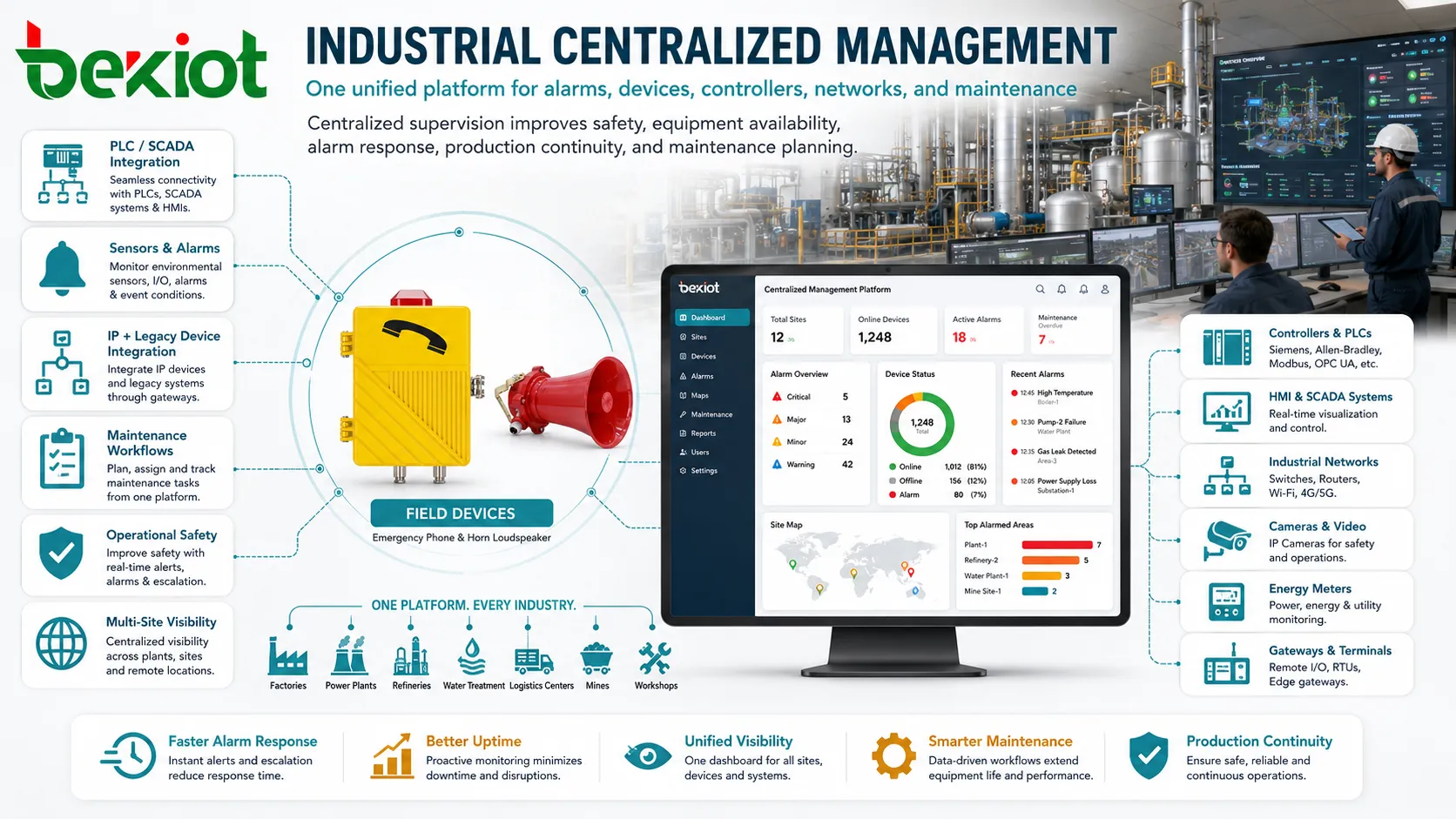
Factories, power plants, refineries, water treatment facilities, logistics centers, mines, and manufacturing workshops use centralized management to supervise industrial systems, production equipment, sensors, controllers, gateways, monitoring terminals, and maintenance workflows.
In these environments, the goal is not only convenience. Centralized supervision can improve operational safety, equipment availability, alarm response, production continuity, and maintenance planning.
Industrial systems often include both modern IP-connected equipment and legacy control devices. A unified platform may need to integrate PLCs, SCADA systems, HMIs, industrial switches, cameras, energy meters, environmental sensors, and work order systems.
Smart Buildings and Facility Systems
Modern buildings contain many subsystems, including HVAC, lighting, elevators, access control, surveillance, parking, fire alarm interfaces, energy meters, visitor systems, and public displays. Facility teams need a coordinated way to supervise these systems rather than managing each one in isolation.
Central platforms can display equipment status, energy usage, fault alarms, environmental readings, access events, maintenance records, and system schedules. This helps building managers reduce energy waste, improve comfort, and respond to service problems faster.
For large campuses, hospitals, commercial complexes, hotels, and public facilities, multi-building management is especially valuable. One operations team can supervise several buildings from a control room or remote management center.
Telecommunication and Service Provider Networks
Telecom operators and managed service providers often manage large numbers of devices across many customer sites or network locations. These may include routers, optical equipment, base station devices, gateways, customer premises equipment, voice platforms, transmission systems, and monitoring nodes.
Centralized management supports provisioning, performance monitoring, fault handling, customer service, service activation, firmware upgrade, and capacity planning. Without it, operating a large distributed network would require excessive manual work.
For service providers, unified control also supports service-level agreements. Operators can detect failures earlier, track fault history, and provide clearer reports to customers.
Healthcare and Medical Facilities
Hospitals and healthcare organizations use centralized platforms to manage clinical workstations, medical IT systems, nurse call systems, imaging servers, laboratory systems, access control, patient information systems, and network-connected medical devices.
Healthcare environments require reliability, privacy, and quick response. A device failure or access issue may affect clinical workflow, appointment processing, patient records, or diagnostic availability.
Central management helps technical teams track device health, software status, user access, security compliance, and incident history. It also supports audit requirements where sensitive medical data is involved.
Education and Campus Operations
Schools, universities, training centers, and research campuses use centralized tools to manage computer labs, classroom devices, network access, student accounts, learning platforms, Wi-Fi infrastructure, library systems, security cameras, and facility services.
Campus environments are complex because users change frequently. Students, teachers, visitors, researchers, contractors, and administrators may all require different access levels.
Centralized control allows IT and facility teams to apply policies by role, location, department, course, or device type. It also helps during exams, enrollment periods, holidays, and public events.
Retail, Hospitality, and Distributed Branches
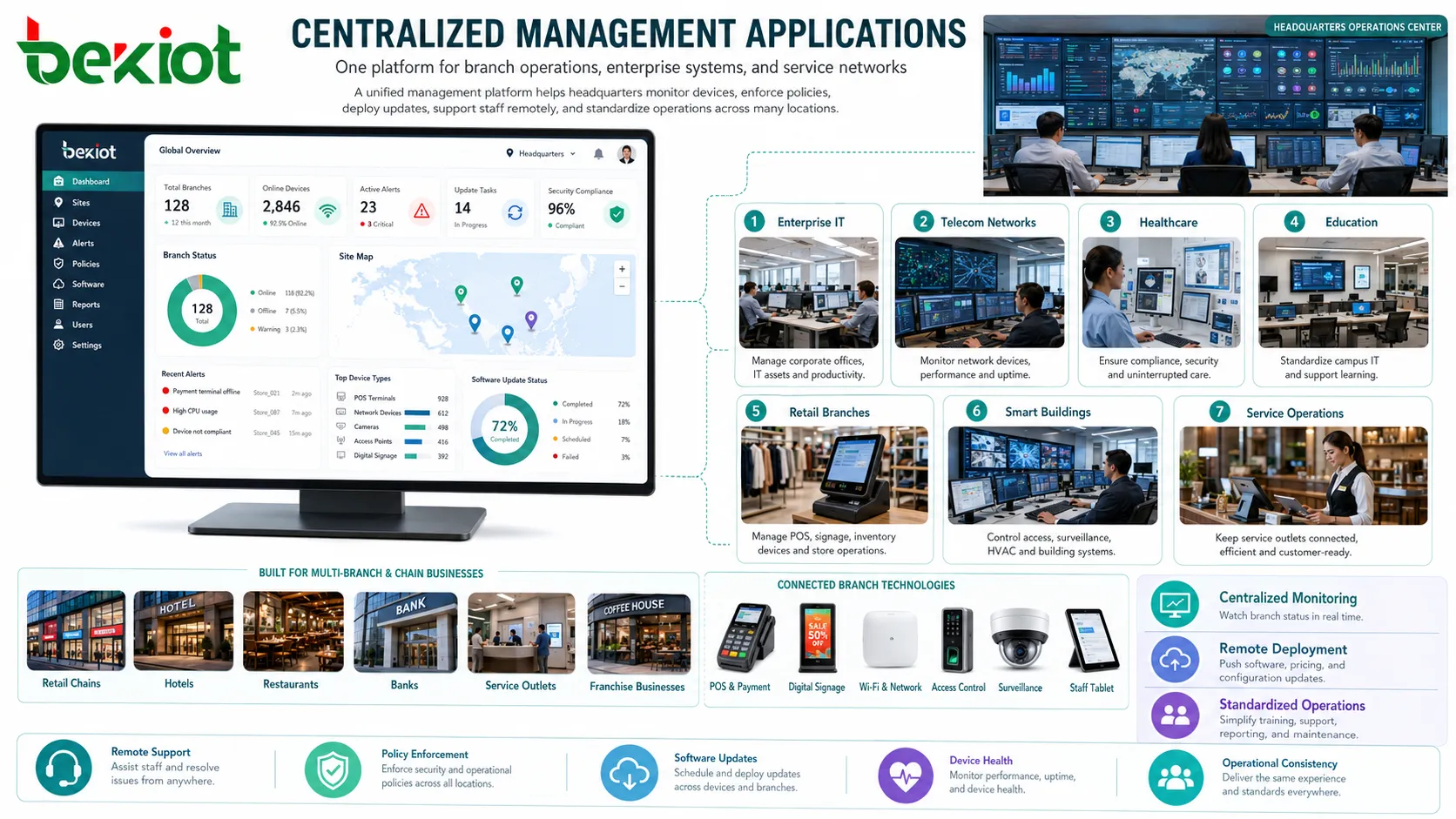
Retail chains, hotels, restaurants, banks, service outlets, and franchise businesses operate many branches that need consistent systems. These may include POS terminals, payment systems, digital signage, Wi-Fi, guest networks, access control, surveillance, inventory systems, and staff devices.
A central management platform allows headquarters to monitor branch status, deploy software, update pricing displays, detect device failures, enforce security policies, and support local staff remotely.
This field benefits strongly from standardization. When all branches follow the same device and policy model, training, support, reporting, and maintenance become easier.
Transportation and Public Infrastructure
Railways, metros, airports, ports, highways, tunnels, bus terminals, and traffic control centers rely on many distributed systems. These may include communication equipment, passenger information displays, cameras, access systems, ticketing devices, emergency phones, network equipment, sensors, and control room platforms.
Centralized management helps operators supervise equipment across stations, roads, terminals, depots, tunnels, and control centers. Faults can be detected faster, and maintenance teams can be dispatched with better information.
Public infrastructure often requires high availability. The management platform should support alarm prioritization, historical logs, remote diagnostics, and clear escalation procedures.
Energy, Utilities, and Environmental Monitoring
Power grids, renewable energy sites, oil and gas facilities, water utilities, district heating systems, environmental monitoring stations, and pipeline networks use centralized platforms to monitor distributed assets and field data.
These systems may collect status from meters, sensors, substations, pumps, valves, inverters, weather stations, remote terminal units, and communication gateways. Central visibility helps operators understand system conditions and respond to faults.
For utilities, location awareness is important. A fault is not only a technical event; it is tied to a site, route, customer area, or service zone. Centralized management should therefore connect alarms with asset maps and maintenance records.
Logistics, Warehousing, and Field Services
Warehouses, distribution centers, fleet operations, and field service teams need centralized management for handheld terminals, barcode scanners, vehicle devices, warehouse networks, dispatch systems, asset trackers, and maintenance work orders.
Operations depend on real-time coordination. If handheld terminals lose connectivity, if warehouse scanners are not updated, or if vehicle devices fail, delivery and inventory workflows may be delayed.
A unified platform can track device status, assign tasks, push updates, monitor location, and support remote troubleshooting for mobile teams.
What Functions Are Usually Included
Unified Monitoring
Monitoring provides visibility into device status, service health, alarms, performance indicators, connection status, and resource usage. This is the foundation for faster response.
Configuration Control
Central configuration allows administrators to apply standard settings, templates, policies, network parameters, user rules, and feature options across many devices or sites.
Update and Patch Management
Software, firmware, security patches, and application versions can be deployed from one platform. This reduces outdated systems and helps keep environments consistent.
User and Permission Management
Central identity control helps define who can access which resources, which roles they have, and when permissions should be changed or removed.
Alarm and Event Handling
Alarms should be categorized, prioritized, assigned, escalated, and recorded. A central system helps avoid missed alerts and repeated manual checking.
Reporting and Audit Trails
Reports show system availability, user actions, configuration changes, security events, maintenance history, and compliance evidence. Audit trails are especially important in regulated industries.
Implementation Challenges
One challenge is system integration. Many organizations have equipment from different vendors, different generations, and different protocols. A central platform must connect these systems without creating blind spots.
Another challenge is data quality. If assets are mislabeled, locations are wrong, users are duplicated, or device records are outdated, management decisions may be inaccurate.
Security must also be designed carefully. A central platform has powerful control over many systems. It should use strong authentication, role-based access, logging, backup, encryption, and change approval processes.
Scalability matters as well. A platform that works for one building may not perform well when extended to hundreds of sites or thousands of devices.
Selection Criteria for Projects
Start by defining what must be managed. The platform for IT endpoints may not be the same as the platform for industrial controllers, building systems, or telecom equipment.
Next, check integration capability. APIs, standard protocols, device templates, log collection, user directory support, and third-party system connections are often important.
Review user roles. Operators, administrators, auditors, maintenance teams, security analysts, and branch staff may need different views and permissions.
Finally, confirm lifecycle support. A good platform should support deployment, daily operation, updates, troubleshooting, reporting, backup, and eventual device retirement.
Centralized management is most valuable when it turns scattered devices, users, alarms, policies, and maintenance tasks into a controlled operational system.
FAQ
Can centralized management work across multiple vendors?
Yes, but compatibility depends on supported protocols, APIs, device models, log formats, and integration modules. Multi-vendor testing should be done before full deployment.
Is a cloud platform always better than an on-premises platform?
Not always. Cloud platforms are flexible for distributed sites, while on-premises systems may be preferred for strict data control, isolated networks, or industrial environments.
What should be protected first in a central platform?
Administrative accounts, remote access, configuration change functions, backup files, audit logs, and integration credentials should receive strong protection.
Why do some projects fail after platform deployment?
Common causes include poor asset data, unclear ownership, weak integration, lack of staff training, excessive alerts, and no process for keeping records updated.
How can management efficiency be measured?
Useful indicators include faster fault response, fewer manual site visits, higher update completion rate, reduced configuration errors, better asset visibility, and clearer audit records.







