


Configuration backup is the practice of saving system settings, device parameters, application rules, network policies, user permissions, routing tables, firewall rules, service profiles, and operational templates in a secure and recoverable form. It is not the same as ordinary data backup. Data backup protects business files and records, while configuration backup protects how systems are built, connected, secured, and operated.
In modern IT, telecom, industrial automation, security, cloud, and enterprise environments, configuration can be as valuable as the equipment itself. A device may be easy to replace physically, but if its settings are lost, service restoration may take hours or days. This is why configuration backup has become a basic requirement for reliable operations.
The Hidden Value Behind System Settings
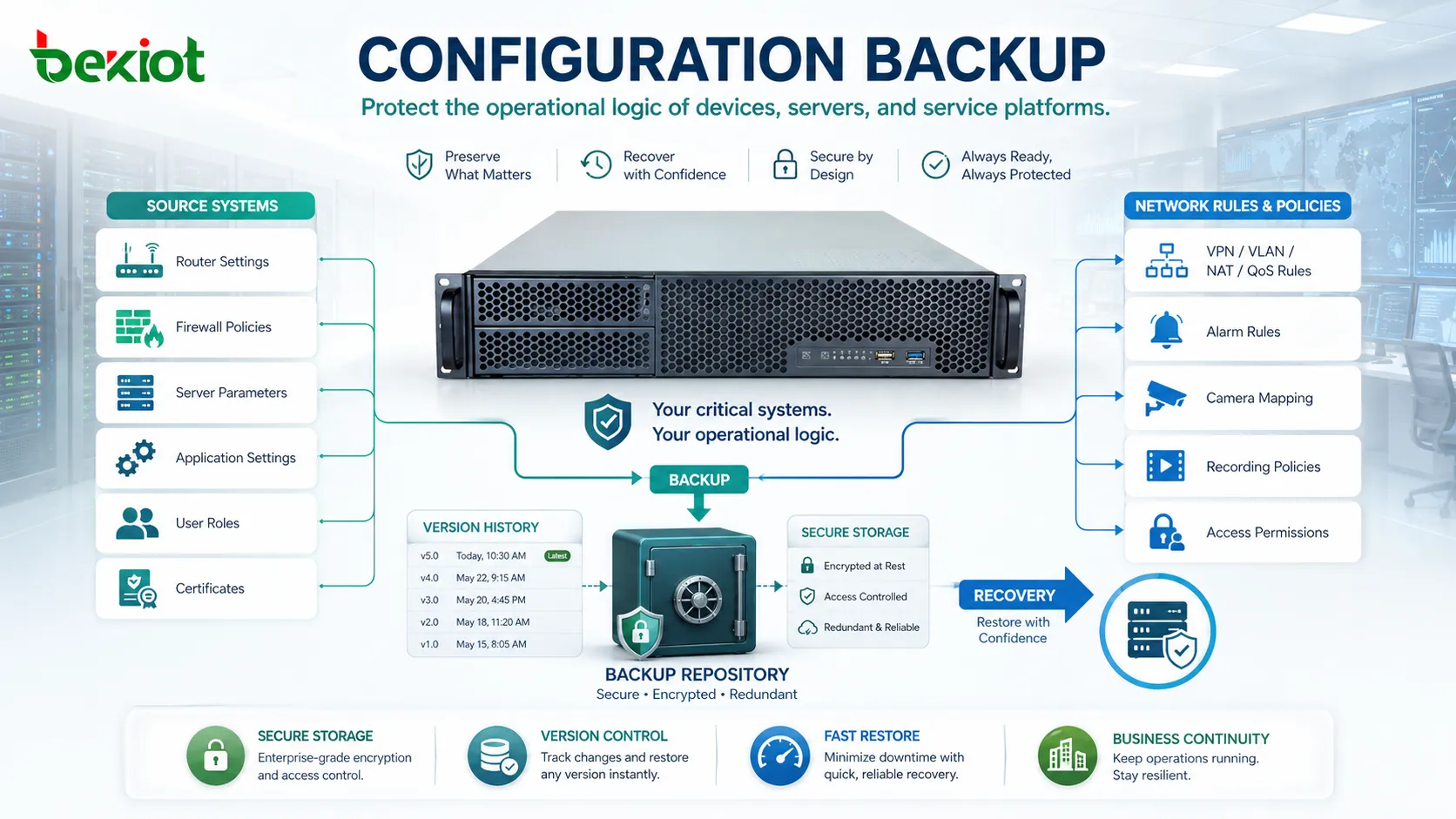
Most systems depend on many detailed settings that are not visible to ordinary users. A router may contain routing rules, VLAN settings, VPN tunnels, access control lists, NAT policies, and QoS rules. A server may contain service parameters, certificates, user roles, scheduled tasks, and application dependencies. A security platform may contain alarm rules, camera mappings, recording policies, and access permissions.
These settings are often created gradually over time. Engineers adjust them after commissioning, troubleshooting, expansion, security updates, or user feedback. If they are not backed up, the organization may lose years of operational knowledge in one hardware failure, wrong command, firmware issue, cyberattack, or accidental reset.
Configuration backup therefore protects more than files. It protects the operational logic of the system.
What Usually Needs to Be Preserved
Network Device Settings
Switches, routers, firewalls, wireless controllers, load balancers, gateways, and SD-WAN devices often contain complex operational rules. These may include IP addressing, routing, VLANs, trunk ports, port descriptions, security policies, VPN settings, SNMP parameters, admin accounts, and firmware-related options.
If these settings are lost, the device may power on but fail to communicate correctly with the rest of the network.
Server and Application Parameters
Servers and applications depend on configuration files, environment variables, database connection strings, service ports, authentication settings, API keys, storage paths, logging options, and scheduled jobs.
Application failure after migration or update is often caused not by missing software, but by missing or incorrect configuration.
Security Policies
Security platforms rely on rules. Firewall policies, access control rules, identity roles, multi-factor settings, certificate stores, endpoint policies, SIEM correlation rules, and alert thresholds must be preserved carefully.
Losing these settings can create both downtime and security exposure. A restored system with incomplete rules may work, but not safely.
Industrial and Facility Systems
Industrial controllers, building automation systems, access control platforms, surveillance systems, public address systems, energy meters, and monitoring gateways often include site-specific configuration.
These settings may map devices to zones, alarms to responses, sensors to dashboards, and user actions to permissions. Rebuilding them manually can be slow and risky.
Why Recovery Speed Depends on Prepared Settings
When equipment fails, replacement hardware can often be installed quickly. The real delay comes from restoring the correct behavior. Without a backup, engineers must reconstruct settings from memory, screenshots, outdated documents, or trial-and-error testing.
This creates several risks. The rebuilt system may not match the original. Old bugs may return. Security rules may be missed. Network routes may be wrong. User permissions may be too broad or too narrow. Small differences can cause service problems that are difficult to locate.
With a verified backup, recovery becomes more predictable. The replacement device or restored application can be returned to a known working state much faster.
Protection Against Human Error
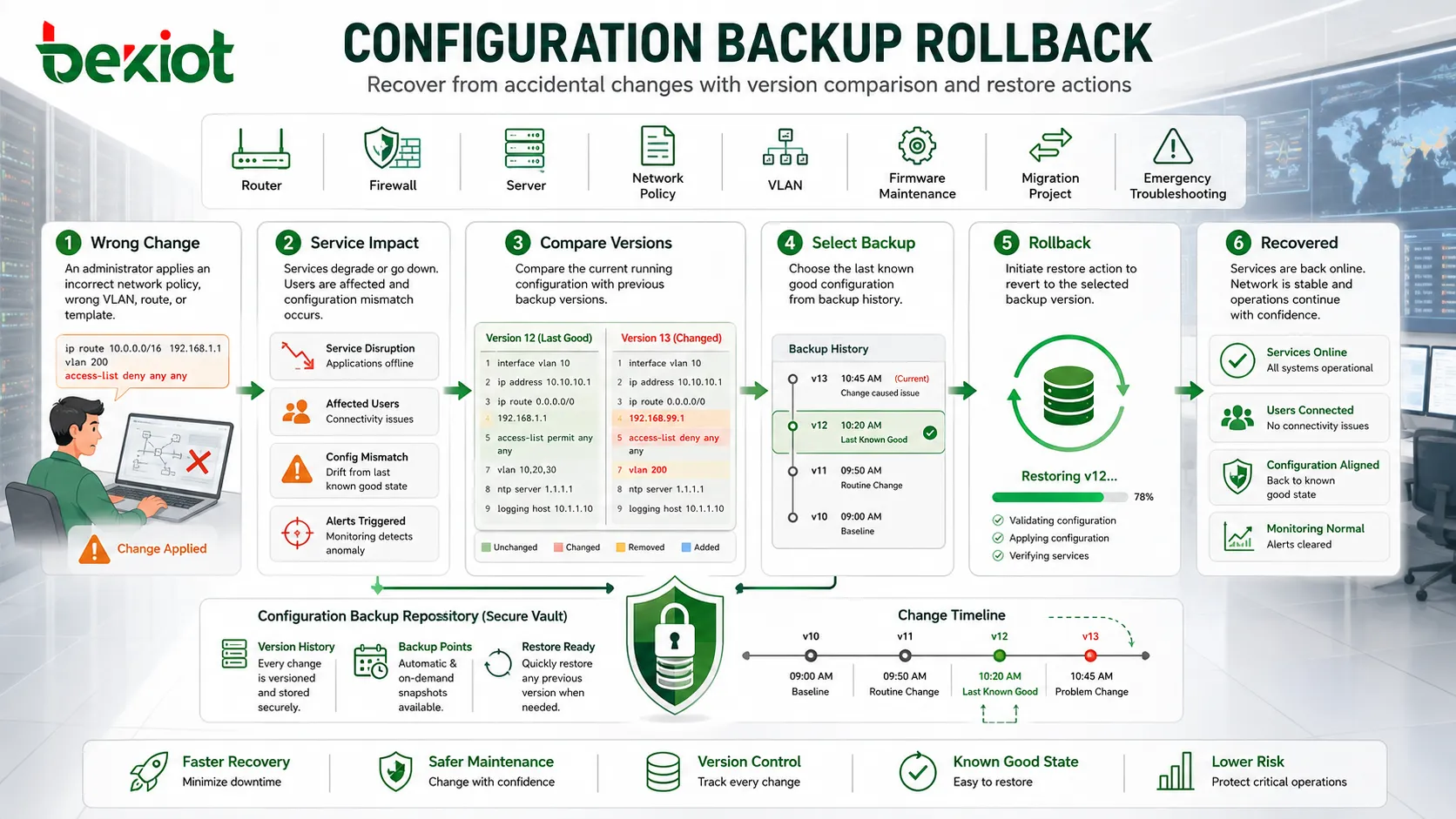
Many outages are caused by accidental changes. A technician may delete a route, overwrite a policy, change a VLAN, apply the wrong template, disable a port, or import an incorrect file. In complex systems, a small change can affect many users.
A configuration backup provides a rollback point. If the new setting causes problems, administrators can compare the previous version, identify what changed, and restore the earlier state if needed.
This is especially important during maintenance windows, firmware upgrades, migration projects, and emergency troubleshooting, where time pressure can increase the chance of mistakes.
Version History and Change Visibility
A single backup is useful, but version history is much more powerful. Versioned backups show how configuration has changed over time. This helps teams understand whether a problem started after a specific modification.
For example, if users report that calls, network access, camera recording, VPN login, or application access stopped working after a change, administrators can compare the current configuration with an earlier version. The difference may reveal the cause faster than manual investigation.
Version records also support accountability. They show when a change occurred, what was changed, and sometimes who made the change if integrated with change management systems.
Business Continuity and Disaster Recovery
Business continuity planning focuses on keeping important services available during failures. Configuration backup is a foundation of that plan because restored systems need correct settings to function.
In disaster recovery, organizations may need to rebuild services in another site, cloud region, spare server, or replacement appliance. Without saved configuration, the recovery environment may exist physically but remain unusable operationally.
For critical infrastructure, branch networks, contact centers, data centers, hospitals, factories, and public service systems, configuration loss can delay recovery even when backup hardware is available.
Security and Compliance Benefits
Policy Evidence
Auditors may need evidence that systems follow approved security settings. Backed-up configurations help show firewall rules, access policies, logging settings, encryption options, and administrative controls at a point in time.
This supports internal governance, external audits, incident investigation, and compliance reporting.
Unauthorized Change Detection
If configuration is backed up regularly, unauthorized or unexpected changes can be detected by comparing versions. This helps identify misconfiguration, insider activity, compromised accounts, or uncontrolled field changes.
Configuration drift is a common security risk. A system may start compliant but gradually become unsafe after repeated undocumented changes.
Credential and Secret Handling
Some configuration files may contain passwords, tokens, certificates, private keys, or connection strings. These backups must be encrypted and access-controlled.
A backup that exposes secrets can become a security risk. Protection of the backup repository is therefore as important as the backup itself.
Useful in Migration and Device Replacement
Migration projects often depend on accurate configuration records. When replacing devices, moving services to the cloud, changing vendors, upgrading platforms, or consolidating systems, teams need to know how the old environment works.
Backups provide a reference. Even if the new system uses a different format, the old settings help engineers understand routing logic, user roles, policy rules, service mappings, and integration points.
For device replacement, a backup can reduce downtime by allowing faster restoration to equivalent hardware. For system redesign, it helps avoid missing important legacy behavior.
Automation and Large-Scale Operations
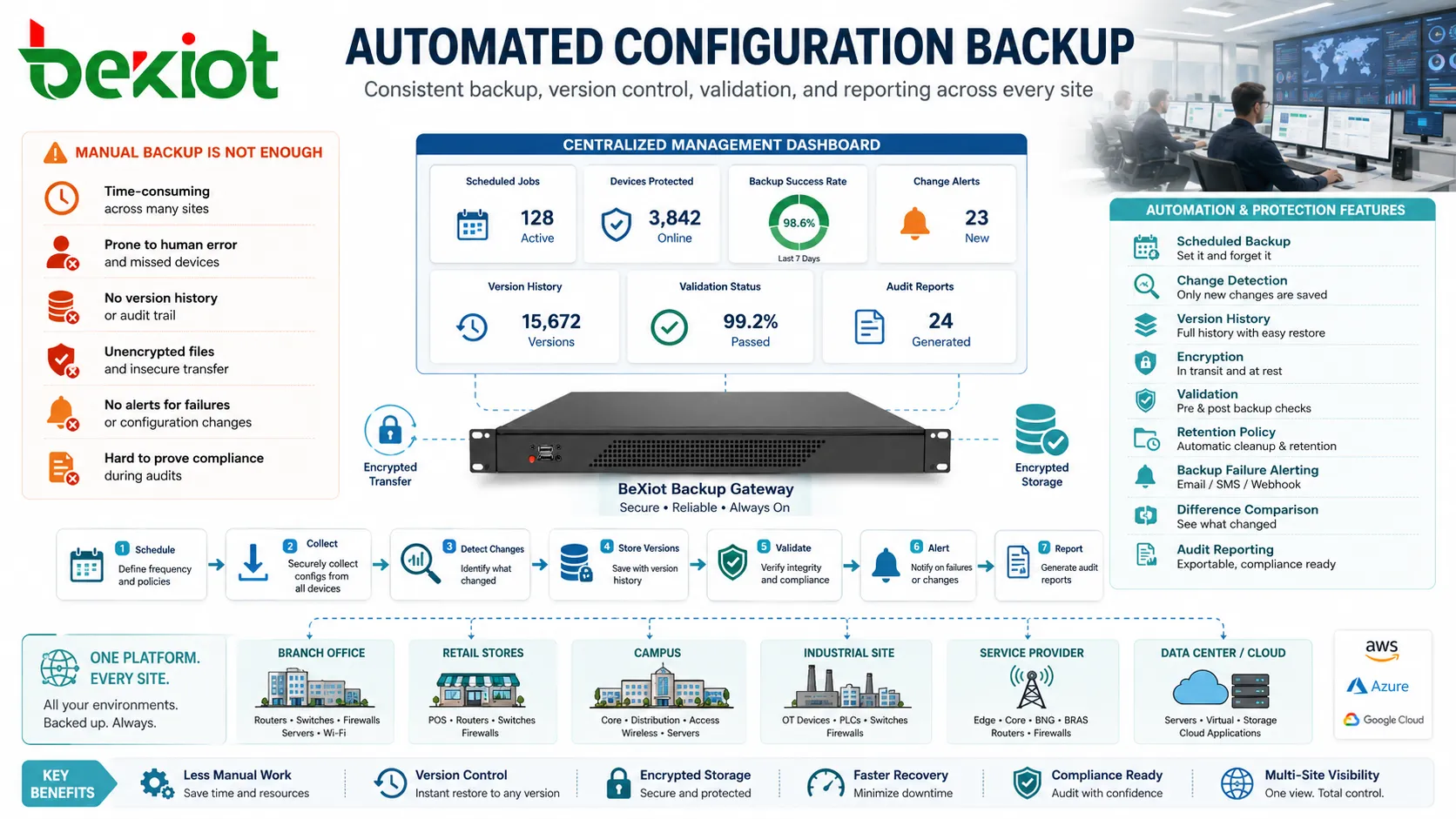
In large environments, manual backup is not enough. Hundreds or thousands of devices may need regular backup, version control, encryption, validation, retention policies, and reporting. Automation helps make the process consistent.
Automated systems can collect configurations on a schedule, detect changes, store versions, alert when backup fails, and compare differences. This reduces dependence on individual memory or manual discipline.
Automation is especially valuable for distributed branches, service providers, campuses, industrial sites, retail chains, and multi-site enterprises.
What Makes a Backup Reliable
Regular Schedule
Backups should run regularly. A backup created months ago may not reflect current system behavior. The schedule should match how often configuration changes occur.
Critical systems may need backup after every approved change, while stable systems may use daily, weekly, or event-triggered backup policies.
Secure Storage
Configuration files should be stored in a secure repository with encryption, access control, logging, and backup of the backup location itself. Storing files only on an engineer’s laptop or shared folder creates unnecessary risk.
Access should be limited to authorized personnel because configuration may reveal internal architecture and credentials.
Version Control
Keeping only the latest version can be risky. If a bad change is backed up, the latest backup may also be bad. Version history allows teams to restore an earlier known-good state.
Retention rules should balance storage cost, audit needs, and operational value.
Restore Testing
A backup is only useful if it can be restored. Teams should test restoration procedures before an emergency occurs. This includes checking file integrity, compatibility, device model requirements, firmware version, license dependencies, and hidden secrets.
Untested backups create false confidence.
Documentation
Backup files should be linked with documentation that explains device role, location, system version, dependencies, and restore procedure. A file without context may be difficult to use during an emergency.
Common Mistakes
Backing Up Only After Installation
Many teams save the initial configuration but forget later changes. The system may evolve for years, while the backup remains outdated.
Ignoring Small Devices
Small switches, gateways, access points, converters, controllers, and local service devices may still contain important settings. If they fail, missing configuration can delay recovery.
Storing Backups Without Encryption
Configuration files may expose internal IP addresses, passwords, routing logic, and security rules. Unprotected storage can create a serious security problem.
Not Separating Good and Bad Versions
If every version is overwritten automatically, a bad configuration may replace a good one. Version retention helps prevent this.
No Ownership
If nobody is responsible for backup success, failures may go unnoticed. Each system should have a clear owner and review process.
Practical Implementation Approach
Start by listing all systems that contain operational settings. Include network devices, servers, applications, security tools, communication platforms, industrial controllers, cloud services, and remote site equipment.
Next, classify them by criticality. Systems that affect business continuity, security, safety, customer service, or large user groups should receive stricter backup and testing policies.
Then define collection methods. Some devices support export files, APIs, command-line backup, controller-based backup, cloud snapshots, or configuration templates. The method should be reliable and repeatable.
Finally, define review rules. Backup failure alerts, version comparison, restore testing, access audit, and documentation updates should be part of routine operations.
Configuration backup is indispensable because it preserves the knowledge required to rebuild, verify, secure, migrate, and recover systems after failure or change.
FAQ
How often should configurations be backed up?
The frequency depends on change rate and system importance. Critical systems should be backed up after approved changes and on a regular schedule.
Should configuration files be stored with ordinary file backups?
They may be included, but they should also have controlled versioning, encryption, access restrictions, and clear restore documentation.
Can screenshots replace configuration backup?
No. Screenshots may help with reference, but they cannot reliably restore a system or capture all hidden settings.
What should be checked before restoring a configuration?
Check hardware model, firmware version, license status, interface mapping, passwords, certificates, network environment, and whether the backup is the correct version.
Who should have access to configuration backups?
Only authorized administrators and recovery personnel should have access. Access should be logged because backups may contain sensitive operational details.







